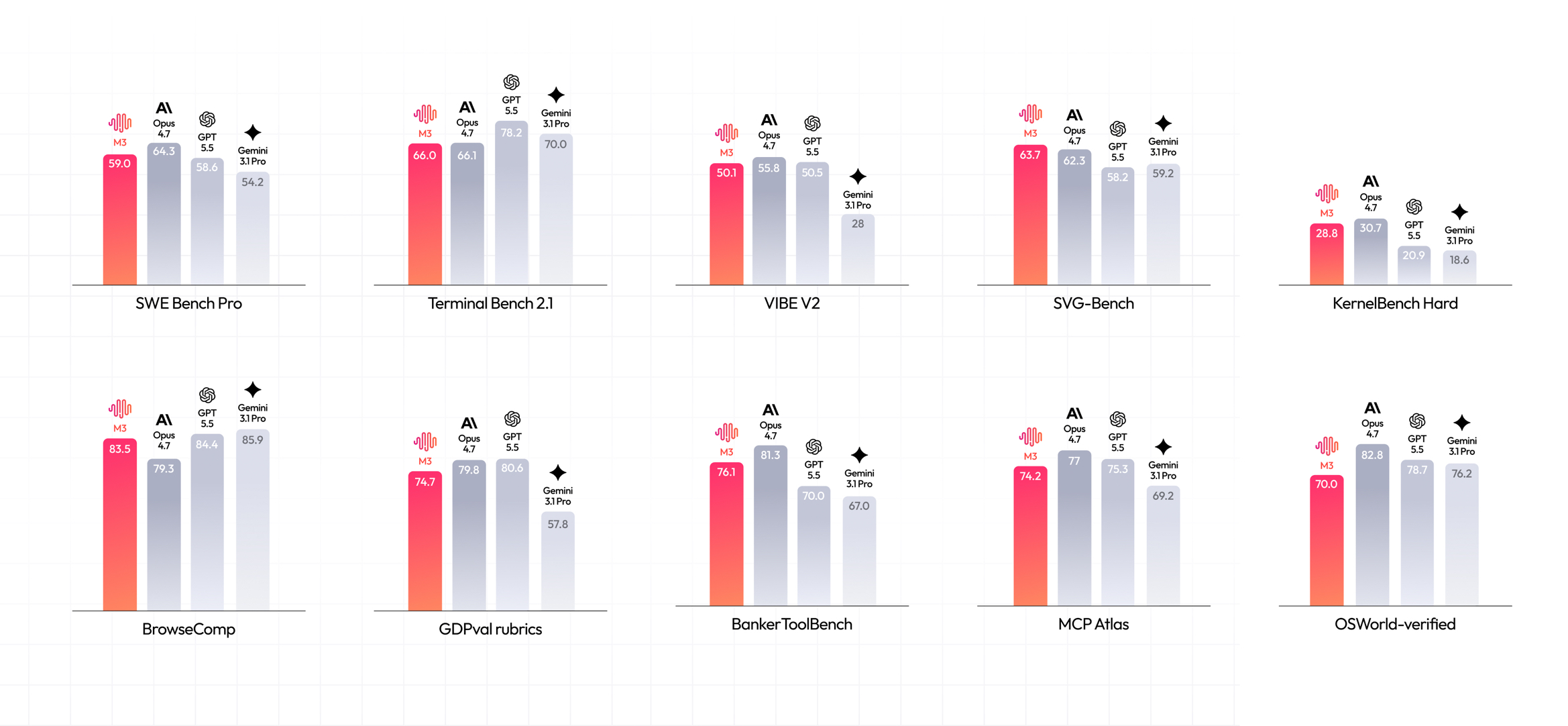
MiniMax M3 is a frontier reasoning and coding model with a context window of up to 1,000,000 tokens. That number is the headline. You can feed it an entire repository, a week of logs, or a long design doc and ask it to reason across all of it in one call. If you want the background on what the model is and where it fits, read what is MiniMax M3 first.
This guide is the hands-on version. You’ll get an API key, send your first request three different ways, and test every step in Apidog so you can see the raw request and response before you wire anything into your own code. Download Apidog if you want to follow along.
The official reference lives at the MiniMax API docs. Keep it open in a tab.
What you’ll need
- A MiniMax account at platform.minimax.io.
- An API key (we generate one below).
- A way to pay for usage: pay-as-you-go credits or a subscription token plan. Both work for the same endpoints.
You don’t need anything else installed for the curl examples. For the SDK examples, you’ll want Python 3.8+ or Node 18+.
Step 1: Get your API key
Sign in at platform.minimax.io, open the API keys section of your account, and create a new key. MiniMax issues two kinds of credentials, and the difference matters:
- A regular API Key bills against your pay-as-you-go balance.
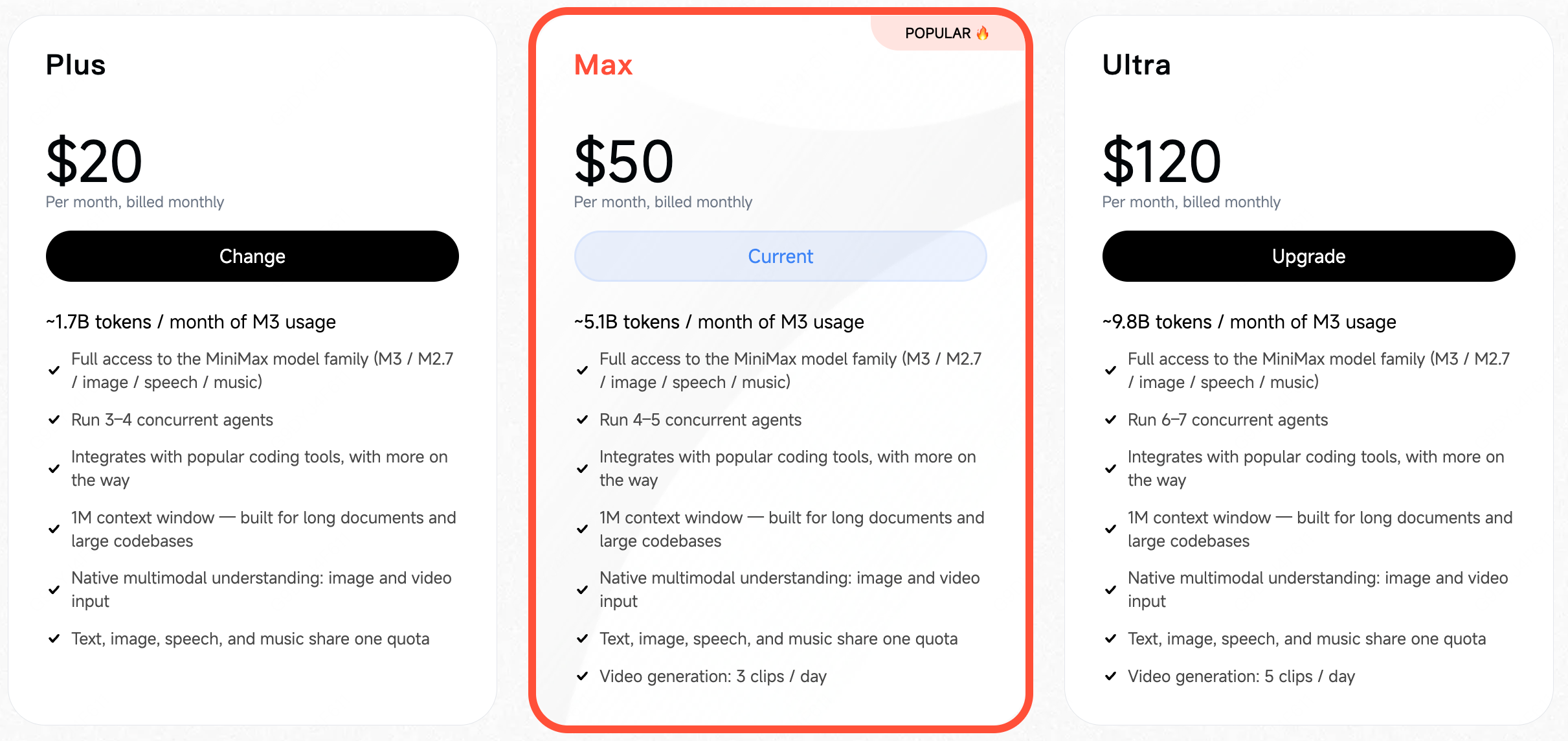
- A Subscription Key draws on the token credits from your plan (Plus, Max, or Ultra). When the plan’s tokens run out, calls on that key stop until the plan renews or you switch to a pay-as-you-go key.
Pick whichever matches how you want to be billed. Copy the key once and store it. You won’t see it again.
Never paste the key directly into source code. Export it as an environment variable instead:
export MINIMAX_API_KEY="your-key-here"
This keeps the secret out of your git history and out of any file you might share. If you also work with API keys inside your editor, the same hygiene rules apply there. We covered the common leaks in VS Code extension API key security.
Step 2: Send your first request
The base URL is https://api.minimax.io/v1 and chat lives at POST https://api.minimax.io/v1/chat/completions. Authentication is a bearer token: Authorization: Bearer $MINIMAX_API_KEY. The model id string is MiniMax-M3.
Here’s the smallest useful call with curl. The task is a real one, asking the model to refactor a function:
curl https://api.minimax.io/v1/chat/completions \
 -H "Authorization: Bearer $MINIMAX_API_KEY" \
 -H "Content-Type: application/json" \
 -d '{"model":"MiniMax-M3","messages":[{"role":"user","content":"Refactor this function to be async."}]}'
You have three ways to call M3. MiniMax recommends the Anthropic SDK, but the OpenAI SDK and raw HTTP both work against the same endpoint. Use whichever your stack already speaks.
Here’s the OpenAI SDK in Python. The only change from a normal OpenAI setup is the base_url:
from openai import OpenAI

client = OpenAI(
 base_url="https://api.minimax.io/v1",
 api_key="YOUR_API_KEY",
)

response = client.chat.completions.create(
 model="MiniMax-M3",
 messages=[
 {"role": "user", "content": "Refactor this function to be async."}
 ],
)

print(response.choices[0].message.content)
And the same idea in Node, again just repointing the base URL:
import OpenAI from "openai";

const client = new OpenAI({
 baseURL: "https://api.minimax.io/v1",
 apiKey: process.env.MINIMAX_API_KEY,
});

const response = await client.chat.completions.create({
 model: "MiniMax-M3",
 messages: [
 { role: "user", content: "Refactor this function to be async." },
 ],
});

console.log(response.choices[0].message.content);
If you’ve used the Qwen 3.7 API, this pattern is familiar. Most frontier models now expose an OpenAI-compatible surface, so the migration cost is a single line. The OpenAI Python SDK docs and Anthropic SDK docs cover the full client options.
Step 3: Test and inspect it in Apidog
Before you bury this call inside an application, send it by hand and read the raw response. That’s where Apidog earns its place in the loop.
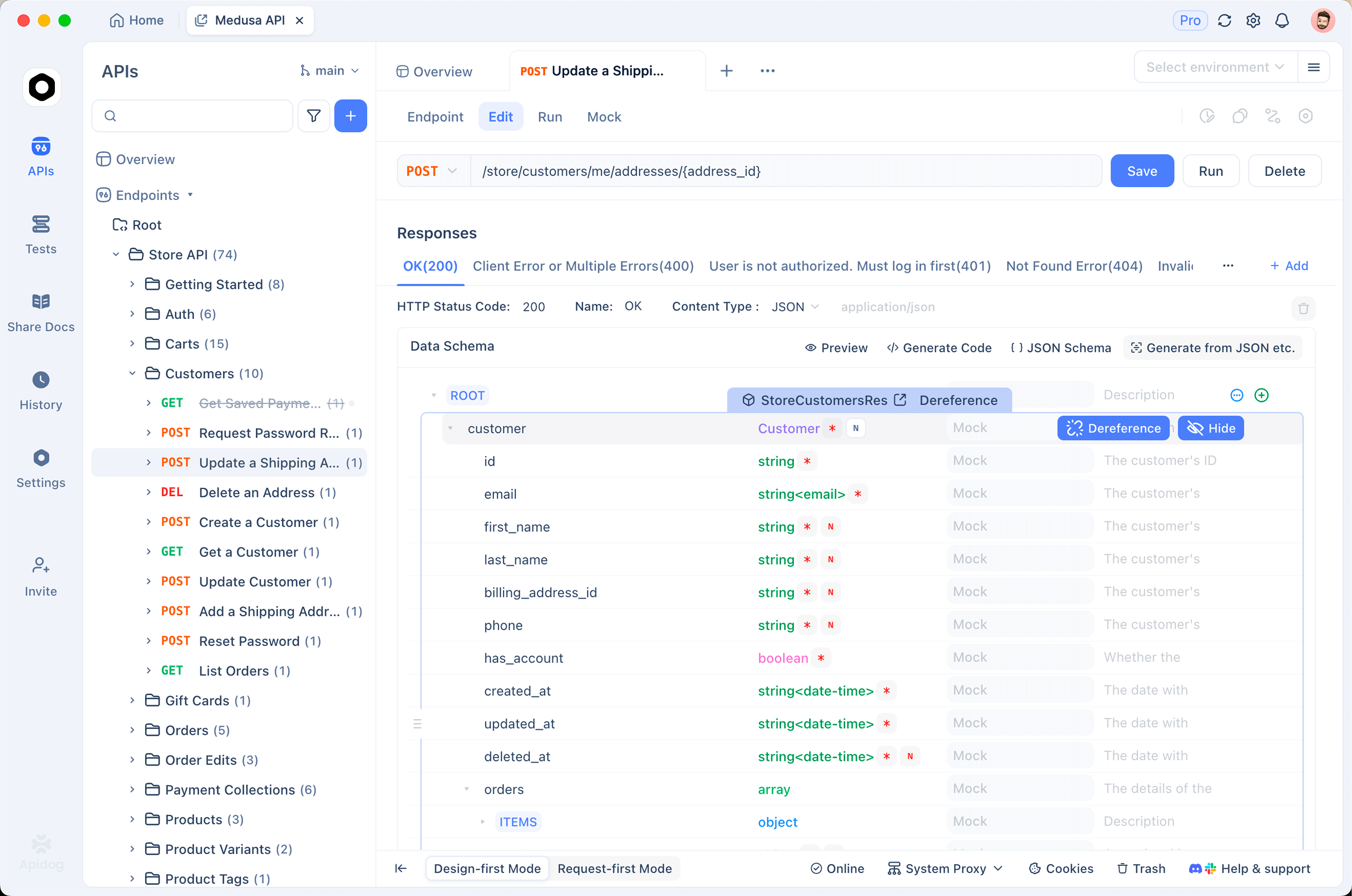
- Create a new HTTP request and set the method to
POSTwith the URLhttps://api.minimax.io/v1/chat/completions. - Open the Environments panel and add a variable named
MINIMAX_API_KEYwith your key as the value. Store it as an environment variable so it never sits in the request body or in your shared collection. - In the request headers, add
Authorizationwith the valueBearer {{MINIMAX_API_KEY}}. Apidog substitutes the variable at send time. - Set the body to raw JSON and paste the same payload from the curl example.
- Hit Send and watch the response panel.
[Screenshot: the MiniMax-M3 request and response in Apidog]
Storing the token as an environment variable means you can share the request with teammates without leaking the secret, and you can swap keys (pay-as-you-go versus subscription) by changing one variable. When you turn on streaming later, Apidog shows the server-sent events as they arrive, so you can confirm the stream format before writing any parsing code. Inspecting the response by hand catches schema surprises early, which is the whole point of testing an endpoint before you trust it.
Step 4: Toggle thinking on and off
M3 is a reasoning model. By default it returns a final answer. You can also ask it to expose its intermediate reasoning, which is useful when you want to debug why it reached a conclusion or feed the reasoning into a review step.
With the OpenAI SDK, pass reasoning_split through extra_body:
from openai import OpenAI

client = OpenAI(
 base_url="https://api.minimax.io/v1",
 api_key="YOUR_API_KEY",
)

response = client.chat.completions.create(
 model="MiniMax-M3",
 messages=[
 {"role": "user", "content": "Refactor this function to be async."}
 ],
 extra_body={"reasoning_split": True},
)

print(response.choices[0].message.reasoning_details[0]["text"]) # the thinking
print(response.choices[0].message.content) # the final answer
When reasoning_split is on, the thinking text comes back at response.choices[0].message.reasoning_details[0]["text"] and the final answer stays at response.choices[0].message.content. Keep the two separate in your UI. Show users the answer, and keep the reasoning for logs or a verification pass.
Turn thinking on for hard problems: multi-step refactors, tricky bug hunts, anything where you want to audit the chain. Turn it off for simple, latency-sensitive calls where the extra reasoning tokens cost time and money you don’t need to spend.
Step 5: Work with the 1M-token context
The large context window is the reason to reach for M3. You can paste an entire log file and ask a single question across all of it:
with open("production-2026-05-30.log") as f:
 log_text = f.read()

response = client.chat.completions.create(
 model="MiniMax-M3",
 messages=[
 {
 "role": "user",
 "content": f"Find the root cause of the 502 spike at 14:20 UTC.\n\n{log_text}",
 }
 ],
)
Tbilling edge you need to know about. MiniMax charges a standard rate for calls with 512K input tokens or fewer, and a higher long-context rate once input passes 512K tokens. So the jump from a 400K-token prompt to a 600K-token prompt isn’t linear. It crosses a pricing threshold.
The practical takeaway: don’t dump a million tokens into context out of habit. Send the slice the model needs. If you’re chaining many calls in an agent, trimming context per call is one of the biggest levers on your bill. We go deeper on that in how to reduce agent token costs.
Step 6: Tool calling and multimodal input
M3 handles tool calling and multimodal input, so it can drive agents and read images, not only text.
For tool calling, you declare the tools the model is allowed to invoke, then handle the call it returns:
tools = [
 {
 "type": "function",
 "function": {
 "name": "run_tests",
 "description": "Run the test suite for a given module path.",
 "parameters": {
 "type": "object",
 "properties": {
 "module": {"type": "string"},
 },
 "required": ["module"],
 },
 },
 }
]

response = client.chat.completions.create(
 model="MiniMax-M3",
 messages=[
 {"role": "user", "content": "Fix the failing test in auth/session.py and confirm it passes."}
 ],
 tools=tools,
)
When the model decides to call a tool, the response carries a tool_calls array. Your code runs the function, appends the result as a tool message, and calls the API again so the model can continue. Getting this handshake right is where most agent bugs live. The wiring patterns and the failure modes are worth reading before you ship: agentic workflow tool wiring.
Apidog helps here too. You can replay the full multi-turn exchange (the initial request, the tool-call response, your tool result, the follow-up) as separate saved requests, so you can verify each hop end to end instead of guessing inside your agent runtime.
For multimodal input, you pass image content in the same message array, alongside your text prompt, following the standard content-parts shape. Check the API reference for the exact field names, since these evolve faster than text endpoints.
Pricing and tiers
Two separate dials control what you pay and how fast you’re served.
Token plans set your credit budget. The subscription tiers are Plus at $20, Max at $50, and Ultra at $120, each bundling a larger pool of token credits drawn down by your Subscription Key. Pay-as-you-go bills a regular API Key against your balance instead.
Service tiers set scheduling priority. There are two: standard (the default) and priority. Standard is fine for most workloads. Priority is for latency-sensitive or SLA-bound traffic that can’t sit in a queue behind everyone else.
Stack that on top of the standard versus long-context rate from Step 5, and your real cost depends on input size, plan, and tier together. For current per-token numbers, check the MiniMax pricing and model page and the API docs, since published rates change.
FAQ
Is there a free way to try M3? Yes. You can test the model without committing to a plan, and there are a few no-cost routes. We collected them in how to use MiniMax M3 for free.
Which SDKs work with the API? Three options: raw HTTP, the Anthropic SDK, and the OpenAI SDK. MiniMax recommends the Anthropic SDK, but all three hit the same https://api.minimax.io/v1/chat/completions endpoint. For the OpenAI and Anthropic clients, you only change the base_url to point at MiniMax.
How do I stream responses? Add "stream": true to your request body. The API returns server-sent events, and both SDKs expose an iterator you loop over to read chunks as they arrive. Test the stream in Apidog first so you can see the event format before you parse it.
What’s the rate limit? Limits depend on your account tier and whether you’re on standard or priority service. If you hit a 429, back off and retry, or move latency-sensitive traffic to the priority tier. The current numbers are on your account dashboard and the API docs.
How does the 512K threshold affect my bill? Calls with input of 512K tokens or fewer bill at the standard rate. Past 512K input tokens, the higher long-context rate applies. Trim your prompt to the tokens the model actually needs, especially in agent loops where the cost compounds across calls.
Can I self-host the weights instead of calling the API? The hosted API is the path this guide covers, and it’s the fastest way to start. Self-hosting depends on what MiniMax publishes for M3 at any given time, so check the model page for the current weight and license situation.
Wrap
You now have everything to call MiniMax M3: an API key stored as an environment variable, working curl, Python, and Node requests, a thinking toggle, the 512K billing threshold, and the tool-calling handshake. The fastest way to lock it in is to run one real call by hand. Drop the endpoint into Apidog, store your bearer token as an environment variable, send the refactor prompt, and read the response. Once you’ve seen the raw shape, wiring it into your code takes minutes.