
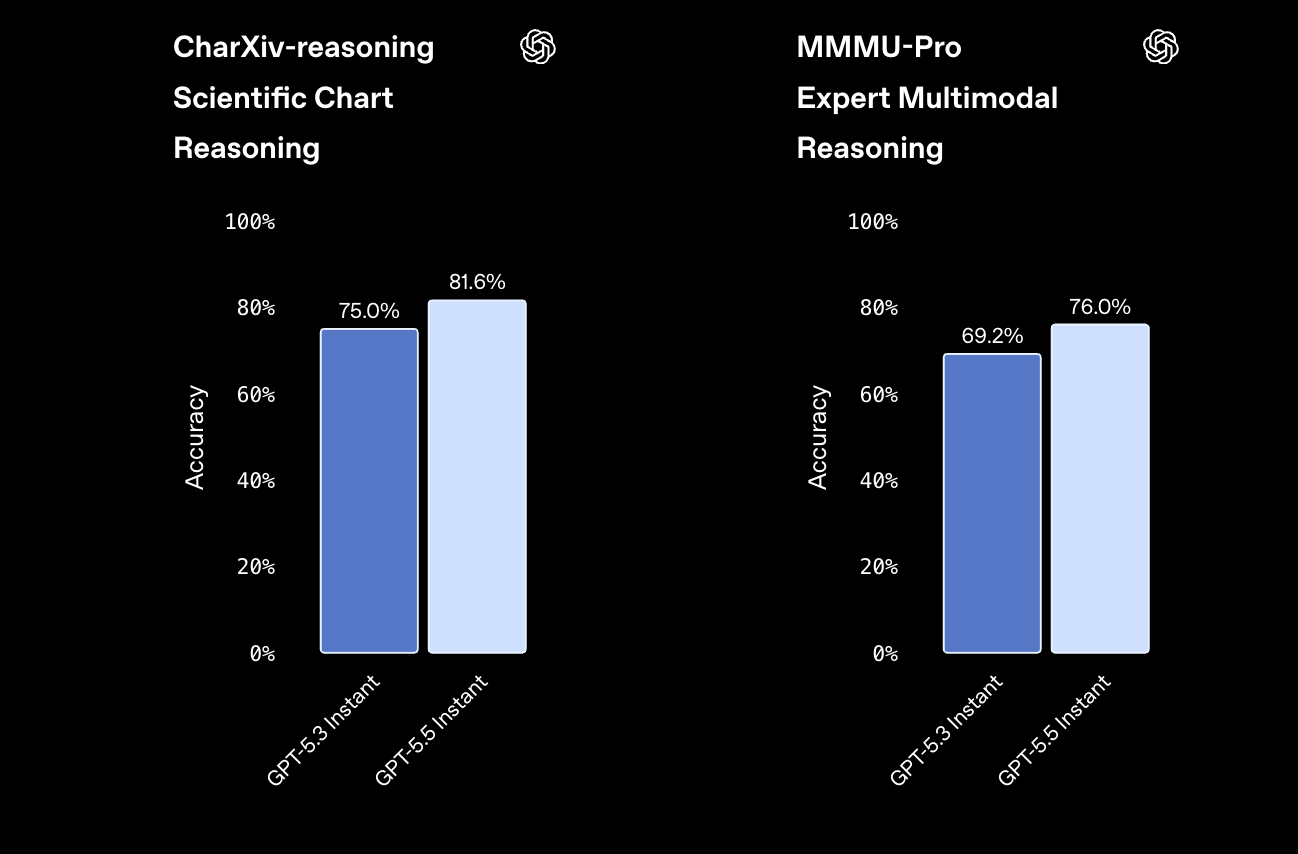
OpenAI swapped ChatGPT’s default brain on May 5, 2026, and most users will never notice. GPT-5.5 Instant quietly took over from GPT-5.3 Instant, cut hallucinated claims on high-stakes prompts by 52.5%, and kept the same low-latency feel that made Instant the workhorse model in the first place. If you build with the API, the same upgrade is sitting behind the gpt-5.5 model name, with a 1M-token context window and a per-million pricing card you can budget against.
This guide walks through every way to access GPT-5.5 Instant, when it switches you over to GPT-5.5 Thinking under the hood, and how to wire it into a working API request you can test before shipping.
TL;DR
GPT-5.5 Instant is OpenAI’s new ChatGPT default and the fast tier of the GPT-5.5 family. Free users get 10 messages every 5 hours, Plus users get 160 every 3 hours, and Pro/Business get unlimited use. Developers call it through the Responses or Chat Completions API as gpt-5.5 at $5 per million input tokens and $30 per million output tokens, with a 1M-token context window.
Introduction
If you opened ChatGPT this week and your replies feel a touch sharper, that is GPT-5.5 Instant doing its job. OpenAI rolled the model out as the new default for free, Plus, Pro, Business, and Enterprise accounts on May 5, 2026, replacing GPT-5.3 Instant without forcing a single click in the UI.
The headline is not raw intelligence. It is reliability. OpenAI reports a 52.5% reduction in hallucinated claims on high-stakes prompts in medicine, law, and finance against GPT-5.3 Instant, and a 37.3% reduction in inaccurate claims on user-flagged factual errors. That size of jump matters when you are putting the model in a customer-facing path or feeding it into an agent that calls real APIs.
This guide covers the access paths, the routing rules, the pricing math, and the API call you will copy into your codebase, with a working test workflow at the end.
What GPT-5.5 Instant is
GPT-5.5 Instant is the latency-optimized variant of GPT-5.5. In ChatGPT, OpenAI exposes three flavors of the model: Instant, Thinking, and Pro. Instant returns answers in roughly the same time window as GPT-5.3 Instant did, so the user-facing UX did not get slower. Thinking trades latency for deeper reasoning. Pro extends Thinking with extra compute and is gated behind paid tiers.
The Instant label exists for two reasons. First, OpenAI maintains a router that may upgrade an Instant request to GPT-5.5 Thinking when the model decides the prompt is hard enough to deserve more reasoning. Second, paid users can override the router and pin Instant manually from the model picker, which is useful when you want predictable speed on a long conversation.
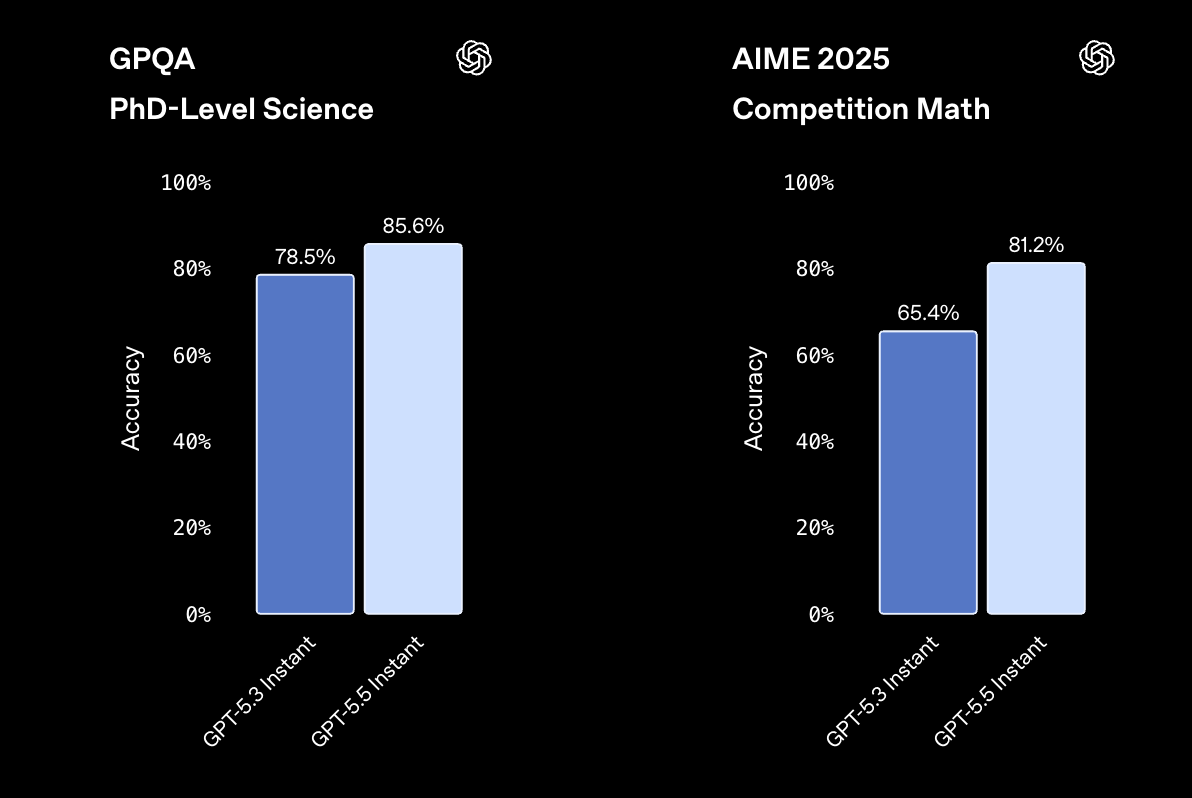
Under the hood, GPT-5.5 Instant shares the same underlying architecture as GPT-5.5 Thinking. The split is about reasoning depth, not knowledge cutoff. Both have access to:
- A 1M-token context window
- Up to 128,000 output tokens per response
- Code generation and debugging across mainstream languages
- Live web search through the search tool
- File handling, including PDF, image, and spreadsheet inputs
- Memory of past conversations on Plus and Pro web sessions, with optional Gmail and uploaded-file recall
For a deeper walkthrough of the broader release, the GPT-5.5 overview covers the full feature set, including how Thinking and Pro differ from Instant on agent workloads.
How to access GPT-5.5 Instant in ChatGPT
The fastest path is the one most people take by accident. Open chatgpt.com or the mobile app, send a message, and you are already on GPT-5.5 Instant. OpenAI made it the default across every account tier, so there is nothing to toggle.
What does change is how often you can use it before the tier ceiling kicks in.
| Plan | GPT-5.5 Instant cap | What happens after the cap |
|---|---|---|
| Free | 10 messages every 5 hours | Falls back to GPT-5.5 mini |
| Plus | 160 messages every 3 hours | Falls back to GPT-5.5 mini |
| Pro | Unlimited (subject to abuse guardrails) | Stays on GPT-5.5 |
| Business | Unlimited (subject to abuse guardrails) | Stays on GPT-5.5 |
| Enterprise | Unlimited (subject to abuse guardrails) | Stays on GPT-5.5 |
Plus, Pro, and Business accounts also unlock the model picker in the top-left of the chat window. Click it and you can pin GPT-5.5 Instant or GPT-5.5 Thinking for the next message. Pinning is per-chat, not per-account, so a fresh conversation goes back to whatever default the router chooses.
If you are on Pro or Business and want to compare Instant against Thinking on a real task, open two side-by-side tabs, pin one to each, and feed them the same prompt. The difference shows up on tasks with implicit multi-step reasoning, where Thinking explores branches before answering. For day-to-day chats, Instant wins on time-to-first-token.
What the auto-router decides on your behalf
When you do not pin the model, ChatGPT’s auto-router reads the prompt and picks Instant or Thinking. OpenAI has not published the routing rules in full, but in practice you see Thinking kick in when the prompt:
- Asks for a multi-step plan or chain-of-tools execution
- Includes ambiguous constraints that require backtracking
- Touches high-stakes domains where hallucination cost is high
- Spans a long context that needs cross-document synthesis
For everything else, the router stays on Instant. That is the right behavior for chat. It is the wrong behavior when you want guaranteed reasoning depth, which is why the model picker exists.
How to call GPT-5.5 Instant through the API
In the API, GPT-5.5 Instant and GPT-5.5 Thinking collapse into a single model identifier: gpt-5.5. There is no separate gpt-5.5-instant endpoint. Instead, you control reasoning depth with the reasoning_effort parameter, which accepts minimal, low, medium, or high. Setting reasoning_effort: "minimal" is the closest API equivalent to the Instant experience in ChatGPT.
GPT-5.5 ships in two endpoints:
- Responses API (
/v1/responses): the recommended endpoint for new builds, with first-class support for tools, structured output, and streaming. - Chat Completions API (
/v1/chat/completions): the legacy endpoint, kept for backward compatibility.
Pricing is the same across both:
| Tier | Input ($/1M tokens) | Output ($/1M tokens) |
|---|---|---|
| Standard | $5.00 | $30.00 |
| Batch | $2.50 | $15.00 |
| Flex | $2.50 | $15.00 |
| Priority | $12.50 | $75.00 |
Note one quirk: prompts with more than 272K input tokens get billed at 2x input and 1.5x output for the rest of the session, on every tier except Priority. If you are doing long-document RAG, slice your requests carefully.
For a side-by-side cost calculation against earlier OpenAI models, the GPT-5.5 pricing breakdown walks through unit economics for common workloads.
A minimal Python request
You will need an API key from the platform and the official Python SDK.
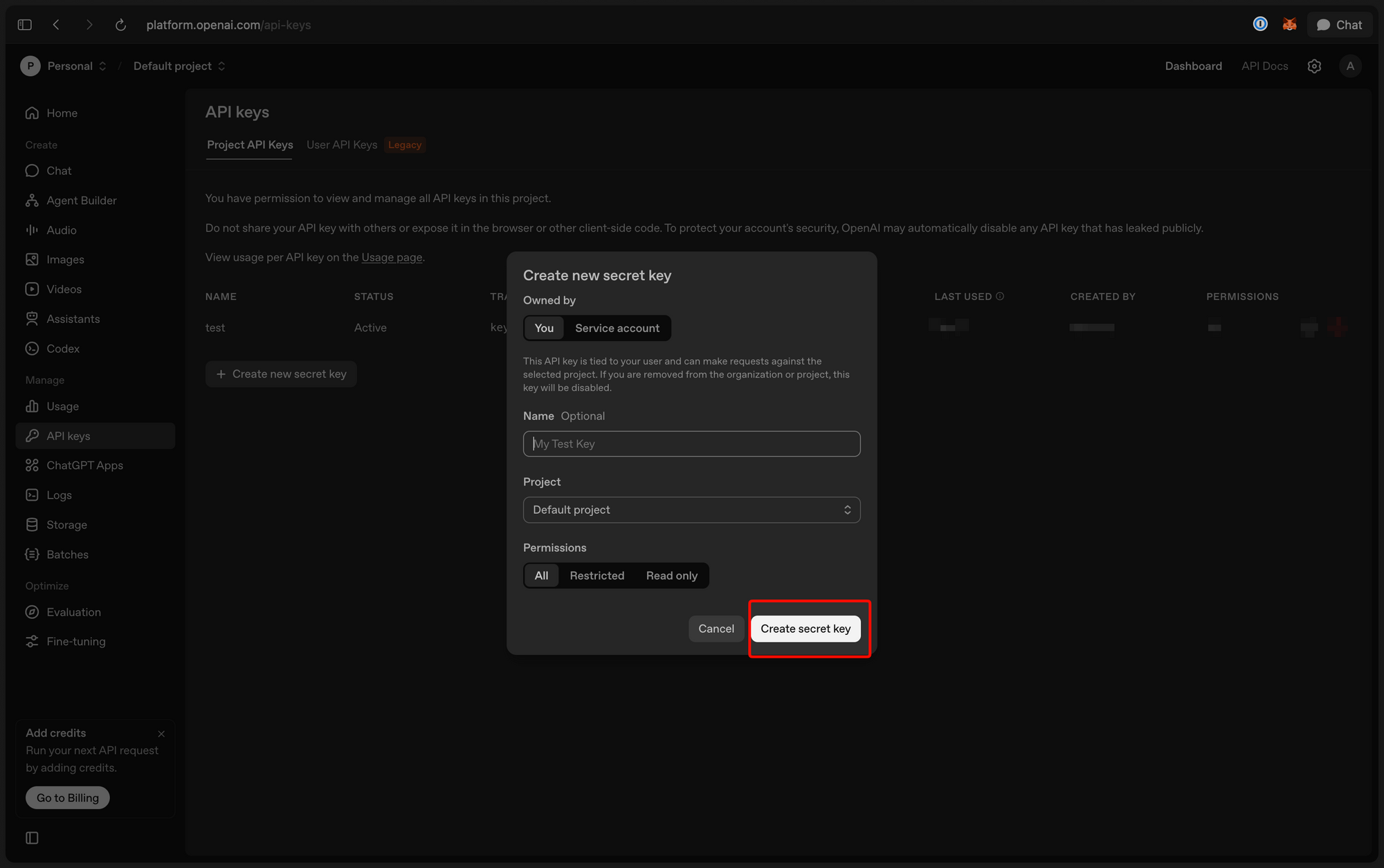
pip install --upgrade openai
export OPENAI_API_KEY="sk-..."
The Responses API call:
from openai import OpenAI

client = OpenAI()

response = client.responses.create(
    model="gpt-5.5",
    reasoning={"effort": "minimal"},
    input=[
        {
            "role": "user",
            "content": "Summarize this changelog entry in 3 bullet points: ..."
        }
    ],
    max_output_tokens=400,
)

print(response.output_text)
reasoning.effort: "minimal" tells the model to behave like Instant in ChatGPT: short, fast, low-latency. Bump it to "medium" or "high" when you need Thinking-style depth on the same model identifier.
A minimal Node.js request
import OpenAI from "openai";

const client = new OpenAI();

const response = await client.responses.create({
  model: "gpt-5.5",
  reasoning: { effort: "minimal" },
  input: [
    {
      role: "user",
      content: "Translate this product description into Spanish, keeping HTML intact: ..."
    }
  ],
  max_output_tokens: 600,
});

console.log(response.output_text);
Streaming responses
Streaming is where the Instant experience pays off. Set stream: true on the request and pipe the resulting iterator to your UI:
stream = client.responses.create(
    model="gpt-5.5",
    reasoning={"effort": "minimal"},
    input=[{"role": "user", "content": "Draft a release note for v2.7..."}],
    stream=True,
)

for event in stream:
    if event.type == "response.output_text.delta":
        print(event.delta, end="", flush=True)
If you are migrating from Chat Completions, the parameter shape is similar but the response object differs. The output_text helper consolidates the structured output blocks into a plain string so you do not have to walk the JSON tree by hand.
For free-tier API usage and quota tricks, the GPT-5.5 free access guide covers the credits flow and rate-limit mechanics.
Test GPT-5.5 Instant requests with Apidog before you ship
Calling the OpenAI API from a notebook is fine for sketching. Putting it into production needs more discipline: you want to test prompts at scale, save reproducible request templates, switch between gpt-5.5 and gpt-5.5-pro to compare cost and quality, and version the entire spec next to your codebase.
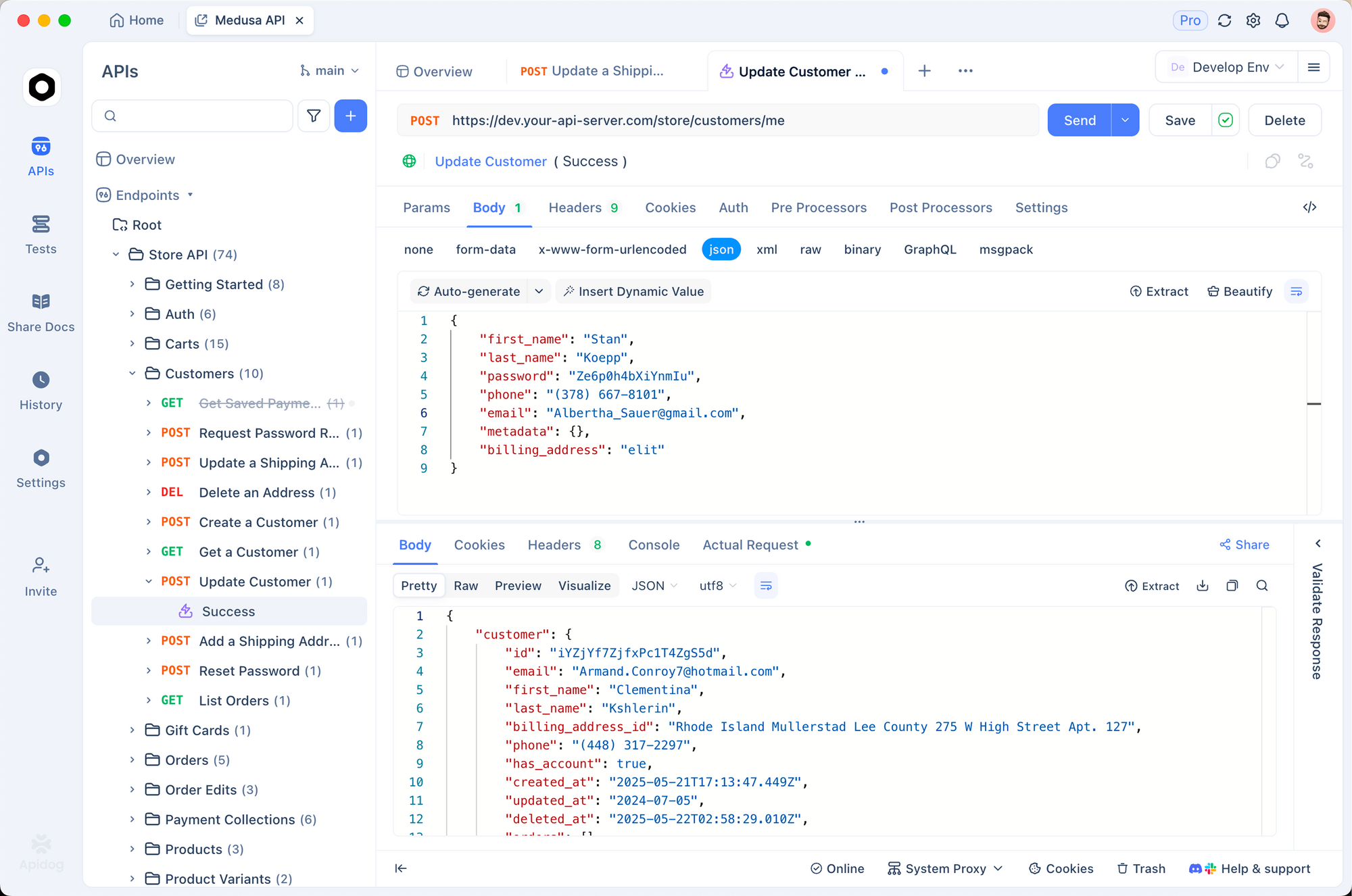
Apidog gives you that loop without writing throwaway scripts. Here is the workflow most teams settle on.
Step 1, import the OpenAI OpenAPI spec. Apidog reads OpenAPI 3.x natively. Drop in the Responses API spec and every endpoint, parameter, and response shape lights up with autocomplete.
Step 2, add your API key as a workspace secret. Apidog stores secrets per environment, so your staging key and production key never leak into a shared request. Reference the secret in the Authorization header with {{OPENAI_API_KEY}} and you can switch environments without re-typing the value.
Step 3, save a GPT-5.5 Instant request template. Set model: "gpt-5.5", reasoning.effort: "minimal", and the system + user messages you want to test. Save it to your project. Anyone on the team can replay the exact same call.
Step 4, run side-by-side tests. Duplicate the template, change reasoning.effort to "high" or swap the model to gpt-5.5-pro, and run both. Apidog shows latency, token counts, and the response body in a diff view so you can score quality vs cost on the spot.
Step 5, wire the request into a test suite. Apidog test scenarios let you chain requests, assert on response fields, and run the suite from CI. That is how you catch regressions when OpenAI ships a model update or you tweak a prompt.
Step 6, mock the endpoint for offline development. Apidog can mock the Responses API based on the OpenAPI schema, so frontend engineers can build against a stable shape while you keep iterating on prompts.
If you want a deeper look at the testing setup, API testing for QA engineers covers the assertion library and the CI integration end to end. You can grab Apidog from Download Apidog and have the first request running in under five minutes.
Advanced techniques and pro tips
Once you have GPT-5.5 Instant calling cleanly, the real work is making it cheap, fast, and predictable.
Pin reasoning effort per route. A customer-support bot does not need reasoning.effort: "high" on every turn. Pin "minimal" on the hot path and reserve "high" for escalation handlers. The token bill drops without hurting the user experience.
Cap output with max_output_tokens. GPT-5.5 can emit up to 128K output tokens. That is a runaway-cost vector if a prompt accidentally encourages a long answer. Cap it at the smallest value your UI tolerates; you can always paginate.
Watch the 272K token cliff. Once your input crosses 272K tokens, every subsequent call in the session pays the 2x input, 1.5x output multiplier. If you are doing long-document analysis, chunk and stream instead of stuffing the entire document into one call.
Use Batch for offline workloads. Generating embeddings for a backfill, summarizing weekly reports, classifying support tickets in bulk; these have no latency budget. Batch cuts the bill in half and runs within 24 hours.
Use Priority for user-facing latency-critical calls. If your SLA is tight and you are willing to pay 2.5x, Priority gives you reserved capacity. Worth it for chat-style products that compete on response time.
Stream from the first token. Instant is fast, but perceived latency drops further when you render tokens as they arrive. The Responses API supports stream: true and emits delta events you can pipe to a websocket or SSE channel.
Common mistakes to avoid:
- Calling
gpt-5.5-profor low-stakes prompts. Pro costs 6x as much on input and 6x on output. Use it only when the accuracy delta justifies the bill. - Leaving the system prompt empty. Even on Instant, a tight system prompt cuts tokens and improves consistency.
- Forgetting to set
reasoning.effort. The default behavior changes between endpoints; pin it explicitly so your traces are reproducible. - Storing the API key in source code. Use a secret manager or Apidog environments instead.
Alternatives and how GPT-5.5 Instant compares
GPT-5.5 Instant is not the only fast frontier model on the market. Here is how it lines up against the obvious competitors.
| Model | Input ($/1M) | Output ($/1M) | Context | Notable strength |
|---|---|---|---|---|
| GPT-5.5 (Instant) | $5.00 | $30.00 | 1M | Default in ChatGPT, low hallucination, broad tool use |
| GPT-5.5 Pro | $30.00 | $180.00 | 1M | Highest accuracy in the OpenAI lineup |
| Gemini 3 Flash Preview | varies | varies | 1M | Fast multimodal, tight Google ecosystem fit |
| DeepSeek V4 | low | low | 128K | Cheapest open-weights frontier model |
The honest answer on which to pick: GPT-5.5 Instant wins when you need ChatGPT-grade reliability and tool use. Gemini 3 Flash wins on multimodal latency in Google Cloud setups. DeepSeek V4 wins on raw cost when you control the inference stack.
Real-world use cases for GPT-5.5 Instant
Customer support triage. Route incoming tickets to GPT-5.5 with reasoning.effort: "minimal", classify by intent, and hand off to a human only on edge cases. The hallucination drop on flagged conversations matters here; misclassified billing tickets cost real money.
Documentation Q&A. Feed a docs site as a retrieval-augmented context window and let GPT-5.5 Instant answer at low latency. The 1M context handles even large product manuals without aggressive chunking.
Code review assistant. GPT-5.5 catches obvious bugs and suggests refactors with reasoning.effort: "low". Bump it to "medium" for security-sensitive paths. Pair it with the Apidog VS Code extension for inline API tests on the suggested code.
Text generation is only half of what OpenAI gives away these days — if you want visuals to go with your prompts, our walkthrough on using ChatGPT Image 2.0 for free covers the image side of the same account.
Beyond the ChatGPT interface, developers looking to keep token costs near zero should know how to access GPT-5.5 and other OpenAI models through free-tier routes before committing to a paid API plan.
Conclusion
GPT-5.5 Instant is the path of least friction for anyone who wants the new model. In ChatGPT, you already have it. In the API, you opt in by setting model: "gpt-5.5" and reasoning.effort: "minimal". The rest is engineering: rate-limit budget, prompt design, secret hygiene, and a test loop you trust.
Key takeaways:
- GPT-5.5 Instant is the new ChatGPT default, replacing GPT-5.3 Instant.
- It cuts hallucinated claims by 52.5% on high-stakes prompts versus its predecessor.
- Free, Plus, and paid tiers all see different message caps before falling back to GPT-5.5 mini.
- The API ships under
gpt-5.5, controlled byreasoning.effort, on Responses and Chat Completions. - Pricing starts at $5/$30 per million input/output tokens, with batch, flex, and priority tiers.
- A 1M context window covers most RAG use cases without aggressive chunking.
- Apidog gives you a reproducible test environment for the API before you ship.
The right next move depends on where you sit. If you are a ChatGPT user, keep chatting; the upgrade is automatic. If you are a developer, grab an API key, install Apidog, and run your first gpt-5.5 request through a saved request template. The full developer reference lives in the GPT-5.5 API guide, and the free-credits walkthrough is in GPT-5.5 free access.
FAQ
Is GPT-5.5 Instant free?Yes, on a capped basis. Free ChatGPT accounts can send 10 messages every 5 hours on GPT-5.5 Instant. After that, the conversation falls back to GPT-5.5 mini until the timer resets. Plus accounts get 160 messages every 3 hours; Pro and Business get unlimited use.
What is the API model name for GPT-5.5 Instant?There is no separate gpt-5.5-instant model identifier. Use gpt-5.5 and set reasoning.effort: "minimal" to get the Instant behavior. Higher effort values map closer to GPT-5.5 Thinking. The full reference lives in the GPT-5.5 API guide.
How is GPT-5.5 Instant different from GPT-5.5 Thinking?Same underlying model, different reasoning budget. Instant returns fast, low-latency answers. Thinking explores more branches before answering and handles agent-style multi-step tool use better. Pro adds even more compute on top of Thinking and is API-priced at $30/$180 per million tokens.
Does GPT-5.5 Instant support tool use?Yes. The model can call tools, browse the web through the search tool, run code interpreters, and operate the file API. The Responses API exposes this through a tools parameter on the request body.
What is the context window?1 million input tokens, with up to 128,000 output tokens per response. Watch the 272K input-token threshold; past that, your session pays a 2x input and 1.5x output multiplier on standard, batch, and flex tiers.
Can I pin GPT-5.5 Instant in ChatGPT?On Plus, Pro, and Business plans, yes. Open the model picker in the chat header and select GPT-5.5 Instant. The pin lasts for the current chat. Free accounts cannot pin and rely on the auto-router instead.
How do I test GPT-5.5 Instant requests before deploying?Save the request as a template in Apidog, set the API key as an environment secret, and replay it across staging and production environments. Add response assertions to a test scenario and wire the scenario into CI to catch regressions.
What happens when GPT-5.5 Instant routes me to Thinking?The router upgrades automatically when the prompt looks complex enough. You will see a slightly longer wait for the first token. The output bills against the same gpt-5.5 model, so there is no surprise pricing change unless you explicitly set a higher reasoning.effort in the API.


