TL;DR
GLM-5.1 is available through the BigModel API at https://open.bigmodel.cn/api/paas/v4/. The API is OpenAI-compatible: same endpoint structure, same request format, same streaming pattern. You need a BigModel account, an API key, and the model name glm-5.1. This guide covers authentication, your first request, streaming, tool calling, and testing your integration with Apidog.
Introduction
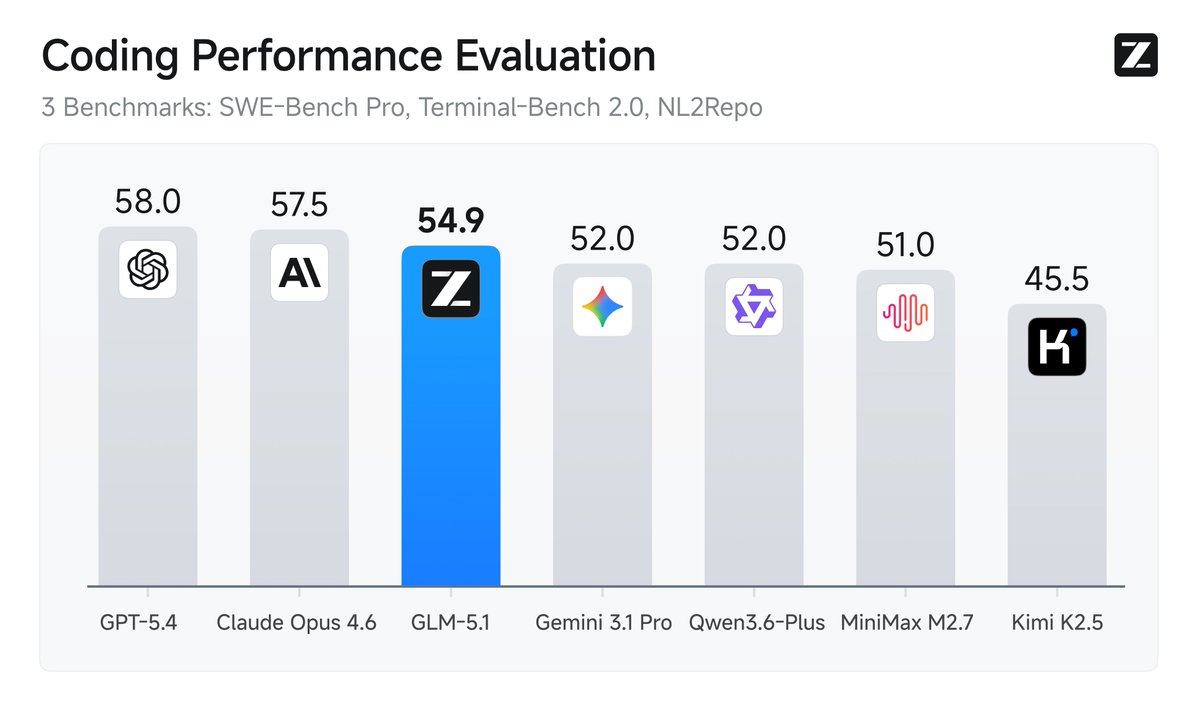
GLM-5.1 is Z.AI's flagship agentic model, released April 2026. It ranks #1 on SWE-Bench Pro and leads GLM-5 on every major coding benchmark. If you're building an AI coding assistant, autonomous agent, or any application that benefits from long-horizon task execution, GLM-5.1 is worth integrating.
The good news for developers: the API is OpenAI-compatible. If you've already built on GPT-4 or Claude, you can switch to GLM-5.1 by changing the base URL and model name. No new SDK to learn. No different response format to handle.
Prerequisites
Before making your first call, you need:
- A BigModel account at bigmodel.cn. Registration is free.
- An API key from the BigModel console under API Keys.
- Python 3.8+ or Node.js 18+ (examples cover both).
- The OpenAI SDK or standard
requests/fetch(GLM-5.1's API is OpenAI-compatible).
Set your API key as an environment variable:
export BIGMODEL_API_KEY="your_api_key_here"
Never hardcode API keys in your source code.
Authentication
Every request needs a Bearer token in the Authorization header:
Authorization: Bearer YOUR_API_KEY
The BigModel API key format looks like xxxxxxxx.xxxxxxxxxxxxxxxx, a two-part string separated by a dot. This is different from OpenAI's sk- format but works the same way in the header.
Base URL
https://open.bigmodel.cn/api/paas/v4/
The chat completions endpoint is:
POST https://open.bigmodel.cn/api/paas/v4/chat/completions
Your first request
Using curl
curl https://open.bigmodel.cn/api/paas/v4/chat/completions \
  -H "Authorization: Bearer $BIGMODEL_API_KEY" \
  -H "Content-Type: application/json" \
  -d '{
    "model": "glm-5.1",
    "messages": [
      {
        "role": "user",
        "content": "Write a Python function that finds all prime numbers up to n using the Sieve of Eratosthenes."
      }
    ],
    "max_tokens": 1024,
    "temperature": 0.7
  }'
Using Python (requests)
import os
import requests

api_key = os.environ["BIGMODEL_API_KEY"]

response = requests.post(
    "https://open.bigmodel.cn/api/paas/v4/chat/completions",
    headers={
        "Authorization": f"Bearer {api_key}",
        "Content-Type": "application/json"
    },
    json={
        "model": "glm-5.1",
        "messages": [
            {
                "role": "user",
                "content": "Write a Python function that finds all prime numbers up to n using the Sieve of Eratosthenes."
            }
        ],
        "max_tokens": 1024,
        "temperature": 0.7
    }
)

result = response.json()
print(result["choices"][0]["message"]["content"])
Using the OpenAI SDK (recommended)
Because the API is OpenAI-compatible, you can use the official OpenAI Python SDK with a custom base URL:
import os
from openai import OpenAI

client = OpenAI(
    api_key=os.environ["BIGMODEL_API_KEY"],
    base_url="https://open.bigmodel.cn/api/paas/v4/"
)

response = client.chat.completions.create(
    model="glm-5.1",
    messages=[
        {
            "role": "user",
            "content": "Write a Python function that finds all prime numbers up to n using the Sieve of Eratosthenes."
        }
    ],
    max_tokens=1024,
    temperature=0.7
)

print(response.choices[0].message.content)
This is the cleanest approach. The OpenAI SDK handles retries, timeout management, and response parsing. You get all that for free just by pointing it at the BigModel base URL.
Response format
The response structure is identical to OpenAI's:
{
  "id": "chatcmpl-abc123",
  "object": "chat.completion",
  "created": 1744000000,
  "model": "glm-5.1",
  "choices": [
    {
      "index": 0,
      "message": {
        "role": "assistant",
        "content": "def sieve_of_eratosthenes(n):\n    ..."
      },
      "finish_reason": "stop"
    }
  ],
  "usage": {
    "prompt_tokens": 32,
    "completion_tokens": 215,
    "total_tokens": 247
  }
}
Access the response text via result["choices"][0]["message"]["content"].
The usage field shows token counts for the request. Track this to monitor your quota consumption, since GLM-5.1 bills at 3x quota during peak hours (14:00-18:00 UTC+8).
Streaming responses
For long code generation tasks, streaming gives you tokens as they arrive rather than waiting for the full response. This is essential for any user-facing application.
import os
from openai import OpenAI

client = OpenAI(
    api_key=os.environ["BIGMODEL_API_KEY"],
    base_url="https://open.bigmodel.cn/api/paas/v4/"
)

stream = client.chat.completions.create(
    model="glm-5.1",
    messages=[
        {
            "role": "user",
            "content": "Explain how a B-tree index works in a database, with a code example."
        }
    ],
    stream=True,
    max_tokens=2048
)

for chunk in stream:
    if chunk.choices[0].delta.content is not None:
        print(chunk.choices[0].delta.content, end="", flush=True)

print()  # newline after streaming completes
Each chunk in the stream is a delta containing only the new tokens since the last chunk. The final chunk has finish_reason set to "stop" (or "length" if you hit the token limit).
Streaming with raw requests
If you prefer not to use the OpenAI SDK:
import os
import json
import requests

api_key = os.environ["BIGMODEL_API_KEY"]

response = requests.post(
    "https://open.bigmodel.cn/api/paas/v4/chat/completions",
    headers={
        "Authorization": f"Bearer {api_key}",
        "Content-Type": "application/json"
    },
    json={
        "model": "glm-5.1",
        "messages": [{"role": "user", "content": "Write a merge sort in Python."}],
        "stream": True,
        "max_tokens": 1024
    },
    stream=True
)

for line in response.iter_lines():
    if line:
        line = line.decode("utf-8")
        if line.startswith("data: "):
            data = line[6:]
            if data == "[DONE]":
                break
            chunk = json.loads(data)
            delta = chunk["choices"][0]["delta"]
            if "content" in delta:
                print(delta["content"], end="", flush=True)
Tool calling
GLM-5.1 supports tool calling: the ability to request function execution mid-conversation. This is the core mechanism for agentic workflows where the model needs to run code, search databases, call external APIs, or take actions in the real world.
Defining tools
import os
import json
from openai import OpenAI

client = OpenAI(
    api_key=os.environ["BIGMODEL_API_KEY"],
    base_url="https://open.bigmodel.cn/api/paas/v4/"
)

tools = [
    {
        "type": "function",
        "function": {
            "name": "run_python",
            "description": "Execute Python code and return the output. Use this to test, profile, or benchmark code.",
            "parameters": {
                "type": "object",
                "properties": {
                    "code": {
                        "type": "string",
                        "description": "The Python code to execute"
                    }
                },
                "required": ["code"]
            }
        }
    },
    {
        "type": "function",
        "function": {
            "name": "read_file",
            "description": "Read the contents of a file",
            "parameters": {
                "type": "object",
                "properties": {
                    "path": {
                        "type": "string",
                        "description": "File path to read"
                    }
                },
                "required": ["path"]
            }
        }
    }
]

response = client.chat.completions.create(
    model="glm-5.1",
    messages=[
        {
            "role": "user",
            "content": "Write a function to compute Fibonacci numbers, test it for n=10, and show me the output."
        }
    ],
    tools=tools,
    tool_choice="auto"
)

message = response.choices[0].message
print(f"Finish reason: {response.choices[0].finish_reason}")

if message.tool_calls:
    for tool_call in message.tool_calls:
        print(f"\nTool called: {tool_call.function.name}")
        print(f"Arguments: {tool_call.function.arguments}")
Handling tool call responses
When GLM-5.1 requests a tool call, you execute the function, then return the result in the next message:
import subprocess

def execute_tool(tool_call):
    """Execute the tool and return the result."""
    name = tool_call.function.name
    args = json.loads(tool_call.function.arguments)

    if name == "run_python":
        result = subprocess.run(
            ["python3", "-c", args["code"]],
            capture_output=True,
            text=True,
            timeout=10
        )
        return result.stdout or result.stderr

    elif name == "read_file":
        try:
            with open(args["path"]) as f:
                return f.read()
        except FileNotFoundError:
            return f"Error: file {args['path']} not found"

    return f"Unknown tool: {name}"


def run_agent_loop(user_message, tools, max_iterations=20):
    """Run a full agent loop with tool calling."""
    messages = [{"role": "user", "content": user_message}]

    for i in range(max_iterations):
        response = client.chat.completions.create(
            model="glm-5.1",
            messages=messages,
            tools=tools,
            tool_choice="auto",
            max_tokens=4096
        )

        message = response.choices[0].message
        messages.append(message.model_dump())

        if response.choices[0].finish_reason == "stop":
            # Model is done
            return message.content

        if response.choices[0].finish_reason == "tool_calls":
            # Execute each tool call and add results
            for tool_call in message.tool_calls:
                tool_result = execute_tool(tool_call)
                messages.append({
                    "role": "tool",
                    "tool_call_id": tool_call.id,
                    "content": tool_result
                })

    return "Max iterations reached"


result = run_agent_loop(
    "Write a quicksort implementation, test it with a random list of 1000 integers, and report the time.",
    tools
)
print(result)
This pattern scales directly to GLM-5.1's strength as an agentic model. You let the model decide when to call tools, process the results, and continue until it reaches a solution or decides it's done.
Key parameters
| Parameter | Type | Default | Description |
|---|---|---|---|
model |
string | required | Use "glm-5.1" |
messages |
array | required | Conversation history |
max_tokens |
integer | 1024 | Max tokens to generate (up to 163,840) |
temperature |
float | 0.95 | Randomness. Lower = more deterministic. Range: 0.0-1.0 |
top_p |
float | 0.7 | Nucleus sampling. Z.AI recommends 0.7 for coding tasks. |
stream |
boolean | false | Enable streaming responses |
tools |
array | null | Function definitions for tool calling |
tool_choice |
string/object | "auto" | "auto", "none", or specific tool |
stop |
string/array | null | Custom stop sequences |
Recommended settings for coding tasks:
{
    "model": "glm-5.1",
    "temperature": 1.0,
    "top_p": 0.95,
    "max_tokens": 163840  # full context for long agentic runs
}
Z.AI uses these settings in their own benchmark evaluations. For deterministic code generation, lower temperature to 0.2-0.4.
Using GLM-5.1 with coding assistants
The Z.AI Coding Plan lets you route Claude Code, Cline, Kilo Code, and other AI coding assistants through GLM-5.1 via the BigModel API. This is useful if you want a strong coding model at lower cost than running Claude Opus or GPT-5.4 directly.
Claude Code setup
In your Claude Code configuration file (~/.claude/settings.json or equivalent):
{
  "model": "glm-5.1",
  "baseURL": "https://open.bigmodel.cn/api/paas/v4/",
  "apiKey": "your_bigmodel_api_key"
}
Cline / Roo Code setup
In your VS Code settings or the Cline extension config:
{
  "cline.apiProvider": "openai",
  "cline.openAIBaseURL": "https://open.bigmodel.cn/api/paas/v4/",
  "cline.openAIApiKey": "your_bigmodel_api_key",
  "cline.openAIModelId": "glm-5.1"
}
Quota consumption
GLM-5.1 uses the Z.AI quota system rather than per-token billing: - Peak hours (14:00-18:00 UTC+8): 3x quota per request - Off-peak: 2x quota per request - Promotional rate through April 2026: 1x during off-peak
For heavy agentic workloads, schedule long-running tasks for off-peak hours. A 600-iteration optimization run like Z.AI demonstrated costs significantly more quota at peak.
Testing the GLM-5.1 API with Apidog
Testing an agentic API integration requires handling multiple response types correctly: normal completions, streaming chunks, tool call requests, tool result messages, and error states. Testing all of these against the real API consumes quota and requires a live connection.
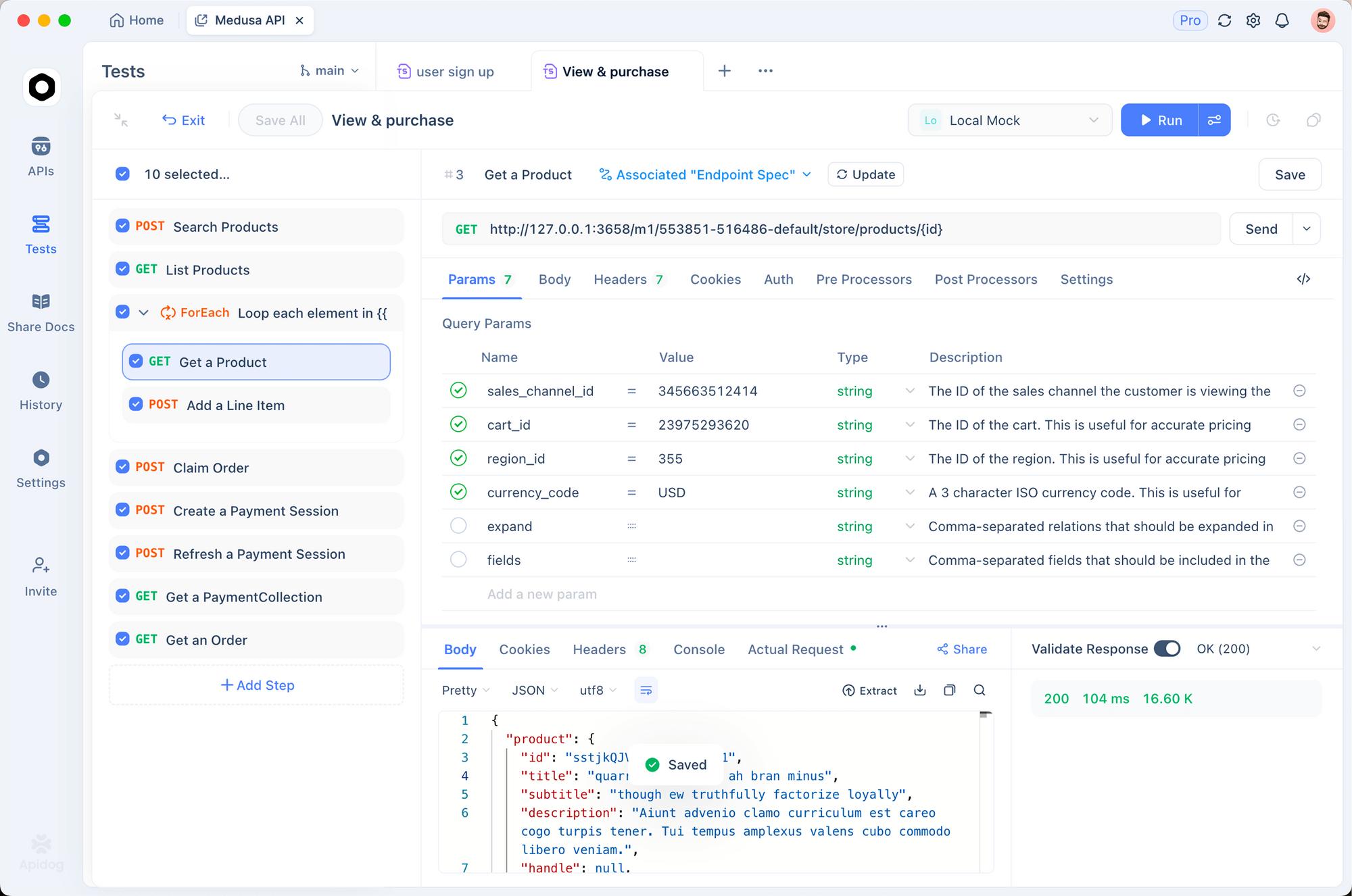
Apidog's Smart Mock lets you define all of these response states and test them without hitting the real API.
Setting up the mock endpoint
- In Apidog, create a new endpoint:
POST https://open.bigmodel.cn/api/paas/v4/chat/completions - Add a Mock Expectation for a standard success response:
{
  "id": "chatcmpl-test123",
  "object": "chat.completion",
  "created": 1744000000,
  "model": "glm-5.1",
  "choices": [
    {
      "index": 0,
      "message": {
        "role": "assistant",
        "content": "def sieve(n): ..."
      },
      "finish_reason": "stop"
    }
  ],
  "usage": {
    "prompt_tokens": 32,
    "completion_tokens": 120,
    "total_tokens": 152
  }
}
- Add a second expectation for a tool call response:
{
  "id": "chatcmpl-tool456",
  "object": "chat.completion",
  "created": 1744000001,
  "model": "glm-5.1",
  "choices": [
    {
      "index": 0,
      "message": {
        "role": "assistant",
        "content": null,
        "tool_calls": [
          {
            "id": "call_abc",
            "type": "function",
            "function": {
              "name": "run_python",
              "arguments": "{\"code\": \"print(2+2)\"}"
            }
          }
        ]
      },
      "finish_reason": "tool_calls"
    }
  ],
  "usage": {
    "prompt_tokens": 48,
    "completion_tokens": 35,
    "total_tokens": 83
  }
}
- Add a rate limit response (HTTP 429):
{
  "error": {
    "message": "Rate limit exceeded. Please retry after 60 seconds.",
    "type": "rate_limit_error",
    "code": "rate_limit_exceeded"
  }
}
Testing the full agent loop
Use Apidog's Test Scenarios to chain multiple requests together. For an agent loop test:
- Step 1: POST to
/chat/completionswith your initial message, assert 200 andfinish_reason == "tool_calls" - Step 2: POST again with the tool result in the messages array, assert 200 and
finish_reason == "stop" - Step 3: Extract the final content and assert it contains the expected code
This tests the complete agent loop without spending any quota. You can also test the error handling by switching the mock to return 429, then verifying your retry logic kicks in correctly.
For multi-step agentic workflows, Apidog's Test Scenarios let you pass data between steps using variables, so request_id or tool_call_id values from step 1 automatically flow into step 2. This mirrors how a real agent loop works and catches integration bugs before production.
Error handling
The API returns standard HTTP status codes:
| Status | Meaning | Action |
|---|---|---|
| 200 | Success | Process response normally |
| 400 | Bad request | Check your request format |
| 401 | Unauthorized | Verify your API key |
| 429 | Rate limit | Retry after the Retry-After header value |
| 500 | Server error | Retry with exponential backoff |
| 503 | Service unavailable | Retry with exponential backoff |
import time
import requests

def call_with_retry(payload, max_retries=3):
    for attempt in range(max_retries):
        try:
            response = requests.post(
                "https://open.bigmodel.cn/api/paas/v4/chat/completions",
                headers={"Authorization": f"Bearer {os.environ['BIGMODEL_API_KEY']}",
                         "Content-Type": "application/json"},
                json=payload,
                timeout=120
            )

            if response.status_code == 429:
                retry_after = int(response.headers.get("Retry-After", 60))
                print(f"Rate limited. Waiting {retry_after}s...")
                time.sleep(retry_after)
                continue

            response.raise_for_status()
            return response.json()

        except requests.exceptions.Timeout:
            wait = 2 ** attempt
            print(f"Timeout on attempt {attempt + 1}. Retrying in {wait}s...")
            time.sleep(wait)

    raise Exception("Max retries exceeded")
For long agentic runs where individual steps can take 30-60 seconds, always set a generous timeout (120-300 seconds). The model may need time to generate a complete code file or analyze a complex benchmark result.
Developers building autonomous workflows are rarely locked into a single model provider — Moltbook's API for orchestrating AI agents offers a different approach worth evaluating alongside GLM for multi-step task automation.
Conclusion
GLM-5.1's OpenAI-compatible API means you can integrate it in minutes if you've already worked with GPT or Claude. The key difference is the endpoint (open.bigmodel.cn) and the quota system instead of per-token billing.
For agentic applications where the model runs hundreds of tool calls over a long session, GLM-5.1's long-horizon optimization capability is a real advantage. Pair it with proper testing via Apidog's Smart Mock and Test Scenarios to make sure your integration handles all the edge cases before it runs unsupervised.
For background on what GLM-5.1 is and how its benchmarks compare, see the GLM-5.1 model overview. For more on building and testing AI agent workflows with Apidog, see how AI agent memory works.
FAQ
Is the GLM-5.1 API OpenAI-compatible?Yes. The request format, response structure, streaming protocol, and tool calling format are all identical to the OpenAI chat completions API. You can use the official OpenAI Python SDK or any OpenAI-compatible client by setting the base URL to https://open.bigmodel.cn/api/paas/v4/.
What is the model name to use in API requests?Use "glm-5.1" as the model name. Do not use a full versioned name; just glm-5.1 works.
How does GLM-5.1 API pricing work?The BigModel API uses a quota system. GLM-5.1 consumes 3x quota during peak hours (14:00-18:00 UTC+8) and 2x during off-peak. Through end of April 2026, off-peak usage is billed at 1x quota as a promotional rate.
What is the maximum context length?200,000 tokens input context. Maximum output is 163,840 tokens. For long agentic runs, set max_tokens to a large value (32,768 or higher) to avoid truncating the model's output mid-task.
Can I use GLM-5.1 for function calling / tool use?Yes. GLM-5.1 supports the same tool calling format as OpenAI's API. Define tools with a type: "function" schema, pass them in the tools array, and handle finish_reason: "tool_calls" responses in your agent loop.
How do I test GLM-5.1 API calls without spending quota?Use Apidog's Smart Mock to define mock responses for each API state: success, tool calls, rate limits, errors. Run your test suite against the mock during development and only use the real API for final validation.
Where can I find the GLM-5.1 model weights?The open-source weights are on HuggingFace at zai-org/GLM-5.1. They're released under the MIT License and support vLLM and SGLang for local inference.