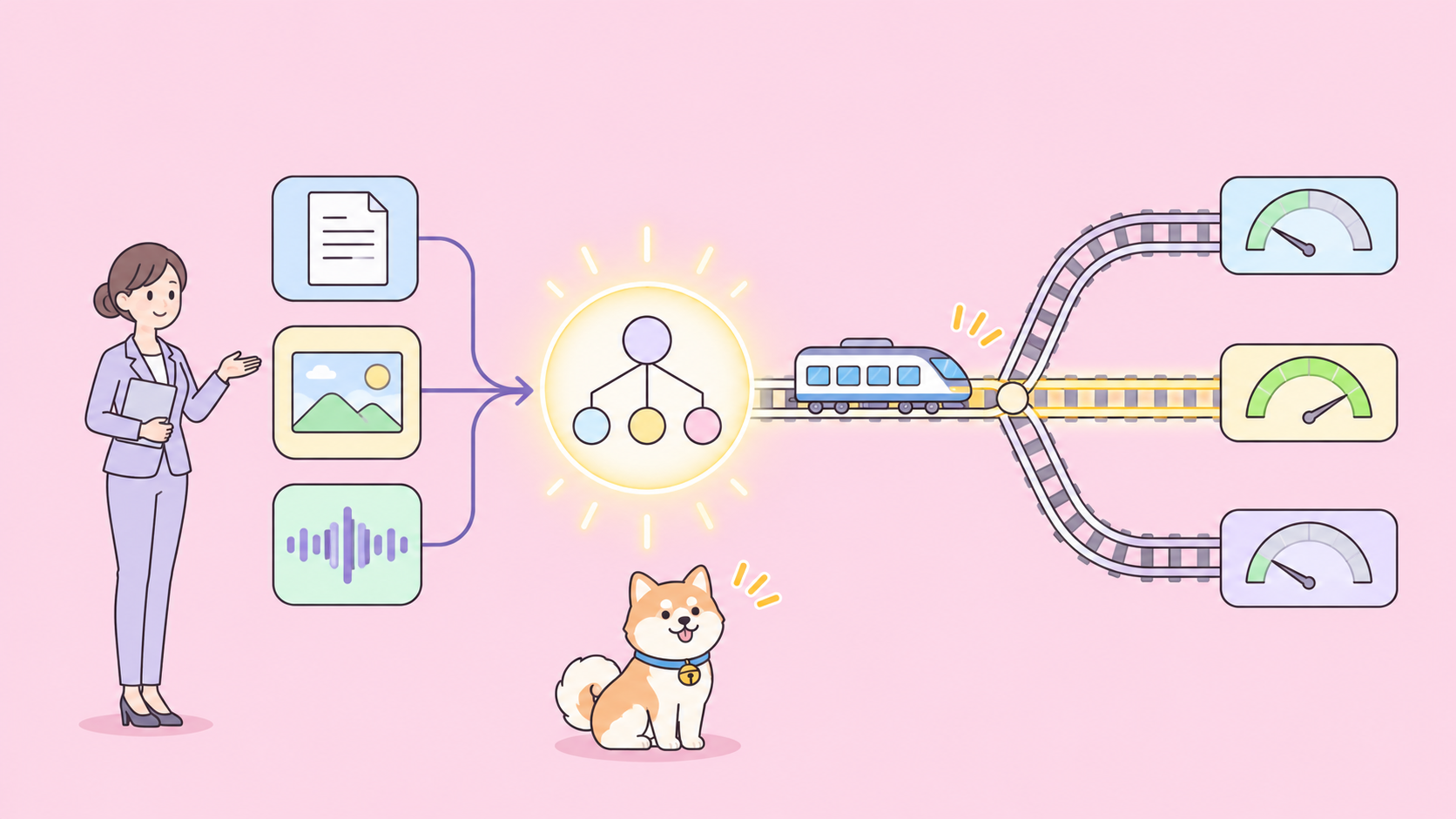
To use the Gemini Decisions API, get a key in Google AI Studio, install google-genai 3.2 or later, and call client.decisions.create() with the model gemini-decision-1, one shared input, and a map of typed questions (noul, choice or score). You get back a calibrated probability and a confidence for every question, with zero output tokens.
Below: each step in Python, JavaScript and REST, from your first yes/no question to confidence routing and a CI test suite.
What is the Gemini Decisions API?
The Gemini Decisions API is an endpoint in the Gemini Developer API (v1beta) that answers closed-set questions instead of generating text. You send one multimodal input and up to 1,000 independent questions. The model gemini-decision-1 scores every option in a single forward pass and returns calibrated probabilities your code can branch on directly.
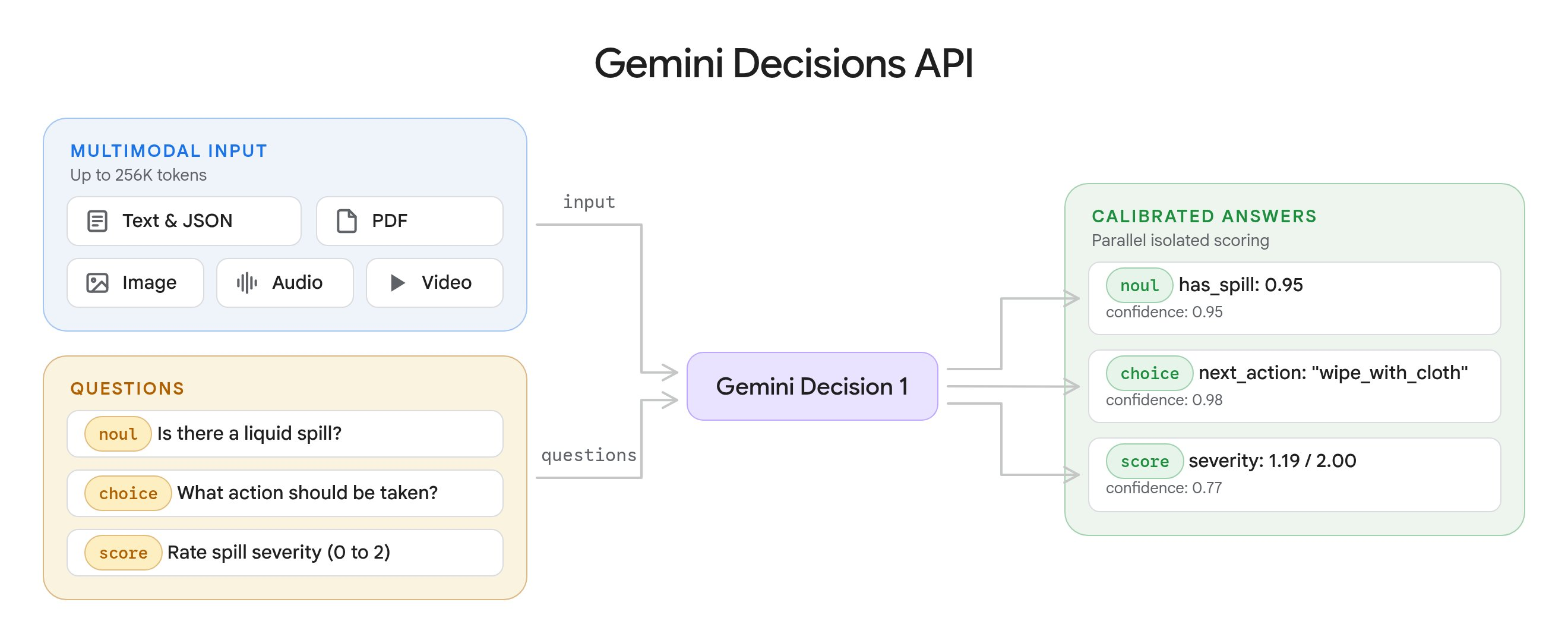
Google announced it on November 11, 2026. The official docs define three question types:
| Question type | Use it to | Returns |
|---|---|---|
noul |
Check if a statement holds (yes/no) | noul (0.01 to 0.99), confidence |
choice |
Pick one option from 2 to 255 | choice, probabilities, confidence |
score |
Rate against 2 to 255 ordered levels | score, probabilities, legend, confidence |
Pricing is $0.10 per 1M input tokens and $0 for output, according to the Gemini API pricing page. Shared input is billed once per request, however many questions you ask. If you’ve already read our guide on how to use the OpenAI Decisions API, the shape will feel familiar, but the fields below are Gemini’s own.
Step 1: Get an API key and install the SDK
- Open Google AI Studio and create an API key.
- Export it:
export GEMINI_API_KEY="your-key". - Install SDK 3.2 or later:
pip install -U google-genaiornpm install @google/genai@latest.
You can try questions without code first in the Decisions Playground, which exports runnable code.
Free tier, checked November 12, 2026: the rate limits page lists 200 requests per minute, 50,000 tokens per minute and 10,000 requests per day on the Free tier. Input is free of charge there, but the pricing page marks Free tier data as “Used to improve our products: Yes,” so keep real customer data on a paid tier. For more on Google’s free quotas, see our Gemini API free tier guide.
| Tier | RPM | TPM | RPD |
|---|---|---|---|
| Free | 200 | 50,000 | 10,000 |
| Tier 1 | 1,500 | 1,000,000 | 50,000 |
| Tier 2 | 5,000 | 4,000,000 | Unlimited |
| Tier 3 | 15,000 | 10,000,000 | Unlimited |
Step 2: Ask your first noul (yes/no) question
A noul question returns the probability that the answer is yes. Note the v1beta API version: the endpoint isn’t on v1.
Python:
from google import genai

client = genai.Client(http_options={"api_version": "v1beta"})

result = client.decisions.create(
    model="gemini-decision-1",
    input="The blue mug I ordered on Monday arrived cracked on Wednesday.",
    questions={
        "is_damaged": {
            "type": "noul",
            "instructions": "Did the item arrive damaged?",
        },
    },
)

answer = result.answers["is_damaged"]
print(f"P(yes)={answer.noul:.2f} confidence={answer.confidence:.2f}")
JavaScript:
import { GoogleGenAI } from "@google/genai";

const ai = new GoogleGenAI({ apiVersion: "v1beta" });

const result = await ai.decisions.create({
  model: "gemini-decision-1",
  input: "The blue mug I ordered on Monday arrived cracked on Wednesday.",
  questions: {
    is_damaged: { type: "noul", instructions: "Did the item arrive damaged?" },
  },
});

const answer = result.answers?.is_damaged;
if (answer?.type === "noul") console.log(answer.noul, answer.confidence);
REST:
curl -X POST "https://generativelanguage.googleapis.com/v1beta/decisions" \
  -H "x-goog-api-key: $GEMINI_API_KEY" \
  -H "Content-Type: application/json" \
  -d '{
    "model": "gemini-decision-1",
    "input": "The blue mug I ordered on Monday arrived cracked on Wednesday.",
    "questions": {
      "is_damaged": { "type": "noul", "instructions": "Did the item arrive damaged?" }
    }
  }'
Google’s docs show this response (an example from the docs, not a run of ours):
{
  "answers": { "is_damaged": { "type": "noul", "noul": 0.99, "confidence": 0.99 } },
  "usage": { "total_input_tokens": 100, "total_output_tokens": 0, "total_tokens": 100 }
}
When “yes” is ambiguous, add criteria with a true_description and a false_description. One rule to remember: noul values always fall between 0.01 and 0.99, so a threshold above 0.99 never matches.
Step 3: Add choice and score questions
Put independent questions about the same input in one request. The input is billed once; each question adds only its own tokens.
result = client.decisions.create(
    model="gemini-decision-1",
    input="I was charged twice for my order and the export page crashes in Safari.",
    questions={
        "department": {
            "type": "choice",
            "instructions": "Which department should handle this request?",
            "criteria": {
                "billing": "Payments, invoices, and refunds.",
                "technical": "Problems using the product.",
                "shipping": "Delivery and tracking.",
                "other": "Anything outside these categories.",
            },
        },
        "severity": {
            "type": "score",
            "instructions": "How severe is this issue for the user?",
            "criteria": [
                "Cosmetic: appearance only, no lost functionality.",
                "Workaround available: a task fails, but another way works.",
                "Fully blocked: a task fails with no workaround.",
            ],
        },
    },
)
Three details from the docs trip people up:
- Choice keys are sorted alphabetically before scoring. Use
otherfor a catch-all, notnone_of_the_above, which sorts ahead of real options. - Score criteria is a list, ordered lowest to highest and indexed from 0. The returned
scoreis a probability-weighted average, so it can land between levels (the docs show1.12). - The model never sees your question keys. Write the full question in
instructions.
To get a discrete level from a score, take the most probable entry:
sev = result.answers["severity"]
level = max(sev.probabilities, key=sev.probabilities.get)
print(sev.legend[level])
Step 4: Send images, PDFs and audio
input takes a string, one content block or a list of blocks, in the same block format as the Interactions API. Supported blocks are text, image, audio, video and document (PDF only).
import base64

with open("earcup.jpg", "rb") as f:
    image_b64 = base64.b64encode(f.read()).decode("utf-8")
with open("return-form.pdf", "rb") as f:
    pdf_b64 = base64.b64encode(f.read()).decode("utf-8")

result = client.decisions.create(
    model="gemini-decision-1",
    input=[
        {"type": "text", "text": "Customer photo and form for return #8821.\n"},
        {"type": "image", "data": image_b64, "mime_type": "image/jpeg", "resolution": "low"},
        {"type": "document", "data": pdf_b64, "mime_type": "application/pdf"},
    ],
    questions={
        "visible_damage": {
            "type": "noul",
            "instructions": "Does the photo show physical damage to the device? Ignore the packaging.",
        },
        "form_signed": {
            "type": "noul",
            "instructions": "Is the return form in the PDF signed by the customer?",
        },
    },
)
For audio, pass a block like {"type": "audio", "uri": "<https-url>", "mime_type": "audio/mp3"}. Limits worth knowing:
- Inline base64 data is capped at 100 MB per request (50 MB for PDFs); external URLs at 15 MB each.
- Set the real MIME type. The API rejects
application/octet-stream. - YouTube URLs and
gs://URIs aren’t supported. Use the Files API, a public or signed HTTPS URL, or inline bytes. resolution(low,medium,high,ultra_high) trades visual detail for tokens.ultra_highis images only.
Step 5: Read probabilities and confidence
Every answer carries a confidence from 0 to 1, the estimated chance the top answer is right. For choice and score, it equals the top outcome’s probability. For noul, it’s max(noul, 1 - noul).
So a noul of 0.03 has a confidence of 0.97: the model is sure the answer is no.
Step 6: Route low-confidence answers to a fallback
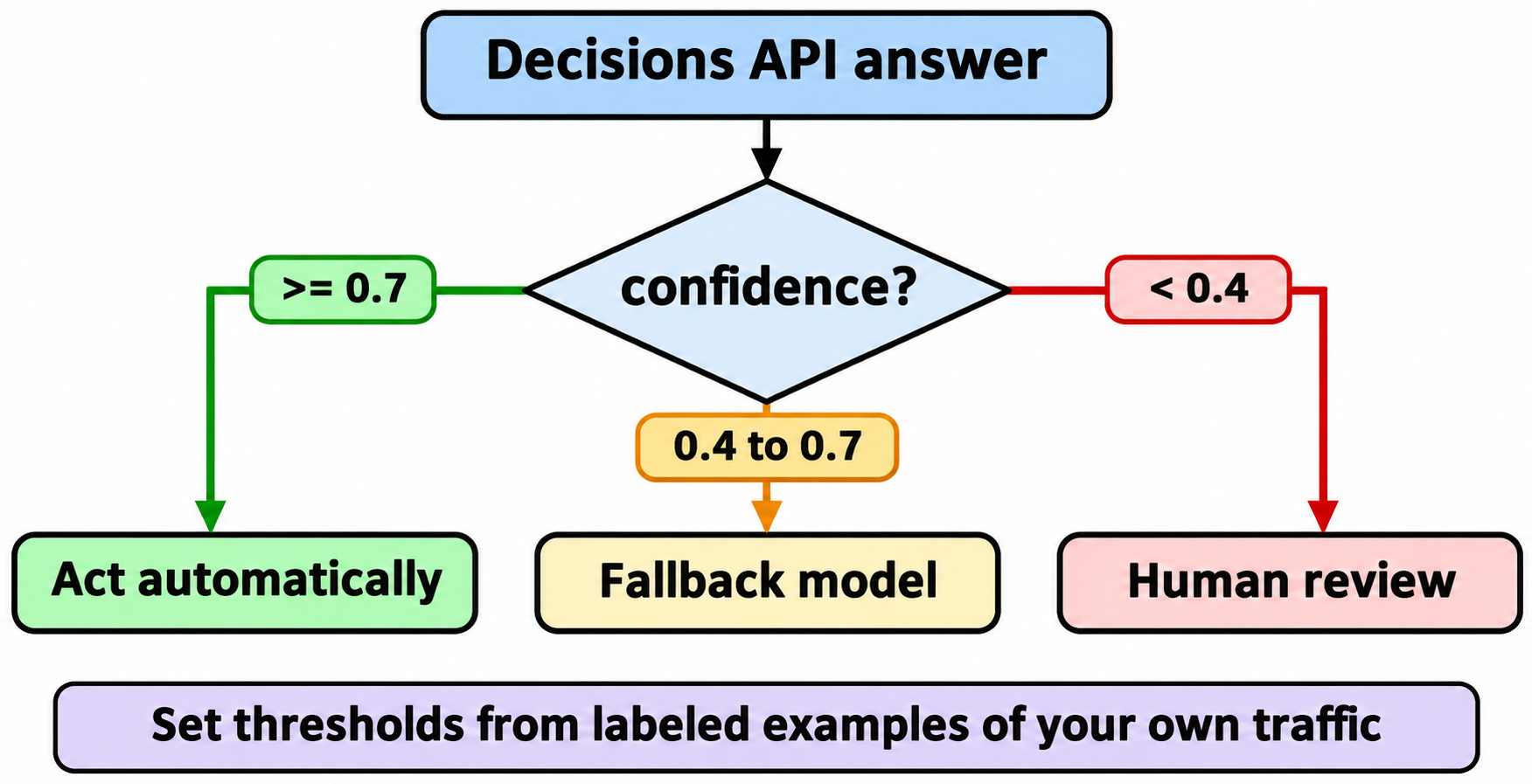
Use the value to pick an action and the confidence to decide whether to act automatically:
a = result.answers
dept = a["department"]

if dept.confidence >= 0.7 and dept.choice != "other":
    route_to(dept.choice)
elif dept.confidence >= 0.4:
    route_to_fallback_model(ticket)   # a bigger model reasons it out
else:
    route_to("human_review")
The 0.7 and 0.4 cutoffs are placeholders: Google advises setting thresholds from labeled examples of your own traffic. Two more rules from the docs:
- Choice questions always split probability across your options, even when none fits. Pair them with a scope check such as “Is this message about an order?”
- Treat input as untrusted. A user’s message can argue for its own classification. Keep a human or a second check on payouts and other high-stakes actions.
Step 7: Let your coding agent test it with Apidog CLI
A routing layer fails quietly. Someone rewords a criterion, billing becomes technical for half your tickets, and nothing errors. The fix is a regression suite that pins expected decisions, and your coding agent can build it with Apidog CLI while you review.
npm install -g apidog-cli@latest
apidog auth login --with-token <YOUR_TOKEN>
npx -y skills add https://apidog.com   # pick your agent when prompted
Then give your agent one prompt:
In Apidog project <id>, build a test suite for POST
https://generativelanguage.googleapis.com/v1beta/decisions (header x-goog-api-key
from env var GEMINI_API_KEY). Add one request per question type (noul, choice,
score) asserting status 200, confidence between 0 and 1 and zero output tokens.
Add a test data set of 20 tickets with expected departments and assert each
choice matches with confidence >= 0.7. Run it and summarize failures.
The agent reads each payload schema, validates it, writes the resources and runs the suite:
apidog cli-schema get test-scenario-create
apidog cli-schema validate test-scenario-create --file scenario.json
apidog test-scenario create --project <id> --file scenario.json
apidog test-data create --project <id> --file tickets.json
apidog test-suite create --project <id> --file suite.json
apidog run --test-suite <suiteId> --project <id> -e <envId> -d <testDataId> -r cli,junit --out-dir reports
Every flag above comes from apidog run --help on CLI 2.2.12. Now a prompt or criteria change that flips a fixture’s decision fails the run. Drop the same apidog run ... -r cli,junit into GitHub Actions and the JUnit file shows which ticket flipped; our Apidog CLI CI/CD guide has the workflow file, and Apidog CLI in Claude Code covers the agent setup. Apidog’s Free plan covers up to 4 users.
Limits and what’s not supported yet
From the Decisions API limits, checked November 12, 2026:
- 1 to 1,000 questions per request, inside a 262,144-token context window.
- No context caching, no Batch API, no Flex or Priority inference. Repeated input across requests is billed in full.
- Safety blocks return HTTP 400 with an
error.codesuch assafetyorprohibited_content, not an answer. - Gemini Developer API (
v1beta) only. Google says Vertex AI support is “coming soon,” with no date.
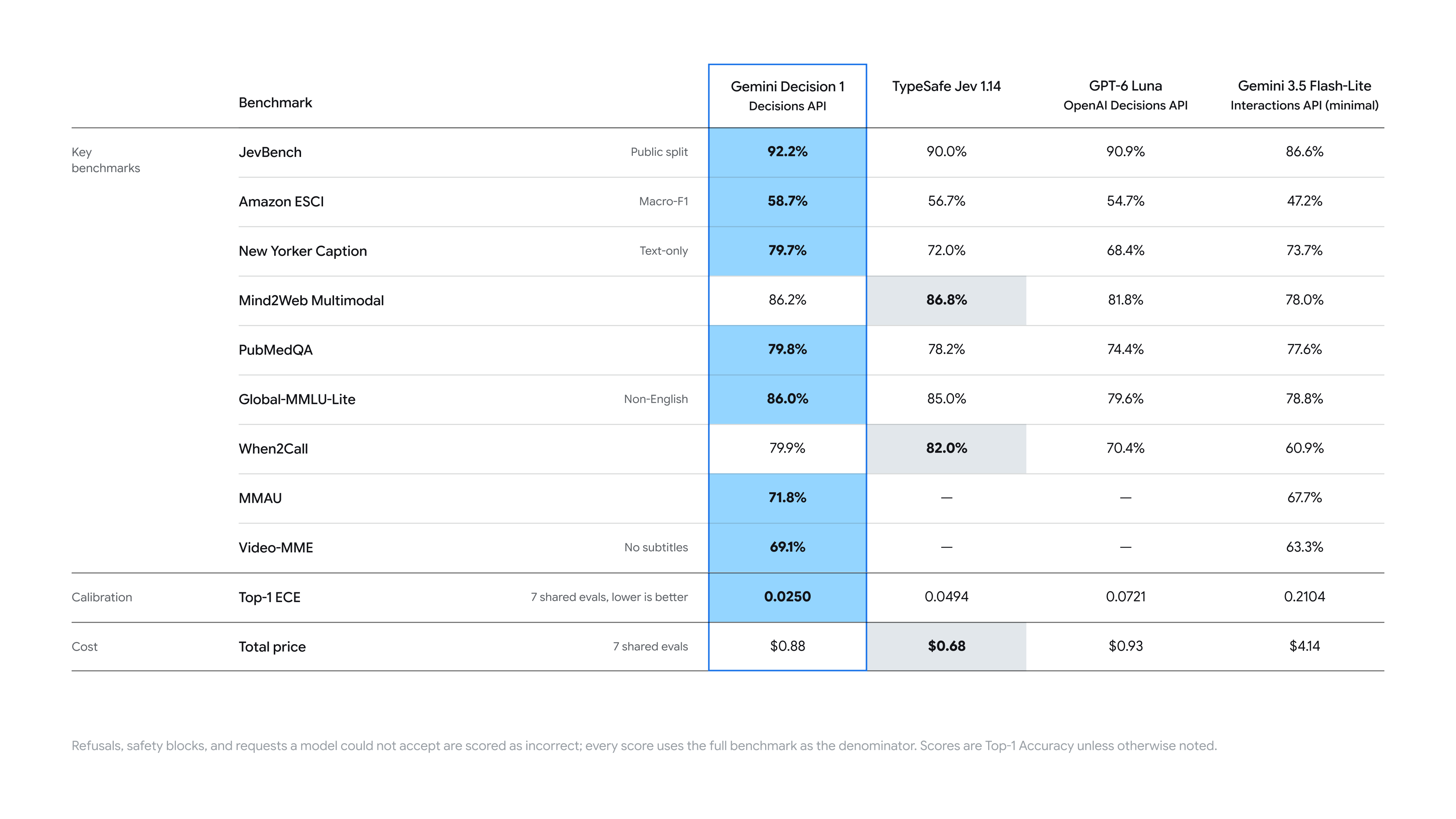
Google reports 150 to 250 ms end-to-end latency, nearly flat from 1 to 100 questions for inputs up to 16K tokens, and says Gemini Decision 1 leads its own benchmark suite with the lowest calibration error. Those are Google’s numbers; measure latency on your own inputs before you design around them.
FAQ
Is the Gemini Decisions API free? There’s a Free tier with input free of charge, capped at 200 RPM, 50,000 TPM and 10,000 requests per day (checked November 12, 2026). Free tier data may be used to improve Google’s products. The paid tier is $0.10 per 1M input tokens.
What does noul mean? It’s the yes/no question type. The noul field is the probability the answer is yes, between 0.01 and 0.99.
Which API version do I need? v1beta. Set http_options={"api_version": "v1beta"} in Python, apiVersion: "v1beta" in JavaScript, or call /v1beta/decisions over REST.
Does it work on Vertex AI? Not yet. It’s on the Gemini Developer API only; Google lists Gemini in Google Cloud as coming soon.
How do I pick a confidence threshold? Label a few hundred real inputs, run them through the API, and choose the cutoff where the cost of wrong automatic actions matches the cost of human review.