

DeepSeek V4 launched with the API live on day one. The model IDs are deepseek-v4-pro and deepseek-v4-flash, the endpoint is OpenAI-compatible, and the base URL is https://api.deepseek.com. That means any client you already use against GPT-5.5 or other OpenAI-shape APIs works against V4 with a single base-URL swap.
This guide covers authentication, every parameter that matters, Python and Node examples, thinking-mode math, tool calling, streaming, and an Apidog-based workflow that keeps the cost visible while you iterate.
For the product-level overview, see what is DeepSeek V4. For the no-cost path, see how to use DeepSeek V4 for free.
TL;DR
- DeepSeek V4 ships on the OpenAI-compatible endpoint at
https://api.deepseek.com/v1/chat/completionsand the Anthropic-compatible endpoint athttps://api.deepseek.com/anthropic. - Model IDs:
deepseek-v4-pro(1.6T total, 49B active) anddeepseek-v4-flash(284B total, 13B active). - Both variants support a 1M-token context and three reasoning modes:
non-thinking,thinking,thinking_max. - Use
temperature=1.0, top_p=1.0as DeepSeek recommends; do not import GPT-5.5 or Claude defaults. - The legacy IDs
deepseek-chatanddeepseek-reasonerdeprecate on July 24, 2026; migrate before then. - Download Apidog to replay requests, diff thinking modes, and keep the key out of your shell history.
Prerequisites
Before the first request, line up four things.
- A DeepSeek developer account at platform.deepseek.com with at least a $2 top-up. Without a balance, calls return
402 Insufficient Balance. - An API key scoped to the project you will bill against. Project-scoped keys are safer than account keys for anything production.
- An SDK that can hit an OpenAI-compatible base URL. Python
openai>=1.30.0and Nodeopenai@4.xboth work without modification. - An API client that can replay requests without spamming the terminal. curl works for one call; after that, use Apidog.
Export the key once:
export DEEPSEEK_API_KEY="sk-..."
Endpoint and authentication
Two base URLs cover two request shapes.
POST https://api.deepseek.com/v1/chat/completions    # OpenAI format
POST https://api.deepseek.com/anthropic/v1/messages  # Anthropic format
Pick OpenAI-compatible unless you have an existing Anthropic-shape codebase. The rest of this guide uses the OpenAI format.
Authentication is a bearer token on the standard Authorization header. The minimum viable request:
curl https://api.deepseek.com/v1/chat/completions \
  -H "Authorization: Bearer $DEEPSEEK_API_KEY" \
  -H "Content-Type: application/json" \
  -d '{
    "model": "deepseek-v4-pro",
    "messages": [
      {"role": "user", "content": "Explain MoE routing in two sentences."}
    ]
  }'
Successful responses return a JSON body with a choices array, a usage block broken down into input and output tokens (and reasoning_tokens if thinking mode was on), and an id you can use for tracing. Failures return the standard OpenAI envelope with error.code and error.message.
Request parameters
Every field maps to cost or behavior. Here is the map for deepseek-v4-pro and deepseek-v4-flash.
| Parameter | Type | Values | Notes |
|---|---|---|---|
model |
string | deepseek-v4-pro, deepseek-v4-flash |
Required. |
messages |
array | role/content pairs | Required. Same schema as OpenAI. |
thinking_mode |
string | non-thinking, thinking, thinking_max |
Default is non-thinking. |
temperature |
float | 0 to 2 | DeepSeek recommends 1.0. |
top_p |
float | 0 to 1 | DeepSeek recommends 1.0. |
max_tokens |
int | 1 to 131,072 | Caps output length. |
stream |
bool | true or false | Enables SSE streaming. |
tools |
array | OpenAI tool spec | For function calling. |
tool_choice |
string or object | auto, required, none, or specific tool |
Controls tool use. |
response_format |
object | {"type": "json_object"} |
JSON-mode output. |
seed |
int | any int | For reproducibility. |
presence_penalty |
float | -2 to 2 | Penalize repeated topics. |
frequency_penalty |
float | -2 to 2 | Penalize repeated tokens. |
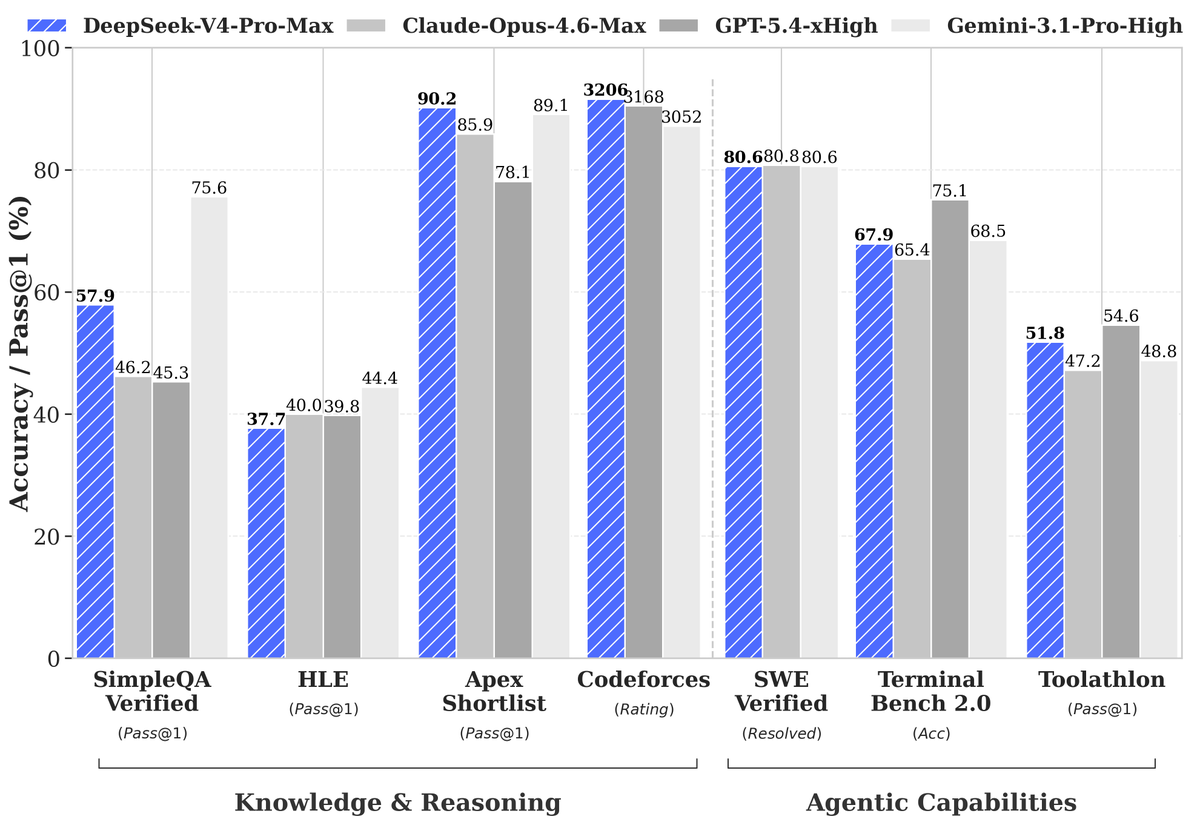
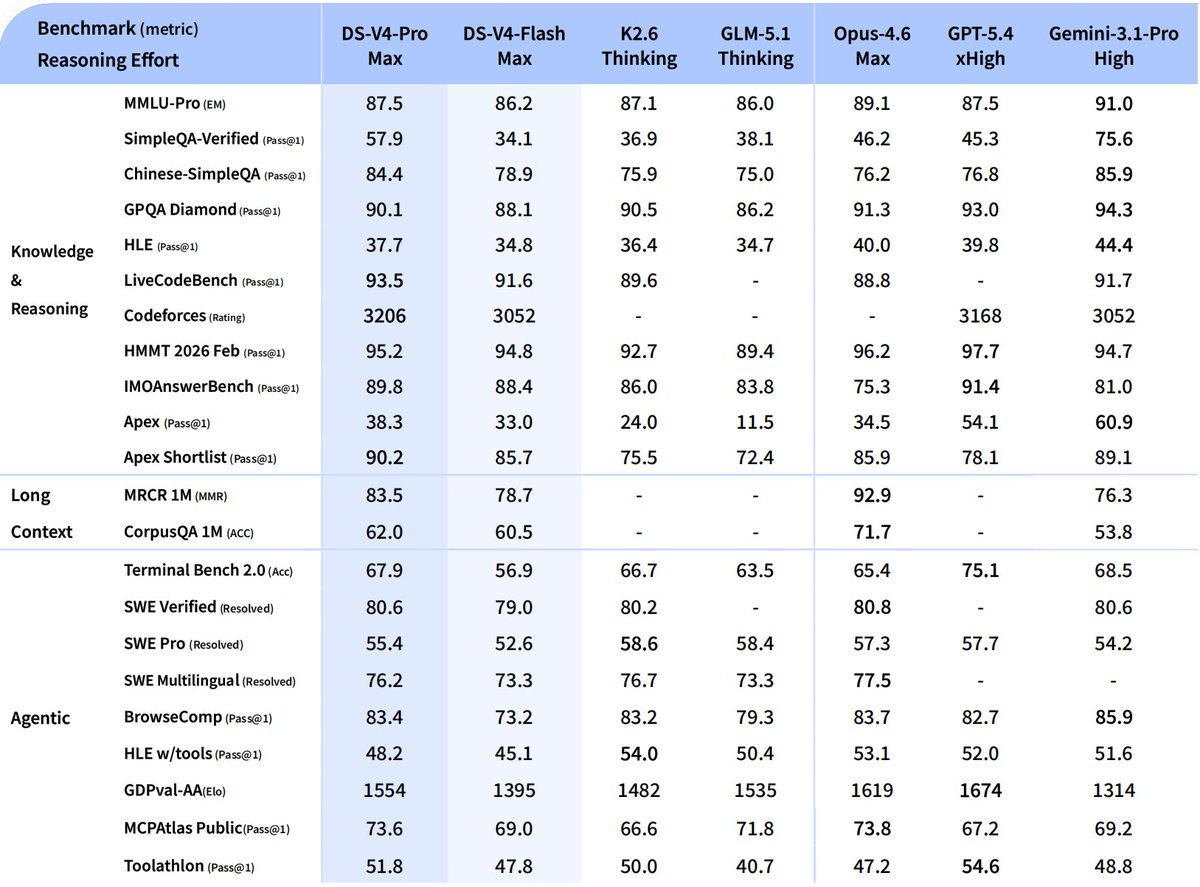
thinking_mode is the biggest cost lever. non-thinking skips the reasoning trace entirely and returns tokens at roughly V3.2 speed. thinking enables a reasoning block that costs extra tokens but improves accuracy on code and math. thinking_max produces the scores in DeepSeek’s headline table; it also burns the most tokens and is the only mode that requires a 384K+ context budget.
Python client
The official openai SDK works with a base-URL override. Every existing OpenAI-compatible wrapper, including LangChain, LlamaIndex, and DSPy, also works.
import os
from openai import OpenAI

client = OpenAI(
    api_key=os.environ["DEEPSEEK_API_KEY"],
    base_url="https://api.deepseek.com/v1",
)

response = client.chat.completions.create(
    model="deepseek-v4-pro",
    messages=[
        {"role": "system", "content": "Reply in code only."},
        {"role": "user", "content": "Write a Rust function that debounces events."},
    ],
    extra_body={"thinking_mode": "thinking"},
    temperature=1.0,
    top_p=1.0,
    max_tokens=2048,
)

choice = response.choices[0]
print("Content:", choice.message.content)
print("Reasoning tokens:", response.usage.reasoning_tokens)
print("Total tokens:", response.usage.total_tokens)
The extra_body trick is how you pass DeepSeek-specific parameters through the OpenAI SDK without patching the library.
Node client
Same structure on Node:
import OpenAI from "openai";

const client = new OpenAI({
  apiKey: process.env.DEEPSEEK_API_KEY,
  baseURL: "https://api.deepseek.com/v1",
});

const response = await client.chat.completions.create({
  model: "deepseek-v4-flash",
  messages: [
    { role: "user", content: "Explain the Muon optimizer in plain English." },
  ],
  thinking_mode: "thinking",
  temperature: 1.0,
  top_p: 1.0,
});

console.log(response.choices[0].message.content);
console.log("Usage:", response.usage);
The Node SDK accepts unknown fields silently, so thinking_mode passes through at the top level without extra_body.
Streaming responses
Set stream: true and iterate the SSE chunks. The shape matches OpenAI exactly.
stream = client.chat.completions.create(
    model="deepseek-v4-pro",
    messages=[{"role": "user", "content": "Stream a 300-word essay on MoE."}],
    stream=True,
    extra_body={"thinking_mode": "non-thinking"},
)

for chunk in stream:
    delta = chunk.choices[0].delta.content or ""
    print(delta, end="", flush=True)
Reasoning traces stream separately when thinking mode is on; the delta.reasoning_content field carries them and you can surface them in the UI or drop them.
Tool calling
V4 supports the standard OpenAI tool-call schema. Functions defined in the tools array become callable, and the model decides when to invoke them.
tools = [{
    "type": "function",
    "function": {
        "name": "get_weather",
        "description": "Return the current weather for a city.",
        "parameters": {
            "type": "object",
            "properties": {
                "city": {"type": "string"},
                "unit": {"type": "string", "enum": ["c", "f"]},
            },
            "required": ["city"],
        },
    },
}]

response = client.chat.completions.create(
    model="deepseek-v4-pro",
    messages=[{"role": "user", "content": "Weather in Lagos in Celsius?"}],
    tools=tools,
    tool_choice="auto",
    extra_body={"thinking_mode": "thinking"},
)

tool_call = response.choices[0].message.tool_calls[0]
print(tool_call.function.name, tool_call.function.arguments)
From there, call the function, append the result as a role: "tool" message, and call the API again to continue the loop. The pattern is identical to the OpenAI and Anthropic tool-use loops.
JSON mode
For structured output, ask for JSON explicitly and set the response format.
response = client.chat.completions.create(
    model="deepseek-v4-flash",
    messages=[
        {"role": "system", "content": "Reply with a single JSON object."},
        {"role": "user", "content": "Summarize this release note as {title, date, bullets}: ..."},
    ],
    response_format={"type": "json_object"},
    extra_body={"thinking_mode": "non-thinking"},
)
JSON mode forces valid JSON but does not enforce a specific schema. For schema validation, pair it with Pydantic or Zod on the client side.
Build the collection in Apidog
Replaying requests from the terminal burns credits and hides the diff between runs. The workflow that survives real use:
- Download Apidog and create a project.
- Add an environment with
{{DEEPSEEK_API_KEY}}stored as a secret variable. - Save a POST request to
{{BASE_URL}}/chat/completionswith theAuthorization: Bearer {{DEEPSEEK_API_KEY}}header. - Parameterize
modelandthinking_modeso you can A/B across variants without duplicating requests. - Use the response viewer to inspect
usage.reasoning_tokenson every run. That is the single clearest signal of whether you are paying for thinking mode you do not need.
Teams already running the matching GPT-5.5 API collection in Apidog can duplicate it, swap the base URL to https://api.deepseek.com/v1, swap the model ID, and run comparison prompts across both providers in minutes.
Error handling
The envelope follows OpenAI exactly. The ones you will hit first:
| Code | Meaning | Fix |
|---|---|---|
| 400 | Bad request | Check JSON schema, especially messages and tools. |
| 401 | Invalid key | Regenerate at platform.deepseek.com. |
| 402 | Insufficient balance | Top up the account. |
| 403 | Model not allowed | Check the key’s scope and the model ID spelling. |
| 422 | Parameter out of range | max_tokens or thinking_mode probably mismatched. |
| 429 | Rate limit | Back off, then retry with exponential jitter. |
| 500 | Server error | Retry once; if it repeats, check status page. |
| 503 | Overloaded | Fall back to V4-Flash or retry in 30 seconds. |
Wrap calls in a retry helper that handles 429 and 5xx with exponential backoff. Do not retry 4xx errors automatically; they are logic bugs, not transient failures.
Cost control patterns
Four patterns keep spend predictable.
- Default to V4-Flash. Switch to V4-Pro only for prompts where you have measured a quality lift.
- Gate
thinking_maxbehind a flag. It is the most expensive mode by a wide margin; only route to it when correctness beats latency. - Cap
max_tokens. Most answers fit in 2,000 output tokens. The 1M context is for input, not output. - Log
usageon every call. Ship input, output, and reasoning counts to your observability stack; an alert on a sudden reasoning-token spike catches prompts that drifted.
Migrating from older DeepSeek models
The older deepseek-chat and deepseek-reasoner IDs deprecate on July 24, 2026. Migration takes one line of diff per call site; the request and response shapes are unchanged.
-  model="deepseek-chat"
+  model="deepseek-v4-pro"
Before flipping production, run side-by-side A/B comparisons in Apidog. The response quality jump usually rewards the switch; the deprecation deadline forces it either way.
FAQ
Is the DeepSeek V4 API production-ready?Yes. The API went live on April 23, 2026 alongside the weights. DeepSeek V3 and V3.2 ran on the same infrastructure at scale for over a year, so the API surface is mature.
Does V4 support the Anthropic message format?Yes. Point at https://api.deepseek.com/anthropic/v1/messages and send the Anthropic-shape payload. Both formats hit the same underlying model.
What is the context window?1 million tokens on both V4-Pro and V4-Flash. Note that Think Max mode recommends a minimum 384K working window.
How do I count input tokens before sending?Use the standard OpenAI tokenizer for approximations; DeepSeek publishes exact counts in the usage block on every response. For production budgeting, trust the response-side count.
Can I fine-tune via the API?Not at launch. Fine-tuning currently runs through the self-hosted Base checkpoints on Hugging Face.
Is the API free to try?There is no free tier at the account level, but new sign-ups occasionally receive a trial credit.
DeepSeek has since released the 0813 checkpoint of V4 Pro with measurable benchmark gains over the base release; if you want a step-by-step walkthrough of calling the V4 Pro 0813 API endpoint, a dedicated guide covers the updated request format and authentication flow.


