
TL;DR
You stop babysitting AI agents by building three things: guardrails (constraints that prevent catastrophic failures), observability (logs and metrics that tell you what happened), and checkpoints (automatic pauses where humans verify decisions). Set these up once, and your agents can run autonomously for hours instead of minutes. Tools like Apidog help by letting you define API contracts that agents can’t violate, turning your API layer into a safety net.
Introduction
Last week I watched a developer spend 4 hours supervising an AI agent that was supposed to save him time. Every few minutes, he’d interrupt it, fix a mistake, and restart. By the end, he’d done more manual work than if he’d just written the code himself.
This is the babysitting problem, and it’s the #1 reason AI agents fail to deliver on their promise. The tools work. The models are capable. But most teams never get past the constant supervision phase.
Here’s what’s happening: most AI agent setups treat the LLM like a junior developer who needs hand-holding on every task. But LLMs aren’t juniors. They’re more like extremely fast, occasionally hallucinating interns who will confidently do the wrong thing if you don’t set boundaries.
Define API contracts your AI agents can follow
By the end of this guide, you’ll have:
- A mental model for thinking about agent autonomy
- Concrete patterns for guardrails, observability, and checkpoints
- Code examples you can copy into your projects today
- A checklist for evaluating whether an agent is ready to run unsupervised
Why agents need constant supervision
AI agents fail in predictable ways. Understanding these failure modes is the first step to fixing them.
Failure mode 1: Scope creep
You ask an agent to “add authentication to the API endpoint.” It adds authentication. Then it adds rate limiting. Then it refactors the database schema. Then it deletes what it thinks are “unused” files, which turn out to be important.
The agent kept going because nobody told it to stop. LLMs don’t have an innate sense of “done.” They’ll keep making changes until they hit a token limit or you interrupt them.
Failure mode 2: Wrong abstractions
An agent tasked with “improve error handling” might add try-catch blocks everywhere. Technically correct. Practically terrible. The code becomes unreadable, logging is inconsistent, and the actual error cases aren’t handled.
The agent understood the request literally but missed the intent. Without examples of good error handling, it defaulted to the most obvious (and worst) interpretation.
Failure mode 3: Cascading failures
An agent makes a small mistake in step 1. By step 10, that mistake has propagated through every subsequent decision. What started as a typo in a function name becomes a broken API, broken tests, and a confused developer trying to figure out what went wrong.
This is the most dangerous failure mode because the agent doesn’t know it failed. Each step seems reasonable in isolation. Only the final result reveals the problem.
Failure mode 4: Resource exhaustion
Left unsupervised, some agents will loop forever. They’ll retry failed API calls indefinitely, spawn new sub-agents without limit, or keep generating code until they hit your billing ceiling.
Without resource constraints, agents don’t know when to quit.
The autonomy framework: guardrails, observability, checkpoints
You solve these problems with three layers. Think of them as a pyramid: guardrails at the bottom (preventing failures), observability in the middle (detecting failures), and checkpoints at the top (recovering from failures).
Layer 1: Guardrails (prevention)
Guardrails are constraints that prevent catastrophic failures. They’re rules your agent cannot break, enforced by code, not by prompts.
Hard constraints via code:
# Don't: Trust the agent to follow instructions
agent.run("Only modify files in the src/ directory")

# Do: Enforce constraints in code
import os
from pathlib import Path

ALLOWED_DIRECTORIES = {"src", "tests", "docs"}

def validate_file_path(path: str) -> bool:
    """Agent cannot write outside allowed directories."""
    abs_path = Path(path).resolve()
    return any(
        str(abs_path).startswith(str(Path(d).resolve()))
        for d in ALLOWED_DIRECTORIES
    )

# Use in your agent's file operations
def agent_write_file(path: str, content: str):
    if not validate_file_path(path):
        raise ValueError(f"Cannot write to {path}: outside allowed directories")
    with open(path, 'w') as f:
        f.write(content)
API schema constraints:
When your agent calls APIs, use schemas to prevent malformed requests. This is where Apidog shines. Define your API contract once, and your agent can’t send the wrong data shape.
// apidog-schema.ts
export const CreateUserSchema = {
  type: 'object',
  required: ['email', 'name'],
  properties: {
    email: { type: 'string', format: 'email' },
    name: { type: 'string', minLength: 1, maxLength: 100 },
    role: { type: 'string', enum: ['user', 'admin', 'guest'] }
  },
  additionalProperties: false
}

// Agent must validate before calling API
function validateRequest(schema: object, data: unknown): void {
  const valid = ajv.validate(schema, data)
  if (!valid) {
    throw new Error(`Invalid request: ${JSON.stringify(ajv.errors)}`)
  }
}
Budget constraints:
import time
from dataclasses import dataclass

@dataclass
class AgentBudget:
    max_steps: int = 50
    max_tokens: int = 100000
    max_time_seconds: int = 600  # 10 minutes
    max_api_calls: int = 100

class BudgetEnforcer:
    def __init__(self, budget: AgentBudget):
        self.budget = budget
        self.start_time = time.time()
        self.steps = 0
        self.tokens_used = 0
        self.api_calls = 0

    def check(self) -> bool:
        """Returns False if budget exceeded."""
        elapsed = time.time() - self.start_time

        if self.steps >= self.budget.max_steps:
            raise RuntimeError(f"Step limit reached: {self.steps}")
        if self.tokens_used >= self.budget.max_tokens:
            raise RuntimeError(f"Token limit reached: {self.tokens_used}")
        if elapsed >= self.budget.max_time_seconds:
            raise RuntimeError(f"Time limit reached: {elapsed:.0f}s")
        if self.api_calls >= self.budget.max_api_calls:
            raise RuntimeError(f"API call limit reached: {self.api_calls}")

        return True

    def record_step(self, tokens: int, api_calls: int = 0):
        self.steps += 1
        self.tokens_used += tokens
        self.api_calls += api_calls
        self.check()
Layer 2: Observability (detection)
When agents run for hours, you need to know what they’re doing without watching every step. Observability gives you a timeline of decisions.
Structured logging:
import json
from datetime import datetime
from typing import Any

class AgentLogger:
    def __init__(self, log_file: str = "agent_trace.jsonl"):
        self.log_file = log_file
        self.entries = []

    def log(self, event: str, data: dict[str, Any] | None = None):
        entry = {
            "timestamp": datetime.utcnow().isoformat(),
            "event": event,
            "data": data or {}
        }
        self.entries.append(entry)

        # Append to file immediately (don't lose logs on crash)
        with open(self.log_file, 'a') as f:
            f.write(json.dumps(entry) + '\n')

    def log_decision(self, decision: str, reasoning: str, confidence: float):
        """Log when agent makes a significant decision."""
        self.log("decision", {
            "decision": decision,
            "reasoning": reasoning,
            "confidence": confidence
        })

    def log_action(self, action: str, params: dict, result: str):
        """Log agent actions and their outcomes."""
        self.log("action", {
            "action": action,
            "params": params,
            "result": result[:200]  # Truncate long results
        })

    def log_error(self, error: str, context: dict):
        """Log errors with full context."""
        self.log("error", {
            "error": error,
            "context": context
        })

# Usage in agent
logger = AgentLogger()
logger.log_decision(
    decision="Add rate limiting to API",
    reasoning="Current endpoint has no protection against abuse",
    confidence=0.85
)
logger.log_action(
    action="write_file",
    params={"path": "src/middleware/rate-limit.ts"},
    result="Successfully wrote 45 lines"
)
Metrics dashboard:
For longer-running agents, you want aggregate metrics, not just individual logs.
from collections import Counter
from dataclasses import dataclass, field

@dataclass
class AgentMetrics:
    actions_taken: Counter = field(default_factory=Counter)
    files_modified: list[str] = field(default_factory=list)
    api_calls: dict[str, int] = field(default_factory=dict)
    errors: list[str] = field(default_factory=list)
    decisions_by_confidence: dict[str, int] = field(default_factory=lambda: {
        "high (>0.9)": 0,
        "medium (0.7-0.9)": 0,
        "low (<0.7)": 0
    })

    def record_action(self, action: str):
        self.actions_taken[action] += 1

    def record_file_modification(self, path: str):
        if path not in self.files_modified:
            self.files_modified.append(path)

    def record_api_call(self, endpoint: str):
        self.api_calls[endpoint] = self.api_calls.get(endpoint, 0) + 1

    def record_error(self, error: str):
        self.errors.append(error)

    def record_decision(self, confidence: float):
        if confidence > 0.9:
            self.decisions_by_confidence["high (>0.9)"] += 1
        elif confidence >= 0.7:
            self.decisions_by_confidence["medium (0.7-0.9)"] += 1
        else:
            self.decisions_by_confidence["low (<0.7)"] += 1

    def summary(self) -> str:
        return f"""
Agent Metrics Summary
=====================
Actions: {dict(self.actions_taken)}
Files modified: {len(self.files_modified)}
API calls: {self.api_calls}
Errors: {len(self.errors)}
Decisions by confidence: {self.decisions_by_confidence}
"""
Layer 3: Checkpoints (recovery)
Checkpoints are automatic pauses where the agent waits for human verification. They let you catch problems early without constant supervision.
Automatic checkpoints:
from enum import Enum
from typing import Callable

class CheckpointTrigger(Enum):
    BEFORE_FILE_WRITE = "before_file_write"
    BEFORE_API_CALL = "before_api_call"
    BEFORE_GIT_COMMIT = "before_git_commit"
    BEFORE_DELETE = "before_delete"
    AFTER_N_STEPS = "after_n_steps"

@dataclass
class Checkpoint:
    trigger: CheckpointTrigger
    description: str
    data: dict
    requires_approval: bool = True

class CheckpointManager:
    def __init__(self, auto_approve: set[CheckpointTrigger] | None = None):
        self.auto_approve = auto_approve or set()
        self.pending: list[Checkpoint] = []

    def create_checkpoint(
        self,
        trigger: CheckpointTrigger,
        description: str,
        data: dict
    ) -> bool:
        """Returns True if approved, False if rejected."""

        # Auto-approve certain triggers
        if trigger in self.auto_approve:
            return True

        checkpoint = Checkpoint(
            trigger=trigger,
            description=description,
            data=data
        )
        self.pending.append(checkpoint)

        # In a real system, this would notify the human and wait
        # For now, we return False to pause execution
        return False

    def approve(self, checkpoint_id: int) -> None:
        """Human approves a pending checkpoint."""
        if 0 <= checkpoint_id < len(self.pending):
            self.pending.pop(checkpoint_id)

    def reject(self, checkpoint_id: int) -> None:
        """Human rejects a pending checkpoint."""
        raise RuntimeError(f"Checkpoint rejected: {self.pending[checkpoint_id]}")

# Usage in agent
checkpoints = CheckpointManager(
    auto_approve={CheckpointTrigger.BEFORE_FILE_WRITE}  # Trust file writes
)

# Before destructive action
if not checkpoints.create_checkpoint(
    trigger=CheckpointTrigger.BEFORE_DELETE,
    description="About to delete src/legacy/ directory",
    data={"path": "src/legacy/", "files": ["old_handler.ts", "deprecated.ts"]}
):
    # Wait for human approval
    agent.pause("Waiting for approval to delete files")
Building autonomous agents with Apidog
When your AI agent interacts with APIs, the biggest risk is malformed requests that cause downstream failures. Apidog helps by letting you define exact API schemas that your agent must follow.
Setting up API contracts:
- Import or define your OpenAPI spec in Apidog
- Generate client code with built-in validation
- Give your agent the validated client instead of raw HTTP
// Instead of letting agent call APIs directly
const response = await fetch('/api/users', {
  method: 'POST',
  body: JSON.stringify(data)  // No validation
})

// Give agent a validated client
import { UsersApi } from './generated/apidog-client'

const usersApi = new UsersApi()
// Agent can only send valid requests - schema enforced
const response = await usersApi.createUser({
  email: 'user@example.com',
  name: 'Test User',
  role: 'user'  // Must be valid enum value
})
This turns your API layer into a guardrail. The agent literally cannot send invalid data because the client rejects it before the request goes out.
Generate validated API clients for your AI agents
Proven patterns and common mistakes
Pattern 1: The approval sandwich
For risky operations, require approval before AND after.
def risky_operation(agent, operation):
    # Pre-approval
    if not agent.checkpoint(f"About to: {operation.description}"):
        return "Cancelled by user"

    # Do the operation
    result = operation.execute()

    # Post-approval (verify the result)
    if not agent.checkpoint(f"Verify result of: {operation.description}"):
        operation.rollback()
        return "Rolled back by user"

    return result
Pattern 2: Confidence thresholds
Don’t let agents act on low-confidence decisions.
MIN_CONFIDENCE = 0.75

def agent_decide(options: list[dict]) -> dict:
    best = max(options, key=lambda x: x.get('confidence', 0))

    if best['confidence'] < MIN_CONFIDENCE:
        # Escalate to human
        return {
            'action': 'escalate',
            'reason': f"Best option has confidence {best['confidence']:.2f} < {MIN_CONFIDENCE}",
            'options': options
        }

    return best
Pattern 3: Idempotent operations
Design your agent’s actions to be repeatable without side effects.
import hashlib

def idempotent_write(path: str, content: str) -> bool:
    """Only write if content changed."""
    content_hash = hashlib.sha256(content.encode()).hexdigest()

    existing_hash = None
    if os.path.exists(path):
        with open(path, 'r') as f:
            existing_hash = hashlib.sha256(f.read().encode()).hexdigest()

    if content_hash == existing_hash:
        logger.log_action("write_file", {"path": path}, "Skipped - no changes")
        return False

    with open(path, 'w') as f:
        f.write(content)
    logger.log_action("write_file", {"path": path}, f"Wrote {len(content)} bytes")
    return True
Common mistakes to avoid
Trusting prompts as constraints. “Don’t delete files” in a prompt is not a constraint. File permissions are constraints.
No rollback plan. When an agent makes a mistake, you need to undo it. If you’re not using git or backups, you’re trusting the agent with unrecoverable actions.
**Ignoring confidence scores. Most LLMs output confidence or can be prompted for it. Low confidence = pause and ask human.
**Over-monitoring. If you’re watching every step, you haven’t built an autonomous system. You’ve built a slow manual system.
Under-specifying success. The agent needs to know when it’s done. “Fix the bug” has no end condition. “Fix the bug AND all tests pass” does.
Alternatives and comparisons
| Approach | Autonomy | Risk | Best for |
|---|---|---|---|
| Manual coding | None | Low | Complex, critical work |
| Pair programming with AI | Low | Low | Learning, exploration |
| Supervised agents | Medium | Medium | Routine tasks |
| Autonomous agents with guardrails | High | Controlled | Bulk operations, migrations |
| Fully autonomous agents | Very high | High | Trusted, well-tested workflows |
Most teams should aim for “autonomous with guardrails.” It’s the sweet spot where you get 80% of the time savings with 10% of the risk.
Real-world use cases
Codebase migration. A team used an autonomous agent to migrate 200 API endpoints from REST to GraphQL. Guardrails prevented schema changes. Checkpoints required approval before deleting old endpoints. The migration took 3 days instead of 3 weeks, with zero production incidents.
Documentation generation. An agent automatically generates API docs from code. Guardrails ensure it only reads from specific directories. Checkpoints pause before publishing. The team reviews once a week instead of writing docs manually.
Test coverage. An agent analyzes code and writes missing tests. Budget constraints prevent runaway test generation. Confidence thresholds flag uncertain tests for human review. Coverage improved from 60% to 85% in one month.
Give agents a manager, not a babysitter
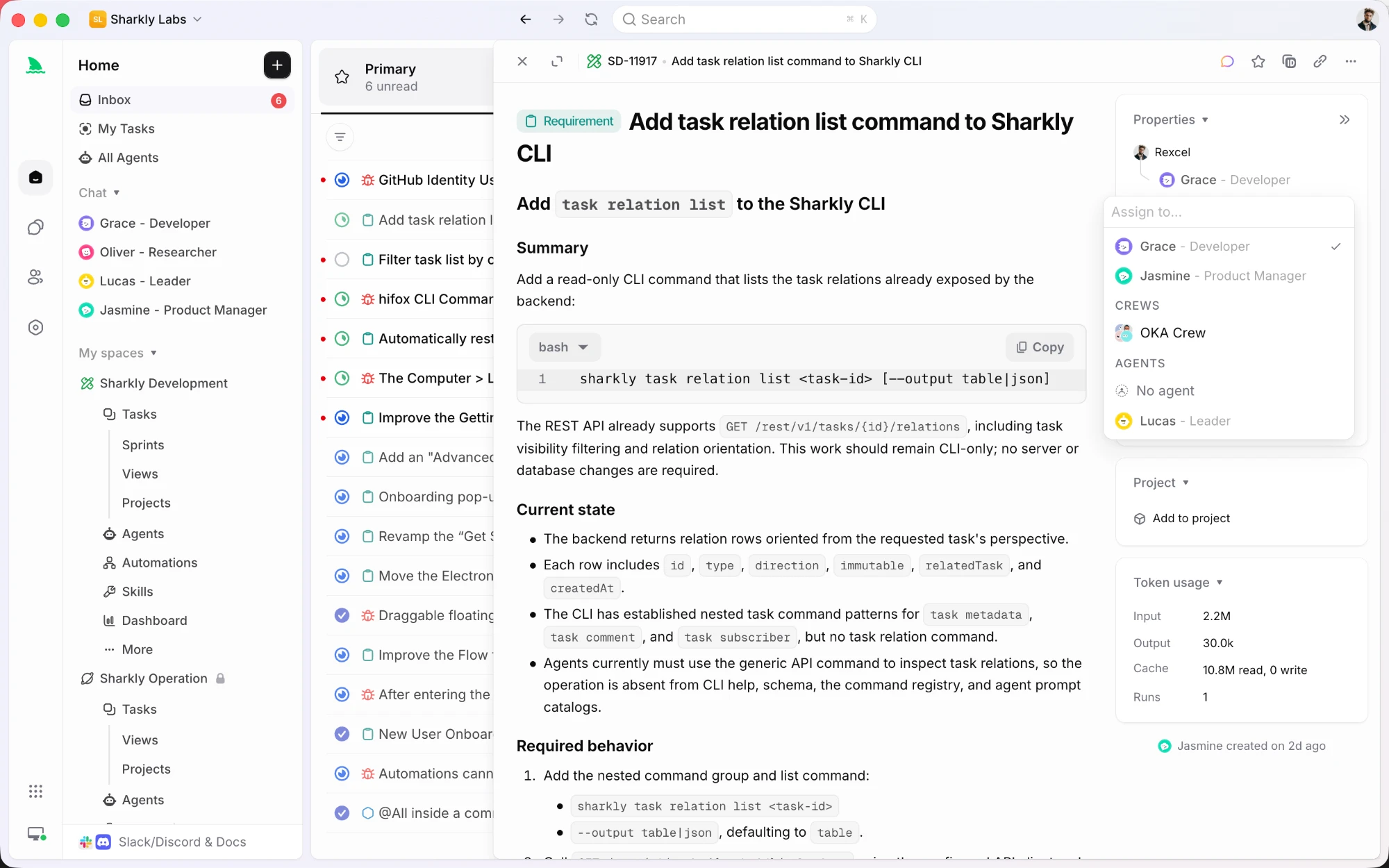
Guardrails, observability, and checkpoints are easier to hold when they live outside the terminal session. That is the gap Sharkly fills. It is a work management system for people and agents, where the task rather than the prompt is the shared record.
You assign a task to an agent the way you would assign it to a teammate. An Agent there is a saved configuration (instructions, runtime, skills, repositories, environment), so a working practice you tuned once gets reused instead of retyped. Execution runs on Computers you connect, which can be your laptop, a server, or a container, and the Runtime is the agent tool already installed on that machine.
The checkpoint story is the part that matters for this article. A task sitting in Backlog does not start a run, so work can be prepared before anything executes. Once it moves to an executable status, progress, tool calls, and the result stream back to the task, and the agent's output is stored as comments you reply to. Reviewing three finished tasks in an inbox beats watching three terminals.
Wrapping up
Here’s what you’ve learned:
- AI agents fail in predictable ways: scope creep, wrong abstractions, cascading failures, resource exhaustion
- Three layers solve most problems: guardrails (prevention), observability (detection), checkpoints (recovery)
- Guardrails are code, not prompts. Enforce constraints programmatically.
- Observability means structured logs and metrics, not watching every step
- Checkpoints let humans verify decisions without constant supervision
- API schemas from Apidog turn your API layer into a guardrail
Your next steps:
- Identify your most repetitive AI-assisted task
- Define guardrails: what must the agent never do?
- Add structured logging to see what’s happening
- Create checkpoints for high-risk operations
- Let it run for 30 minutes and check the logs
The goal isn’t to remove humans from the loop. It’s to put humans at the right place in the loop: making high-level decisions instead of correcting low-level mistakes.
Build API guardrails for your AI agents - free
FAQ
What’s the difference between an AI agent and an AI assistant?An assistant responds to your requests and waits for your next instruction. An agent takes a goal and autonomously plans and executes steps to achieve it. Assistants need you in every loop. Agents run until they hit a checkpoint or finish.
How do I know if my agent is ready to run autonomously?Run it in supervised mode for 10 sessions. Track every time you had to intervene. If interventions drop below 2 per session and all were minor (clarifications, not corrections), it’s ready. If interventions are frequent or require undoing work, add more guardrails.
What’s the biggest risk with autonomous agents?Cascading failures that the agent doesn’t recognize. A small mistake early becomes a large problem later, and the agent keeps going because each step seems reasonable in isolation. Checkpoints break these cascades by forcing verification.
Can I use these patterns with any LLM?Yes. The patterns (guardrails, observability, checkpoints) are model-agnostic. They work with Claude, GPT-4, Gemini, or any other model. The specific implementation details might vary, but the concepts transfer.
How much does observability slow down the agent?Negligible. Writing to a log file takes microseconds. The slowdown comes from checkpoints that wait for human input. For truly autonomous runs, you checkpoint only at high-risk moments, not every step.
What if the agent makes a decision I disagree with?That’s what checkpoints are for. When you see a decision you disagree with, reject the checkpoint. The agent rolls back or tries a different approach. Better: include your preferences in the agent’s instructions so it learns your style over time.
Should I start with supervised or autonomous agents?Always start supervised. Run the agent with checkpoints on every significant action until you trust it. Gradually remove checkpoints for low-risk actions. This builds confidence incrementally instead of risking a catastrophic failure on your first autonomous run.
How does Apidog specifically help with AI agents?Apidog generates validated API clients from your schemas. When an agent uses these clients, malformed requests are rejected before they reach your backend. This prevents a whole class of failures where the agent sends the wrong data shape or invalid values.