
DeepSeek V4 dropped on April 23, 2026 with MIT-licensed weights on Hugging Face. That single license choice changes the math for any team that wants frontier AI on their own hardware. V4-Flash (284B total, 13B active) fits on a pair of H100s at FP8. V4-Pro (1.6T total, 49B active) needs a cluster but runs competitively with GPT-5.5 and Claude Opus 4.6 on code and reasoning.
This guide is the local-deployment walkthrough. It covers hardware requirements, quantization options, vLLM and SGLang setups, tool-use configuration, and a test workflow in Apidog that validates the local server before you point production traffic at it.
For the product overview, see what is DeepSeek V4. For the hosted API path, see how to use the DeepSeek V4 API. For cost comparison, see DeepSeek V4 API pricing.
TL;DR
- V4-Flash runs on 2 × H100 80GB at FP8, or 1 × H100 at INT4. Weights are ~500GB at FP8.
- V4-Pro needs 16+ H100s at FP8 for production throughput; not a laptop model.
- vLLM is the fastest path to an OpenAI-compatible server.
vllm>=0.9.0adds V4 support. - SGLang is the alternative for teams who want better tool-use and structured-output features.
- Quantization to AWQ INT4 or GPTQ INT4 fits V4-Flash on a single 80GB card with ~5% quality loss.
- Use Apidog to point at
http://localhost:8000/v1and reuse the exact collection you use against the hosted API.
Who should self-host
Self-hosting V4 is the right call for three kinds of teams.
- Compliance-bound. Health, finance, legal, or defense work where data cannot leave the network. Open-weights MIT licensing means no usage agreement, no cross-border data flows.
- Large stable workloads. At cache-miss rates, V4-Pro API costs $1.74 / M input and $3.48 / M output. For workloads over roughly 200 billion tokens per month, dedicated hardware starts to beat pay-per-token economics.
- Fine-tuning and research. The Base checkpoints exist specifically for continued pre-training and domain adaptation. The MIT license covers commercial redistribution of the resulting model.
Who should not self-host: prototypers, teams without GPU operations experience, and anyone whose workload fits inside $200/month of hosted API usage. The operational overhead eats the cost savings fast at small scale.
Hardware requirements
DeepSeek V4 uses FP4 + FP8 mixed precision natively. That means the memory math is friendlier than a naive parameter-count calculation suggests.
| Variant | Total params | Active params | FP8 VRAM | INT4 VRAM | Minimum cards |
|---|---|---|---|---|---|
| V4-Flash | 284B | 13B | ~500GB | ~140GB | 2 × H100 80GB (FP8) or 1 × H100 (INT4) |
| V4-Pro | 1.6T | 49B | ~2.4TB | ~700GB | 16 × H100 80GB (FP8) or 8 × H100 (INT4) |
A few clarifications:
- MoE memory is total, not active. You need enough VRAM for all experts, even though only a subset fires per token. The 13B “active” figure only reflects compute cost per token, not memory.
- H200 and MI300X swap in cleanly. 141GB or 192GB per card means fewer cards for the same model.
- Consumer GPUs are not a fit. Even V4-Flash at INT4 does not run on a 24GB RTX 5090.
- Apple Silicon: M3 Max and M4 Max with 128GB unified memory can run V4-Flash at heavy quantization, slowly. It is a dev-box toy, not a deployment target.
Step 1: Download the weights
The official repos:
deepseek-ai/DeepSeek-V4-Flashdeepseek-ai/DeepSeek-V4-Prodeepseek-ai/DeepSeek-V4-Flash-BaseandDeepSeek-V4-Pro-Basefor fine-tuning.
Install the CLI and pull:
pip install -U "huggingface_hub[cli]"
huggingface-cli login

huggingface-cli download deepseek-ai/DeepSeek-V4-Flash \
  --local-dir ./models/deepseek-v4-flash \
  --local-dir-use-symlinks False
Reserve ~500GB of disk for V4-Flash and several terabytes for V4-Pro. ModelScope (modelscope.cn) mirrors the same checkpoints and is usually faster for users in China.
Step 2: Pick a serving engine
Two engines matter: vLLM and SGLang.
- vLLM. Best throughput, cleanest OpenAI-compatible surface, largest community. Default choice.
- SGLang. Better tool-use primitives, structured output, and some gains on long context. Pick this if your workload leans heavily on function calling.
Both support V4 out of the box as of the versions released this week.
Step 3: Serve V4-Flash with vLLM
pip install "vllm>=0.9.0"

vllm serve deepseek-ai/DeepSeek-V4-Flash \
  --tensor-parallel-size 2 \
  --max-model-len 1048576 \
  --dtype auto \
  --enable-prefix-caching \
  --port 8000
Flags worth knowing:
--tensor-parallel-size 2splits the model across 2 H100s. Raise it for more cards.--max-model-len 1048576enables the full 1M-token context window. Drop to 131072 if you do not need it; shorter context frees VRAM.--enable-prefix-cachingmirrors the cache-hit pricing of the hosted API locally. Same effect: repeated prefixes run much faster.--dtype autorespects the FP8 mixed precision of V4.
Once the server is up, any OpenAI-compatible client works against http://localhost:8000/v1.
Step 4: Serve V4-Pro with vLLM
V4-Pro needs a cluster. The command shape does not change, just the parallelism.
vllm serve deepseek-ai/DeepSeek-V4-Pro \
  --tensor-parallel-size 8 \
  --pipeline-parallel-size 2 \
  --max-model-len 524288 \
  --enable-prefix-caching \
  --port 8000
Context is dropped to 512K here to fit comfortably on a 16-H100 box; push it back to 1M if VRAM allows. Pipeline parallelism plus tensor parallelism is the common shape for cross-node deployment.
Step 5: Serve with SGLang (the tool-use alternative)
pip install "sglang[all]>=0.4.0"

python -m sglang.launch_server \
  --model-path deepseek-ai/DeepSeek-V4-Flash \
  --tp 2 \
  --context-length 1048576 \
  --port 30000
SGLang exposes the same OpenAI-compatible surface at http://localhost:30000/v1. Its lang DSL gives cleaner function-calling and JSON-mode primitives than vLLM’s JSON-schema guidance.
Step 6: Quantize for a single-GPU box
INT4 quantization runs V4-Flash on a single 80GB card with a measurable but small quality drop. Two paths.
AWQ (recommended)
pip install autoawq

python -c "
from awq import AutoAWQForCausalLM
from transformers import AutoTokenizer

model_path = './models/deepseek-v4-flash'
out_path = './models/deepseek-v4-flash-awq'
model = AutoAWQForCausalLM.from_pretrained(model_path)
tokenizer = AutoTokenizer.from_pretrained(model_path)
model.quantize(tokenizer, quant_config={'w_bit': 4, 'q_group_size': 128})
model.save_quantized(out_path)
tokenizer.save_pretrained(out_path)
"
GPTQ
pip install auto-gptq
# Follow the GPTQ quantization recipe; similar pattern to AWQ.
Serve the quantized checkpoint with vLLM by passing --quantization awq or --quantization gptq at launch.
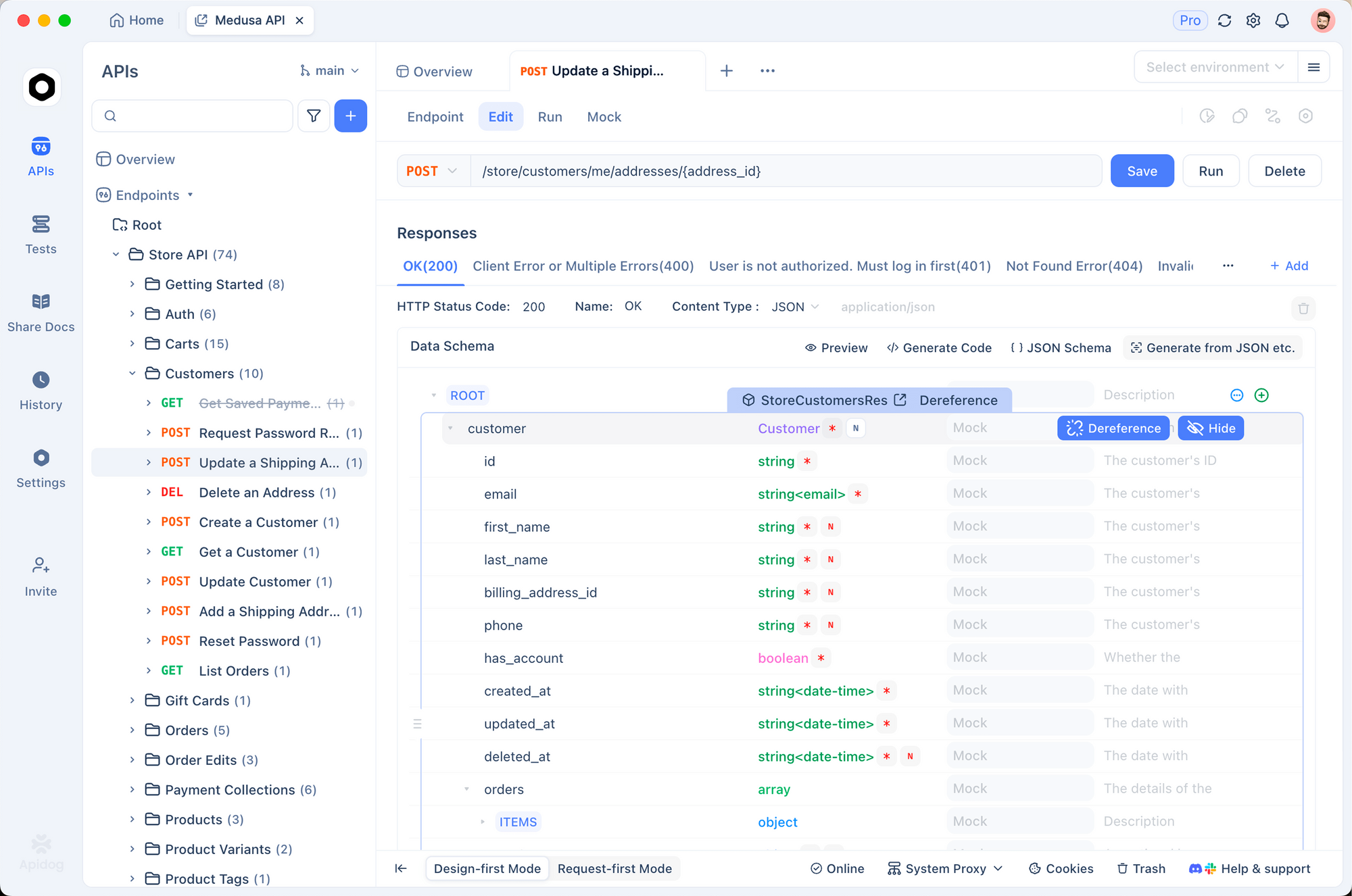
Step 7: Test with Apidog
Do not send production traffic at a fresh local server. Validate it first.
- Download Apidog.
- Create a collection pointed at
http://localhost:8000/v1/chat/completions. - Paste the same test prompt you use against the hosted API. Compare responses side by side.
- Hit the endpoint with a 500K-token context test to confirm the KV cache holds up.
- Run a tool-calling flow end to end before you connect an agent loop.
The exact collection you use against the hosted DeepSeek V4 API works against a local server with one base-URL change; that is the payoff of OpenAI-compatible endpoints.
Observability and monitoring
Four metrics to track from day one:
- Tokens per second. Both prompt and generation. vLLM exposes these on
/metricsin Prometheus format. - GPU utilization.
nvidia-smior DCGM. Sustained <70% usually means your batch size is wrong. - KV cache hit rate. With
--enable-prefix-caching, vLLM reports this; a falling hit rate signals prompt churn that is costing throughput. - Request latency p50/p95/p99. Use standard tracing; a climbing p99 with stable p50 means one request shape is stalling the queue.
Ship all four to Grafana or whatever observability stack you already run.
Fine-tuning V4 Base checkpoints
The Base checkpoints exist for continued pre-training and SFT. The standard pipeline:
pip install "torch>=2.6" transformers accelerate peft trl

# Standard SFT with LoRA on V4-Flash-Base
python -m trl sft \
  --model_name_or_path deepseek-ai/DeepSeek-V4-Flash-Base \
  --dataset_name your-org/your-sft-set \
  --output_dir ./models/v4-flash-custom \
  --per_device_train_batch_size 1 \
  --gradient_accumulation_steps 16 \
  --learning_rate 2e-5 \
  --bf16 true \
  --use_peft true \
  --lora_r 64 \
  --lora_alpha 128
Full-parameter fine-tuning on V4-Pro is a serious research task. LoRA adapters on V4-Flash-Base are the realistic ceiling for most teams; plenty of quality gain, a fraction of the compute.
Common pitfalls
- OOM on start. Usually either
--max-model-lenis set higher than VRAM allows or--tensor-parallel-sizeis set too low. Halve the context or double the parallelism. - Slow first request. vLLM compiles kernels lazily. The first call per shape is always slow; warm up with a dummy request.
- Tool-use parsing errors. The DeepSeek encoding scheme differs slightly from OpenAI’s. Pin your SDK to a version that explicitly supports V4.
- FP8 errors on older cards. A100s do not support FP8 natively. Use BF16 on anything pre-Hopper; expect roughly 2x VRAM.
When self-hosting pays off
Rough break-even math, based on the hosted DeepSeek V4 pricing:
- V4-Flash at 200B input tokens/month + 20B output tokens/month: ~$33.6K on the hosted API. An 8 × H100 box rents for ~$20K/month. Self-hosting wins by ~40%.
- V4-Pro at 500B input + 50B output per month: ~$1.04M on the hosted API. A 16 × H100 cluster rents for ~$35K/month. Self-hosting wins by over 95%.
The break-even point for V4-Flash sits at roughly 100B tokens/month at production mixes. Below that, the hosted API is cheaper and the operational overhead is not worth it.
Once you have a local DeepSeek setup working, you have options beyond the stock weights — running the uncensored DeepSeek R1 variant follows a similar process on the same hardware.
FAQ
Can I run V4-Flash on a single A100?At heavy quantization and shorter context, yes, but slowly. INT4 on an 80GB A100 runs 5 to 15 tok/s. H100 is where the architecture actually wants to run.
Does V4 support LoRA fine-tuning?Yes. Use the Base checkpoints and the standard TRL or Axolotl pipelines. The MoE routing does not change the LoRA math.
Is the local server OpenAI-compatible?Yes. vLLM and SGLang both expose /v1/chat/completions and /v1/completions with the OpenAI request shape. The hosted API guide works unchanged against localhost.
How do I enable thinking mode locally?Pass thinking_mode: "thinking" or "thinking_max" in the request body. vLLM and SGLang forward the flag to the model.
Can I stream from a local V4 server?Yes. Set stream: true exactly as you would against OpenAI or the hosted DeepSeek API.
What is the cheapest way to experiment before buying hardware?Rent a single H100 on RunPod or Lambda for a few hours, run V4-Flash at INT4, and measure throughput against your actual prompts. A $10 to $30 test answers the hardware question faster than a week of planning.


