Front-end developers often face a common challenge: the API is designed but not yet implemented. To create a functional user interface, developers need to generate fake data, which typically involves setting up a mock server and crafting response examples. In cases where the API documentation lacks clear examples, developers find themselves inventing response data, leading to frustration and inefficiency.
Every time I encounter this situation, I can’t help but think that this isn't how front-end development should work. There has to be a better way!
The Challenge of Manual Mocking
I've tried various tools in the past. For instance, while Postman offers mock server capabilities, it requires manual input for all response data. Tools like Faker.js seemed promising, but I ended up writing mocking code for every single field.
What I really wanted was a mocking server that could generate data automatically. This way, developers can focus on what truly matters in their projects.
Great News: Mock an API in Just One Minute!
The good news is that you can now mock an API in under a minute—without writing a single line of code!
Why Use Mocking?
Mocking is particularly useful in several scenarios:
- API Designed but Not Developed: This is common in agile teams, where the front end needs to progress without waiting for the back end to be ready.
- Restricted or Paid APIs: For instance, banking APIs may not allow access to real data before the development is complete, necessitating the use of mock data.
- Offline Development: Mock data enables you to work effectively in an offline environment or intranet.
Let’s Get Started with Mocking
Mocking your API with Apidog involves just two simple steps:
- Import API Definitions
- Get the Mock URL
Step 1: Import API Definitions
API documentation is essential for this process. OpenAPI (Swagger) is the preferred format, but other formats are also supported. Here’s how to import your API definitions into Apidog:
1. Create a New Project: Start by creating a new project in Apidog.

2. Import Your API File: Go to Settings > Import Data, choose the import file type, and drag your file into the designated area. Apidog supports over ten formats of API documentation. Click "Continue" to complete the import.

Now, you’ll see your APIs listed in Apidog!

Step 2: Get the Mock URL
- Click on one of your endpoints in Apidog. You’ll be directed to the corresponding endpoint documentation, where you’ll find a tag labeled Mock.
- Click on "Mock" to get a list of URLs of the Mocking APIs, and copy the link.
- Paste the URL into your browser to test its functioning.

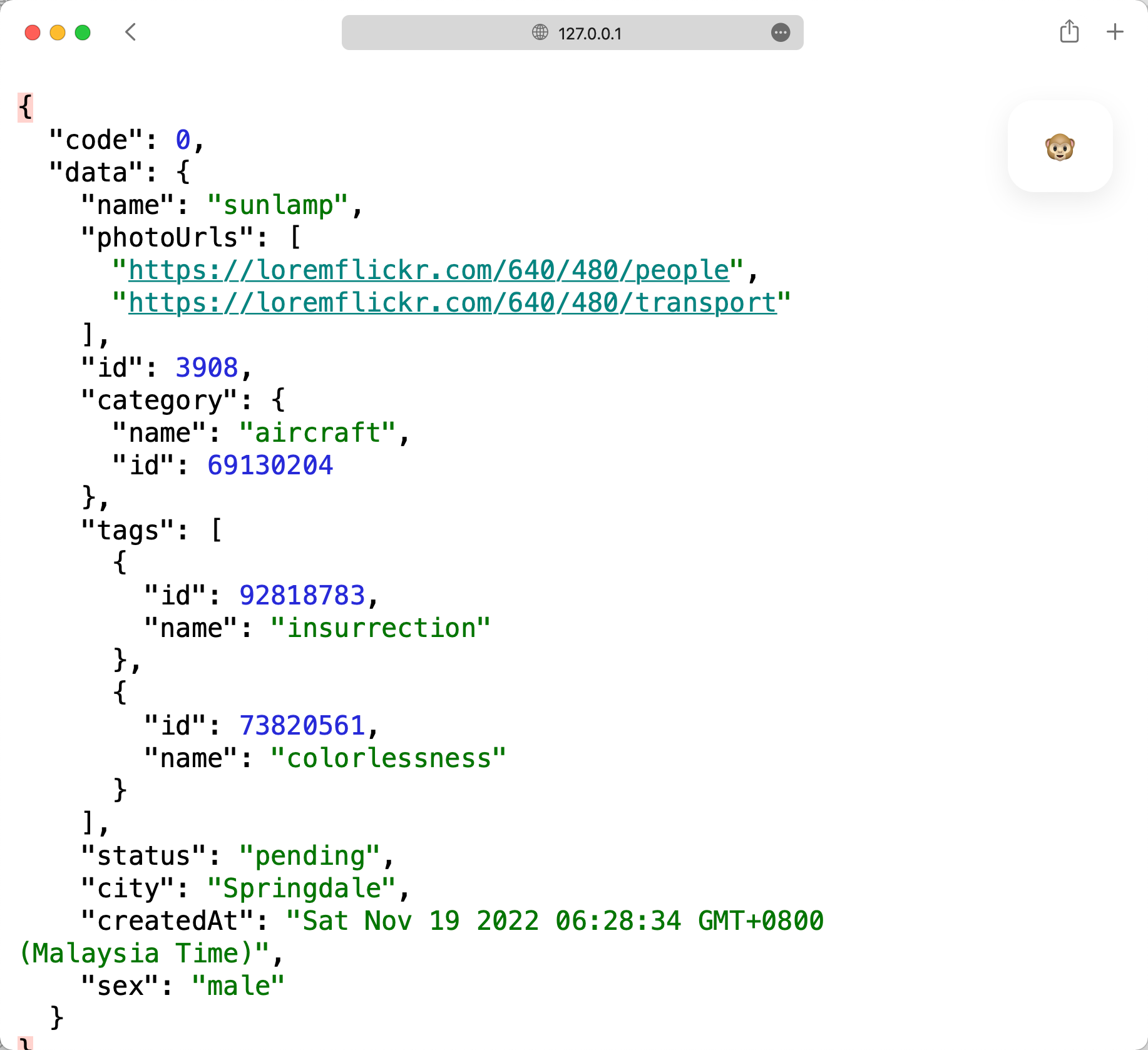
And just like that, you’ll see a mocking JSON response!
- The "city" field will display a city name
- The "id" field will show an integer.
- The "createdAt" field will present a date-time
Now, you can use this mock API data in your application without any scripting. Plus, if you refresh your browser, the data will automatically update!
How Apidog's API Mocking Work?
The first time I discovered this feature, I was amazed that Apidog could generate mock data without any setup on my part! I later learned that Apidog includes a set of built-in mocking rules. If your field names in the response definition align with these rules, Apidog will automatically generate the appropriate data.
Additionally, Apidog automatically starts a mock server on your local machine, eliminating the need for any server configuration.

Customizing Your Mock Data
What if the automatically generated mock data isn’t to your liking? No problem! You can easily customize the mock values using Faker.js syntax.
- Apidog supports all Faker.js grammar, allowing you to select values effortlessly.
- If any field requires a fixed value, you can directly specify that in the mock configuration.



Conclusion
Mocking APIs shouldn’t be a cumbersome task, and with Apidog, it isn’t! This tool not only simplifies the mocking process but also enhances overall API development. I hope you enjoy using Apidog for your mocking needs. It's truly a valuable asset for any developer looking to streamline their workflow and focus on creating amazing applications!