

Claude Fable 5 is more capable than the models before it, but that capability cuts both ways. Point it at a routine task at high effort and it will gather context, deliberate, and tidy up code you never asked it to touch; burning tokens and minutes you didn’t need to spend. Write the prompt well and the same model finishes faster, returns less filler, and runs longer on the hard problems where you actually want it working. The prompt is the lever that decides how far each request goes.
This guide turns Anthropic’s official Fable 5 prompting guidance into a practical playbook, then shows how to test and tune those prompts with Apidog so you’re measuring the effect instead of guessing. “Extending your usage” isn’t a trick to dodge limits; it’s getting more useful work out of every call by matching effort, scope, and verbosity to the job.
What “extending your usage” actually means
Three controls decide how much a Fable 5 request costs you and how much you get back:
- Effort. This is the primary trade-off between intelligence, latency, and cost. Anthropic recommends
highas the default,xhighfor the hardest workloads, andmediumorlowfor routine work. Lower effort on Fable 5 still performs well, and often beatsxhighon older models. Dropping effort on simple tasks is the single biggest way to stretch your budget. - Output tokens. Un-steered, Fable 5 elaborates; it surveys options it won’t pursue, explains root causes at length, and writes comments narrating the next line. A short brevity instruction cuts that down without losing substance.
- Run length. On hard tasks, Fable 5 sustains long, goal-directed runs; sometimes minutes per request, sometimes hours autonomously. That’s where you want the capability spent, so the prompt’s job is to stop it overspending on easy work and let it run on the hard parts.
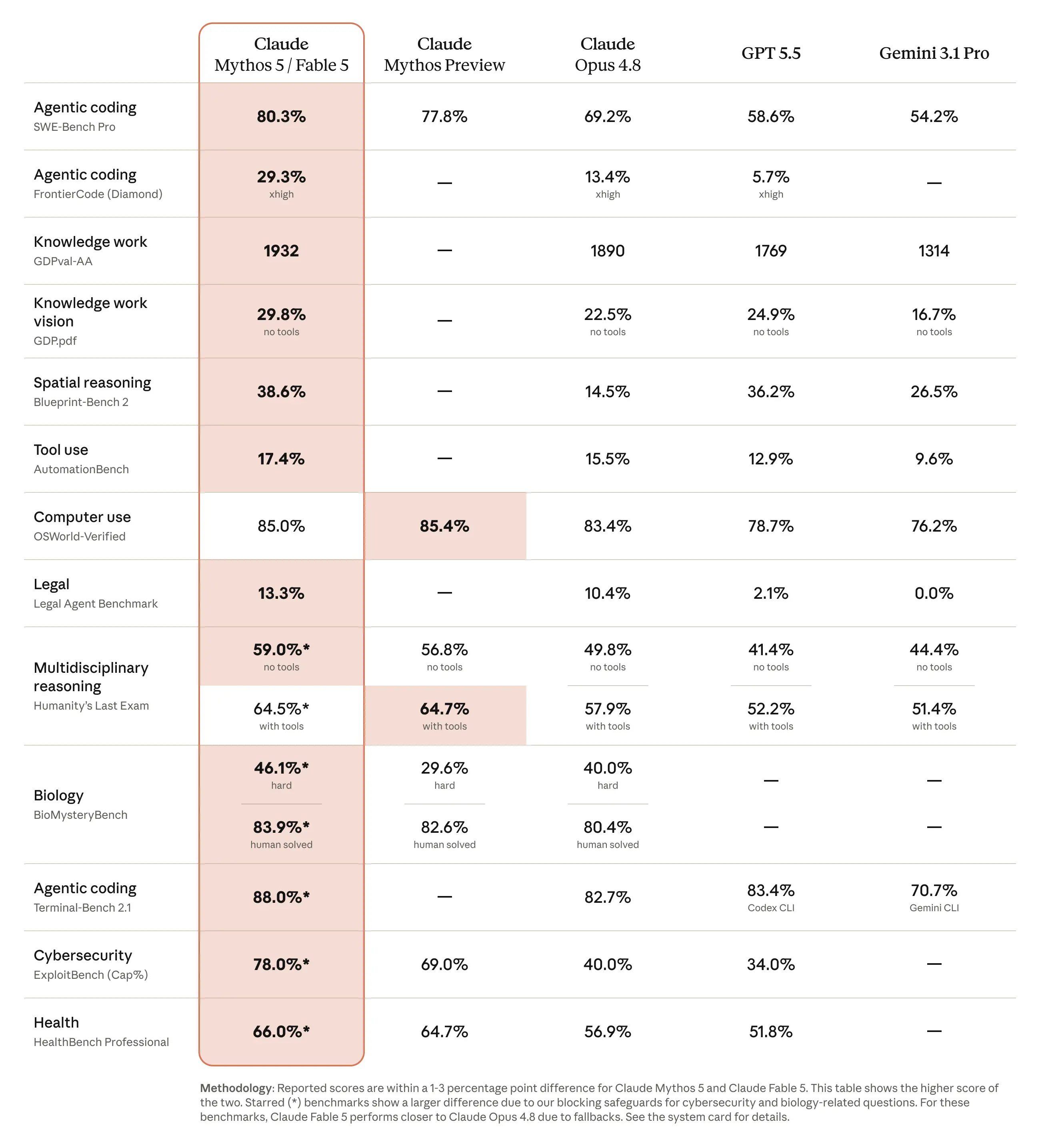
Get those three right in the prompt and you extend your usage in the only way that matters: more finished work per token. The patterns below do exactly that.
The prompt patterns that stretch every call
These come straight from Anthropic’s guide. Each one is a short instruction you drop into a system prompt; Fable 5 follows instructions well enough that you steer behavior with a sentence instead of a checklist.
Match effort to the task
Don’t leave effort on a single setting. Use high as your baseline, raise to xhigh only for capability-sensitive work, and drop to medium or low for routine calls. If a task completes correctly but takes longer than it should, lower the effort. This one change saves the most cost, because most calls don’t need maximum deliberation. If you’re tracking spend, our breakdown of Claude API cost and Claude API rate limits shows why effort discipline pays off at volume.
Tell it to act when it has enough information
Fable 5 can overplan ambiguous tasks; surveying options instead of moving. A short instruction fixes it:
When you have enough information to act, act. Do not re-derive facts already established
in the conversation, re-litigate a decision the user has already made, or narrate
options you will not pursue. If you are weighing a choice, give a recommendation, not an
exhaustive survey. This does not apply to thinking blocks.
Lead with the outcome
This is your token-saver. Telling the model to front-load the answer trims the long preambles that inflate output:
Lead with the outcome. Your first sentence after finishing should answer "what happened"
or "what did you find": the thing the user would ask for if they said "just give me the
TLDR." Supporting detail and reasoning come after. Being readable and being concise are
different things, and readability matters more.
Constrain the scope
At higher effort, Fable 5 may refactor or “clean up” beyond the task. Pin it down:
Don't add features, refactor, or introduce abstractions beyond what the task requires. A
bug fix doesn't need surrounding cleanup. Don't add error handling, fallbacks, or
validation for scenarios that cannot happen. Only validate at system boundaries (user
input, external APIs). Do the simplest thing that works well.
Ground progress claims on long runs
On long autonomous runs, make the model check its claims against real tool results. Anthropic reports this nearly eliminates fabricated status reports:
Before reporting progress, audit each claim against a tool result from this session.
Only report work you can point to evidence for; if something is not yet verified, say so
explicitly.
Give the reason, not only the request
Fable 5 performs better when it knows the intent behind a task, because context lets it connect the work to what matters instead of guessing:
I'm working on [the larger task] for [who it's for]. They need [what the output
enables]. With that in mind: [request].
Build a memory file for repeated work
Fable 5 does well when it can record lessons and reference them later. A plain Markdown file works: one lesson per entry, a one-line summary at the top, updated rather than duplicated. For repeated workflows this compounds; later runs skip mistakes earlier ones already made.
Test and tune your prompts in Apidog
Here’s the part the official guide leaves to you: knowing whether a prompt change actually helped. Wording that feels tighter can produce the same token count; a brevity instruction can backfire and trigger refusals. The only way to know is to fire both versions and compare. Apidog is a clean place to do that, because it lets you save the request, swap variables, assert on the response, and mock the API so iteration stays cheap. If you’ve never run prompt experiments outside a chat window, this is the same workflow as API testing without Postman, pointed at the Messages endpoint.
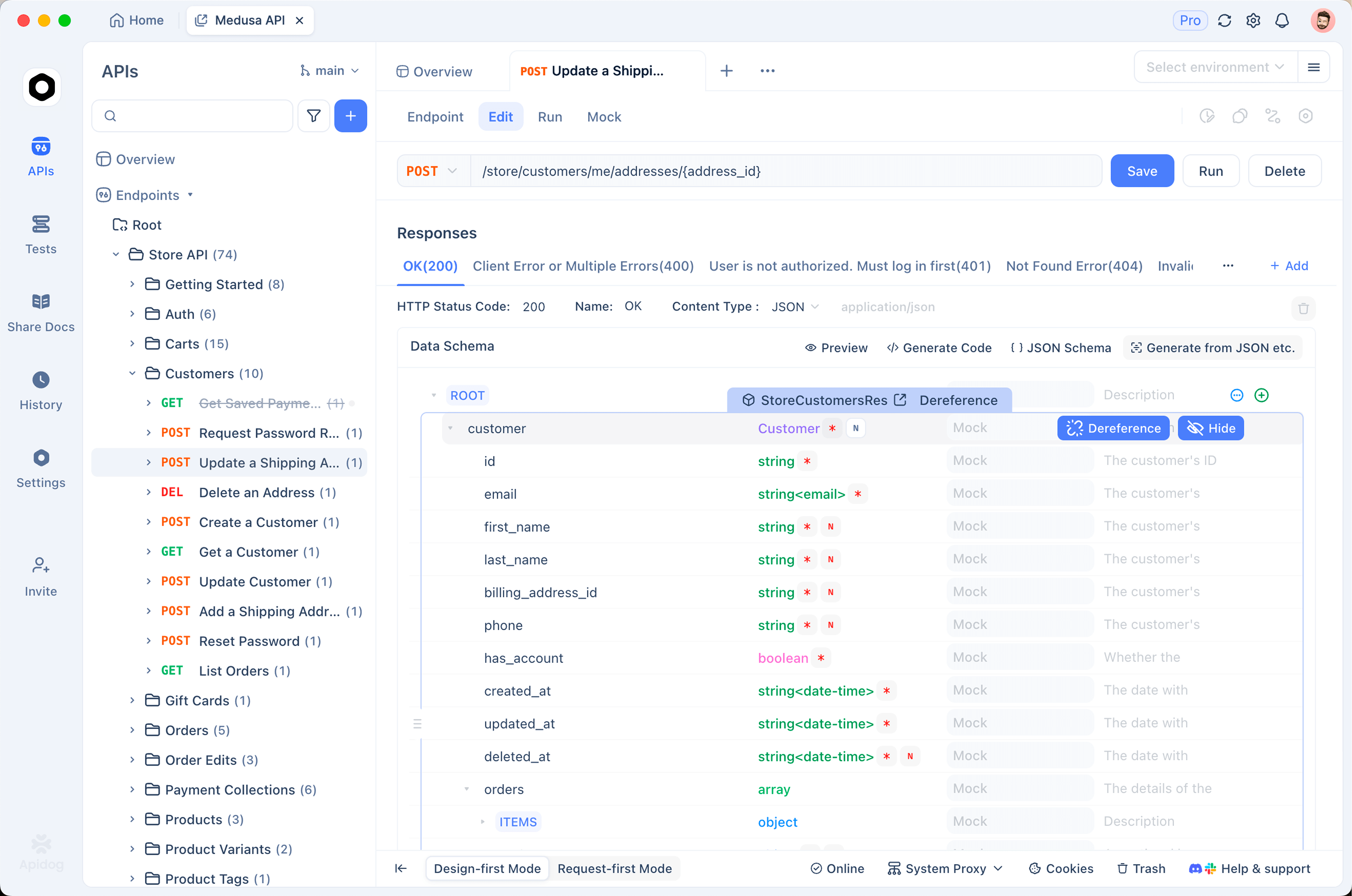
1. Parameterize the prompt and effort
Create a request to the Messages API and pull the volatile parts; the system prompt, the effort level, the API key; into Apidog environment variables. Now you can flip effort from high to medium or swap a whole system prompt with one change, without editing the request body each time.
POST https://api.anthropic.com/v1/messages
x-api-key: {{ANTHROPIC_API_KEY}}
anthropic-version: 2023-06-01
content-type: application/json

{
  "model": "claude-fable-5",
  "max_tokens": 2048,
  "system": "{{SYSTEM_PROMPT}}",
  "messages": [
    { "role": "user", "content": "{{TASK}}" }
  ]
}
2. A/B two prompt variants and measure the difference
Save two versions of the request; one with your brevity-and-scope instructions, one without; and run both against the same task. Then compare what actually changed:
- Output tokens from
usage.output_tokensin the response. This is your direct cost signal. A good brevity instruction visibly lowers it. - Latency, shown in Apidog’s response timing. Lower effort should show up here.
- Quality, which you read yourself. Cheaper is only better if the answer still does the job.
Now “the perfect prompt” is a number you can point to, not a hunch. Keep the variant that gets the same result for fewer tokens.
3. Assert on stop_reason and catch refusal fallbacks
Fable 5 runs safety classifiers and can return stop_reason: "refusal", which many setups fall back to Opus 4.8 to handle. An over-aggressive prompt, or one that asks the model to echo its reasoning, can trigger these more often than you expect; and silent fallbacks change your cost and behavior. Add an assertion in Apidog that stop_reason is end_turn, so a spike in refusals shows up as a failed test instead of a surprise on your bill. Treat that assertion as part of your prompt’s contract.
4. Plan for longer turns
Fable 5 runs longer than older models; individual hard-task requests can take many minutes at high effort. Before you ship, set a realistic timeout on your request in Apidog and confirm your client handles a slow or streamed response cleanly rather than hanging. If you see timeouts creeping in, the debugging path in fixing upstream request timeouts applies directly. Lower effort is also a valid fix when a task finishes correctly but slower than you need.
5. Mock the API so iteration stays free
You’ll run a prompt dozens of times while tuning it. You don’t want every iteration billed. Apidog’s mock server can stand in for the Messages endpoint, returning a saved response shape; including the refusal and error cases; so you can test your client’s handling, assertions, and timeout logic without spending tokens. Flip the base URL back to the live API for the real comparison runs. If you’re building this into an automated pipeline, the Apidog CLI and Claude skills guide shows how to run these checks in CI.
FAQ
Does a better prompt mean fewer tokens on Fable 5? Often, yes. A brevity instruction that leads with the outcome cuts the preamble and narration Fable 5 produces un-steered, which lowers output_tokens. Measure it in Apidog rather than assuming; some rewrites don’t change the count.
What’s the fastest way to cut Fable 5 cost? Lower the effort level on routine tasks. Effort is the primary cost-and-latency lever, and medium or low on Fable 5 still performs well. Save high and xhigh for genuinely hard work.
Why is my Fable 5 request timing out when the same prompt worked on Opus? Fable 5 runs longer on hard tasks; minutes per request at high effort is normal. Raise your client timeout, handle streaming, or drop the effort level if the task finishes correctly but too slowly.
Why am I suddenly getting Opus responses when I asked for Fable 5? A stop_reason: "refusal" triggered a fallback. Prompts that ask the model to reproduce its reasoning, or that brush against the safety classifiers, raise refusal rates. Assert on stop_reason in Apidog to catch this.
Can I test prompt changes without spending money? Yes. Mock the Messages endpoint in Apidog to develop and test your client logic for free, then run the live API only for the comparison runs where you measure real tokens and latency.
Wrapping up
Extending your Fable 5 usage isn’t about gaming a quota; it’s about writing prompts that match effort, scope, and verbosity to the task so every call does more. Anthropic’s guidance gives you the patterns; match effort to difficulty, lead with the outcome, constrain scope, ground progress, and give the reason. Apidog gives you the proof; parameterize the prompt, A/B the variants, measure tokens and latency, and assert against refusal fallbacks. Download Apidog, wire up your Messages request, and turn “this prompt feels tighter” into a number you can stand behind.


