
On July 9, 2026, OpenAI made GPT-5.6 generally available across ChatGPT, Codex, and the API, with a global rollout over roughly 24 hours. If you opened Codex after that, you were looking at a new default frontier family: three models named Sol, Terra, and Luna, six reasoning effort levels, and an ultra mode that runs four agents in parallel. The limited preview that started June 26 is over; everything here is live for regular accounts.
That is a lot of new surface for a tool many developers run on autopilot. Whether you use Codex in the cloud, in your IDE, or through the Codex CLI, it now asks questions that did not exist last week. Which tier should handle this task? How much reasoning effort does a bug hunt deserve? Is a wide refactor worth ultra mode’s parallel agents, or will a single careful Sol run do?
This guide covers what changed, how to pick between the three models for agentic coding, when ultra mode earns its extra token burn, and how to check the API code Codex writes before you ship it. For that last step we’ll bring in Apidog, because Codex produces plenty of endpoint calls you should test rather than trust.
TL;DR
- GPT-5.6 reached Codex at GA on July 9, 2026. Sol, Terra, and Luna are selectable, subject to your ChatGPT plan.
- Sol is the deep-reasoning flagship. Terra is the balanced pick. Luna is built for fast, cheap, high-volume work.
- Ultra mode runs four agents in parallel and is available in Codex from Plus upward. Per OpenAI, it lifts Terminal-Bench 2.1 from 88.8% to 91.9%.
- Ultra trades higher token and usage burn for faster wall-clock results. Use it for wide refactors, not one-file fixes.
- Six reasoning effort levels (none, low, medium, high, xhigh, max) let you tune depth against cost per task.
- GPT-5.6 writes shorter output than GPT-5.5, so remove old “be concise” directives from your Codex instructions.
- Pair Codex with Apidog to verify the endpoints your agent generates or consumes.
What landed in Codex on July 9
GA day put the full GPT-5.6 family into Codex at once. The model picker now lists the new generation, with what you can select tied to your ChatGPT plan. The same day, Sol, Terra, and Luna arrived in GitHub Copilot too, so the major agentic coding tools converged on the same family within hours.
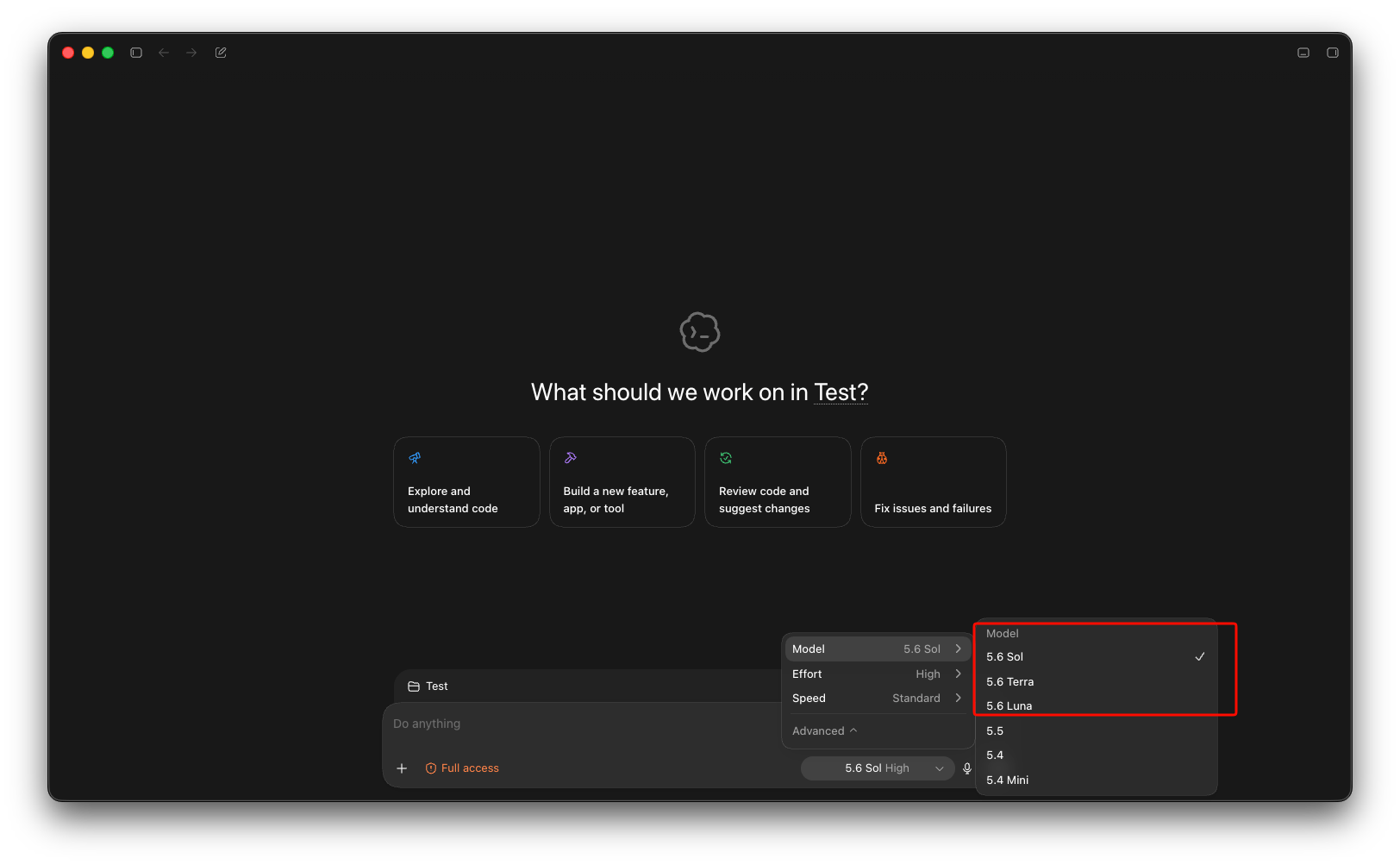
Three things about the lineup matter for Codex users:
The number is the generation; the names are tiers. Sol, Terra, and Luna are durable capability tiers that advance on their own cadence. gpt-5.6-sol is the flagship with the deepest reasoning, and the bare gpt-5.6 alias routes to it. gpt-5.6-terra is the balanced middle, positioned as competitive with GPT-5.5 at roughly half the price. gpt-5.6-luna is the fastest and cheapest, aimed at high-volume, latency-sensitive work.
Ultra mode is a setting, not a model. It fans a task out to four agents working in parallel by default. In Codex it is available from the Plus plan upward.
Effort levels are now a first-class control. Six levels, from none to max, replace the coarser knobs of the GPT-5.5 era. More on how to use them for coding below.
One thing has not changed: Codex still behaves like Codex. Your instructions files, approval settings, and workflow carry over; the models underneath got smarter and more configurable.
Picking a model: Sol, Terra, or Luna for coding
Codex is an agentic coding tool, so the question is not “which model is best” but “which model fits this task’s depth”. The short version:
| Model | Coding sweet spot | When to pick it |
|---|---|---|
gpt-5.6-sol |
Multi-step agentic work: debugging across files, architecture changes, long tool-call chains | The task would take you hours, and getting it wrong is expensive |
gpt-5.6-terra |
Day-to-day coding: features, tests, reviews, medium refactors | Your default. Most sessions should start here |
gpt-5.6-luna |
Boilerplate, commit messages, quick scripts, first-pass drafts | Speed matters more than depth |
On agentic coding specifically, OpenAI’s launch numbers give Sol 88.8% on Terminal-Bench 2.1, rising to 91.9% with ultra mode. Treat these as launch-day claims from the vendor; independent verification takes weeks. For balance: on SWE-Bench Pro, OpenAI’s own reporting shows Claude Fable 5 ahead at 80.3% against Sol’s 64.6%, so GPT-5.6 is not a clean sweep across coding benchmarks.
Model selection happens through the model picker in your Codex settings; the layout varies by surface (cloud, IDE extension, CLI). OpenAI’s developer docs list the current model IDs and where each surface exposes them.
Resist leaving Sol on max effort for everything. You will hit your limits sooner and wait longer for answers Terra could have produced.
Ultra mode in Codex
Ultra mode is the headline feature for Codex users. It runs four agents in parallel by default and consolidates their results. The goal is wall-clock speed on large tasks, and the cost is deliberate. Token and usage burn go up because four agents are doing the work of one.
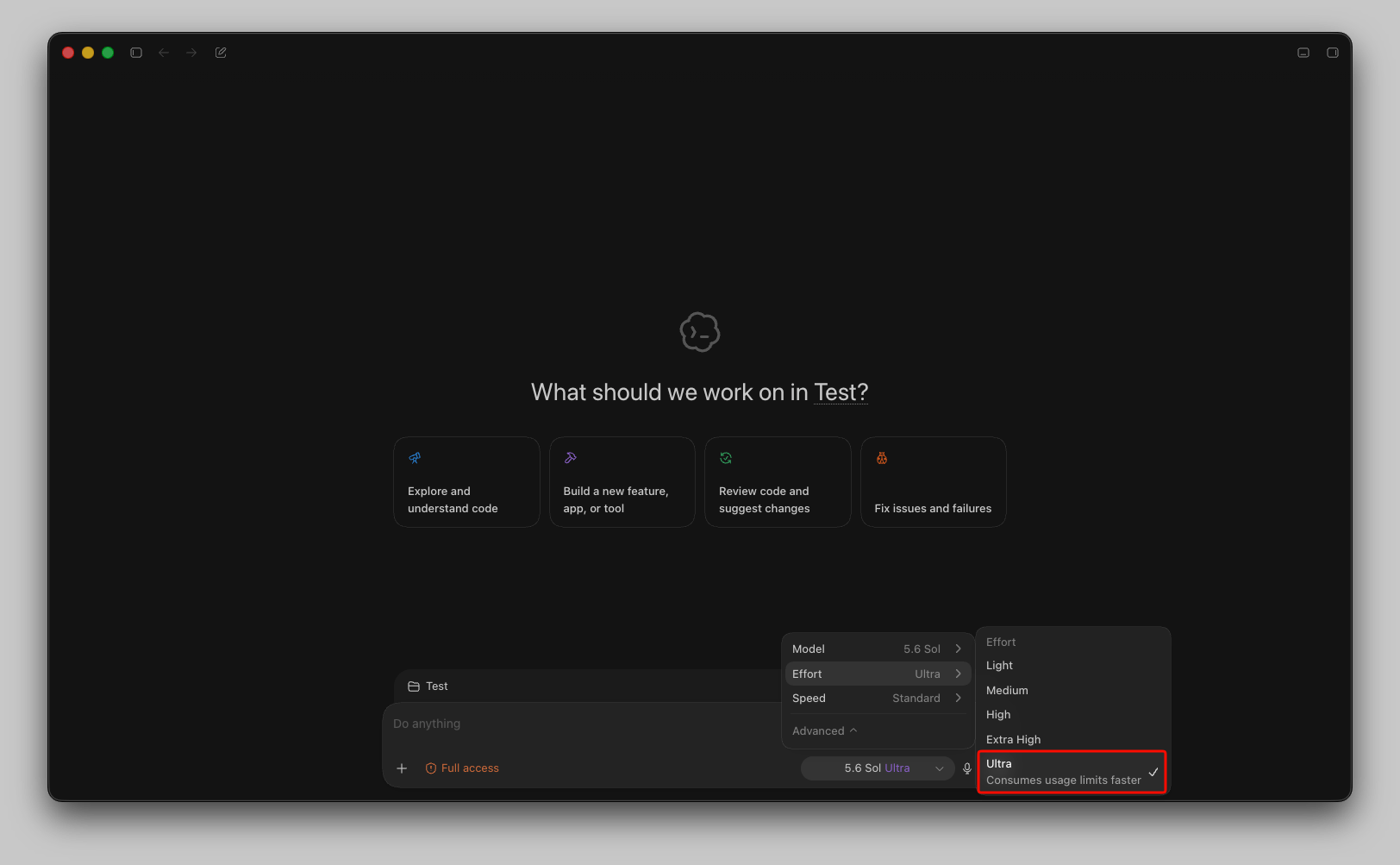
When it is worth it:
- Wide refactors that touch many files, where parallel exploration genuinely divides the work
- Migration passes (framework upgrades, API version bumps) with many similar but not identical call sites
- Time-boxed debugging where you want several hypotheses chased at once
When a single Sol run is the better call:
- Single-file changes and focused bug fixes; parallelism has nothing to divide
- Tasks with a serial dependency chain, where step three needs step two’s output
- Anything late in your billing window. Ultra consumes your Codex usage limits noticeably faster, and running out mid-week hurts more than a slower refactor.
The three-point Terminal-Bench gain is real but modest. The stronger argument is time: if a refactor takes 40 minutes as a single run and finishes in a fraction of that with four agents, the extra tokens are a fair trade during a deadline. Codex ultra mode is a time lever more than a quality lever. See how GPT-5.6 ultra mode works for a deeper look, including how to write task prompts that four parallel agents can split cleanly.
Reasoning effort for coding tasks
GPT-5.6 exposes six effort levels: none, low, medium, high, xhigh, and max. In Codex, effort is a per-model setting (on Plus, Sol runs at medium effort and up). A practical mapping for coding work:
- none / low: renames, formatting, mechanical edits, generating tests from a clear template
- medium: standard feature work, code review, writing straightforward endpoints
- high: multi-file debugging, performance investigation, unfamiliar codebases
- xhigh / max: race conditions, memory corruption, “we’ve been staring at this for two days” problems
OpenAI’s migration guidance is worth taking literally: treat the move as a tuning pass, not only a model swap. Test your current effort level and one level lower. GPT-5.6 often matches previous-generation output at reduced effort, which is free headroom on your usage allowance.
Update your instructions too. GPT-5.6 writes notably shorter answers with fewer generic intros than GPT-5.5 did, so remove leftover “be concise” or “skip the preamble” directives from your instructions file. Stacking brevity rules on an already-brief model can push it into terse, underexplained diffs.
What each ChatGPT plan gets in Codex
Access is plan-gated, and OpenAI adjusts these details often. Treat this table as a snapshot per OpenAI’s help center, subject to change:
| Plan | GPT-5.6 models | Ultra mode in Codex | Notes |
|---|---|---|---|
| Free / Go | Terra (in ChatGPT) | No | Codex is not included in the free tiers |
| Plus | Sol, Terra, Luna | Yes | Sol at medium effort and up; per-model effort control |
| Pro | Sol, Terra, Luna, Sol Pro | Yes | Higher limits; ultra also in ChatGPT Work |
| Business / Enterprise | Sol, Terra, Luna, Sol Pro | Yes | Ultra via ChatGPT Work; admin controls |
Two takeaways. First, Plus already gets the full model picker and ultra mode in Codex, so the gap between Plus and Pro for coding is about limits and Sol Pro, not raw capability. Second, if API billing fits you better than a subscription, the API has no plan gating at all: any API account can call all three models self-serve at $5/$30 for Sol, $2.50/$15 for Terra, and $1/$6 for Luna per million input/output tokens.
Verify what Codex writes: pair it with Apidog
Much of what a coding agent produces in a working session is code that talks to APIs: route handlers, client calls, webhook consumers, test fixtures. GPT-5.6 makes Codex faster at producing that code. It does not make the code correct, and an agent that confidently writes a wrong endpoint call is more dangerous at 91.9% on a benchmark than at 60%, because you review its output less carefully.
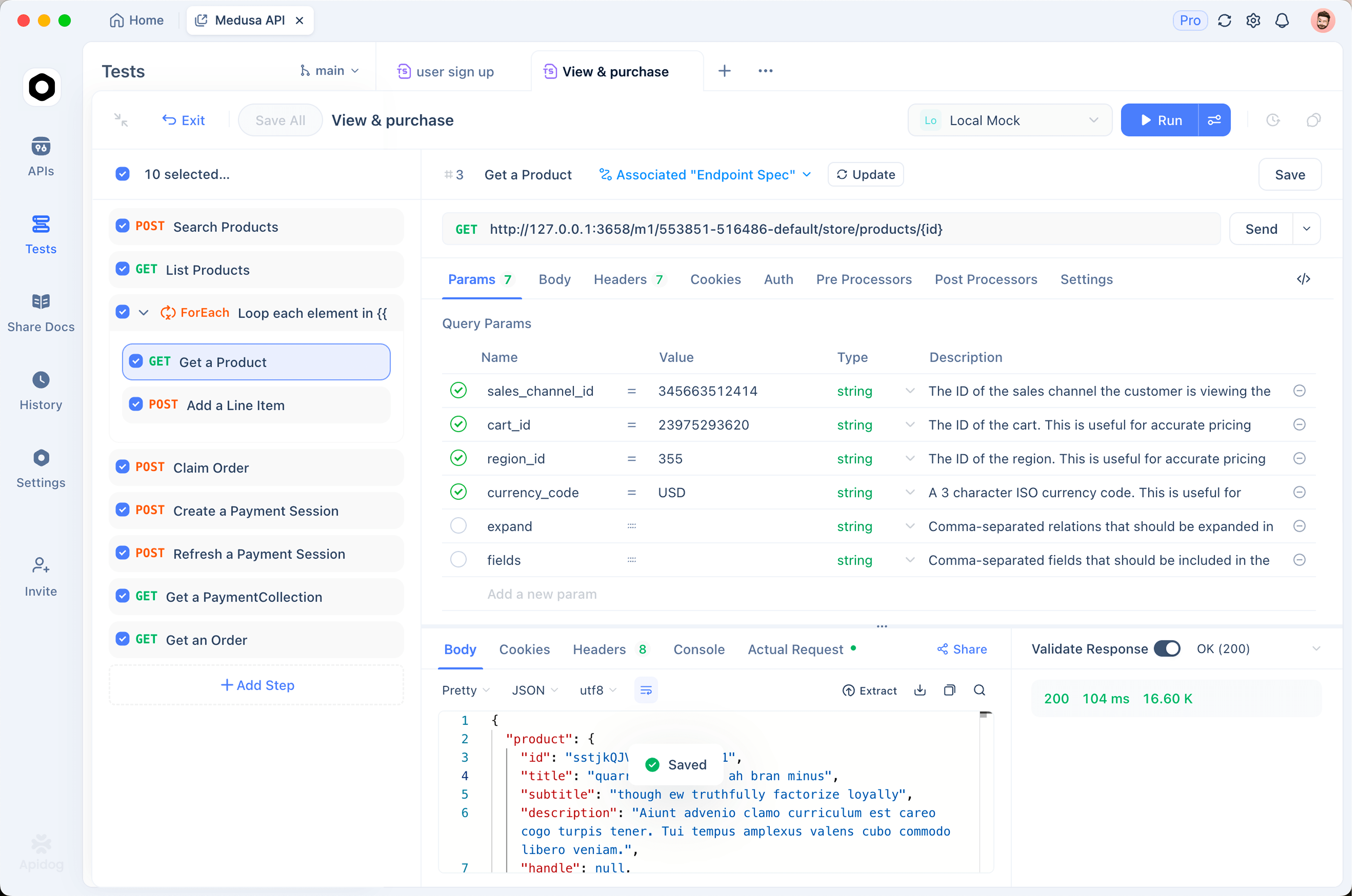
A workflow that keeps the speed without the blind trust:
- Give Codex your OpenAPI spec. Put the spec file in the repo, or reference it in your instructions, so the agent generates against your real contract instead of guessing field names.
- Let Codex write the integration. Endpoints, clients, tests: this is where Terra or Sol at medium-to-high effort shines.
- Test the endpoints before merging. Import the same spec into Apidog, hit every endpoint Codex generated or consumed, and check status codes, response schemas, and edge cases visually. Download Apidog free; a spec-driven test pass catches the mismatches an agent introduces silently, like a renamed field or a wrong content type.
- Mock what does not exist yet. If Codex is building against an API that is not deployed, mock it from the spec so the agent’s integration work runs against something real-shaped.
If you want the verification loop inside the agent instead of alongside it, you can wire the Apidog CLI directly into Codex so the agent runs your API test suites as part of its own task loop. The setup is covered step by step in how to use the Apidog CLI in Codex.
What is still settling
GPT-5.6 in Codex is days old, and some rough edges come with that:
- Rollout unevenness. GA rolled out over roughly 24 hours, and some surfaces or regions may still be catching up. If a model or setting is missing from your picker, whether in the IDE or the Codex CLI, check OpenAI’s release notes before filing a bug report.
- Specs are still secondhand. The reported 1M-token context window and 128K max output come from early documentation coverage rather than a confirmed spec sheet. Treat them as reported until OpenAI’s pages settle.
- Benchmarks are vendor-reported. The Terminal-Bench and other launch numbers are OpenAI’s own. Independent evaluations will follow over the coming weeks.
- Plan details move. OpenAI has a history of adjusting limits and access in the weeks after a launch. The help center article above is the source of truth.
None of this is a reason to wait. It is a reason to run GPT-5.6 on a handful of representative tasks from your backlog before you commit your team’s default settings.
FAQ
Which GPT-5.6 model should I set as my Codex default?
Terra. OpenAI positions it as competitive with GPT-5.5 at roughly half the cost, and it handles day-to-day feature work comfortably. Switch to Sol when a task spans many files or needs long reasoning chains, and drop to Luna for boilerplate and quick scripts.
Can I use GPT-5.6 in Codex without a paid plan?
Not directly. Codex requires a paid ChatGPT plan, and free-tier ChatGPT access to GPT-5.6 is limited to Terra. There are legitimate low-cost and trial routes though, and the API itself has no plan gating. The options are collected in how to use Codex free.
Does ultra mode burn through my usage limits faster?
Yes, by design. Ultra runs four agents in parallel, so a single task consumes several times the tokens of a normal run in exchange for faster completion. Reserve it for large parallelizable jobs and check your remaining allowance before starting one.
Is ultra mode the same as Sol Pro?
No. Pro mode (Sol Pro in ChatGPT) is a quality-first reasoning setting on a single model. Ultra is a multi-agent execution mode that parallelizes work. Pro aims for a better answer; ultra aims for a faster wall-clock result on big tasks.
Where this leaves you
Codex got a real upgrade on July 9: a smarter flagship, a cheaper strong default, per-model effort controls, and a parallel mode that shortens big jobs. The setup that serves most developers is unglamorous. Run Terra at medium effort as the default, reach for Sol at high effort on the hard tickets, and reserve ultra for wide refactors when the deadline argues for it.
Whatever settings you land on, the agent’s output still needs the same scrutiny as a fast human’s. Give Codex your OpenAPI spec so it builds against the real contract, then verify every generated endpoint in Apidog before it reaches a branch anyone depends on. Faster code generation only pays off when the checking keeps pace.