
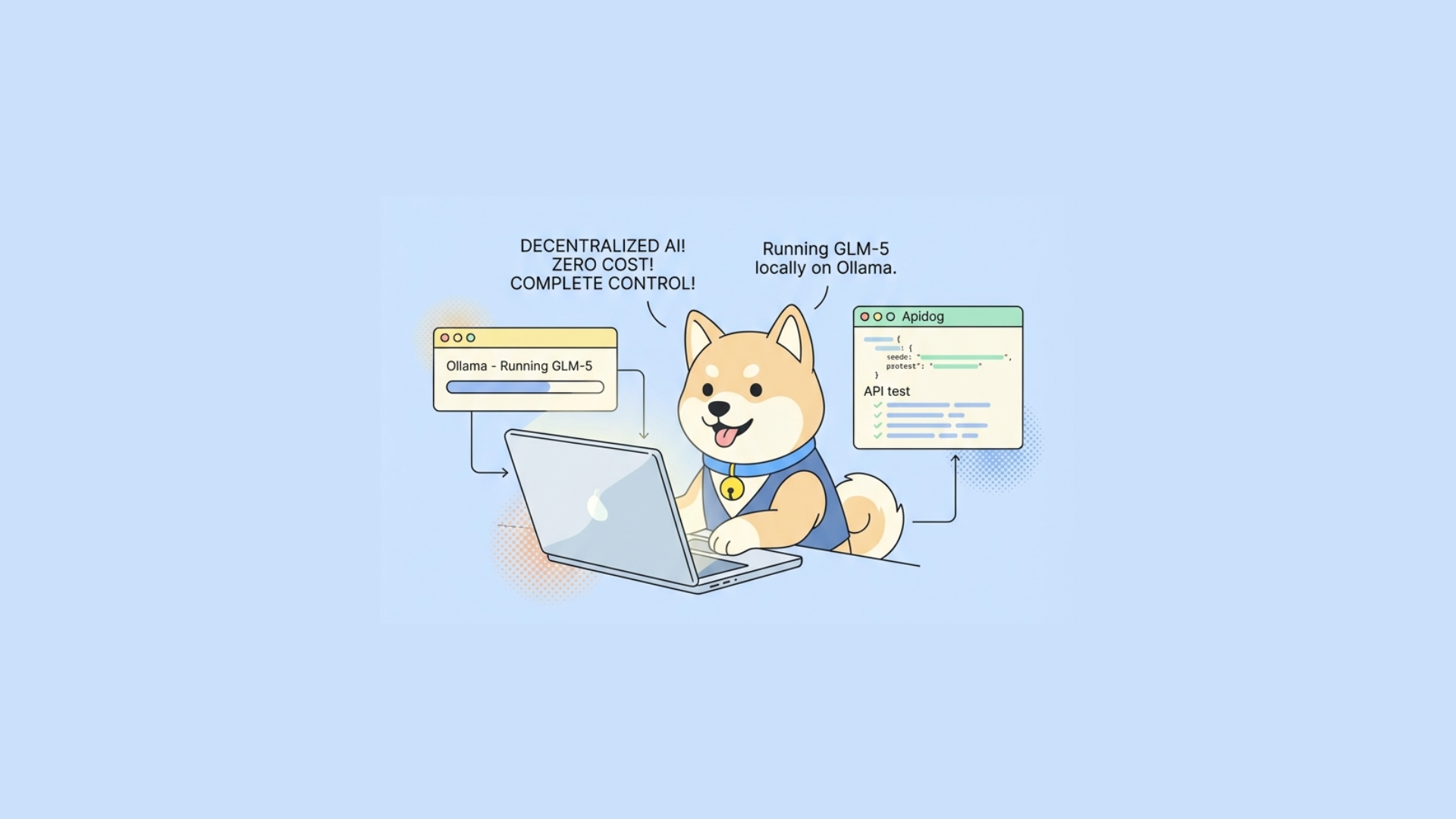
GLM-5 from Z.ai delivers a frontier-level open-source model now accessible through Ollama. You gain exceptional capabilities in complex reasoning, software engineering, and long-horizon agentic workflows while keeping everything on your own hardware.
What Makes GLM-5 Stand Out
Z.ai released GLM-5 under the MIT License, making its weights freely available on Hugging Face and ModelScope. The model scales to 744 billion total parameters in a Mixture-of-Experts (MoE) architecture, activating only 40 billion parameters per token. This design maintains high intelligence while controlling inference costs.
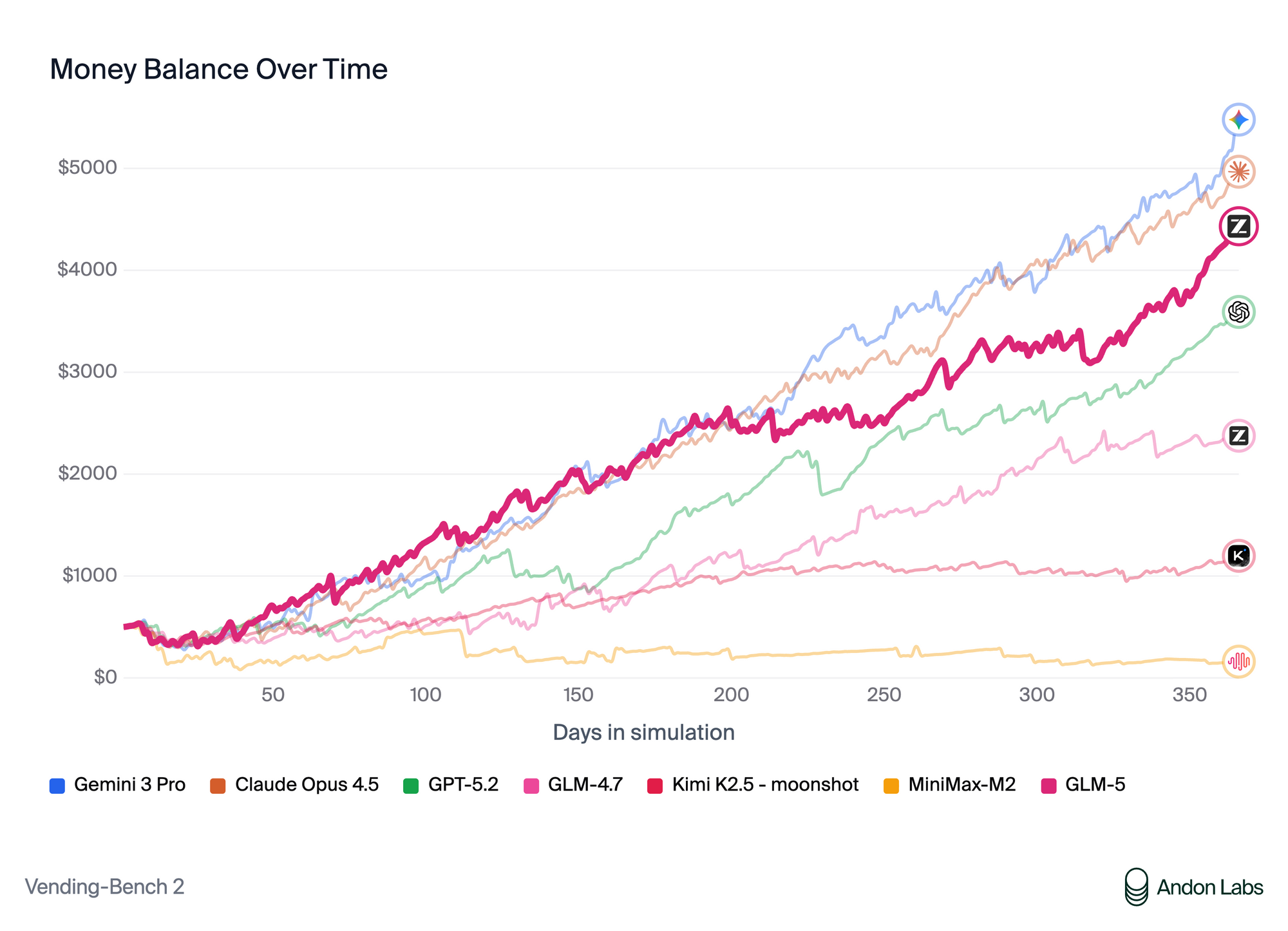
Pre-training on 28.5 trillion tokens equips GLM-5 with strong multilingual support, primarily excelling in English and Chinese. It handles contexts up to approximately 198K tokens in the Ollama implementation through DeepSeek Sparse Attention (DSA), which reduces computational overhead without sacrificing long-sequence performance.
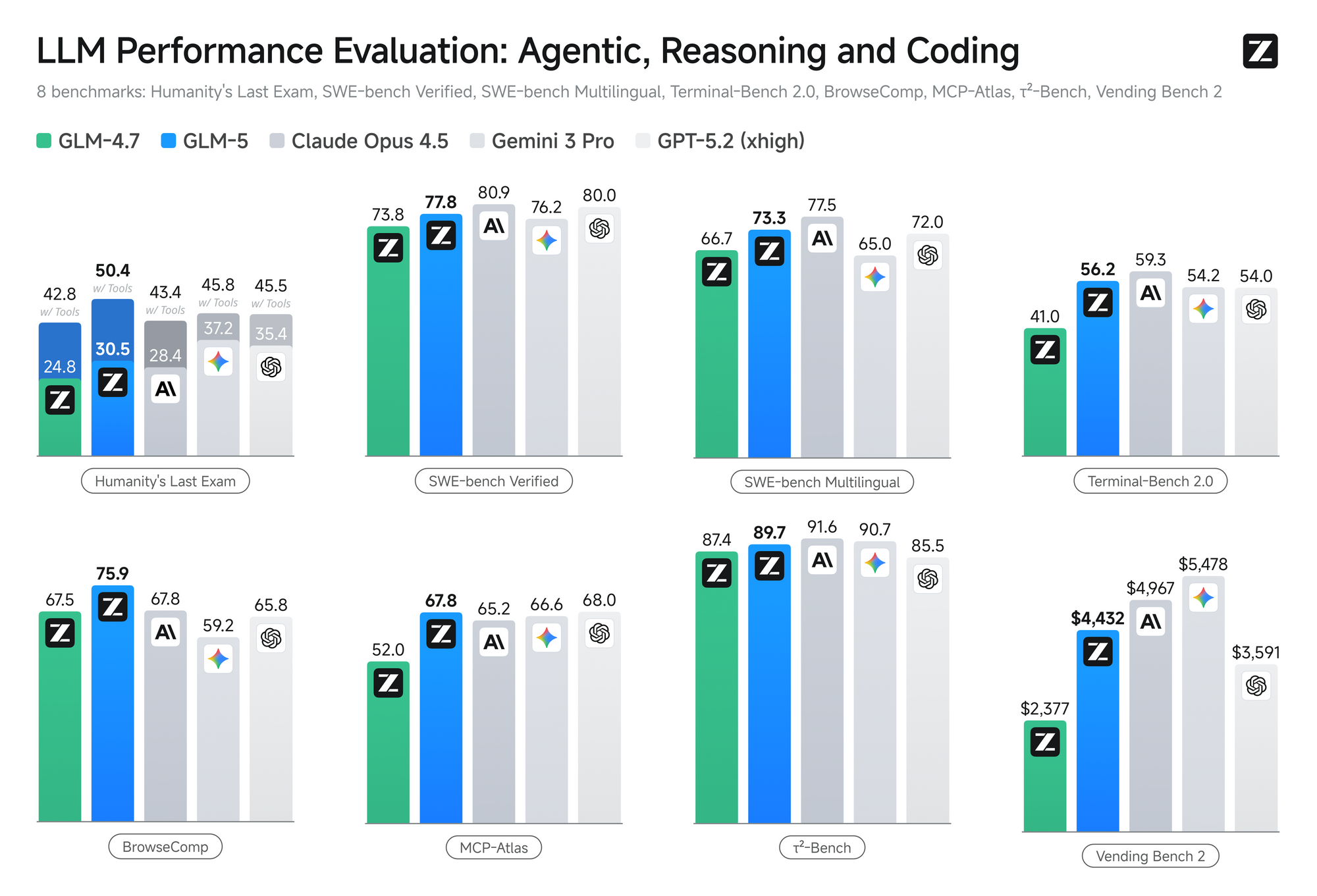
Benchmarks highlight its strengths. GLM-5 achieves 92.7% on AIME 2026 I, 86.0% on GPQA-Diamond, and 77.8% on SWE-bench Verified. These results position it competitively against leading models in coding, mathematical reasoning, and agentic tasks such as multi-step planning and tool use.
Users particularly appreciate its ability to generate structured documents like PRDs, spreadsheets, and reports, and its compatibility with agent frameworks. The model transitions smoothly from simple chat to sophisticated engineering workflows.
Why Pair GLM-5 with Ollama
Ollama simplifies local LLM deployment across macOS, Linux, and Windows. It manages model downloads, quantization, and serving while exposing an OpenAI-compatible REST API at http://localhost:11434/v1. Consequently, any tool built for OpenAI endpoints works with GLM-5 out of the box.
You avoid cloud costs, rate limits, and data transmission to third parties. Moreover, Ollama supports easy switching between models and integrates directly with developer tools. The glm-5:cloud tag provides an optimized variant tailored for local execution, balancing capability and resource demands.
Prerequisites for Running GLM-5 Locally
Prepare your system before installation. Ollama runs on modern hardware, but GLM-5 benefits from substantial resources due to its scale.
- Operating System: macOS (Apple Silicon preferred), Linux, or Windows with WSL2.
- GPU Recommendation: NVIDIA cards with 24 GB+ VRAM deliver comfortable performance at higher context lengths. Apple Silicon Macs with 32 GB+ unified memory also perform well. CPU-only setups work but yield slower token generation.
- RAM: At least 32 GB system memory; 64 GB+ improves stability during long contexts.
- Storage: Allocate 50 GB+ free SSD space for the model files and Ollama runtime.
- Internet: Required for the initial
ollama pullcommand.
Check your hardware against these guidelines. Users with mid-range GPUs often achieve usable speeds by limiting context or employing lower quantization where available. Test incrementally after setup.
Step 1: Install Ollama
Visit the official Ollama website and download the installer for your platform. The process takes seconds on most systems.
On macOS or Linux, open a terminal and run the installation command provided on the site. Windows users execute the downloaded .exe file.
After installation, verify success by opening a terminal and typing:
ollama --version
This command confirms the runtime is active. Start the Ollama server in the background with ollama serve if it does not launch automatically.
Step 2: Pull and Run GLM-5
Download the model with a single command:
ollama pull glm-5:cloud
The process downloads the necessary files and may take time depending on your connection. Monitor progress in the terminal.
Launch an interactive session immediately afterward:
ollama run glm-5:cloud
You now interact directly with GLM-5 in the command line. Type prompts and observe responses. Exit the session with /bye when finished.
Step 3: Interact via Command Line and Basic API Calls
The CLI suits quick testing. For programmatic access, use the REST API.
Test a simple chat completion with curl:
curl http://localhost:11434/api/chat -d '{
  "model": "glm-5:cloud",
  "messages": [
    { "role": "user", "content": "Explain the advantages of Mixture-of-Experts architectures in large language models." }
  ],
  "stream": false
}'
Ollama returns a JSON response containing the assistant’s message. This endpoint supports streaming when you set "stream": true, enabling real-time token output in applications.
Python developers leverage the official ollama library or the OpenAI SDK for compatibility:
from openai import OpenAI

client = OpenAI(
    base_url="http://localhost:11434/v1",
    api_key="ollama"  # Placeholder; no real key required
)

response = client.chat.completions.create(
    model="glm-5:cloud",
    messages=[
        {"role": "system", "content": "You are an expert software architect."},
        {"role": "user", "content": "Design a scalable microservices system for an e-commerce platform handling 1M daily users."}
    ],
    temperature=0.7,
    max_tokens=2048
)

print(response.choices[0].message.content)
This code demonstrates how existing OpenAI-compatible codebases adapt effortlessly to the local model.
Step 4: Enhance Your Workflow with Apidog
Visual API testing accelerates development and debugging. Apidog excels here by providing an intuitive interface for crafting requests, managing environments, and generating client code.
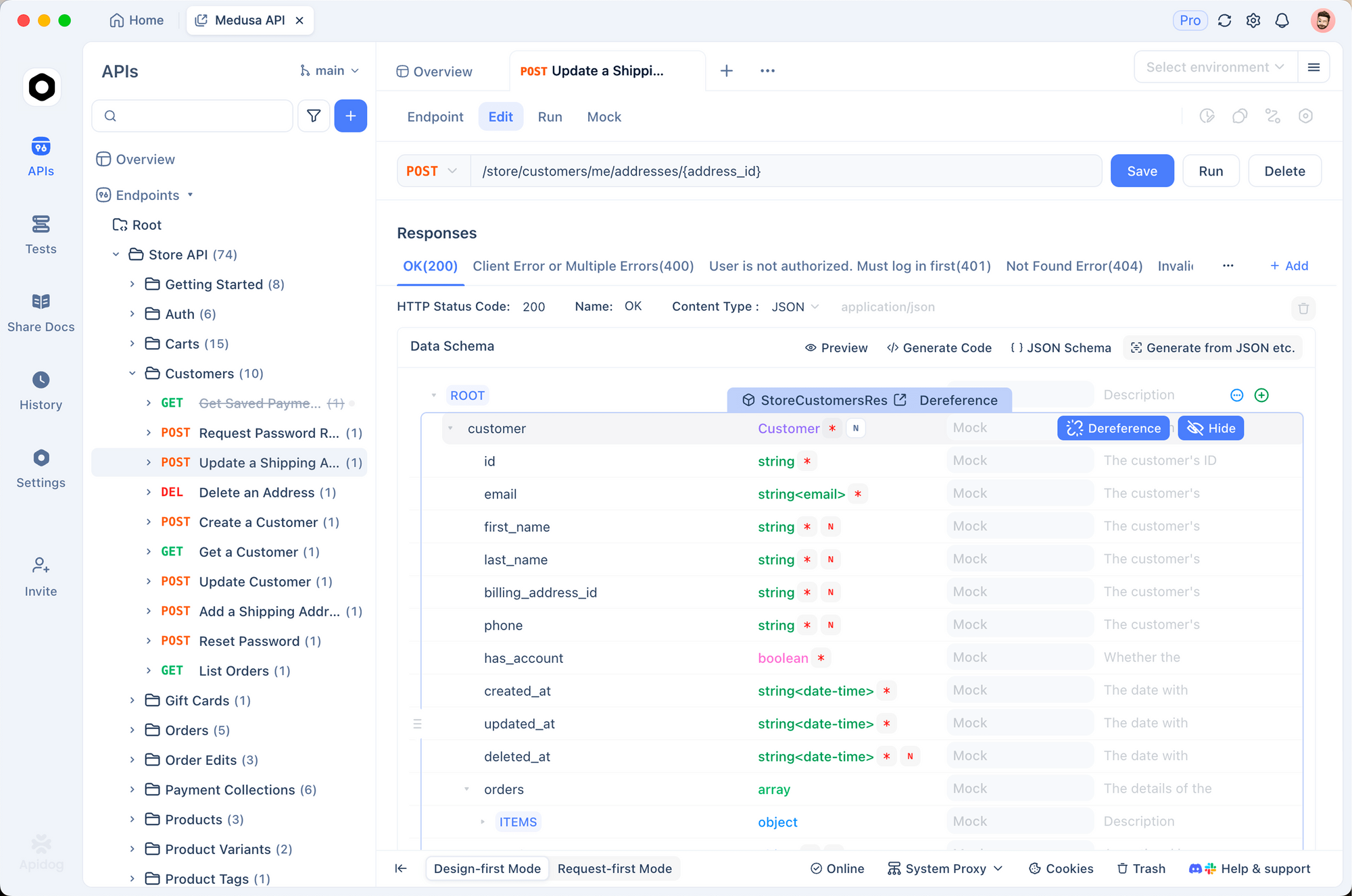
Download Apidog for free from the official site and install it. Create a new project and configure the following:
- Base URL:
http://localhost:11434/v1 - Endpoint: Add
/chat/completionsas a POST request. - Headers: Set
Content-Type: application/json(no Authorization header needed for local Ollama).
Build your request body visually. Define messages array, adjust parameters like temperature, top_p, or max_tokens, and include the model name "glm-5:cloud". Send the request and inspect the full JSON response, including token usage and timing.
Apidog further allows you to:
- Save reusable environments for different models or contexts.
- Generate SDK code in Python, JavaScript, or other languages.
- Create automated test suites to validate GLM-5 outputs against expected schemas.
- Mock responses for frontend development when the backend runs locally.
This integration transforms raw API experimentation into a structured, collaborative process. Developers who test complex multi-turn conversations or tool-calling scenarios particularly benefit from Apidog’s visual debugging tools.
Advanced Configurations and Optimizations
Customize behavior by creating a Modelfile. For example:
FROM glm-5:cloud
SYSTEM You are a precise engineering assistant focused on long-term planning and code quality.
PARAMETER temperature 0.6
PARAMETER num_ctx 131072
Build the custom model with ollama create my-glm5 -f Modelfile and run it as ollama run my-glm5.
Adjust context length carefully. Larger windows consume more memory but enable analysis of extensive codebases or documents. Monitor VRAM usage with tools like nvidia-smi.
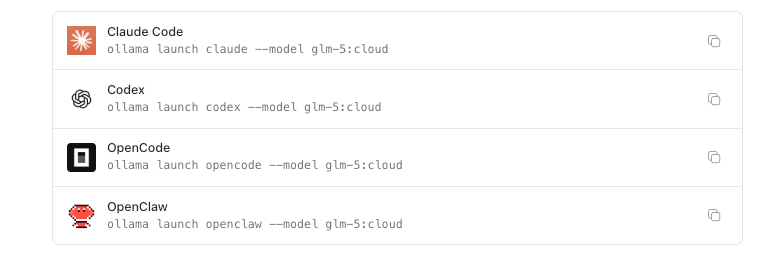
For agentic workflows, launch compatible tools directly:
ollama launch openclaw --model glm-5:cloud
Similar commands support Claude Code, Codex, and other frameworks, letting GLM-5 power desktop agents or coding assistants locally.
Experiment with system prompts to steer the model toward specific domains, such as frontend architecture or cybersecurity analysis. Track performance metrics—tokens per second typically improve with GPU acceleration and optimized context management.
Troubleshooting Common Issues
Users occasionally encounter challenges during initial setup. If the pull command fails, verify your internet connection and disk space. Restart the Ollama service and retry.
Memory errors during inference signal insufficient VRAM or an overly ambitious context size. Reduce num_ctx or close other GPU-intensive applications. On Apple Silicon, ensure sufficient unified memory allocation.
Slow response times often improve by confirming GPU offloading. Check Ollama logs for confirmation that layers load to the accelerator.
When API calls return unexpected formats, confirm the model tag matches exactly and that the request body follows the expected schema. Apidog helps isolate these issues quickly by displaying raw requests and responses side-by-side.
Community forums and official documentation provide additional solutions as the ecosystem evolves.
If you need to run GLM-5 without Ollama or with a different inference backend, running GLM-5 locally for free via alternative setups covers the options that give you full control over the serving layer.
If you already have GLM-5 running locally via Ollama and want to evaluate the updated release without spinning up new infrastructure, GLM-5.2's free access tiers and self-hosted options cover both the API quota route and the weights you can pull directly.
Conclusion: Take Control of Advanced AI Today
Running GLM-5 locally through Ollama removes barriers to high-quality AI assistance. You access state-of-the-art reasoning and coding performance while maintaining complete data sovereignty and eliminating usage costs.
Start with the installation steps outlined above, integrate Apidog to refine your API interactions, and explore custom configurations that match your specific workflows. Small adjustments—such as optimized prompts, context management, or tool integrations—frequently yield substantial improvements in output quality and efficiency.
The combination of GLM-5’s capabilities and Ollama’s simplicity empowers developers to experiment freely and build production-grade solutions entirely on their own infrastructure. Begin your local deployment now and unlock the full potential of this powerful open-source model.


