Anthropic’s Claude family is the most capable closed-source model line for serious coding, agentic work, and long-context reasoning, and the API price reflects it: Sonnet runs $3 / $15 per million tokens, Opus runs higher. That cost stops most side projects before they start. There is one path that flips the billing model on its head: Puter.js exposes the full Claude lineup (Opus 4.7, Sonnet 4.6, Haiku 4.5, and seven other variants) without an Anthropic key, and bills the end user instead of the developer. For you as the builder, it is structurally free and unlimited.
This guide walks the setup end to end: the model IDs, the working code, streaming, and the trade-offs you need to know before you ship.
TL;DR
- Puter.js gives developers free, unlimited access to the full Claude family with no API key, no Anthropic billing, no server.
- The end user covers their own usage from a Puter account; you pay zero.
- Supported models: Opus 4.7, Opus 4.6, Opus 4.6 Fast, Opus 4.5, Opus 4.1, Opus 4, Sonnet 4.6, Sonnet 4.5, Sonnet 4, Haiku 4.5.
- One
<script>tag, one function call (puter.ai.chat), and you are talking to Claude. - Streaming, system prompts, multi-turn conversations all work; Puter mirrors Anthropic’s message shape.
- Use Apidog to script the same prompt against Claude through Puter and against the official Anthropic API for benchmarking.
How “free unlimited” works under the hood
Puter.js is a serverless cloud and AI library that ships in the browser. The architecture flip: instead of you holding the Anthropic API key and eating the bill, your end user signs in to Puter (free account) and the call charges against their balance. New Puter accounts ship with starter credit; users top up if they want more.
For the developer, this means three things:
- No API key in your repo. No leak risk, no rotation, no project-scoped keys to manage.
- No usage cap on your side. Every user runs against their own account, so your “limit” scales linearly with your user base.
- No Anthropic relationship needed. You never sign a contract with Anthropic; Puter is the intermediary.
The trade-off: this is browser-first. A backend Python script cannot use Puter without a logged-in user session. For backend use, see the alternatives section below.
Step 1: Drop in the script
One tag in your HTML, no build step:
<script src="https://js.puter.com/v2/"></script>
That is the whole installation. There is no npm install, no key configuration, no DNS setup. If you prefer NPM for a bundled app:
npm install @heyputer/puter.js
import { puter } from '@heyputer/puter.js';
The CDN tag is the path of least resistance for a static site or a quick prototype. The NPM import gives you tree-shaking and TypeScript types in a Vite or Webpack build.
Step 2: Pick a Claude model
Puter exposes the full Anthropic catalog. The model IDs follow Anthropic’s naming with hyphen separators:
| Model ID | When to use |
|---|---|
claude-opus-4-7 |
Latest flagship; deepest reasoning, best agentic work |
claude-opus-4-6 |
Prior flagship; strong coding, slightly cheaper |
claude-opus-4.6-fast |
Lower-latency Opus variant |
claude-opus-4-5 |
Stable choice for production agents |
claude-opus-4-1 |
Legacy stable; well-understood behavior |
claude-opus-4 |
Original Opus 4 baseline |
claude-sonnet-4-6 |
Default daily driver; strong cost/quality balance |
claude-sonnet-4-5 |
Prior Sonnet; cheaper, still excellent for most tasks |
claude-sonnet-4 |
Sonnet 4 baseline |
claude-haiku-4-5 |
Fastest, cheapest; good for high-volume classification |
The two you reach for first: claude-sonnet-4-6 for daily reasoning and claude-haiku-4-5 for fast classification. Pull out claude-opus-4-7 when you need real depth (long-form reasoning, complex code review, agentic multi-step planning).
Step 3: Make Claude talk
The minimum viable call:
<!DOCTYPE html>
<html>
<body>
  <script src="https://js.puter.com/v2/"></script>
  <script>
    puter.ai.chat(
      "Explain quantum computing in simple terms",
      { model: 'claude-sonnet-4-6' }
    ).then(response => {
      puter.print(response.message.content[0].text);
    });
  </script>
</body>
</html>
Open the file in a browser. Puter handles the API call, the user signs in (or creates a free Puter account on first run), and the response prints to the page.
The response shape mirrors Anthropic’s message API. response.message.content is an array of content blocks; for plain text replies you read [0].text. For multi-part responses (text + tool calls), iterate the array.
Step 4: Stream the response
Long answers feel sluggish without streaming. Pass stream: true and consume the iterator:
const response = await puter.ai.chat(
  "Write a detailed essay on the impact of artificial intelligence on society",
  { model: 'claude-sonnet-4-6', stream: true }
);

for await (const part of response) {
  puter.print(part?.text);
}
The for await pattern reads chunks as they arrive. For a chat UI, append each part.text to your message bubble; the user sees text appear word by word.
Step 5: Multi-turn conversations
Pass an array of messages instead of a single string. Each message has a role and content:
const messages = [
  { role: 'user', content: 'I am building a Next.js app with Postgres.' },
  { role: 'assistant', content: 'Got it. What do you need help with?' },
  { role: 'user', content: 'How should I structure the migrations folder?' },
];

const response = await puter.ai.chat(messages, {
  model: 'claude-opus-4-7',
});

console.log(response.message.content[0].text);
To keep state across turns, push every user message and every assistant response onto the array before the next call. Claude reads the whole transcript and stays consistent.
Step 6: System prompts
Set persona, constraints, and output format with a system message at the top:
const messages = [
  { role: 'system', content: 'You are a senior backend engineer. Reply in numbered bullets, never more than five.' },
  { role: 'user', content: 'How do I prevent SQL injection in a Node app?' },
];

const response = await puter.ai.chat(messages, { model: 'claude-sonnet-4-6' });
System prompts hold across the whole conversation and are the right place for tone, output format, and behavioral guardrails.
Comparing models on the same prompt
The fastest way to find the right Claude model for your use case is to script the same prompt across all of them and compare. A small benchmark loop:
const models = ['claude-haiku-4-5', 'claude-sonnet-4-6', 'claude-opus-4-7'];
const prompt = "Refactor this React component to use hooks: ...";

for (const model of models) {
  const start = performance.now();
  const response = await puter.ai.chat(prompt, { model });
  const elapsed = performance.now() - start;
  console.log(`${model}: ${elapsed.toFixed(0)}ms`);
  console.log(response.message.content[0].text);
  console.log('---');
}
Run it once and you will see the trade-off pattern: Haiku is 5–10x faster than Opus, Sonnet sits in the middle, Opus produces noticeably better answers on hard prompts. For most apps, Sonnet 4.6 is the right default.
To benchmark Puter’s free path against the official Anthropic API in Apidog, keep both providers in the same collection and toggle the environment.
What you get and what you don’t
Free unlimited Claude through Puter is real, but the surface is a subset of the official API. The honest list:
You get:
- Full Claude model catalog (Opus, Sonnet, Haiku, all current versions)
- Multi-turn conversations
- System prompts
- Streaming responses
- Production-ready scale (Puter handles the infrastructure)
- Zero billing exposure to you as the developer
You may not get (depending on Puter version):
- Native tool use / function calling (check the latest Puter docs)
- Vision input (image attachments)
- Anthropic’s prompt caching cost reduction
- Server-side use without a browser context
- Direct rate limit visibility (you do not see Anthropic’s headers)
For deep tool-use workflows, the official Anthropic API or MCP server testing in Apidog gives you more control. For a typical chatbot, Q&A app, or content generator, Puter’s surface is enough.
When to use Puter vs the official Anthropic API
The split:
Use Puter when:
- You are shipping a free public app and do not want billing exposure.
- You are prototyping and do not want to set up a billing relationship with Anthropic yet.
- You want to support Claude in a static site, hackathon project, or browser extension without a backend.
- Your users are happy to sign in to Puter (or already use it).
Use the official Anthropic API when:
- You need server-side calls (cron jobs, API endpoints, batch processing).
- You need prompt caching for cost savings on stable system prompts.
- You need fine-grained tool use, vision input, or the Files API.
- You need a contractual relationship for compliance (BAAs, SOC 2, regional residency).
- Your users will not tolerate a Puter sign-in step.
Most projects start on Puter for prototyping and migrate to the official API when they hit one of the limits above. The migration is straightforward; the message shape is the same.
For the GPT equivalent, see How to use the GPT-5.5 API.
Testing the integration in Apidog
Puter calls happen in the browser, so you cannot script them from a backend test runner directly. The pattern that works:
- Build a small static page with the Puter script and a query parameter for the prompt.
- Use Apidog to validate the upstream Anthropic API surface (when you eventually migrate).
- Keep both as separate environments in the same Apidog collection so you can swap with one click.
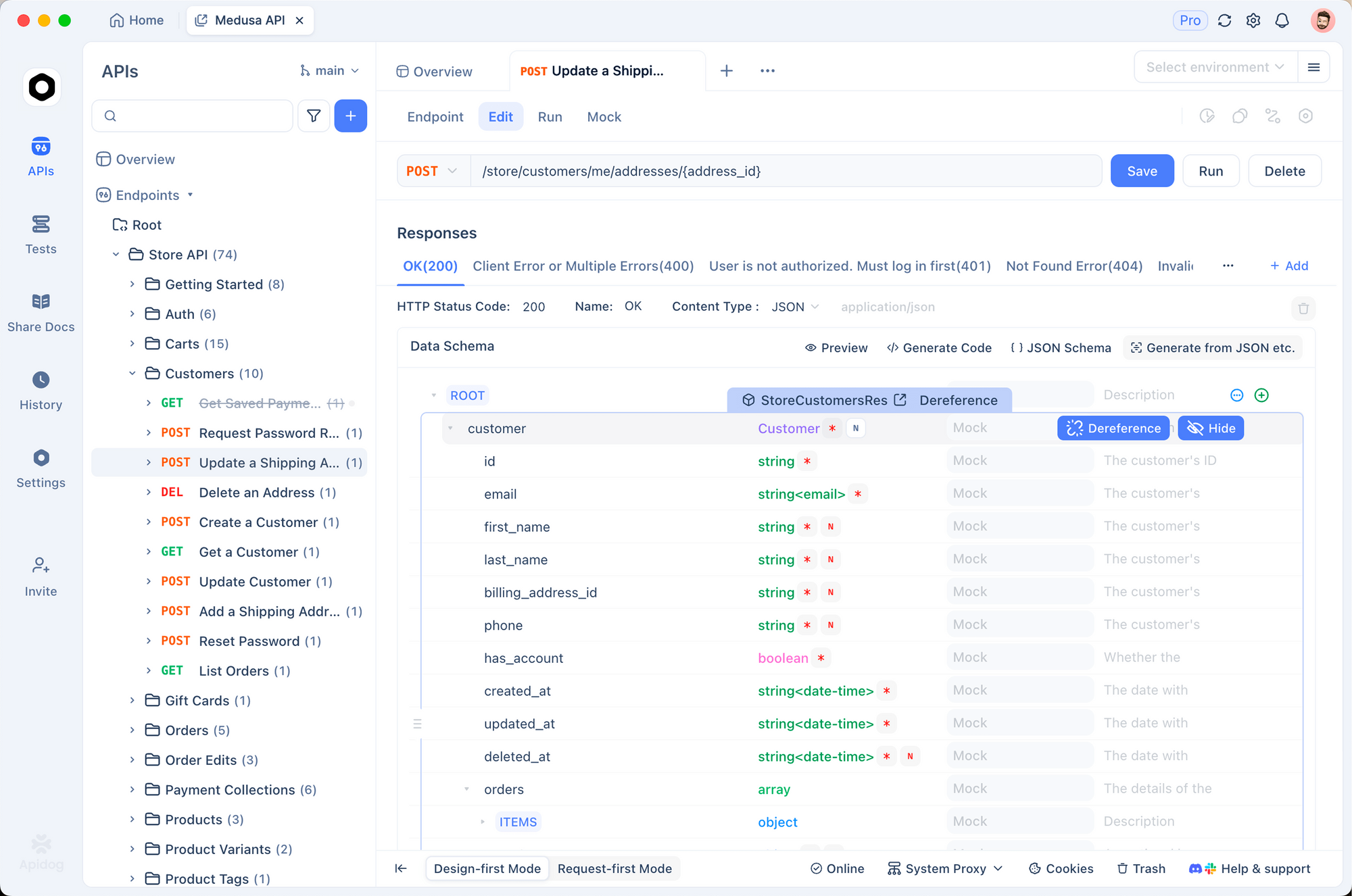
Download Apidog and set up two environments: puter-prototype (a localhost URL hosting your Puter page) and anthropic-prod (https://api.anthropic.com/v1). The collection ports cleanly when you graduate from Puter to the official API.
FAQ
Is this truly unlimited, or is there a hidden cap?Unlimited from the developer’s side, yes. The end user has whatever balance is in their Puter account; new accounts get starter credit and users top up if they want more. There is no per-developer cap.
Do I need to sign up for Anthropic?No. Puter handles the Anthropic relationship. You never see an Anthropic key.
Can I use this in production?Yes for browser-based apps. Puter runs production infrastructure. The right question is whether your users are willing to sign in to Puter; if yes, ship it.
Does Claude through Puter perform identically to the official API?The model output is the same; Puter calls the official Anthropic API on the user’s behalf. Latency may be marginally higher because of the extra hop, but the model behavior is unchanged.
What about Claude’s prompt caching savings?Puter does not expose Anthropic’s prompt caching pricing controls today. If you have a stable 50k-token system prompt and need the cache discount, use the official API.
Can I use Claude in a Discord bot or backend service through Puter?Not cleanly. Puter is browser-first and assumes a user session. Backend services should use the official Anthropic API.
What model should I default to?claude-sonnet-4-6. It is the right balance of cost, speed, and quality for most prompts. Move to claude-opus-4-7 when you need deeper reasoning, and claude-haiku-4-5 when you need bulk classification.
Will my users be charged a lot?Most chat-style usage costs cents per session at Anthropic’s rates. A casual user can run dozens of conversations on Puter’s starter credit before they need to top up.
Wrapping up
Free unlimited Claude through Puter.js is the cleanest path for any browser-based app that wants Anthropic-quality output without Anthropic-quality billing. Drop in the script, pick a model, write the prompt. The end user covers usage; you ship without a key.
For server-side workloads, prompt caching, or full tool-use flows, the official Anthropic API is still the right answer. But for prototypes, free public apps, hackathon builds, side projects, and static sites, Puter is the answer.
Build the request once in Apidog, benchmark Puter against the official API, and pick the path that matches your shape.