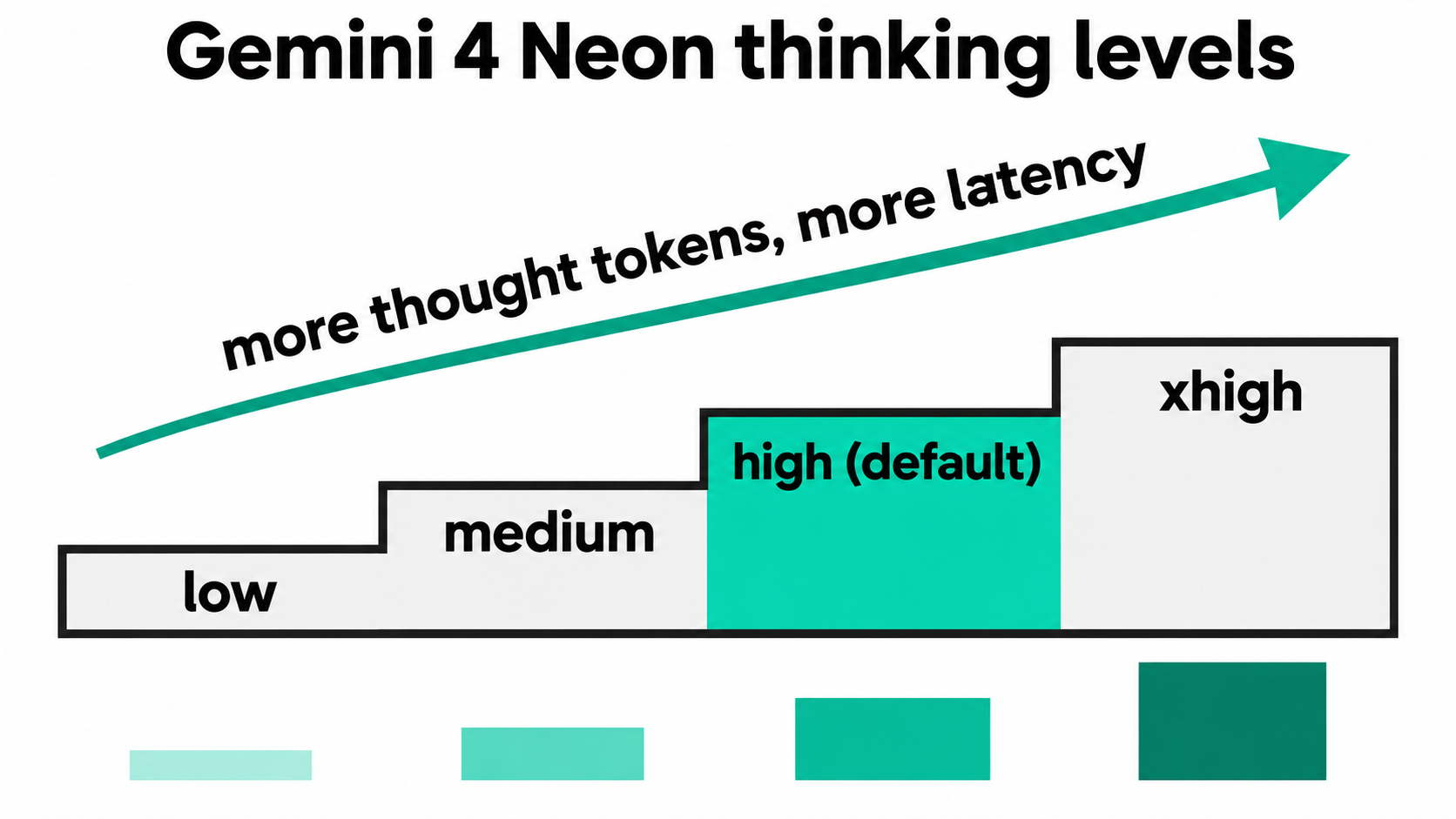
Gemini 4 Neon thinking levels give you four settings for how hard the model reasons before it answers: low, medium, high and xhigh. Neon defaults to high. Google recommends you keep high for most complex work and switch to xhigh only when high misses on hard, multi-step problems, because xhigh burns more tokens and takes longer.
What are Gemini 4 Neon thinking levels?
Thinking levels are values of the thinking_level parameter that set how much internal reasoning gemini-4-neon does before it writes a reply. Neon supports four: low, medium, high (the default) and xhigh. Higher levels use more thought tokens and add latency; lower levels answer faster and cost less.
Here’s how Google’s thinking guide describes each level for Neon:
thinking_level |
Token use | Google’s suggested use |
|---|---|---|
low |
Fewest tokens, lowest latency | Fast chat, high-throughput processing; still capable on agentic tasks |
medium |
Lower token use, faster responses | Interactive coding, live UI prototyping, latency-sensitive tool calls |
high (default) |
Balanced intelligence and speed | Complex coding, agentic execution, tool calling, multimodal knowledge work |
xhigh |
Most tokens, deepest reasoning | Hard multi-step engineering, analytical and scientific problems where high falls short |
Two values you might expect are missing. Neon rejects minimal with an error, so code copied from a Gemini 3 Flash app breaks if it sends that value. And the old thinkingBudget token count is deprecated on Gemini 4: sent alone, it maps to the nearest level with a warning; sent together with thinkingLevel, it returns a 400.
How does Neon’s default compare with other Gemini 4 models?
Neon starts one step higher than its larger siblings. Per the Gemini 4 Neon release notes, Neon and Hydrogen default to high and support xhigh, while Carbon and Argon default to medium and cap at high.
| Model | Default level | Levels supported |
|---|---|---|
gemini-4-neon |
high |
low, medium, high, xhigh |
gemini-4-hydrogen |
high |
low, medium, high, xhigh |
gemini-4-carbon |
medium |
low, medium, high |
gemini-4-argon |
medium |
low, medium, high |
This matters when you switch models. Move a Carbon workload to Neon without setting thinking_level and every request jumps from medium to high reasoning, which changes your token count. If you’re weighing the bigger models, our Gemini 4 Carbon vs Argon comparison covers that split.
How do you set thinking_level in the Gemini API?
Neon runs on the paid tier of both the Interactions API and generateContent. The field name differs between them.
Interactions API: put thinking_level inside generation_config.
curl "https://generativelanguage.googleapis.com/v1beta/interactions" \
  -H "x-goog-api-key: $GEMINI_API_KEY" \
  -H 'Content-Type: application/json' \
  -X POST \
  -d '{
    "model": "gemini-4-neon",
    "input": "Audit this payment retry queue for race conditions.",
    "generation_config": {
      "thinking_level": "xhigh",
      "max_output_tokens": 65536
    }
  }'
generateContent: use thinkingLevel inside generationConfig.thinkingConfig.
curl "https://generativelanguage.googleapis.com/v1beta/models/gemini-4-neon:generateContent" \
  -H "x-goog-api-key: $GEMINI_API_KEY" \
  -H 'Content-Type: application/json' \
  -X POST \
  -d '{
    "contents": [{"parts": [{"text": "Audit this payment retry queue for race conditions."}]}],
    "generationConfig": {
      "thinkingConfig": {"thinkingLevel": "medium"}
    }
  }'
In the Python SDK, the Interactions call takes generation_config={"thinking_level": "high"}, and the generateContent call takes thinking_config=types.ThinkingConfig(thinking_level="low"). Leave temperature, top_p and top_k out: Google says Neon ignores in-range values and rejects out-of-range ones with a 400. For a full first-request walkthrough on the same API design, see our Gemini 4 Hydrogen API guide.
When should you use high vs xhigh?
Use high by default and promote a task to xhigh only after high fails your quality bar on it. Google’s launch post frames xhigh as “deeper, multi-step reasoning for the hardest engineering, analytical, and scientific workloads.”
Pick xhigh when:
- The task has many dependent steps and an early mistake ruins the result, such as a multi-file refactor or a concurrency audit.
highgave a confident but wrong answer on your evaluation set, not just a slower one.- Latency doesn’t matter much, as in background jobs, nightly reviews or batch analysis.
- A wrong answer costs more than tokens, as in security patches or financial calculations.
Stay on high (or drop lower) when:
- The prompt is extraction or formatting. Google warns that
xhigh“can cause overthinking or exhaustmax_output_tokenson simpler prompts such as text or JSON extraction.” - A user is waiting. Chat, autocomplete and live tool calls fit
mediumorlow. - You run high volume. Every extra thought token is billed, and the difference multiplies across requests.
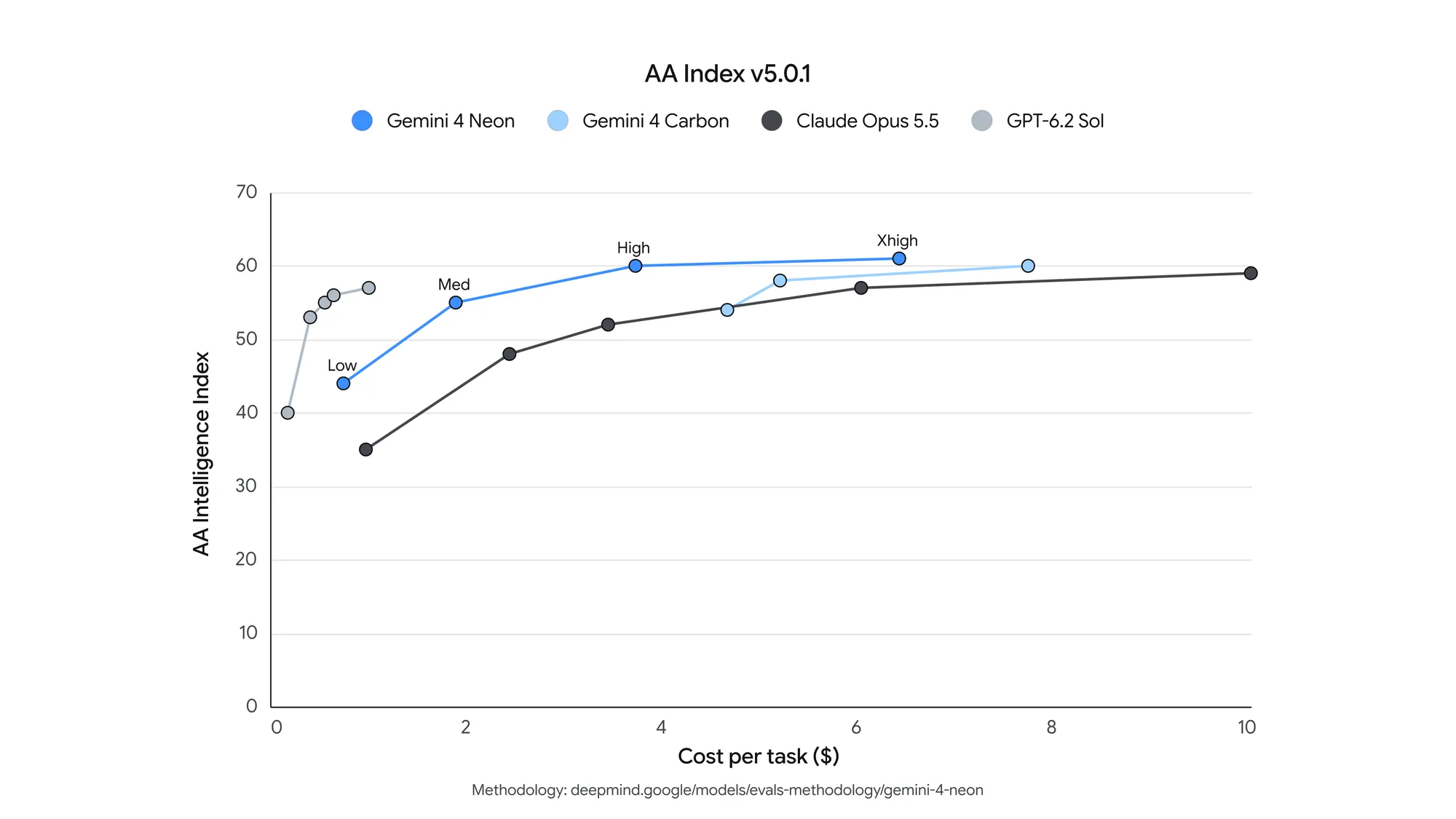
Google’s benchmark numbers back the split. In its launch announcement, Neon at xhigh scores 61 on the Artificial Analysis Intelligence Index, ranked third. At the default high, Google reports a 32% lower cost per task than Carbon. Those are Google’s figures, not our tests, but they show the trade: xhigh buys Neon’s highest score, high buys efficiency.
How much does each thinking level cost?
Each level has the same per-token price; what changes is how many tokens you pay for. Neon costs $3.00 per 1M input tokens and $15.00 per 1M output tokens, and Google’s pricing page states the output rate includes thinking tokens. Cached input drops to $0.15 per 1M through implicit caching (explicit caching isn’t supported on Neon). There’s no free tier for this model.
So the cost of a level is the thought tokens it adds, times $15 per million. Here’s the arithmetic for one request with 2,000 input tokens and an 800-token visible answer. The thought-token counts are hypothetical, chosen to show the math, not measured:
| Thought tokens (hypothetical) | Input cost | Output + thinking cost | Total per request | Per 10,000 requests |
|---|---|---|---|---|
| 500 | $0.006 | $0.0195 | $0.0255 | $255 |
| 2,000 | $0.006 | $0.042 | $0.048 | $480 |
| 8,000 | $0.006 | $0.132 | $0.138 | $1,380 |
Thinking dominates the bill quickly. At 8,000 thought tokens, reasoning is 87% of the request’s cost. That’s why Google’s own advice is to run your evaluation at all four levels and “pick the lowest thinking_level that meets your quality bar.” Our Gemini 3.8 Flash thinking levels guide covers the same trade on a cheaper model if you want to compare.
How do you measure tokens and latency per level?
Run the same prompt at each level and read the usage block. In the Interactions API, the response’s usage object reports total_input_tokens, total_output_tokens and total_thought_tokens separately. In generateContent, thought tokens appear as usageMetadata.thoughtsTokenCount.
This loop sends one prompt at all four levels and prints thought tokens plus wall-clock time:
for level in low medium high xhigh; do
  start=$(date +%s)
  usage=$(curl -s "https://generativelanguage.googleapis.com/v1beta/interactions" \
    -H "x-goog-api-key: $GEMINI_API_KEY" \
    -H 'Content-Type: application/json' \
    -d "{\"model\":\"gemini-4-neon\",
         \"input\":\"Find the race condition in this retry loop: ...\",
         \"generation_config\":{\"thinking_level\":\"$level\",\"max_output_tokens\":65536}}" \
    | jq -c '{status, thought: .usage.total_thought_tokens, out: .usage.total_output_tokens}')
  echo "$level $(( $(date +%s) - start ))s $usage"
done
Run it on 10 to 20 prompts from your real workload. One prompt tells you little; a set shows where high and xhigh start to disagree on quality.
Set your HTTP client timeout high while you test. Google’s migration notes say hard prompts can take several minutes and suggest a timeout of at least 15 minutes, or background execution.
Why does xhigh sometimes return an empty answer?
max_output_tokens caps thinking and visible output together. If Neon spends the whole budget reasoning, the interaction stops with status incomplete and returns a truncated or empty answer, and you still pay for the thought tokens it generated.
Three rules from Google’s docs avoid this:
- Remove old low caps. If your app hardcodes something like 8,192, raise it to 65,536, the default synchronous cap.
- Lower the level, not the cap. To cut cost or latency, drop to
mediumorlowinstead of shrinkingmax_output_tokens. - Go background for long work. For answers past 65,536 tokens, set
backgroundtotrueandmax_output_tokensup to 1,048,576 minus your input. Input, thinking and output share one 1M-token window. Our Gemini 4 Argon long-output guide walks through the polling pattern.
Let your coding agent benchmark all four levels with Apidog CLI
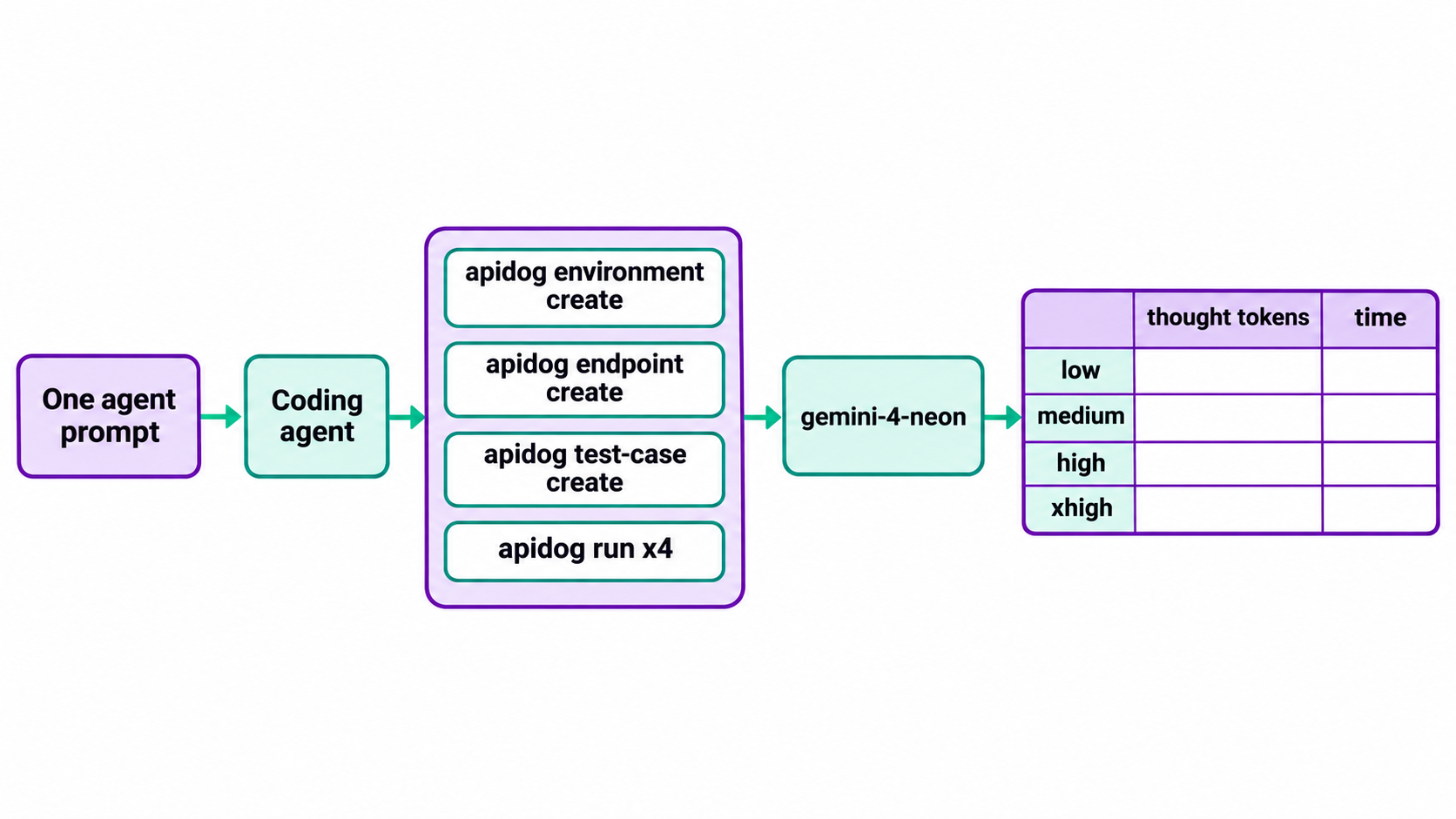
Rerunning that loop by hand gets old. Instead, let your coding agent (Claude Code, Codex, Cursor) build one reusable test with Apidog CLI and rerun it at each level whenever you want fresh numbers.
Set it up once:
npm install -g apidog-cli@latest
apidog login --with-token <YOUR_TOKEN>
npx -y skills add https://apidog.com   # pick your agent when prompted
Then give your agent one prompt:
In Apidog project <projectId>, create an environment "gemini" with base URL
https://generativelanguage.googleapis.com and variables GEMINI_API_KEY and
THINKING. Add an endpoint for POST /v1beta/interactions that sends the
x-goog-api-key header from GEMINI_API_KEY. Create a test case that sends model
"gemini-4-neon", my audit prompt, generation_config.thinking_level {{THINKING}}
and max_output_tokens 65536, and asserts: HTTP 200, status is "completed",
and usage.total_thought_tokens exists. Run it once per level (low, medium,
high, xhigh) and give me a table of thought tokens and response time.
The agent reads each payload schema, validates its JSON, writes the resources, and loops the run:
apidog environment create gemini --project <projectId> --base-url https://generativelanguage.googleapis.com
apidog cli-schema get endpoint-create
apidog cli-schema validate endpoint-create --file endpoint.json
apidog endpoint create --project <projectId> --file endpoint.json
apidog cli-schema validate test-case-create --file case.json
apidog test-case create --project <projectId> --file case.json
for level in low medium high xhigh; do
  apidog run --test-case <caseId> --project <projectId> -e <envId> \
    --env-var "THINKING=$level" -r cli,json --out-file "neon-$level"
done
The status is "completed" assertion catches the incomplete trap from the previous section, so a level that runs out of budget fails loudly instead of returning an empty string. Swap -r cli,json for -r junit and the same run goes into CI; the Apidog CLI CI/CD guide shows the pipeline, and Apidog CLI in Claude Code covers the agent setup. Apidog’s Free plan covers up to 4 users.
FAQ
What is the default thinking level for Gemini 4 Neon? high. You don’t need to send thinking_level to get it. Carbon and Argon default to medium, so set the level explicitly when you migrate from them.
Does Gemini 4 Neon support minimal thinking? No. Neon supports low, medium, high and xhigh, and it rejects minimal with an error. Use low for the fastest, cheapest responses.
Are thinking tokens billed on Gemini 4 Neon? Yes. Thought tokens bill at the $15.00 per 1M output rate. Google counts every token the model processes, including thinking tokens.
Can I still use thinkingBudget with Gemini 4 Neon? It’s deprecated on Gemini 4 models. Sent alone, it maps to the nearest thinkingLevel and returns a warning. Sent alongside thinkingLevel, the request fails with a 400.
Is xhigh always more accurate than high? Not always. Google says xhigh can overthink simple prompts such as text or JSON extraction and can exhaust max_output_tokens. Test both on your own prompts and keep the lowest level that passes.
Can I use Gemini 4 Neon thinking levels for free? No. Gemini 4 Neon isn’t available on the Gemini API free tier. In Google AI Studio and Google Antigravity it’s tied to paid Google AI Pro and Ultra plans.