Google shipped Gemini 3.5 Flash on May 19, 2026, and the headline pricing claim is bold: “less than half the cost of other frontier models” for agentic tasks. That’s the marketing line. This guide does the actual math.
You’ll find the per-token rates, the free-tier caps, the batch-mode discount, real-world cost scenarios for common workloads, and a side-by-side cost comparison against GPT-5.5 and Claude Opus 4.7. By the end, you’ll know exactly what Flash costs to run, and where you can save 50% or more without giving up much.
Quick summary
| Cost type | Rate |
|---|---|
| Standard input | ~$1.50 / 1M tokens |
| Standard output | ~$9.00 / 1M tokens |
| Batch mode input | ~$0.75 / 1M tokens (~50% off) |
| Batch mode output | ~$4.50 / 1M tokens (~50% off) |
| Cached input | reduced rate (varies) |
| Free tier (AI Studio) | ~1,500 requests/day, 1M tokens/min, 15 RPM |
| Vertex AI new account | $300 credit over 90 days |
Rates current as of May 2026 per Google’s launch announcement and aggregator listings. Always verify against the official pricing page before committing budget.
Gemini 3.5 Flash per-token rates
Flash uses the same pay-as-you-go model that every Gemini variant has used since 2.5: you pay per million input tokens and per million output tokens, independently.
| Tier | Input ($/1M) | Output ($/1M) |
|---|---|---|
| Standard | ~$1.50 | ~$9.00 |
| Cached input | discounted | n/a |
| Batch (async) | ~$0.75 | ~$4.50 |
Two practical notes:
- Tokens are not words. Rough rule: 1,000 tokens ≈ 750 English words. A 100,000-word novel is about 133K input tokens.
- Output is roughly 6× more expensive than input. Prompts that elicit long answers cost much more than prompts that get short answers. Structured output schemas usually save money over free-form prose because the model writes less.
For background on how Gemini’s batch mode works, see Gemini API batch mode is here and 50% cheaper.
Free tier: what you get without paying
The AI Studio free tier ships with Flash from day one. Limits on launch:
- 1,500 requests per day
- 1M tokens per minute
- 15 requests per minute
That’s enough for most side projects, internal prototypes, and small-scale automation. If your workload fits inside 1,500 calls/day, you pay $0.
Free-tier specifics:
- No credit card required
- Same
gemini-3.5-flashmodel as the paid endpoint - Same SDK pattern, just a different key
- Prompts may be used to improve Google’s models (opt out in AI Studio settings)
- Quotas can shift; don’t bet a launch deadline on the exact numbers
For the full setup walkthrough, see How to use Gemini 3.5 Flash for free and How to get a free Google Gemini API key.
Batch mode: the 50% discount most teams miss
If your workload doesn’t need real-time responses, batch mode cuts Flash costs roughly in half.
How it works:
- Submit a batch job with up to 50,000 prompts at once
- Google processes them within 24 hours
- You pay ~50% less per token, both input and output
When batch mode makes sense:
- Bulk document analysis (legal review, support ticket triage, content moderation)
- Overnight content generation for SaaS dashboards
- Embedding-style precomputation
- Migration jobs where you’re reprocessing historical data
When it doesn’t:
- Chat UIs (users won’t wait 24 hours)
- Live agent loops with user interaction
- Anything user-facing in real time
Most production stacks should run batch mode for any workload that can tolerate latency. The savings compound fast at scale. Setup details in our batch mode guide.
Cached input: another lever
If your prompts share a long static prefix (system prompt, big reference document, long instructions), context caching gives you a discount on the cached portion.
Pattern:
- Cache a 100K token reference document once
- Reuse it across thousands of queries
- Pay full rate only on the new question, not the cached prefix
Concrete savings depend on cache hit rate, but for RAG-style apps where the same retrieved chunks come back across queries, expect 30–60% input-cost reduction.
Real-world cost scenarios
Token math gets abstract fast. Here are five concrete scenarios at Flash’s standard rates.
Scenario 1: Customer support chat bot
- 10,000 user messages per day
- Average 200 input tokens (user message + system prompt)
- Average 400 output tokens (response)
Daily cost:
- Input: 10,000 × 200 × ($1.50 / 1M) = $3.00/day
- Output: 10,000 × 400 × ($9.00 / 1M) = $36.00/day
- Total: ~$39/day, ~$1,170/month
Run the same workload through batch mode (if you can tolerate batched responses): ~$585/month. Add context caching for the system prompt: another 20–30% off.
Scenario 2: Document Q&A SaaS
- 1,000 documents analyzed per day
- Each document averages 30K tokens (long PDF)
- Each Q&A returns 500 output tokens
Daily cost:
- Input: 1,000 × 30,000 × ($1.50 / 1M) = $45.00/day
- Output: 1,000 × 500 × ($9.00 / 1M) = $4.50/day
- Total: ~$50/day, ~$1,500/month
This is where Flash’s 1M context shines: no chunking infrastructure, just send the whole document. Compared to chunked RAG with a flagship model, you’d pay multiples more in API plus infrastructure.
Scenario 3: Long-running autonomous agent
- One agent run = ~50 model turns
- Each turn averages 5K input (growing context) and 1K output
- 200 runs per day
Per-run cost:
- Input: 50 × 5,000 × ($1.50 / 1M) = $0.375
- Output: 50 × 1,000 × ($9.00 / 1M) = $0.45
- Per run: ~$0.83
Daily total: 200 × $0.83 = ~$165/day, ~$4,950/month
For comparison, the same workload on Opus 4.7 (~$15/$75 per 1M) costs roughly $25/run, or $5,000/day. That’s the agentic cost gap Google’s claim is pointing at.
Scenario 4: Chart extraction pipeline
- 5,000 dashboard screenshots per day
- Each image input: equivalent of ~1,500 tokens
- Output: 300 tokens of structured JSON
Daily cost:
- Input: 5,000 × 1,500 × ($1.50 / 1M) = $11.25/day
- Output: 5,000 × 300 × ($9.00 / 1M) = $13.50/day
- Total: ~$25/day, ~$750/month
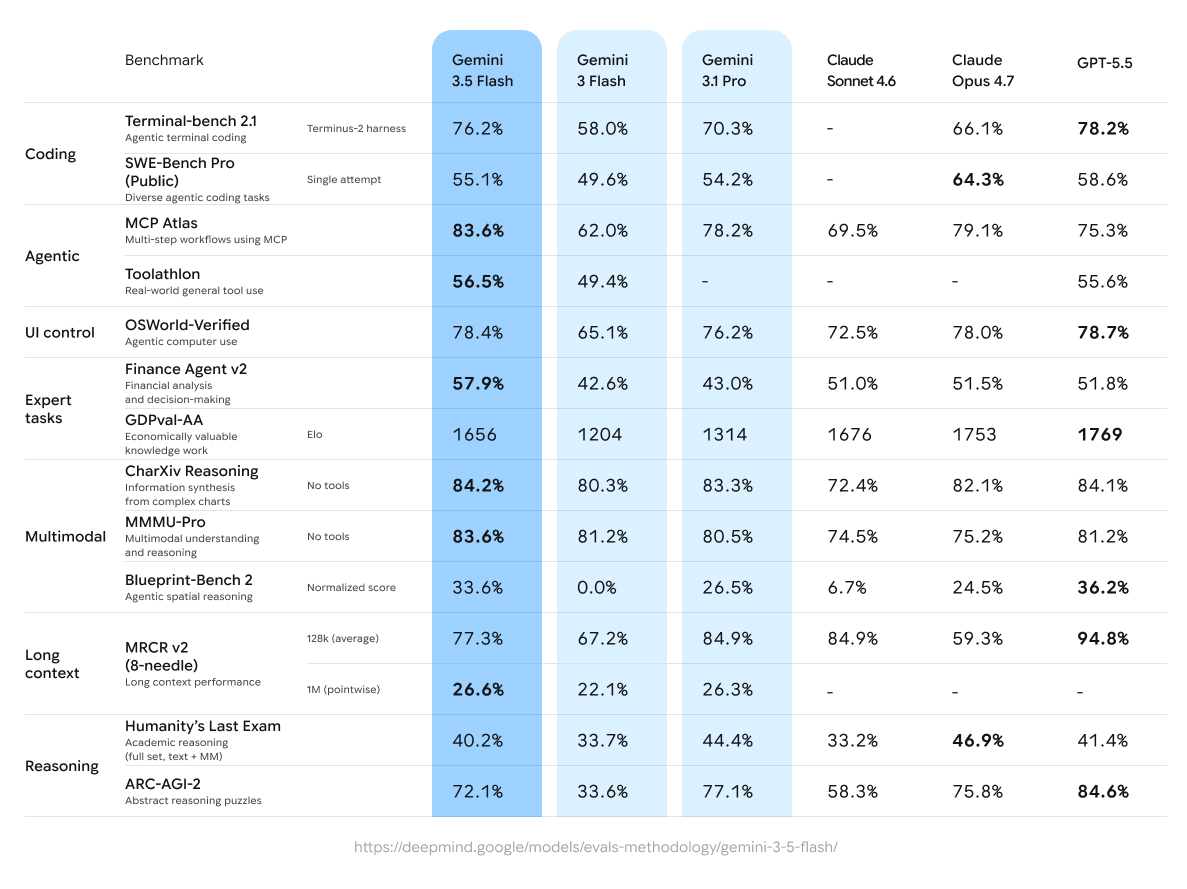
Add batch mode and the same workload runs at ~$375/month. CharXiv reasoning at 84.2% means the quality holds up.
Scenario 5: High-volume content generation
- 100,000 short articles generated per day
- 500 input tokens, 2,000 output tokens each
Daily cost:
- Input: 100,000 × 500 × ($1.50 / 1M) = $75/day
- Output: 100,000 × 2,000 × ($9.00 / 1M) = $1,800/day
- Total: ~$1,875/day, ~$56,250/month
Move this to batch mode and the monthly bill drops to ~$28K. At this scale you’d also want to test routing routine pieces to even cheaper models like 3.1 Flash-Lite and reserving Flash for harder generations.
Cost vs GPT-5.5 and Opus 4.7
The headline pricing comparison:
| Model | Input ($/1M) | Output ($/1M) | Multiple vs Flash |
|---|---|---|---|
| Gemini 3.5 Flash | ~$1.50 | ~$9.00 | 1× (baseline) |
| GPT-5.5 | ~$10 | ~$30 | 6.7× input, 3.3× output |
| Claude Opus 4.7 | ~$15 | ~$75 | 10× input, 8.3× output |
Run Scenario 1 (customer support chat) through each:
- Flash: $39/day
- GPT-5.5: ~$140/day (3.6× more)
- Opus 4.7: ~$330/day (8.5× more)
This is the agentic cost gap that drives Google’s marketing line. The flagships return marginally better quality on the hardest tasks; for everyday workloads, Flash is enough at a fraction of the price.
For deeper breakdowns, see GPT-5.5 pricing and our three-way comparison.
Cost vs other Gemini variants
| Model | Input ($/1M) | Output ($/1M) | When to use |
|---|---|---|---|
| Gemini 3.1 Flash-Lite | ~$0.40 | ~$2.00 | High-volume routine work |
| Gemini 3 Flash | ~$0.50 | ~$3.00 | Last-generation, still solid |
| Gemini 3.1 Pro | ~$2.00 | ~$12.00 | Reasoning-heavy work pre-3.5 Pro |
| Gemini 3.5 Flash | ~$1.50 | ~$9.00 | New default for most workloads |
| Gemini 3.5 Pro (June 2026) | TBD | TBD | Hardest reasoning tasks |
Flash is more expensive than its 3.x Flash predecessors but credibly cheaper than the previous Pro tier. For most teams, that’s the right trade: better than Flash 3.x, costs less than Pro 3.x.
For the older Gemini line, see 3.1 Flash-Lite, 3.0 API pricing, and 3 Flash.
Vertex AI pricing (production)
If you call Flash through Vertex AI instead of AI Studio, per-token pricing is the same. The differences are billing and account features:
- Service account auth instead of API keys
- Audit logs in Cloud Logging
- Data residency controls
- No free tier, but $300 new-account credit covers ~90 days of moderate use
- Custom quotas you can negotiate at scale
For most production teams, the path is: prototype on AI Studio’s free tier, switch to AI Studio paid for scale, then move to Vertex AI when you need enterprise controls. The model behavior is identical across all three.
Cost optimization tips
Six concrete habits that cut Flash bills the most:
- Run batch mode for anything that doesn’t need real-time response. 50% off, no quality loss.
- Cache long static prefixes. System prompts, reference docs, instructions, all good candidates.
- Use structured JSON output. Forces the model to write less, both faster and cheaper than free-form prose.
- Route by task complexity. Easy tasks to Flash-Lite; hard ones to Flash; the rare killer task to 3.5 Pro when it ships.
- Pre-validate inputs. Don’t burn tokens on malformed requests. Apidog catches these before they hit the API.
- Track per-prompt cost. Add a logging middleware that records input/output tokens per request. Cost overruns almost always come from a few outlier prompts.
For the prompt validation flow, download Apidog, build a test scenario for your Gemini endpoint, and add response-shape assertions. Burning the same broken request 200 times in a debug session is how teams waste their free-tier quotas in a single afternoon.
When the free tier isn’t enough
Three signals to upgrade from free to paid Flash:
- You’re hitting 1,500 requests/day multiple days in a row. Pay-as-you-go is cheap enough that the dev time spent dodging quotas costs more than the upgrade.
- You need higher RPM throughput. Free tier caps at 15 requests per minute; paid tiers go much higher.
- You need data residency or audit logs. Move to Vertex AI on a billed account.
Most teams find $50–200/month in paid Flash usage replaces a lot of free-tier juggling.
Pricing risks and what to watch
Three things that could change the math:
- Quota tightening. Google has historically narrowed free-tier quotas as models age. Don’t architect around the exact 1,500/day number.
- Pro launch pricing. When 3.5 Pro lands in June, Flash pricing may shift up or down depending on how Google positions the tiers.
- Region surcharges. Vertex AI pricing varies by region. US Central is the cheapest reference; expect 10–20% premiums in some regions.
Set up cost alerts on day one. Both AI Studio (in the project’s quotas page) and Vertex AI (in Cloud Billing) support per-day budget caps. Use them.
For teams benchmarking frontier model costs across providers, Grok 4.5's API pricing and tier structure follows a different cost model that is worth comparing before you commit to a provider.
If you're evaluating the newer generation, Gemini 3.6 Flash pricing follows a revised tier structure worth comparing directly against these 3.5 Flash rates.
Bottom line
Gemini 3.5 Flash is cheap enough that most production AI workloads in 2026 should start there. The standard rates ($1.50 / $9 per 1M tokens) undercut every other frontier-class option. Batch mode and context caching push the effective cost even lower.
For the workloads where Flash isn’t enough, the right move is to mix tiers: Flash for the bulk, a flagship like GPT-5.5 or Opus 4.7 for the hardest tasks. Routing by task complexity is the highest-leverage cost optimization you can make.
To put this into practice:
- Download Apidog and save the Gemini 3.5 Flash endpoint as a request
- Build a small eval comparing Flash vs your current model on 20 real prompts
- Log token counts; extrapolate monthly cost
- Decide where Flash replaces a more expensive model and where it doesn’t
That’s two days of work that usually pays back in a single billing cycle.