
Claude Opus 4.8 costs $5 per million input tokens and $25 per million output tokens in standard mode. That’s the same rate as Opus 4.7, so if you’re already budgeting for 4.7, nothing changes when you upgrade. The interesting part is everything around that headline number: a faster mode, a token-spend dial, caching, and batch discounts that move your real bill far more than the base rate.
This guide breaks down what you actually pay, with worked examples. For the model overview, see what is Claude Opus 4.8. To start building, see the API guide.
The rate card
| Mode | Input (per 1M tokens) | Output (per 1M tokens) | Speed |
|---|---|---|---|
| Standard | $5 | $25 | baseline |
| Fast | $10 | $50 | 2.5x faster output |
Two things stand out. First, output tokens cost five times more than input tokens, so the length of Claude’s responses drives your bill, not the size of your prompts. Second, fast mode doubles the rate for 2.5x faster output. Anthropic notes that fast mode is about three times cheaper than the equivalent was on previous models, so the premium for speed has dropped generation over generation.
You can confirm current rates in Anthropic’s pricing docs.
What fast mode is for
Standard mode is the default and the right choice for most workloads. Fast mode exists for the cases where latency is the product: live coding assistants, interactive agents, anything where a user is watching the cursor. You pay double per token for output that streams 2.5x faster.
The decision is simple. If a human is waiting on the response in real time, fast mode can be worth it. If the work runs in the background, an agent loop, a batch job, a scheduled task, stay on standard and keep the money.
How effort changes your bill
This is the lever most teams miss. Opus 4.8’s effort parameter controls how many tokens the model spends across the whole response, including tool calls. Because output is the expensive half, lowering effort on work that doesn’t need deep reasoning cuts cost directly.
The five levels, from cheapest to most expensive in token terms:
low: terse answers, fewest tool calls, lowest spendmedium: balancedhigh: the default, thoroughxhigh: deep reasoning, more tool calls, recommended for codingmax: no constraints, highest spend
A classification task at low effort might use a tenth of the output tokens it would at high. Same model, same rate, a fraction of the bill. Anthropic’s effort guidance covers where each level holds quality. The takeaway: match effort to the task instead of paying for high everywhere.
Worked cost scenarios
All figures use standard pricing ($5 input, $25 output per million tokens). They’re illustrative; your real token counts will vary.
Scenario 1: a chatbot turn. 1,000 input tokens, 500 output tokens.
- Input: 1,000 / 1,000,000 x $5 = $0.005
- Output: 500 / 1,000,000 x $25 = $0.0125
- Total: about $0.018 per turn
At low effort the output shrinks, pulling the per-turn cost under a cent.
Scenario 2: an agentic coding task. 50,000 input tokens of repo context, 8,000 output tokens at xhigh.
- Input: 50,000 / 1,000,000 x $5 = $0.25
- Output: 8,000 / 1,000,000 x $25 = $0.20
- Total: about $0.45 per task
If that 50K context repeats across calls, prompt caching drops the input cost to roughly $0.025, cutting the total to about $0.23.
Scenario 3: an overnight batch job. 1,000,000 input tokens, 200,000 output tokens, run through the Batch API at a 50% discount.
- Input: 1,000,000 / 1,000,000 x $5 x 0.5 = $2.50
- Output: 200,000 / 1,000,000 x $25 x 0.5 = $2.50
- Total: about $5.00 for the whole batch
For comparison shopping against cheaper models, see the Gemini 3.5 Flash pricing breakdown and Xiaomi MiMo v2.5 API cost.
Prompt caching: the biggest single saving
If you send the same system prompt, document, or codebase on every call, you’re paying full input price for tokens the model has already seen. Prompt caching fixes that. Cached input reads are charged at a fraction of the normal input rate, roughly a tenth, after the initial cache write.
Long-context agents save the most. A 50K-token system prompt billed at full rate on every call is expensive; cached, the repeated portion costs almost nothing. The first call writes the cache, every call after reads it cheap.
Batch API and large outputs
The Batch API runs jobs at a discount when you don’t need a real-time answer. Submit a set of requests, get results back within the batch window, pay less per token. It also raises the output ceiling: Opus 4.8 supports up to 300K output tokens through the Batch API with the output-300k-2026-03-24 beta header, versus 128K on the synchronous endpoint.
Use it for evals, bulk summarization, data labeling, and any pipeline where minutes of latency don’t matter.
Opus pricing across generations
Opus 4.8 holds the line on price. The story is how far the line dropped two generations ago:
| Model | Input (per 1M) | Output (per 1M) |
|---|---|---|
| Opus 4.1 | $15 | $75 |
| Opus 4.5 | $5 | $25 |
| Opus 4.6 | $5 | $25 |
| Opus 4.7 | $5 | $25 |
| Opus 4.8 | $5 | $25 |
Opus dropped from $15/$75 to $5/$25 at the 4.5 generation and has stayed there since, while the model behind the price keeps improving. You’re getting 4.8’s quality at 4.5’s rate. For a head-to-head against other vendors’ flagships, see Opus 4.8 vs GPT-5.5 vs Gemini 3.5.
A cost-optimization checklist
Before you scale Opus 4.8, work through this list:
- Set effort per task. Don’t pay
highfor classification orxhighfor a lookup. - Cache repeated context. System prompts, docs, and codebases should be cached.
- Batch the non-urgent. Move evals and bulk jobs to the Batch API.
- Cap
max_tokenssensibly. It bounds the worst-case output cost per call. - Stay on standard mode unless a human is waiting in real time.
- Watch usage tiers. Rate limits and spend climb together; the Claude Code weekly limits change is a reminder to track quota.
Track your real spend with Apidog
Estimated cost and actual cost diverge fast once you’re in production, because real responses vary in length and tool-call count. The way to stay honest is to inspect the usage object that every Messages API response returns, which reports input and output token counts per call.
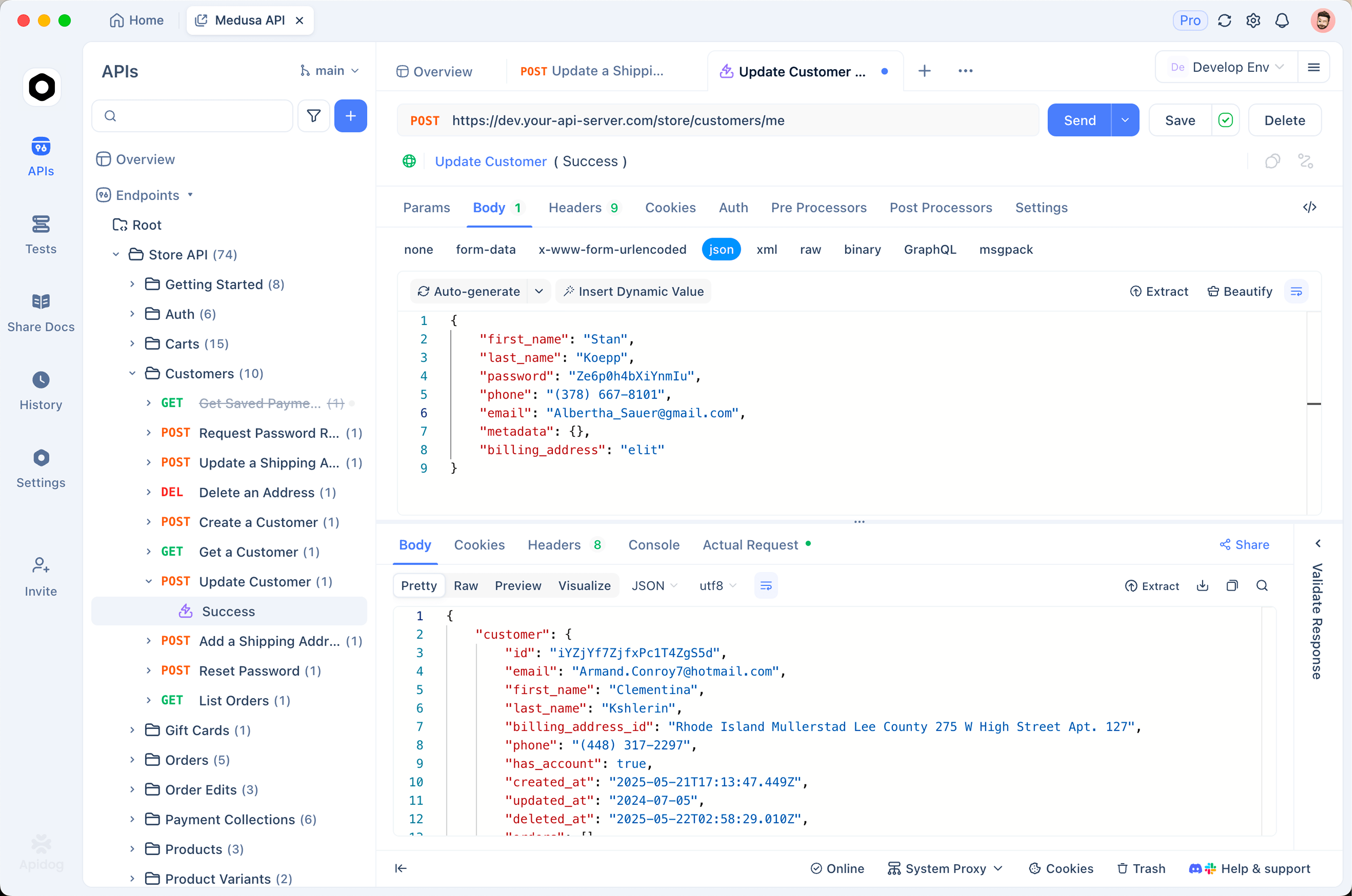
Apidog makes that visible:
- Send a real Opus 4.8 request and read the
usageblock in the response - Compare token counts across
effortlevels on the same prompt to see the cost delta directly - Save requests for each workload and re-run them as your prompts change
- Mock the endpoint so you can build and test without spending a token
Download Apidog, point a request at the Messages endpoint, and run the same prompt at low, high, and xhigh. The token counts tell you exactly what each effort level costs before you commit to it in production.
Once you have the Opus 4.8 numbers in hand, the logical next question is whether Fable 5 justifies the premium—a detailed Fable 5 vs Opus 4.8 breakdown examines which workloads actually benefit from the more expensive model.
FAQ
How much does Claude Opus 4.8 cost? $5 per million input tokens and $25 per million output tokens in standard mode. Fast mode is $10 and $50 for 2.5x faster output.
Is Opus 4.8 more expensive than Opus 4.7? No. The per-token rates are identical, so upgrading from 4.7 doesn’t change your bill.
What’s the difference between standard and fast mode pricing? Fast mode doubles the per-token rate in exchange for output that streams about 2.5x faster. Use it only when latency matters to a waiting user.
How do I lower my Opus 4.8 costs? Drop the effort level on simpler tasks, cache repeated prompt content, batch non-urgent jobs, and keep max_tokens tight. Output tokens are the main cost driver.
Does prompt caching really save money? Yes. After the first call writes the cache, repeated input is read at roughly a tenth of the normal input rate. Long-context agents save the most.
How many output tokens can Opus 4.8 produce? Up to 128K on the synchronous Messages API, and up to 300K through the Batch API with the output-300k-2026-03-24 beta header.
Where do I see token usage per call? In the usage object on every Messages API response. Tools like Apidog surface it so you can compare cost across effort levels.