To use Claude Haiku 5.5 in Claude Code, update to v2.1.293 or later with claude update, then start a session with claude --model claude-haiku-5-5 or run /model claude-haiku-5-5 inside one. The bigger win for most people is running it as a subagent: put model: haiku in a subagent file and let Sonnet 5.5 or Opus 5.5 hand it the searches, test runs and summaries. With an API key it costs $0.10/$0.50 per million input/output tokens for prompts up to 100K tokens, and $0.50/$2.50 above that.
Below: setup, the haiku alias trap, effort, subagent files, the 100K price step, and when Sonnet or Opus should lead. For the model itself, read what Claude Haiku 5.5 is. If your code calls APIs, Apidog holds the test scenarios a Haiku subagent can run for you.
Claude Haiku 5.5 in Claude Code at a glance
| Setting | Haiku 5.5 |
|---|---|
| Minimum version | v2.1.293 (claude update) |
| Model ID | claude-haiku-5-5 |
haiku alias |
Haiku 5.5 on the Anthropic API only |
| Context | 1M native on every plan, no [1m] suffix |
| Auto-compaction | About 967K tokens by default |
| Default effort | medium (levels low to max) |
| Thinking | Always on; can’t be turned off |
| API price | $0.10/$0.50 for prompts up to 100K tokens; $0.50/$2.50 over 100K |
| Plans | Pro, Max, Team, Enterprise or an API key; not Free |
Step 1: update Claude Code
Haiku 5.5 needs Claude Code v2.1.293 or later. The changelog entry calls it “now the default Haiku model on the Anthropic API.”
claude update
Claude Code isn’t on the Free plan. Free users can select Haiku 5.5 in the Claude.ai apps, but Claude Code needs Pro, Max, Team, Enterprise or an Anthropic API key. Per claude.com/pricing, Pro is $17 a month billed annually or $20 monthly, and Max starts at $100.
Step 2: select Haiku 5.5 as your main model
claude --model claude-haiku-5-5
Inside a running session, /model claude-haiku-5-5 does the same. If your saved model setting is haiku, a session saved on Haiku 4.5 resumes on Haiku 5.5.
The haiku alias only means Haiku 5.5 on the Anthropic API
| Provider | haiku resolves to |
|---|---|
| Anthropic API | Haiku 5.5 |
| Claude Platform on AWS | Haiku 4.5 |
| Amazon Bedrock, Google Cloud’s Agent Platform | Haiku 4.5 |
| Microsoft Foundry | Haiku 4.5 |
On any cloud provider, /model haiku and model: haiku in a subagent file give you Haiku 4.5. Pin the full ID there instead: claude-haiku-5-5 on Google Cloud and Claude Platform on AWS, your deployment name on Foundry, and an inference profile ID such as us.anthropic.claude-haiku-5-5 on Amazon Bedrock. Or point the alias at it with ANTHROPIC_DEFAULT_HAIKU_MODEL (Step 5).
Step 3: pick an effort level
Haiku 5.5 is the first Haiku with effort control: low, medium, high, xhigh and max, starting at medium in Claude Code.
claude --model claude-haiku-5-5 --effort high
In a session, /effort low saves a level for the current model. Anthropic’s prompting guide pitches low for short tool tasks and high-volume requests, medium for most work, and high for longer agent tasks. Save xhigh and max for jobs where your evals show a gain.
Thinking stays on. You can’t turn it off on Haiku 5.5 in Claude Code; alwaysThinkingEnabled: false and MAX_THINKING_TOKENS=0 have no effect. (The raw Messages API can disable it at high or below.) Lower the effort when you want fewer thinking tokens.
Step 4: run Haiku 5.5 as a subagent
Anthropic says Haiku 5.5 “pairs well with Opus 5.5 and Sonnet 5.5 as a subagent on coding work.” Subagents are Markdown files with YAML frontmatter in .claude/agents/ (project) or ~/.claude/agents/ (all projects). Only name and description are required, and the subagent docs accept sonnet, opus, haiku, fable, a full model ID, or inherit for model. Our subagent guide covers scopes and tools.
Replace Explore with a cheap explorer
The built-in Explore subagent runs on the main conversation’s model, not Haiku. On an Opus 5.5 session, every Explore search runs on Opus. A user or project subagent named Explore overrides the built-in and keeps its own model:
---
name: Explore
description: Fast read-only codebase search. Use to find files, symbols and call sites without editing anything.
tools: Read, Grep, Glob
model: haiku
effort: low
---

You search the codebase and report what you find. Return file paths with line
numbers and a short summary of each match. Never edit files.
Save it as .claude/agents/Explore.md. Run /tasks while it works to confirm the model. On a cloud provider, swap haiku for the full ID from Step 2.
Force every subagent onto Haiku
To run every subagent on Haiku, Explore included, set both variables in a settings file’s env block:
{
  "env": {
    "CLAUDE_CODE_SUBAGENT_MODEL": "haiku",
    "CLAUDE_CODE_SUBAGENT_MODEL_FORCE": "1"
  }
}
CLAUDE_CODE_SUBAGENT_MODEL alone is a default: a subagent’s own model field still wins, and Explore doesn’t move.
Step 5: point background work at Haiku 5.5
ANTHROPIC_DEFAULT_HAIKU_MODEL sets “the model to use for haiku, or background functionality,” such as summarizing past sessions for claude --resume. The older ANTHROPIC_SMALL_FAST_MODEL is deprecated, per the environment variable reference; replace it if your shell profile still sets it.
On the Anthropic API you needn’t set anything. On Google Cloud, background tasks default to Sonnet; on Foundry, to the primary model; on Bedrock, to Sonnet or the primary model. Once Haiku 5.5 is enabled in your account, pin it:
# Google Cloud's Agent Platform
export ANTHROPIC_DEFAULT_HAIKU_MODEL=claude-haiku-5-5

# Amazon Bedrock (inference profile ID)
export ANTHROPIC_DEFAULT_HAIKU_MODEL=us.anthropic.claude-haiku-5-5
The 100K price step in long sessions
Haiku 5.5’s price depends on prompt length, and Claude Code sends the conversation as the prompt on every turn. Once a session’s context passes 100K tokens, each request bills at $0.50/$2.50 instead of $0.10/$0.50, five times the short-prompt rate. The docs don’t say whether cached tokens count toward that line, so budget as if they do.
Auto-compaction won’t save you: Haiku 5.5 compacts at about 967K tokens by default, so a session can run far above the price step first. Two habits help when you pay per token:
- Compact earlier.
/autocompact 100ksets the lowest window Claude Code accepts, so the session compacts near the boundary instead of near 1M. - Push bulky work into subagents. A subagent has its own context, so test logs and search results stay out of the main conversation.
Even above 100K, $0.50/$2.50 is a quarter of Sonnet 5.5’s $2/$10. On a paid plan, sessions draw on usage limits instead, and Anthropic hasn’t published how Haiku 5.5 counts against them. Our Haiku 5.5 pricing breakdown works through the arithmetic.
Max and Team subscribers: the new monthly API credits ($100 on Max 5x, $200 on Max 20x, up to $500 pooled on Team) don’t cover interactive Claude Code, per Anthropic’s API credits docs.
When to keep Sonnet 5.5 or Opus 5.5 as the lead
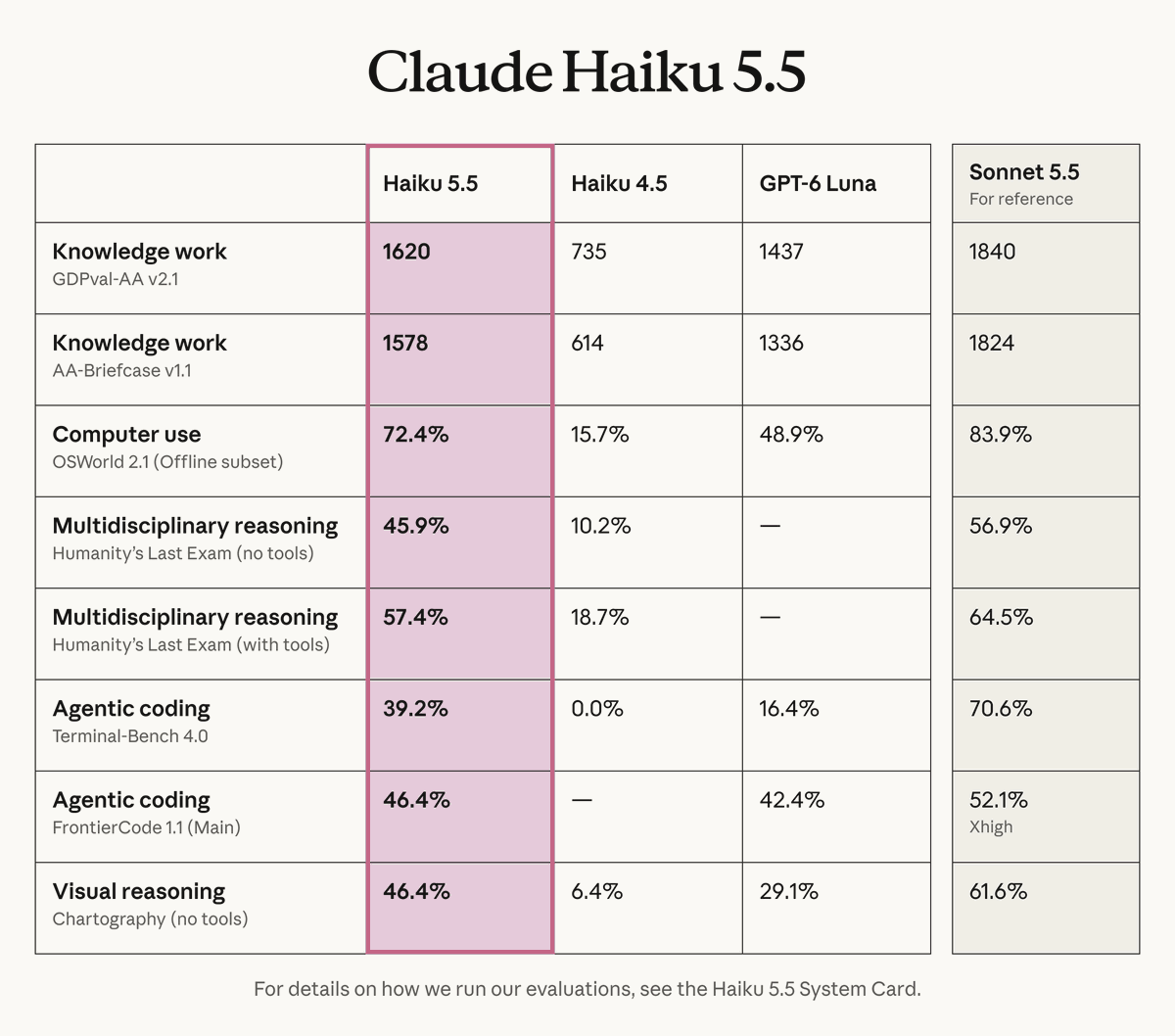
Anthropic says Sonnet 5.5 and Opus 5.5 “remain better choices for complex agentic coding tasks.” On Terminal-Bench 4.0, run by Anthropic in Claude Code at max effort, Haiku 5.5 scored 39.2% against Sonnet 5.5’s 70.6%. The launch charts add cost per attempt:
| Effort | Haiku 5.5 | Sonnet 5.5 |
|---|---|---|
medium |
20.3% at $0.68 | 28.8% at $0.68 |
high |
24.8% at $1.04 | 43% at $1.46 |
max |
39.2% at $2.64 | 70.6% at $10.44 |
At medium, both cost about the same per attempt and Sonnet scores higher. Haiku’s token price doesn’t carry over to long shell work, so don’t make it the lead for hard coding sessions.
Computer use tells a different story. On OSWorld 2.1, Haiku 5.5 at medium scored 53.3% at $0.13 per attempt, while Sonnet 5.5 at low scored 57.9% at $0.68. Our Haiku 5.5 benchmarks breakdown has every row, and the Sonnet 5.5 Claude Code guide covers the lead-model side.
A practical split: Sonnet 5.5 or Opus 5.5 as the main model, Haiku 5.5 for Explore, test runners, log readers and doc fetchers.
Example: a Haiku subagent that runs your Apidog tests
Test runs are verbose and repetitive, a good fit for Haiku. The Apidog CLI runs your saved Apidog test scenarios from the terminal, so a subagent can run them and hand back a short report while the lead model’s context stays clean.
---
name: api-test-runner
description: Runs the project's Apidog test scenarios with the Apidog CLI after an API endpoint changes, then reports pass and fail counts with the failing requests.
tools: Bash, Read
model: haiku
effort: low
---

Run the Apidog CLI test command documented in this repo's README for the
scenario that covers the changed endpoint. Report the pass and fail counts.
For each failure, give the request name, the expected result and the actual
result. Don't edit code. Don't retry a failed run more than once.
Setup for the CLI, including auth and the run command, is in Apidog CLI in Claude Code. Download Apidog to build the scenarios the subagent runs.
Migrating an app from Haiku 4.5
If your app calls Haiku 4.5 through the API, Claude Code can start the migration:
/claude-api migrate this project to claude-haiku-5-5
Expect breaking changes: manual budget_tokens thinking, non-default temperature or top_p, any top_k, and assistant prefill all return a 400 on Haiku 5.5. The Haiku 5.5 vs Haiku 4.5 guide lists each fix. After the edit, save the old and new request as a pair in Apidog, store ANTHROPIC_API_KEY as an environment variable, and assert on stop_reason and usage, so a new refusal stop or a jump in tokens fails a test instead of reaching production.
FAQ
Is Haiku 5.5 the default model in Claude Code? No. It’s the default Haiku model on the Anthropic API, which means the haiku alias points to it. Select it as your main model with --model or /model.
Can I use Haiku 5.5 in Claude Code on the Free plan? No. Claude Code needs a paid plan or an API key. Free users can pick Haiku 5.5 in the Claude.ai apps; see how to use Claude Haiku 5.5 for free.
Why does model: haiku give me Haiku 4.5? You’re on Bedrock, Google Cloud, Foundry or Claude Platform on AWS, or on a version before v2.1.293. Pin the full ID or set ANTHROPIC_DEFAULT_HAIKU_MODEL.
Can I turn off thinking to save tokens? Not in Claude Code. Lower the effort instead; low is the cheapest setting.
Your next step
Run claude update, add the Haiku Explore override, and keep your current lead model for a week. Then add the test-runner subagent if your project has APIs. To call the model from your own code, start with the Haiku 5.5 API guide. Apidog is free to start and gives that subagent real tests to run.