Claude Opus 4.8 shipped with a headline feature for Claude Code: Dynamic Workflows. In one session, an orchestrating agent can spin up hundreds of parallel subagents to attack a large, branching task: refactoring across dozens of files, running a wide test matrix, or exploring several solution paths at once. It looks like magic in the terminal. Under the hood it’s two concrete pieces working together.
This guide takes apart how Dynamic Workflows actually work, when to reach for them, and how to build the same orchestration pattern through the raw API. For the model itself, see what is Claude Opus 4.8. For agent architecture background, our Claude Code agent harness breakdown is the companion read.
What Dynamic Workflows actually are
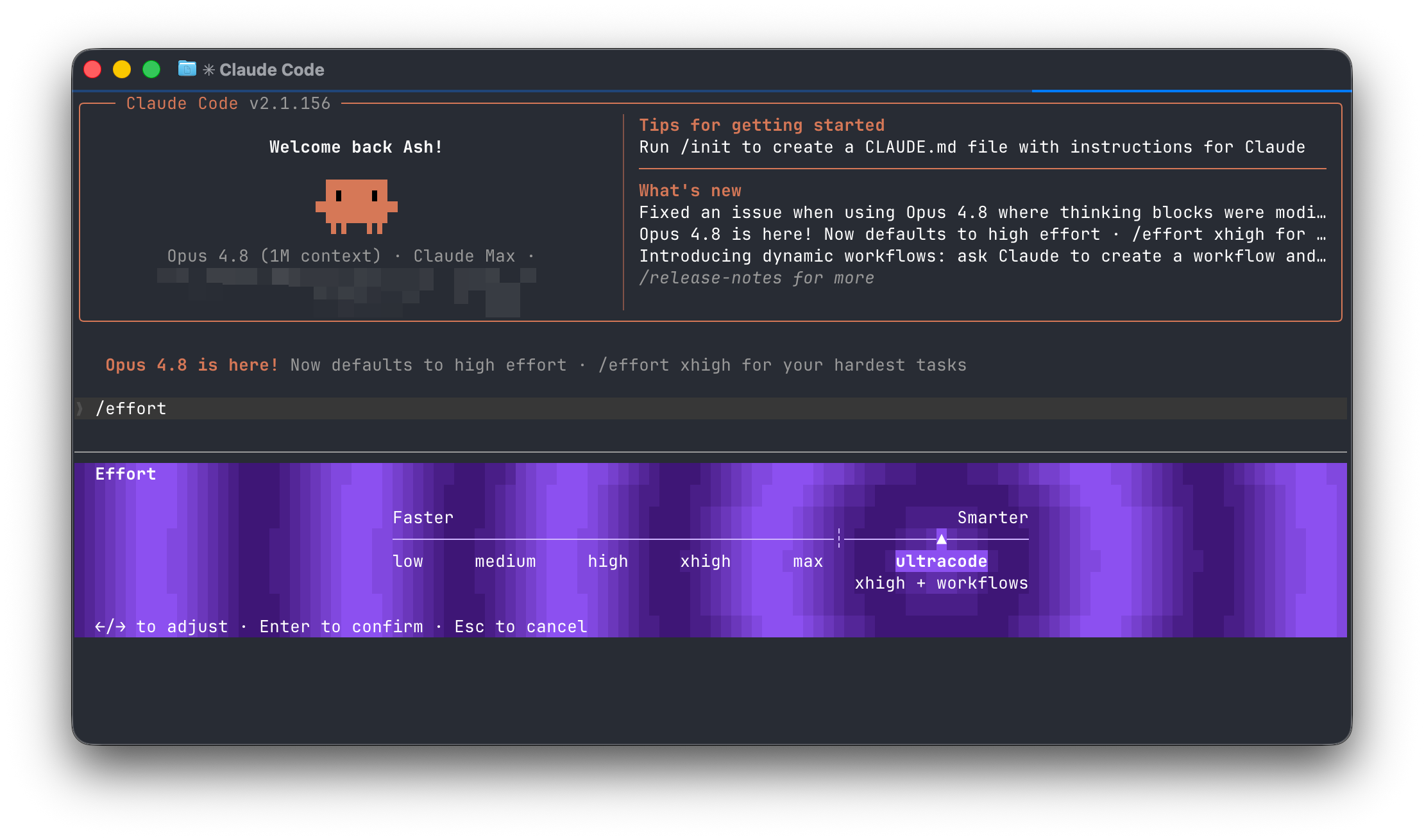
In Claude Code, Dynamic Workflows surface as a mode called ultracode in the effort menu. Here’s the part worth understanding: ultracode is not a new API effort level. It’s a combination of two things that already exist in Opus 4.8:
- The
xhigheffort level - Mid-conversation system messages
Put together, those give an orchestrator agent both the reasoning depth to plan a large job and the standing permission to launch worker agents as the job unfolds. That’s the whole trick. Everything else is Claude Code wiring.
Ingredient 1: xhigh effort
The effort parameter controls how many tokens Opus 4.8 spends across a response, including tool calls. xhigh is the level Anthropic recommends for long-horizon coding and agentic work; it’s tuned for runs that stretch past 30 minutes with token budgets in the millions.
For a Dynamic Workflow, that depth matters because the orchestrator has to do real planning: break the task into independent units, decide how many workers to spawn, and merge their results. Lower effort levels scope work down and make fewer tool calls, which is the opposite of what an orchestrator needs. When you run xhigh, set a large max_tokens (64K is a sane starting point) so the model has room to think and coordinate.
Ingredient 2: mid-conversation system messages
This is the new Messages API capability that makes the whole thing possible. Before Opus 4.8, a system prompt sat at the start of a conversation and stayed fixed. Now you can place a system entry partway through the messages array, injecting new instructions or permissions mid-task.
That’s what grants an orchestrator standing permission to launch multi-agent workflows after the conversation has started, rather than negotiating it up front. Anthropic documents the mechanism in mid-conversation system messages. It’s a small API change with a large consequence: agents can now gain capabilities in the middle of a run based on what they discover.
Turning it on in Claude Code
In Claude Code, Dynamic Workflows live behind the ultracode option in the effort menu. Selecting it sets xhigh effort and grants the session permission to spawn parallel subagents through mid-conversation system messages. From there you describe a large task and let the orchestrator fan it out.
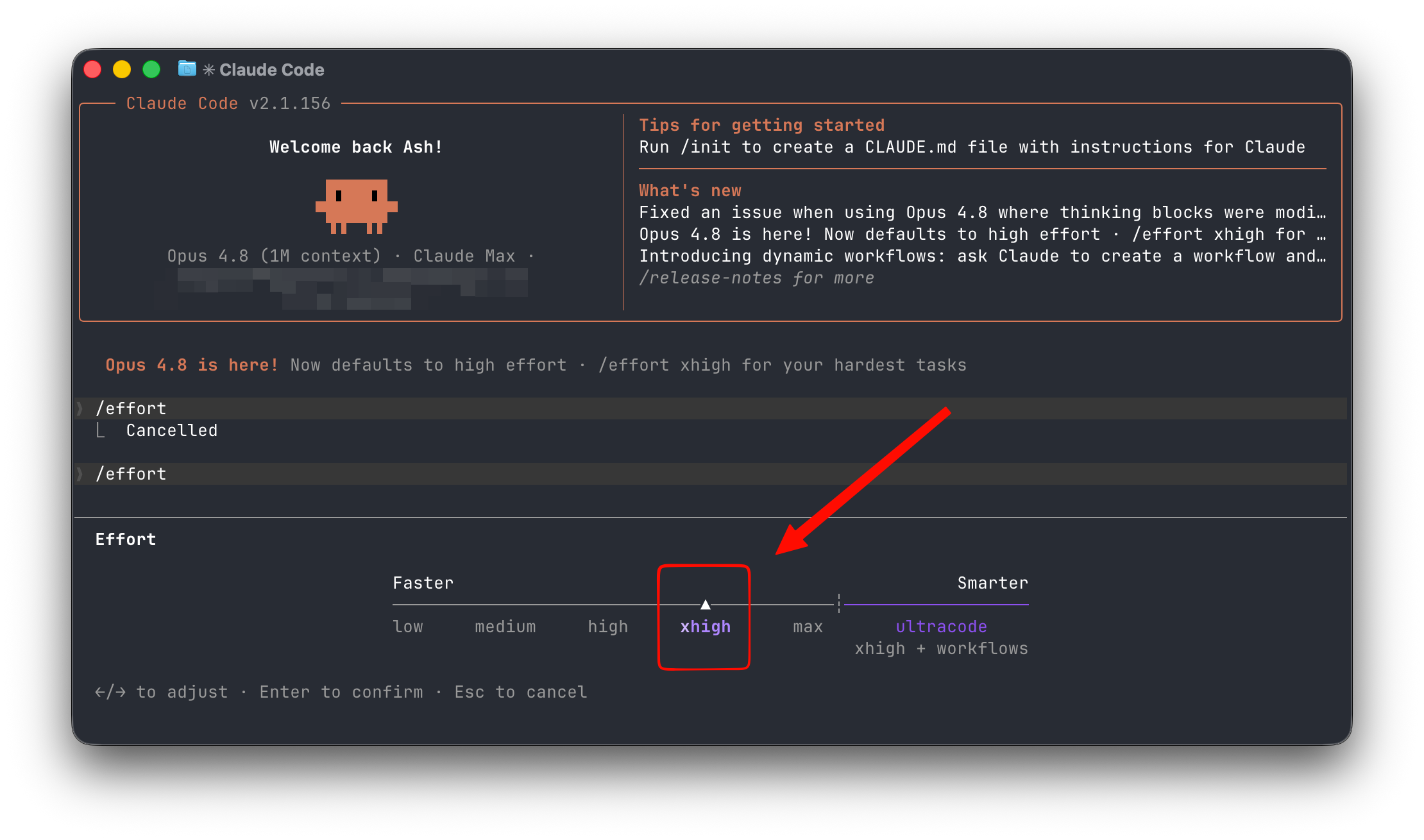
A few things happen automatically:
- Claude plans the task and decides how to split it
- It launches workers in parallel, each scoped to a slice of the job
- Results stream back and get merged into the main session
If you’ve set up Claude Code with a plan, our Claude Agent SDK with Claude plan setup guide covers the surrounding configuration.
When to use Dynamic Workflows (and when not to)
Dynamic Workflows shine on wide, parallelizable work:
- Refactoring a pattern across many files at once
- Generating and running a large test matrix
- Exploring several implementation approaches in parallel, then comparing
- Large-scale codebase analysis where each worker takes a module
They’re the wrong tool for narrow, sequential tasks. Spawning hundreds of subagents for a one-file change burns tokens for no benefit, and parallel workers can’t help when each step depends on the last. The cost is real: hundreds of xhigh subagents mean millions of tokens. Match the pattern to the shape of the work.
Building the same thing through the API
You don’t need Claude Code to build orchestration. The same two ingredients are available on the raw Messages API, and Anthropic provides a worked example in build an orchestration mode. The shape is:
- Run an orchestrator call at
xhigheffort that plans the task - Use mid-conversation system messages to grant the orchestrator permission to dispatch workers
- Fan out worker calls in parallel, each scoped to one unit of work
- Collect results and feed them back to the orchestrator to merge
import anthropic

client = anthropic.Anthropic()

orchestrator = client.messages.create(
    model="claude-opus-4-8",
    max_tokens=64000,
    output_config={"effort": "xhigh"},
    thinking={"type": "adaptive"},
    messages=[
        {"role": "user", "content": "Plan a refactor of the auth module across all 14 services."},
    ],
)
Each worker is a separate Messages call you can run concurrently, often at a lower effort level since its job is narrow. If you’re weighing this against Anthropic’s hosted agent infrastructure, the managed agents vs Agent SDK guide lays out the trade-offs.
Cost and control
Parallel subagents multiply token spend fast. A Dynamic Workflow that launches 200 workers, each spending tens of thousands of tokens at xhigh, runs into real money. Three habits keep it sane:
- Scope workers tightly and run them at
mediumorloweffort where the subtask allows - Cap
max_tokensper worker so a runaway agent can’t drain your budget - Cache shared context so the repeated system prompt isn’t billed at full rate on every worker
The Opus 4.8 pricing breakdown has the math on effort levels and caching. The short version: orchestration is powerful, but the bill scales with the number of agents, so treat parallelism as a deliberate choice.
Parallelism beyond a single session
Dynamic Workflows spawn subagents inside one Claude Code session. The limit is the session: when it ends the orchestration ends with it, and nobody else can see what ran.
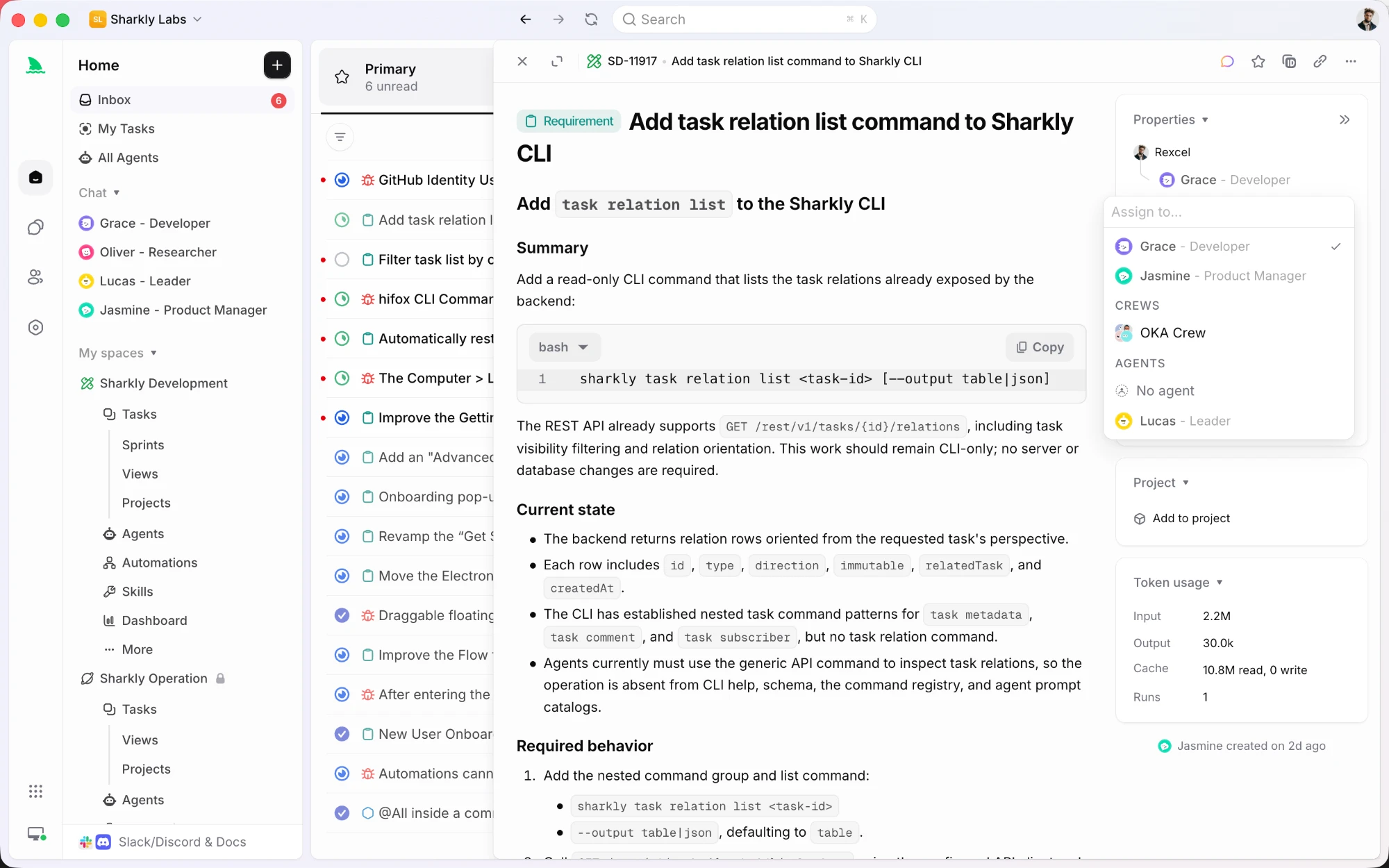
Sharkly handles the layer above. Each task is assigned to an Agent or a Crew and dispatched to a Computer you connect, so parallel work spreads across machines instead of one process tree. Repository-backed runs can use a separate worktree per task, which is the mechanical fix for several agents editing one repo at once, and each Computer carries its own task concurrency limit so you decide how much parallelism a machine takes.
Crews cover the coordination case. A leader agent reads the task, mentions the specialist agents it needs, and their results come back into the same task instead of a transcript only one person holds. Run states and execution traces are stored per task, so a failed branch of the fan-out is something you can open and read later.
Use Dynamic Workflows for the fan-out inside a problem. Use a task board when the fan-out needs to outlive the session.
Testing your orchestration with Apidog
When you build orchestration through the API, the hard part to debug is the fan-out: are workers getting the right scoped context, are their responses the shape your merge step expects, and does your mid-conversation system message land correctly? You don’t want to discover a bug after 200 live worker calls.
Apidog lets you test the pieces in isolation:
- Save the orchestrator request and inspect the planned task breakdown before you dispatch anything
- Mock the worker endpoint so you can test your fan-out and merge logic without spending tokens on hundreds of real calls
- Add assertions on worker response shape so a drifting payload fails loudly
- Replay a single worker call at different
effortlevels to tune cost per worker
Download Apidog, build the orchestrator and worker requests against https://api.anthropic.com/v1/messages, and validate the loop on mocks first. The Opus 4.8 API guide has the base request to start from. Once the logic is solid on mocks, flip to the live endpoint.
Workflow tooling is evolving on the version-control side too — gstack is rethinking how stacked changes ship, and it pairs naturally with agent-driven development.
FAQ
What are Dynamic Workflows in Claude Code? A feature that lets one session launch hundreds of parallel subagents to handle large, branching tasks. It’s powered by xhigh effort plus mid-conversation system messages on Opus 4.8.
Is ultracode a separate effort level? No. Ultracode is Claude Code’s name for xhigh effort paired with standing permission to launch multi-agent workflows. The API effort levels are still low, medium, high, xhigh, and max.
What are mid-conversation system messages? A Messages API change in Opus 4.8 that lets you place a system entry partway through the conversation, injecting new instructions or permissions mid-task. It’s what enables an orchestrator to spawn workers after a run starts.
Can I build Dynamic Workflows without Claude Code? Yes. Use xhigh effort plus mid-conversation system messages on the raw Messages API. Anthropic publishes a worked orchestration example in its docs.
Do Dynamic Workflows cost a lot? They can. Hundreds of xhigh subagents add up to millions of tokens. Scope workers tightly, lower their effort where you can, and cache shared context to control spend.
When should I avoid Dynamic Workflows? On narrow or strictly sequential tasks. Parallel workers add no value when each step depends on the previous one, and they waste tokens on small jobs.