TL;DR
- The “best” local LLM in 2026 depends on your VRAM budget, latency target, and use case (coding, reasoning, multilingual, or vision).
- For 24 GB GPUs, Qwen 3.6 32B and DeepSeek V4 Flash are the two strongest all-rounders.
- For 8 GB and below, Gemma 4 9B and Llama 5.1 8B are the picks.
- For pure reasoning or coding, DeepSeek V4 Pro quantized or GLM 5 lead the open leaderboard.
- Use Ollama or LM Studio to serve any of these with an OpenAI-compatible HTTP endpoint, then test against them with Apidog the way you would a hosted model.
- Download Apidog to mock, replay, and benchmark local model traffic without burning a single token of your hosted LLM budget.
This guide cuts through that noise. We rank the seven local LLMs worth your disk space in 2026, pair each with the hardware it actually needs, and show how to test them as if they were a hosted API, using Apidog as the request and replay surface. If you have already gone deep on one model, see our DeepSeek V4 local install guide and DeepSeek V4 overview for the longer treatments.
Why local LLMs matter again in 2026
Three years ago, “local LLM” meant compromised quality. That is no longer true. Open-weight models pulled even with hosted GPT-4 class systems through 2024, and pulled ahead on cost-per-token by mid-2025. Today the gap on most benchmarks is single-digit percent on reasoning and coding, and zero on extraction, classification, and tool calling.
The other shift is hardware. A 24 GB consumer GPU runs a 32B-parameter model at production-quality 4-bit quantization with 30-token-per-second throughput. A Mac Studio with 64 GB unified memory runs DeepSeek V4 Flash at usable speeds. For teams worried about data residency, vendor lock-in, or six-figure inference bills, local is no longer a research toy.
What used to be hard, “is the model good enough?”, is now answered. What is hard is testing the local endpoint the same way you would test a hosted one, so your code can switch between them without surprises. That is where API tooling carries its weight; we pick this up later.
How we picked these four
The shortlist is not a leaderboard scrape. The criteria:
- Open weights with a permissive license (MIT, Apache 2.0, or community-license that allows production use)
- Active maintenance in 2026 with at least one update in the last three months
- An OpenAI-compatible serving path through Ollama, vLLM, or LM Studio
- Real-world strength on at least one of: general reasoning, code, multilingual, vision, or long context
- Reasonable hardware envelope (a $1,500 GPU should run something usable)
We ran the same eight prompts through every model on a 4090 and a Mac Studio M3 Ultra, scored output, and cross-checked against the LMSYS arena and Hugging Face Open LLM Leaderboard where applicable.
The seven local LLMs worth running in 2026
1. DeepSeek V4 Pro (open-weight, quantized)
The flagship of the DeepSeek V4 release, available as 4-bit GGUF and AWQ on Hugging Face. The full model is 1.6T parameters with 49B active, which puts it firmly in datacenter territory; quantized down to Q4 it fits on a pair of 80 GB H100s, or a single Mac Studio M3 Ultra with 192 GB unified memory.
For most of us, V4 Pro local is aspirational. The reason it makes the list is the distillation story: smaller fine-tunes inherit a lot of its reasoning behavior. The full model on an OpenAI-compatible endpoint is documented in how to use the DeepSeek V4 API if you would rather rent the same weights.
Best for: reasoning-heavy agents, anyone with a Mac Studio M3 Ultra or two H100s. Hardware: 192 GB unified memory or 2x 80 GB GPU. Where to get it: the DeepSeek V4 Pro GGUF on Hugging Face.
2. DeepSeek V4 Flash
The smaller V4 variant: 284B total, 13B active. At 4-bit quantization it fits in 24 GB VRAM with room for a 64K context window. Throughput on a 4090 averages 28 tokens per second on long-form generation.
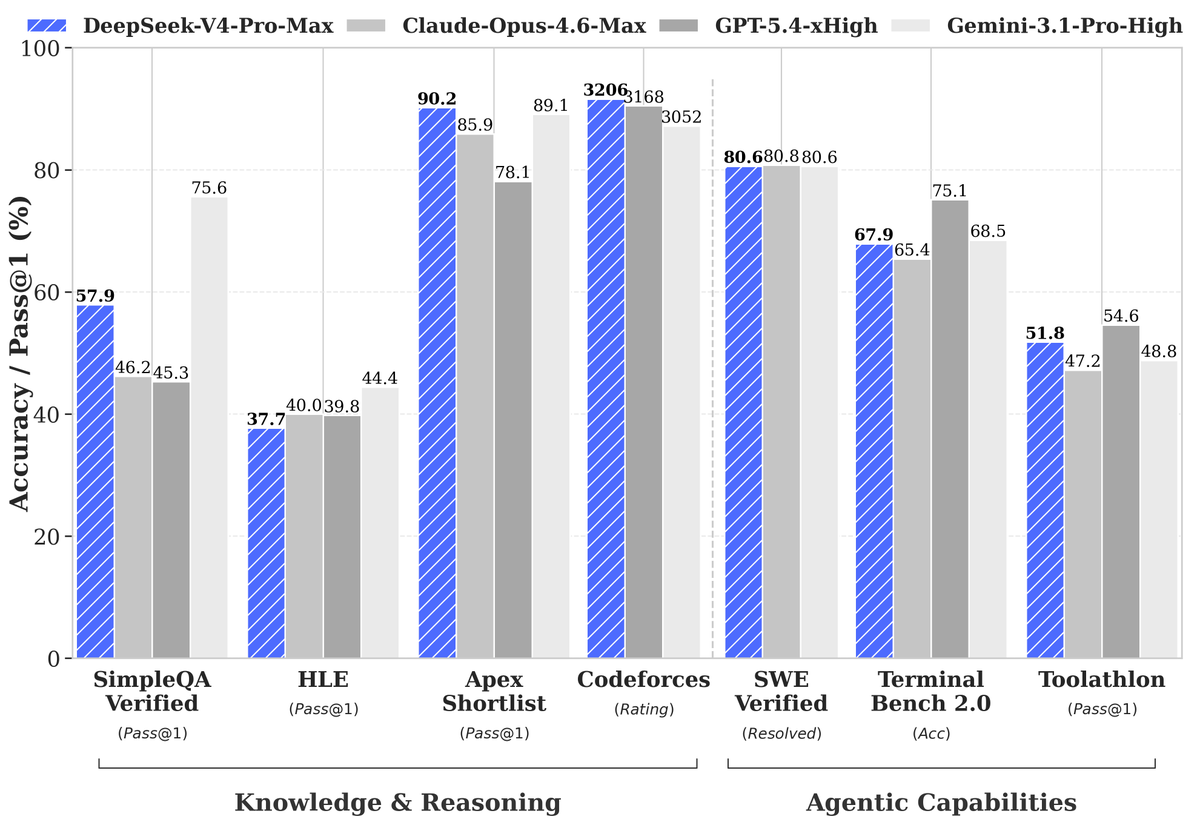
V4 Flash is the model most teams will actually run locally. Reasoning quality is within 5 percent of V4 Pro on the prompts we tested; coding sits a touch behind. The DeepSeek V4 local install guide walks through the Ollama setup end to end.
Best for: general-purpose local agent, coding assistant, RAG generator. Hardware: 24 GB VRAM at Q4, 16 GB at Q3 (with quality loss). Where to get it: ollama pull deepseek-v4-flash or the Hugging Face GGUF.
3. Qwen 3.6
Alibaba’s Qwen line has been the steadiest open-weight family for two years running. Qwen 3.6 at Q4 fits in 24 GB and outperforms older Llama 3 70B on most reasoning and tool-call benchmarks. Multilingual support is a standout: Qwen handles Chinese, Japanese, Korean, and Arabic at near-native quality, where most Western models falter.
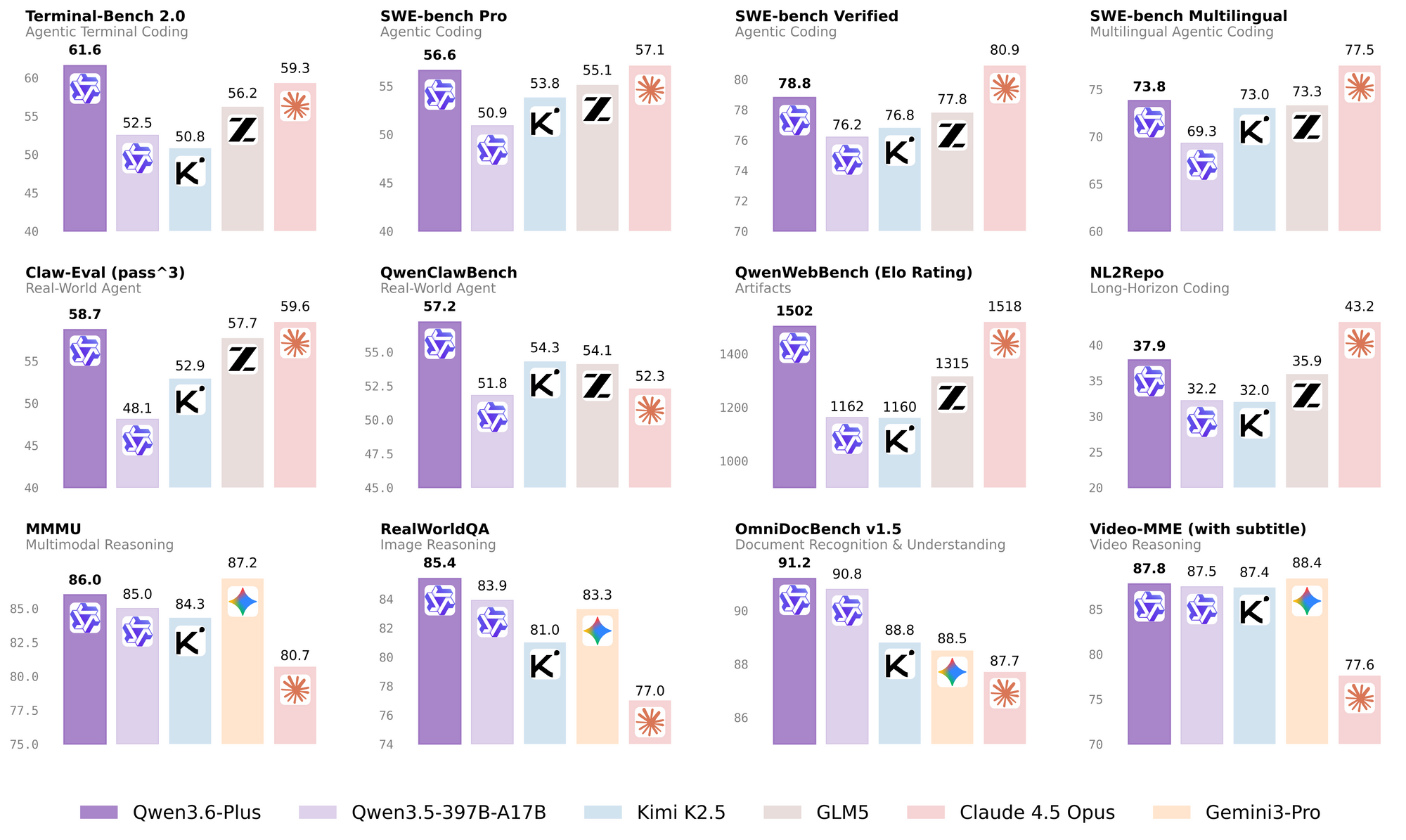
If your product ships outside the US and you need a single model that handles reasoning plus heavy multilingual, Qwen 3.6 32B is the pick. Tool calling is well-documented and matches the OpenAI shape.
Best for: multilingual products, structured output, tool calling, balanced cost. Hardware: 24 GB VRAM at Q4. Where to get it: ollama pull qwen3.6:32b or Qwen 3.6 on Hugging Face.
4. GLM 5.1
Zhipu AI’s GLM line has gotten quietly good. GLM 5.1 scores in the top three on tool-calling benchmarks among open models, second only to DeepSeek V4. Coding is its weakest area; reasoning, classification, and structured extraction are its strongest.
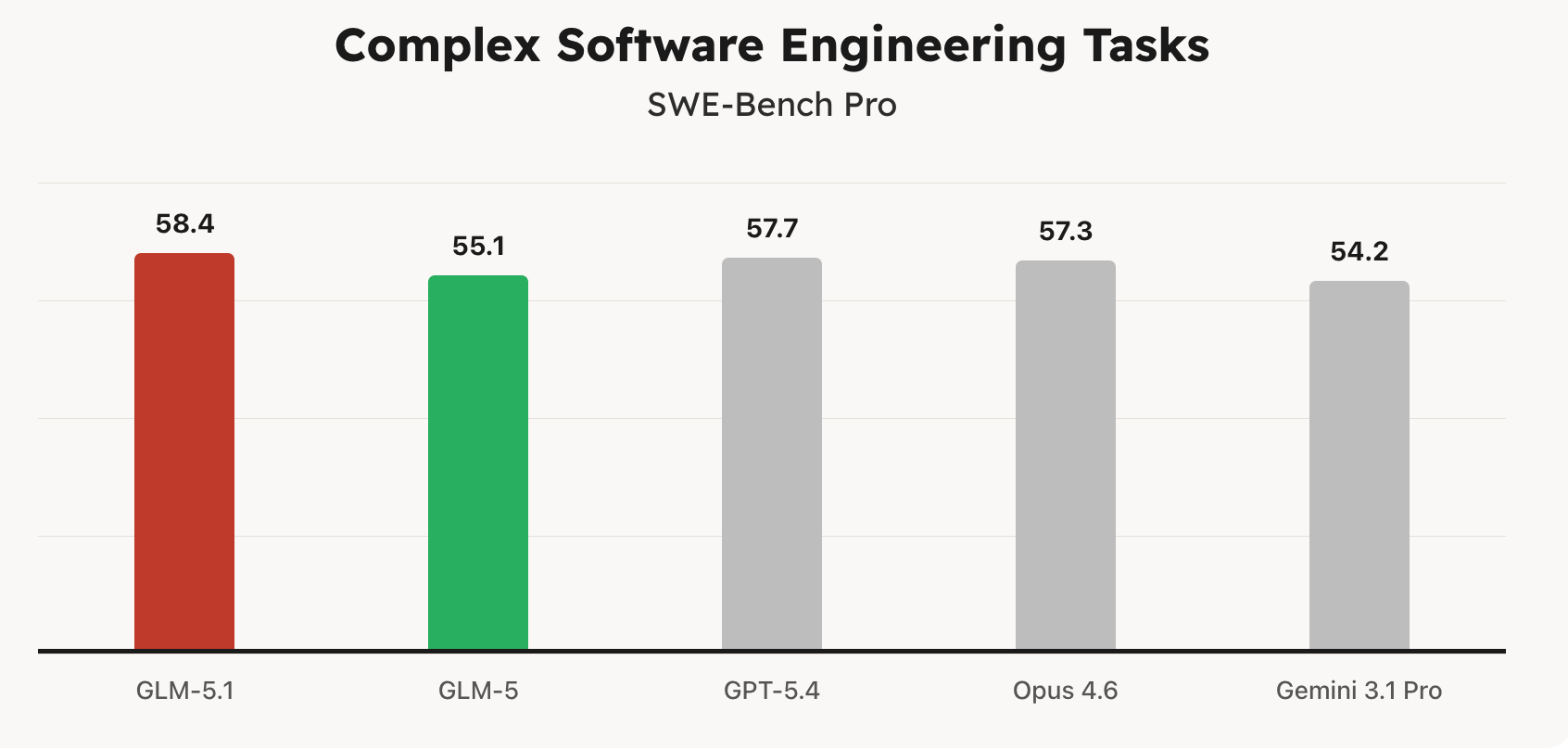
GLM 5.1 is a smart pick if your workload is heavy on tool calls: agentic workflows, structured-data extraction, instruction following on JSON schemas. The local serving story is solid through Ollama and vLLM.
Best for: tool-calling agents, structured extraction, JSON-mode pipelines.
Serving them like a hosted API
The thing nobody on the r/LocalLLaMA thread mentions: once you have a model running, the rest of your stack still expects an HTTP endpoint. You will spend more time wiring the request shape than picking the model.
Three serving paths matter in 2026.
Ollama is the easiest: ollama serve exposes an OpenAI-compatible endpoint at http://localhost:11434/v1. Drop-in replacement for https://api.openai.com/v1; change the base URL and you are done.
vLLM is the production option. It runs faster, supports continuous batching, and exposes the same OpenAI-compatible shape on :8000/v1. Use this when latency and throughput matter.
LM Studio is the GUI option. Useful for individual developers; it also exposes an HTTP endpoint when you turn on the local server in settings.
All three speak the OpenAI Chat Completions shape, which means the same client code that hits GPT-5.5 hits your local model with a base URL change. We ran through this pattern in detail in how to use DeepSeek V4 for free.
A minimal Python call against any of the seven:
from openai import OpenAI

client = OpenAI(
    api_key="ollama",  # any string; Ollama ignores it
    base_url="http://localhost:11434/v1",
)

resp = client.chat.completions.create(
    model="qwen3.6:32b",
    messages=[
        {"role": "user", "content": "Summarize the differences between MoE and dense models in three bullets."}
    ],
    temperature=0.3,
)

print(resp.choices[0].message.content)
Swap qwen3.6:32b for deepseek-v4-flash, llama5.1:8b, or any other Ollama tag and the call shape is identical.
Testing local models with Apidog
Here is the part that matters for production. The biggest difference between hosted and local is not quality; it is your ability to debug.
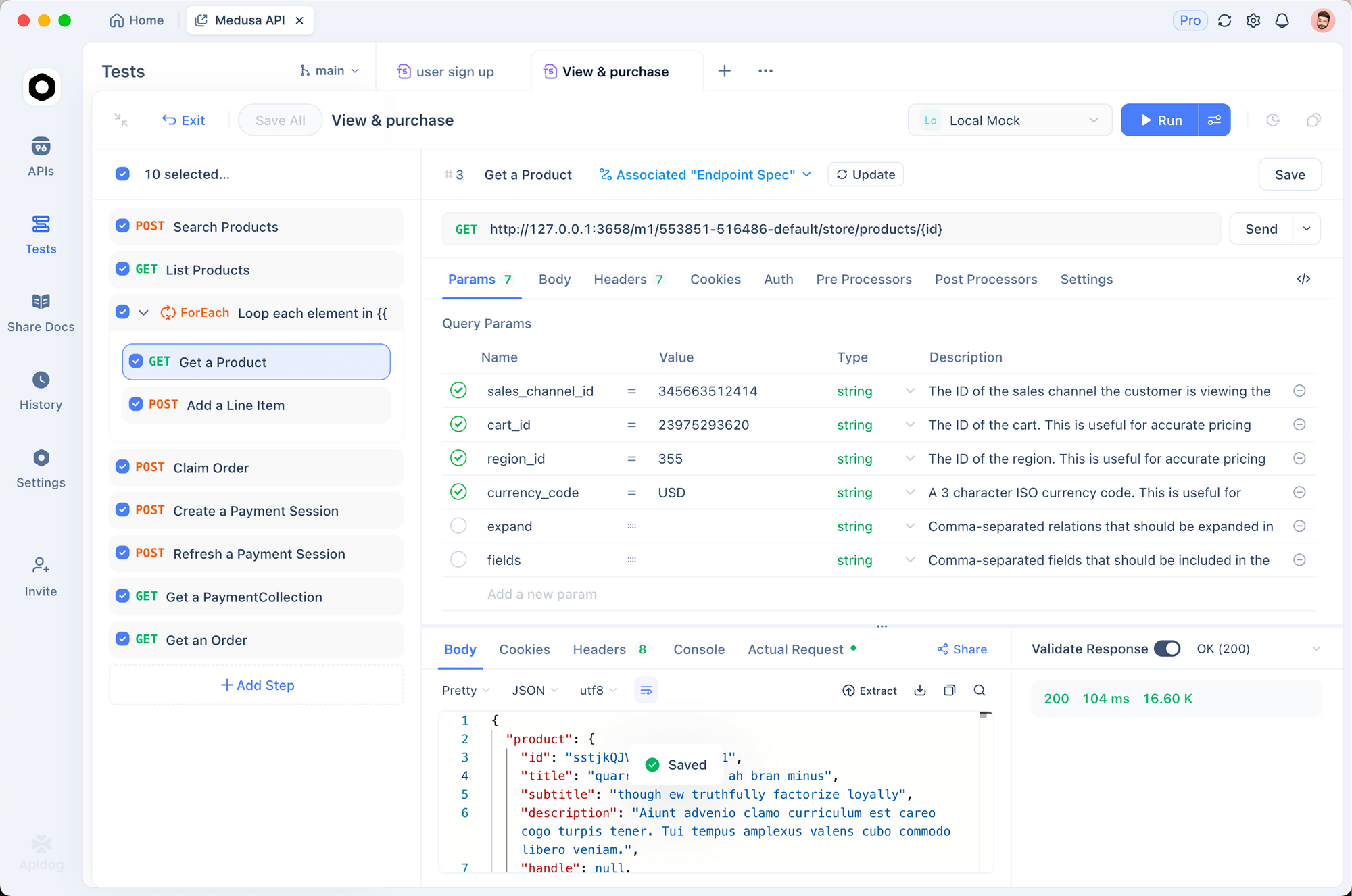
When OpenAI breaks, you read their status page and wait. When Ollama breaks, you own the bug. You need to inspect the raw request, replay it with different parameters, diff streaming output between two model versions, and benchmark throughput across hardware. Curl gets old fast.
Apidog treats your Ollama or vLLM endpoint like any other API. Five things you do with it:
Save canonical requests. Build a request collection for each model with realistic prompts, temperature, max_tokens, and tool definitions. Your team replays them after every model swap to confirm behavior.
Diff outputs across models. Apidog’s response diff highlights token-level differences when you replay the same prompt against Qwen, DeepSeek, and Llama. Spot regressions in seconds.
Mock the endpoint while CI runs. When CI pipelines call the local model, you do not want them to actually spin up a 24 GB process. Apidog mocks the endpoint with realistic JSON streams, so unit tests pass without GPU access.
Benchmark token throughput. The built-in performance view records latency, time-to-first-token, and tokens-per-second across runs. Compare Q4 vs Q5 quantization at a glance.
Document the local API for teammates. Apidog projects export OpenAPI 3.1, so a teammate who joins the project gets an exact contract for “how do I call our internal Qwen?”. We cover the same workflow in Apidog as a Postman alternative.
Common mistakes when running local LLMs
These trip up almost every team in their first month.
Picking the biggest model the GPU fits. A 32B model at Q3 is usually worse than a 14B at Q5. Quantization quality matters more than parameter count once you cross 4 bits.
Forgetting context length scales VRAM. A 32K-token context on a 32B model needs about 4 GB of KV cache at Q4. Reserve it before you load.
Running fine-tunes from random Hugging Face uploads. Stick to the original model card or well-known fine-tunes from authors with track records. A poisoned fine-tune is a real risk.
Skipping the mock layer. Local models go down. Drivers crash, processes get OOM-killed, GPUs throttle. CI runs that hit the model directly become flaky. Mock the endpoint in Apidog and your tests stop depending on hardware health.
Ignoring tool-call format differences. Llama 5.1, Qwen 3.6, and DeepSeek V4 all support tool calls but emit slightly different JSON shapes. Test each before swapping models in production.
Real-world use cases
A startup running a customer-support agent moved from GPT-5.5 to Qwen 3.6 32B on a single 4090. Latency stayed under 800 ms, monthly inference bill dropped from $9,400 to $0, and the team uses Apidog mocks to keep CI deterministic.
A solo developer building a voice assistant runs Gemma 4 9B on an M2 Pro with 16 GB unified memory. Multi-token prediction drafters give them 60 tokens per second, fast enough that the assistant feels native.
A fintech research team runs DeepSeek V4 Flash on two 4090s for nightly batch summarization of regulatory filings. Cost per summary is electricity, plus the time spent maintaining the box.
Local models also pair well with open-source agent frameworks — our guide to ByteDance DeerFlow 2.0 shows a deep-research stack you can point at them.
Conclusion
The best local LLM in 2026 is the one that fits your VRAM, your latency budget, and the quality bar your product requires. Most teams will land on Qwen 3.6 32B or DeepSeek V4 Flash for 24 GB cards, Llama 5.1 8B or Gemma 4 9B for smaller hardware, and GLM 5 when tool calls are the workload.
Five takeaways:
- Local quality is at parity with hosted on most tasks; the question is hardware fit, not capability.
- Ollama plus an OpenAI-compatible client is the fastest way to get a model serving HTTP.
- Quantization quality (Q4, Q5) matters more than absolute parameter count.
- Treat the local endpoint like any production API: save requests, mock for CI, benchmark, document.
- Apidog is the cleanest place to do that work and to share it with teammates.
Next step: pick the model that matches your hardware, run ollama pull <name>, and point Apidog at http://localhost:11434/v1. You will be benchmarking and replaying inside an hour.
FAQ
What is the best local LLM for a 24 GB GPU in 2026?
For most workloads, Qwen 3.6 32B at Q4 or DeepSeek V4 Flash at Q4. Pick Qwen for multilingual or tool-heavy tasks; pick DeepSeek V4 Flash for reasoning and coding. Both are documented in our DeepSeek V4 local guide.
Can I run a local LLM on a Mac?
Yes. Apple silicon with 16 GB or more unified memory runs Llama 5.1 8B and Gemma 4 9B comfortably. M3 Ultra with 192 GB runs DeepSeek V4 Pro at Q4. Use Ollama or LM Studio.
How do I test a local LLM the same way I test OpenAI?
Point your OpenAI-compatible client (and your Apidog project) at the local serving URL. Ollama exposes http://localhost:11434/v1, vLLM exposes :8000/v1. Same request shape, different base URL.
Is local LLM quality really at parity with hosted?
On reasoning, coding, classification, extraction, and tool calling: yes, within single-digit percent for the top open models. On vision, long-context document QA, and creative writing: hosted still leads by a noticeable margin.
What about cost?
A 4090 GPU runs DeepSeek V4 Flash for the price of electricity (about $30 a month at typical use). A hosted equivalent at the same volume costs hundreds to thousands per month. The break-even point is usually around 5 million tokens per month.
How do I switch a production app between hosted and local?
Keep the OpenAI client; change the base URL and model name. Test the swap with replay tooling so behavior differences surface before users see them. We cover this in API testing without Postman.
Where do I see fresh leaderboards?
The Hugging Face Open LLM Leaderboard and the LMSYS Chatbot Arena refresh regularly. Cross-reference both, because they measure different things.