Kreya earned its following the honest way. It treats gRPC as a first-class protocol, runs fully offline, and stores every project as plain files you can diff in Git. If you live in proto definitions and care about privacy, it fits.
But “fits” is not the same as “fits forever.” Maybe you need design and mock features alongside your request client. Maybe your team wants real-time collaboration. Maybe you just want a CLI you can pipe into a script.
This guide covers the strongest Kreya alternatives. We lead with what Kreya does well, then walk through six tools with fair pros and cons. By the end, you will know which one matches how you actually work.
What Makes Kreya Worth Replacing (and Worth Keeping)
Kreya is a desktop GUI client built around gRPC, with support for REST, GraphQL, WebSocket, and Server-Sent Events. A few things set it apart.
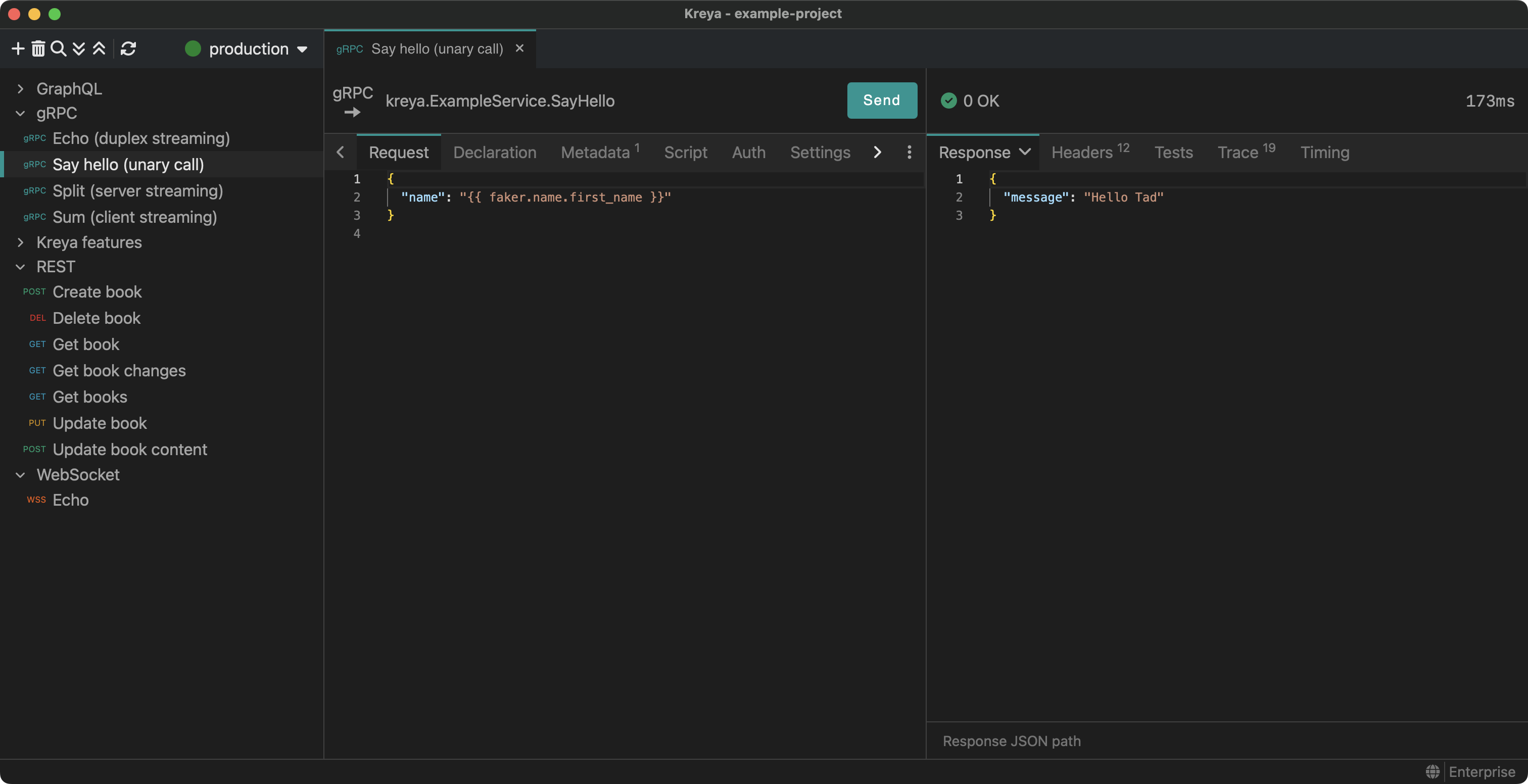
First, gRPC depth. Kreya reads your proto files or uses server reflection, then generates example payloads for each method. Streaming calls feel native, not bolted on.
Second, it runs offline. All data, including keys, responses, and test results, stays on your machine. There is no required account and no telemetry. The Enterprise Offline license lets the app work with no network at all.
Third, projects are Git-diffable. Requests, environments, and authorizations live in files you can review in a pull request. Kreya offers a free-forever plan, with Pro and Enterprise tiers on top.
So why look elsewhere? Kreya is a request client first. It does not design your API contract, generate interactive docs, or run a no-code mock server. If your workflow needs those layers, you will end up stitching together other tools. That gap is the reason this list exists.
The Best Kreya Alternatives at a Glance
| Tool | Best for | gRPC | Offline | Git-friendly | Beyond requests |
|---|---|---|---|---|---|
| Apidog | Teams wanting design + mock + docs | Yes | Yes (desktop) | Yes | Design, test, mock, docs |
| Postman | Cloud-first collaboration | Yes | Limited | Via paid Git Sync | Mock, docs, monitors |
| Insomnia | Lean open-source client | Yes | Local + Scratch Pad | Git Sync | Design, basic testing |
| Bruno | Git-native, file-first teams | Yes (2.10+) | Yes | Yes (core design) | Lightweight testing |
| grpcurl | CLI-only gRPC calls | Yes | Yes | Scriptable | None (by design) |
| gRPCui | Browser UI on top of grpcurl | Yes | Yes | Scriptable | None |
Now let’s get into the detail.
1. Apidog: The All-in-One Pick
Apidog is an API platform, not just a request client. That is the core difference from Kreya. It covers design, testing, mocking, documentation, and collaboration in one workspace.
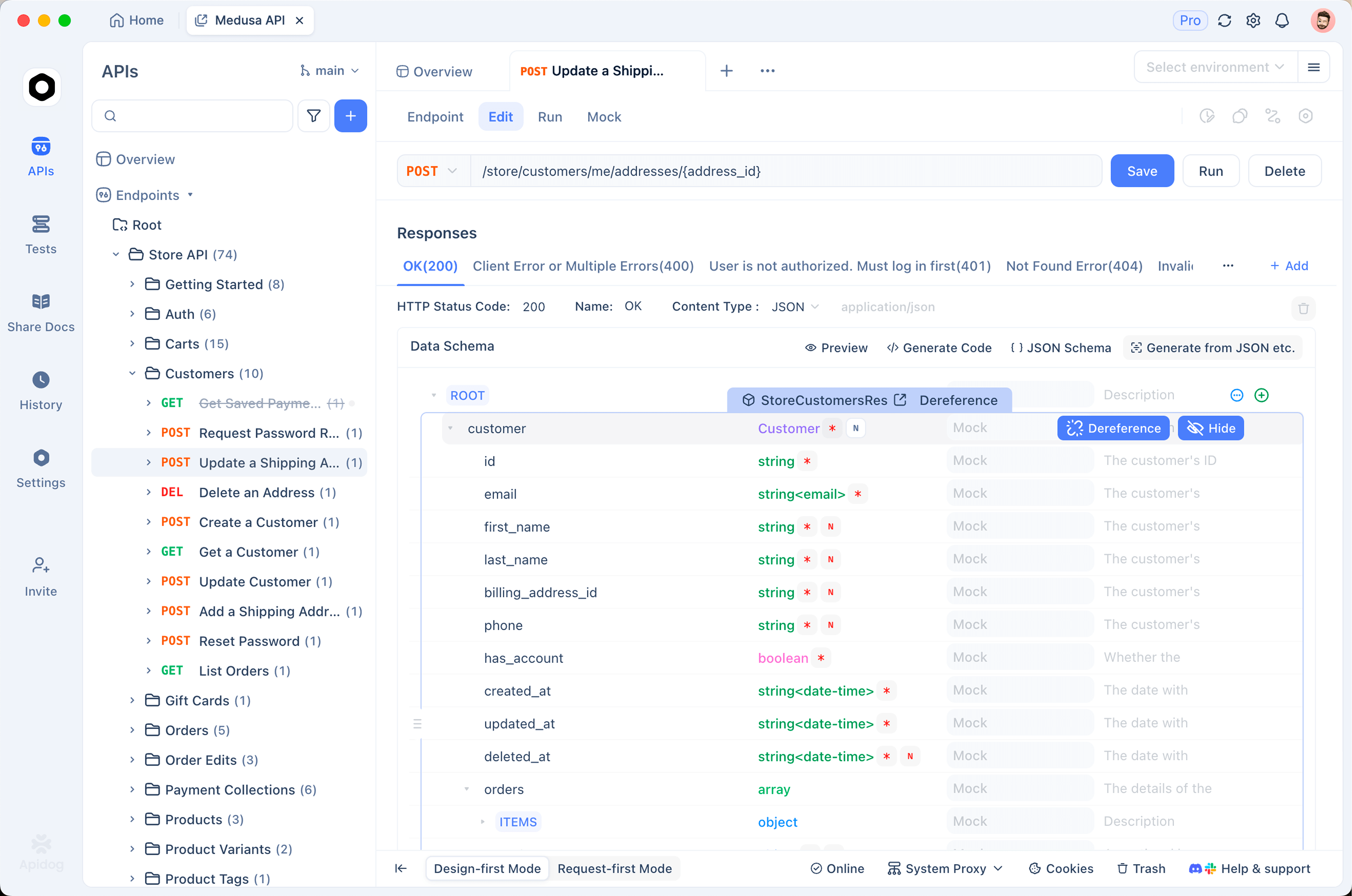
On protocols, Apidog handles REST, GraphQL, gRPC, WebSocket, SOAP, and SSE. So the multi-protocol breadth you get from Kreya is here too, including gRPC over TLS. It ships as a desktop app for Windows, Mac, and Linux, plus a web app and a CLI.
Where it goes further is the layers above the request. You design contracts in a visual OpenAPI editor with branch support. You generate dynamic, no-code mock servers from your schema. You auto-publish interactive docs with custom domains. Your team works in shared workspaces with real-time sync.
For automation, the Apidog CLI runs saved test scenarios in CI. The apidog run command executes your suites and reports in cli, html, json, or junit format, with data-driven runs via -d. To be clear, the CLI runs saved scenarios. It is not an interactive terminal client like grpcurl for one-off ad-hoc calls.
Pros:
- Design, mock, test, and document in one place
- Full multi-protocol support including gRPC, WebSocket, SOAP
- Desktop, web, and CLI; team collaboration built in
Cons:
- Broader than a pure request client, so there is more to learn
- It owns the API-quality layer; it is not a gateway, CMS, or load generator
Apidog fits teams who want more than a request runner. If you only need to fire gRPC calls and nothing else, that breadth is overkill, and a focused tool may suit you better. See how it stacks up in our Apidog vs Insomnia and Apidog vs Bruno comparisons.
2. Postman: The Cloud-First Standard
Postman is the most widely used API client, and it covers gRPC well. Load a .proto definition and Postman maps every service and method, generating example payloads. You can save multi-file Protobuf APIs to the cloud and share them across your org.
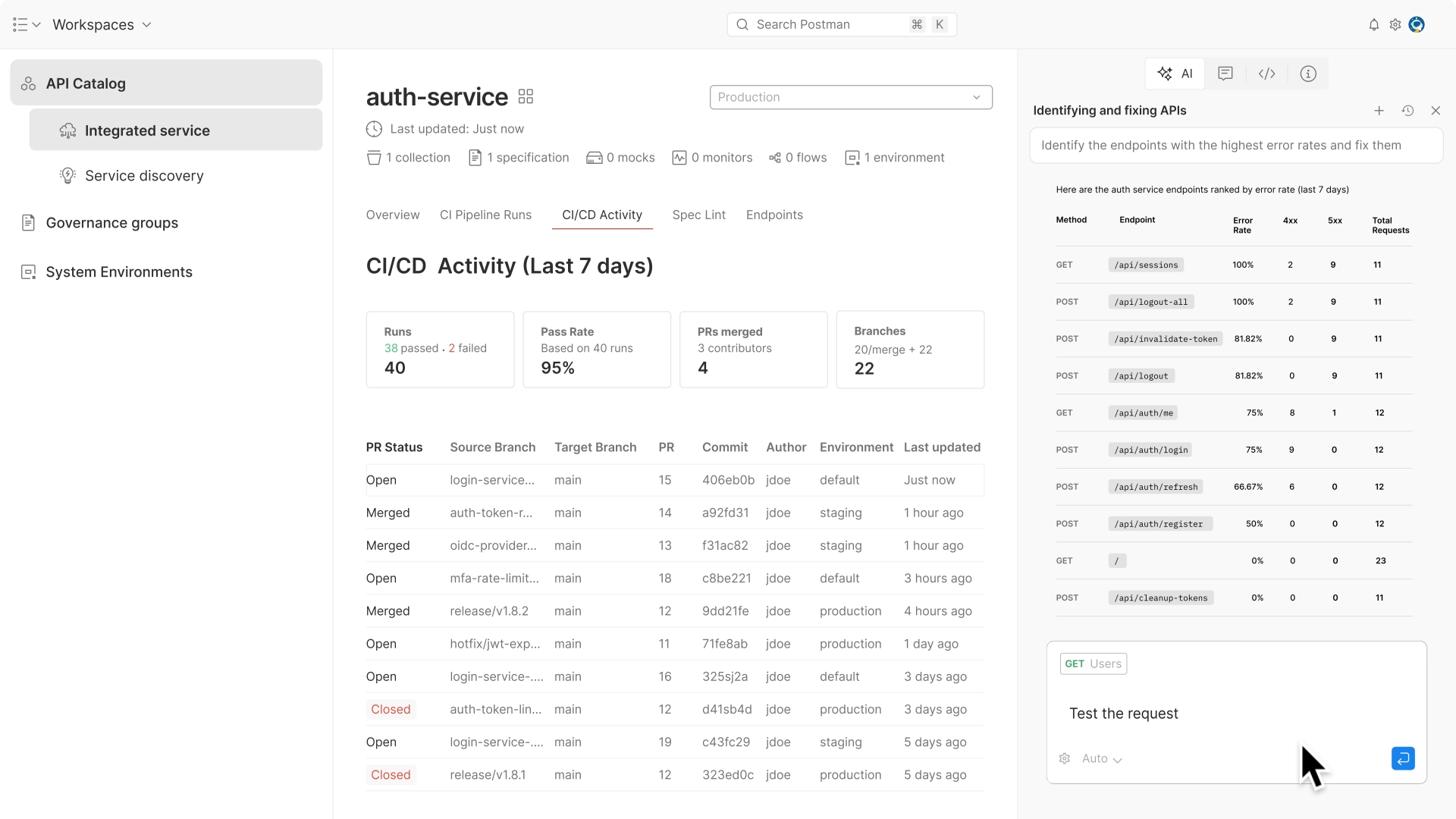
The strength is collaboration breadth. Forking, commenting, mocks, docs, and monitors all live in one cloud platform. Postman is also expanding protocol coverage in 2026, adding more messaging and AI request types.
The trade-off runs opposite to Kreya. Postman is cloud-centric. Heavy offline, account-free, local-file workflows are not its sweet spot. Git Sync exists but sits behind paid plans.
Pros:
- Deep gRPC tooling and broad protocol roadmap
- Mature collaboration, mocks, docs, and monitoring
Cons:
- Cloud-first; weaker offline and local-file story than Kreya
- Git Sync gated to paid tiers
If you came to Kreya specifically to escape the cloud, Postman is a sideways move. Browse the wider field in our Postman alternatives roundup.
3. Insomnia: The Lean Open-Source Client
Insomnia is an open-source, cross-platform client for REST, GraphQL, WebSocket, SSE, and gRPC, maintained by Kong. It is lighter than Postman while still covering the protocols most teams use.
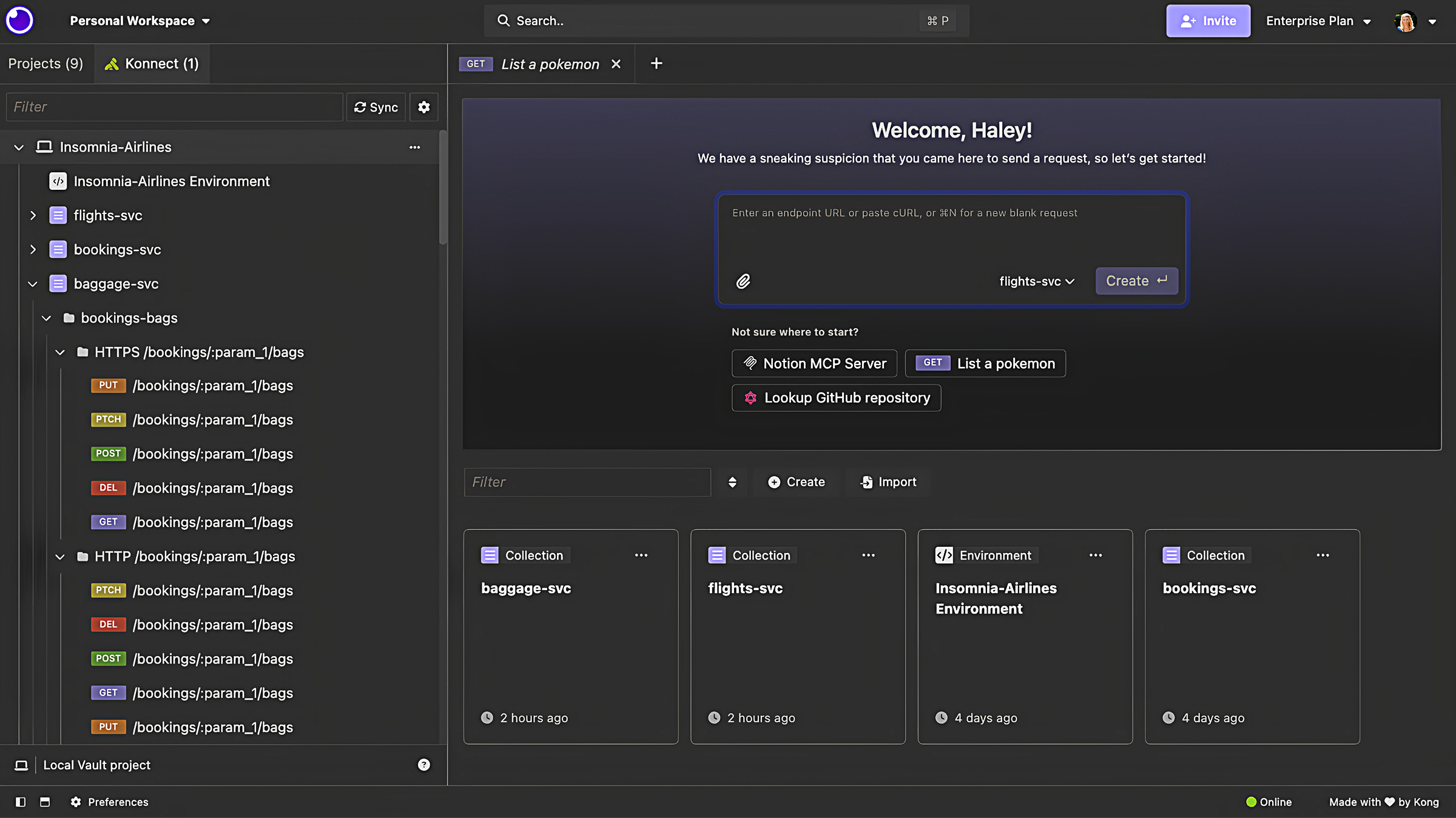
It supports cloud, local, and Git storage, so you can pick your model. The Scratch Pad lets you work without an account, which is closer to Kreya’s privacy-first feel. Insomnia also includes a design feature for spec-driven work.
The catch: most full features expect an account, even though it is free. The account-optional path is narrower than Kreya’s account-free default. Some teams also weighed past licensing changes after the Kong acquisition.
Pros:
- Open source, lighter footprint than Postman
- gRPC, GraphQL, and design in one tool; Git Sync available
Cons:
- Full features lean on an account
- Account-free path is more limited than Kreya’s
Insomnia suits developers who want an open client without the platform weight. Our Apidog vs Insomnia piece goes deeper on where each fits.
4. Bruno: The Git-Native Choice
If Git-diffable projects are why you love Kreya, Bruno deserves a hard look. Bruno is an open-source, local-first client that stores collections as plain text files on your filesystem. No cloud sync, by design.
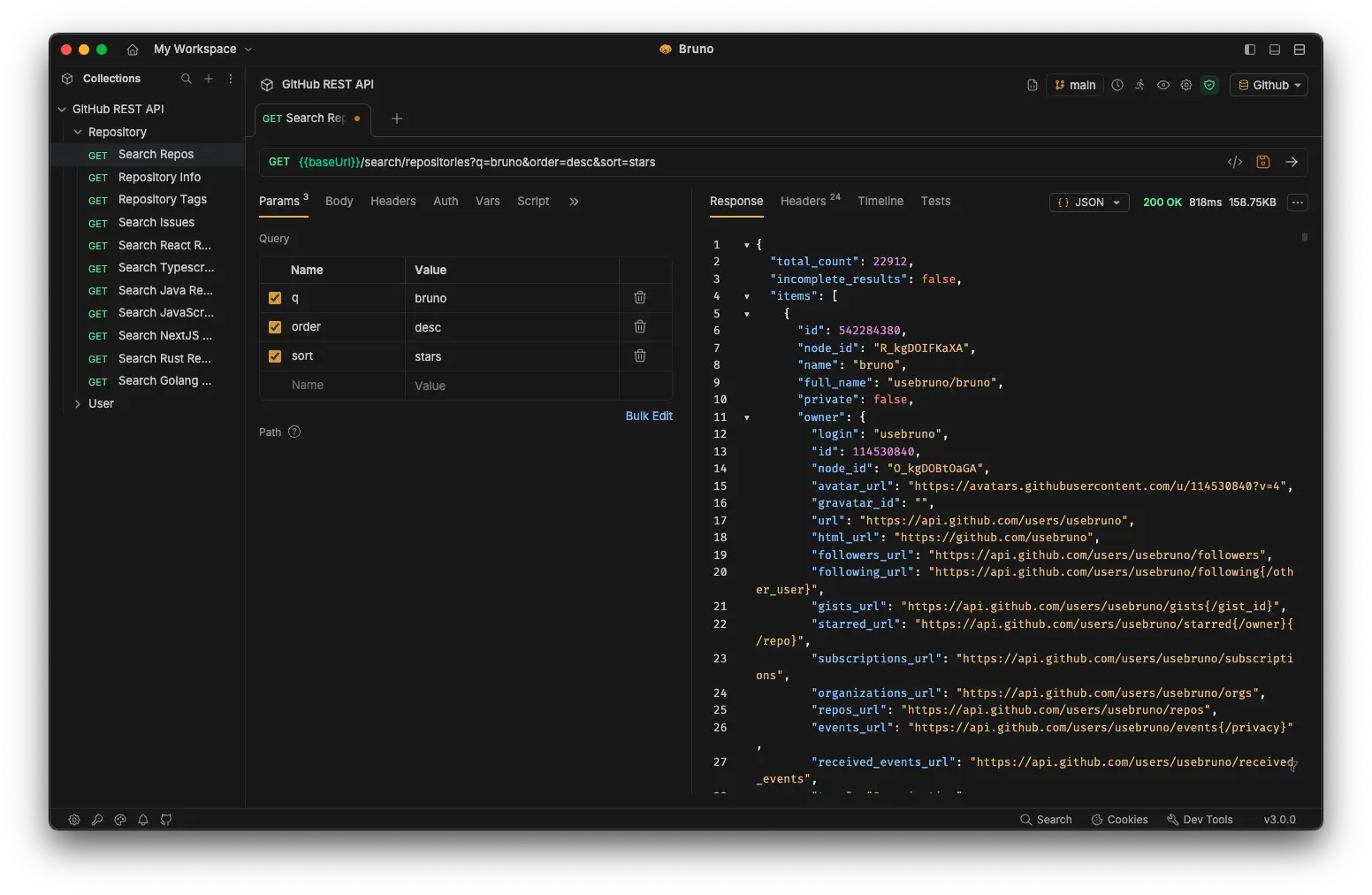
Bruno covers REST, GraphQL, gRPC, and WebSocket. gRPC landed in version 2.10.0, so it is newer here than in Kreya, but it is real. Collections are plain files, so version control is the native workflow, not an add-on.
Because everything is a file, code review and branching work the way they do for source. That is the same instinct behind Kreya’s design, expressed in an open-source tool.
Pros:
- File-first, Git-native; no cloud lock-in
- Open source; gRPC, REST, GraphQL, WebSocket
Cons:
- gRPC support is relatively recent
- Lighter on mock and docs than a full platform
Bruno is a strong match for teams who want everything in the repo. Read our Apidog vs Bruno comparison, and the wider Git-native API clients overview.
5. grpcurl: The CLI for Pure gRPC
Sometimes you do not want a GUI at all. grpcurl, from fullstorydev, is “curl, but for gRPC.” It is a command-line tool for invoking RPC methods straight from the terminal.
It uses gRPC server reflection by default, or reads .proto source or compiled protoset files. It speaks JSON for request and response, which is friendly for both humans and scripts. It handles TLS, mTLS via -cert and -key, custom headers via -H, and streaming over stdin.
This is the tool for CI scripts, quick checks, and headless servers. There is no project file, no design layer, no docs. That is the point. grpcurl does one job and does it cleanly.
Pros:
- Zero-GUI, scriptable, perfect for CI and quick checks
- Reflection and proto support; TLS, mTLS, streaming
Cons:
- gRPC only; no GUI, no project management
- Not a replacement if you want a visual client
If you want to go deeper on terminal gRPC workflows, see our guides on how to test gRPC APIs and choosing a gRPC client.
6. gRPCui: A Browser UI Over the Same Engine
gRPCui, also from fullstorydev, is the GUI companion to grpcurl. It spins up a small local web server and gives you a browser form for building gRPC requests, much like a Postman-style interface but generated from reflection or proto files.
It is handy when you want a visual surface without installing a full desktop app, and it shares grpcurl’s discovery model. Like grpcurl, it is gRPC-focused and stays out of design, mock, and docs territory.
Pros:
- Browser UI with no heavy install
- Same reflection and proto discovery as grpcurl
Cons:
- gRPC only; no broader protocol or platform features
- Runs a local web server, which not every environment allows
gRPCui is a nice middle ground between raw CLI and a full desktop client.
How to Choose Your Kreya Alternative
Match the tool to the job, not the hype.
- Want the all-in-one platform? Apidog adds design, mock, and docs around a multi-protocol client.
- Cloud collaboration first? Postman, if offline is not a hard requirement.
- Lean open-source client? Insomnia.
- Everything in Git, file-first? Bruno.
- CLI only? grpcurl, with gRPCui if you want a quick browser form.
If your reason for using Kreya was offline-first privacy, weigh the best offline API client options and the free API client field before you switch. If protocol coverage drives your choice, our breakdown of REST vs GraphQL vs gRPC can help you confirm which protocols you actually need to support.
FAQ
Is there a free Kreya alternative?
Yes. Bruno and grpcurl are open source and free. Insomnia and Postman offer free tiers, and Apidog has a free plan. The right free pick depends on whether you need a GUI, gRPC, or a full platform.
Which Kreya alternative is best for gRPC specifically?
For a GUI with deep gRPC plus other protocols, Apidog and Postman both qualify. For CLI-only gRPC, grpcurl is hard to beat. Bruno covers gRPC from version 2.10.0 onward.
Do any alternatives keep Kreya’s offline, Git-friendly model?
Bruno is the closest match. It is local-first, stores collections as plain files, and treats Git as the native workflow with no cloud sync. Apidog also offers a desktop app for local work.
Can I replace Kreya with a command-line tool?
If you only invoke gRPC methods, grpcurl can replace a GUI client for scripting and CI. It does not manage projects or design APIs, so it complements a GUI rather than fully replacing one for visual work.
What does Apidog add over a plain request client?
Apidog adds API design, no-code mock servers, auto-generated interactive docs, automated testing, and team collaboration on top of a multi-protocol client. It covers the API-quality layer, not gateways or load testing.