You need to fire off a quick API request. Do you open a browser tab, or launch a full platform? That single question explains most of the difference between ReqBin and Apidog.
ReqBin is a browser-based API tester. You open a page, type a URL, and send a request. Nothing to install. Apidog is an all-in-one API platform. It handles design, testing, mocking, documentation, and team collaboration across one workspace.
Both send HTTP requests. That’s where the overlap ends. This guide walks through where each tool fits so you can pick the right one for your workflow.
The core difference
ReqBin solves one problem well: send a request right now, with zero setup. It runs entirely in the browser. You don’t sign in to make a basic call. You don’t download anything. It works on any device with internet access, including Chromebooks and tablets.
Apidog solves a bigger problem: managing an API across its full lifecycle. You design the contract, test it, mock it, document it, and keep a team in sync. It runs as a desktop app on Windows, macOS, and Linux, plus a web app and a CLI for automation.
Think of it this way. ReqBin is a quick browser tester. Apidog is the workshop where an API gets built and maintained over time.
Neither is “better” in the abstract. The right choice depends on what you’re doing.
When ReqBin is the better pick
Be honest about your use case. ReqBin wins in a few common situations.
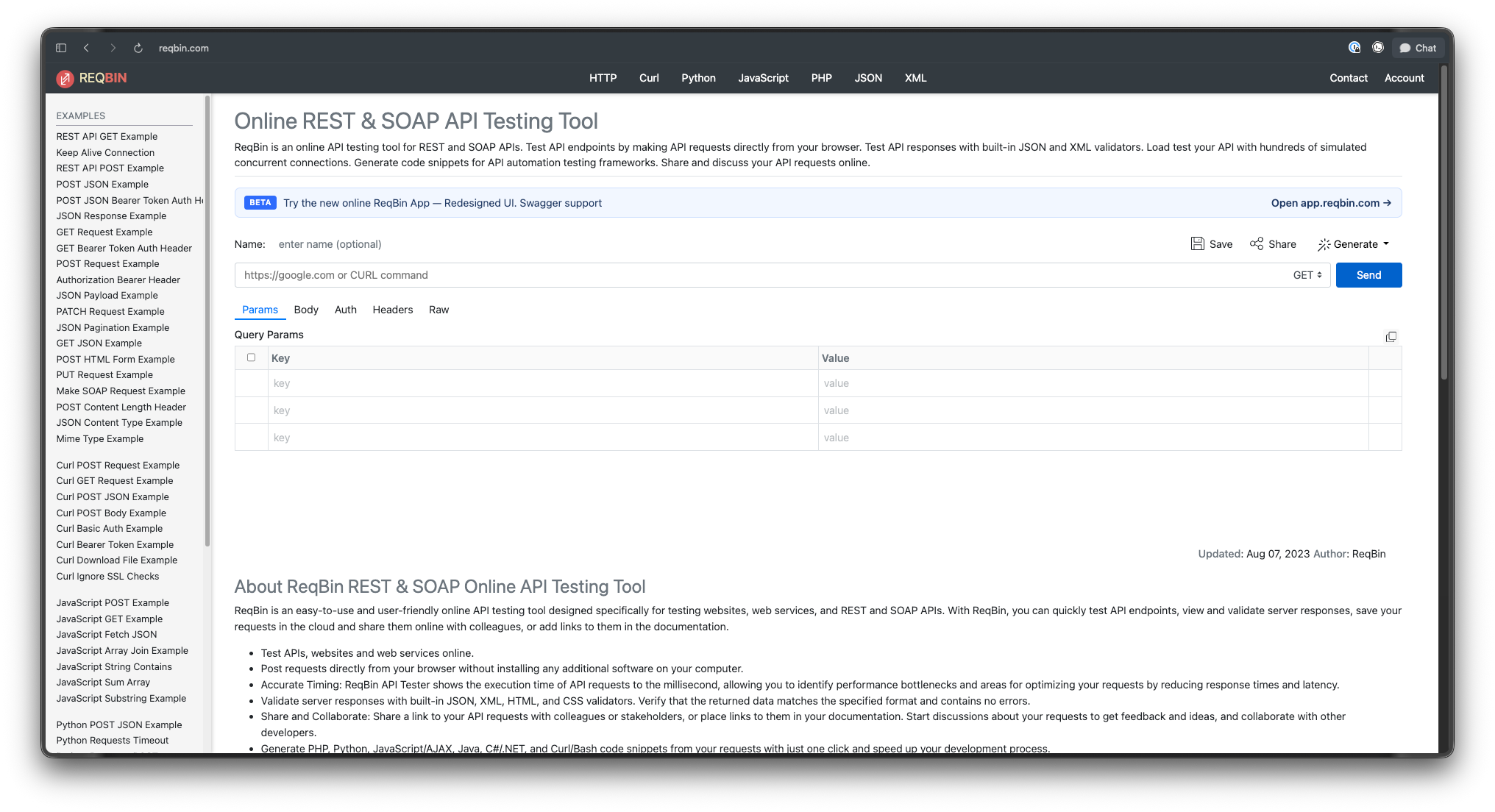
One-off requests. You want to check whether an endpoint returns a 200. You paste the URL, hit send, read the response. Done in seconds. No project, no account.
Zero install. You’re on a locked-down machine, a borrowed laptop, or a colleague’s desk. ReqBin needs only a browser. That’s a real advantage when you can’t install software.
Sharing a single request. ReqBin lets you generate a shareable link to a request. Drop it in a Slack thread, a Jira ticket, or your docs. The recipient opens it and sees the exact call. This is genuinely convenient for “can you reproduce this?” moments.
Quick code snippets. ReqBin generates code in cURL, Python, JavaScript, PHP, Java, and C#. Build a request in the UI, copy the snippet, paste it into your app. For a fast handoff from “tested it” to “shipped it,” that flow is smooth.
If your work lives in those moments, ReqBin is a fine tool. You don’t need a platform to send one request. For more options in this category, see our roundup of web-based API clients.
When Apidog is the better pick
The picture flips the moment your work becomes ongoing rather than one-off.
ReqBin keeps things lightweight. The trade-off is that lightweight tools forget. Close the tab and your setup is gone unless you saved the request, and saving multiple requests is limited in the free version.
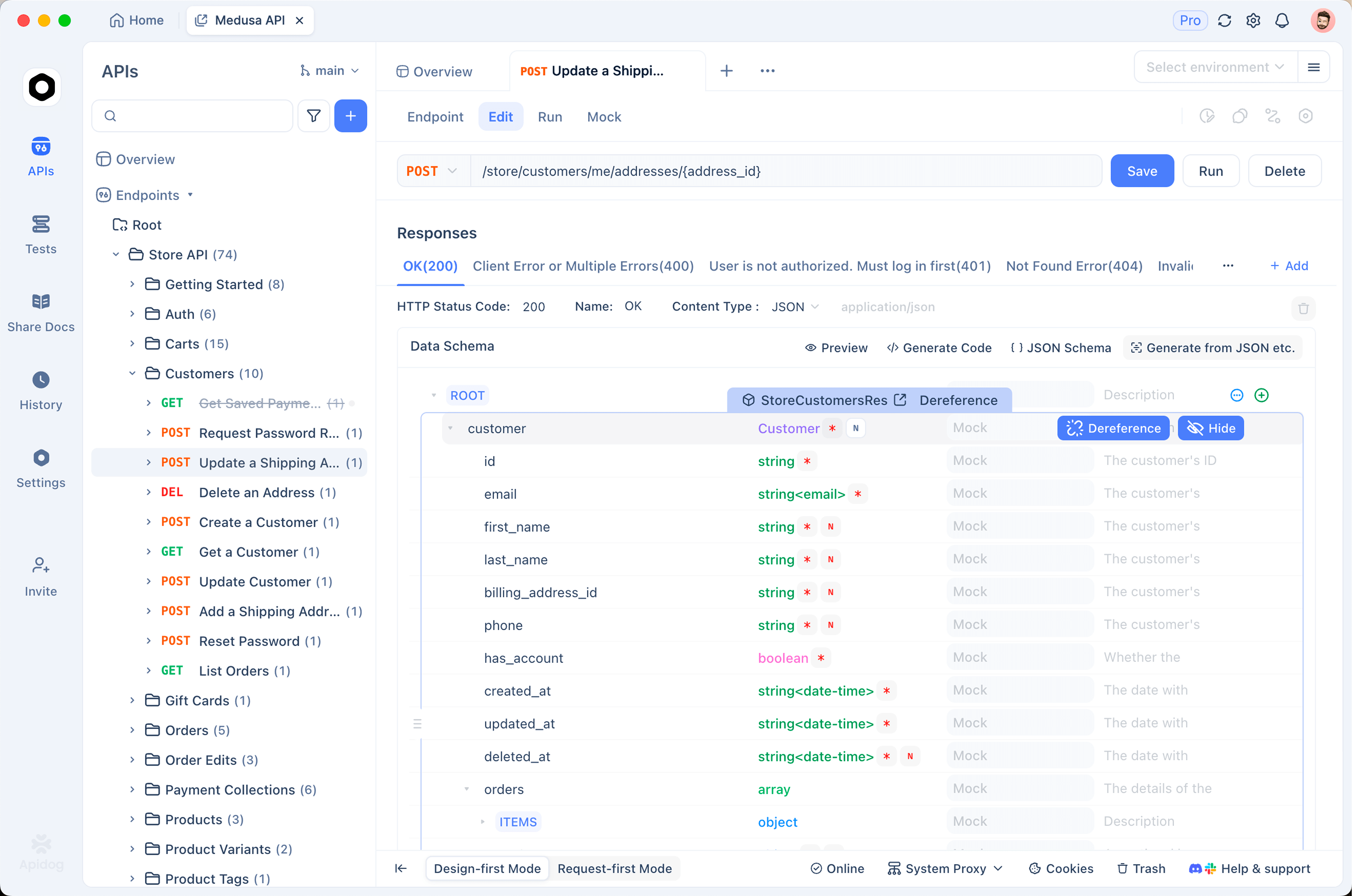
Apidog is built to remember. It stores your endpoints, test cases, environments, and docs in persistent projects. You return tomorrow and everything is where you left it. That persistence is the foundation for the features below.
Collections and persistence
Apidog organizes requests into collections and folders inside a project. You build a structured map of your API, not a scratchpad of one-off calls. Teammates open the same project and see the same structure.
ReqBin centers on the single request in front of you. Saving and organizing many requests sits behind its paid tier. If you manage dozens of endpoints, that gap shows fast.
Environments and variables
Real APIs run in more than one place. You have local, staging, and production. Each has its own base URL, tokens, and config.
Apidog handles this with environments and variables. Define {{baseUrl}} once, switch environments from a dropdown, and every request updates. No find-and-replace across requests.
ReqBin focuses on sending the request you typed. It isn’t built around managing environment sets the way a full client is.
Mocking
Frontend and backend teams rarely finish at the same time. Apidog generates a mock server straight from your API design. Smart mock reads field names and returns realistic sample data with no code. The frontend builds against the mock while the backend is still in progress.
ReqBin doesn’t provide a built-in mock server in the same way. It’s a request tester, not a mock platform.
Documentation
Apidog publishes interactive API docs directly from your spec. Readers get a “Try it out” button to call endpoints from the doc page. You can host on a custom domain and version the docs.
ReqBin lets you share request links, which helps with informal sharing. It doesn’t generate a full documentation site from a spec.
Testing and CI/CD
This is the biggest gap, and it’s worth being precise about it.
Apidog builds automated test scenarios visually. Chain requests, add assertions, run data-driven tests with a CSV or JSON dataset. Then run those saved scenarios in CI with the Apidog CLI:
apidog run -e <env-id> -r html,junit
apidog run executes saved test scenarios and suites. It supports reporters (cli, html, json, junit), data-driven runs via -d, and environment selection via -e. You wire it into Jenkins, GitHub Actions, or any pipeline so tests run on every push.
ReqBin has no CLI counterpart. There’s no reqbin run to drop into a pipeline. ReqBin does offer browser-based load testing against simulated concurrent users, which is a different feature aimed at performance checks rather than regression automation in CI. For functional test automation in a pipeline, Apidog is the tool with the rails for it.
One honesty note: the Apidog CLI runs saved scenarios. It is not an interactive terminal request client. It won’t replace curl or httpie for typing an ad-hoc request in your shell. If that’s what you want, see our guide to REST API clients.
Collaboration
Apidog uses team workspaces with real-time sync. Edit an endpoint and teammates see it. Roles and permissions control who changes what. The whole team works from one source of truth.
ReqBin’s collaboration centers on shareable request links and discussion on those requests. That covers casual sharing. It doesn’t replace a synced team project where everyone works the shared API contract together.
Comparison table
| Capability | ReqBin | Apidog |
|---|---|---|
| Install / access | Browser only, zero install | Desktop (Win/Mac/Linux) + web + CLI |
| Request building | Yes, in browser | Yes, full client |
| Collections / persistence | Limited; saving multiple requests is a paid feature | Persistent projects, collections, folders |
| Environments / variables | Not the focus | Environments + variables across local/staging/prod |
| Auth | Common schemes supported | Full auth support across requests |
| Mock server | Not built in | Smart, no-code dynamic mocking |
| Documentation | Shareable request links | Auto-generated interactive docs, custom domains |
| Testing / CI | Browser load testing; no CLI for CI | Visual test scenarios + apidog run in CI/CD |
| Code generation | cURL, Python, JS, PHP, Java, C# | Code snippets across many languages |
| Collaboration | Shareable links, request discussion | Team workspaces, real-time sync, roles |
| Pricing | Free tier; paid plans add saved requests and team features | Free tier (small teams); paid plans scale up |
Pricing in plain terms
ReqBin is free to run requests. Advanced features such as saving multiple requests, larger payloads, and team collaboration sit behind paid plans that start around $9 per month.
Apidog has a free tier that supports small teams, which is generous for getting started. Paid tiers scale with team size and unlock more capacity. Both tools let you start without paying, so cost rarely decides this on its own. The deciding factor is scope, not price.
For a wider view of pricing across the category, our free API client guide breaks down what each tool gives away.
How to choose
Run through these questions.
Are you sending a one-off request? Use ReqBin. Open the browser, send, read the response, move on.
Do you need to share a single request with someone fast? ReqBin’s shareable links handle that cleanly.
Can you not install anything? ReqBin runs in the browser, so it’s your answer.
Are you building and maintaining an API over time? Use Apidog. You’ll want persistent collections, environments, and a single project the team shares.
Do you need mocking, generated docs, or automated tests in CI? Use Apidog. ReqBin doesn’t compete in those areas, and that’s by design.
The two tools sit at different points on the same spectrum. ReqBin optimizes for speed on a single request. Apidog optimizes for managing an API end to end. Many developers keep ReqBin bookmarked for quick checks and use Apidog for project work. That’s a reasonable setup.
If you’re weighing other platforms too, our comparisons of Apidog vs Postman alternatives and Apidog vs Insomnia cover the heavier clients side by side.
FAQ
Is ReqBin free?
Yes. You can run API requests on ReqBin for free with no account. Some features, like saving many requests, larger payloads, and team collaboration, require a paid plan that starts around $9 per month.
Does ReqBin have a CLI like Apidog?
No. ReqBin is a browser-based tool with no command-line client. Apidog ships a CLI where apidog run executes saved test scenarios in CI/CD pipelines, with reporters such as cli, html, json, and junit.
Can Apidog replace ReqBin for quick requests?
Yes, for sending requests. Apidog’s request client handles ad-hoc calls. The difference is overhead. ReqBin opens a tab and sends instantly with no install, while Apidog is a fuller app you set up once and reuse for everything.
Does Apidog work in the browser like ReqBin?
Apidog offers a web app in addition to its desktop apps for Windows, macOS, and Linux. So you can use Apidog in a browser. ReqBin is browser-only by design.
Which tool is better for a team?
Apidog. It provides team workspaces with real-time sync, roles, shared collections, and one source of truth for the API. ReqBin’s collaboration centers on sharing individual request links rather than a synced team project.
Can I generate code from both tools?
Yes. ReqBin generates snippets in cURL, Python, JavaScript, PHP, Java, and C#. Apidog also generates code snippets across many languages from your saved requests and endpoints.
The bottom line
Pick ReqBin when you want zero install and a fast, single request, especially when you need to share that one call with someone. Pick Apidog when you’re designing, testing, mocking, documenting, and maintaining an API with a team over time.
They aren’t rivals. One is a browser tester. The other is a platform. Match the tool to the size of the job. For a broader look at where Apidog fits among the heavy hitters, see our guide to Postman alternatives for API testing.