This is a 10-part series sharing how Apidog developed Apidog CLI, a command-line tool for API testing and API lifecycle management. Read in order or jump to any post that interests you:
| Title | Focus | |
|---|---|---|
| 1 | We Built 126 MCP Tools. But It Is Not the Best Solution for Agent | Problem discovery |
| 2 | Why We Developed Brand-new Apidog CLI | Architecture development |
| 3 | The Golden Rule: CLI Produces Facts, Model Acts on Facts | Core philosophy |
| 4 | agentHints: Teaching CLIs to Talk to Agents |
Structured output |
| 5 | SKILL: Shipping Operational Experience as Code | Operational experience |
| 6 | The Numbers Don't Lie: 30% Fewer Tool Calls, 25% Fewer Tokens | Quantitative results |
| 7 | From PRD to Testing Loop: A Complete Agent Workflow with Apidog CLI | Practical tutorial |
| 8 | Why CI/CD Compatibility Is Non-Negotiable for Agent Tools | DevOps perspective |
| 9 | AI Branch: Safer Project Changes with AI Agents | Security layer |
| 10 | Spec-First Was Yesterday. Welcome to Skill-First. | Vision & future |
Walk through a real example: a team has an Order Refund PRD and codebase. See how an Agent uses Apidog CLI + SKILL to generate OpenAPI, create tests, validate, and verify—end to end.
The Scenario
Let's make everything concrete with a real workflow.
Context:
A team has just finished writing a "Order Refund" PRD. The codebase already has corresponding routes and controllers.
User request to Agent:
"Generate API tests for the refund functionality based on the PRD and codebase, then run verification."
The Old Approach Problem
With MCP tools, the Agent faces a series of dilemmas:
| Decision Point | Uncertainty |
|---|---|
| Query project first? | Or create endpoint first? |
| Write test case first? | Or generate Schema first? |
| Run tests directly? | Or read back resources first? |
| Which tool for each step? | Search through 126 tools |
The Agent spends significant effort just deciding the path—not executing the task.
The CLI + SKILL Path
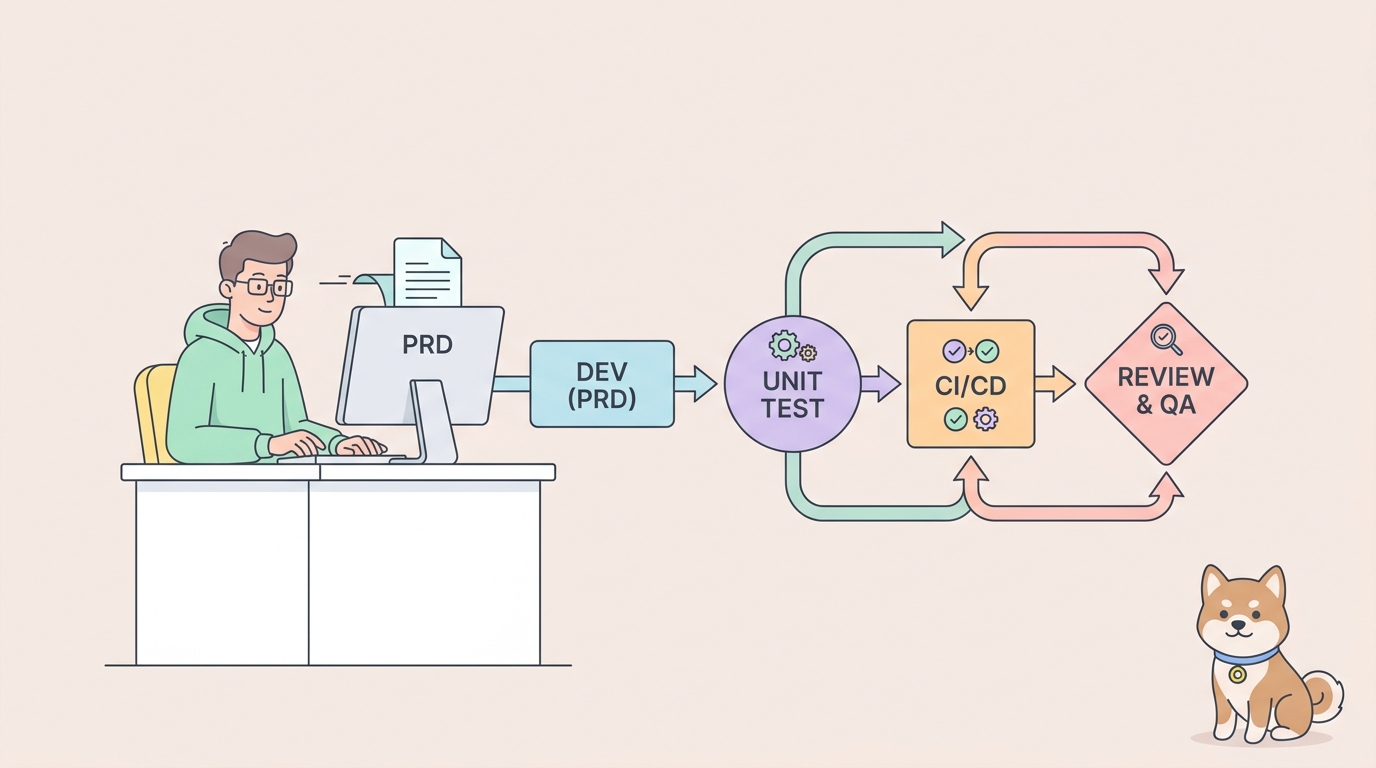
CLI + SKILL satisfies real R&D flows with a clear sequence:
Generate OpenAPI from PRD & codebase
        ↓
Import into Apidog
        ↓
Add single-endpoint test cases
        ↓
Validate before writing
        ↓
Generate test scenario for business flow
        ↓
Validate before writing
        ↓
Run automated testing
Let's walk through each step.
Step 1: Generate OpenAPI & Import
The Agent reads the PRD and codebase, then generates OpenAPI specification.
PRD excerpt:
Order Refund API

POST /api/orders/{orderId}/refund
- Request body: { "reason": string, "amount": number }
- Response: { "refundId": string, "status": string, "processedAt": datetime }

GET /api/orders/{orderId}/refund/{refundId}
- Response: { "refundId": string, "status": string, "amount": number }
Agent generates OpenAPI:
{
  "openapi": "3.0.0",
  "paths": {
    "/api/orders/{orderId}/refund": {
      "post": {
        "summary": "Create refund request",
        "parameters": [...],
        "requestBody": {...},
        "responses": {...}
      }
    },
    "/api/orders/{orderId}/refund/{refundId}": {
      "get": {
        "summary": "Get refund status",
        ...
      }
    }
  }
}
Import into Apidog:
apidog import --project <projectId> --format openapi --file ./openapi.jsonCLI output:
{
  "success": true,
  "data": {
    "importedEndpoints": ["POST /refund", "GET /refund/{refundId}"],
    "endpointIds": ["ep-001", "ep-002"]
  },
  "agentHints": {
    "summary": "OpenAPI imported successfully. 2 endpoints created.",
    "nextSteps": [
      "List the imported endpoints to confirm structure.",
      "Add test cases for each endpoint.",
      "Create a test scenario for the complete refund flow."
    ]
  }
}
Step 2: Single-Endpoint Test Cases
The Agent focuses on the "refund endpoint" first.
Agent reads endpoint:
apidog endpoint get ep-001 --project <projectId>CLI returns endpoint structure:
{
  "id": "ep-001",
  "method": "POST",
  "path": "/api/orders/{orderId}/refund",
  "requestBody": {
    "schema": {
      "type": "object",
      "properties": {
        "reason": { "type": "string" },
        "amount": { "type": "number" }
      },
      "required": ["reason", "amount"]
    }
  },
  "responses": {
    "200": {...}
  }
}
Agent generates test case:
{
  "name": "Create refund - success",
  "endpointId": "ep-001",
  "request": {
    "path": "/api/orders/order-123/refund",
    "body": {
      "reason": "Customer request",
      "amount": 99.99
    }
  },
  "assertions": [
    {
      "subject": "responseJson.status",
      "comparator": "equal",
      "target": "processed"
    }
  ]
}
Validate before writing:
apidog cli-schema validate test-case-create --file ./test-case-create.jsonCLI validation result:
{
  "success": true,
  "agentHints": {
    "summary": "Test case structure is valid.",
    "nextSteps": [
      "Create the test case in Apidog.",
      "Read back the created test case to confirm.",
      "Add more assertions if needed."
    ]
  }
}
Create test case:
apidog test-case create --project <projectId> --file ./test-case-create.jsonCLI output:
{
  "success": true,
  "data": {
    "id": "tc-001",
    "name": "Create refund - success"
  },
  "agentHints": {
    "summary": "Test case created successfully.",
    "nextSteps": [
      "Read back test case tc-001 to confirm assertions.",
      "Create test case for GET /refund/{refundId}.",
      "Build test scenario for complete refund flow."
    ]
  }
}
Step 3: Test Scenario for Complete Flow
Based on the PRD, the complete business flow is:
Create order → Pay → Refund → Query refund statusAgent generates scenario:
{
  "name": "Order Refund Complete Flow",
  "steps": [
    { "type": "case", "caseId": "tc-create-order" },
    { "type": "case", "caseId": "tc-pay" },
    { "type": "case", "caseId": "tc-001" },
    { "type": "case", "caseId": "tc-get-refund" }
  ]
}
Validate before writing:
apidog cli-schema validate test-scenario-update --file ./scenario-update.jsonCreate scenario:
apidog test-scenario create --project <projectId> --file ./scenario-update.jsonStep 4: Run Verification
After test cases and scenarios are ready:
apidog run --project <projectId> \
  --test-scenario scenario-001 \
  --environment env-production \
  -r "cli,html,junit" \
  --out-dir ./apidog-reports
CLI output:
{
  "success": true,
  "stats": {
    "total": 4,
    "passed": 4,
    "failed": 0
  },
  "reportFiles": {
    "cli": "./apidog-reports/cli-report.txt",
    "html": "./apidog-reports/report.html",
    "junit": "./apidog-reports/junit.xml"
  },
  "agentHints": {
    "summary": "All tests passed. 4 steps executed successfully.",
    "nextSteps": [
      "Review the HTML report for detailed results.",
      "If failures occurred, debug using CLI error details.",
      "Integrate this test into CI pipeline."
    ]
  }
}
The Complete Chain
All elements are now connected:
| Element | Status |
|---|---|
| PRD | Read and processed |
| Codebase | Analyzed for routes |
| OpenAPI | Generated and imported |
| Endpoint assets | Created in Apidog |
| Single-endpoint tests | Created and validated |
| Business scenario | Built and verified |
Everything is verifiable and traceable.
agentHints Through the Flow
Notice how agentHints guides each transition:
| After | agentHints Suggests |
|---|---|
| Import endpoints | "List endpoints, add test cases" |
| Create test case | "Read back, create more test cases, build scenario" |
| Create scenario | "Add assertions, validate, run" |
| Run tests | "Review report, debug if needed, integrate to CI" |
The Agent never has to guess what to do next.
Comparison: MCP vs. CLI + SKILL for This Task
| Dimension | MCP Approach | CLI + SKILL Approach |
|---|---|---|
| Starting point | Agent searches for project tools | SKILL identifies task type |
| Endpoint creation | Agent guesses which tool, which fields | CLI import from OpenAPI |
| Test case creation | Multiple retries on field errors | Local validation before write |
| Scenario building | Agent hand-writes structure | Import steps, read back, update |
| Verification | Agent finds run tool | agentHints suggests after scenario |
| Total steps | ~20-25 calls with retries | ~10-12 validated calls |
What's Next
This practical example shows how CLI + SKILL works in a real workflow.
But there's a foundation underneath all this: CI/CD compatibility.
In Part 8, Why CI/CD Compatibility is Non-Negotiable for Agent Tools, we'll explore why apidog run serves both CI pipelines and AI Agents—and why that dual purpose matters for sustainable tool design.
Key Takeaways
- Complete workflow: PRD → OpenAPI → Import → Test Cases → Scenario → Verify
- Each step has CLI command + validation + agentHints
- Import steps + read back is safer than hand-writing scenarios
--with-case-detailgives real structure for updates- agentHints guides every transition
- Everything is verifiable and traceable
Download Apidog to design, mock, test, and document APIs in one workspace. Learn more about Apidog CLI for command-line API testing, CI automation, and AI Agent workflows.