API documentation security is the part of your API program that almost nobody audits. You harden the API itself with auth, rate limits, and security tests. But the docs that describe that API, the OpenAPI spec, the Swagger UI page, the markdown explaining your auth flow, often live in a Git repo or on a static host that no one has reviewed since the day it was set up. On May 20, 2026, GitHub confirmed that attackers stole data from roughly 3,800 of its internal code repositories. The entry point was a poisoned VS Code extension installed on a GitHub employee’s laptop. That breach is a good reason to ask an uncomfortable question about your own setup: if someone could quietly change your published API docs, would you notice, and would your API consumers?
TL;DR
Secure API documentation means your docs have access control, version history, integrity you can verify, and an audit trail, so a compromised repo or host cannot silently feed wrong endpoints, tokens, or auth instructions to the developers who copy them into production. Docs-as-code in Git is fine for many teams and gives you review and history for free. It becomes a liability when the repo is public with no access control, when stale specs drift from the live API, or when a tampered example reaches consumers undetected. A managed documentation layer like Apidog adds password protection, IP and email allowlists, custom domains, versioning, and a spec kept in sync with your API design as the source of truth.
Why the GitHub breach should make you look at your API docs
The GitHub incident is worth understanding before you panic about it. The threat group TeamPCP exfiltrated GitHub-internal repositories and is now selling the dataset for more than $50,000 on an underground forum. BleepingComputer’s coverage confirms the malicious VS Code extension came straight from the official marketplace and ran on an employee device. GitHub says it found no evidence that customer data stored outside its internal repos was affected, and the investigation is ongoing.
What the breach does is hand you a prompt. It is a reminder to look at where and how your API documentation lives, and whether it can be tampered with. Most teams have never asked that. They published Swagger UI to GitHub Pages three years ago, pointed a CNAME at it, and moved on. The repo is public. The spec is whatever was last merged. Nobody reviews changes to the docs site with the same care they apply to application code.
That gap matters because API documentation is instructions. When a developer integrates with your API, they copy the endpoint paths, the request shapes, the auth headers, and often the example values straight from your docs into their code. If an attacker can change those instructions, they are not defacing a marketing page. They are editing code that other people will run. The same logic shows up in the post-incident reviews of other 2026 breaches; our writeup on API security lessons from the Vercel breach covers how a small change in a trusted surface ripples outward.
This article walks through four things: the concrete ways compromised API docs hurt your consumers, when docs-as-code-in-Git is genuinely fine versus when it turns into a liability, what “secure API documentation” actually means as a checklist, and how a managed documentation layer closes the gaps. Two sibling pieces go deeper on related angles: what the GitHub breach means for self-hosted API tools and VS Code extension API key security.
What goes wrong when your API docs repo or host is compromised
Start with the threat model. Your API docs sit on some surface: a Git repo, a CI pipeline that builds them, and a host that serves them. Compromise any of those and a few specific bad outcomes follow. None of them are theoretical.
Documentation tampering reaches production code
This is the worst case and the least obvious. An attacker with write access to your docs repo, or to the host serving the built site, makes a small edit. They change https://api.payments.acme.com/v2/charge to a domain they control. They swap the example bearer token in your “Getting started” page for one that routes through their proxy. They rewrite a single sentence in your OAuth section so the token exchange posts to the wrong URL.
None of that breaks your site. The page still renders. CI still passes, because the spec is still valid YAML. But the next developer who integrates with your API copies that endpoint or that flow into their service. The change is now running in their production environment, and they trusted it because it came from your official docs.
Consider a realistic OpenAPI fragment. A team documents a payment endpoint like this:
paths:
  /v2/payment-intents:
    post:
      summary: Create a payment intent
      servers:
        - url: https://api.acme-pay.com
      security:
        - bearerAuth: []
      requestBody:
        required: true
        content:
          application/json:
            schema:
              $ref: '#/components/schemas/PaymentIntentRequest'
      responses:
        '201':
          description: Payment intent created
One edit to that servers URL, merged through a compromised account or pushed to a hijacked host, and every consumer who regenerates a client from the spec now sends card data to the attacker’s domain. The diff is two words. Nobody flags two words in a docs commit.
Internal and undocumented endpoints leak
Docs repos accumulate things. A spec that started as the public API often grows internal-only paths, admin endpoints, debug routes, or partner-only operations that were never meant to be published. If the repo is public, or becomes public through a misconfiguration, those endpoints are now a map for anyone scanning your attack surface.
Even a private repo is a problem here. A breach like GitHub’s exfiltrates private repositories. The moment your internal API spec is in a repo that gets stolen, an attacker has a precise inventory of your endpoints, parameters, and expected payloads. They do not have to guess. You handed them the schema. If you want a framework for finding these gaps before someone else does, our API security testing checklist for 2026 is built around exactly this kind of surface review.
Public GitHub Pages has no access control
GitHub Pages is a static host. It serves files. It has no concept of who is reading them. For a genuinely public API, that is correct and fine. For docs that should only be visible to paying customers, to a named set of partners, or to your own team, it is the wrong tool, because there is no gate at all.
Teams work around this with “security through a hard-to-guess URL.” The docs live at a path nobody links to. That is not access control. URLs leak through browser history, referrer headers, proxy logs, and shared bookmarks. Anyone who finds the link sees everything, forever, with no way for you to know they did.
Stale and unverifiable docs
The quieter failure mode does not need an attacker at all. Docs in a Git repo drift. Someone ships an API change, forgets to update the spec, and the markdown now describes an endpoint that behaves differently in production. Consumers integrate against the documented behavior, hit the real behavior, and burn a day debugging.
When docs are compromised, this problem gets worse, because you lose the ability to tell drift from tampering. Was that endpoint always wrong, or did someone change it? Without a verifiable history tied to your actual API design, you cannot answer that. The docs become unverifiable, and unverifiable docs are not much better than no docs.
When docs-as-code in Git is fine, and when it is a liability
Docs-as-code is a legitimate, popular practice, and this section is not an argument against it. Putting your OpenAPI spec and markdown in a Git repo, building Swagger UI or Redoc with CI, and deploying to a static host gives you real benefits. You get pull-request review on documentation changes. You get a full history of who changed what and when. You get the docs versioned alongside the code. Those are the exact properties that make tampering detectable, when the workflow is followed.
So the question is not “Git or not Git.” It is “is this particular setup safe for this particular API.” Here is how the two cases split.
Docs-as-code in Git is fine when
The practice works well under a specific set of conditions:
- The API is fully public, so there is nothing to hide and no access control needed.
- The repo has branch protection, required reviews, and a small, audited set of people with write access.
- Docs changes go through the same review rigor as code, so a swapped URL or token gets caught in review.
- The build pipeline is locked down: pinned actions, no unreviewed third-party steps, scoped deploy credentials.
- The spec is generated from or validated against the real API, not hand-edited and hoped over.
- Someone owns keeping the spec current, so drift does not accumulate.
If all of those hold, Git-hosted docs are a strong, transparent system. The history is your audit trail. The reviews are your integrity check.
Docs-as-code in Git becomes a liability when
The same setup turns risky when the conditions slip:
- The docs should be private or partner-only, but the host has no access control, so “private” means “unlinked.”
- Write access is broad, or includes service accounts and CI tokens nobody tracks.
- Docs commits are rubber-stamped, because “it’s just docs,” so a malicious diff sails through.
- The spec is hand-maintained and drifts from the live API, so consumers cannot trust it.
- The repo holds internal or undocumented endpoints alongside the public ones.
- There is no integrity signal: nobody could tell you whether the deployed site matches the reviewed source.
The GitHub breach lands squarely on these failure modes. The attack came through a developer endpoint and reached internal repos. If your private API spec lived in one of those repos, the breach exposed your schema regardless of how careful your review process was. Git gives you transparency; it does not give you confidentiality once the repo itself is stolen. For a fuller comparison of where different self-hosted documentation approaches stand on these tradeoffs, see our self-hosted API docs comparison.
The takeaway is balanced on purpose. Keep docs-as-code if your API is public and your pipeline is disciplined. Reconsider it if your docs need access control, if your review process treats docs as second-class, or if you cannot answer “does the live site match the reviewed source.”
What “secure API documentation” actually means
“Secure API documentation” is vague until you break it into properties you can check. Four of them carry the weight.
Access control
The docs are visible only to the people who should see them. Public for a public API. Restricted for customer-only, partner-only, or internal docs. Restriction has to be a real gate, password, IP allowlist, email allowlist, or SSO, not an obscure URL. The test: can you name exactly who can read your docs right now, and revoke one of them in under a minute?
Versioning
Every published version of the docs is preserved and identifiable. Consumers on your v1 API see v1 docs; v2 consumers see v2. You can show what the docs said on a given date. The test: can a developer integrating against your older API version still find accurate docs for it, instead of docs that silently updated to v2?
Integrity
You can verify the published docs match what you intended. Either the docs are generated from a controlled source of truth, or there is a review-and-history trail strong enough that an unauthorized change stands out. The test: if someone changed one endpoint URL on your live docs an hour ago, would anything tell you?
Audit trail
You can answer who changed the docs, what they changed, and when. Git history gives you this for the repo; you also need it for the published surface, since the deploy step is its own attack point. The test: can you produce a change log for your published docs over the last 90 days?
A setup that satisfies all four is secure documentation. Git-hosted docs can hit versioning, integrity, and audit trail through branch protection and history. The one they usually miss on a static host is access control, and that gap is the case for a managed documentation layer.
How Apidog gives you secure API documentation
Apidog is an all-in-one API platform for designing, debugging, testing, mocking, and documenting APIs. The documentation side is built so the four properties above are defaults rather than things you bolt on. To follow along, download Apidog and open any project with an API definition.
Published documentation from a controlled source of truth
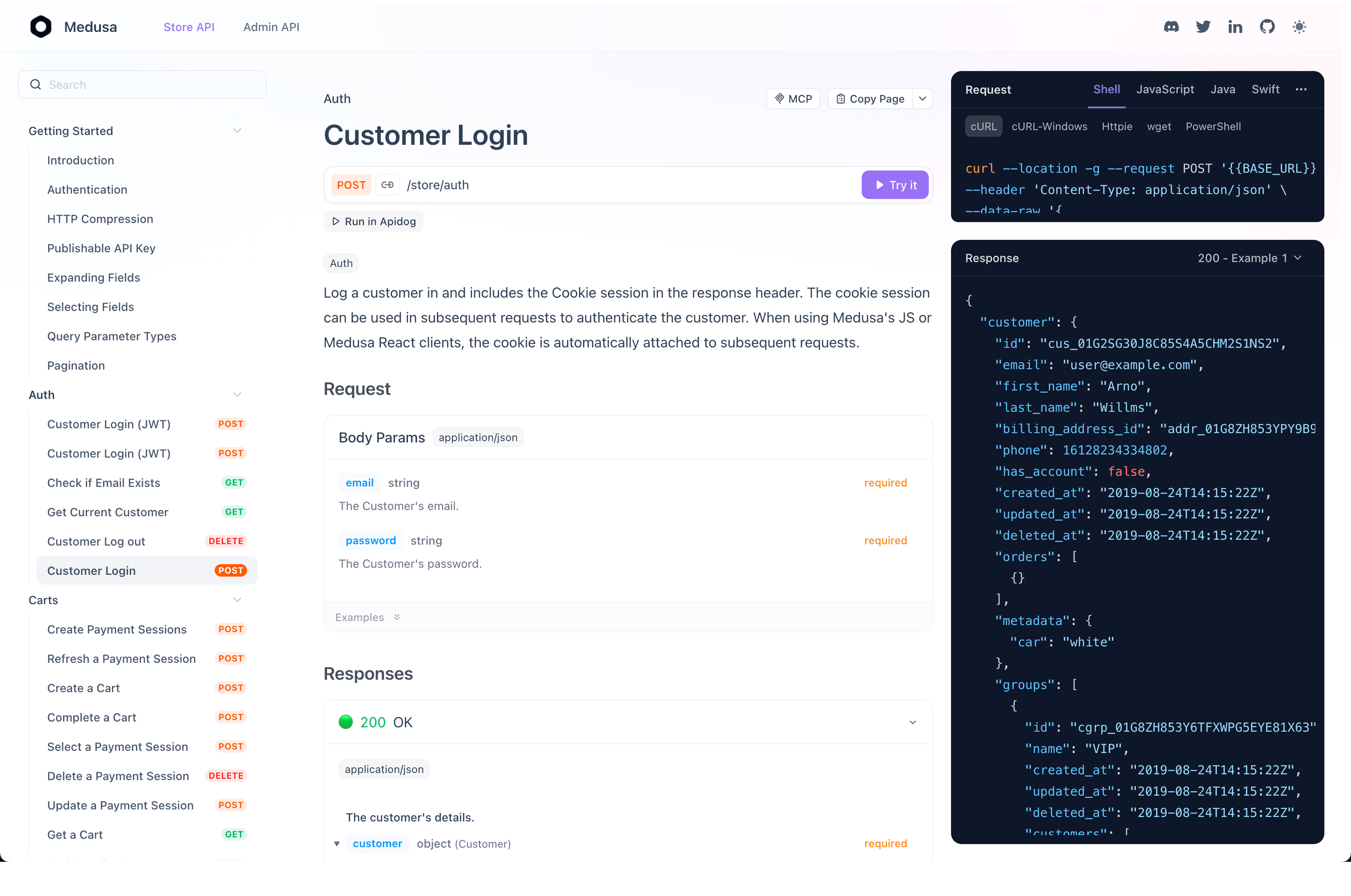
In Apidog, the documentation is generated from your API design inside the project. You design endpoints, schemas, and auth in the visual designer, and Apidog auto-generates the documentation from that definition. Hit Publish and you get an interactive docs site with a “Try it” console and multi-language code samples.
The integrity benefit is structural. The published docs are not separately editable markdown that can drift or be tampered with on its own. They reflect the API definition. Change the definition, the docs follow. To alter what consumers see, you change the design inside the project, which has its own permissions and change history, instead of editing a loose file on a static host.
Documentation access control
This is where Apidog closes the GitHub Pages gap. When you publish, you choose visibility, and the options are real gates, not obscurity:
- Public: anyone with the link can read it. Correct for a genuinely open API.
- Password protection: set a password (or generate a random one) and share it with stakeholders. Only people with the password get in.
- IP allowlist: restrict access to specific IPs or ranges, such as your office or VPN. Useful for internal docs.
- Email allowlist: list the email addresses or domains allowed in; users verify with a one-time code. Wildcards like
*@yourcompany.comcover a whole organization. - Custom login: connect your own auth system; your server issues a JWT, Apidog verifies it, and access depends on validity.
Apidog documents all five methods in its guide to controlling API documentation access. That answers the access-control test directly: you can state who can read the docs, and you can revoke a password or pull an email off the allowlist immediately.
Custom domain
You can serve published docs on your own domain, so consumers see developer.yourcompany.com instead of a generic URL. Apidog supports a custom domain through a DNS CNAME (the recommended path) or a reverse proxy. A custom domain alone is not a security control, but it keeps your docs on infrastructure you administer and govern, rather than scattered across hosts nobody owns.
OpenAPI spec kept in sync with your API design
Drift is a documentation security problem because it makes docs unverifiable. Apidog treats the API design as the single source of truth and keeps documentation in sync as the design changes. Apidog imports OpenAPI 3.0, 3.1, and Swagger 2.0, and supports scheduled imports so an external spec stays current automatically.
If you currently maintain a spec by hand in a Git repo, that is the highest-drift, hardest-to-verify setup. Moving the spec into Apidog as the source of truth means the published docs always match a definition you control. Teams coming from SwaggerHub can follow our guide to migrating SwaggerHub API docs to Apidog.
Documentation versioning
Apidog supports documentation versioning, so you publish and keep multiple versions side by side. A consumer integrating against your v1 API reads accurate v1 docs even after v2 ships. Versioning ties into branches and change history, so the evolution of the API, and its docs, stays tracked. That covers both the versioning and audit-trail tests.
None of this would have stopped TeamPCP from compromising a developer laptop. It does mean a different thing: a clear answer to who can read your docs, whether the published version matches your design, and what changed over time. That is the audit the GitHub breach should push you to run.
Comparing the documentation hosting options
A quick side-by-side of the common approaches against the four security properties.
| Property | Public GitHub Pages (Swagger UI / Redoc) | Self-hosted docs on your own server | Managed docs (Apidog) |
|---|---|---|---|
| Access control | None; URL obscurity only | Whatever you build and maintain | Built in: password, IP, email, custom login |
| Versioning | Manual; separate builds or branches | Manual | Built in; versions published side by side |
| Integrity | Git review + history (if enforced) | Depends on your pipeline | Docs generated from controlled API design |
| Audit trail | Git history for repo, not for deploy | Depends on your logging | Change history on design and published docs |
| Maintenance cost | Low to set up, ongoing pipeline upkeep | High; you own the whole stack | Low; platform handles hosting and gates |
| Best fit | Fully public APIs, disciplined pipeline | Teams with strict self-hosting needs | Teams needing access control without ops overhead |
There is no universally correct row. Public GitHub Pages is a fine choice for a public API with a locked-down pipeline. Self-hosting suits teams with hard residency or isolation requirements; our self-hosted API docs comparison and the Scalar vs SwaggerHub vs Apidog comparison lay out those tradeoffs in detail. The point is to choose deliberately against the four properties, not to inherit a setup from three years ago and never look at it again.
Conclusion
The GitHub breach is not a reason to abandon docs-as-code or distrust GitHub. It is a prompt to audit a surface most teams have ignored: where your API documentation lives and whether it can be tampered with.
Next step: list every place your API docs are published, check each against the four properties, and close whichever gap is widest. If access control is the gap, download Apidog and publish one project’s docs with a password or email allowlist to see how a managed layer handles it.