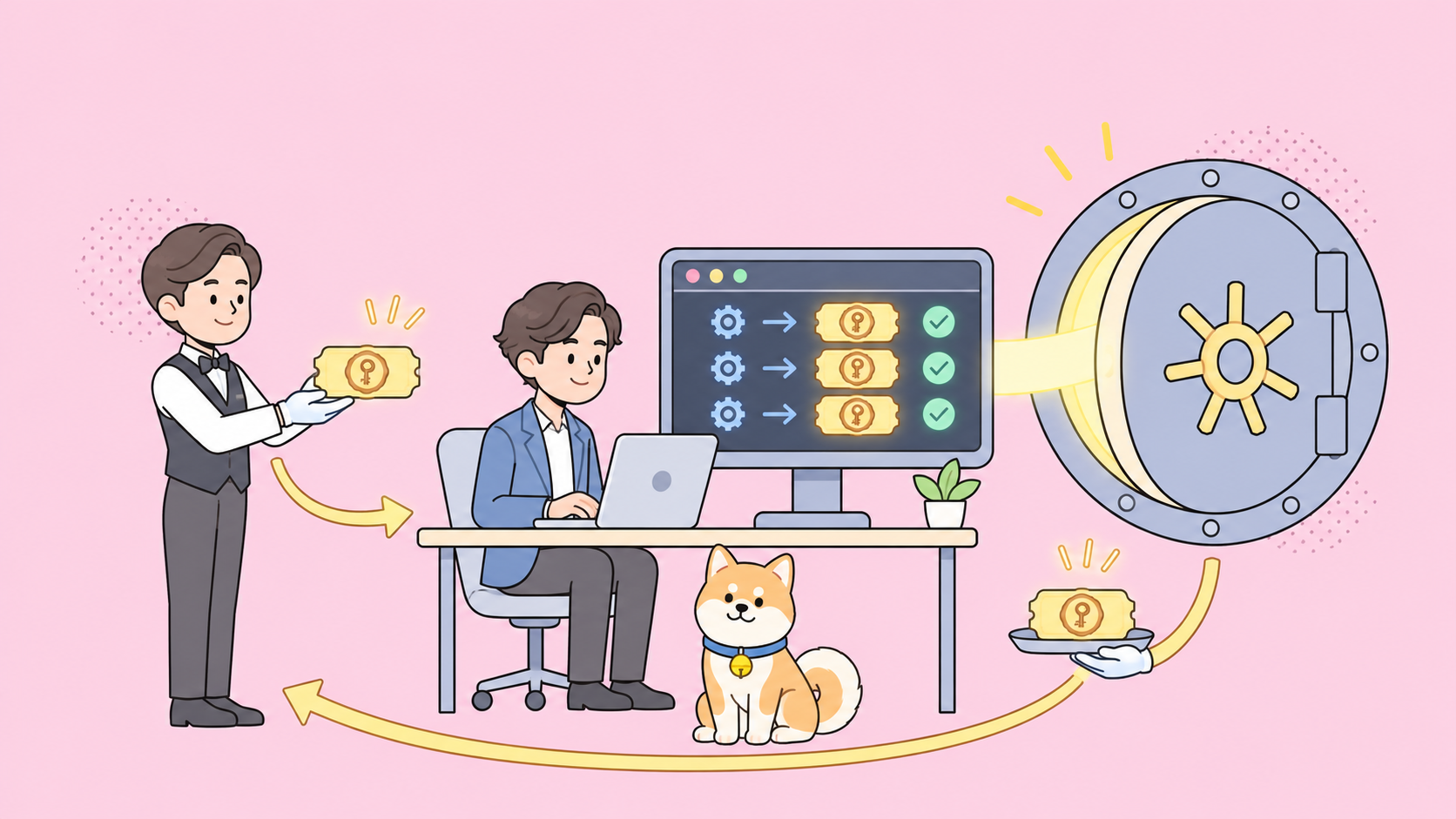
You can run API tests with real keys and still commit nothing secret. The pattern for 1Password CLI API testing is simple: keep a .env.tpl file of op:// secret references in the repo, then run your tests through op run, which swaps each reference for its value inside a subprocess and masks secrets in the output. Your coding agent, your teammates and your CI logs only ever see references.
This guide shows the exact setup with Apidog CLI: a single-key run your coding agent can drive, a multi-secret run with op inject, and the same suite in GitHub Actions with a 1Password service account. One honest note up front: Apidog has no native 1Password integration. Everything here works through 1Password’s own CLI, which is why it works with any test runner that reads environment variables.
What 1Password CLI does for API testing
1Password CLI (op) resolves secret references at run time. A reference such as op://api-testing/staging-api/credential names a vault, an item and a field. Your files hold that address, not the key. When a command needs the value, op run, op inject or op read fetches it from 1Password after you approve access.
For API tests, that gives you three properties at once:
- No plaintext keys in Git. The
.env.tplfile is safe to commit because it only holds addresses. - One source of truth. Rotate a key in 1Password and every run picks up the new value. Nobody edits five
.envfiles. - Least privilege by vault. A service account scoped to one vault can read your test credentials and nothing else.
The syntax is op://<vault>/<item>/[section/]<field>, as described in 1Password’s secret references guide.
How op run passes secrets as environment variables
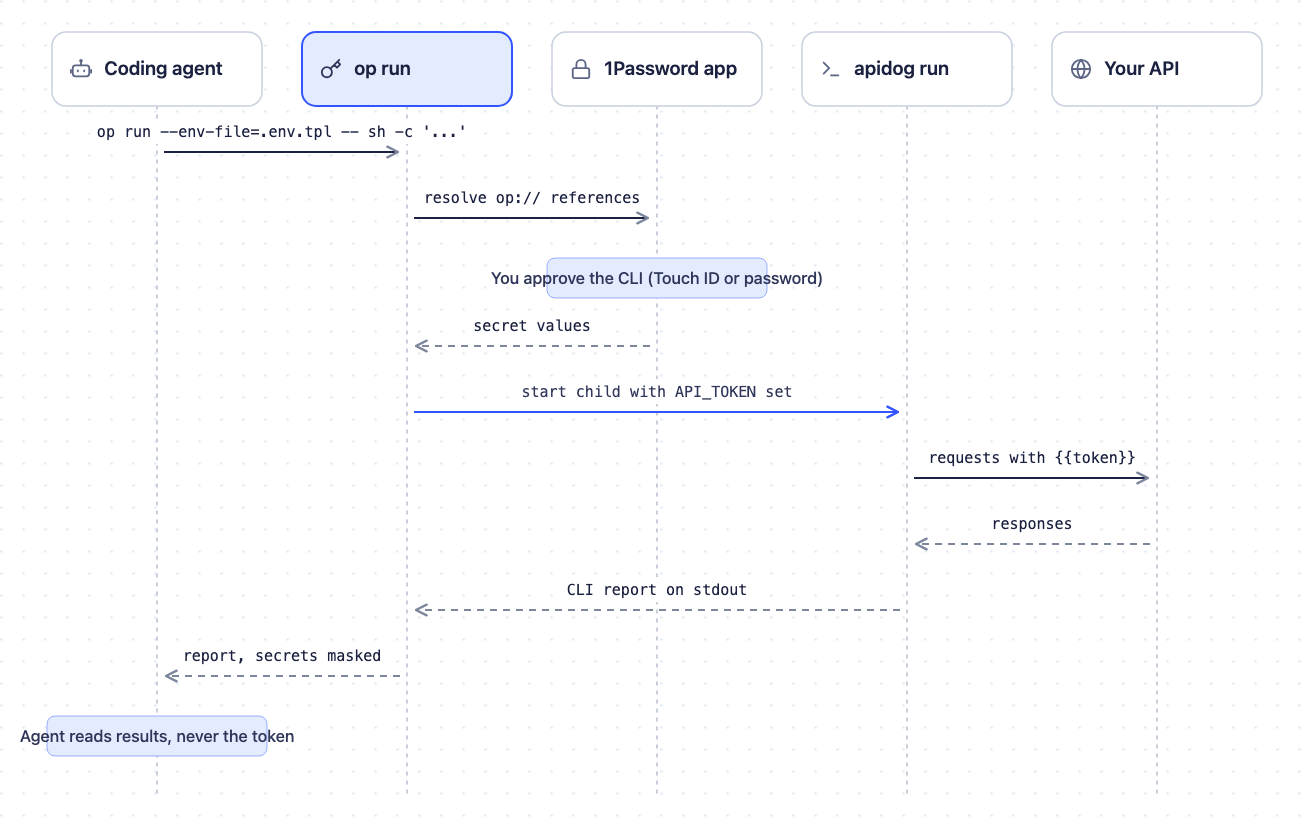
op run scans environment variables and env files for secret references, then starts your command in a subprocess with the real values set. The values exist only for the life of that subprocess. According to the op run reference, anything the subprocess prints to stdout or stderr is masked by default.
Start with a template in the repo:
# .env.tpl (safe to commit: references only)
API_TOKEN=op://api-testing/staging-api/credential
Then wrap the test command:
op run --env-file=.env.tpl -- sh -c 'apidog run -t <scenarioId> --project <projectId> -e <envId> --env-var "token=$API_TOKEN" -r cli'
Two details matter here:
- Single quotes around the
sh -cbody. If your outer shell expands$API_TOKENbeforeop runstarts, it expands to the reference string or to nothing. 1Password’s docs say to expand variables in a subshell soop runreplaces the reference first. --env-var "token=$API_TOKEN"sets the Apidog environment variabletokenfor this run only. Your requests already use{{token}}in their auth header, so nothing in the Apidog project changes.
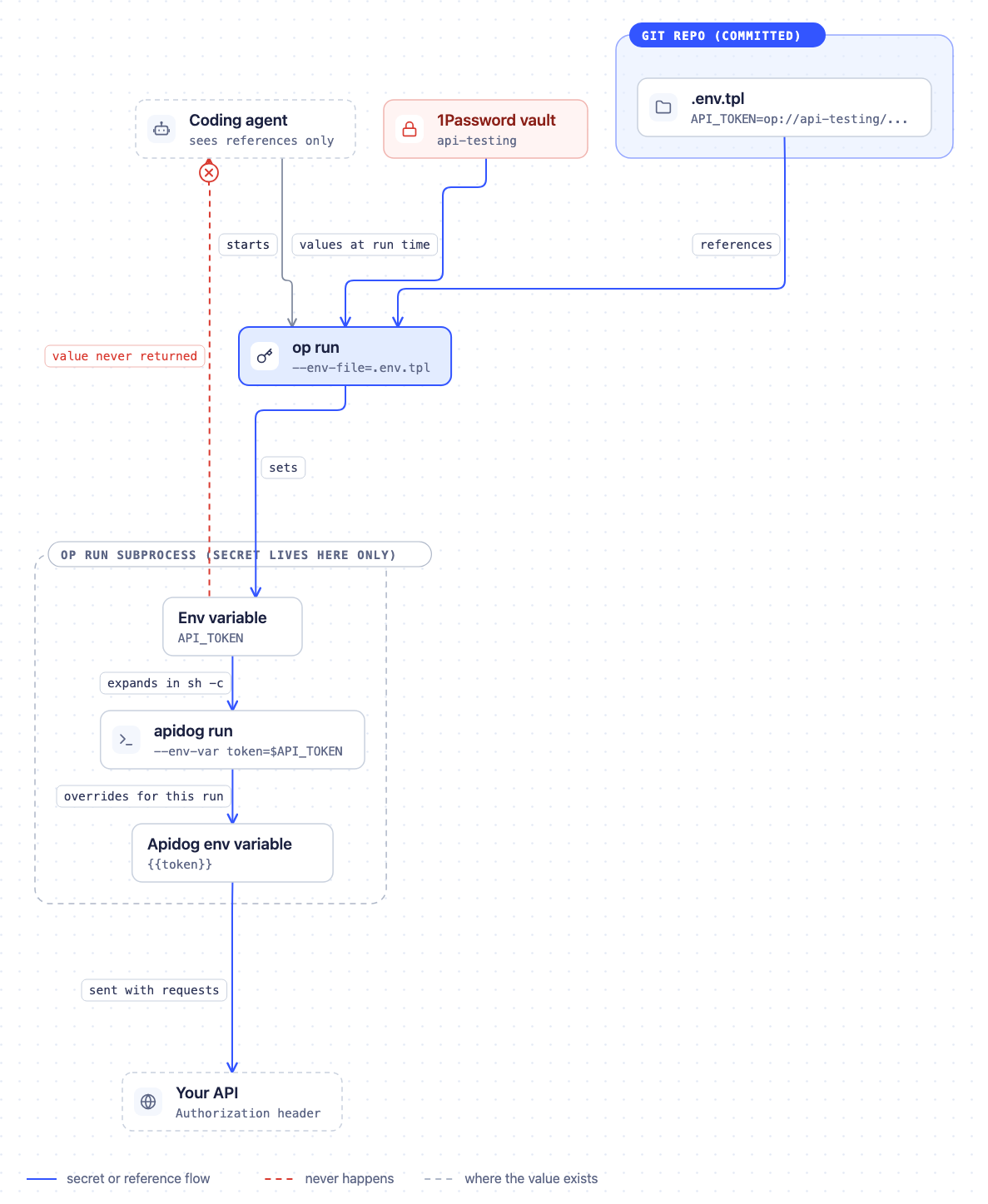
Leave masking on. The --no-masking flag prints raw values, which defeats the point the moment an agent or a CI log reads the output. Also note what masking does not cover: it filters stdout and stderr, not files. If you write -r json or -r html reports, treat those files as sensitive and keep them out of the repo, because a request log can carry a header value.
Let your coding agent run the tests with Apidog CLI
A coding agent is the right operator for this loop. It can find the scenario, run it, read the failures and fix the code, all without ever holding the key. The agent only sees .env.tpl, the command it runs and the masked report.
Set up both CLIs once on your machine:
brew install 1password-cli          # or winget install 1password-cli on Windows
npm install -g apidog-cli@latest
apidog login --with-token <YOUR_APIDOG_TOKEN>
npx -y skills add https://apidog.com   # pick your agent when prompted
In the 1Password app, open Settings, then Developer, and turn on Integrate with 1Password CLI. With that on, op asks you to approve access with Touch ID, Windows Hello or your 1Password unlock, so a human signs off on each session. The Apidog CLI side is covered in more depth in the Claude Code setup guide.
Then give your agent one prompt:
Run the smoke test scenario in Apidog project <projectId> against staging.
Get the API token from 1Password: wrap the run in op run --env-file=.env.tpl
and pass it with --env-var "token=$API_TOKEN". Never use --no-masking,
never run op read, and never print or write the token. Summarize the
failing steps from the CLI report.
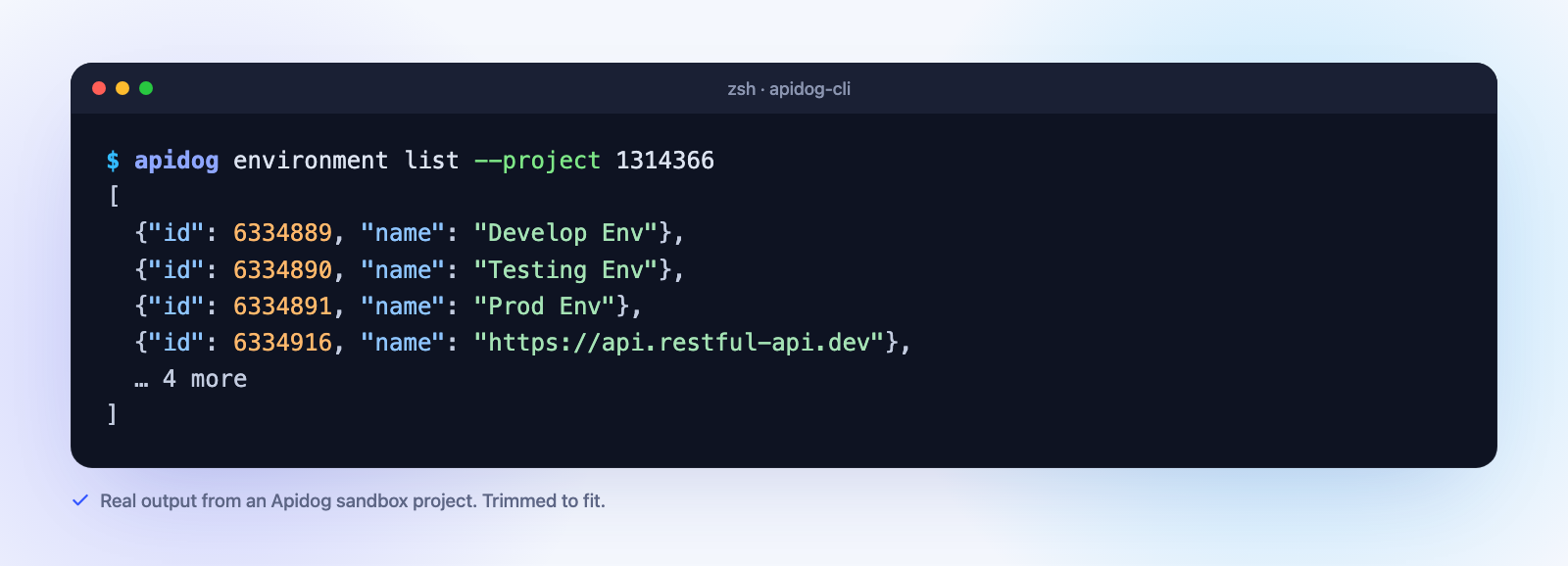
The agent looks up the IDs, then runs the wrapped command:
apidog environment list --project <projectId>
apidog test-scenario list --project <projectId>
op run --env-file=.env.tpl -- sh -c 'apidog run -t <scenarioId> --project <projectId> -e <envId> --env-var "token=$API_TOKEN" -r cli'
Here’s the full exchange, step by step:
A prompt is a request, not a fence. An agent with shell access could still call op read. Your real boundary is scope: put test credentials in their own vault, and for unattended runs use a service account that can read only that vault. The broader patterns for keeping values out of agent context are in how to let AI agents use API keys without seeing them.
Once this loop works for one person, Sharkly lets a team hand those agent test runs out as tasks on a shared board, with Claude Code, Codex or Gemini CLI running on your own machines under your own plans, and review what each agent ships before it merges. It’s free to start.
Many secrets: render a variables file with op inject
Ten --env-var flags get unwieldy. For larger suites, apidog run --variables <path> loads environment and global variables from a JSON file, and op inject can render that file from a template.
The template holds references in {{ }} blocks:
{
  "environments": [
    {
      "id": <envId>,
      "name": "Staging",
      "variable": {
        "values": [
          { "key": "token", "value": "{{ op://api-testing/staging-api/credential }}" },
          { "key": "clientSecret", "value": "{{ op://api-testing/oauth-client/client-secret }}" }
        ]
      }
    }
  ],
  "globals": { "variable": { "values": [] } }
}
The id must match the environment you pass with -e. Render it to a temp file, run and clean up in one script:
#!/bin/sh
set -e
VARS="$(mktemp)"
trap 'rm -f "$VARS"' EXIT
op inject -f -i apidog-vars.json.tpl -o "$VARS"
apidog run -t <scenarioId> --project <projectId> -e <envId> --variables "$VARS" -r cli
op inject writes the output with file mode 0600 by default, and the op inject reference tells you to delete the resolved file when you’re done. The trap does that even when a test fails. Apidog CLI also writes the run’s variable values back into the --variables file when it finishes, which is one more reason the file must not outlive the run.
The trade-off: unlike op run, this puts plaintext on disk for a few seconds. For agent-driven runs, prefer op run and keep op inject for CI or scripts no agent reads.
1Password secrets in CI with GitHub Actions
In CI, nobody is there to tap Touch ID, so you authenticate with a 1Password service account. The service account token is the only secret you store in GitHub. Everything else, the Apidog token included, stays in 1Password.
1Password’s GitHub Actions integration loads references into environment variables and masks the values in logs as ***:
name: api-tests
on: [push]

jobs:
  api-tests:
    runs-on: ubuntu-latest
    steps:
      - uses: actions/checkout@v4
      - uses: actions/setup-node@v4
        with:
          node-version: 20
      - run: npm install -g apidog-cli@latest

      - name: Load secrets from 1Password
        uses: 1password/load-secrets-action@v4
        with:
          export-env: true
        env:
          OP_SERVICE_ACCOUNT_TOKEN: ${{ secrets.OP_SERVICE_ACCOUNT_TOKEN }}
          APIDOG_ACCESS_TOKEN: op://api-testing/apidog-ci/credential
          API_TOKEN: op://api-testing/staging-api/credential

      - name: Run Apidog tests
        run: |
          apidog run -t <scenarioId> --project <projectId> -e <envId> \
            --access-token "$APIDOG_ACCESS_TOKEN" \
            --env-var "token=$API_TOKEN" -r cli,junit
The apidog run line matches what your agent runs locally, plus --access-token because CI has no apidog login session. Same scenario, same environment, same assertions. The Apidog CLI CI/CD guide covers JUnit reports and failure gates, and the apidog run command reference lists every flag.
Scope the service account to the api-testing vault only. If its token leaks, the blast radius is your test credentials, not production.
Already on HashiCorp Vault, AWS or Azure?
If your team keeps secrets in HashiCorp Vault, AWS Secrets Manager or Azure Key Vault, you don’t need a wrapper. Apidog connects to those three providers natively, so variables resolve inside Apidog itself. 1Password is not on that list, which is why this guide uses op run.
Setup guides for each:
| Secret store | Native in Apidog | Guide |
|---|---|---|
| HashiCorp Vault | Yes | Integrate HashiCorp Vault |
| AWS Secrets Manager | Yes | Integrate AWS Secrets Manager |
| Azure Key Vault | Yes | Integrate Azure Key Vault |
| 1Password | No, use op run or op inject |
This guide |
Common mistakes to avoid
- Double quotes around the
sh -cbody. Your shell expands$API_TOKENtoo early. Use single quotes outside and double quotes inside. - Committing a resolved file. Add
.envandapidog-reports/to.gitignore, and renderop injectoutput to a temp path outside the repo. Only.env.tpland other*.tplfiles belong in Git. - Running with
--no-masking“just to debug”. Debug withop run --env-file=.env.tpl -- printenv API_TOKEN, which stays masked and still proves the reference resolves. - One vault for everything. A service account with access to production secrets turns a CI leak into an incident.
- Saving the token in the Apidog environment. Keep the shared value empty or a placeholder and let
--env-varor--variablessupply it per run.
For the incident timeline and defensive regression checks, see what the 1Password breach teaches about API tokens.
FAQ
Does Apidog integrate with 1Password directly? No. Apidog’s native vault providers are HashiCorp Vault, AWS Secrets Manager and Azure Key Vault. With 1Password you wrap apidog run in op run or render a variables file with op inject, as shown above.
Can my coding agent see the secret when it runs op run? Not through normal output: op run masks secret values on stdout and stderr. The agent sees the op:// reference and the masked report. Scope 1Password access to a test-only vault, because an agent with a shell could still try op read.
What is the difference between op run and op inject? op run puts secrets in environment variables of a subprocess and never writes them to disk. op inject renders a template into a file with real values, which you must delete after use. Prefer op run when an agent drives the run.
How do I use 1Password secrets in CI without storing API keys in GitHub? Create a 1Password service account, store only its token as the OP_SERVICE_ACCOUNT_TOKEN repository secret, and load everything else with 1password/load-secrets-action@v4 using op:// references.
Do I need to change my Apidog test cases? No. Keep using {{token}} or any variable name in your requests. --env-var "token=..." or a --variables file overrides the value for that run only.