

Claude Sonnet 5 landed on June 30, 2026, and it’s one of the strongest defaults you can run in Claude Code. Anthropic calls it “the most agentic Sonnet model yet,” and the launch benchmarks back that up: on tool-use and agentic coding tasks, it lands within a few points of Opus 4.8 at a fraction of the price. That combination matters most inside Claude Code, where the model spends its day reading files, running terminal commands, and editing your repo in a loop.
This guide shows you how to select Sonnet 5 in Claude Code, what changes about its behavior (adaptive thinking is on by default now), how to run a realistic workflow, and when to switch up to Opus 4.8. You’ll also see how to pair it with Apidog so the model can build an API and test the real endpoint instead of guessing.
Why Sonnet 5 is a strong default for Claude Code
Claude Code is an agentic coding tool. The model doesn’t just answer once. It plans, runs commands, reads output, edits files, and repeats. That loop rewards models that are good at tool use, and Sonnet 5 is tuned for exactly that.
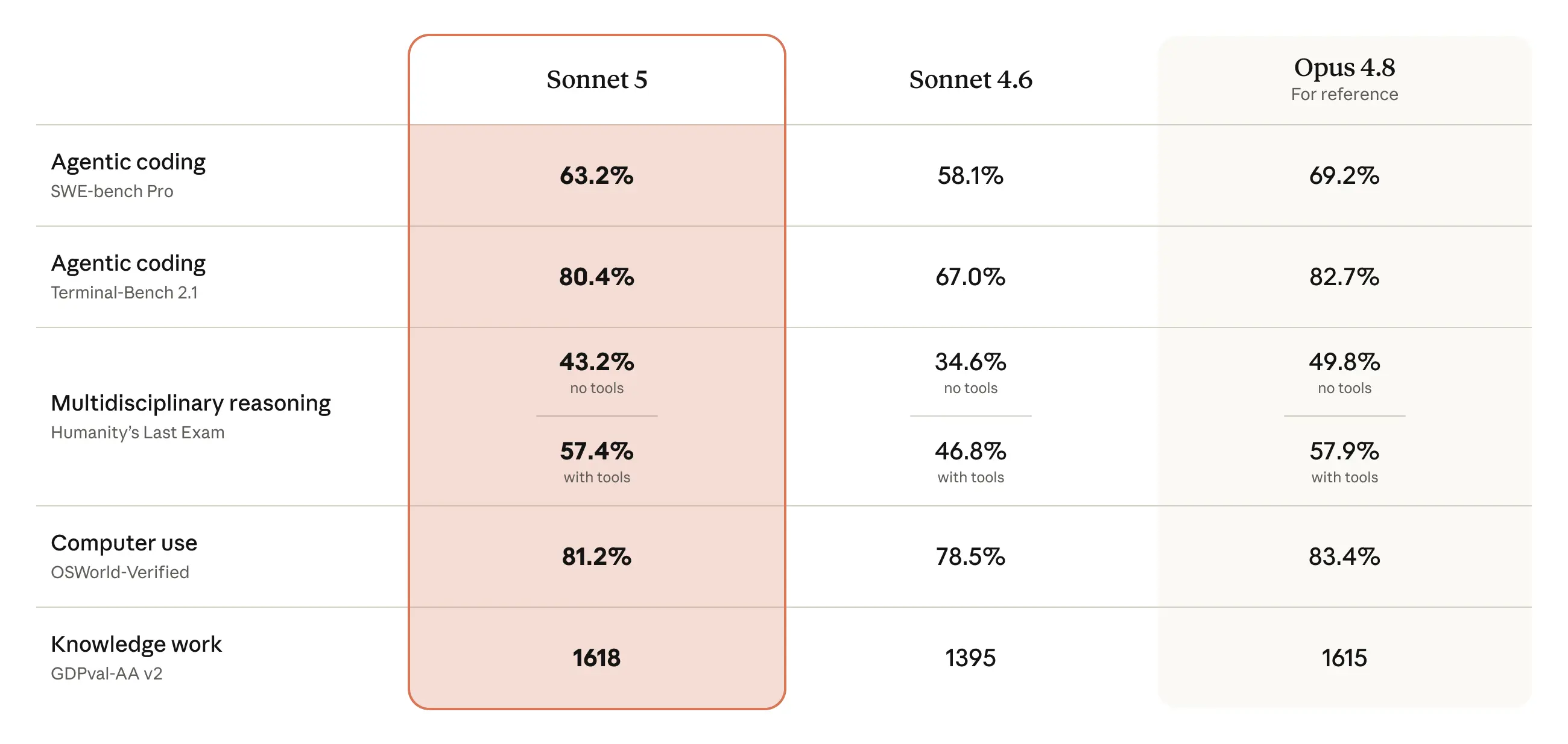
Here’s the launch benchmark snapshot, reported by Anthropic. Treat these as reported figures, not our own testing.
| Benchmark | Sonnet 5 | Opus 4.8 | Sonnet 4.6 |
|---|---|---|---|
| SWE-bench Pro (agentic coding) | 63.2% | 69.2% | 58.1% |
| Terminal-Bench 2.1 | 80.4% | 82.7% | n/a |
| OSWorld-Verified (computer use) | 81.2% | 83.4% | 78.5% |
The pattern is the useful part. With tools in the loop, Sonnet 5 sits within about 1 to 3 points of Opus 4.8. On pure reasoning with nothing to lean on, Opus pulls ahead by around 6 points. Coding in Claude Code is a tool-heavy job, so most of the time you’re in the range where Sonnet 5 is close to Opus and much cheaper.
Price makes the case clearer. Sonnet 5 runs at $3 per million input tokens and $15 per million output at standard rates, with an introductory rate of $2 input and $10 output through August 31, 2026. Opus 4.8 is $5 per million input and $25 output. For a busy day of agentic coding, that gap adds up. Our Claude Sonnet 5 pricing breakdown walks through the numbers, including the tokenizer catch below.
Select Sonnet 5 in Claude Code
Claude Code exposes model selection through the interactive /model command. Inside a session, type:
/model
You’ll get a picker listing the available models. Choose Claude Sonnet 5. From that point, the session uses it for planning and edits.
If you prefer to set the model without opening the picker, you can pass it directly:
/model claude-sonnet-5
The claude-sonnet-5 string is the exact API model ID, with no date suffix. If you’re scripting Claude Code or setting a project default, use that exact ID.
Sonnet 5 is available in Claude Code from launch. It’s also the default model on the Free and Pro Claude apps, and available to Max, Team, and Enterprise. So whether you’re on a paid seat or a free plan, you can run Sonnet 5 today. For a full walkthrough, see our Claude Code guide, and the Claude Code CLI commands reference covers the rest of the slash commands.
What changes in the model’s behavior
Sonnet 5 is a drop-in upgrade from Sonnet 4.6, but a few behaviors are different. Two of them show up while you work in Claude Code.
Adaptive thinking is on by default
On Sonnet 4.6, a request with no thinking field ran without thinking. On Sonnet 5, adaptive thinking is on by default. The model decides how much to think based on the task in front of it. A quick rename gets almost no thinking. A tricky refactor across several files gets more.
You don’t configure this in Claude Code the way you would in a raw API call. The tool manages the request for you. What you’ll notice is that Sonnet 5 pauses to reason on harder steps and moves fast on simple ones. That’s the adaptive behavior working as intended. Anthropic’s adaptive thinking docs explain the mechanism if you want the detail.
The model also supports an effort parameter with four levels: low, medium, high, and xhigh. Effort controls how deep the thinking goes and how many tokens it spends. Higher effort helps on the hardest problems and costs more. In an agentic loop, this is the dial you reach for when a task genuinely needs more deliberation.
Manual extended thinking and sampling params are gone
If you’ve built custom tooling around Claude, note two removals. Manual extended thinking (thinking: {type: "enabled", budget_tokens: N}) now returns a 400 error. Use adaptive thinking and the effort parameter instead. Setting temperature, top_p, or top_k to a non-default value also returns a 400. Steer behavior through your prompt and system instructions instead. Claude Code handles this for you, but any scripts you wrote against Sonnet 4.6 need a look. The full list lives in our Sonnet 5 vs Sonnet 4.6 comparison.
The new tokenizer affects context and cost
Sonnet 5 uses a new tokenizer. The same source text produces roughly 30% more tokens than on Sonnet 4.6, about 1.3 times as many. The request and response shapes don’t change, so nothing breaks, but two things shift.
First, the 1,000,000 token context window holds less text on average, since each token covers less. A large repo fills the window a little faster than the raw character count suggests. Second, the per-request cost of equivalent text can be higher even though the per-token price is unchanged. Don’t reuse your Sonnet 4.6 token estimates. Recount against Sonnet 5 with Anthropic’s token counting endpoint if you’re budgeting a workload.
A realistic Claude Code workflow with Sonnet 5
Sonnet 5 is at its best when you let it plan before it edits:
- Describe the task at a high level. Ask it to read the relevant files and propose a plan before touching code.
- Review the plan. Correct anything wrong. This is cheaper than fixing bad edits later.
- Let it implement, running terminal commands and editing files as it goes.
- Have it run your tests. If they fail, let it read the output and iterate.
Because adaptive thinking is on, you don’t need to manually crank up reasoning for the planning step. The model spends more effort where the task is harder. Your job is to give clear instructions and review the plan.
Keep context in mind. Even with a 1M window, feeding the model your entire repo every turn wastes tokens and money. Point it at the files that matter. Sonnet 5 is good at following a scoped task and pulling in more context only when it needs to.
Build an API, then let Sonnet 5 test it
Here’s where the workflow gets concrete. Say you’re building a REST API in Claude Code. The model can scaffold the routes, but it can’t see whether the running endpoint actually behaves. That’s the gap Apidog fills.
Design and mock the API in Apidog first. You define the endpoints, request and response schemas, and a mock server that returns realistic data, so your frontend and tests have something to hit before the backend is finished. Then, as Sonnet 5 writes the implementation, you point it at the real endpoint through the Apidog MCP server, which exposes your API spec to the model. The model reads the actual schema instead of inventing one, generates handlers that match it, and can run test scenarios against the live server.
The loop looks like this:
# Sonnet 5 in Claude Code implements the endpoint,
# then runs your Apidog test suite via the CLI:
apidog run --access-token $APIDOG_TOKEN \
  --project-id $PROJECT_ID \
  --test-scenario "user-signup-flow"
When a test fails, the model reads the assertion output and fixes the handler. You get a tight build-test loop where the model verifies against a real contract, not a guess. Apidog’s automated tests and visual assertions catch the mismatch; Sonnet 5 does the fixing. Download Apidog to set up the project locally first.
The honest tie-in is small: the model writes the code, and Apidog is where you confirm the API actually does what the contract says.
When to switch up to Opus 4.8
Sonnet 5 is the right default for most Claude Code sessions, but Opus 4.8 earns its higher price in a few cases.
Reach for Opus 4.8 when:
- The task is a hard reasoning problem, not a tool-loop problem. Pure algorithmic design or subtle logic is where Opus’s ~6 point lead shows up.
- You’re running long-horizon autonomous work where small errors compound over many steps.
- Quality matters more than cost for a specific critical change.
Stay on Sonnet 5 when:
- You’re doing standard agentic coding: reading files, running commands, editing, testing.
- Volume is high and cost matters.
- You want fast iteration across many small tasks.
Switching is one command. Type /model claude-opus-4-8 for the hard task, then switch back to claude-sonnet-5 for the rest of your session. You don’t have to commit to one model for everything. For a deeper side-by-side, read our Sonnet 5 vs Opus 4.8 comparison. If you used Sonnet 4.5 in Claude Code or Fable 5 in Claude Code before, the workflow here will feel familiar.
Practical tips
- Let it plan. Ask for a plan before edits on anything non-trivial. Adaptive thinking handles the reasoning depth automatically.
- Scope your context. Point the model at the files that matter. The 1M window is large, but the new tokenizer means it fills faster than you’d expect.
- Watch cost on heavy days. Sonnet 5 is cheaper than Opus, but a full day of edits adds up. The introductory rate through August 31, 2026 helps.
- Test against real contracts. Have the model run Apidog tests against your endpoints instead of trusting that the code “looks right.”
- Use effort for hard steps. When a task needs more deliberation, the effort parameter (up to xhigh) is the dial, not manual thinking budgets.
FAQ
Is Claude Sonnet 5 available in Claude Code?
Yes. Sonnet 5 is available in Claude Code as of its June 30, 2026 release. Select it with the /model command and pick Claude Sonnet 5, or pass the model ID directly with /model claude-sonnet-5.
Do I need to change my settings for adaptive thinking?
No. Adaptive thinking is on by default on Sonnet 5, and Claude Code manages the request for you. The model decides how much to think per task. This is a change from Sonnet 4.6, where a request with no thinking field ran without any thinking. See our Sonnet 5 vs Sonnet 4.6 comparison for the full list of behavior changes.
Is Sonnet 5 good enough for coding, or should I use Opus 4.8?
For most agentic coding in Claude Code, Sonnet 5 is a strong default. Anthropic’s launch benchmarks put it within about 1 to 3 points of Opus 4.8 on tool-use tasks like SWE-bench Pro and Terminal-Bench, at a lower price. Switch to Opus 4.8 for the hardest pure-reasoning problems or long-horizon autonomous work.
Can I use Sonnet 5 in Claude Code for free?
Sonnet 5 is the default model on the Free and Pro Claude apps and is available in Claude Code. Free usage comes with rate and usage limits. See our Claude Sonnet 5 free guide for the honest paths and what the limits are.
How does the new tokenizer affect my Claude Code sessions?
The same text produces roughly 30% more tokens than on Sonnet 4.6. Nothing breaks, but the 1M context window holds less text and equivalent-text cost can be higher. Recount tokens against Sonnet 5 rather than reusing old estimates.


