

Claude Sonnet 5 shipped on June 30, 2026, and it’s the most agentic Sonnet model Anthropic has released. It performs close to Opus 4.8 on tool-use and coding tasks at a much lower price, which makes it a strong default for anything that calls tools in a loop. This guide shows you how to call the Claude Sonnet 5 API end to end: get a key, send your first request in curl and Python, read the response, handle the new adaptive-thinking default, avoid the three request changes that return 400 errors, stream long outputs, and count tokens under the new tokenizer.
You’ll also set the whole thing up in Apidog so your requests live in a reusable collection with saved environments and automated tests, instead of scattered across shell history. If you’ve called the Messages API before, most of this will feel familiar. The model ID is claude-sonnet-5, and the request shape matches what you already use.
What you need before you start
You need three things to call the API.
- An Anthropic account and an API key from the Claude platform console.
- The model ID:
claude-sonnet-5. It’s the exact string, with no date suffix. - A way to send HTTP requests. curl works for a quick test. Apidog works better once you’re iterating.
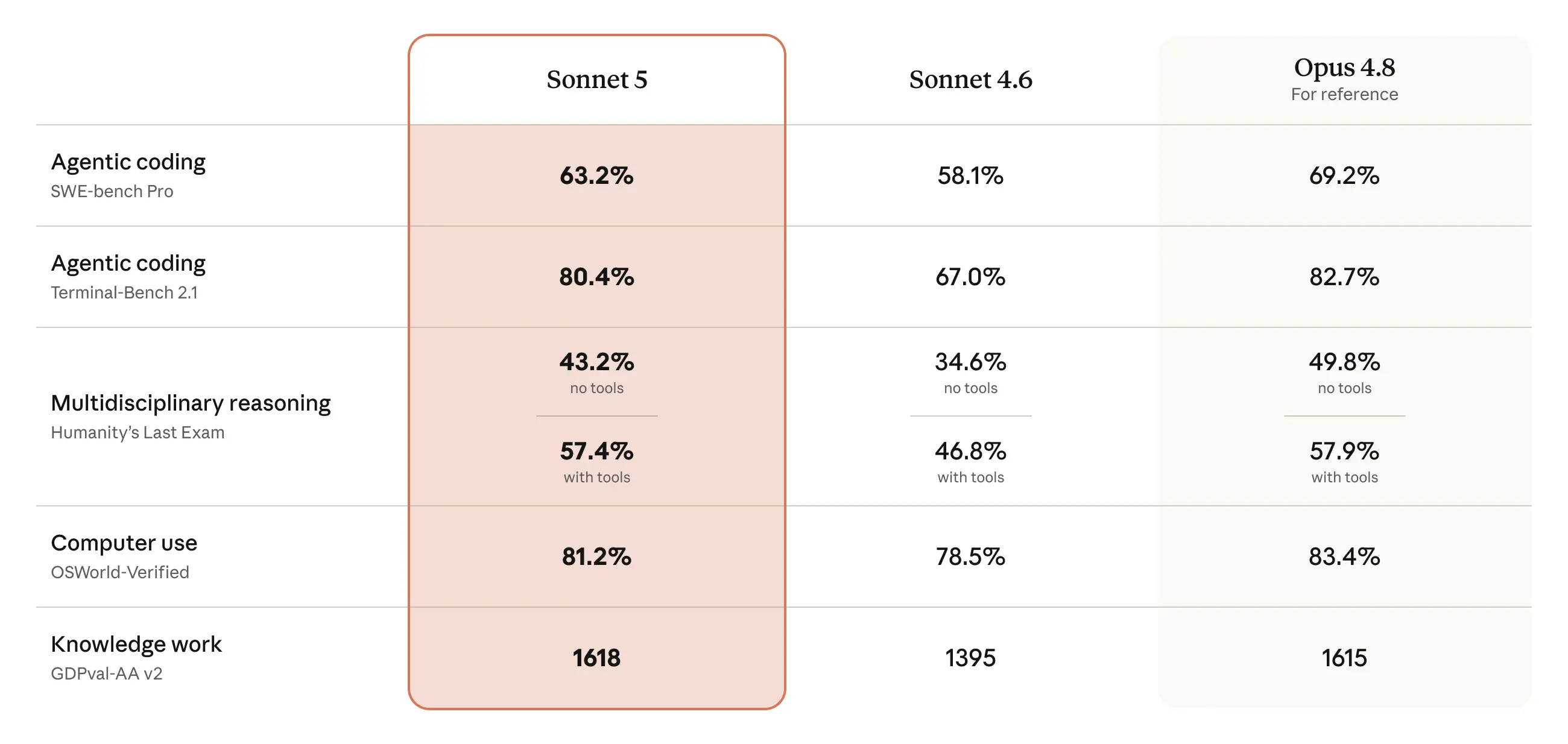
Sonnet 5 is available to all API customers, plus Amazon Bedrock (through the Claude Platform on AWS), Google Cloud through Vertex AI, and Microsoft Foundry in preview. This guide uses the direct Anthropic API. The request body is the same across platforms; only auth and the endpoint host change.
Get your API key
Sign in to the Claude platform console, open the API keys section, and create a new key. Copy it once and store it somewhere safe, because the console won’t show it again. Never hard-code the key in your source or commit it to git. Set it as an environment variable instead:
export ANTHROPIC_API_KEY="sk-ant-..."
If you’re on a ZDR agreement, Sonnet 5 supports zero data retention, so nothing about the API surface changes for you here.
Your first request
The Sonnet 5 API uses Anthropic’s Messages endpoint. Here’s a minimal request with curl.
curl https://api.anthropic.com/v1/messages \
  -H "x-api-key: $ANTHROPIC_API_KEY" \
  -H "anthropic-version: 2023-06-01" \
  -H "content-type: application/json" \
  -d '{
    "model": "claude-sonnet-5",
    "max_tokens": 1024,
    "messages": [
      {"role": "user", "content": "Write a haiku about API testing."}
    ]
  }'
The same request with the Python SDK:
import os
from anthropic import Anthropic

client = Anthropic(api_key=os.environ["ANTHROPIC_API_KEY"])

message = client.messages.create(
    model="claude-sonnet-5",
    max_tokens=1024,
    messages=[
        {"role": "user", "content": "Write a haiku about API testing."}
    ],
)

print(message.content[0].text)
Two fields do the heavy lifting. model selects Sonnet 5. max_tokens caps the total output. Keep reading, because max_tokens behaves differently on Sonnet 5 than it did on Sonnet 4.6, and it’s the easiest thing to get wrong.
Reading the response
A successful call returns HTTP 200 with a JSON body like this (trimmed):
{
  "id": "msg_01ABC...",
  "type": "message",
  "role": "assistant",
  "model": "claude-sonnet-5",
  "content": [
    {"type": "text", "text": "Assertions green,\nendpoints answer on the first try,\nship the merge tonight."}
  ],
  "stop_reason": "end_turn",
  "usage": {
    "input_tokens": 18,
    "output_tokens": 27
  }
}
A few fields matter for real work.
contentis an array. Text lives in blocks wheretypeis"text". With tool use or thinking enabled, you’ll see other block types in the same array, so iterate; don’t assumecontent[0]is always your answer.stop_reasontells you why generation ended.end_turnis normal.max_tokensmeans you hit the cap and the output was truncated.refusalis new and worth understanding (below).usagereportsinput_tokensandoutput_tokens. This is what you’re billed on, and the numbers are higher on Sonnet 5 for the same text because of the new tokenizer.
The refusal stop reason
Sonnet 5 is the first Sonnet-tier model with real-time cybersecurity safeguards. If a request touches a prohibited or high-risk cyber topic, the model may refuse. A refusal comes back as a normal HTTP 200 with stop_reason: "refusal", not as an error. Handle it in your response-parsing code the same way you’d handle any non-end_turn stop reason, rather than treating it as a failed HTTP call.
Adaptive thinking is on by default
This is the biggest behavior change from Sonnet 4.6, and it trips people up. On Sonnet 4.6, no thinking field meant no thinking. On Sonnet 5, adaptive thinking is on by default. A request with no thinking field now runs with adaptive thinking, and thinking tokens count toward your total output.
Because max_tokens is a hard cap on total output (thinking tokens plus response text), a max_tokens value that was comfortable on 4.6 can now truncate your visible answer before it finishes. If you migrated a workload that never used thinking and set a tight max_tokens, raise it or expect truncation.
To turn thinking off entirely:
message = client.messages.create(
    model="claude-sonnet-5",
    max_tokens=1024,
    thinking={"type": "disabled"},
    messages=[
        {"role": "user", "content": "Return only the JSON, no reasoning."}
    ],
)
To keep adaptive thinking on and control how hard the model works, use the effort parameter instead of trying to set a manual token budget. Effort supports low, medium, high, and xhigh. Higher effort means deeper thinking and more token spend. Anthropic documents the behavior on the adaptive thinking page. Note the field value is {"type": "adaptive"}, not a budget_tokens number.
Three request changes that return 400
If you’re porting code from Sonnet 4.6 or an older Claude model, three things that used to work now return a 400 error. Fix them before you migrate.
- Manual extended thinking is removed.
thinking: {type: "enabled", budget_tokens: N}returns 400. It was already deprecated on 4.6. Use adaptive thinking plus the effort parameter instead. - Sampling parameters are rejected. Setting
temperature,top_p, ortop_kto a non-default value returns 400. Remove them. Omitting them, or leaving them at their default, is fine. Steer behavior with system-prompt instructions instead. This constraint was already on Opus 4.7 and up; it’s new for the Sonnet class. - Assistant-message prefilling is not supported. Prefilling the start of the assistant turn returns 400. Use structured outputs or
output_config.formator system-prompt instructions to shape the output instead.
Everything else that runs on Sonnet 4.6 runs on Sonnet 5 with no other code changes. The request, response, and streaming shapes are identical. For a fuller migration walkthrough, see our guide on the Claude Sonnet 4.6 API, which covers the same request surface Sonnet 5 inherits.
Streaming for large outputs
Sonnet 5 supports up to 128,000 tokens of output. For long responses, or any request where adaptive thinking pushes total output high, stream the result so you get tokens as they’re generated instead of waiting for the full response. Streaming also avoids client timeouts on big generations.
with client.messages.stream(
    model="claude-sonnet-5",
    max_tokens=8000,
    messages=[
        {"role": "user", "content": "Draft an OpenAPI 3.1 spec for a bookstore checkout API."}
    ],
) as stream:
    for text in stream.text_stream:
        print(text, end="", flush=True)
The streaming event shape is the same as on Sonnet 4.6, so existing stream handlers work unchanged.
Token counting under the new tokenizer
Sonnet 5 uses a new tokenizer. The same input text produces roughly 30% more tokens than on Sonnet 4.6, about 1.3x. This is not an API change. Request, response, and streaming shapes are identical, and you don’t change any code for it. But it affects anything you measure or budget in tokens.
- Your
usagenumbers and token-counting results are higher for the same text. Recount against Sonnet 5; don’t reuse your 4.6 counts. - The 1,000,000-token context window holds less text on average, because each token now covers less text.
- A
max_tokensvalue sized near your expected output may now truncate. Revisit it. - Per-request cost for equivalent text can be higher even though the per-token price is unchanged.
Use the count-tokens endpoint before you send, so you’re budgeting on Sonnet 5’s real numbers:
count = client.messages.count_tokens(
    model="claude-sonnet-5",
    messages=[
        {"role": "user", "content": "Estimate the tokens for this prompt on Sonnet 5."}
    ],
)
print(count.input_tokens)
Anthropic documents this on the token counting page.
Errors, rate limits, and cost basics
Standard HTTP semantics apply. A 400 means a malformed request (the three changes above are the usual suspects on Sonnet 5). A 401 means a bad or missing API key. A 429 means you hit a rate limit. Read the retry-after header and back off before retrying. Remember that a refusal is a 200, not an error, so don’t route it through your retry logic.
On pricing, the introductory rate is $2 per million input tokens and $10 per million output tokens, in effect through August 31, 2026. After that it moves to the standard $3 per million input and $15 per million output, the same per-token rate as Sonnet 4.6. Because of the tokenizer change, the cost of an equivalent-text request can still be higher than on 4.6 even though the per-token rate matches, so model your real workloads with token counting rather than assuming flat parity. For a deeper cost walkthrough, see our Claude API cost breakdown and Claude API rate limits guide. Priority Tier is not available on Sonnet 5.
Test and organize your Sonnet 5 calls in Apidog
Once you’re past the first curl command, you want your requests saved, your key stored once, and your responses checked automatically. That’s where Apidog fits. It’s an all-in-one API platform, so the same request you send by hand becomes a reusable, testable asset. Download Apidog to follow along.
Here’s a practical setup for the Sonnet 5 API.
1. Create the request. Add a new HTTP request in Apidog. Set the method to POST and the URL to https://api.anthropic.com/v1/messages. Add the headers anthropic-version: 2023-06-01 and content-type: application/json. Paste the JSON body with "model": "claude-sonnet-5".
2. Store the API key as an environment variable. Create an environment (for example, “Anthropic Production”) and add a variable named ANTHROPIC_API_KEY. Reference it in the x-api-key header as {{ANTHROPIC_API_KEY}}. Now your key lives in one place, out of your request body, and you can swap environments without editing requests.
3. Save it in a collection. Group your Sonnet 5 requests, a plain message call, a streaming call, a tools call, into one collection. Your whole team gets the same known-good requests instead of copying curl snippets around.
4. Add an automated test. Attach assertions to the request so a run fails loudly when something drifts. For example:
- Assert the response status is
200. - Assert
modelequalsclaude-sonnet-5. - Assert
stop_reasonis present and notmax_tokens(a fast way to catch truncation after the tokenizer change). - Assert
usage.output_tokensis greater than0.
Chain these into a test scenario and run it in CI whenever you change prompts or migrate model versions. That last assertion is the cheapest way to catch a max_tokens regression caused by adaptive thinking now being on by default.
5. Mock the endpoint. Apidog’s smart mock returns a realistic response for the Messages shape, so your app’s client code, error handling, and streaming parser can be built and tested without spending a single token. That’s useful for frontend work and for load-testing your own integration layer.
If you’re moving off Postman for this, our take on API testing without Postman in 2026 covers why a design-plus-test-plus-mock workflow in one tool saves round-trips. Prefer the terminal? The Apidog CLI complete guide shows how to run these same saved tests in a pipeline.
FAQ
What is the Claude Sonnet 5 model ID?
It’s claude-sonnet-5, the exact string with no date suffix. Use it in the model field of your Messages request. It’s a drop-in replacement for claude-sonnet-4-6, so in most cases you change the model ID and review three things: adaptive thinking now being on by default, the removed sampling parameters, and the removed manual thinking budget. For the full picture of the model, read what is Claude Sonnet 5.
Why is my max_tokens output getting cut off on Sonnet 5?
Adaptive thinking is on by default, and thinking tokens count against max_tokens along with your response text. If your cap was tuned for a no-thinking workload on Sonnet 4.6, raise it, or set thinking: {"type": "disabled"} if you don’t want thinking at all. The new tokenizer produces about 30% more tokens for the same text, which compounds the effect.
Do I need to change my code to migrate from Sonnet 4.6?
Only in three places. Remove non-default temperature, top_p, and top_k. Remove any thinking: {type: "enabled", budget_tokens: N}. Remove assistant-message prefilling. Each of those returns a 400 on Sonnet 5. Everything else, including streaming and response shapes, is unchanged. If you also run Opus, our Opus 4.8 API guide uses the same Messages surface.
Is a refusal an error I need to catch?
No. A cybersecurity refusal returns HTTP 200 with stop_reason: "refusal". Treat it as a normal response with a non-end_turn stop reason, not as a failed request. Don’t send it through your retry-on-error path.
How much does the Sonnet 5 API cost?
Introductory pricing is $2 per million input tokens and $10 per million output tokens through August 31, 2026, then $3 and $15 after that. The per-token rate matches Sonnet 4.6, but the new tokenizer means equivalent text can cost more, so measure with token counting instead of assuming parity.


