
Anthropic shipped Claude Fable 5 on June 9, 2026, and the headline use case is exactly the kind of work most developers reach for Claude Code to do: long, autonomous coding sessions that hold their shape across an entire codebase. If you already run the Claude Code CLI for day-to-day engineering, pointing it at the new model is a small config change with a big behavioral difference. This guide walks through running Claude Fable 5 with Claude Code end to end, from selecting the model to confirming you are on it, tuning long autonomous runs, and keeping the bill in check. By the end you will know each supported way to set the model, how to verify it, and where the 2x cost over Opus 4.8 is worth paying.
If you want a deeper primer on the model itself before configuring anything, see what is Claude Fable 5. This piece stays focused on the Claude Code workflow.
TL;DR
Install and authenticate Claude Code (v2.1.170 or later), then set the model to Fable 5 with the in-session command /model fable or /model claude-fable-5. You can also launch with claude --model fable, export ANTHROPIC_MODEL=claude-fable-5, or pin "model": "fable" in your settings file. Confirm with /status. Fable 5 costs $10/M input and $50/M output, which is 2x Opus 4.8, so scope long sessions deliberately.
Why run Claude Code on Fable 5
Claude Code is Anthropic’s official command-line coding agent. It runs on Anthropic models, edits files in your repo, runs commands, and drives multi-step tasks from your terminal. The model behind it sets the ceiling on how far it can run before it loses the thread, and that is where Fable 5 changes the math.
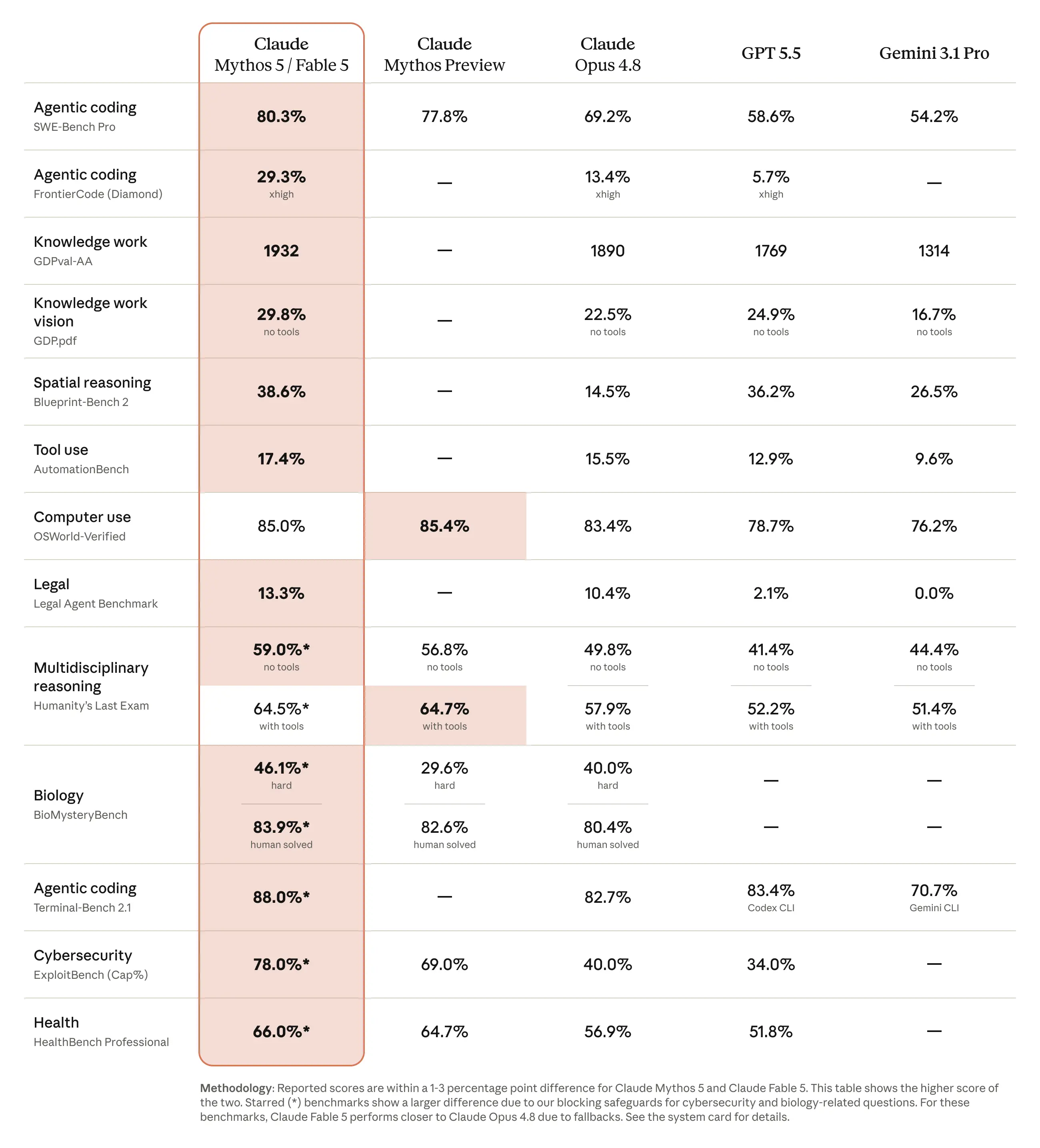
Anthropic built Fable 5 for long-horizon autonomous coding. In its own words, the model “stays focused across millions of tokens in long-running tasks and improves its outputs using its own notes.” That is a different shape of work than a quick refactor. The proof point Anthropic published is a migration Stripe ran during testing: Fable 5 completed a codebase-wide change across 50 million lines of Ruby in a single day, work the company said would have taken a team over two months by hand. You can read the full writeup in the Claude Fable 5 announcement.
The tradeoff is price. Fable 5 lists at $10 per million input tokens and $50 per million output tokens, which is double Opus 4.8 at $5 and $25. So the honest answer to “should I run Claude Code on Fable 5 all the time” is no. Run it when the task is genuinely long-horizon and the cost of a human doing the same work dwarfs the token bill. For routine edits, Opus 4.8 or Sonnet is the better default. If you are weighing the two head to head, Claude Fable 5 vs Opus 4.8 breaks down where each one wins.
This is also a familiar exercise if you have swapped models in Claude Code before. The mechanics here are the same ones covered in running GLM-5.1 with Claude Code; only the model id changes.
Prerequisites
Before you set the model, make sure you have the following in place:
- Claude Code installed and updated. Fable 5 requires Claude Code v2.1.170 or later. Older versions do not show Fable 5 in the model picker and cannot select it. Run
claude updateto upgrade, then confirm withclaude --version. - An Anthropic account with Fable 5 access. On the Anthropic API and on Max, Team Premium, Enterprise pay-as-you-go, and similar plans, Fable 5 is available once you select it. It is never the default on any account type, so you always opt in.
- API billing or a qualifying subscription. Because Fable 5 is a paid model at $10/$50 per million tokens, your account needs active API billing or a plan that includes it. Check the current tiers in the Anthropic models overview.
- A repository to work in. Claude Code operates inside a project directory. Open your terminal in the repo you want the agent to touch.
One caveat worth knowing up front: Fable 5 is not available under zero data retention. If your organization runs Claude Code with ZDR enabled, the model picker either omits Fable 5 or shows it disabled. That is a policy constraint, not a bug.
Set Claude Code to use Claude Fable 5
Claude Code gives you four ways to select a model, and they apply in a defined order of priority. From highest to lowest at the moment a session starts: an in-session /model choice, the --model launch flag, the ANTHROPIC_MODEL environment variable, then the model field in your settings file. Here is each one with the Fable 5 value.
You can use either the fable alias or the full model name claude-fable-5 everywhere a model is accepted. The alias resolves to the recommended Fable version for your provider and updates over time; the full id pins to that exact model. The full Claude Code reference lives in the Claude Code model configuration docs.
Option 1: switch in-session with /model
This is the fastest path and the one most people use. Inside a running Claude Code session, type:
/model fable
Or, to pin the exact model id rather than the alias:
/model claude-fable-5
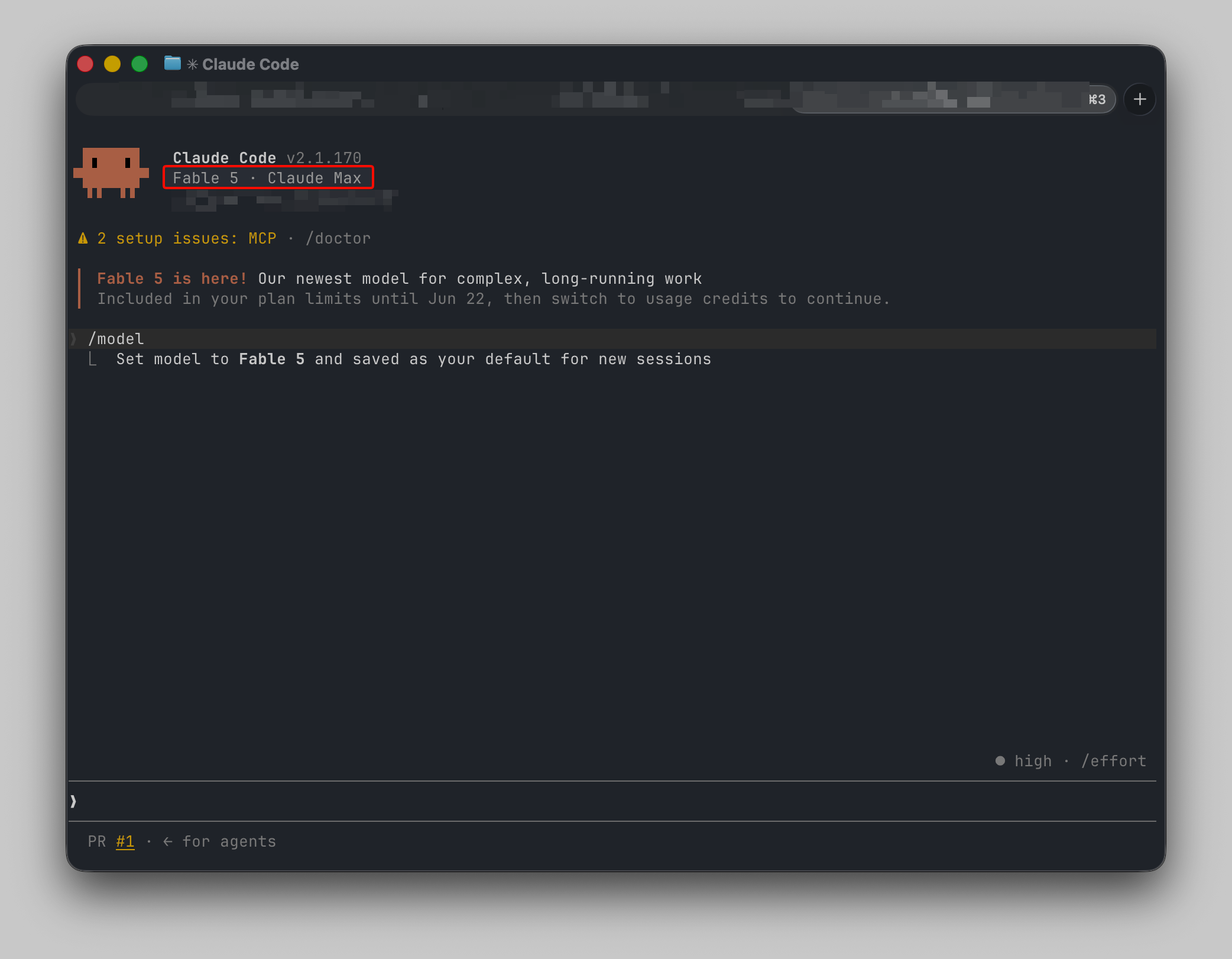
Running /model with no argument opens the picker instead, where you select Fable 5 from the list. As of recent versions, choosing a model with /model saves it as the default for new sessions by writing the model field in your user settings. In the picker, pressing Enter switches and saves it as your default, while pressing s switches for the current session only. Typing /model fable directly behaves like Enter, so later sessions start on Fable 5 until you change models.
If the conversation already has output, the picker asks for confirmation before switching, because the next response re-reads the full history without cached context. That is expected; a model switch mid-conversation pays a one-time re-read cost.
Option 2: launch with the --model flag
To start a single session on Fable 5 without changing any saved default, pass the flag when you launch:
claude --model fable
Or with the full id:
claude --model claude-fable-5
The --model flag applies only to the session you launch with it. This is the cleanest way to run different models in different terminals at the same time: give each window its own --model flag rather than switching with /model, which would write a shared default.
Option 3: set the ANTHROPIC_MODEL environment variable
If you want a session to start on Fable 5 from your shell, export the variable before launching:
export ANTHROPIC_MODEL=claude-fable-5
claude
Like the flag, ANTHROPIC_MODEL applies only to sessions launched under it. One precedence detail to keep straight: if you set ANTHROPIC_MODEL both as a shell export and inside the env block of settings.json, the shell export wins, because the settings env object applies at startup but does not overwrite a pre-existing shell variable.
Option 4: pin it in your settings file
To make Fable 5 your persistent default across sessions, set the model field in your settings file. User settings live in ~/.claude/settings.json; project-scoped settings live in .claude/settings.json (or .claude/settings.local.json, which takes priority but applies only to you). A minimal settings file looks like this:
{
  "model": "claude-fable-5"
}
The alias works here too:
{
  "model": "fable"
}
Project and managed settings take precedence and reapply on the next launch, so if a teammate’s /model choice diverges from the project default, the project setting wins when they restart. That is the mechanism enterprises use to standardize a team on one model.
Verify you’re on Fable 5
Never assume the switch took. Confirm the active model before you kick off an expensive long run. There are two reliable ways:
- Run
/status. Inside a Claude Code session,/statusdisplays the active model alongside your account information. This is the definitive check. - Read the status line. If you have a status line configured, the active model shows there continuously, so you can confirm at a glance without opening a menu.
If /status shows Opus 4.8 instead of Fable 5 right after you selected Fable, the most common cause is a project or managed setting overriding your choice on launch. When the active model at startup comes from project or managed settings, the startup header tells you which settings file set it. Run /model to override for the session; the project setting reapplies next launch.
The second thing to watch for: Fable 5 runs safety classifiers for cybersecurity and biology content. When a classifier flags a request, Claude Code automatically re-runs it on the default Opus model, Opus 4.8 on the Anthropic API, and shows a notice in the transcript. So even after you select Fable 5, an individual request can quietly run on Opus 4.8. Anthropic reports more than 95% of Fable sessions involve no fallback, so for ordinary application code this is rare, but it explains the occasional “switched to Opus” notice. To return to Fable 5 after a fallback, run /model fable again.
If you're also evaluating other frontier models for agentic coding work, how Claude Opus 5 integrates with Claude Code gives you a direct comparison point within the same toolchain.
Pairing Claude Code with Apidog
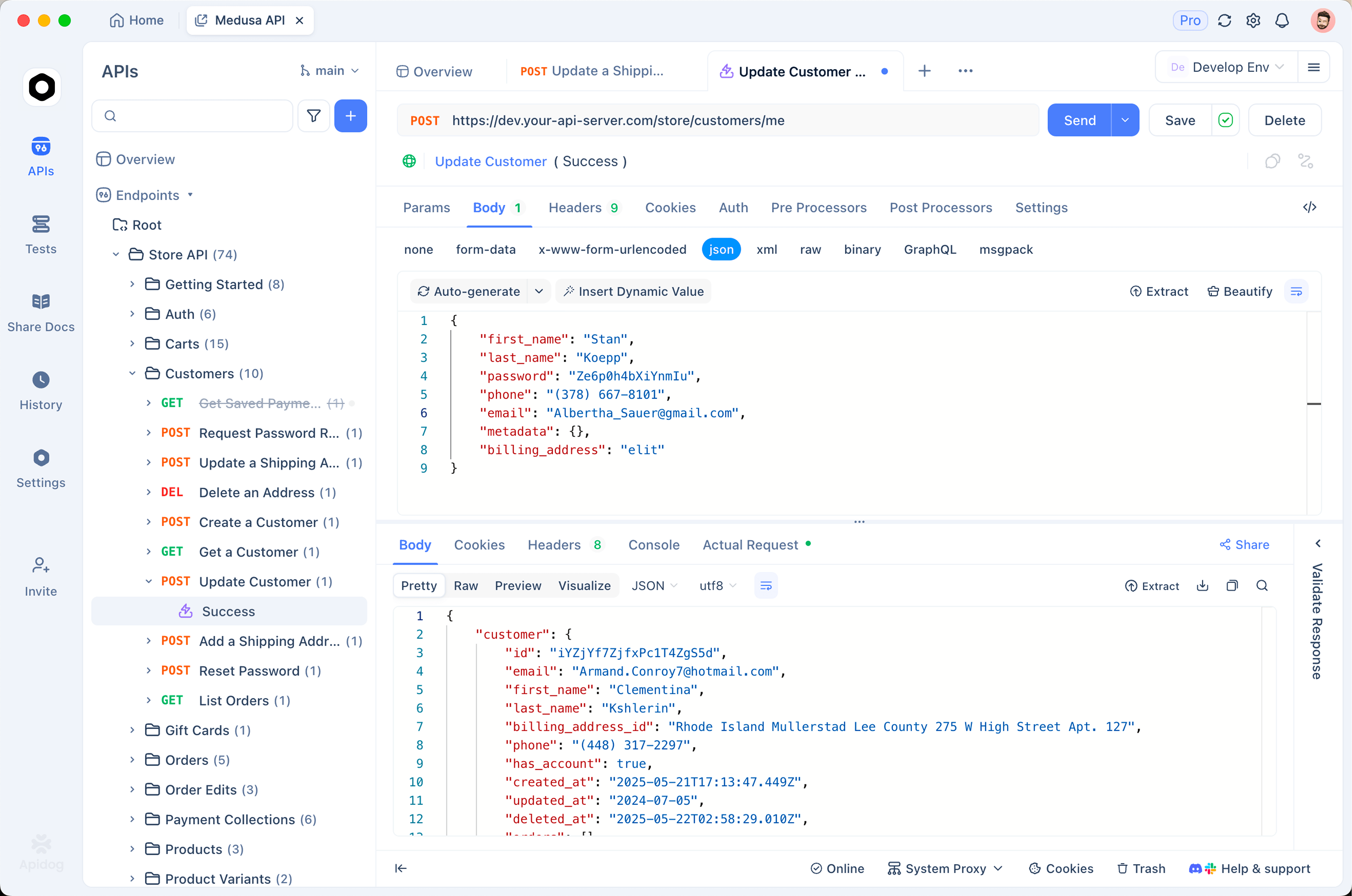
When Claude Code finishes writing or editing an API, the next question is whether the endpoints actually behave. A long autonomous run can touch dozens of routes, and reading a diff is not the same as confirming the API returns what it should. This is where Apidog fits cleanly into the loop: Claude Code writes the code, Apidog validates the live behavior.
Here is a concrete workflow after a Claude Code session that changed your API:
- Have Claude Code emit or update an OpenAPI spec. If your project keeps an OpenAPI document, ask the agent to update it alongside the implementation. If it does not, ask it to generate one for the routes it changed. A spec is the cleanest handoff between the code and your test tooling.
- Import the spec into Apidog. In Apidog, create or open a project and import the OpenAPI file. Apidog reads the paths, methods, parameters, and schemas and turns each endpoint into a runnable request, so you are not hand-typing URLs.
- Run the requests. Fire the changed endpoints against your local or staging server. Send a real request, inspect the status code, headers, and body, and confirm the response matches what the code is supposed to return.
- Validate responses against the schema. Apidog can check that each response conforms to the schema in the spec. That catches the gap between what the code returns and what the contract promises, which is exactly the kind of drift a fast, automated change can introduce.
- Save the requests as test cases. Once the endpoints pass, keep the requests as a regression suite. The next time Claude Code, or anyone, touches these routes, you re-run the suite and see immediately whether anything broke.
This pairing matters more, not less, with a long-horizon model. The bigger the autonomous change, the more surface area there is to verify, and a runnable test suite in Apidog turns “the agent says it is done” into “the endpoints are confirmed working.” You can download Apidog and import an existing spec in a couple of minutes.