
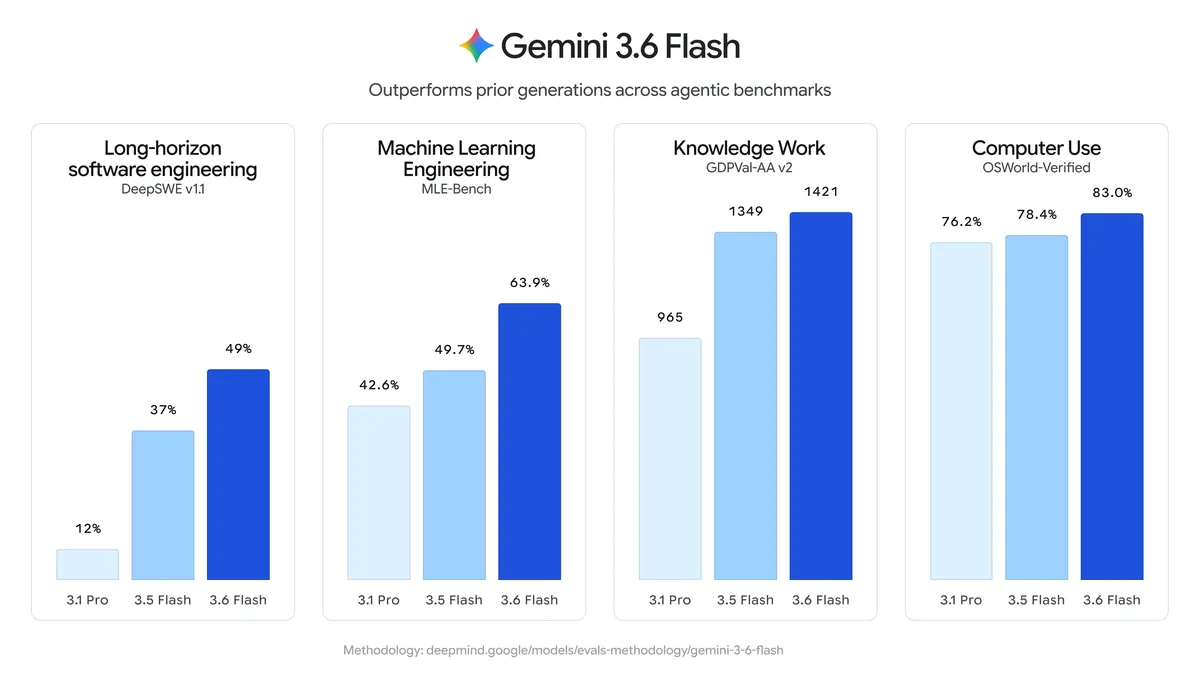
You call Gemini 3.6 Flash with the model id gemini-3.6-flash over Google’s Gemini API. That’s the core of it. Google shipped the Flash refresh on July 21, 2026, and 3.6 Flash is the workhorse tier: cheaper output than 3.5 Flash, a 1M-token context window, and text, image, video, audio, and PDF inputs. This guide takes you from zero to a tested request. You’ll grab a key, make your first call in curl and Python, learn the parameters that matter, and set up a regression test so the call keeps working after you ship it.
What you need before you start
Three things, and none of them cost money to start.
- A Google account. That’s how you sign in to get a key.
- A Gemini API key. It’s free from Google AI Studio, and the next section covers it.
- A way to send an HTTP request. curl works from any terminal. Python works if you’d rather write code. You can also use an API client like Apidog if you want a UI over the whole thing. We’ll show all three.
No billing setup is required up front. The free tier runs through AI Studio and is rate-limited, so you can test without a card on file. More on those limits below.
Get a Gemini API key
Go to Google AI Studio and sign in with your Google account. Click “Get API key,” then “Create API key.” Copy the string it hands you and store it somewhere safe. Treat it like a password: anyone who has the key can spend against your account.
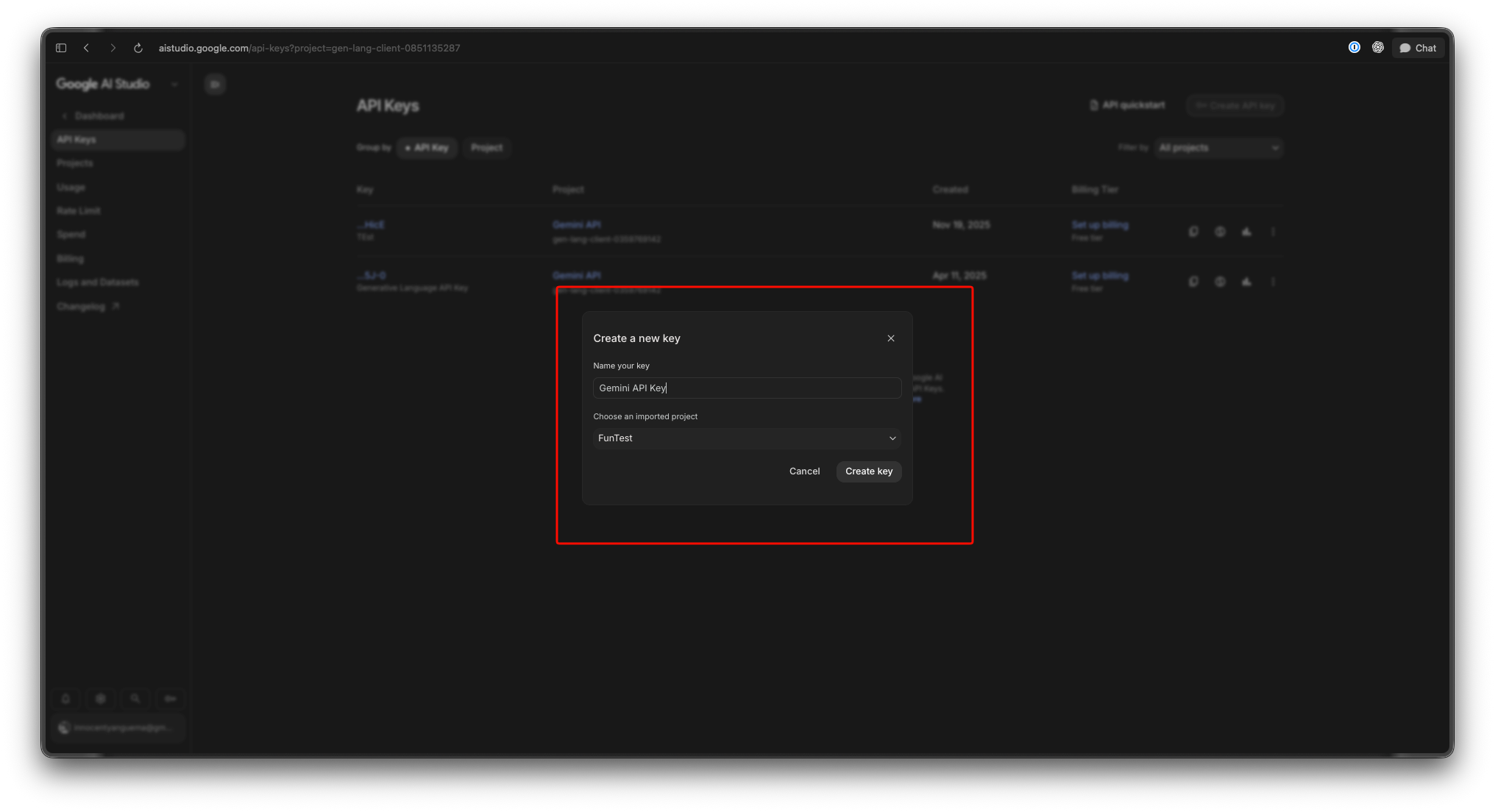
Don’t paste the key into client-side code, and don’t commit it to a repo. Set it as an environment variable instead:
export GEMINI_API_KEY="your_key_here"
The official Python SDK reads that variable on its own, which keeps the secret out of your source files. For the canonical setup steps, see Google’s Gemini API docs.
Make your first API call
The REST endpoint is a POST to the model’s generateContent method. Here it is in curl:
curl "https://generativelanguage.googleapis.com/v1beta/models/gemini-3.6-flash:generateContent" \
  -H "x-goog-api-key: YOUR_API_KEY" \
  -H "Content-Type: application/json" \
  -X POST \
  -d '{
    "contents": [
      {
        "parts": [
          {"text": "Explain how APIs work"}
        ]
      }
    ]
  }'
The key goes in the x-goog-api-key header. The body is a contents array; each entry has a parts array; each part here is a text string. That nesting looks fussy for a single prompt, but it’s the same shape that later lets you mix text with images and files in one request.
Prefer Python? Install the SDK with pip install google-genai, then:
from google import genai

client = genai.Client()  # reads GEMINI_API_KEY from the environment
resp = client.models.generate_content(
    model="gemini-3.6-flash",
    contents="Explain how APIs work",
)
print(resp.text)
The client picks up GEMINI_API_KEY by itself, so there’s no key sitting in your code. resp.text holds the generated answer. That’s a working call in five lines.
Under the hood, the API returns JSON. The generated text sits at candidates[0].content.parts[0].text. Worth noting now, because that’s the exact field you’ll assert on when you turn this call into a test later in the guide.
Key parameters worth knowing
The bare request works, but a handful of settings change what you get back.
- System instruction. Set a persona or a set of rules that apply to the whole conversation, kept separate from the user prompt. Use it for “Answer in JSON only” or “You are a terse code reviewer.” It steers tone and format far more reliably than stuffing instructions into every message.
- Max output tokens. Cap the length of the response. 3.6 Flash can produce up to 64k output tokens, so raise the cap for long generations and lower it when you want to control cost and latency.
- Multimodal inputs. The model reads text, images, video, audio, and PDFs in the same call. You add them as extra entries in the
partsarray alongside your text. Output is text only, so think of it as many kinds of input in, words out. The context window holds up to 1M input tokens, which is room for a long PDF or a full video transcript. - Thinking and reasoning. 3.6 Flash reasons before it answers on hard prompts. That’s what improves multi-step work, and it’s the reason the output price includes thinking tokens (more on that in the next section). You can tune the reasoning effort when you want to trade depth for speed.
The full parameter list lives in the Gemini API docs. Don’t guess field names; the docs are the source of truth, and they update when the API does.
Pricing and the free tier
Gemini 3.6 Flash costs $1.50 per 1M input tokens and $7.50 per 1M output tokens. That output rate is a cut from the $9.00 that 3.5 Flash charged, and 3.6 Flash also tends to generate around 17% fewer output tokens on the same task, so the savings compound. One detail to internalize: the output price includes thinking tokens. The model’s internal reasoning bills at the output rate, so a prompt that triggers heavy reasoning can cost more than the visible answer length suggests. Budget for it. We break the full math down in our Gemini 3.6 Flash pricing guide.
The free tier runs through AI Studio, and it’s real, but it’s rate-limited: capped requests per minute and per day, and Google may use free-tier data to improve its products. It’s built for prototyping, not production traffic. For learning and testing, it’s plenty. To see how far it stretches, read how to use Gemini 3.6 Flash for free. When you outgrow it, you enable billing and the same key keeps working, no code changes needed.
Test and debug the Gemini API in Apidog
curl proves the call works once. It won’t tell you when Google changes a response field, when your key expires, or when a deploy quietly breaks the request. For that you want a saved, repeatable test. This is where Apidog earns its spot in the workflow.
Apidog is an API client and testing platform. Here’s the flow for the Gemini call, start to finish:
- Create the request. Add a new POST request with the URL
https://generativelanguage.googleapis.com/v1beta/models/gemini-3.6-flash:generateContent. Paste the JSON body from earlier into the request body. - Store the key in an environment variable. Add a variable named
GEMINI_API_KEYto an Apidog environment, then reference it in thex-goog-api-keyheader as{{GEMINI_API_KEY}}. The secret stays out of the shared request, and you can swap keys per environment (dev, staging, prod) without touching the call itself. - Add assertions. After the request runs, assert on the JSON response: the status is 200, and
candidates[0].content.parts[0].textexists and isn’t empty. Now a passing run means the API actually answered, not just that it returned something. - Save it and schedule it. Keep the request in a collection and schedule it as a regression test. Run it on a timer or inside CI, and you’ll find out the moment the Gemini call stops behaving, before your users do.
Download Apidog and you can have this test running in a few minutes. That’s the honest fit here: Apidog doesn’t run the model, it makes sure the API you depend on keeps responding the way your app expects.
Common errors and fixes
Three failures cover most of what you’ll hit early on.
- 401 Unauthorized (invalid key). The key is wrong, revoked, or missing from the header. Check that
x-goog-api-keyholds the exact string from AI Studio and that your environment variable actually resolved. A trailing space or an unexpanded{{GEMINI_API_KEY}}is the usual culprit. - 429 Too Many Requests (rate limit). You hit the free tier’s per-minute or per-day cap. Slow the request rate, add a retry with backoff, or enable billing to raise the ceiling. Tight test loops trip this fast.
- 404 Not Found (model not found). This is almost always a typo in the model id. It’s
gemini-3.6-flash, exactly. Notgemini-3.5-flash, notgemini-flash-3.6. The Lite tier in this same release isgemini-3.5-flash-lite, a different model on the 3.5 line, so don’t cross the wires between them.
FAQ
What’s the exact model id for Gemini 3.6 Flash? It’s gemini-3.6-flash. Use it as the model name in the SDK, and in the REST URL path right before :generateContent.
Is the Gemini 3.6 Flash API free to use? There’s a free tier through AI Studio, and it’s rate-limited. It’s fine for prototyping and learning. Production traffic needs billing enabled. For the details, see how to use it for free.
What can I send to the model? Text, images, video, audio, and PDF, up to a 1M-token context window. Output is text only.
Why did my bill come in higher than the visible responses? The output price of $7.50 per 1M tokens includes the model’s thinking tokens. Reasoning-heavy prompts bill for more than the answer length shows on screen.
Is this the same as the older Gemini 3.5 Flash API? The call shape is the same, so if you used the Gemini 3.5 API, you swap the model id and you’re done. 3.6 Flash cuts the output price and uses fewer output tokens on the same work.
Can I use the same key in curl, Python, and Apidog? Yes. One key from AI Studio works across all of them. Keep it in an environment variable in each tool rather than hard-coding it, and you can rotate or revoke it in one place.
Where to go from here
You’ve got a key, a working call in curl and Python, the parameters that matter, and a saved regression test watching the endpoint. Start on the free tier, keep your key in an environment variable, and lean on the official docs for anything past the basics. When the call becomes something your app depends on, wrap it in an Apidog test so a silent API change never reaches your users first.