
The Muse Wonder API is Meta’s Model API serving muse-wonder-1.0 at https://api.meta.ai/v1, with three request formats: the Responses API, Chat Completions, and an Anthropic-compatible Messages endpoint. You authenticate with a bearer key from dev.meta.ai, pay $4 per million input tokens and $20 per million output, and get a 1M-token context window with reasoning effort from minimal to max. Any OpenAI SDK works once you change the base URL.
This guide takes you from key to a working agentic loop: the first request, choosing an endpoint, controlling reasoning, multi-turn state, tools, streaming, background runs, and the usage fields that tell you what a call cost. Every request is also set up in Apidog so your team can test the model without passing the key around. For what the model is and how it scores, start with the Muse Wonder explainer.
Muse Wonder API at a glance
| Value | |
|---|---|
| Base URL | https://api.meta.ai/v1 |
| Model ID | muse-wonder-1.0 |
| Auth | Authorization: Bearer $MODEL_API_KEY |
| Endpoints | POST /v1/responses, POST /v1/chat/completions, POST /v1/messages |
| Price per 1M tokens | $4 input, $20 output, $0.20 cached input |
| Context window | 1,048,576 tokens, no long-context premium |
| Reasoning effort | minimal, low, medium, high, xhigh, max |
| Rate limits | 3,000 requests and 4M tokens per minute, per team per model |
| Web search tool | $2.50 per 1,000 queries on top of tokens |
Muse Wonder Full, the larger model, is not on the API. It is only available inside Muse Code on the Power and Maximum plans. Setting effort to max on Wonder does not turn it into Full.
Step 1: get a key and make the first call
Create a key in the Model API dashboard under API keys and store it as MODEL_API_KEY. Then:
curl https://api.meta.ai/v1/responses \
  -H "Authorization: Bearer $MODEL_API_KEY" \
  -H "Content-Type: application/json" \
  -d '{
    "model": "muse-wonder-1.0",
    "input": "List three risks in a lease clause that lets the landlord enter without notice.",
    "reasoning": {"effort": "medium"},
    "max_output_tokens": 2048
  }'
With the OpenAI SDK, change two lines:
from openai import OpenAI
import os

client = OpenAI(base_url="https://api.meta.ai/v1", api_key=os.environ["MODEL_API_KEY"])

resp = client.responses.create(
    model="muse-wonder-1.0",
    input="List three risks in a lease clause that lets the landlord enter without notice.",
    reasoning={"effort": "medium"},
    max_output_tokens=2048,
)
print(resp.output_text)
print(resp.usage)
The response carries the text plus a usage block. Check it on every call: output_tokens_details.reasoning_tokens tells you how much of the output budget went to thinking, and input_tokens_details.cached_tokens tells you how much input was billed at the cached rate.
Step 2: pick an endpoint
Meta’s quickstart uses the Responses API, and that is the right default for anything multi-step. It preserves reasoning across turns and can manage conversation history for you. Chat Completions exists for code you already have against an OpenAI SDK. The Messages endpoint at https://api.meta.ai/v1/messages accepts Anthropic-format requests, which is how Claude Code runs on Muse Wonder.
| Need | Use |
|---|---|
| New agent, tool loops, long sessions | Responses |
| Existing OpenAI-style code, single turns | Chat Completions |
| Claude Code or other Anthropic-format harness | Messages |
| Reasoning summaries | Responses only |
The three formats differ in parameter names. Reasoning effort is reasoning.effort on Responses and a top-level reasoning_effort on Chat Completions. Output caps are max_output_tokens and max_tokens respectively. Structured output on Responses uses text.format, not response_format.
Step 3: set reasoning effort
Muse Wonder always reasons. none returns HTTP 400. The accepted levels are minimal, low, medium, high, xhigh and max, and if you omit the parameter the model picks its own level. Meta’s advice is the usual one: use the lowest level that gives acceptable results, because reasoning tokens are billed at the $20 output rate and count toward your output cap.
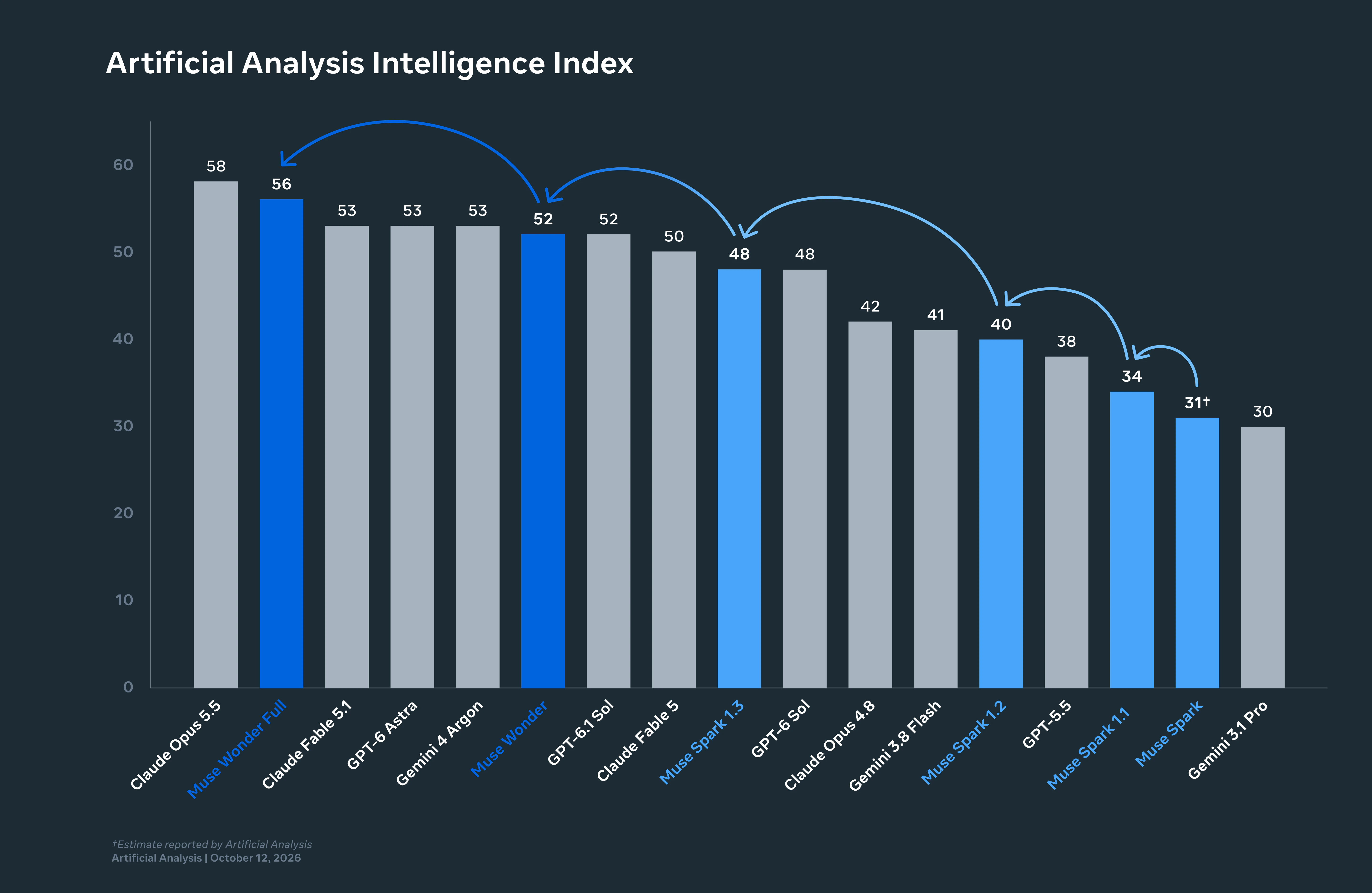
Two practical rules follow. First, set max_output_tokens generously at high effort; at max, reasoning is a large share of output and a tight cap truncates the answer. Second, log reasoning_tokens per request type so you can see what each effort level costs on your traffic rather than on a benchmark. The Artificial Analysis runs that score the model at 52 used max effort and about 54,000 output tokens per task.
On the Responses API you can ask for a reasoning summary with reasoning.summary set to auto, concise or detailed. Summaries are not guaranteed; the array can come back empty. Raw reasoning is never returned.
Step 4: carry state across turns
The Responses API offers two modes, and they cannot be combined.
Stateless encrypted replay is Meta’s recommendation. Send store: false and include: ["reasoning.encrypted_content"], keep the reasoning items the response returns, and pass them back on the next turn with their encrypted_content and a summary field (an empty array is fine). The model’s reasoning survives the turn without Meta storing anything.
Server-managed history is simpler: pass previous_response_id and send only the new input. Note that instructions does not carry over, so resend your system instructions on every request.
first = client.responses.create(model="muse-wonder-1.0", input="Summarize this API's auth flow: ...", instructions="You are an API reviewer.")
second = client.responses.create(model="muse-wonder-1.0", previous_response_id=first.id, instructions="You are an API reviewer.", input="Now list the endpoints that need an OAuth scope.")
Step 5: tools, structured output, and web search
Function tools follow the OpenAI shape on Responses and Chat Completions. Muse Wonder calls tools in parallel and is trained to recover from failed tool calls, which is one of the things the Meta launch post means by Active Focus. Define tools with a JSON schema, execute the function_call items the model returns, and send function_call_output items back.
For an answer your code can parse, set text.format to a JSON schema on Responses. For current information, add Meta’s hosted search with tools=[{"type": "web_search"}]; it bills $2.50 per 1,000 queries in addition to tokens. If you are already testing tool calls for other models, the agent tool-call harness in Apidog works unchanged here: the request shape is the same as OpenAI’s.
Step 6: stream, or run in the background
Set stream: true and consume the event stream: response.created, response.output_item.added, response.output_text.delta, response.function_call_arguments.delta, and response.completed. A failure ends with response.failed. Reasoning summaries arrive as response.reasoning_summary_text.delta when requested.
For long jobs, send background: true. The API acknowledges with "status": "queued", and you poll or stream lifecycle events from GET /v1/responses/{id}?stream=true. Background cannot be combined with stream: true on the POST, the request body is capped at 1 MiB, and there is a separate limit of 600 new background submissions per minute per team. Cancel with POST /v1/responses/{id}/cancel.
Step 7: cache what repeats
Cached input is $0.20 per million, 95% off the $4 rate, and Meta reports it in usage.input_tokens_details.cached_tokens. The pattern that earns it is the same as on other providers: put the stable material (system instructions, tool definitions, reference documents) first and the per-request content last. The prompt caching guide covers prefix design. Watch the cache-write side too: in Artificial Analysis’s run, $1.92 of Wonder’s $4.52 per-task cost was cache writes, more than the $1.44 in cache hits.
Test the Muse Wonder API in Apidog
A shared Apidog project keeps the key out of chat threads and gives everyone the same requests.
- Create an environment called Meta Model API with a
base_urlofhttps://api.meta.ai/v1andMODEL_API_KEYas a secret variable. Secret values are masked in the UI and never exported. - Add three requests, one per endpoint, each with
Authorization: Bearer {{MODEL_API_KEY}}. Duplicate the Responses request forlow,mediumandmaxeffort so you can compare cost side by side. - Assert on usage. Add JSONPath assertions on
$.usage.output_tokens_details.reasoning_tokensand$.usage.input_tokens_details.cached_tokens. A cached-tokens value of zero on a request you expected to hit the cache is a prefix bug, caught before it reaches production. - Mock the 429. Meta’s docs say to back off exponentially with jitter from about 500 ms and honor
Retry-After. Point your client at an Apidog mock that returns 429 with that header and prove the retry logic before you share a 3,000-request-per-minute limit with the rest of your team. - Run it in CI with the Apidog CLI so a model or pricing change fails a pipeline instead of a customer.
Download Apidog and import the three endpoints from the request examples above.
Frequently asked questions
Does the Muse Wonder API have a free tier? No. Billing is per token with no minimum, so a handful of test calls costs cents, but there are no free credits. The free-access guide covers the cheapest routes.
Is my API data used for training? Not in the API’s Standard mode. Muse Code subscriptions default to Contributor mode, which does use your data; that setting lives in Muse Code, not the API.
Can I use Muse Wonder Full through the API? No. It has no model ID you can call and no per-token price. Only Muse Code Power and Maximum subscribers can select it.
What are the rate limits and can I raise them? 3,000 requests and 4 million tokens per minute per model, counted across every key in your team. Meta’s pricing page lists no tiers and no process for increases. The rate limits post covers how to stay under them.
Next step
Make the three calls above at low, medium and max effort on one real task from your product, and compare reasoning_tokens before you pick a default. That number, not the $4 headline, is what your bill will track.