

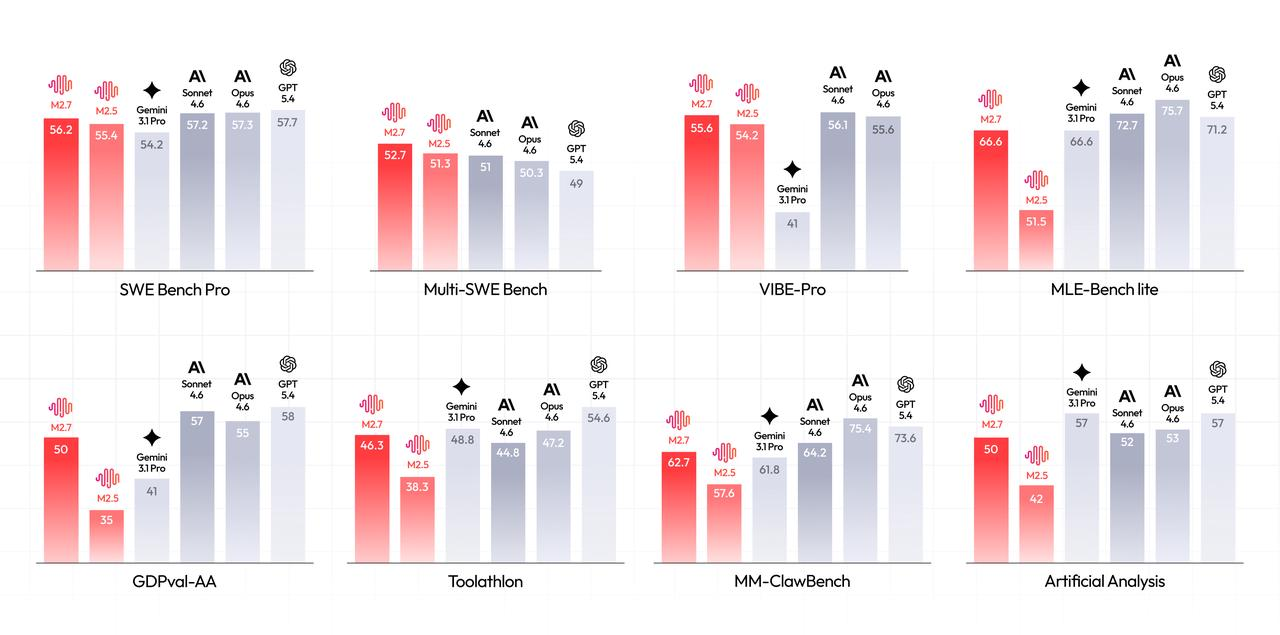
MiniMax M2.7 is an AI model that participates in its own self-evolution. It builds complex agent harnesses, debugs production systems in under 3 minutes, and autonomously runs machine learning competitions. On SWE-Pro, it scores 56.22%, nearly matching Claude Opus 4.6.
If you’ve used Cursor, Claude Code, or GitHub Copilot, you know what AI coding assistants can do. MiniMax M2.7 goes further: it doesn’t just write code on command. It runs a self-evolution loop of “analyze failures, plan changes, modify code, evaluate, compare, keep or revert” for over 100 rounds without human intervention.
In this guide, we’ll cover what makes M2.7 different, how to use it via API, and whether it’s worth switching from your current AI coding setup.
Quick Answer: What Makes MiniMax M2.7 Different?
| Feature | MiniMax M2.7 | Standard AI Assistants |
|---|---|---|
| Self-evolution workflow | Runs 100+ autonomous iteration loops | Static between model updates |
| Agent Teams (native) | Built-in multi-agent collaboration | Requires custom orchestration |
| Production debugging | Reduces incident recovery to under 3 minutes | Limited real-world debugging |
| Full project delivery | 55.6% on VIBE-Pro (repo-level generation) | Fragmented output |
| Professional work (GDPval-AA) | 1495 ELO, best open-source model | Varies by model |
| Character consistency | OpenRoom interactive demos | Text-only responses |
What Is MiniMax M2.7?
MiniMax M2.7 is the latest release in MiniMax’s M2 series, announced March 18, 2026. It’s the company’s first model designed to participate in its own evolution.
After releasing M2, MiniMax got extensive feedback from users and developers. Instead of just iterating on that feedback internally, they built M2.7 to run its own improvement cycles. The model collects feedback, builds evaluation sets, and iterates its own architecture, skills, and memory mechanisms.
Core Capabilities
1. Self-Evolution Loop
M2.7 ran an autonomous optimization task on an internal scaffold:
- Executed 100+ rounds of “analyze failure, plan changes, modify code, evaluate, compare, decide”
- Discovered optimal sampling parameters (temperature, frequency penalty, presence penalty)
- Added loop detection and workflow guidelines automatically
- Achieved 30% performance improvement on internal evaluation sets
2. Research Agent Harness
MiniMax uses M2.7 internally to accelerate their own RL team workflow:
- Researcher discusses an experimental idea with the agent
- Agent handles literature review, experiment tracking, data pipelines
- Agent monitors experiments, triggers log reading, debugging, metric analysis
- Agent runs code fixes, merge requests, and smoke tests autonomously
- M2.7 handles 30-50% of the workflow - humans only step in for critical decisions
3. Machine Learning Autonomy
In MLE Bench Lite (22 ML competitions on single A30 GPU):
- M2.7 ran 3 trials, each with 24 hours for iterative evolution
- Built short-term memory, self-feedback, and self-optimization modules
- Final result: 9 gold, 5 silver, 1 bronze medals
- 66.6% average medal rate - tying Gemini 3.1, behind only Opus 4.6 (75.7%) and GPT-5.4 (71.2%)
Real-World Performance
| Benchmark | M2.7 Score | Comparison |
|---|---|---|
| SWE-Pro | 56.22% | Matches GPT-5.3-Codex |
| VIBE-Pro (full project delivery) | 55.6% | Nearly equals Opus 4.6 |
| Terminal Bench 2 | 57.0% | System-level comprehension |
| GDPval-AA (professional work) | 1495 ELO | Best open-source model |
| Toolathon | 46.3% | Top tier globally |
| MM Claw | 62.7% | Near Sonnet 4.6 level |
Note: These benchmarks show M2.7 competes with top closed models while remaining accessible via API.
How Does Self-Evolution Work?
This is where M2.7 differs from standard AI assistants.
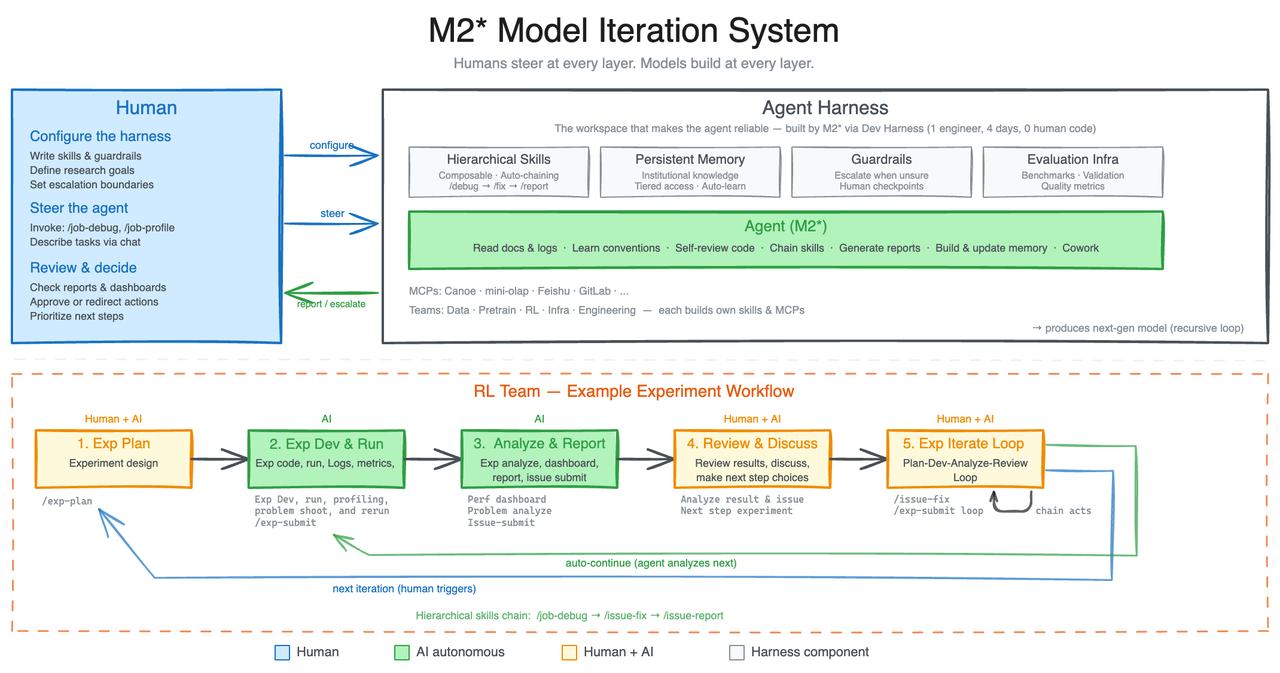
MiniMax shared an internal workflow that enables the model to improve itself. Here’s how it works:
Step 1: Agent Harness Setup
The model runs within an agent harness that tracks:
- Task completion rates
- Error patterns
- Tool usage efficiency
- User feedback signals
Step 2: Continuous Feedback Loop
When the agent completes a task, the system:
- Evaluates the output against success criteria
- Identifies where the agent struggled
- Generates training signals for improvement
- Updates the agent’s skill weights
Step 3: Skill Refinement
Over time, the agent:
- Learns which tools work best for specific tasks
- Builds memory of past solutions
- Develops more efficient workflows
- Reduces repeat errors
Example Workflow: ML Experiment Pipeline
MiniMax shared a real example from their RL team:
- Researcher discusses an experimental idea with the agent
- Agent handles literature review, experiment tracking, data pipelines
- Agent monitors experiments, triggers log reading, debugging, metric analysis
- Agent runs code fixes, merge requests, and smoke tests autonomously
- M2.7 handles 30-50% of the workflow - humans only step in for critical decisions
This is not a chatbot responding to prompts. It’s an autonomous research assistant that owns the entire workflow.
Professional Work: Office Document Processing
On GDPval-AA (45 models evaluated), M2.7 scored 1495 ELO, second only to Opus 4.6, Sonnet 4.6, and GPT-5.4.
For office work, M2.7 handles:
- Word, Excel, PPT - Generate files from templates or edit existing files with high fidelity
- Multi-round revisions - Maintain context across complex editing sessions
- 40+ complex skills - 97% skill adherence rate even with skills exceeding 2,000 tokens each
Real example: Financial analysis for TSMC
- Read annual reports and earnings call transcripts
- Cross-reference multiple research reports
- Design assumptions and build revenue forecast model
- Generate PPT and Word research report automatically
- Output quality: Ready as a first draft for analysts
Entertainment: OpenRoom Interactive Demos
Beyond productivity, M2.7 has strong character consistency and emotional intelligence:
- OpenRoom - Interactive Web GUI where AI characters exist in visual spaces, not just text
- Characters proactively engage with their environment
- Conversation drives real-time visual feedback and scene interactions
- Most of the code was written by AI itself
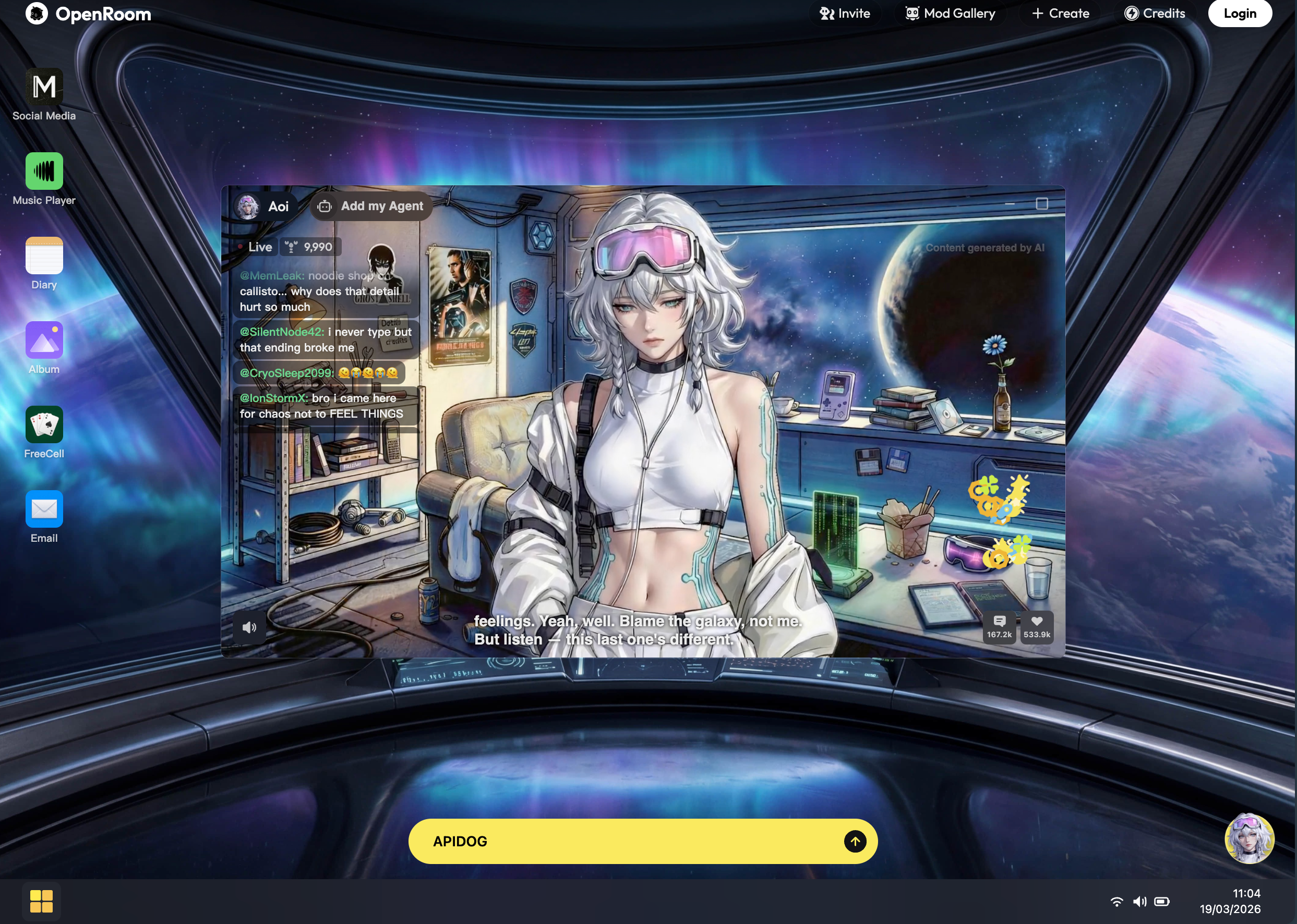
Try it: OpenRoom.ai
MiniMax M2.7 Performance Benchmarks
MiniMax tested M2.7 on GDPval-AA, a benchmark that measures:
- Domain expertise across fields
- Task delivery capability
- Ability to interact with complex environments
Production Debugging: Real-World Example
When faced with production alerts, M2.7:
- Correlates monitoring metrics with deployment timelines for causal reasoning
- Conducts statistical analysis on trace sampling with precise hypotheses
- Proactively connects to databases to verify root causes
- Pinpoints missing index migration files in the code repository
- Uses non-blocking index creation to stop the bleeding first, then submits a merge request
Result: Incident recovery time reduced to under 3 minutes, multiple times faster than manual troubleshooting.
Comparison to Closed-Source Alternatives
| Model | SWE-Pro | VIBE-Pro | GDPval-AA | Agent Teams |
|---|---|---|---|---|
| MiniMax M2.7 | 56.22% | 55.6% | 1495 ELO | Native |
| Claude Opus 4.6 | ~57% | ~56% | ~1550 ELO | Limited |
| GPT-5.4 | ~56% | N/A | ~1520 ELO | Limited |
| GPT-5.3-Codex | 56.22% | N/A | N/A | No |
Note: M2.7 matches or nearly matches top closed models on key benchmarks while being available via API at lower cost.
How to Use MiniMax M2.7 API
MiniMax M2.7 is available via API and as a self-hosted model. Here’s how to get started.
Prerequisites
- Python 3.10+ or Node.js 18+
- API key from MiniMax (free tier available)
- Apidog (recommended for API testing)
Step 1: Get Your API Key
- Sign up at MiniMax API Platform
- Navigate to API Keys
- Create a new key with M2.7 access
- Copy and store securely
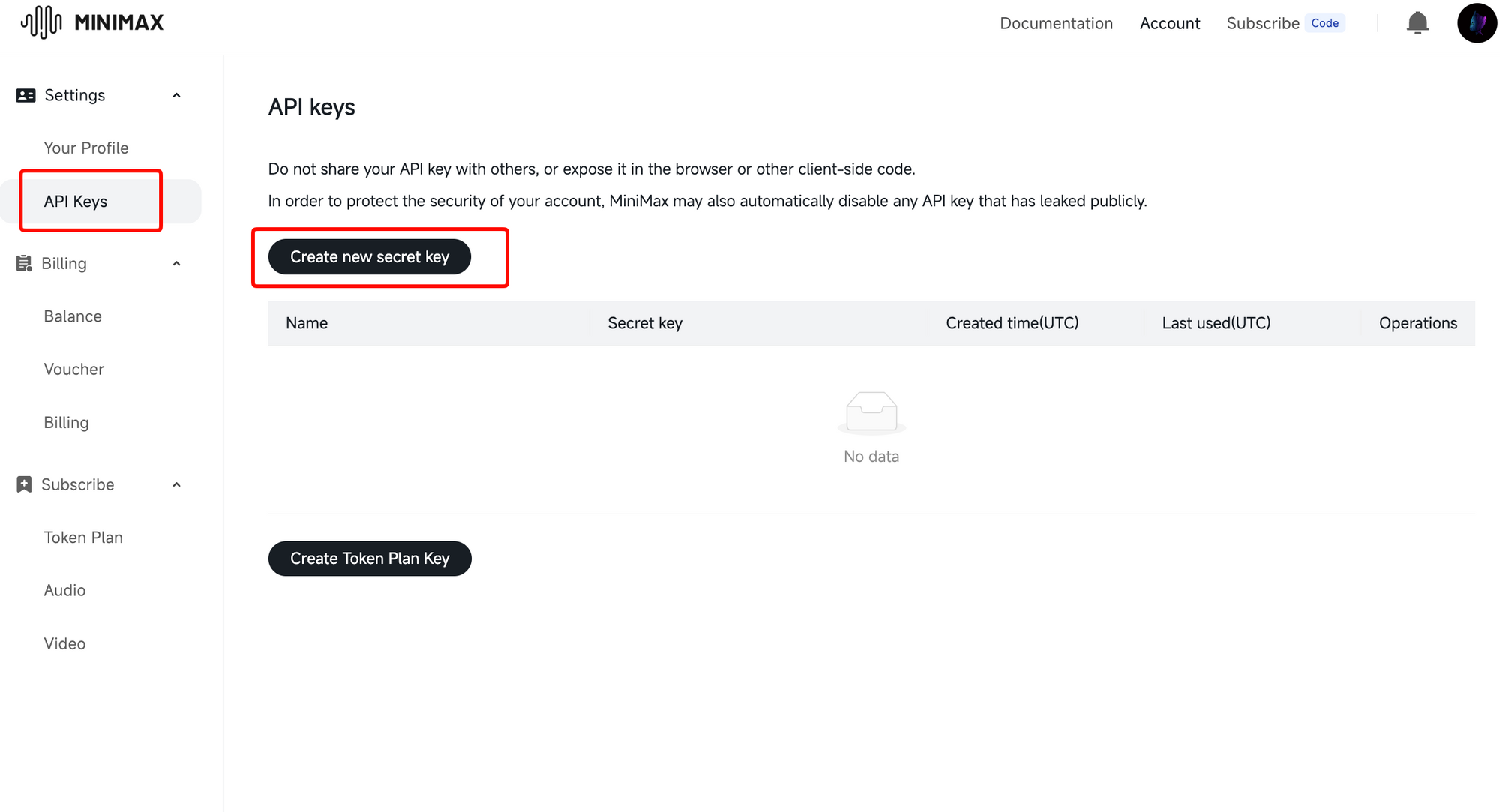
Pricing: MiniMax has competitive pricing with a free tier for testing. Check their Coding Plan for developer subscriptions.
Step 2: Make Your First API Call
Python Example:
import requests

API_KEY = "your-api-key"
ENDPOINT = "https://api.minimax.io/v1/chat/completions"

headers = {
    "Authorization": f"Bearer {API_KEY}",
    "Content-Type": "application/json"
}

payload = {
    "model": "minimax-m2.7",
    "messages": [
        {"role": "user", "content": "Build a REST API with user authentication"}
    ],
    "temperature": 0.7,
    "max_tokens": 4096
}

response = requests.post(ENDPOINT, headers=headers, json=payload)
print(response.json())
Node.js Example:
const axios = require('axios');

const API_KEY = 'your-api-key';
const ENDPOINT = 'https://api.minimax.io/v1/chat/completions';

const response = await axios.post(
  ENDPOINT,
  {
    model: 'minimax-m2.7',
    messages: [
      { role: 'user', content: 'Build a REST API with user authentication' }
    ],
    temperature: 0.7,
    max_tokens: 4096
  },
  {
    headers: {
      'Authorization': `Bearer ${API_KEY}`,
      'Content-Type': 'application/json'
    }
  }
);

console.log(response.data);
Step 3: Test and Debug with Apidog
API debugging gets messy when you work with agent outputs, streaming responses, and complex payloads. Apidog helps here.
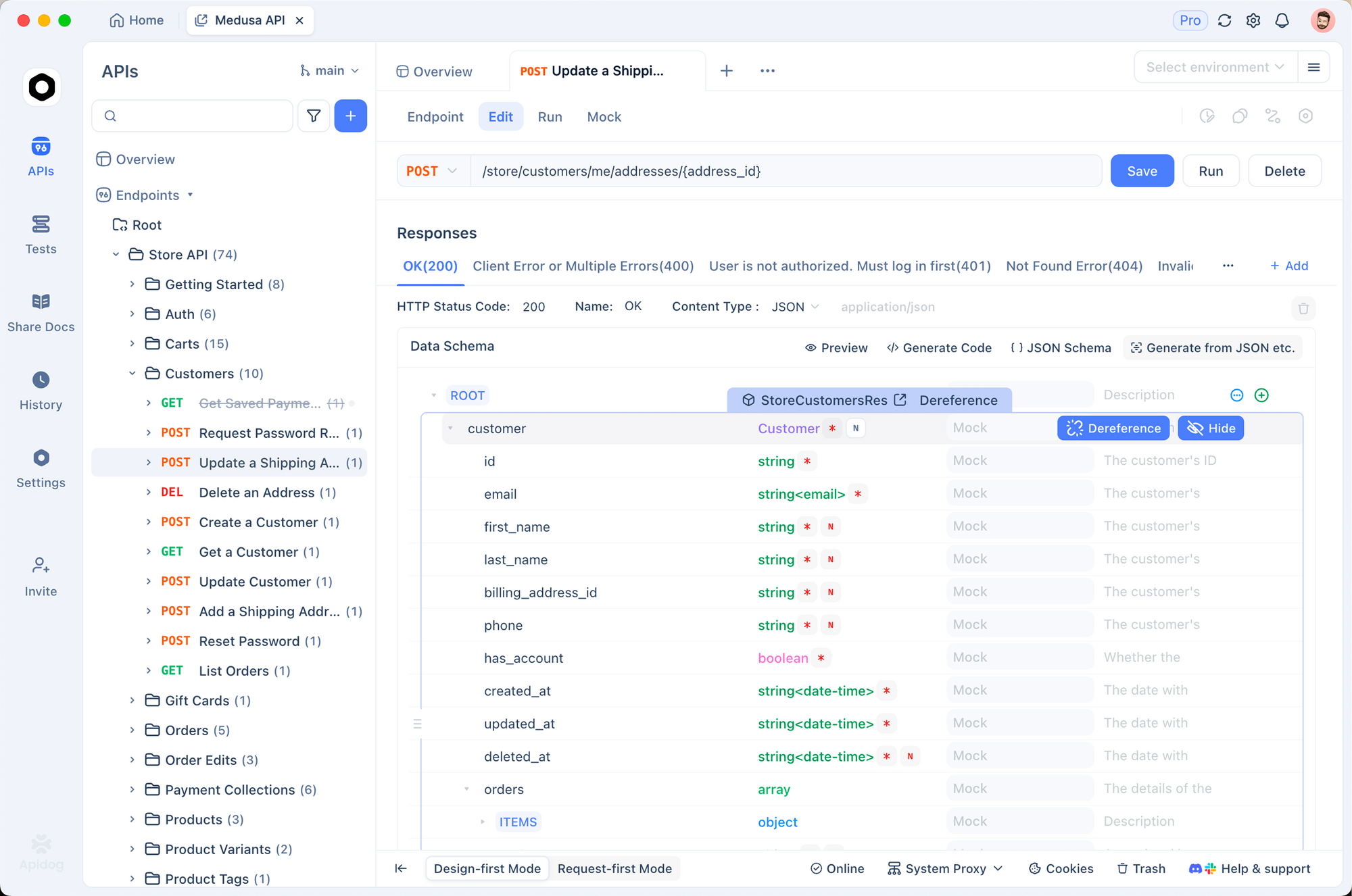
Import the MiniMax API into Apidog:
- Open Apidog and create a new project
- Import API from OpenAPI spec (MiniMax provides one)
- Add your API key to environment variables
- Create requests for each endpoint
Debug agent responses:
- View full JSON responses with syntax highlighting
- Trace multi-turn conversations
- Test edge cases with different temperatures and token limits
- Share debug sessions with your team
Monitor API performance:
- Track response times
- Set up alerts for rate limit errors
- Log all requests for audit trails
MiniMax M2.7 Use Cases
1. Autonomous Code Review
Set up M2.7 to review pull requests:
# Agent workflow for code review
review_agent = MiniMaxAgent(
    model="minimax-m2.7",
    skills=["code_review", "security_audit"],
    tools=["github_api", "diff_parser"]
)

pr_diff = get_pr_diff(repo, pr_number)
review = review_agent.analyze(pr_diff)
review_agent.post_comments(review)
2. Production Log Analysis
Connect M2.7 to your logging system:
log_agent = MiniMaxAgent(
    model="minimax-m2.7",
    skills=["log_analysis", "debugging"],
    tools=["cloudwatch_api", "pagerduty_api"]
)

alerts = log_agent.monitor_logs(log_stream)
if alerts.critical:
    log_agent.trigger_incident(alerts)
3. Full-Stack Project Generation
Give M2.7 a spec and let it build:
build_agent = MiniMaxAgent(
    model="minimax-m2.7",
    skills=["fullstack_dev", "devops"],
    tools=["github_api", "vercel_api", "supabase_api"]
)

project = build_agent.build({
    "type": "SaaS dashboard",
    "features": ["user auth", "analytics", "billing"],
    "stack": "Next.js + Supabase"
})
MiniMax M2.7 vs. The Competition
MiniMax M2.7 vs. Claude Code
| Aspect | MiniMax M2.7 | Claude Code |
|---|---|---|
| Self-evolution | Runs autonomous iteration loops | Static between updates |
| Agent Teams | Native multi-agent collaboration | Limited |
| Production debugging | Under 3 min incident recovery | Good but slower |
| SWE-Pro Score | 56.22% | ~57% (Opus 4.6) |
| GDPval-AA | 1495 ELO | ~1550 ELO |
| API Access | Available via platform | Available |
Choose M2.7 if: You want cutting-edge self-evolution capabilities, native agent teams, and competitive pricing.
Choose Claude Code if: You’re already in the Anthropic ecosystem and prefer established tooling.
MiniMax M2.7 vs. Cursor
| Aspect | MiniMax M2.7 | Cursor |
|---|---|---|
| IDE Integration | Via API | Built-in IDE |
| Agent Capabilities | Advanced (Agent Teams) | Basic |
| Self-improvement | Yes | No |
| Pricing | API-based | $20/month |
| Setup | API integration | Install and ready to use |
Choose M2.7 if: You want advanced agent capabilities and are building custom workflows.
Choose Cursor if: You want a polished IDE experience ready to use.
Limitations and Considerations
MiniMax M2.7 is powerful, but it’s not perfect:
Known Limitations
- Setup complexity - Requires more configuration than closed-source alternatives
- Resource requirements - Self-hosting needs significant GPU memory
- Documentation gaps - Some features lack detailed docs
- Community support - Smaller community compared to OpenAI/Anthropic
When NOT to Use M2.7
- You need a plug-and-play solution (use Cursor or Claude Code)
- You lack GPU resources for self-hosting
- Your team isn’t comfortable with open-source tooling
- You need enterprise SLAs and support
The Bottom Line
MiniMax M2.7 represents a shift in how we think about AI coding assistants. It’s not just a smarter chatbot. It’s an autonomous agent that can plan, execute, and improve its own workflows.
Who should use MiniMax M2.7:
- Teams building autonomous development pipelines
- Developers who want open-source flexibility
- Anyone interested in self-evolving AI systems
- Organizations that need to self-host for compliance
Who should look elsewhere:
- Solo developers wanting a simple IDE plugin
- Teams without resources for open-source tooling
- Anyone needing enterprise support and SLAs
The self-evolution capability is the real differentiator. While other AI assistants stay static between model updates, M2.7 gets better the more you use it. That’s a glimpse of where AI development is heading.
Want to test AI agent APIs more efficiently? Download Apidog - the all-in-one API client for testing, debugging, and documenting AI endpoints.