TL;DR
Alibaba released Qwen3.5-Omni on March 30, 2026. It processes text, images, audio, and video in a single model and outputs both text and real-time speech. It outperforms Gemini 3.1 Pro on general audio understanding and reasoning benchmarks, supports 113 languages for speech recognition, and includes voice cloning. Three variants are available: Plus, Flash, and Light.
One model for everything
Most AI workflows today involve stitching together separate models: one for speech-to-text, another for vision, another for text generation, and another for text-to-speech. Each handoff adds latency, cost, and points of failure.
Qwen3.5-Omni collapses that stack. It takes text, images, audio, and video as input and returns text or speech as output, all within a single model inference call. The context window holds 256,000 tokens, which covers over 10 hours of audio or roughly 400 seconds of 720p video with audio.
Alibaba trained it on over 100 million hours of native audio-visual data. The result is a model that doesn’t just handle multiple modalities; it reasons across them at the same time.
If you’re building apps that involve any combination of voice, video, images, and text, this changes what’s possible at the API level.
What changed from Qwen3-Omni
The previous generation, Qwen3-Omni Flash, launched in December 2025 with 234ms response latency. Qwen3.5-Omni is the next full release. Here’s what changed:
Language coverage expanded significantly
Speech recognition in Qwen3-Omni covered 19 languages. Qwen3.5-Omni covers 113 languages and dialects. Speech generation went from 10 languages to 36. That’s not a minor bump; it’s the difference between a model that works for Western markets and one that works globally.
Voice cloning is now built in
You can upload a voice sample and have the model respond in that voice. In the previous generation, this wasn’t available. In Qwen3.5-Omni Plus and Flash, voice cloning is accessible via the API. The model matches speaker identity well enough to pass as a consistent voice persona across long conversations.
ARIA technology eliminates audio garbling
Numbers and unusual words (product names, technical terms, proper nouns) have historically garbled in neural TTS systems. ARIA, Qwen’s dynamic text-speech synchronization layer, specifically addresses this. It reads ahead in the text buffer and adjusts phoneme generation before outputting audio, so “IPv6,” “$249.99,” and “Qwen3.5-Omni” all come out correctly.
Semantic interruption works the way humans expect
When you say “uh-huh” during a voice response, you want the model to keep talking. When you say “wait, stop,” you want it to stop. Earlier voice AI systems treated any audio input as an interruption command. Qwen3.5-Omni distinguishes between backchannels (acknowledgments) and actual interruptions, making voice conversations feel more natural.
Real-time web search is integrated
The model can query the web during inference and incorporate live results into its response. You don’t need to pre-fetch context and inject it into the prompt; the model handles retrieval itself when needed.
Audio-Visual Vibe Coding
Screen recordings now function as a coding input. Record your screen, pass the video to the model, and ask it to replicate or improve what it sees. It generates working code from the visual context. This is the multimodal equivalent of Cursor’s context-aware code generation, except the input is video.
Benchmark results
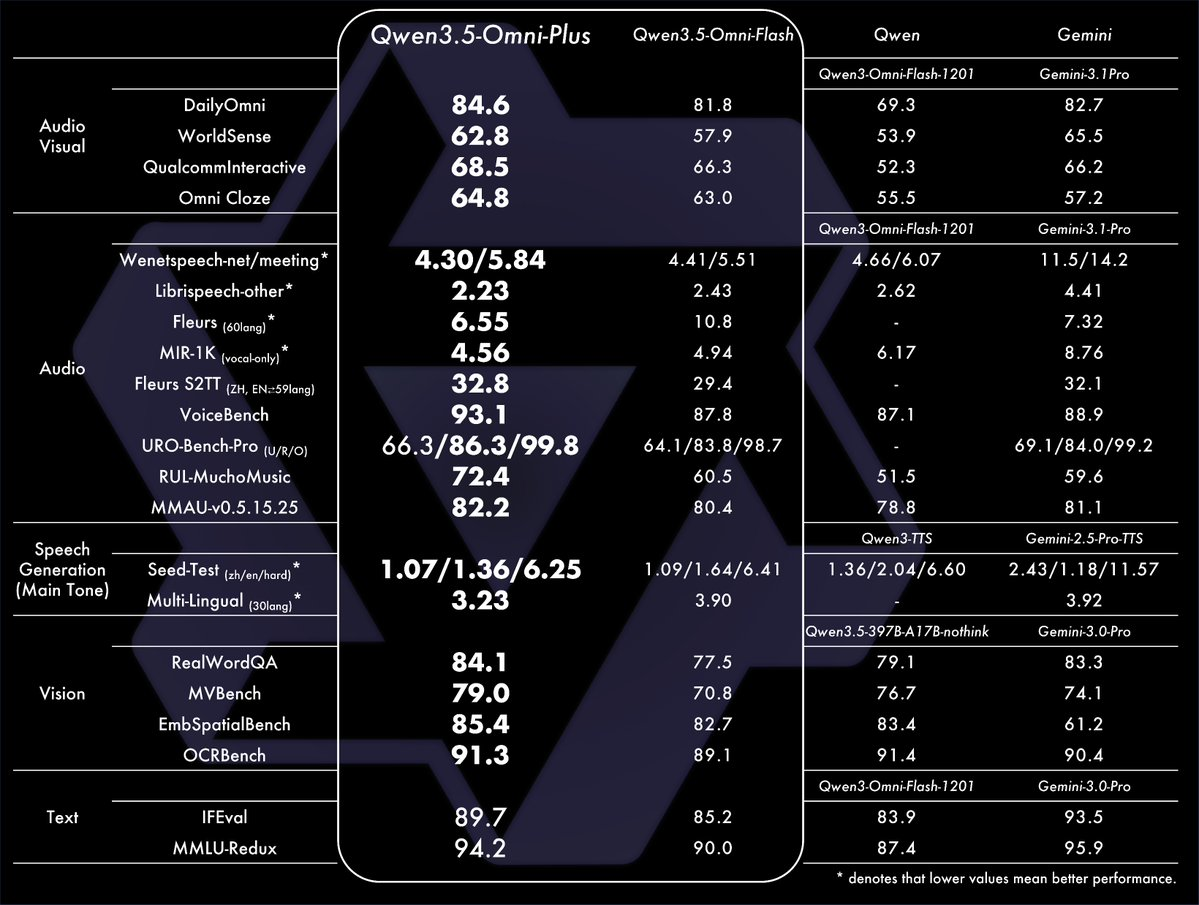
Across 36 audio and audio-visual benchmarks:
- Qwen3.5-Omni achieves state-of-the-art on 32 out of 36
- It sets new state-of-the-art on 22 of those 36
- It outperforms Gemini 3.1 Pro on general audio understanding, reasoning, and translation
- It matches Gemini 3.1 Pro on audio-visual comprehension
For speech generation quality specifically, it beats ElevenLabs, GPT-Audio, and Minimax on multilingual voice stability across 20 languages. That’s a meaningful comparison: ElevenLabs is a dedicated voice AI company with years of focus on this problem.
Model variants
Alibaba ships three versions:
| Variant | Best for |
|---|---|
| Qwen3.5-Omni Plus | Maximum quality; audio-visual reasoning, voice cloning, long-context tasks |
| Qwen3.5-Omni Flash | Balanced speed and quality; real-time voice chat, production APIs |
| Qwen3.5-Omni Light | Low-latency tasks; mobile and edge scenarios |
All three handle the full input modality stack (text, images, audio, video). The differences are in output quality, latency, and cost. Plus is the benchmark leader; Flash is what most production applications should start with.
The 256K token context window
256K tokens is the input ceiling. What does that translate to in practice?
- Audio: Over 10 hours of continuous speech
- Video: Roughly 400 seconds of 720p video with embedded audio
- Text: Around 190,000 words, or a novel-length document
For most multimodal use cases, 256K is enough that you won’t need to chunk inputs. A 30-minute meeting recording, a full product demo video, or a long customer support call all fit in a single request.
Compare this to GPT-4o’s 128K context or Gemini 2.5 Pro’s 1M context. Qwen3.5-Omni is smaller than Gemini’s ceiling, but its audio-visual performance on benchmarks compensates for that difference in most real-world tasks.
113-language speech recognition
The jump from 19 to 113 languages in speech recognition isn’t just a marketing number. It matters for three categories of applications:
Customer support for global products. If your users speak Thai, Bengali, Swahili, or Finnish, you now have a single model that can handle their voice input without routing through a separate ASR pipeline.
Multilingual content processing. Podcasts, videos, and interviews in non-English languages can be transcribed, translated, and summarized in one call.
Mid-conversation language switching. Bilingual speakers often switch languages mid-sentence. Qwen3.5-Omni handles this natively. A conversation that moves between English and Spanish doesn’t confuse the model or degrade recognition accuracy.
Architecture: Thinker-Talker with MoE
The model uses a Thinker-Talker architecture. The Thinker component processes multimodal input and generates reasoning tokens. The Talker component converts those tokens to natural speech in real time using a multi-codebook approach that minimizes latency.
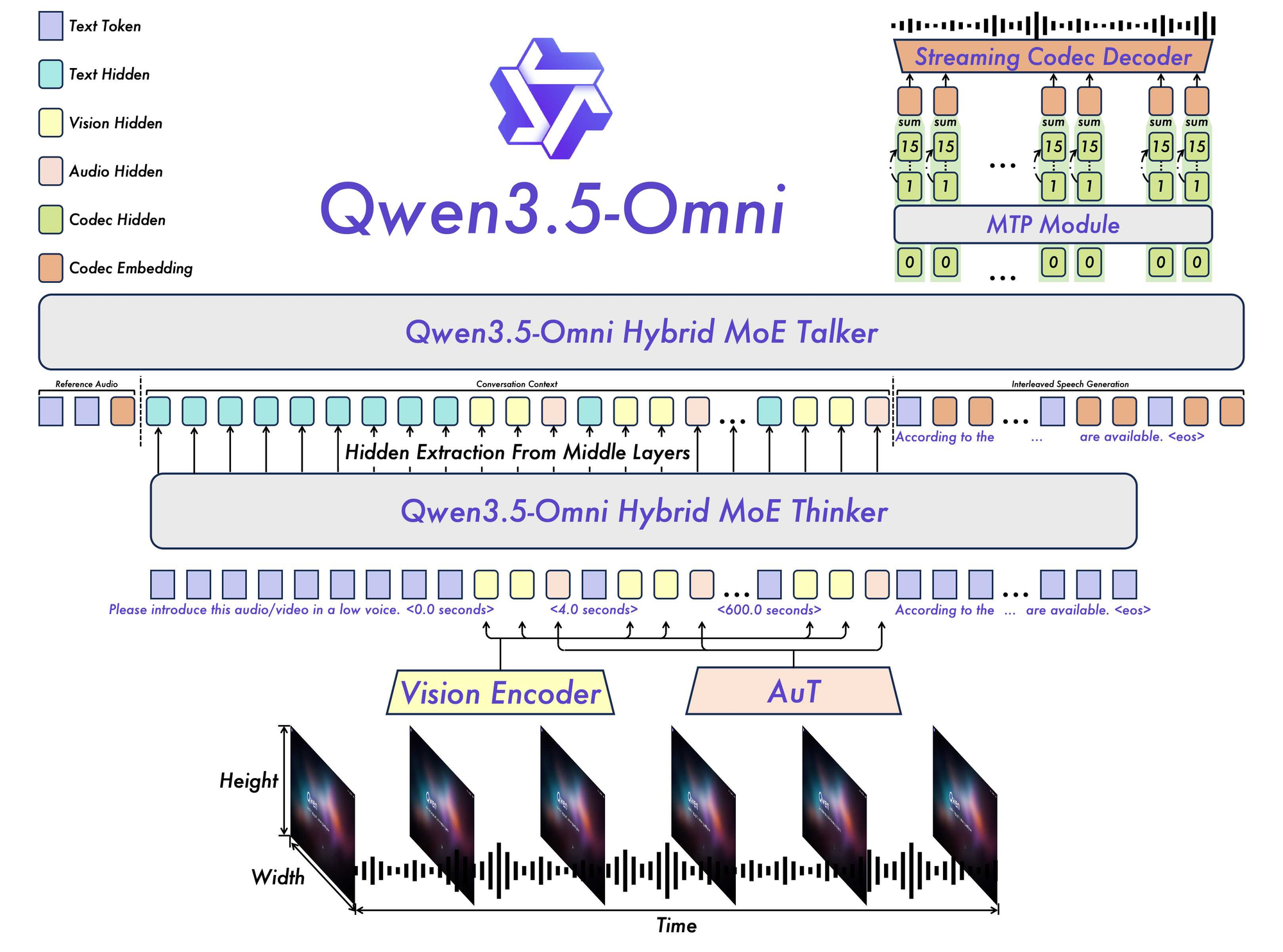
Under the hood, the Plus variant uses Mixture of Experts (MoE), which means only a subset of model parameters activate per token. This keeps inference fast and memory efficient relative to a dense model of equivalent quality.
For local deployment, vLLM is the recommended inference server because of how it handles MoE routing. HuggingFace Transformers works but is slower on MoE architectures.
Where Apidog fits in
If you’re evaluating whether to build on Qwen3.5-Omni’s API, you’ll be sending multimodal requests: JSON bodies with base64-encoded audio, image URLs, video references, and text all mixed together.
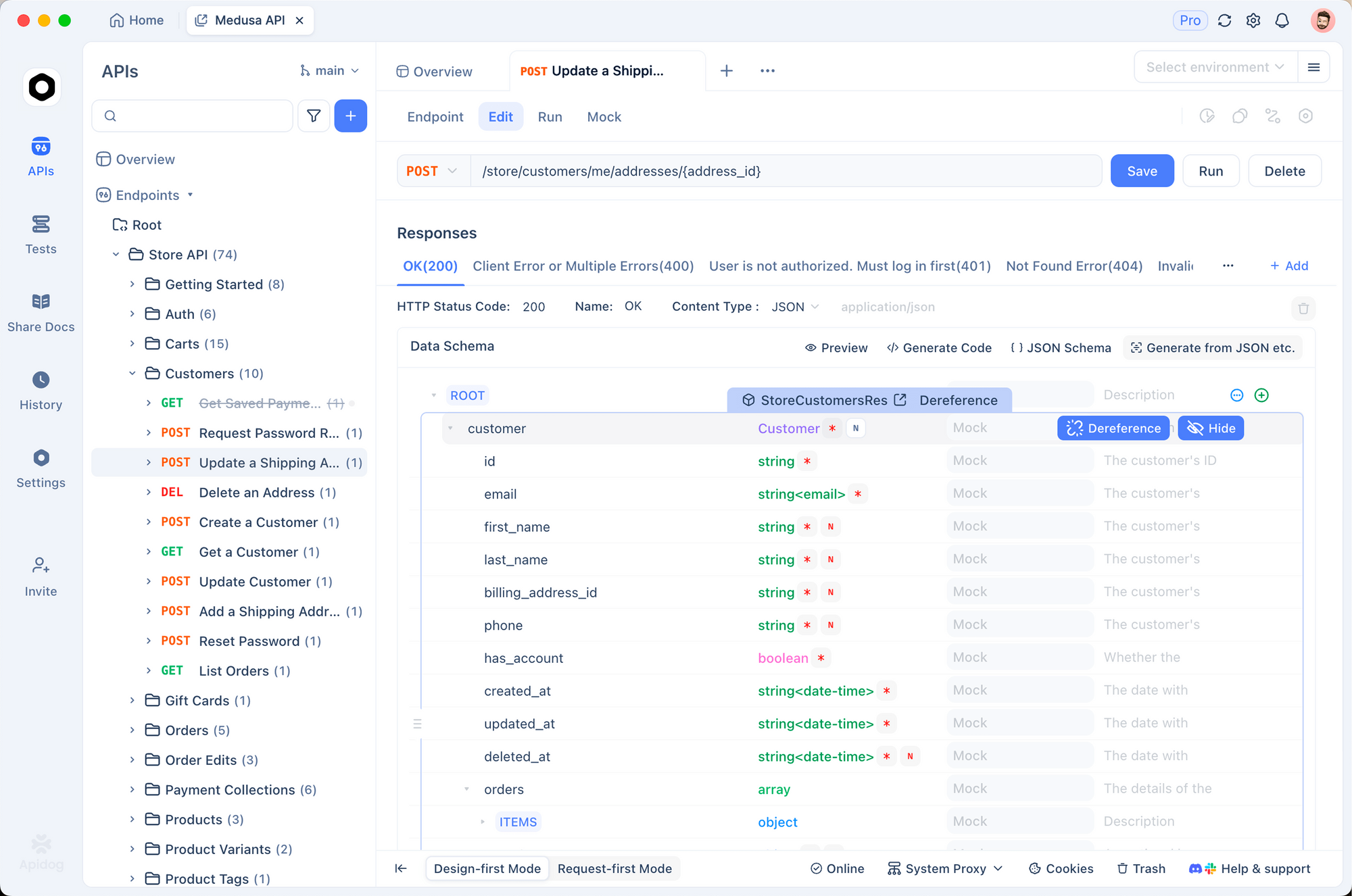
Debugging those requests without a proper API client gets painful quickly. Apidog handles this well. You can build and save your Qwen3.5-Omni request templates, set environment variables for your API keys, and write automated tests that verify response structure and content.
For teams evaluating the three model variants, Apidog makes it easy to run the same request against Plus, Flash, and Light and compare latency and output quality side by side.
Download Apidog free to start testing multimodal API requests.
Who this is for
Qwen3.5-Omni makes sense to evaluate if you’re building:
Voice assistants. Real-time speech in, speech out, with conversation memory and web retrieval. The semantic interruption and ARIA features solve two of the hardest problems in voice UX.
Video analysis tools. Automated video summarization, meeting transcription, tutorial generation from screen recordings. The 256K context window means you can pass in long recordings without chunking.
Multilingual customer products. 113-language ASR and 36-language TTS in one model. No separate vendor for each language tier.
Accessibility tooling. Alt-text generation for images, audio descriptions for video content, real-time caption generation with language support for under-resourced languages.
Developer productivity tools. Audio-Visual Vibe Coding turns screen recordings into working code. That’s a new input modality for code assistants.
Access
Qwen3.5-Omni is available through:
- Alibaba Cloud DashScope API (production API access)
- qwen.ai (web interface for testing)
- HuggingFace Hub (model weights for local deployment)
- ModelScope (recommended for users in mainland China)
The API follows Alibaba Cloud’s standard authentication model. You’ll need a DashScope API key. See the DashScope documentation for endpoint details and pricing per modality.
What to watch
Qwen3.5-Omni is strong on audio benchmarks. Whether those benchmark gains translate to real-world quality in your specific use case is worth testing directly. Benchmarks measure aggregate performance across curated test sets; they don’t predict how the model handles your domain’s vocabulary, your users’ accents, or your video formats.
The voice cloning feature is API-only for now. The qwen.ai web interface doesn’t expose it yet.
Local deployment requires significant GPU memory. The Plus variant (30B MoE) needs at least 40GB VRAM for comfortable inference. Flash and Light variants are more accessible.
FAQ
How is Qwen3.5-Omni different from Qwen2.5-Omni?
Qwen2.5-Omni supported 7B and 3B dense model sizes with 19 languages for speech. Qwen3.5-Omni uses an MoE architecture, expands speech recognition to 113 languages, adds voice cloning, and introduces ARIA for better audio quality. The benchmark performance and context window also grew significantly.
Can I run Qwen3.5-Omni locally?
Yes, via HuggingFace Transformers or vLLM. The Plus variant needs 40GB+ VRAM. Flash and Light variants run on smaller GPUs. vLLM is the better choice for production local deployment because of MoE optimization.
Is there a free tier?
The qwen.ai web interface is free to use. API access through DashScope is paid. Pricing per modality (audio tokens, video frames, text tokens) is available in the DashScope pricing documentation.
Does it support real-time streaming?
Yes. The Thinker-Talker architecture outputs audio in a streaming chunked manner, so the first audio bytes arrive before the full response is generated. This is what makes live voice conversation feel natural.
What’s the difference between Plus, Flash, and Light?
Plus is the highest quality, best for tasks where accuracy matters more than speed. Flash is the balanced option for most production APIs. Light is the fastest, intended for latency-sensitive applications like mobile or edge inference.
Can I use my own voice with the API?
Yes, via voice cloning on the API. You upload an audio sample of the target voice, and the model uses it for speech output. This is not available through the web interface yet.
How does it compare to ElevenLabs for voice generation?
On Alibaba’s benchmarks across 20 languages, Qwen3.5-Omni Plus outperforms ElevenLabs on multilingual voice stability. ElevenLabs has a longer track record and more voice customization options in its product. If you need voice-only capabilities, ElevenLabs is still worth comparing. If you need an integrated multimodal model, Qwen3.5-Omni is the cleaner choice.
Is it safe to send sensitive audio or video data through the API?
Review Alibaba Cloud’s data processing agreement before sending sensitive content. As with any cloud API, assume data may be logged unless the agreement explicitly guarantees otherwise.