

The Pokee Enterprise API is a REST API that runs a long-form AI agent inside a dedicated, persistent sandbox for each customer. You create a session, send a message, and read the agent’s answer as a Server-Sent Events (SSE) stream. Sessions can hold files, custom skills, your own tools and memory that carries across sessions. Access is through a Pokee demo request, not self-serve signup.
Below: how sessions and streams work, your first call, Pokee Isaac pricing, the limits, and how to let a coding agent test the endpoints with Apidog CLI. Every number comes from the Pokee docs, read on October 28, 2026.
What is the Pokee Enterprise API?
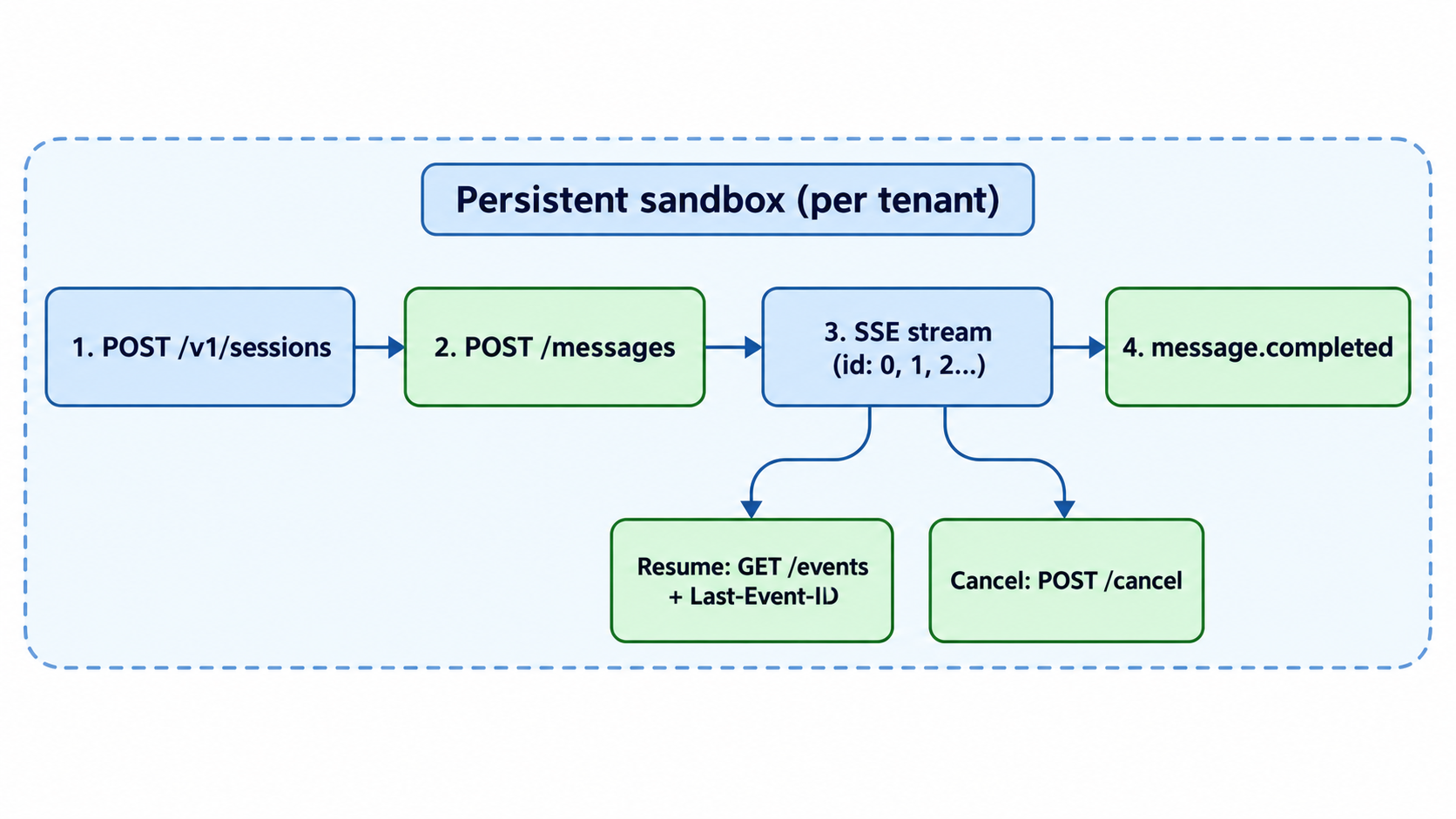
The Pokee Enterprise API (Pokee calls it the Enterprise Responses API) lets you run agent-driven workflows that take minutes, not seconds. Each tenant gets a private workspace, a stable bearer token and its own subdomain, https://your-tenant.enterprise.pokee.ai. Inside that workspace, each session is one agent process in its own sandbox.
A chat call answers one prompt and forgets. A Pokee session keeps its conversation, files and busy state, so the agent can research, write files and call tools across many turns. If you’ve read our guide to Claude Managed Agents, the shape will feel familiar: the provider hosts the agent loop and the sandbox, and you drive it over HTTP.
It’s built for teams that want a hosted agent with tenant isolation and enterprise network controls (IP allowlists, mTLS, AWS PrivateLink, region pinning), which Pokee lists as available on request.
Core concepts: sessions, files, skills and memory
The API has four building blocks.
| Concept | Endpoint | What it gives you |
|---|---|---|
| Sessions | POST /v1/sessions |
One agent process per session, with its own history, file scope and model |
| Files | /v1/sessions/{id}/files/{path} |
Upload, download, list and delete workspace files (about 100 MB per upload) |
| Skills | POST /v1/skills/{name} |
Install a zip bundle with a SKILL.md at its root; applies to new sessions |
| Memory | .pokee/*.md, .memory/MEMORY.md |
Tenant instructions added to the system prompt, plus memory across sessions |
A few session details matter early:
- Persistence. By default
persistentisfalse, and the session destroys itself 5 minutes after its last response. Set it totrueto keep the session until itsttlruns out (default 14,400 seconds, or 4 hours) or you delete it. - Model lock. The
modelyou pass at create time applies to every turn in that session. - File scope. Pass
file_accesswithreadandwritepath lists to restrict what the agent sees; the HTTP file API returns403outside that scope. - One turn at a time. Sending a second message while a turn runs returns
409 Conflict.
How to make your first Pokee API call
Pokee hands you two values out of band: your tenant URL and a key shaped like pk_<tenant>_<token>. Then the first call takes three steps.
- Check the gateway is up (no auth needed).
- Create a session and keep its
id. - Post a message and read the SSE stream.
export POKEE_API="https://your-tenant.enterprise.pokee.ai"
export POKEE_KEY="pk_<tenant>_<token>"

curl "$POKEE_API/health"

SID=$(curl -s -X POST "$POKEE_API/v1/sessions" \
  -H "Authorization: Bearer $POKEE_KEY" \
  -H "Content-Type: application/json" \
  -d '{"persistent": true}' | jq -r '.id')

curl -N -i -X POST "$POKEE_API/v1/sessions/$SID/messages" \
  -H "Authorization: Bearer $POKEE_KEY" \
  -H "Content-Type: application/json" \
  -d '{"message": "Summarize the files in my workspace in three bullets."}'
The -i flag prints headers. Save X-Response-Id (msg_ plus 24 hex characters): you need it to resume or cancel the turn.
Each event is three lines, id:, event: and data:. You’ll see message.created, then text.delta chunks (plus thinking.* or tool_use.* events), and the stream ends with message.completed, message.cancelled or message.error. If SSE is new to you, MDN’s Server-Sent Events guide explains the format, and our post on testing LLM APIs that stream over SSE shows how to read the chunks.
Tool calling: two surfaces
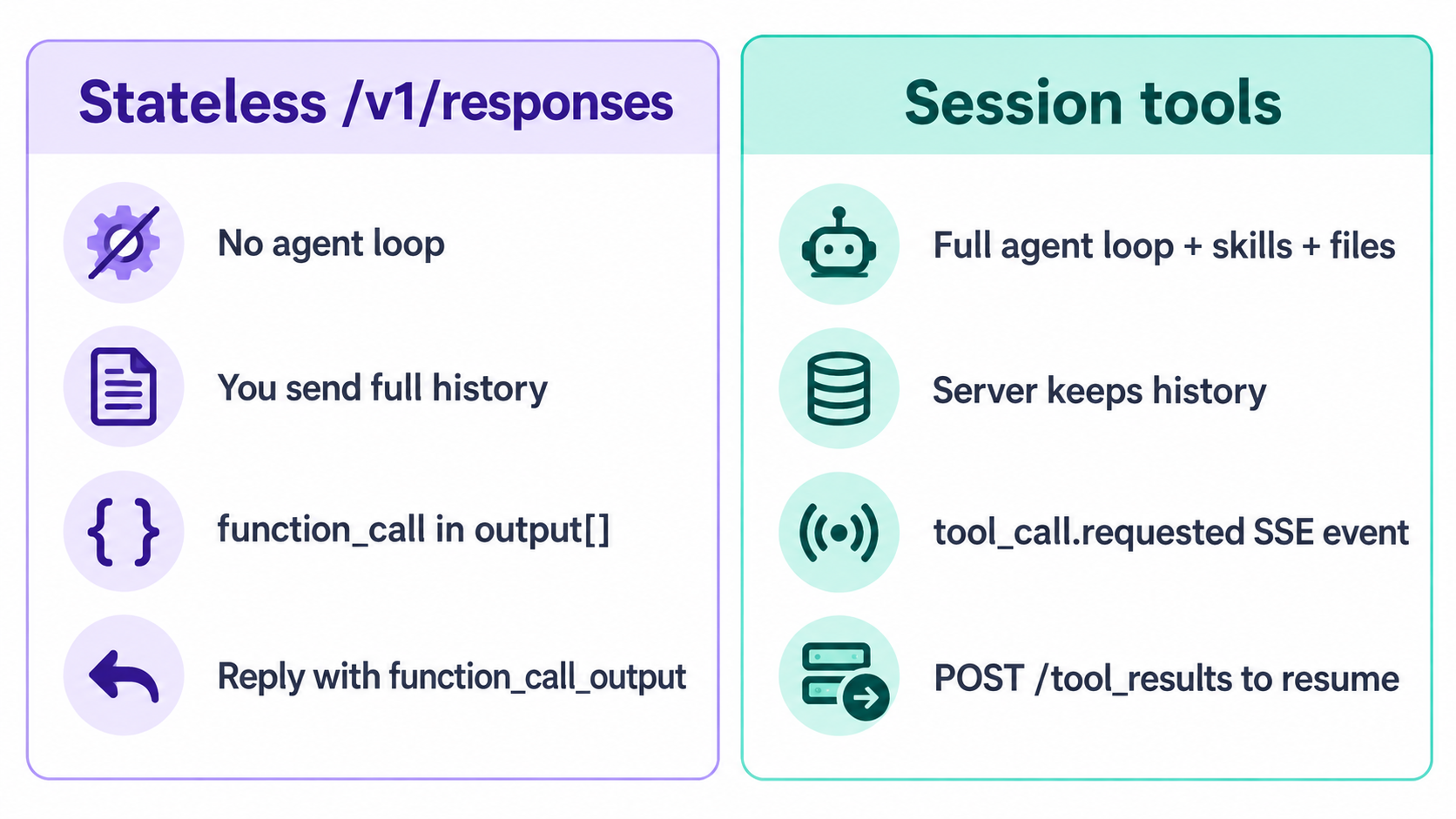
Pokee gives the agent two ways to call your functions, both using OpenAI-style function definitions.
Stateless /v1/responses |
Session tools | |
|---|---|---|
| Agent loop | None, one inference round trip | Full agent session with skills and files |
| State | You send the full history each call | The server holds the conversation |
| How a call appears | A function_call item in output[] |
A tool_call.requested SSE event mid-stream |
| How you continue | New call with a function_call_output item |
POST /v1/sessions/{id}/tool_results |
The stateless route is the one to pick when you’re swapping Pokee in behind code written for the OpenAI Responses API, because the wire shape matches. It accepts up to 128 tools per request, tool names up to 64 characters and descriptions up to 16 KiB. It also takes reasoning.effort (minimal, the default, keeps extended thinking off; low, medium and high turn it on). Output defaults to 4,096 tokens, capped at 32,000.
Session tools fit when the agent should reason, run skills and sometimes call your systems in the same turn. You register them at session create.
Resume, cancel and idempotency keys
Long turns break in ways short calls don’t. Pokee added three fixes on May 4, 2026, per its changelog.
- Resume. If your client drops mid-stream, the agent keeps running. Reconnect to
GET /v1/sessions/{id}/responses/{rid}/eventswith aLast-Event-IDheader and the server replays from the next event. Closed turns stay available for 120 seconds, and resuming doesn’t re-bill tokens. - Cancel.
POST /v1/sessions/{id}/responses/{rid}/cancelreturns202and the stream ends withmessage.cancelled. Partial usage on a cancelled turn isn’t billed. The session and its files stay alive. - Idempotency keys. Send
Idempotency-Key: <uuid>on the message POST. A retry with the same key and body returns the original response ID instead of starting a second turn. Keys live 24 hours, and the same key with a different body returns422.
The stateless /v1/responses route supports all three when stream is true.
Pokee Isaac models and pricing
Pokee publishes two Isaac tiers on its models and pricing page. Prices are per million tokens.
| Model | Input | Output | Cache read |
|---|---|---|---|
pokee-isaac-high-reasoning |
$3 | $15 | $0.30 |
pokee-isaac |
$0.30 | $5 | $0.10 |
New tenants default to pokee-isaac-high-reasoning when you omit model. Kimi, GPT-5.5 and Gemini backends are available per tenant by contract. The docs don’t list a free tier or a minimum contract; ask Pokee for those terms.
There’s also a Direct Isaac API, added August 7, 2026: an OpenAI-compatible POST /v1/chat/completions route with no agent loop or tools. It’s enabled per tenant, accepts only pokee-isaac, and routes long requests (200,000 and 2,000,000 tokens and up) to bigger context pools automatically. GET /v1/usage shows your credit balance.
One security note from the docs: the tenant bearer is a direct API key. Keep it on your server or behind your own proxy, never in browser, mobile or desktop code.
Limits and error codes
These are the defaults from the limits and errors page. Pokee says it can raise any of them on request.
| Limit | Default |
|---|---|
| Concurrent sessions | 10 |
| Turn timeout | 90 minutes |
| Session TTL | 4 hours |
| Turns per hour / per day | 300 / 5,000 |
| Tokens per hour / per day | 20M / 200M |
| Max upload | About 100 MB per call |
| Max workspace | 100 GB |
The error codes you’ll handle most: 401 (bad or missing key), 402 (out of credits, hard credit mode only), 403 (path outside the session’s scope), 409 (session busy), 422 (idempotency key reused with a different body), 429 (usage limit) and 500 (retry with backoff). Errors come back as {"error": "<name>", "message": "<detail>"}.
Let your coding agent test the Pokee API with Apidog CLI
A session API has a lot of contract to pin down: 201 on create, a sess_ ID, 409 while busy, 204 on delete, 202 on cancel. Your coding agent can write and run those checks while you keep working. Apidog CLI gives Claude Code, Codex or Cursor the commands to do it.
Set it up once:
npm install -g apidog-cli@latest
apidog auth login --with-token <YOUR_APIDOG_TOKEN>
apidog skill install
Then give your agent one prompt:
Write an OpenAPI file for the Pokee Enterprise API endpoints /health,
POST/GET/DELETE /v1/sessions, /v1/sessions/{id}/responses/{rid}/cancel and
/v1/usage, import it into Apidog project <projectId>, create an environment
for my tenant URL, then add test cases that assert 201 and an id starting
with "sess_" on create, 204 on delete and a credit balance on /v1/usage.
Run them and summarize failures. Read POKEE_KEY from my shell, never a file.
The agent imports the spec, checks each payload against the CLI’s schema, then creates and runs the cases:
apidog import --project <projectId> --format openapi --file ./pokee-openapi.json
apidog environment create pokee-tenant --project <projectId> --base-url https://your-tenant.enterprise.pokee.ai
apidog cli-schema get test-case-create
apidog cli-schema validate test-case-create --file create-session.json
apidog test-case create --project <projectId> --file create-session.json
apidog run --test-case <caseId> --project <projectId> -e <envId> --env-var "POKEE_KEY=$POKEE_KEY" -r cli,junit
Passing the key with --env-var keeps it out of any file the agent writes. These cases cover the JSON endpoints; the SSE stream itself is easier to watch in the Apidog app, which renders streamed events (see SSE testing in Apidog). The same apidog run command with -r junit drops into CI, as our Apidog CLI CI/CD guide shows. New to the CLI in an agent? Start with Apidog CLI in Claude Code. Apidog’s Free plan covers up to 4 users.
Where Sharkly fits
Once Pokee agents, or any coding agents, run tasks that take 90 minutes, someone has to decide who does what and check the results. A session ID in a log file isn’t a work queue. Sharkly is a task board where AI agents and people share the work: you assign a task to an agent or a teammate, follow its status, and review the output before it ships. It’s free to start, so you can put one long agent job on the board and see how review fits your team before you scale up.
FAQ
Is there a free tier for the Pokee Enterprise API? The docs don’t describe one. Access starts with a demo request, and Pokee provisions your tenant URL and key out of band. Pricing is per token on the Isaac tiers above.
Is the Pokee API compatible with OpenAI? Partly. The stateless /v1/responses route matches OpenAI’s Responses wire shape for function calling, and the Direct Isaac route accepts the Chat Completions request shape. The session endpoints are Pokee’s own.
How long can a Pokee agent turn run? The default turn timeout is 90 minutes and the default session TTL is 4 hours. Both can be raised on request.
What happens if my client disconnects mid-stream? The agent keeps working. Reconnect to the resume endpoint with Last-Event-ID within 120 seconds of the turn closing and you get the rest of the events without re-billing.
How does it compare to other hosted agent APIs? It sits close to hosted-agent offerings like the OpenAI Agents API; our comparison of OpenAI’s agent options is a good next read, and what CubeSandbox does for AI agents covers the sandbox side.