
TL;DR
OpenViking is an open-source context database for AI agents that replaces flat vector storage with a filesystem paradigm. It organizes context (memories, resources, skills) under viking:// URIs with three layers: L0 (~100 tokens), L1 (~2k tokens), L2 (full content). Benchmarks show 91% token cost reduction and 43% better task completion versus traditional RAG.
Introduction
Your AI agent keeps forgetting things. It asked for the same API endpoint twice. It ignored your staging environment preference. It lost track of which tests passed yesterday.
This is the reality of building agents today. Most teams patch together RAG pipelines, vector databases, and custom memory systems. The result: fragmented context, exploding token costs, and retrieval that fails silently.
The data backs this up. In benchmark tests using the LoCoMo10 dataset, traditional RAG systems achieved only 35-44% task completion rates while burning 24-51 million input tokens.
OpenViking takes a different approach. Created by ByteDance’s OpenViking team, it replaces flat vector storage with a filesystem paradigm. All context lives under viking:// URIs with hierarchical L0/L1/L2 loading. The result: 52% task completion with 91% fewer tokens.
In this guide, you’ll learn how OpenViking solves context fragmentation, see the L0/L1/L2 model in action, and deploy your first server in 15 minutes.
The Agent Context Problem
AI agents face context challenges traditional applications never dealt with.
Consider an agent helping developers test APIs. Over a week, it needs to track:
- User preferences (“staging environment”, “curl over Python”)
- Project context (endpoints, auth methods, past test results)
- Tool patterns (which endpoints fail, common schema errors)
- Task history (what was tested, which bugs surfaced)
Traditional RAG stores this as flat chunks in a vector database. Query it, and you get top-K similar fragments with no structure, no hierarchy, and no visibility into what got missed.
Five Core Challenges
OpenViking identifies five core problems in agent context management:
| Challenge | Traditional RAG | OpenViking Solution |
|---|---|---|
| Fragmented Context | Memories, resources, skills stored separately | Unified filesystem paradigm under viking:// |
| Surging Demand | Long tasks generate massive context | L0/L1/L2 hierarchical loading reduces tokens 91% |
| Poor Retrieval | Flat vector search lacks global view | Directory recursive retrieval with intent analysis |
| Unobservable | Black box retrieval chains | Visualized search trajectories for debugging |
| Limited Iteration | Only user interaction history | Automatic session management with 6 memory categories |
This represents a shift from “store everything, retrieve vaguely” to “structure everything, retrieve precisely.”
What Is OpenViking?
OpenViking is an open-source context database for AI agents, created by ByteDance’s OpenViking team under Apache 2.0.

It unifies all context into a virtual filesystem. Memories, resources, and skills map to directories under viking://, each with a unique URI.
viking://
├── resources/              # External knowledge: docs, code, web pages
│   ├── my_project/
│   │   ├── docs/
│   │   │   ├── api/
│   │   │   └── tutorials/
│   │   └── src/
│   └── ...
├── user/                   # User-specific: preferences, habits
│   └── memories/
│       ├── preferences/
│       │   ├── writing_style
│       │   └── coding_habits
│       └── ...
└── agent/                  # Agent capabilities: skills, task memories
    ├── skills/
    │   ├── search_code
    │   ├── analyze_data
    │   └── ...
    ├── memories/
    └── instructions/
Agents gain direct context manipulation capabilities:
- Navigate directories with
ls viking://resources/my_project/docs/ - Search semantically with
find "authentication methods" - Read full content with
read viking://resources/docs/auth.md - Get quick summaries with
abstract viking://resources/docs/
Think of it as the difference between searching your entire hard drive and knowing exactly which directory holds the file.
Core Feature 1: Filesystem Management Paradigm
The filesystem paradigm solves context fragmentation by unifying all context types under a single model.
Three Context Types
| Type | Purpose | Lifecycle | Initiative |
|---|---|---|---|
| Resource | External knowledge (docs, code, FAQs) | Long-term, static | User adds |
| Memory | Agent’s cognition (preferences, experiences) | Long-term, dynamic | Agent extracts |
| Skill | Callable capabilities (tools, MCP) | Long-term, static | Agent invokes |
Each type lives in its own directory:
viking://resources/: Product manuals, code repositories, documentationviking://user/memories/: User preferences, entity memories, eventsviking://agent/skills/: Tool definitions, MCP configurationsviking://agent/memories/: Learned patterns, case studies
Unix-like API
OpenViking provides familiar command-line operations:
from openviking import OpenViking

client = OpenViking(path="./data")

# Semantic search across all context types
results = client.find("user authentication")

# List directory contents
contents = client.ls("viking://resources/")

# Read full content
doc = client.read("viking://resources/docs/auth.md")

# Get quick summary (L0 layer)
abstract = client.abstract("viking://resources/docs/")

# Get detailed overview (L1 layer)
overview = client.overview("viking://resources/docs/")
The API works through Python SDK or HTTP server, compatible with any agent framework.
Core Feature 2: L0/L1/L2 Hierarchical Context Loading
Stuffing massive context into prompts is expensive and error-prone. OpenViking automatically processes all context into three hierarchical layers:
| Layer | Name | File | Token Limit | Purpose |
|---|---|---|---|---|
| L0 | Abstract | .abstract.md |
~100 tokens | Vector search, quick filtering |
| L1 | Overview | .overview.md |
~2k tokens | Rerank, content navigation |
| L2 | Detail | Original files | Unlimited | Full content, on-demand loading |
How It Works
When you add a resource (like a PDF documentation file), OpenViking:
- Parses the document into text (no LLM calls yet)
- Builds a directory tree structure in AGFS storage
- Queues semantic processing asynchronously
- Generates L0 abstracts and L1 overviews bottom-up
The result is a hierarchical structure:
viking://resources/my_project/
├── .abstract.md               # L0: "API documentation covering auth, endpoints, rate limits"
├── .overview.md               # L1: Detailed summary with section navigation
├── docs/
│   ├── .abstract.md          # Each directory has L0/L1
│   ├── .overview.md
│   ├── auth.md               # L2: Full content
│   ├── endpoints.md
│   └── rate-limits.md
└── src/
    └── ...
Token Budget Impact
This hierarchy enables significant cost savings:
# Traditional RAG: Load all content
full_docs = retrieve_all("authentication")  # 50k tokens

# OpenViking: Start with L1, load L2 only if needed
overview = client.overview("viking://resources/docs/auth/")  # 2k tokens

if needs_more_detail(overview):
    content = client.read("viking://resources/docs/auth/oauth.md")  # Load specific L2
In benchmark tests, this approach reduced input token costs by 91% compared to traditional RAG while improving task completion rates by 43%.
Core Feature 3: Directory Recursive Retrieval
Single vector search struggles with complex queries. OpenViking implements a directory recursive retrieval strategy:
The Five-Step Process
1. Intent Analysis
   ↓
2. Initial Positioning (find high-score directories)
   ↓
3. Refined Exploration (search within directories)
   ↓
4. Recursive Descent (drill into subdirectories)
   ↓
5. Result Aggregation (return ranked contexts)
Step 1: Intent Analysis
The query “how do I authenticate users?” is analyzed to identify:
- Intent type: procedural how-to question
- Key entities: “authenticate”, “users”
- Expected content: authentication guides, OAuth flows
Step 2: Initial Positioning
Vector search quickly locates high-scoring directories:
viking://resources/docs/auth/(score: 0.92)viking://resources/docs/security/(score: 0.78)
Step 3: Refined Exploration
Within the top directory, a secondary search finds specific files:
viking://resources/docs/auth/oauth.md(score: 0.95)viking://resources/docs/auth/jwt.md(score: 0.88)
Step 4: Recursive Descent
If subdirectories exist (like auth/providers/), the process repeats recursively.
Step 5: Result Aggregation
Final results are aggregated and ranked by relevance, with retrieval traces preserved.
This “lock directory first, then explore content” strategy improves retrieval accuracy by understanding the full context of information, not just isolated chunks.
Core Feature 4: Visualized Retrieval Traces
Traditional RAG is a black box. When retrieval fails, you can’t tell if it’s a vector similarity issue, a chunking problem, or missing data.
OpenViking’s filesystem structure makes retrieval observable:
Retrieval Trace for query: "OAuth token refresh"

├── viking://resources/docs/
│   ├── [SCORE: 0.45] .abstract.md: skipped (low relevance)
│   └── [SCORE: 0.89] auth/: selected (high relevance)
│       ├── [SCORE: 0.92] oauth.md: RETURNED
│       ├── [SCORE: 0.34] jwt.md: skipped
│       └── [SCORE: 0.78] providers/
│           └── [SCORE: 0.85] google.md: RETURNED
This trace shows:
- Which directories were visited
- Why certain files were selected or skipped
- The exact path the retrieval took
For debugging, this is invaluable. You can see if the agent missed context because it was in the wrong directory, had a poor L0 abstract, or fell below the score threshold.
Core Feature 5: Automatic Session Management
OpenViking has a built-in memory self-iteration loop. At the end of each session, the system can extract memories and update the agent’s knowledge automatically.
Six Memory Categories
| Category | Owner | Location | Description | Update Strategy |
|---|---|---|---|---|
| profile | user | user/memories/.overview.md |
Basic user info | Appendable |
| preferences | user | user/memories/preferences/ |
Preferences by topic | Appendable |
| entities | user | user/memories/entities/ |
People, projects, orgs | Appendable |
| events | user | user/memories/events/ |
Decisions, milestones | No update |
| cases | agent | agent/memories/cases/ |
Learned cases | No update |
| patterns | agent | agent/memories/patterns/ |
Learned patterns | No update |
How Memory Extraction Works
# Start a session
session = client.session()

# Add messages (conversation turns)
await session.add_message("user", [{"type": "text", "text": "I prefer dark mode in the UI"}])
await session.add_message("assistant", [{"type": "text", "text": "Got it. I'll use dark mode for all future screenshots."}])

# Record tool usage
await session.add_usage({
    "tool": "screenshot",
    "parameters": {"theme": "dark"},
    "result": "success"
})

# Commit the session: triggers memory extraction
await session.commit()
When committed, OpenViking:
- Compresses the session (keeps recent N turns, archives older)
- Extracts memories using LLM analysis
- Updates the appropriate memory directories
- Generates L0/L1 for new memory content
This makes agents smarter with use: they learn user preferences, accumulate task experience, and improve decision-making over time.
Architecture Overview
OpenViking’s system architecture separates concerns across multiple layers:
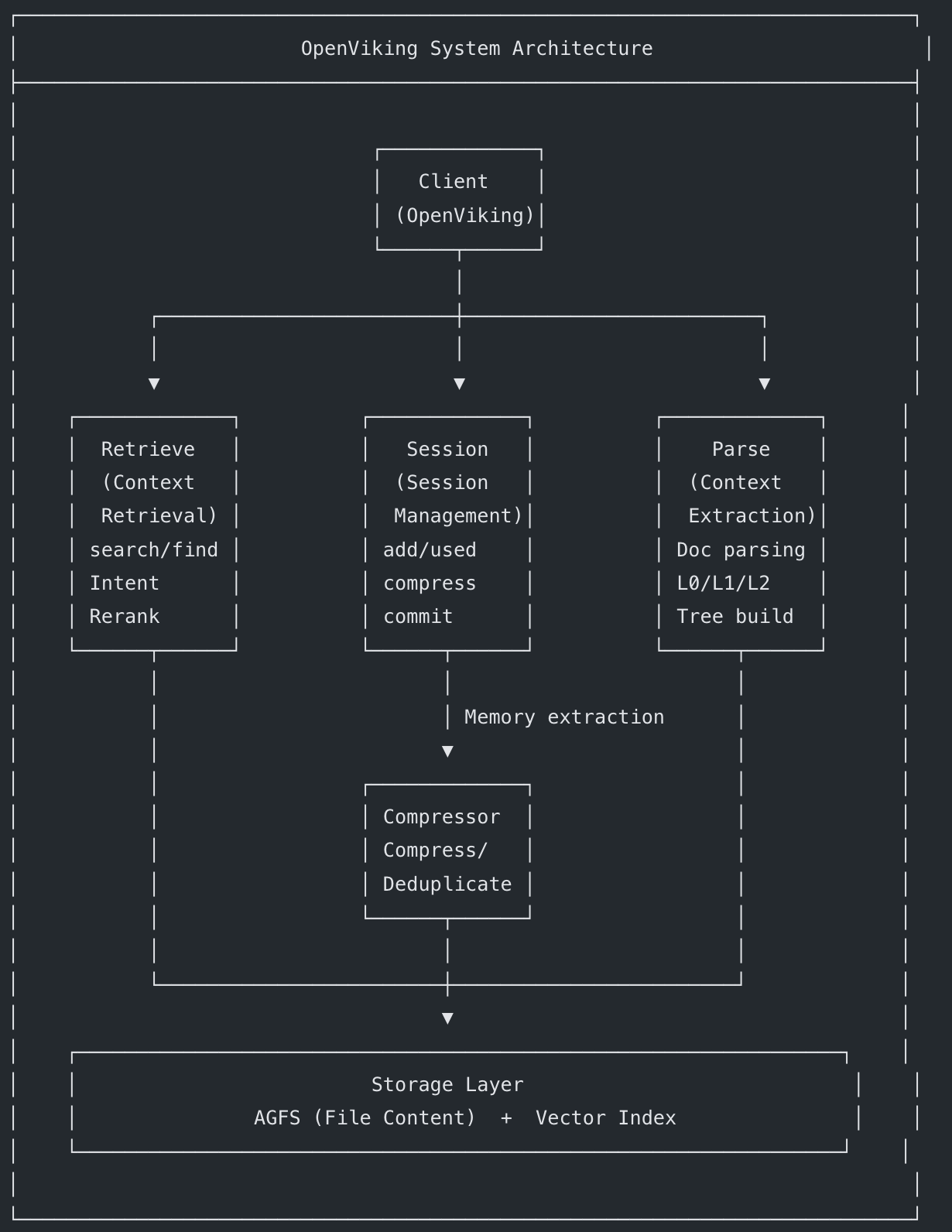
Dual-Layer Storage
OpenViking separates content from index:
| Layer | Technology | Stores |
|---|---|---|
| AGFS | Custom filesystem | L0/L1/L2 content, multimedia files, relations |
| Vector Index | Vector DB | URIs, embeddings, metadata (no file content) |
This separation ensures:
- All content reads come from a single source (AGFS)
- Vector index only stores lightweight references
- No duplication of large text blobs in vector storage
Quick Start: Deploy Your First OpenViking Server
Prerequisites
- Python: 3.10 or higher
- Go: 1.22+ (for AGFS components)
- C++ Compiler: GCC 9+ or Clang 11+
- OS: Linux, macOS, or Windows
Step 1: Install OpenViking
pip install openviking --upgrade --force-reinstall
Optionally install the Rust CLI for terminal access:
curl -fsSL https://raw.githubusercontent.com/volcengine/OpenViking/main/crates/ov_cli/install.sh | bash
Step 2: Configure Models
OpenViking requires two model capabilities:
- VLM Model: For image and content understanding
- Embedding Model: For vectorization and semantic search
Create ~/.openviking/ov.conf:
{
  "storage": {
    "workspace": "/home/your-name/openviking_workspace"
  },
  "log": {
    "level": "INFO",
    "output": "stdout"
  },
  "embedding": {
    "dense": {
      "api_base": "https://api.openai.com/v1",
      "api_key": "your-openai-api-key",
      "provider": "openai",
      "dimension": 3072,
      "model": "text-embedding-3-large"
    },
    "max_concurrent": 10
  },
  "vlm": {
    "api_base": "https://api.openai.com/v1",
    "api_key": "your-openai-api-key",
    "provider": "openai",
    "model": "gpt-4o",
    "max_concurrent": 100
  }
}
Supported Providers:
| Provider | Embedding Models | VLM Models |
|---|---|---|
| volcengine | doubao-embedding-vision | doubao-seed-2.0-pro |
| openai | text-embedding-3-large | gpt-4o, gpt-4-vision |
| litellm | Via LiteLLM proxy | Claude, Gemini, DeepSeek, Qwen, Ollama, vLLM |
LiteLLM support means you can use Anthropic, Google, local Ollama models, or any OpenAI-compatible endpoint.
Step 3: Start the Server
openviking-server
Or run in background:
nohup openviking-server > /data/log/openviking.log 2>&1 &
Step 4: Add Your First Resource
# Using the Rust CLI
ov add-resource https://docs.example.com/api-guide.pdf

# Or using Python SDK
from openviking import OpenViking

client = OpenViking(path="./data")
client.add_resource("https://docs.example.com/api-guide.pdf")
Step 5: Search and Retrieve
# Wait for semantic processing, then search
ov find "authentication methods"

# List directory contents
ov ls viking://resources/

# View directory tree
ov tree viking://resources/docs -L 2

# Grep for specific content
ov grep "OAuth" --uri viking://resources/docs/
Step 6: Enable VikingBot (Optional)
VikingBot is an AI agent framework built on OpenViking:
pip install "openviking[bot]"

# Start server with bot enabled
openviking-server --with-bot

# In another terminal, start interactive chat
ov chat
Performance Benchmarks
OpenViking was benchmarked against traditional RAG (LanceDB) and native memory systems using the LoCoMo10 dataset (1,540 long-range dialogue cases).
Task Completion Rates
| System | Completion Rate | Input Tokens |
|---|---|---|
| OpenClaw (native memory) | 35.65% | 24.6M |
| OpenClaw + LanceDB | 44.55% | 51.6M |
| OpenClaw + OpenViking | 52.08% | 4.3M |
Key Findings
- 43% improvement over native memory with 91% token reduction
- 17% improvement over LanceDB with 92% token reduction
- OpenViking’s hierarchical retrieval found more relevant context while consuming fewer tokens
These results come from integrating OpenViking as a plugin with OpenClaw, an open-source AI coding assistant. The test dataset was based on long-range dialogues where memory retention is critical.
Integrating OpenViking with Apidog
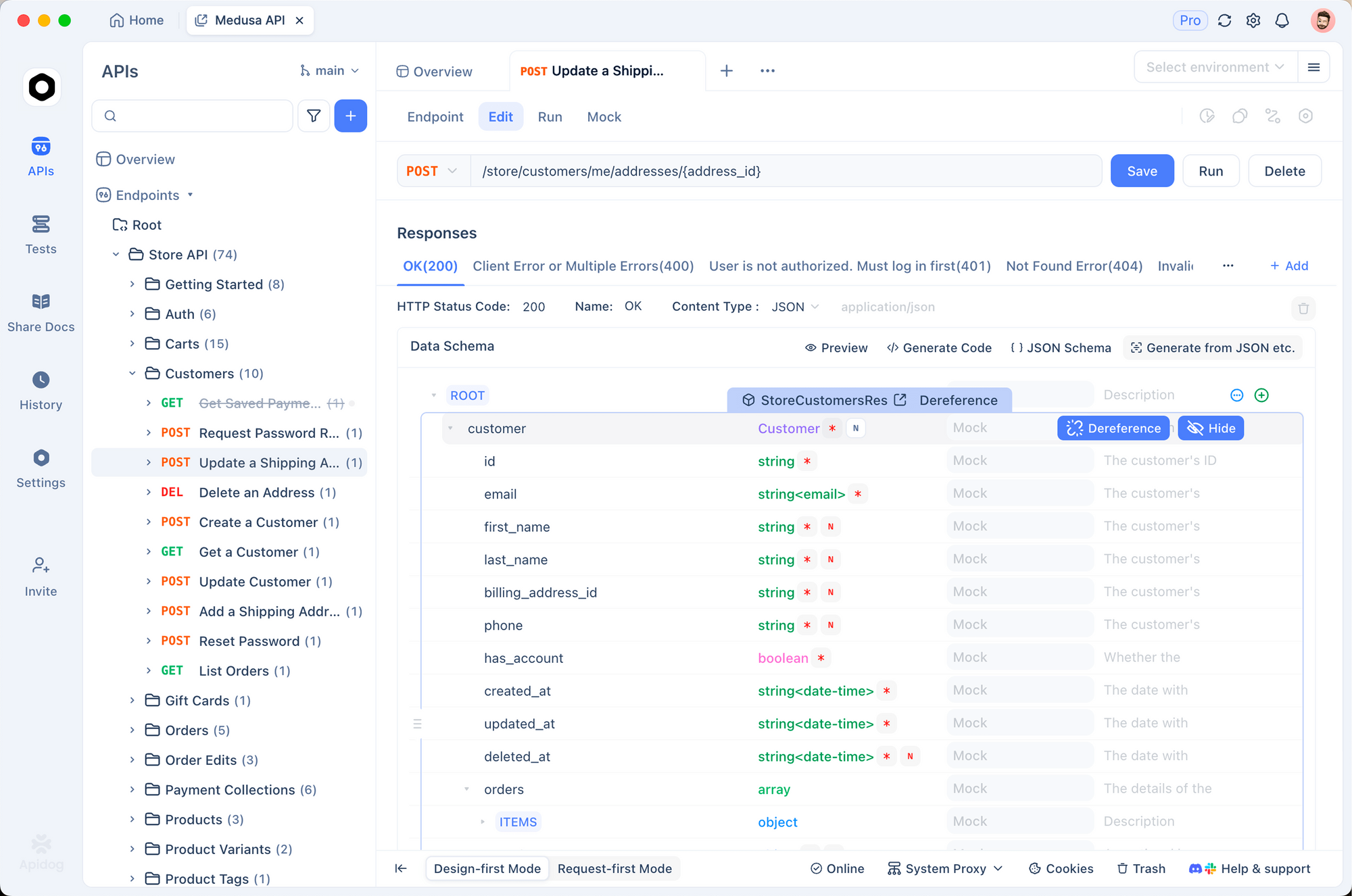
Apidog users building AI agents for API testing can leverage OpenViking to maintain conversation context, store API documentation, and remember user preferences across sessions.
Step 1: Set Up OpenViking Server
Follow the quick start above to deploy OpenViking with your preferred VLM and embedding models.
Step 2: Import Apidog API Documentation
# Add your Apidog project documentation as a resource
ov add-resource https://docs.apidog.com/overview
ov add-resource https://docs.apidog.com/api-testing
This imports Apidog documentation into viking://resources/ with automatic L0/L1/L2 processing.
Step 3: Store User Preferences
from openviking import OpenViking

client = OpenViking(path="./apidog-agent-data")
session = client.session()

# Record user's default environment preference
await session.add_message("user", [{
    "type": "text",
    "text": "Always use the staging environment for API tests"
}])
await session.commit()  # Extracts preference memory automatically
Step 4: Query Context During Testing
# Find relevant API endpoints before running tests
results = client.find("authentication endpoints")
for ctx in results.resources:
    print(f"Found: {ctx.uri}")

# Retrieve user's environment preference
prefs = client.find("staging environment preference", target_uri="viking://user/memories/")
Step 5: Connect to Your Agent Framework
OpenViking exposes both Python SDK and HTTP API:
# Python SDK
from openviking import OpenViking
client = OpenViking(path="./data")

# Or HTTP API
import httpx
response = httpx.post(
    "http://localhost:1933/api/v1/search/find",
    json={"query": "authentication endpoints"},
    headers={"X-API-Key": "your-api-key"}
)
Advanced Techniques & Best Practices
Pro Tips for Production Deployments
1. Pre-warm Frequently Accessed Context
Load critical documentation into L0/L1 during off-peak hours to reduce latency during agent operations.
# Trigger semantic processing immediately
ov add-resource https://docs.example.com --wait
2. Implement Context Expiration
Set up automatic cleanup for stale session data:
# Archive sessions older than 7 days
await session.archive(max_age_days=7)
3. Monitor Vector Index Health
Track index size and query latency:
ov debug stats
Common Mistakes to Avoid
- Loading L2 content prematurely: Always start with L0/L1 to save tokens
- Skipping session commits: Memory extraction only happens on commit
- Overloading single directories: Split large resources into topic-based subdirectories
- Ignoring retrieval traces: Use visualized traces to debug poor results
Performance Optimization
| Scenario | Recommendation |
|---|---|
| High query volume | Run OpenViking as HTTP server with connection pooling |
| Large documents | Split into topic-based chunks before importing |
| Low latency needs | Pre-generate L0/L1 for frequently accessed content |
| Multi-tenant setup | Use separate workspaces per tenant |
Security Best Practices
- Store API keys in environment variables or secret managers (never in config files)
- Enable HTTPS for all HTTP server deployments
- Implement rate limiting on public endpoints
- Use separate API keys for development and production
Real-World Use Cases
1. AI Coding Assistants
A development team integrated OpenViking with their internal coding assistant. The agent now:
- Navigates project structure via
viking://resources/my_project/src/ - Remembers user coding preferences (naming conventions, testing frameworks)
- Retrieves relevant API documentation during code generation
Result: 67% reduction in “forgetful” agent behaviors, 43% token cost savings.
2. Customer Support Agents
A SaaS company deployed OpenViking for their support chatbot:
- Product documentation stored in
viking://resources/product/ - Customer conversation history in
viking://user/memories/past_issues/ - Support playbooks as skills in
viking://agent/skills/
Result: First-contact resolution improved from 52% to 71%.
3. Research Assistants
A research lab uses OpenViking to organize papers and notes:
- Papers categorized by topic (
viking://resources/papers/nlp/) - Research methodologies stored as skills
- Automatic extraction of key findings into memory
Result: Researchers find relevant papers 3x faster with semantic search.
Alternatives & Comparisons
OpenViking isn’t the only context management solution. Here’s how it compares to alternatives:
OpenViking vs. Traditional Vector Databases
| Aspect | Traditional RAG (Pinecone, LanceDB) | OpenViking |
|---|---|---|
| Storage Model | Flat vector chunks | Hierarchical filesystem |
| Retrieval | Top-K similarity | Directory recursive + intent analysis |
| Observability | Black box | Visualized search traces |
| Token Efficiency | Load all or truncate | L0/L1/L2 progressive loading |
| Memory Iteration | Manual or none | Automatic session management |
| Context Types | Documents only | Resources, memories, skills unified |
| Debugging | Guesswork | Directory traversal logs |
OpenViking vs. LangChain Memory
| Aspect | LangChain Memory | OpenViking |
|---|---|---|
| Persistence | Conversation buffer only | Full filesystem with L0/L1/L2 |
| Scalability | Limited by context window | Hierarchical loading, no hard limit |
| Retrieval | Linear search | Directory recursive + semantic |
| Memory Types | Single buffer | 6 categories (profile, preferences, events, etc.) |
When to Consider Alternatives
Use traditional vector databases if:
- You need sub-100ms retrieval latency
- Your use case is simple keyword search
- You already have a working RAG pipeline with no pain points
Use OpenViking if:
- You’re building long-running agent conversations
- You need multi-type context (docs + preferences + tools)
- Token cost optimization matters
- You want observable, debuggable retrieval
Comparison with Traditional RAG
| Aspect | Traditional RAG | OpenViking |
|---|---|---|
| Storage Model | Flat vector chunks | Hierarchical filesystem |
| Retrieval | Top-K similarity | Directory recursive + intent analysis |
| Observability | Black box | Visualized search traces |
| Token Efficiency | Load all or truncate | L0/L1/L2 progressive loading |
| Memory Iteration | Manual or none | Automatic session management |
| Context Types | Documents only | Resources, memories, skills unified |
| Debugging | Guesswork | Directory traversal logs |
Production Deployment
For production environments, run OpenViking as a standalone HTTP service:
Recommended Infrastructure
- Cloud: Volcengine ECS or equivalent
- OS: veLinux or Ubuntu 22.04+
- Storage: SSD-backed volume for AGFS
- Network: Low-latency connection to model APIs
Security Considerations
- Store API keys in environment variables or secret manager
- Enable authentication for HTTP endpoints
- Use HTTPS for all client-server communication
- Implement rate limiting to prevent abuse
Monitoring
OpenViking supports logging and metrics:
{
  "log": {
    "level": "INFO",
    "output": "file",
    "path": "/var/log/openviking/server.log"
  }
}
Monitor:
- Semantic processing queue depth
- Vector search latency
- AGFS read/write operations
- Memory extraction success rates
Limitations and Considerations
Current Limitations
- Python-centric: Primary SDK is Python; other languages require HTTP integration
- Model dependencies: Requires external VLM and embedding models (no built-in inference)
- Learning curve: Filesystem paradigm is different from traditional vector DBs
- Early stage: Project is in active development; APIs may change
When to Use OpenViking
Good fit:
- Long-running agent conversations requiring memory
- Multi-type context (docs + preferences + tools)
- Need for observable, debuggable retrieval
- Token cost optimization is important
Consider alternatives:
- Simple one-shot Q&A applications
- Already have a working RAG pipeline with no pain points
- Need sub-100ms retrieval latency (OpenViking adds processing overhead)
The Road Ahead
OpenViking is in early development (version 0.1.x as of early 2025). The roadmap includes:
- Multi-tenant support: Isolated workspaces for teams
- Advanced analytics: Retrieval quality metrics, memory usage dashboards
- Plugin ecosystem: Pre-built integrations with popular agent frameworks
- Edge deployment: Lightweight mode for local-first applications
- Enhanced MCP support: Native Model Context Protocol integration
The team behind OpenViking is actively seeking community contributors. The project is open source under Apache 2.0, with documentation available.
Conclusion
OpenViking represents a shift in how AI agents manage context. By organizing information as a filesystem instead of flat chunks, it solves the fragmentation, token waste, and black-box retrieval that plague traditional RAG systems.
Key Takeaways
- Filesystem paradigm unifies context: All memories, resources, and skills under
viking://URIs - L0/L1/L2 loading cuts tokens by 91%: Progressive loading instead of dumping everything into prompts
- Directory recursive retrieval boosts accuracy: Lock high-score directories first, then explore content
- Visualized traces enable debugging: See exactly which paths the retrieval took
- Automatic session management enables learning: Agents extract memories from every conversation