
Minimax released Minimax 2.5 — a model that instantly reset expectations for coding agents and autonomous AI systems. With an 80.2% score on SWE-Bench Verified, 51.3% on Multi-SWE-Bench, and native 200K context + advanced tool-calling capabilities, it surpassed Claude 4 Opus, Gemini 2.5 Pro, and o3 in most software engineering benchmarks while running at roughly 1/15th the inference cost.
Official API access requires either heavy waitlists or paid credits, and self-hosting the 405B model remains impractical for the vast majority. This creates a frustrating gap: one of the most capable coding models exists, but remains out of reach for individual engineers and small teams.
This guide closes that gap completely.
You can now run Minimax 2.5 for free through official partner platforms (primarily OpenCode) with full API access, streaming, and tool use — often with generous daily limits. More importantly, you can integrate, test, debug, and productionize it professionally without writing endless cURL scripts.
What Makes Minimax 2.5 a Game-Changer for Developers
Minimax 2.5 builds on its predecessors with reinforcement learning across hundreds of thousands of real-world environments. Engineers at MiniMax trained the model to handle intricate tasks that mirror production demands. Consequently, it excels in areas where other models falter.
Consider its core strengths. In coding, Minimax 2.5 supports over 10 languages, including Go, Rust, TypeScript, and Python. It manages full-stack projects from system design to code review. Furthermore, it demonstrates architect-level planning: the model decomposes tasks, designs structures, and iterates features autonomously.
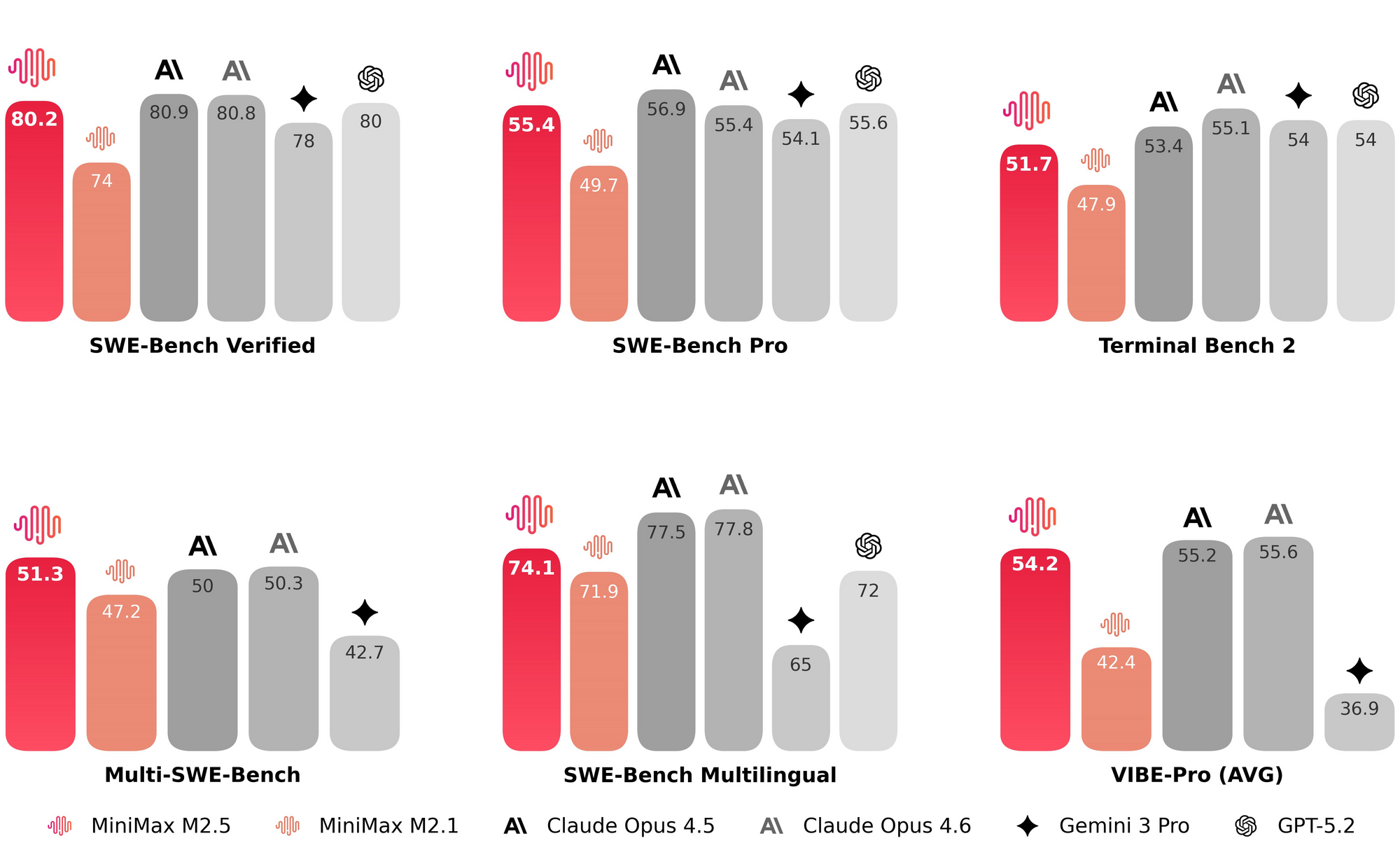
Benchmarks confirm its dominance. On SWE-Bench Verified, it scores 80.2%, surpassing previous leaders. In Multi-SWE-Bench, it hits 51.3%. For agentic search and browsing, BrowseComp yields 76.3% with robust context management. Office productivity shines too: GDPval-MM averages 59.0% success across Word, Excel, and PowerPoint tasks in finance and legal domains.
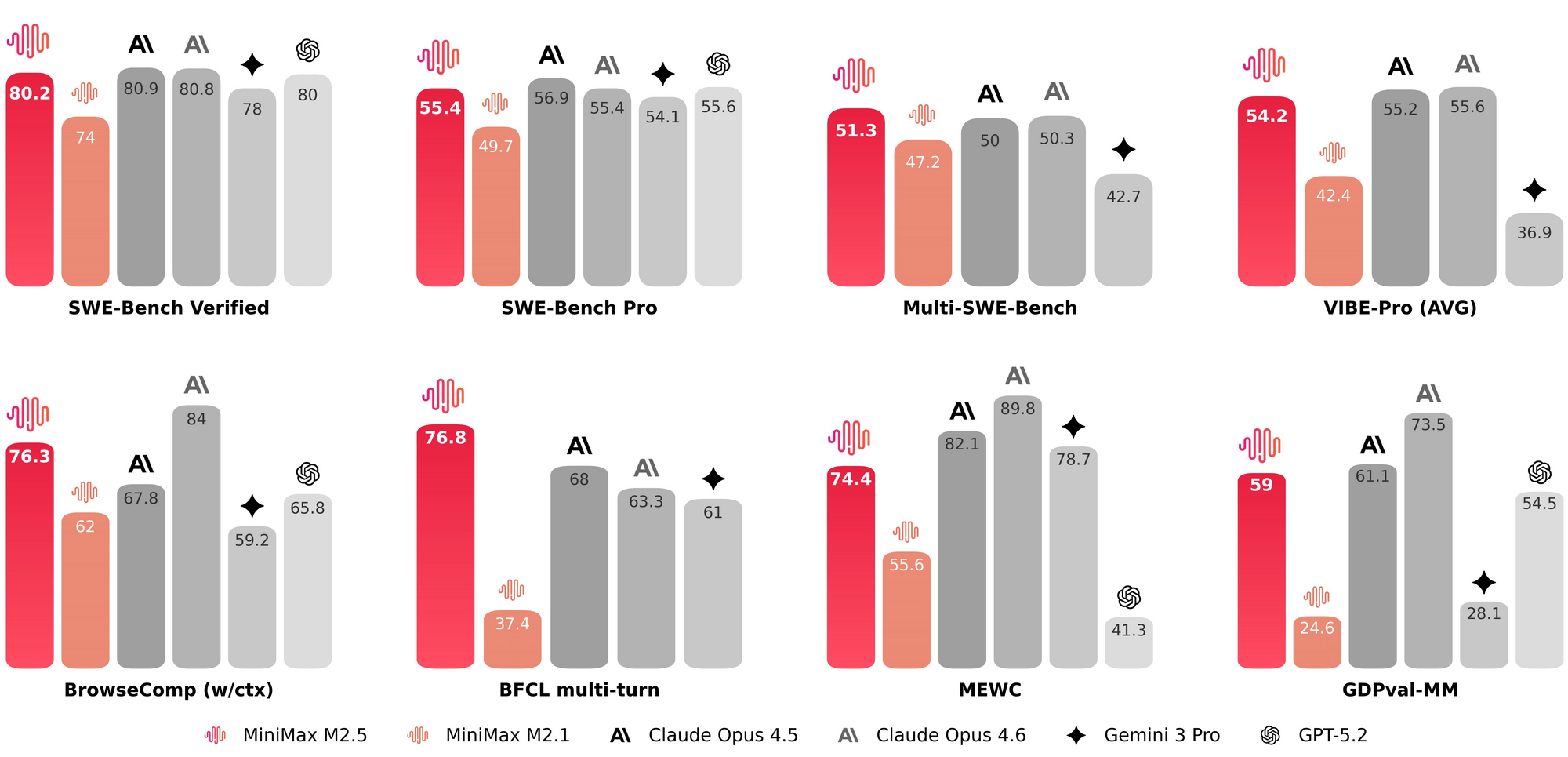
You benefit from these capabilities because the model operates at high speed. M2.5-Lightning processes 100 tokens per second, while the standard version runs at 50. Pricing remains aggressive—output costs sit at roughly 1/10th to 1/20th of Claude or GPT equivalents. Yet the real advantage emerges when you access it without any upfront spend.
Transitioning to free usage requires understanding the temporary windows and proxy platforms that MiniMax and partners provide. Developers who act quickly capitalize on these opportunities before they close.
Why Free Access to Minimax 2.5 Matters in 2026
AI development costs accumulate rapidly. A single long-running agent session can consume thousands of tokens. Minimax 2.5 mitigates this through low latency and efficient token usage, but free tiers accelerate experimentation.
You experiment freely when barriers disappear. Consequently, you prototype agents, refactor codebases, and automate workflows at zero cost. Moreover, free access democratizes advanced AI for indie developers, startups, and educational projects.
Platforms recognize this dynamic. OpenCode, an open-source AI coding agent, partners directly with MiniMax to offer Minimax 2.5 free for a limited period—typically 7 days at launch, with extensions based on feedback. This partnership stems from MiniMax's strategy to gather real-world usage data while showcasing the model's strengths.
Additionally, community tools like Ollama provide cloud-hosted access to the model at no charge for short windows. You combine these with Apidog to create persistent, testable integrations that survive beyond trial periods.
Step 1: Access Minimax 2.5 for Free Through OpenCode
OpenCode delivers the most straightforward path to free Minimax 2.5 usage. This terminal-first coding agent supports 75+ providers and hosts select models at zero cost.
You begin by installing OpenCode. Open your terminal and execute:
curl -fsSL https://opencode.ai/install | bash
The installer configures everything automatically. Next, launch the agent:
opencode
Inside the interface, type /models to view available options. You will see "MiniMax M2.5 Free" listed prominently. Select it, and the model activates immediately.
Transitioning between models happens seamlessly. You issue commands like "Refactor this module for better error handling" or "Build a REST API endpoint that integrates with Stripe." The model responds with production-ready code, complete with tests and documentation.
For users who prefer visual interfaces, OpenCode offers a desktop app and VS Code extension. You install the extension from the marketplace, configure the provider as "opencode-ai/zen", and select the free M2.5 endpoint. Authentication requires no personal keys—OpenCode proxies the requests.
This setup shines in agentic workflows. You chain tool calls for web scraping, database migrations, or UI generation. Since the model supports native tool use, you achieve complex automations without external orchestration layers.
Step 2: Leverage Ollama for Cloud-Hosted Free Access
Ollama extends free access beyond OpenCode. MiniMax collaborates to provide temporary cloud instances.
You run the following command:
ollama run minimax-m2.5:cloud
The :cloud tag routes to hosted infrastructure. You interact via the standard Ollama API at http://localhost:11434. Consequently, you integrate it into scripts or other agents with minimal changes.
However, availability fluctuates. You monitor the official MiniMax announcements or OpenCode's X account for extensions. During active periods, you process thousands of tokens daily at no cost.
Step 3: Integrate Minimax 2.5 with Apidog for Professional API Workflows
Apidog elevates free access from casual experimentation to enterprise-grade development. You treat the OpenCode endpoint as a standard OpenAI-compatible API.
First, open Apidog and create a new project. Add a collection named "Minimax 2.5 Free Integration."
Configure the base URL as:
https://opencode.ai/zen/v1
Set the authorization to Bearer Token and use your OpenCode session token if required (often auto-handled). For most calls, you simply use the chat completions endpoint.
Create a new request. Set the method to POST and the path to /chat/completions. In the body, construct a payload like this:
{
  "model": "minimax-m2.5-free",
  "messages": [
    {
      "role": "system",
      "content": "You are an expert full-stack engineer specializing in scalable architectures."
    },
    {
      "role": "user",
      "content": "Design and implement a real-time collaborative editor using WebSockets and React."
    }
  ],
  "temperature": 0.7,
  "max_tokens": 4096
}
You send the request. Apidog displays the response in formatted JSON, complete with token usage metrics. Moreover, you save the request for reuse and generate client code in Python, JavaScript, or Go with one click.
Transitioning to advanced testing, you create environment variables for dynamic prompts. You chain requests: the first generates code, the second reviews it, and the third deploys a test environment. Apidog's visual flow builder automates these sequences.
You debug streaming responses directly. Enable "Stream" in the request settings, and Apidog renders tokens in real-time. Consequently, you identify issues with context windows or tool calls instantly.
For comparison testing, duplicate the collection and swap models. You evaluate Minimax 2.5 against GLM-4.7 or Claude within the same interface. This side-by-side analysis reveals where the model excels in code quality and reasoning depth.
Advanced Techniques: Optimizing Free Minimax 2.5 Usage
You maximize limited free windows through smart prompting and caching strategies.
First, implement prompt engineering for efficiency. Prefix instructions with role definitions and output formats. For instance:
"Act as a senior architect. Output in JSON with keys: plan, code, tests, deployment_notes."
The model adheres strictly, reducing token waste.
Second, you batch operations. Group related tasks into single calls. The 200k context window accommodates entire codebases, so you upload project files and request comprehensive refactors.
Third, you export responses from Apidog and version them in Git. This creates a living knowledge base of model interactions.
When the free period ends, you transition smoothly. MiniMax offers API keys with generous introductory credits. You update the base URL in Apidog to https://platform.minimax.io/v1 and swap the model name to MiniMax-M2.5. The same requests continue working.
Real-World Use Cases That Demonstrate Value
Developers report transformative results with free Minimax 2.5 access.
One team built a complete SaaS dashboard in under four hours. The model generated the backend in Go, frontend in React, and database migrations in SQL—all while maintaining consistency across files.
Another engineer automated financial report generation. Using Excel tool calls, the model produced investor summaries from raw CSV data, complete with charts and executive summaries.
In agentic scenarios, users created autonomous web researchers. The model navigates sites, extracts data, and synthesizes reports with 20% fewer search iterations than predecessors.
Apidog users extend these successes. They export API collections as OpenAPI specs, share them with teams, and generate SDKs automatically. Consequently, entire organizations adopt Minimax 2.5 workflows without additional tooling costs.
Troubleshooting Common Issues
You encounter occasional rate limits during high-demand periods. Apidog's retry logic handles these gracefully. You configure exponential backoff in the request settings.
Context overflow appears when prompts exceed limits. You split conversations and use Apidog's variable system to maintain state across calls.
Model availability changes. You subscribe to OpenCode's notifications and monitor the /models command for updates.
In all cases, Apidog's error parsing and documentation features accelerate resolution.
Comparing Minimax 2.5 to Alternatives
You choose models based on specific needs. Minimax 2.5 leads in coding benchmarks and cost-efficiency. However, Claude Opus 4.6 may edge it in creative writing.
Gemini 2.5 Pro offers strong multimodal capabilities but requires more setup for free access. Kimi models provide excellent Chinese-language support.
The decisive factor remains accessibility. Free windows through OpenCode and Apidog integration give Minimax 2.5 a practical advantage that raw benchmarks cannot capture.
Developers familiar with MiniMax's free-tier models will find the API access pattern carries over, thoughthe MiniMax M2.1 API endpoint and parameter structure differs enough from earlier versions that a quick review before migrating saves debugging time.
Conclusion: Start Using Minimax 2.5 for Free Today
Minimax 2.5 represents a pivotal advancement in accessible AI. You now possess the complete technical roadmap to leverage it without cost. From OpenCode installation to Apidog-powered API mastery, every step builds toward productive outcomes.
Download Apidog for free right now. Create your first collection targeting the free Minimax 2.5 endpoint. Experiment with a real project. You will witness the model's capabilities firsthand and understand why developers call this era golden for open models.
The landscape shifts rapidly. Act on this guide, and you stay ahead. Furthermore, share your experiences in the comments. What will you build first with free Minimax 2.5 access?