
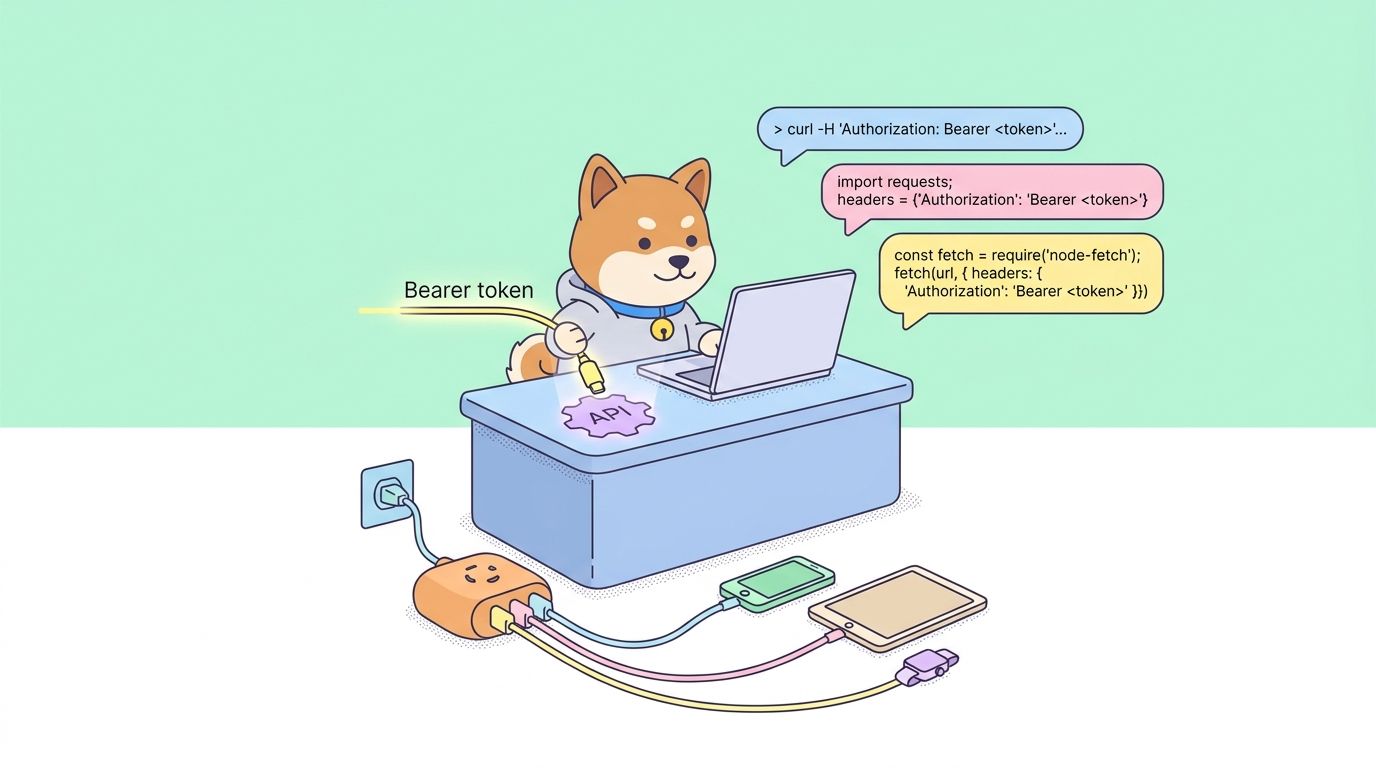
Moonshot AI’s Kimi K2.6 announcement positions it as the new open-source state of the art for coding, long-horizon execution, and agent swarms. The API that powers it is OpenAI-compatible, hosted at https://api.moonshot.ai/v1, and documented on platform. If you have the OpenAI SDK installed, you can be sending real requests in about five minutes.
This guide walks through authentication, your first request, streaming, tool calling, vision and video input, thinking mode, and how to drive Agent Swarm with 300 sub-agents, and shows how to test every endpoint with Apidog before you write integration code.
TL;DR: Kimi K2.6 API in 60 seconds
- Base URL:
https://api.moonshot.ai/v1 - Endpoint:
POST /chat/completions - Model IDs:
kimi-k2.6,kimi-k2.6-thinking - Auth:
Authorization: Bearer $KIMI_API_KEY - Format: OpenAI chat completions schema (messages, tools, stream, etc.)
- Context: 262,144 input tokens, up to 98,304 output tokens for reasoning
- Defaults: temperature 1.0, top-p 1.0 (per Moonshot’s official guidance)
Minimal curl:
curl https://api.moonshot.ai/v1/chat/completions \
  -H "Content-Type: application/json" \
  -H "Authorization: Bearer $KIMI_API_KEY" \
  -d '{
    "model": "kimi-k2.6",
    "messages": [{"role": "user", "content": "Write a Python function that reverses a string."}]
  }'
That’s it. The rest of this guide fills in the details, including Agent Swarm and the 4,000-step execution cap Moonshot calls.
What you can actually do with this API
From the Kimi K2.6 announcement, the API unlocks all of this in production:
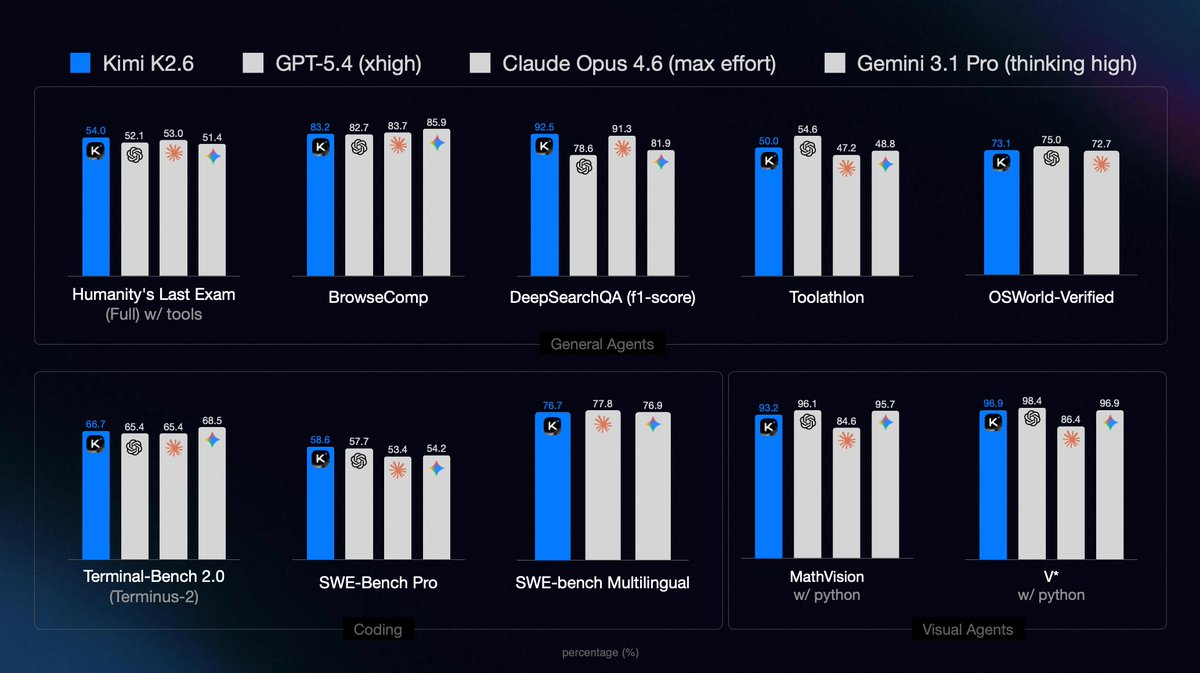
- Coding agents that run 12+ hours on a single task (see the Qwen3.5-0.8B Mac inference demo: 4,000+ tool calls, throughput lifted from 15 to 193 tokens/sec).
- Autonomous infrastructure management over multi-day sessions with automatic incident response.
- Long-horizon reliability across Rust, Go, Python, and Zig.
- Agent swarms of up to 300 sub-agents running 4,000+ coordinated steps.
- Design-driven development generating full-stack apps with auth, databases, and transactions from a single prompt.
- Vision + Python tool use pipelines (MathVision with Python: 93.2%).
If you’re building tools in the same category as Claude Code computer use, build your own Claude Code, or Cursor Composer 2, the K2.6 API is a direct swap at the model layer.
Step 1: Get an API key
- Go to platform.moonshot.ai (or platform.kimi.ai) and sign up. Email or Google OAuth works.
- Verify your account. International users may need SMS verification.
- Add billing. Moonshot typically credits new accounts with a small free balance.
- Open API Keys in the dashboard and click Create Key.
- Copy the key immediately (it’s shown once).
- Export it:
export KIMI_API_KEY="sk-..."
Add it to .zshrc, .bashrc, or a secret manager for production. Never commit it.
Want to avoid paying during development? How to Use Kimi K2.6 for Free covers Cloudflare Workers AI, self-hosted weights, and free credit programs.
Step 2: Pick your SDK
The API is OpenAI-compatible, so the official OpenAI SDKs work after you change the base URL.
| Option | Install | Best for |
|---|---|---|
| curl | built in | Quick tests, CI |
| OpenAI Python | pip install openai |
Python services |
| OpenAI Node | npm install openai |
JS/TS apps |
Python
import os
from openai import OpenAI

client = OpenAI(
    api_key=os.getenv("KIMI_API_KEY"),
    base_url="https://api.moonshot.ai/v1",
)

response = client.chat.completions.create(
    model="kimi-k2.6",
    messages=[{"role": "user", "content": "What is the capital of France?"}],
)

print(response.choices[0].message.content)
Node.js
import OpenAI from "openai";

const client = new OpenAI({
  apiKey: process.env.KIMI_API_KEY,
  baseURL: "https://api.moonshot.ai/v1",
});

const response = await client.chat.completions.create({
  model: "kimi-k2.6",
  messages: [{ role: "user", content: "What is the capital of France?" }],
});

console.log(response.choices[0].message.content);
curl
curl https://api.moonshot.ai/v1/chat/completions \
  -H "Content-Type: application/json" \
  -H "Authorization: Bearer $KIMI_API_KEY" \
  -d '{
    "model": "kimi-k2.6",
    "messages": [{"role": "user", "content": "What is the capital of France?"}]
  }'
All three return the same response shape.
Step 3: Understand the request body
Same fields as OpenAI chat completions:
{
  "model": "kimi-k2.6",
  "messages": [
    { "role": "system", "content": "You are a helpful assistant." },
    { "role": "user", "content": "Your prompt here." }
  ],
  "temperature": 1.0,
  "top_p": 1.0,
  "max_tokens": 8192,
  "stream": false,
  "tools": [],
  "tool_choice": "auto",
  "thinking": { "type": "disabled" }
}
Two Moonshot-specific notes:
- Defaults are high. The official blog recommends temperature 1.0 and top-p 1.0 as the tuned defaults. Don’t carry over temperature 0.2 habits from OpenAI coding workflows.
thinkingtoggles the reasoning trace onkimi-k2.6-thinking.{"type": "disabled"}suppresses it for quick answers.
Step 4: Streaming
Streaming is the right default for any UI or long generation. Max output for reasoning tasks can reach 98,304 tokens; you don’t want to wait for that all at once.
Python
stream = client.chat.completions.create(
    model="kimi-k2.6",
    messages=[{"role": "user", "content": "Write a 500-word essay on MoE models."}],
    stream=True,
)

for chunk in stream:
    delta = chunk.choices[0].delta.content
    if delta:
        print(delta, end="", flush=True)
Node.js
const stream = await client.chat.completions.create({
  model: "kimi-k2.6",
  messages: [{ role: "user", content: "Write a 500-word essay on MoE models." }],
  stream: true,
});

for await (const chunk of stream) {
  const delta = chunk.choices[0]?.delta?.content;
  if (delta) process.stdout.write(delta);
}
Streaming also works with tool calls; the arguments arrive as JSON deltas you concatenate.
Step 5: Tool calling
Moonshot reports a Toolathlon score of 50.0% and 96.60% tool invocation success in partner testing. The format is the standard OpenAI function-calling schema, so existing API-testing workflows for QA engineers apply.
Define tools
tools = [
    {
        "type": "function",
        "function": {
            "name": "get_weather",
            "description": "Get the current weather in a location.",
            "parameters": {
                "type": "object",
                "properties": {
                    "location": {"type": "string", "description": "City name"},
                    "unit": {"type": "string", "enum": ["celsius", "fahrenheit"]}
                },
                "required": ["location"]
            }
        }
    }
]
First call (model decides)
import json

messages = [{"role": "user", "content": "What's the weather in Tokyo?"}]

resp = client.chat.completions.create(
    model="kimi-k2.6",
    messages=messages,
    tools=tools,
    tool_choice="auto",
)

msg = resp.choices[0].message
messages.append(msg)

if msg.tool_calls:
    for call in msg.tool_calls:
        args = json.loads(call.function.arguments)
        result = fetch_weather(args["location"], args.get("unit", "celsius"))
        messages.append({
            "role": "tool",
            "tool_call_id": call.id,
            "content": json.dumps(result),
        })
Second call (final answer)
final = client.chat.completions.create(
    model="kimi-k2.6",
    messages=messages,
    tools=tools,
)
print(final.choices[0].message.content)
K2.6 is strong at multi-step tool chains, which is what makes long-running coding agents like Kimi Code feasible. For a framework comparison, Claude Code workflows covers the same loop with a different backend.
Step 6: Vision input
K2.6 scores 79.4% on MMMU-Pro and 96.9% on V* (with Python). Images go into the user message using OpenAI’s image_url content format:
response = client.chat.completions.create(
    model="kimi-k2.6",
    messages=[
        {
            "role": "user",
            "content": [
                {"type": "text", "text": "Describe this image in one sentence."},
                {"type": "image_url", "image_url": {"url": "https://example.com/photo.jpg"}}
            ]
        }
    ],
)
For local files, base64-encode them:
import base64
with open("photo.jpg", "rb") as f:
    b64 = base64.b64encode(f.read()).decode("utf-8")

image_url = f"data:image/jpeg;base64,{b64}"
For OCR or diagram reading, combine a clear text instruction with the image. For math problems, include a Python interpreter tool; the MathVision 93.2% score was measured with Python access enabled.
Step 7: Video input
Pass a video URL or frame sequence:
response = client.chat.completions.create(
    model="kimi-k2.6",
    messages=[
        {
            "role": "user",
            "content": [
                {"type": "text", "text": "Summarize what happens in this video."},
                {"type": "video_url", "video_url": {"url": "https://example.com/clip.mp4"}}
            ]
        }
    ],
)
Short clips (<30s) work in a single call. Longer video benefits from streaming because frame-by-frame inference produces lots of tokens.
Step 8: Thinking mode
kimi-k2.6-thinking produces a visible reasoning trace (similar to OpenAI’s o1-style models). Moonshot reports 96.4% on AIME 2026 and 90.5% on GPQA-Diamond with thinking enabled.
Thinking on (default for the thinking model):
response = client.chat.completions.create(
    model="kimi-k2.6-thinking",
    messages=[{"role": "user", "content": "Prove sqrt(2) is irrational."}],
)
Thinking off:
response = client.chat.completions.create(
    model="kimi-k2.6-thinking",
    messages=[{"role": "user", "content": "Quick: what's 17 * 23?"}],
    extra_body={"thinking": {"type": "disabled"}},
)
The reasoning trace returns in a reasoning field on the response. You can hide it from end users and show only the final answer, or pipe it into a debug log.
Step 9: Agent Swarm
Agent Swarm is the feature most worth learning. From the Kimi K2.6 blog: up to 300 sub-agents, 4,000+ coordinated steps, 3x the capacity of K2.5.
Invoke it through the platform’s agent parameter:
response = client.chat.completions.create(
    model="kimi-k2.6",
    messages=[{
        "role": "user",
        "content": "Build a 5-page marketing site for a coffee brand with responsive design and a newsletter signup."
    }],
    extra_body={
        "agent": {
            "type": "swarm",
            "max_agents": 30,
            "max_steps": 4000
        }
    },
)
Swarm calls run for minutes or hours. Three practical tips:
- Use streaming. You’ll want to see progress and kill bad runs early.
- Cap
max_agents. 300 is the ceiling; 10 to 30 is more predictable for most tasks. - Set a budget. Long swarm tasks can chew through tokens fast; log
usageon every response and pipe it into your metrics.
The Kimi blog describes demo runs that modified 4,000+ lines of code across 13 hours. The architecture is what makes those possible; the API flag just turns it on.
Step 10: Test everything with Apidog
Every section above introduces a different body shape, header requirement, or response format. Apidog turns the debugging loop into a visual workflow.
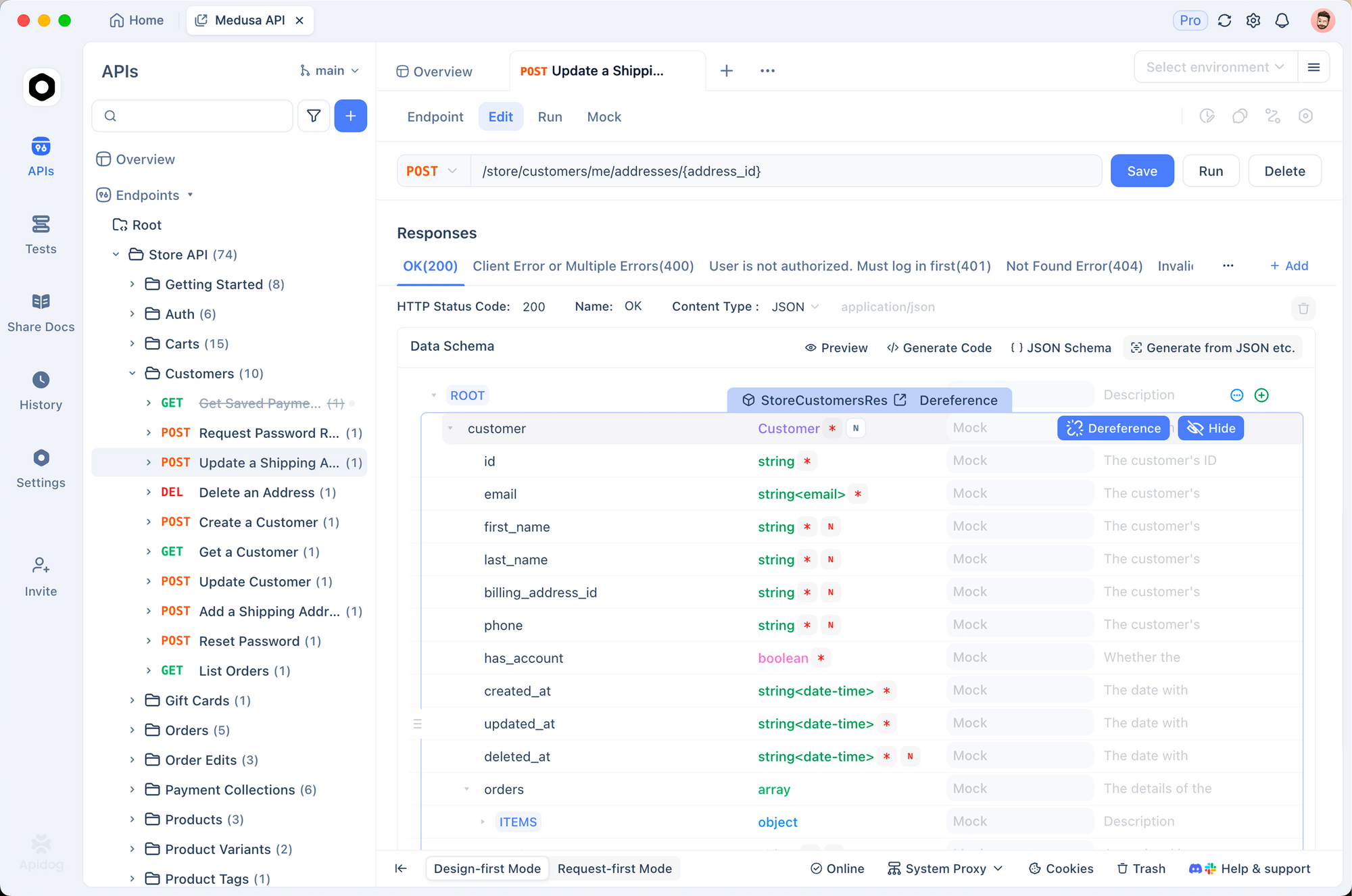
Kimi K2.6 setup in Apidog
- Download Apidog and create a project.
- Create a
kimi-prodenvironment with two variables:BASE_URL = https://api.moonshot.ai/v1andKIMI_API_KEY = sk-.... - New API request:
POST {{BASE_URL}}/chat/completions. - Headers:
Authorization: Bearer {{KIMI_API_KEY}},Content-Type: application/json. - Body (streaming example):
{
  "model": "kimi-k2.6",
  "messages": [{ "role": "user", "content": "Hello, Kimi K2.6!" }],
  "stream": true
}
- Click Send. Tokens stream into the response panel in real time.
What Apidog adds on top
- Schema validation against the OpenAI chat completions spec, so missing fields show up immediately.
- Request history so you can replay the exact call that produced a weird response.
- Environment switching between dev, staging, and prod keys with one click.
- Team sharing via project export; see API testing for teams of 50+ engineers.
- Mock servers for when Moonshot has an incident or you’re offline.
- SSE stream support that handles Kimi’s streaming format cleanly (many API tools don’t).
For in-editor testing, Apidog also ships as a VS Code extension. If you’re currently locked into Postman, how to do API testing without Postman walks through the move.
Error handling that won’t fight you
Moonshot uses standard HTTP status codes:
- 400: bad request. Usually a malformed body or wrong model name.
- 401: auth failure. Key missing, wrong, or expired.
- 429: rate limit or quota exhausted.
- 500: server error. Retry with exponential backoff.
- 529: overloaded. Retry in a few seconds.
Retry wrapper:
import time
from openai import OpenAI, RateLimitError, APIError

def call_kimi(messages, max_retries=5):
    for attempt in range(max_retries):
        try:
            return client.chat.completions.create(
                model="kimi-k2.6",
                messages=messages,
            )
        except RateLimitError:
            time.sleep(2 ** attempt)
        except APIError as e:
            if e.status_code >= 500 and attempt < max_retries - 1:
                time.sleep(2 ** attempt)
            else:
                raise
    raise RuntimeError("Kimi K2.6 failed after retries")
For mid-stream disconnects, track tokens received and restart with a “continue from here” instruction if the connection drops. The 98,304-token reasoning output ceiling means long streams are normal, not an error.
Cost control
Moonshot publishes pricing on kimi.com/membership/pricing. Three production-grade tips for keeping bills predictable:
- Cap
max_tokens. Set to the minimum for your use case. 2,048 is plenty for chat replies. - Cache system prompts. Moonshot’s prompt caching kicks in on repeated system messages; put static instructions first.
- Log
usage. Every response includesprompt_tokens,completion_tokens, andtotal_tokens. Pipe them into Prometheus or whatever metrics stack you use and set alerts.
Production pattern: a GitHub-issue fixer
Here’s an agent that reads a GitHub issue, locates the relevant code, proposes a fix, and runs tests, structured around the Kimi K2.6 tool-calling loop:
from openai import OpenAI
import os, json

client = OpenAI(
    api_key=os.getenv("KIMI_API_KEY"),
    base_url="https://api.moonshot.ai/v1",
)

tools = [
    {"type": "function", "function": {
        "name": "read_file",
        "description": "Read a file in the repo.",
        "parameters": {
            "type": "object",
            "properties": {"path": {"type": "string"}},
            "required": ["path"]
        }
    }},
    {"type": "function", "function": {
        "name": "search_code",
        "description": "Ripgrep the codebase for a pattern.",
        "parameters": {
            "type": "object",
            "properties": {"query": {"type": "string"}},
            "required": ["query"]
        }
    }},
    {"type": "function", "function": {
        "name": "run_tests",
        "description": "Run the project test suite.",
        "parameters": {"type": "object", "properties": {}}
    }},
]

def tool_dispatch(name, args):
    if name == "read_file":
        with open(args["path"]) as f:
            return f.read()
    if name == "search_code":
        return run_ripgrep(args["query"])
    if name == "run_tests":
        return run_pytest()
    raise ValueError(f"Unknown tool: {name}")

messages = [
    {"role": "system", "content": "You are a senior engineer. Fix the described bug."},
    {"role": "user", "content": "Issue: login form submits twice on slow networks."}
]

while True:
    resp = client.chat.completions.create(
        model="kimi-k2.6",
        messages=messages,
        tools=tools,
    )
    msg = resp.choices[0].message
    messages.append(msg)

    if not msg.tool_calls:
        print(msg.content)
        break

    for call in msg.tool_calls:
        result = tool_dispatch(call.function.name, json.loads(call.function.arguments))
        messages.append({
            "role": "tool",
            "tool_call_id": call.id,
            "content": result,
        })
This scales up to Agent Swarm by adding the extra_body swarm config. It also plays well with the Hermes multi-agent stack if you want human-in-the-loop checkpoints.
FAQ
Do I need a Moonshot-specific SDK?No. The OpenAI Python and Node SDKs work after you change base_url.
Is the API rate-limited?Yes. Limits scale with your tier and usage history. Check the dashboard.
Does Kimi K2.6 work with LangChain, LlamaIndex, Vercel AI SDK?Yes. Any framework accepting an OpenAI-compatible base URL works.
Does Kimi K2.6 support JSON mode?Yes. Pass response_format: {"type": "json_object"} for valid JSON output, or {"type": "json_schema", "json_schema": {...}} for strict schemas.
How big is the context window, exactly?262,144 input tokens, 98,304 tokens max output for reasoning tasks, per the official blog.
Can I fine-tune Kimi K2.6 via the API?Not yet. For now, fine-tuning means running the open weights on your own hardware.
What’s the difference between kimi-k2.6 and kimi-k2.6-thinking?kimi-k2.6 is the fast agent model. kimi-k2.6-thinking exposes its reasoning steps and is tuned for math, logic, and hard planning (AIME 2026: 96.4%, GPQA-Diamond: 90.5%).
Is there a free tier?See our Kimi K2.6 free access guide for Cloudflare Workers AI, kimi.com chat, and self-hosted options.
Summary
The Kimi K2.6 API drops into any OpenAI-compatible toolchain with two changes: the base URL and your API key. From there you get a 262K context window, Agent Swarm with 300 sub-agents, tool calling tuned to 96.60% invocation success, and the open-source weights as a fallback if you ever want to move off the hosted API.
If you’re building a new integration, use Apidog to construct and verify each endpoint first. You’ll catch schema mistakes, streaming bugs, and auth issues before they hit your codebase. Then port the working requests into your Python or Node service with confidence.
References and further reading
- Official announcement: Kimi K2.6 — Moonshot AI blog
- API quickstart: platform.kimi.ai
- API platform: platform.moonshot.ai
- Kimi Code terminal agent: kimi.com/code
- Pricing: kimi.com/membership/pricing
- Open weights: huggingface.co/moonshotai/Kimi-K2.6
- Related Apidog guides: What is Kimi K2.6, Kimi K2.6 for free, Qwen 3.6 free on OpenRouter, Qwen3.5-Omni API, Apidog inside VS Code, API testing without Postman, API testing for 50+ engineers, Claude Code workflows, Cursor Composer 2.


