Voice agents used to need three moving parts: speech-to-text, a language model, then text-to-speech. Every hop added latency and lost tone. OpenAI’s Realtime API collapses that into one speech-to-speech model, and gpt-realtime-2.1-mini is the cheaper, faster tier of that family. It listens to audio, thinks, and talks back over a single streaming connection.
This guide shows you how to call it end to end: which model ID to use, how to connect over WebSocket and WebRTC, how to shape a session, and how to test the whole thing with Apidog before you wire it into an app. Everything here maps to the official OpenAI Realtime guide.
First, get the model name right
The naming trips people up, so let’s clear it up before any code. There are two identifiers for the same mini model:
gpt-realtime-2.1-mini: the versioned ID. This is what shows up on the OpenAI pricing page and pins you to the 2.1 generation.gpt-realtime-mini: the family alias. It always points to the latest snapshot, currentlygpt-realtime-mini-2025-12-15.
Snapshots let you lock behavior in production:
| Identifier | What it points to |
|---|---|
gpt-realtime-mini |
Latest mini snapshot (auto-updates) |
gpt-realtime-2.1-mini |
The 2.1-generation mini |
gpt-realtime-mini-2025-12-15 |
Pinned snapshot (current) |
gpt-realtime-mini-2025-10-06 |
Pinned snapshot (previous) |
Use the alias while you build, then pin a dated snapshot before you ship so a model update never changes your agent’s behavior overnight.
What gpt-realtime-2.1-mini does
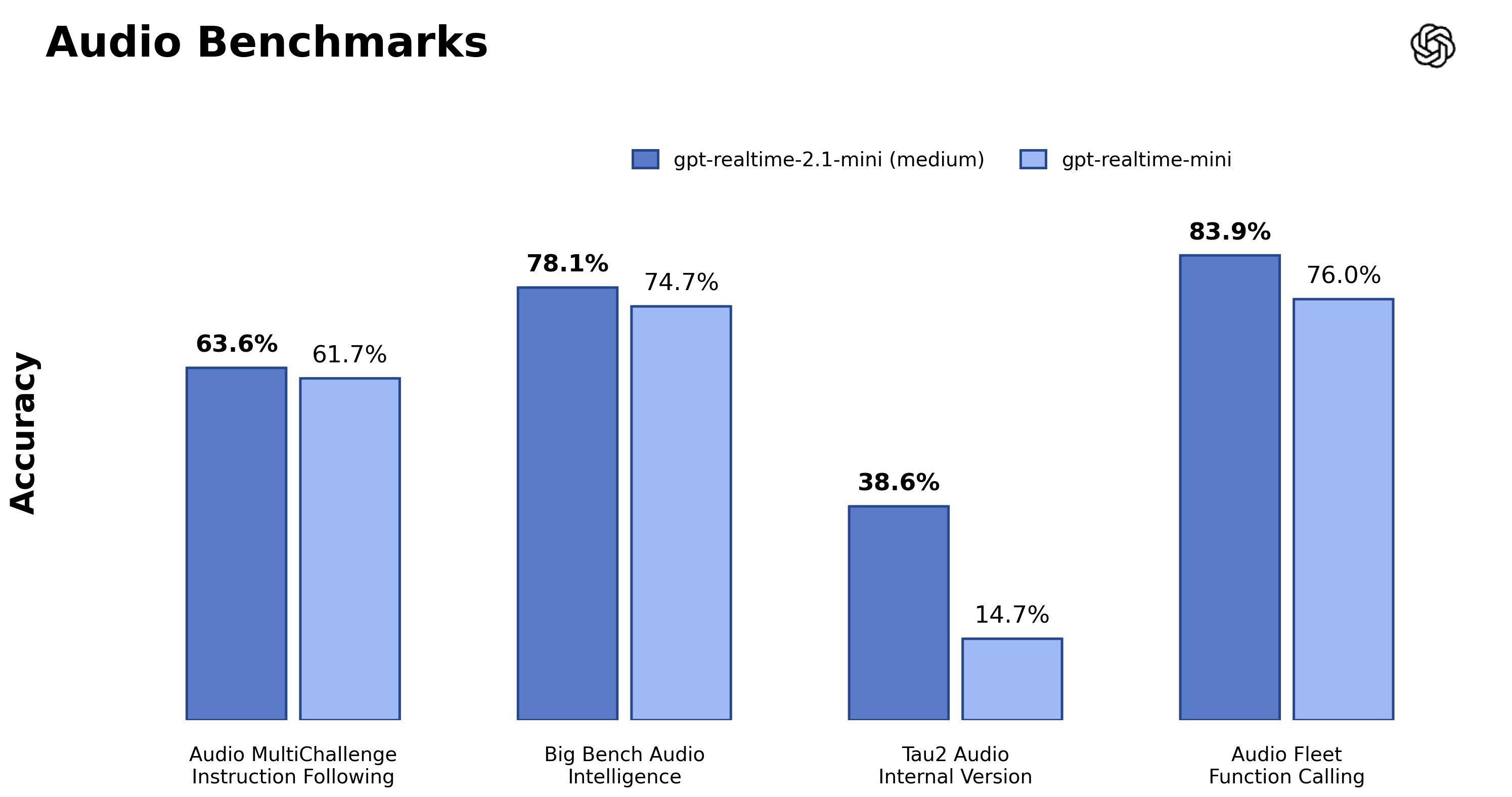
It’s a speech-to-speech model. You stream audio in, and it streams audio back with natural intonation, without a separate transcription or TTS step. It also handles text, so you can mix typed input and spoken output in the same session.
Here’s the spec sheet from the model page:
| Property | Value |
|---|---|
| Input modalities | Text, image, audio |
| Output modalities | Text, audio |
| Context window | 32,000 tokens |
| Max output | 4,096 tokens |
| Connections | WebRTC, WebSocket, SIP |
| Voices | alloy, ash, ballad, coral, echo, sage, shimmer, verse, marin, cedar |
marin and cedar are the newest voices and are exclusive to the Realtime API; OpenAI recommends them for the most natural output. The older voices still work if you want a specific timbre.
The “mini” tier trades a little reasoning depth for lower latency and a much lower bill. For most support bots, order-taking flows, and voice front-ends, it’s the right default. Reach for full gpt-realtime-2.1 only when the conversation needs heavier reasoning.
What it costs
Mini is roughly a third of the price of the full model. Token rates from the pricing page:
| Model | Text input | Cached input | Audio input | Audio output |
|---|---|---|---|---|
gpt-realtime-2.1-mini |
$0.60 / 1M | $0.30 / 1M | $10 / 1M | $20 / 1M |
gpt-realtime-2.1 (full) |
$4.00 / 1M | $0.40 / 1M | $32 / 1M | $64 / 1M |
Audio dominates the bill, and the biggest cost lever is how much your agent talks. An agent that speaks 35 seconds per minute costs roughly twice one that speaks 15 seconds per minute. Real-world per-minute costs for mini land around $0.06 to $0.15 depending on verbosity, so tell your model to be concise in the instructions and you’ll cut the bill directly. Rates change, so confirm against the live pricing page before you forecast.
Prerequisites
You need three things:
- An OpenAI API key with Realtime access, set as
OPENAI_API_KEY. - Node.js 18+ for the server examples (the
wspackage for raw WebSocket, or the officialopenaiSDK). - For browser audio, a page served over HTTPS or
localhostsogetUserMediaworks.
One rule before you touch the browser: never ship your real API key to the client. Browser and mobile apps use short-lived ephemeral tokens instead. More on that below.
Pick a connection method
The mini model speaks three transports. Choose by where your audio lives.
| Transport | Use it when | Auth |
|---|---|---|
| WebRTC | Audio is captured or played in a browser or mobile app | Ephemeral client secret |
| WebSocket | Your server already handles raw audio from a media pipeline | API key (server-side) |
| SIP | You’re connecting a phone or telephony system | API key |
Most people start with WebSocket to prototype server-side, then move to WebRTC for the real client. Let’s do both.
Quickstart 1: WebSocket from your server
WebSocket is the fastest way to see the model respond. The endpoint is a single URL with the model in the query string:
wss://api.openai.com/v1/realtime?model=gpt-realtime-2.1-mini
Because this is the GA interface, you authenticate with a plain Authorization: Bearer header and you no longer need the old OpenAI-Beta header. Here’s a text-in, text-out “hello world” so you can test without a microphone:
import WebSocket from "ws";

const url = "wss://api.openai.com/v1/realtime?model=gpt-realtime-2.1-mini";
const ws = new WebSocket(url, {
  headers: { Authorization: `Bearer ${process.env.OPENAI_API_KEY}` },
});

ws.on("open", () => {
  // 1. Configure the session
  ws.send(JSON.stringify({
    type: "session.update",
    session: {
      type: "realtime",
      model: "gpt-realtime-2.1-mini",
      output_modalities: ["text"],
      instructions: "You are a concise API support agent. Keep answers short.",
    },
  }));

  // 2. Add a user message
  ws.send(JSON.stringify({
    type: "conversation.item.create",
    item: {
      type: "message",
      role: "user",
      content: [{ type: "input_text", text: "What is an idempotent request?" }],
    },
  }));

  // 3. Ask for a response
  ws.send(JSON.stringify({ type: "response.create" }));
});

ws.on("message", (raw) => {
  const event = JSON.parse(raw.toString());
  if (event.type === "response.output_text.delta") process.stdout.write(event.delta);
  if (event.type === "response.done") ws.close();
});
The flow is always the same: configure, add input, request a response, listen for deltas. Server events stream back as JSON. The ones you care about most:
session.created/session.updated: your config was acceptedresponse.output_text.delta: a chunk of textresponse.output_audio.delta: a chunk of base64 audioresponse.output_audio_transcript.delta: the transcript of what the model is sayingresponse.done: the turn is finished
To go from text to voice, switch output_modalities to ["audio"] and add an audio config (next section). Audio arrives in response.output_audio.delta events as base64 PCM chunks that you decode and play.
Quickstart 2: WebRTC in the browser
For a real voice app, the browser captures the mic and plays the reply directly, which keeps latency low. The catch is auth: you can’t expose your API key, so your server mints a short-lived token first.
Step 1: mint an ephemeral token on your server. Call the client-secrets endpoint with your real key:
// server side
const r = await fetch("https://api.openai.com/v1/realtime/client_secrets", {
  method: "POST",
  headers: {
    Authorization: `Bearer ${process.env.OPENAI_API_KEY}`,
    "Content-Type": "application/json",
  },
  body: JSON.stringify({
    session: { type: "realtime", model: "gpt-realtime-2.1-mini" },
  }),
});
const { value } = await r.json(); // ephemeral key, starts with "ek_"
Send value to the browser. It expires quickly, so a leak is low-risk.
Step 2: connect from the browser with WebRTC. You capture the mic, open a data channel for events, and exchange SDP with the /v1/realtime/calls endpoint:
// browser side: `EPHEMERAL_KEY` came from your server
const pc = new RTCPeerConnection();

// play the model's audio
pc.ontrack = (e) => (document.getElementById("audio").srcObject = e.streams[0]);

// send the mic
const mic = await navigator.mediaDevices.getUserMedia({ audio: true });
pc.addTrack(mic.getTracks()[0]);

// events flow over a data channel
const channel = pc.createDataChannel("oai-events");
channel.onmessage = (e) => console.log(JSON.parse(e.data));

// SDP handshake
const offer = await pc.createOffer();
await pc.setLocalDescription(offer);

const sdpResp = await fetch(
  "https://api.openai.com/v1/realtime/calls?model=gpt-realtime-2.1-mini",
  {
    method: "POST",
    body: offer.sdp,
    headers: {
      Authorization: `Bearer ${EPHEMERAL_KEY}`,
      "Content-Type": "application/sdp",
    },
  }
);
await pc.setRemoteDescription({ type: "answer", sdp: await sdpResp.text() });
Once the connection is live, the model listens on the mic track and speaks through pc.ontrack. You send configuration and text over the same oai-events data channel using the exact JSON events from the WebSocket example.
Shaping the session
The session object is where you control behavior. This is the full-audio version of what you saw above:
{
  type: "session.update",
  session: {
    type: "realtime",
    model: "gpt-realtime-2.1-mini",
    output_modalities: ["audio"],
    instructions: "You are a friendly booking assistant. Confirm details before acting.",
    audio: {
      input: {
        format: { type: "audio/pcm", rate: 24000 },
        turn_detection: { type: "semantic_vad" },
      },
      output: {
        format: { type: "audio/pcm", rate: 24000 },
        voice: "marin",
      },
    },
  },
}
The fields that matter:
instructions: your system prompt. Set the persona, the guardrails, and “be brief” if you care about cost.output_modalities:["audio"]for a talking agent,["text"]for a transcript-only bot.audio.output.voice: pick from the ten voices;marinorcedarsound the most natural.audio.input.turn_detection: how the model decides you’ve stopped talking.semantic_vadwaits for a natural pause in meaning;server_vadtriggers on silence. Semantic detection interrupts less and feels smoother in conversation.
Change any field mid-call by sending another session.update. You don’t have to reconnect.
Adding tools so the agent can act
A voice agent that can only chat is a demo. To book a table or check an order, the model needs tools. Realtime uses the same function-calling contract as the rest of the platform: you declare functions in the session, the model emits a call, you run it, and you feed the result back. If you’ve wired tools into the chat API before, this is the same mental model; our walkthrough of OpenAI function calling covers the schema in depth, and structured outputs helps when you need the arguments to match a strict shape.
Declare tools inside the session, then handle the response.function_call_arguments.done event, run your code, and post a conversation.item.create with the result before the next response.create. For anything more elaborate than a couple of functions, OpenAI’s AgentKit gives you a higher-level way to orchestrate multi-step voice agents.
Test the endpoints with Apidog before you build
You don’t want to debug a REST call and a WebSocket handshake by reading console logs in a half-built app. Test the pieces in isolation first. This is where Apidog earns its place in a realtime workflow.
Two things are worth validating before you write client code:
- The token endpoint.
POST https://api.openai.com/v1/realtime/client_secretsis an ordinary REST call. Create a request in Apidog, add yourAuthorization: Bearerheader, drop in the JSON body with your model ID, and send it. You’ll see theek_token and its expiry immediately, so you know your key and account access are good before WebRTC is even in the picture. It’s the same approach you’d use to smoke-test any of OpenAI’s REST surfaces, like the Responses API. - The WebSocket message flow. Apidog has a WebSocket client, so you can open a connection to
wss://api.openai.com/v1/realtime?model=gpt-realtime-2.1-mini, add the auth header, and hand-sendsession.update,conversation.item.create, andresponse.createmessages one at a time. Watching the server events come back in a readable panel makes the event sequence obvious, and you can save the messages as examples for your team. If you already lean on solid API testing strategies, this fits right in.
Testing the transport layer on its own means that when something breaks in the app, you already know it isn’t the API contract. Download Apidog if you want to follow along.
Keep the bill under control
Audio output is the expensive part, so a few habits pay off:
- Tell the model to be brief. “Keep answers to one or two sentences” in the instructions cuts audio-output tokens directly.
- Pin a snapshot in production.
gpt-realtime-mini-2025-12-15won’t drift; thegpt-realtime-minialias can. - Use
semantic_vad. Fewer false interruptions means fewer wasted half-responses you pay for. - Cache your system prompt. Cached input is $0.30 per 1M versus $0.60 for fresh text input, so a stable instructions block is cheaper on every turn.
- Close idle sessions. An open connection with an inactive user is still a session you may be billed for.
Common errors and fixes
- 401 Unauthorized: the key is wrong, or you sent an expired ephemeral token. Ephemeral keys are short-lived by design; mint a fresh one per session.
- Model not found: check the exact ID. It’s
gpt-realtime-2.1-mini, notgpt-realtime-mini-2.1. - No audio in the browser: you probably didn’t attach the remote stream in
pc.ontrack, or the page isn’t on HTTPS/localhost so the mic never opened. - The model won’t stop talking over the user: switch
turn_detectiontosemantic_vadand confirm the mic track is reaching the connection. - Sending the beta header: the GA endpoint doesn’t want
OpenAI-Beta: realtime=v1. Drop it.
FAQ
Is gpt-realtime-2.1-mini the same as gpt-realtime-mini? Effectively yes. gpt-realtime-2.1-mini is the versioned ID, gpt-realtime-mini is the alias that points to the latest snapshot (gpt-realtime-mini-2025-12-15). Use the alias to build, pin the snapshot to ship.
Can I use it for plain transcription instead of a voice agent? The Realtime API is built for interactive speech-to-speech. For one-shot transcription, OpenAI’s dedicated transcription models are a better fit. Use the mini realtime model when you need a two-way conversation with low latency.
Do I need WebRTC, or is WebSocket enough? WebSocket is enough for server-side pipelines and quick prototypes. Use WebRTC when a browser or mobile app captures and plays audio directly, since it handles the media stream and jitter for you.
Which voice should I pick? marin and cedar are the newest and most natural, and they’re exclusive to the Realtime API. The other eight (alloy, ash, ballad, coral, echo, sage, shimmer, verse) still work if you want a particular sound.
How is this billed? Per token, split by modality. For mini: $0.60 per 1M text input, $10 per 1M audio input, and $20 per 1M audio output. Audio output is the dominant cost, so verbosity is your main lever.
Can it call functions like the chat models? Yes. Realtime uses the same function-calling contract, so a voice agent can look up orders, check inventory, or trigger actions mid-conversation.
Where to go next
You now have the full loop: the right model ID, a WebSocket prototype, a WebRTC browser client, session configuration, tools, and a way to test each piece in Apidog before it hits production. Start with the text-only WebSocket example to confirm access, switch output_modalities to audio, then move to WebRTC when you’re ready for a real microphone. Pin a snapshot, tell the model to be concise, and you’ll have a low-latency voice agent that doesn’t surprise you on the invoice.