GLM-5.3-Flash is OpenAI-compatible, which means the fastest path to a working call is to point a client you already have at a different base URL and change one string. The part that is genuinely new is image input: this is the first GLM-5 model that takes pictures in the same request as your text, and the payload shape trips people up.
This guide covers getting a key, making a text call, sending images, controlling reasoning effort, streaming, and tool calling. Every example uses the model id glm-5.3-flash.
If you want the background on what this model is before wiring it up, start with our GLM-5.3-Flash explainer. If you are already running the larger sibling, the GLM-5.3 API guide covers that model, and the differences below are real: different model id, different rate card, and an image pathway that GLM-5.3 does not have natively.
Get an API key
Create an account at z.ai, open the API keys section of the dashboard, and generate a key. Put it in your environment rather than your source:
export ZAI_API_KEY="your-key-here"
The base URL for the standard API is:
https://api.z.ai/api/paas/v4/
There is a separate base URL used by the coding-plan endpoints, which matters if you are wiring up Claude Code or Cline rather than calling the API directly. That setup is covered in our Claude Code and Cline guide.
Your first call
Because the endpoint is OpenAI-compatible, the official OpenAI SDK works unmodified:
from openai import OpenAI
import os

client = OpenAI(
    api_key=os.environ["ZAI_API_KEY"],
    base_url="https://api.z.ai/api/paas/v4/",
)

response = client.chat.completions.create(
    model="glm-5.3-flash",
    messages=[
        {"role": "user", "content": "Explain what a KV cache is in two sentences."}
    ],
)

print(response.choices[0].message.content)
The same thing in curl:
curl https://api.z.ai/api/paas/v4/chat/completions \
  -H "Authorization: Bearer $ZAI_API_KEY" \
  -H "Content-Type: application/json" \
  -d '{
    "model": "glm-5.3-flash",
    "messages": [
      {"role": "user", "content": "Explain what a KV cache is in two sentences."}
    ]
  }'
And in Node:
import OpenAI from "openai";

const client = new OpenAI({
  apiKey: process.env.ZAI_API_KEY,
  baseURL: "https://api.z.ai/api/paas/v4/",
});

const response = await client.chat.completions.create({
  model: "glm-5.3-flash",
  messages: [
    { role: "user", content: "Explain what a KV cache is in two sentences." },
  ],
});

console.log(response.choices[0].message.content);
Nothing here is GLM-specific except the base URL and the model string. That is the point of an OpenAI-compatible surface, and it is why swapping models is cheap enough to be worth actually benchmarking against your own workload.
Sending images
This is the section that does not exist for GLM-5.3. Image input works through content blocks: instead of content being a plain string, it becomes an array of typed blocks.
response = client.chat.completions.create(
    model="glm-5.3-flash",
    messages=[
        {
            "role": "user",
            "content": [
                {
                    "type": "text",
                    "text": "This screenshot shows a rendering bug. What is wrong with the layout?",
                },
                {
                    "type": "image_url",
                    "image_url": {
                        "url": "https://example.com/screenshots/broken-layout.png"
                    },
                },
            ],
        }
    ],
)
Three rules govern this payload:
The URL field takes either a public URL or a base64 data URL. If your image is local or private, encode it:
import base64

with open("broken-layout.png", "rb") as f:
    encoded = base64.b64encode(f.read()).decode("utf-8")

image_block = {
    "type": "image_url",
    "image_url": {"url": f"data:image/png;base64,{encoded}"},
}
Multiple images means multiple blocks. There is no array-of-urls shortcut. To compare a design against its implementation, send two image_url blocks in the same content array:
content = [
    {"type": "text", "text": "Does the second image match the design in the first?"},
    {"type": "image_url", "image_url": {"url": design_data_url}},
    {"type": "image_url", "image_url": {"url": built_data_url}},
]
Order carries meaning. The model reads the content array in sequence, so put the text that frames the task before the images it refers to. “Compare these two” followed by two images reads better than two images followed by a question.
Z.ai’s documentation also lists video and file input using the same content-block mechanism. Video is newer and much less exercised in the wild than image input, so validate it against your own media before you build a feature on it.
For a deeper treatment of the vision side, including screenshot-to-code workflows and putting images alongside a long document in the same 1M-token window, see our GLM-5.3-Flash vision guide.
Controlling reasoning effort
GLM-5.3-Flash exposes three thinking modes through reasoning_effort:
response = client.chat.completions.create(
    model="glm-5.3-flash",
    messages=[{"role": "user", "content": "Refactor this function for clarity."}],
    extra_body={"reasoning_effort": "low"},
)
Accepted values are low, high, and max. The default is max, which is worth knowing because it is the expensive one. If you are running high-volume classification or extraction where the answer does not need deliberation, explicitly setting low will cut your output token count substantially.
This is a change from GLM-5.2, which exposed only High and Max. The low tier is new, and for cost-sensitive batch work it is probably the single most useful parameter on the model.
Note that reasoning_effort goes in extra_body when you use the OpenAI Python SDK, because it is not part of the standard OpenAI schema. In raw curl it is just a top-level field.
Recommended sampling parameters
Z.ai publishes different defaults depending on what you are doing:
| Use case | temperature | top_p |
|---|---|---|
| General | 1.0 | 0.95 |
| Coding | 0.95 | 1.0 |
These are close enough that the difference is marginal for most applications, but if you are getting inconsistent code output, the coding profile is the one to try.
Streaming
Standard OpenAI streaming semantics apply:
stream = client.chat.completions.create(
    model="glm-5.3-flash",
    messages=[{"role": "user", "content": "Write a bash script that rotates logs."}],
    stream=True,
)

for chunk in stream:
    delta = chunk.choices[0].delta.content
    if delta:
        print(delta, end="", flush=True)
Set expectations here. GLM-5.3-Flash generates at roughly 49 tokens per second according to Artificial Analysis, which is slower than its larger sibling GLM-5.3 at about 86. Time to first token is good at 1.52 seconds, so the response starts quickly and then arrives steadily rather than rapidly. If you are streaming to a user interface, that profile is fine. If you are generating long documents in a batch job, budget for it.
Tool calling
Tools use the standard OpenAI schema:
tools = [
    {
        "type": "function",
        "function": {
            "name": "get_deployment_status",
            "description": "Returns the current status of a named deployment.",
            "parameters": {
                "type": "object",
                "properties": {
                    "service": {
                        "type": "string",
                        "description": "The service name, for example 'checkout-api'.",
                    }
                },
                "required": ["service"],
            },
        },
    }
]

response = client.chat.completions.create(
    model="glm-5.3-flash",
    messages=[{"role": "user", "content": "Is checkout-api healthy?"}],
    tools=tools,
)

call = response.choices[0].message.tool_calls[0]
print(call.function.name, call.function.arguments)
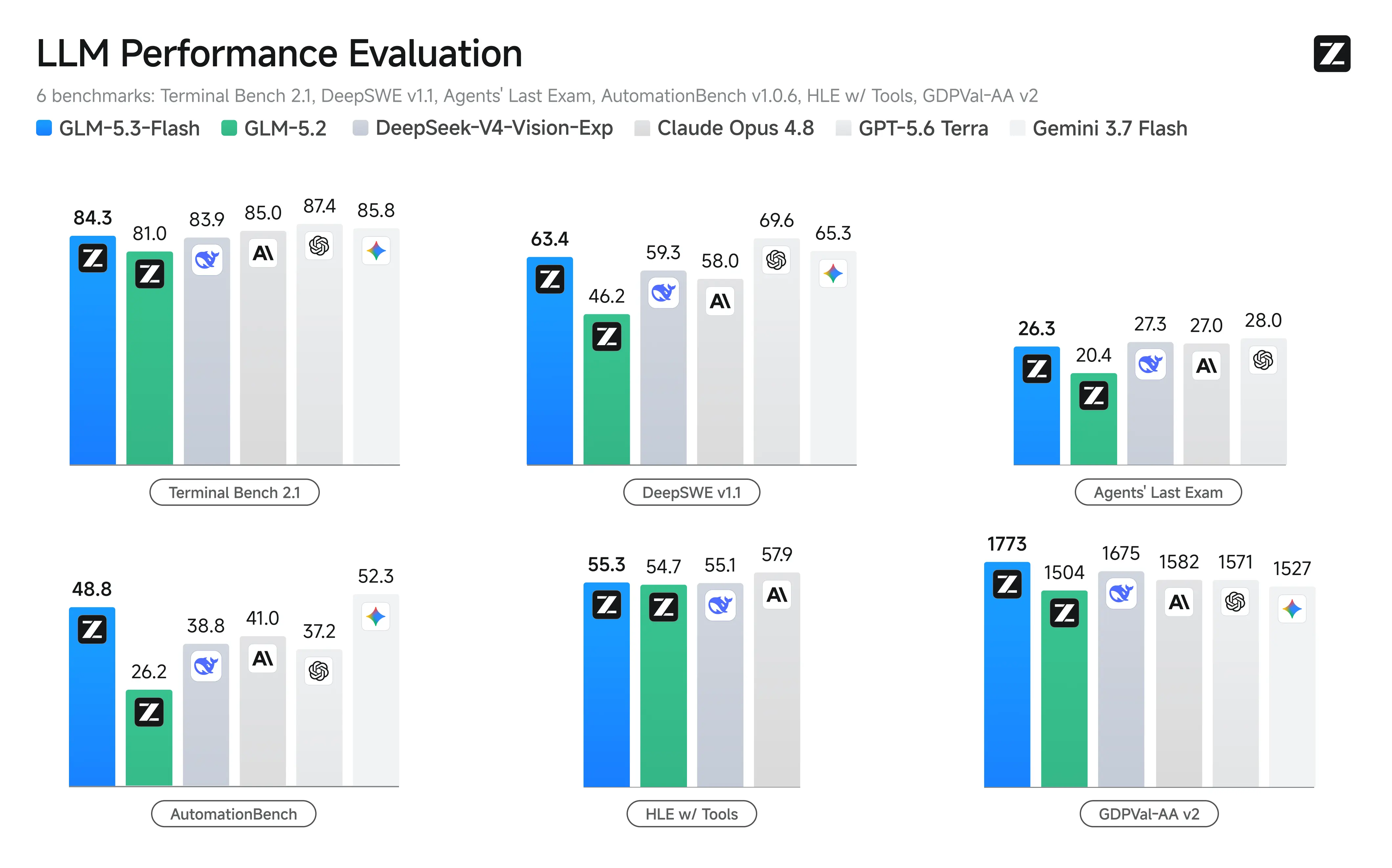
The agentic benchmarks Z.ai published at launch lean heavily on tool use, with AutomationBench at 48.8 against GLM-5.2’s 26.2. Those are vendor numbers, but the direction is consistent with the model being tuned for tool-calling loops rather than single-turn chat.
If you are generating tool definitions from an API you already own, our post on turning an OpenAPI spec into agent tools covers doing that without hand-writing schemas.
Error handling worth writing
Three failure modes account for most production issues on this endpoint.
Rate limits. Retry with exponential backoff and jitter. A fixed retry interval across many workers produces synchronized retries, which is the classic way to turn a brief limit into a sustained one.
import time, random
from openai import RateLimitError

def call_with_retry(**kwargs):
    for attempt in range(5):
        try:
            return client.chat.completions.create(**kwargs)
        except RateLimitError:
            if attempt == 4:
                raise
            time.sleep((2 ** attempt) + random.random())
Context overflow. A 1M-token window is large enough that people stop counting, and then a long document plus a few high-resolution images crosses it. Images consume context, and the error arrives at request time rather than when you assemble the prompt. Track your token budget on the way in.
Truncated output. If a response stops mid-sentence, check finish_reason on the choice. A value of length means you hit the output cap, not that the model gave up. Given that the maximum output figure is itself contested between sources, this is worth checking explicitly rather than assuming.
Reading token usage
Every response carries a usage object, and it is the only reliable source for what a call actually cost:
print(response.usage.prompt_tokens, response.usage.completion_tokens)
Watch the completion count in particular. With reasoning_effort at its max default, reasoning tokens are billed as output, so a short visible answer can carry a large completion count behind it. Comparing that number across effort levels on your own prompts is the fastest way to decide which setting you actually need.
What it costs
List pricing is $0.15 per million input tokens, $0.50 per million output tokens, and $0.03 per million cached input tokens. A 50% launch discount runs through September 9, 2026, halving those to $0.075, $0.25, and $0.015.
Prices differ across resellers. OpenRouter, Cloudflare Workers AI, Vercel AI Gateway, DeepInfra, and others all carry the model at their own rates. Our pricing breakdown works through the cost math and what changes when the discount lapses. Verify any figure against the provider you actually use before you budget on it.
Testing the integration
Two things about this API are annoying to verify by hand. The multimodal payload is verbose, so a base64 image block in a curl command is unpleasant to write and worse to re-run. And model swaps are exactly the kind of change that silently alters response shape.
Apidog handles both. Save the text call, the image call, and the tool-calling call as a collection, attach assertions to the response fields your application actually reads, and store the API key as an environment variable rather than pasting it into a shell. When the launch discount ends and you are deciding whether to stay on Flash or move to GLM-5.3, you can flip the model id in one place and re-run the suite against both.
That turns a model migration into a diff you can look at instead of a thing you hope works.
Developers who run into unexpected refusals on legitimate prompts through the standard endpoint may want a different option — the abliterated GLM-5.3-Flash variant drops the built-in safety layer and handles the same technical requests without objection.
FAQ
What is the exact model id? glm-5.3-flash on the Z.ai API. On OpenRouter it is z-ai/glm-5.3-flash.
Does the OpenAI SDK really work without changes? Yes, for chat completions, streaming, and tool calling. Non-standard parameters like reasoning_effort need extra_body in the Python SDK.
How many images can I send in one request? Multiple, each as its own image_url block. Practical limits come from your context budget rather than a fixed count.
Why are my responses so verbose and slow? reasoning_effort defaults to max. Set it to low for work that does not need deliberation.
What is the maximum output length? Sources disagree: OpenRouter lists 131,072 tokens and the Hugging Face card indicates 163,840. Check your provider before relying on very long generations.