
GLM-5.2 is the newest flagship model from Z.ai (the Zhipu AI lab), and it landed with one clear pitch: open weights, coding-first, and competitive with the biggest closed frontier models. If you have been hearing the name and want a straight answer to “what is GLM-5.2,” this is the canonical explainer. We will cover who makes it, what it actually is under the hood, how to get to it, and where the honest caveats are.
TL;DR
- What it is: GLM-5.2 is an open-weights large language model from Z.ai, built for coding, reasoning, and agentic tool use.
- Size: Roughly 753B parameters in a Mixture-of-Experts (MoE) design, BF16, with a new “IndexShare” sparse-attention trick to keep long-context cheaper.
- Context: 1M tokens (1,048,576). Max output is listed as up to 128K per z.ai docs (verify live, since not every host lists the same ceiling).
- License: MIT, open weights. You can download, self-host, fine-tune, and ship it commercially.
- Headline benchmark: Terminal-Bench 2.1 jumped from GLM-5.1’s 62.0 to 81.0, per Z.ai’s published results. SWE-bench Pro sits at 62.1.
- Access: Z.ai API, Claude Code via the GLM Coding Plan, OpenRouter, and Ollama.
- Caveat: It is text in, text out. There is no confirmed vision variant. Do not expect image input.
Who makes GLM-5.2, and what is it
GLM-5.2 comes from Z.ai, the lab also known as Zhipu AI. It is the latest entry in the GLM (“General Language Model”) family, following the GLM-5.1 release. The positioning is explicit: this is a coding flagship that ships its weights openly rather than hiding behind an API-only wall.
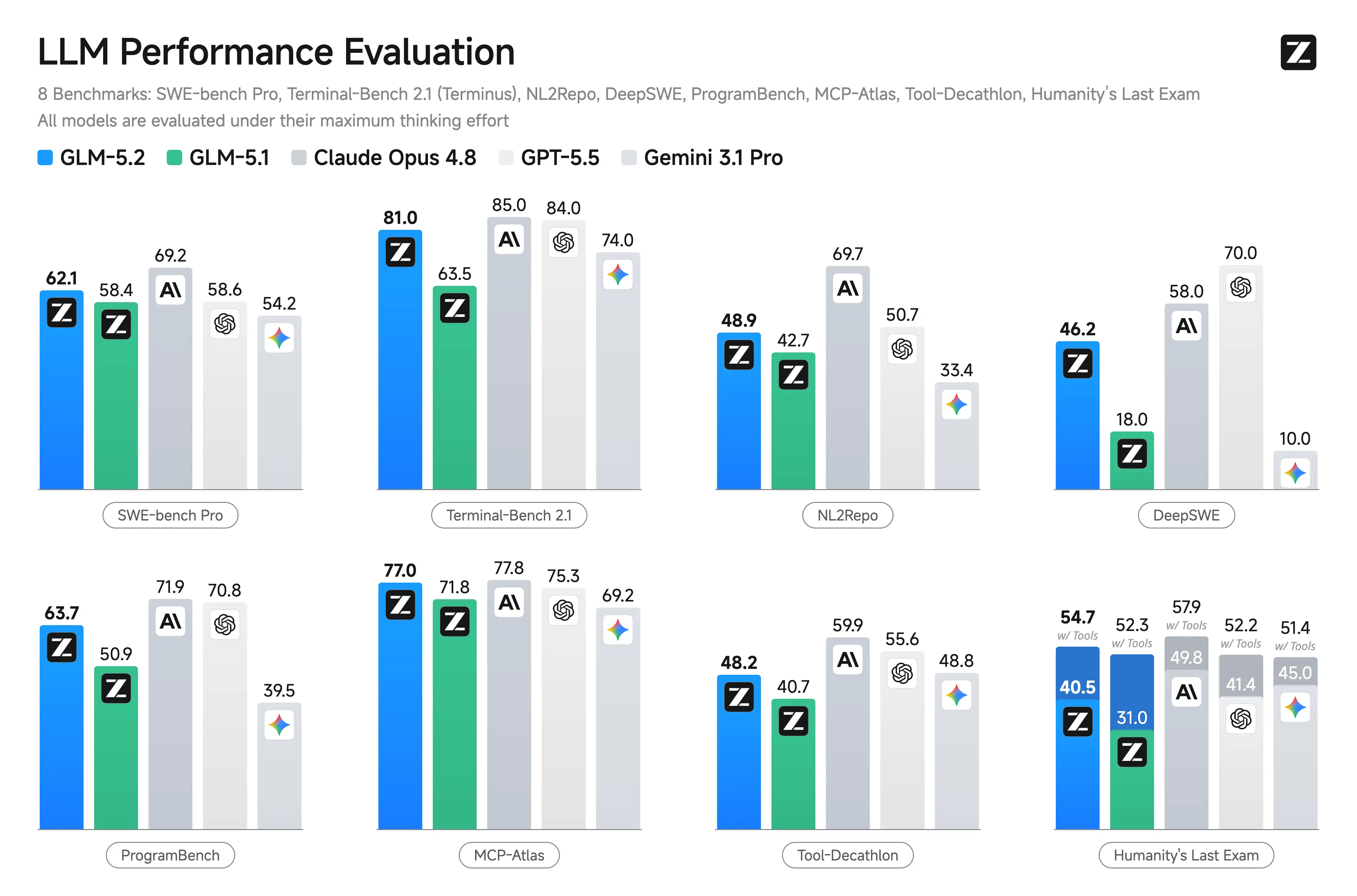
That open-weights stance is the whole story here. Most models that trade blows with GPT-5.5 or Claude Opus 4.8 are closed. GLM-5.2 puts comparable capability into a file you can download. If you have read our GLM-5.1 overview, think of 5.2 as the same lineage with a sharper coding and agentic focus.
GLM-5.2 is a general-purpose model with a coding bias. It handles reasoning, math, and multilingual text (English and Chinese are first-class), but Z.ai tuned it hardest for software engineering and tool-driven, multi-step agent work.
Identity: how to find GLM-5.2 across platforms
One thing that trips people up with open models is the naming. The same model carries different identifiers depending on where you load it. Here is the map.
| Platform | Identifier |
|---|---|
| Hugging Face | zai-org/GLM-5.2 |
| Z.ai API | glm-5.2 |
| Ollama | glm-5.2 |
| OpenRouter | z-ai/glm-5.2 |
The weights are MIT-licensed with no regional restrictions, so the Hugging Face repo is genuinely downloadable rather than gated. You can confirm the card and files at the GLM-5.2 page on Hugging Face.
Architecture in plain terms: 753B MoE + IndexShare
GLM-5.2 is a Mixture-of-Experts model with roughly 753B total parameters, served in BF16. MoE means the model is split into many “expert” sub-networks, and only a fraction of them activate for any given token. You get the knowledge capacity of a huge model without paying the full compute bill on every forward pass. That is how a 753B model stays usable.
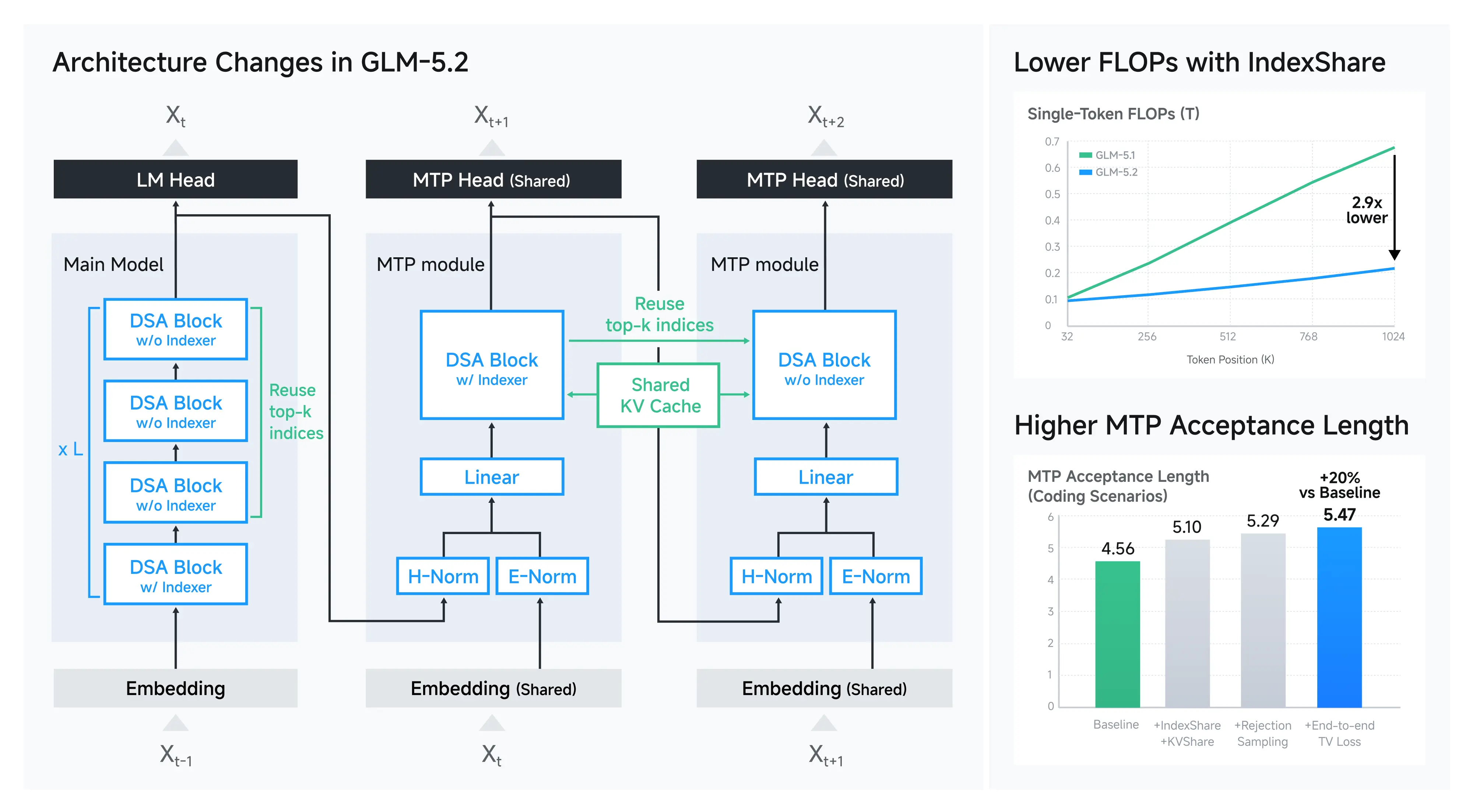
The newer piece is sparse attention. GLM-5.2 introduces a method Z.ai calls IndexShare. Normal attention gets expensive fast as your context grows, because every token attends to every other token. IndexShare reuses a single “indexer” across every group of 4 sparse-attention layers, instead of computing a fresh one per layer. In practice that cuts the cost of attention at long context, which is exactly what you want when your window is a million tokens wide.
You do not need to understand the math to benefit from it. The takeaway: GLM-5.2 is engineered so that feeding it a large codebase or a long document does not blow up your latency and cost the way a dense model would.
A 1M-token context window
GLM-5.2 supports a 1M-token context window (1,048,576 tokens, to be exact). That is enough to drop an entire mid-size repository, a long spec, or a stack of related documents into a single prompt and ask the model to reason across all of it.
Max output is where you should be careful. The z.ai docs list output up to 128K tokens, but not every host publishes the same number, and OpenRouter does not list it at all. So treat 128K as the documented ceiling to verify live rather than a guarantee on every endpoint. If your workflow depends on very long generations, check the limit on the specific provider you are using.
For context on how this generation moved the bar, our GLM-5.2 vs GLM-5.1 comparison breaks down what changed release over release.
Thinking effort: High, Max, and turning it off
GLM-5.2 is a reasoning-capable model with controllable “thinking” behavior. You get two thinking-effort levels:
- High, strong reasoning with a lighter compute cost.
- Max, the deepest reasoning. Z.ai recommends Max specifically for coding tasks.
You can also disable thinking entirely. For quick lookups, formatting, or simple transforms, you do not want the model burning tokens on an internal chain of thought. Turning thinking off keeps those calls fast and cheap.
In the API, this maps to a thinking parameter ({"type": "enabled"} or {"type": "disabled"}) and a reasoning_effort value such as "max". We go deeper on the request shape in the GLM-5.2 API guide, but the mental model is simple: dial reasoning up for hard engineering work, dial it off for trivial calls.
MIT license and open weights: what that actually buys you
“Open weights” gets thrown around loosely, so here is what GLM-5.2’s MIT license concretely allows:
- Self-hosting. Run it on your own hardware or a rented GPU. Nothing leaves your network.
- Fine-tuning. Adapt it to your domain, your codebase conventions, or a specialized task.
- Commercial use. MIT is permissive. You can build products on top of it without a restrictive license hanging over you.
- No regional lockout. The weights are not gated behind a region check.
For teams with data-residency or compliance constraints, this matters more than a benchmark point or two. You can keep prompts and code in-house. If you want to try the fully local path, see run GLM-5 locally for free and GLM-5 for free with Ollama for the patterns, which carry over to 5.2.
Coding-first and agentic: the benchmarks
Z.ai built GLM-5.2 to do real software work, not just chat about it. The benchmark story is centered on coding and agentic tool use. The numbers below are Z.ai’s published results, so read them as the lab’s own measurements rather than independent third-party scores.
| Benchmark | GLM-5.2 | Notable comparison |
|---|---|---|
| Terminal-Bench 2.1 | 81.0 | GLM-5.1 scored 62.0 |
| SWE-bench Pro | 62.1 | GPT-5.5 58.6, GLM-5.1 58.4 |
| MCP-Atlas | 77.0 | GPT-5.5 75.3, Claude Opus 4.8 77.8 |
| Humanity’s Last Exam (w/ tools) | 54.7 | GPT-5.5 52.2 |
| AIME 2026 | 99.2 | n/a |
| GPQA-Diamond | 91.2 | n/a |
The hero stat is Terminal-Bench. Going from 62.0 to 81.0 in a single generation is a large jump on a benchmark that measures whether a model can actually operate a terminal to get tasks done. SWE-bench Pro at 62.1, edging out GPT-5.5’s 58.6, is the other headline: it points to genuine repo-level problem solving, not toy snippets.
Z.ai also reports GLM-5.2 as the highest open-source model on FrontierSWE, PostTrainBench, and SWE-Marathon, and positions it against GPT-5.5, Claude Opus 4.8, Gemini 3.1 Pro, and DeepSeek-V4-Pro. VentureBeat framed the cost angle bluntly, writing that GLM-5.2 “beats GPT-5.5 on long-horizon coding at ~1/6 the cost” (that line is VentureBeat’s framing, in their GLM-5.2 coverage, not an Apidog measurement).
For the full breakdown and the apples-to-apples caveats, see our GLM-5.2 benchmarks deep dive and the head-to-head GLM-5.2 vs GPT-5.5, Claude Opus, and Gemini.
How to access GLM-5.2 at a glance
You have four practical paths, depending on whether you want a hosted API, an agentic coding setup, a router, or a local install.
| Access path | Best for | Quick note |
|---|---|---|
| Z.ai API | Direct, hosted calls | OpenAI-compatible, endpoint at https://api.z.ai/api/paas/v4/ |
| Claude Code (GLM Coding Plan) | Agentic coding in your terminal | Anthropic-compatible base URL, select the [1m] variant |
| OpenRouter | One key, many models | Model id z-ai/glm-5.2 |
| Ollama | Local / offline | Pull glm-5.2 from the library |
Z.ai API. The general API is OpenAI-compatible. You hit https://api.z.ai/api/paas/v4/chat/completions with a Bearer key, and pass the usual parameters plus thinking, reasoning_effort, temperature, and stream. Function and tool calling are supported.
curl https://api.z.ai/api/paas/v4/chat/completions \
  -H "Authorization: Bearer $ZAI_API_KEY" \
  -H "Content-Type: application/json" \
  -d '{
    "model": "glm-5.2",
    "messages": [{"role": "user", "content": "Refactor this function for readability."}],
    "thinking": {"type": "enabled"},
    "reasoning_effort": "max",
    "stream": true
  }'
Claude Code via the GLM Coding Plan. Z.ai exposes an Anthropic-compatible coding endpoint, so you can point Claude Code at GLM-5.2. The coding base URL is https://api.z.ai/api/coding/paas/v4 (some sources show open.z.ai/api/paas/v4, so verify live), and you set your Claude Code environment to route through it.
export ANTHROPIC_BASE_URL="https://api.z.ai/api/coding/paas/v4"
export ANTHROPIC_API_KEY="your-glm-coding-plan-key"
export ANTHROPIC_DEFAULT_SONNET_MODEL="glm-5.2[1m]"
export ANTHROPIC_DEFAULT_OPUS_MODEL="glm-5.2[1m]"
export CLAUDE_CODE_AUTO_COMPACT_WINDOW=1000000
export API_TIMEOUT_MS=3000000
The [1m] suffix selects the 1M-context variant. That API_TIMEOUT_MS line is not optional padding: long, large-context calls can exceed Claude Code’s default timeout, so raising it keeps the tool from killing requests mid-flight. We walk through this setup, plus Cline and Cursor, in the GLM-5.2 in Claude Code, Cline, and Cursor guide. If you have used the prior generation that way, our GLM-5.1 with Claude Code writeup covers the same flow.
OpenRouter. If you already route through OpenRouter, GLM-5.2 is available as z-ai/glm-5.2. Check the live listing at openrouter.ai/z-ai/glm-5.2. Note there is no free OpenRouter lane for this model, so do not plan around one.
Ollama. For local use, pull it from the Ollama library. This is the route for offline work or strict data control, with the obvious tradeoff that you need real GPU memory to serve a 753B MoE comfortably.
For a roundup of the genuinely no-cost options, see how to use GLM-5.2 for free.
Pricing, briefly
On the hosted API, OpenRouter confirms pricing at $1.40 per 1M input tokens and $4.40 per 1M output tokens. VentureBeat cites cached input around $0.26 per 1M. The GLM Coding Plan has tiered subscriptions (Lite, Pro, Max, and Team), but the exact monthly figures vary across secondary sources, so confirm current pricing at z.ai before you commit (as of June 2026). Our GLM-5.2 pricing breakdown keeps a running tally.
Where Apidog fits
If you are building against the GLM-5.2 API, or wiring it into an agent that calls your own services, you still need to design, test, and document those endpoints. That is where Apidog helps. You can mock the LLM-backed endpoints before the real integration is ready, debug the request and response shapes (including streaming and tool-call payloads), and keep your API docs in sync as the contract changes. It is an all-in-one API platform, so design, debug, test, mock, and documentation live in one place rather than four. When you are ready to try it, download Apidog and point it at your GLM-5.2 integration.
How GLM-5.2 compares to the rest of the family and field
GLM-5.2 is the coding-and-agentic peak of the current GLM line. If you are weighing it against earlier releases or rival labs, these are the useful next reads:
- GLM-5.1 vs Claude, GPT, Gemini, and DeepSeek for the prior generation’s standing.
- GLM-5 vs DeepSeek vs GPT-5 on speed and cost for the efficiency angle.
- Claude Opus 4.8 vs GPT-5.5 vs Gemini 3.5 for the closed-model frontier it is chasing.
- The official Z.ai GLM-5.2 blog post and docs for the source-of-truth specs.
FAQ
What is GLM-5.2 in one sentence? It is Z.ai’s open-weights flagship LLM, a ~753B-parameter MoE model tuned for coding, reasoning, and agentic tool use, with a 1M-token context window and an MIT license.
Is GLM-5.2 actually free? The weights are free to download and self-host under MIT. The hosted Z.ai API and the GLM Coding Plan are paid. There is no free OpenRouter tier for it, so “free” here means open weights, not a free hosted endpoint.
Can GLM-5.2 see images? No. It is text in, text out per the API docs, with no confirmed vision variant. Use a separate vision model if you need image input.
How is GLM-5.2 different from GLM-5.1? The biggest visible jump is agentic coding. Terminal-Bench 2.1 went from 62.0 to 81.0 per Z.ai’s results, plus SWE-bench Pro gains and the new IndexShare sparse attention. See the GLM-5.2 vs GLM-5.1 comparison for the full diff.
What context length and output length does it support? Context is 1M tokens. Output is documented at up to 128K per z.ai, but not every host lists the same ceiling, so verify on your provider.
The short version
GLM-5.2 is what happens when an open-weights lab decides to compete head-on with the closed frontier on coding. You get a 753B MoE model with a million-token window, controllable reasoning effort, an MIT license that lets you self-host and ship, and benchmark results that put it in the GPT-5.5 and Claude Opus 4.8 conversation, at least on Z.ai’s own numbers. The caveats are real (text-only, output limits to verify, benchmark claims from the vendor), but the core proposition holds: this is a serious coding model you can actually own. Start with the GLM-5.2 API guide when you are ready to build.