
GLM-5.2 is the cheap way to run a frontier-class coding model. Z.ai (Zhipu AI) ships it with open weights under an MIT license, a 1M-token context window, and an API rate card that undercuts the big closed labs by a wide margin. This page is the money page. You’ll get the exact per-token API cost, how the cached-input discount works, worked dollar examples for real coding sessions, the GLM Coding Plan subscription tiers, and an honest read on whether GLM-5.2 is cheaper than GPT-5.5 for the way you actually work.
A note before the numbers: AI pricing moves fast, and some GLM Coding Plan tiers conflict across secondary sources. Where a figure isn’t locked down, it’s flagged. Treat any flagged number as an estimate and confirm the live price at z.ai before you commit a budget.
GLM-5.2 API cost at a glance
The pay-as-you-go API rate is the cleanest place to start, because it’s confirmed by OpenRouter’s public listing.
| Item | Price | Source |
|---|---|---|
| Input tokens | $1.40 / 1M | Confirmed (OpenRouter) |
| Output tokens | $4.40 / 1M | Confirmed (OpenRouter) |
| Cached input | ~$0.26 / 1M | VentureBeat (attribute) |
So the headline GLM-5.2 cost per token works out to $0.0000014 per input token and $0.0000044 per output token. Output is roughly 3.1x the price of input, which is the normal shape for a reasoning model: the tokens it generates (including its thinking trace) cost more than the tokens you feed it.
The cached-input rate of about $0.26 per 1M tokens is the lever that changes everything for agentic and chat workloads, and it’s covered in its own section below. That figure comes from VentureBeat’s reporting rather than a first-party rate card, so attribute it accordingly.
There’s no free OpenRouter lane for glm-5.2. If you see one claimed elsewhere, it’s wrong. You can run the open weights yourself for the cost of your own hardware, which is a different kind of “free.” For that path, see the companion guide on how to use GLM-5.2 for free and the earlier writeup on running GLM-5 locally for free.
How the cached-input discount works
Prompt caching is the single biggest cost control on the GLM-5.2 price sheet, and most people leave it on the table.
Here’s the mechanic. When you send a long, stable prefix repeatedly (a system prompt, a coding agent’s tool definitions, a large file you keep referencing), the provider can cache the processed prefix. On the next call, the cached portion bills at the cached-input rate (~$0.26 / 1M) instead of the full input rate ($1.40 / 1M). That’s roughly an 81% discount on the repeated part of your prompt.
Where this pays off:
- Coding agents. Tools like Claude Code, Cline, and Cursor resend a big stable preamble (instructions, tool schemas, repo context) on every turn. Caching that preamble cuts the per-turn input bill dramatically. The setup details live in the GLM-5.2 with Claude Code, Cline, and Cursor guide.
- RAG and document Q&A. If you ask many questions against the same long document, cache the document once and only pay full price for each short question plus the answer.
- Long conversations. A growing chat history is a growing stable prefix. Caching keeps the cost of “remembering” the conversation low.
Two practical rules. First, keep the reused content at the front of the prompt and the variable content at the end; caches key off the prefix. Second, caches expire, so the discount applies to calls that land close together, not to a request you make once an hour.
Disabling thinking as a cost control
GLM-5.2 is a reasoning model with two thinking-effort levels, High and Max. Z.ai recommends Max for coding. But thinking tokens are output tokens, and output is the expensive side of the bill at $4.40 / 1M. More thinking means more generated tokens means a bigger invoice.
You have a direct lever for this. In the API you can disable thinking entirely:
{
  "model": "glm-5.2",
  "messages": [
    { "role": "user", "content": "Reformat this JSON and return it." }
  ],
  "thinking": { "type": "disabled" }
}
Use the levels deliberately:
- Thinking disabled for cheap, mechanical work: formatting, extraction, simple rewrites, classification. You skip the reasoning trace and pay only for a short answer.
- High effort for everyday coding and analysis where you want good reasoning without maximal token spend.
- Max effort for hard, long-horizon coding and math, where the extra thinking actually earns its cost in correctness.
Matching the effort level to the task is the difference between a $4.40 output bill and a $1 one on the same prompt. The full parameter reference, including reasoning_effort and streaming, is in the GLM-5.2 API guide, and the earlier GLM-5 API walkthrough covers the same OpenAI-compatible shape if you’re migrating up.
Worked cost examples
Abstract per-token rates don’t mean much until you map them onto real work. Here are three sessions, priced at the confirmed rates.
Example 1: a single 100K-token coding session. Say you run an agentic coding task that reads 100K tokens of context (your repo, instructions, file contents) and generates 20K tokens of code and reasoning.
- Input: 100,000 × $1.40 / 1,000,000 = $0.140
- Output: 20,000 × $4.40 / 1,000,000 = $0.088
- Total: ~$0.23
Example 2: the same session with caching. Now assume 80K of that 100K input is a stable prefix (system prompt, tool defs, unchanged files) served from cache, and 20K is fresh.
- Cached input: 80,000 × $0.26 / 1,000,000 = $0.021
- Fresh input: 20,000 × $1.40 / 1,000,000 = $0.028
- Output: 20,000 × $4.40 / 1,000,000 = $0.088
- Total: ~$0.14
Caching the stable prefix cut the session cost by roughly 40%, and the savings grow the more turns you take against the same context.
Example 3: a chat assistant doing extraction with thinking off. A support bot processes 500 messages a day. Each call sends 2K input tokens and returns 300 output tokens, thinking disabled.
- Input: 500 × 2,000 × $1.40 / 1,000,000 = $1.40
- Output: 500 × 300 × $4.40 / 1,000,000 = $0.66
- Total: ~$2.06 / day, about $62 a month for a 500-call-a-day workload.
These are list-rate estimates. Your real bill depends on how much thinking you allow and how much of your input hits the cache.
GLM Coding Plan tiers
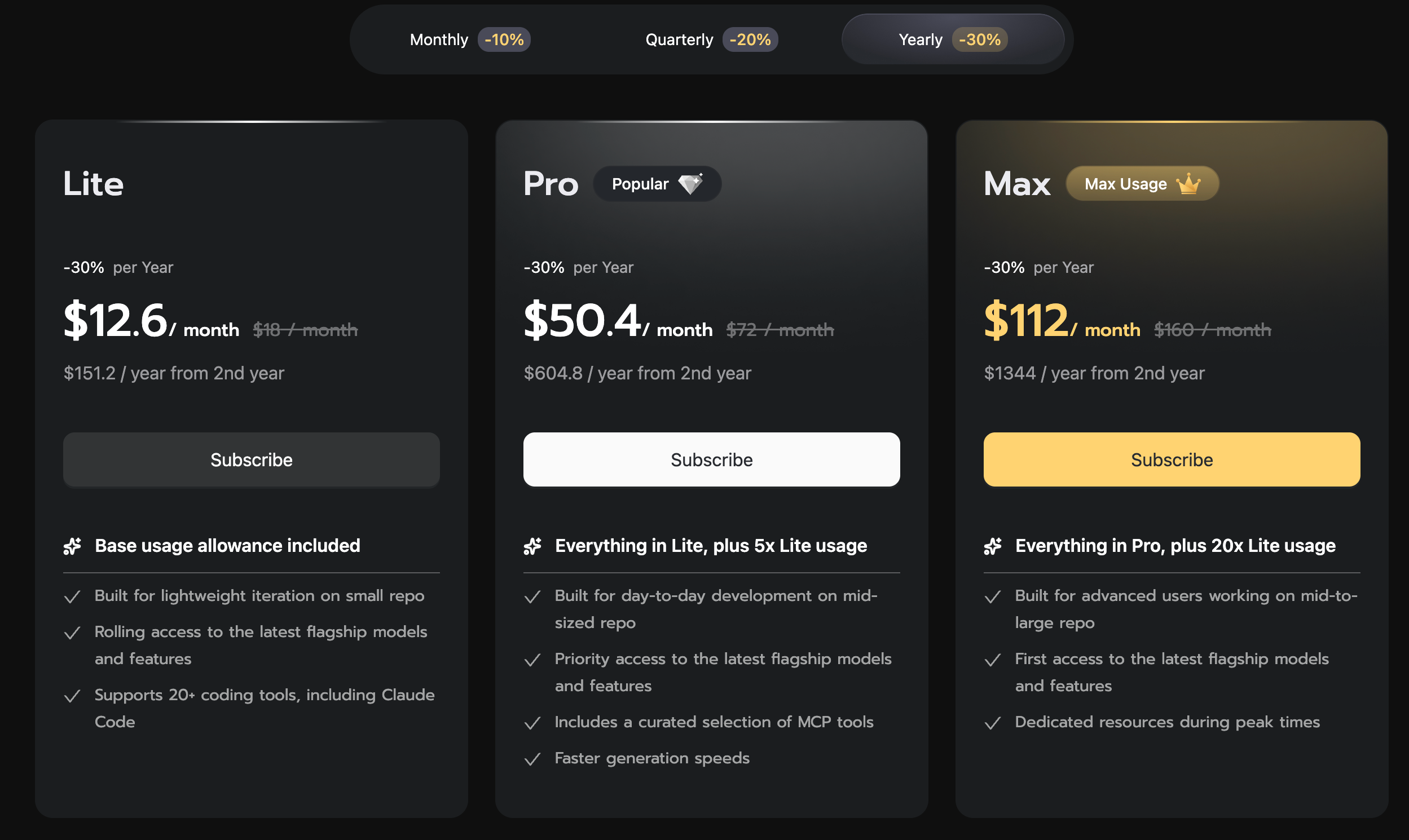
If you live inside a coding agent all day, the subscription path is usually cheaper than metered API calls. Z.ai sells a GLM Coding Plan with named tiers (Lite, Pro, Max, plus Team), exposed to Claude Code and similar tools through an Anthropic-compatible endpoint.
The plan key is a different credential from the standard API key. To wire GLM-5.2 into Claude Code, you point it at the coding endpoint and select the 1M-context variant via the [1m] model suffix:
export ANTHROPIC_BASE_URL="https://api.z.ai/api/coding/paas/v4"
export ANTHROPIC_API_KEY="your-glm-coding-plan-key"
export ANTHROPIC_DEFAULT_SONNET_MODEL="glm-5.2[1m]"
export ANTHROPIC_DEFAULT_OPUS_MODEL="glm-5.2[1m]"
export CLAUDE_CODE_AUTO_COMPACT_WINDOW=1000000
export API_TIMEOUT_MS=3000000
The API_TIMEOUT_MS value matters. Without a long timeout, Claude Code can kill long large-context calls before GLM-5.2 finishes. Some sources show the coding base URL as open.z.ai/api/paas/v4 instead, so verify the exact host live. The full agent setup, including Cline and Cursor, is in the GLM-5.2 coding agents guide, and the earlier GLM-5.1 with Claude Code writeup covers the same pattern for the prior generation.
Is GLM-5.2 cheaper than GPT-5.5?
Yes, on the metered API, and by a wide margin. The clearest framing comes from VentureBeat, which reported that GLM-5.2 “beats GPT-5.5 on long-horizon coding at about 1/6th the cost.” That claim is VentureBeat’s, not an Apidog measurement, and it bundles benchmark performance with price, so read it as a directional value statement rather than a per-token ratio.
At the rate-card level, here’s the high-level comparison. GLM-5.2 lists at $1.40 input / $4.40 output per 1M tokens. The closed frontier models from OpenAI, Anthropic, and Google generally sit well above that for their top reasoning tiers, which is why the “fraction of the cost” framing keeps showing up. For a numbers-first speed-and-cost breakdown across models, see GLM-5 vs DeepSeek vs GPT-5 on speed and cost and the broader GLM-5.1 vs Claude, GPT, Gemini, and DeepSeek comparison.
The subscription comparison is more nuanced. A heavy GLM Coding Plan tier at an estimated ~$80/mo lands in the same ballpark as the priciest single-seat coding subscriptions from other vendors, so the decisive factors become model quality on your tasks and how the plans meter usage. The plan-versus-plan question (GLM Plan against Claude Code, Codex, Cursor, and MiniMax) is worked through in detail in Claude Code vs Codex vs Cursor vs MiniMax Plan vs GLM Plan.
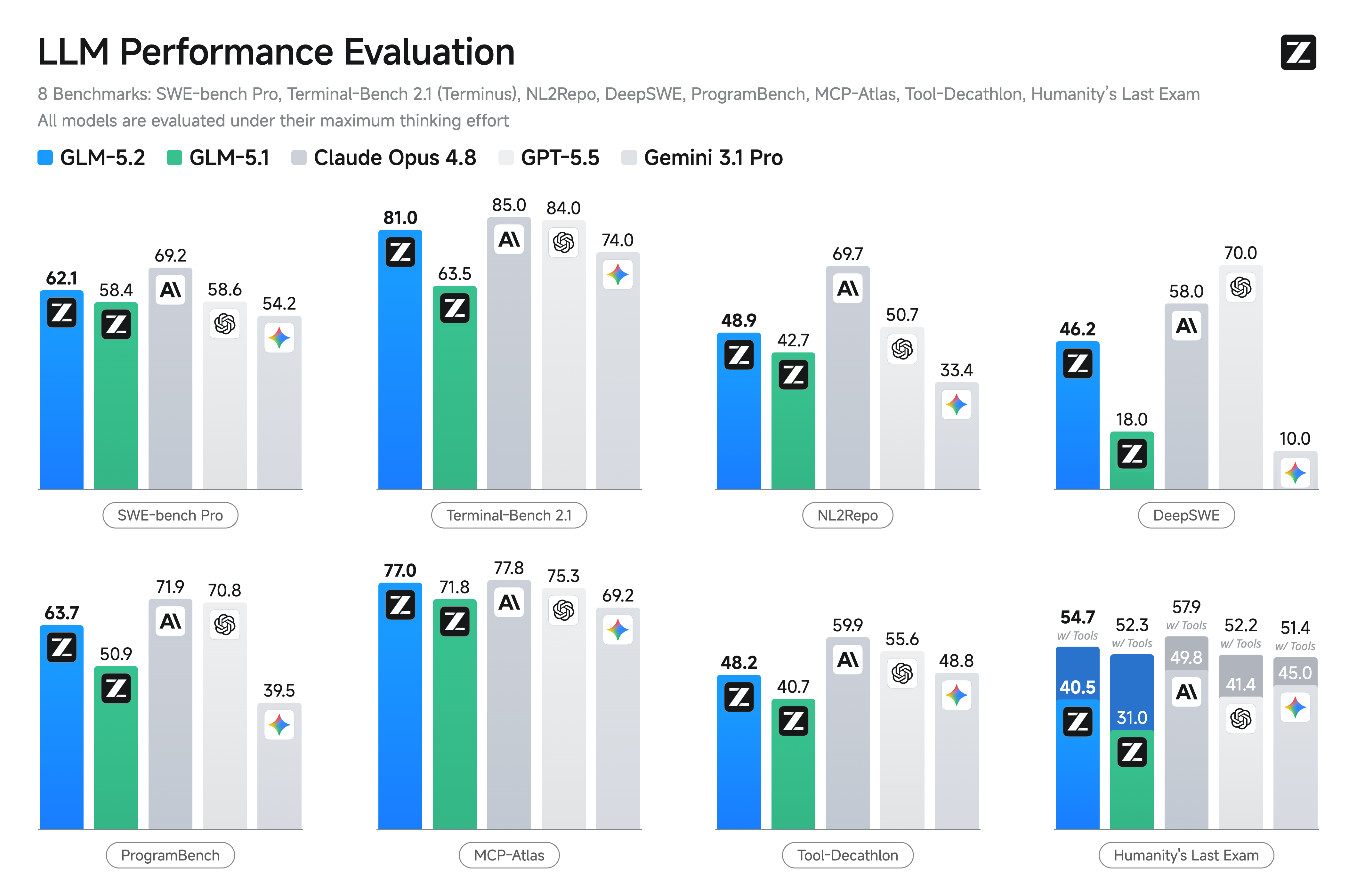
One caveat on benchmarks: the launch results that motivate the value pitch (SWE-bench Pro 62.1, Terminal-Bench 2.1 at 81.0, MCP-Atlas 77.0) are Z.ai’s published results. The full set is broken down in the GLM-5.2 benchmarks deep-dive, and the head-to-head against the closed labs lives in GLM-5.2 vs GPT-5.5, Claude Opus, and Gemini.
Which pricing path should you pick?
A quick decision guide:
- Spiky or low-volume usage: pay-as-you-go API. You only pay for what you run, and the rates are low enough that light use stays cheap.
- All-day coding in an agent: a GLM Coding Plan tier. Predictable monthly cost beats metered billing once you’re making hundreds of calls a day. Verify the tier price first.
- Privacy, offline, or zero-marginal-cost: self-host the open weights. No per-token bill at all, just your own compute. Start with running GLM-5 locally for free or GLM-5 for free with Ollama.
Whichever path you choose, the two cost levers stay the same: cache your stable prefixes, and dial thinking effort down for work that doesn’t need it.
If you're tracking the GLM model line as it evolves, GLM-5.3-Flash pricing and its launch-window discount structure is worth reviewing before you commit to a billing tier.
Testing GLM-5.2 costs before you commit
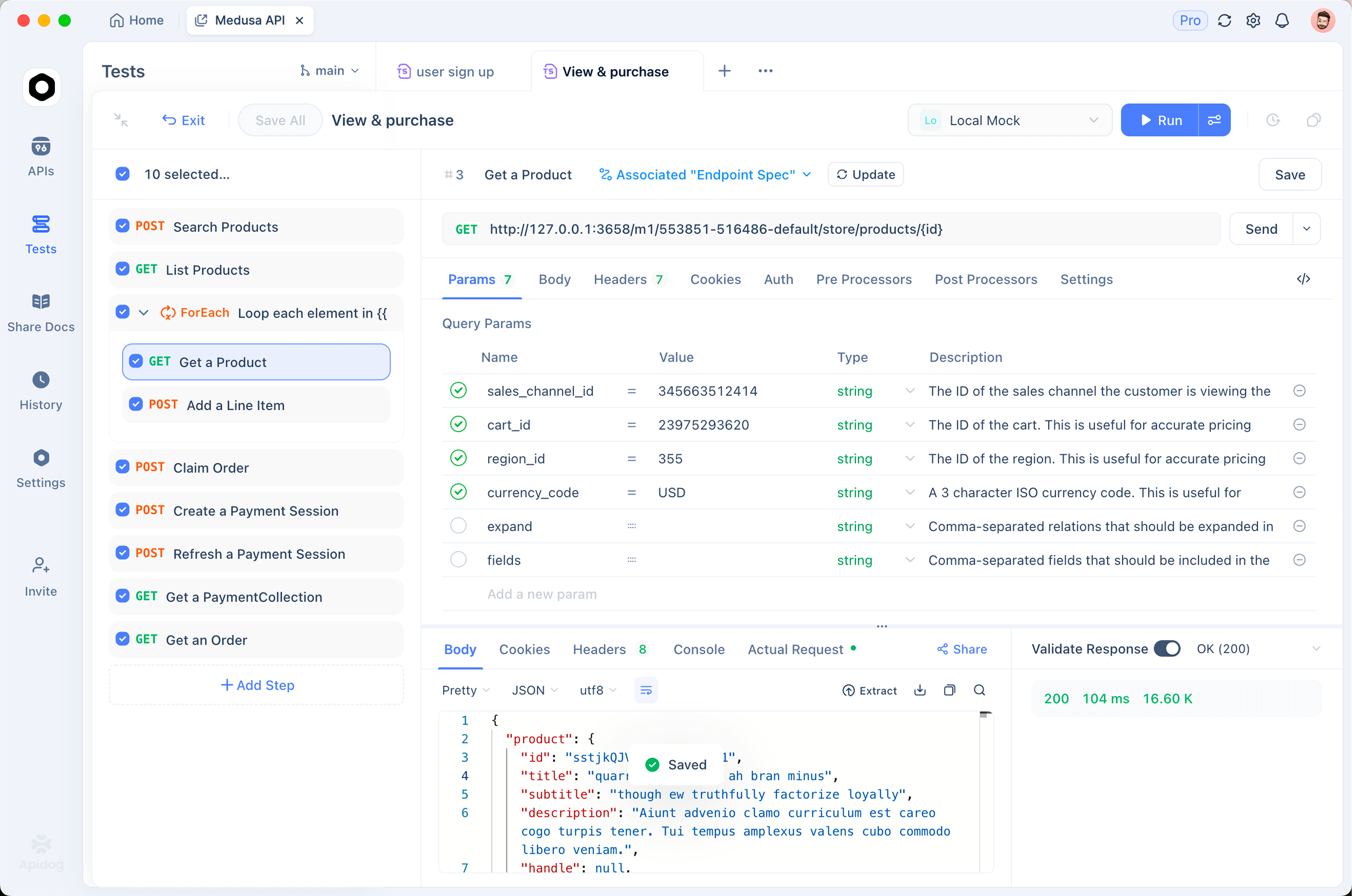
Before you pick a plan, it helps to see what your real prompts cost and how long they take. You can point any OpenAI-compatible client at the GLM-5.2 endpoint and watch token usage per call. Apidog is useful here: it’s an all-in-one API platform for designing, debugging, testing, and documenting APIs, so you can fire requests at https://api.z.ai/api/paas/v4/chat/completions, inspect the response and token counts, and save the calls as a reusable collection while you compare thinking levels and caching behavior. Download Apidog if you want to benchmark the rate card against your own traffic instead of trusting a worked example.
The short version: GLM-5.2’s confirmed API rate of $1.40 in and $4.40 out is the number to anchor on. Cache your prefixes, manage thinking effort, and verify any Coding Plan tier price live before you commit.