

Cursor’s claim with Composer 2.5 is blunt: frontier-level coding quality at roughly a tenth of the price. The question every developer is asking is whether that holds up against the two models it’s measured against, Claude Opus 4.7 and GPT-5.5. This post puts the three side by side on benchmarks, speed, cost, and the daily-driver decision.
If you want the full background on the model itself, start with our Cursor Composer 2.5 guide. Here we focus on one question: given a real codebase and a budget, which model wins?
The short answer
Composer 2.5 isn’t the single best model on every chart. It’s the one that gets you within a point or two of Opus 4.7 on real software tasks while costing under a dollar per task instead of several. For most teams shipping production code daily, that trade decides it. Opus 4.7 still leads at the absolute top end, and GPT-5.5 keeps a clear edge on terminal-heavy work.
Now the evidence.
Benchmark comparison
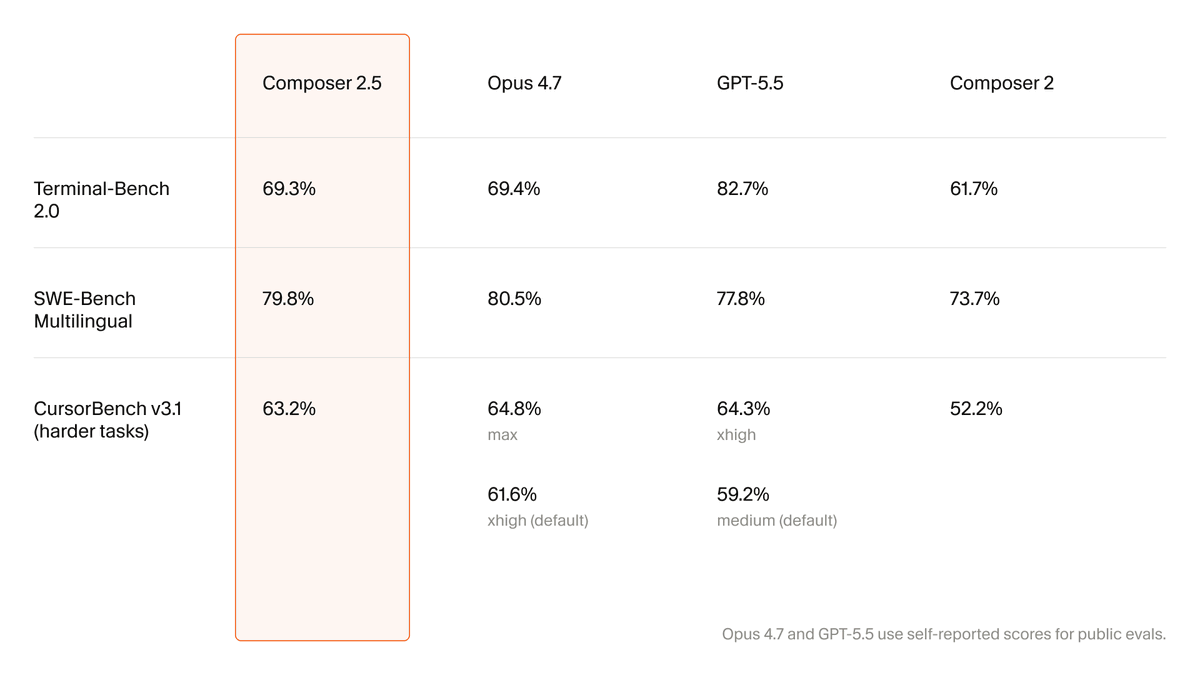
Cursor reports three suites. Here’s the head-to-head, with Composer 2’s old numbers for context:
| Benchmark | Composer 2.5 | Opus 4.7 | GPT-5.5 | Composer 2 |
|---|---|---|---|---|
| SWE-bench Multilingual | 79.8% | 80.5% | 77.8% | 73.7% |
| Terminal-bench 2.0 | 69.3% | 69.4% | 82.7% | n/a |
| CursorBench v3.1 | 63.2% | 64.8% (max) / 61.6% (default) | 59.2% (default) | n/a |
Three things stand out.
SWE-bench Multilingual is a near tie. This suite tests fixing real GitHub issues across languages. Composer 2.5 lands at 79.8%, within a single point of Opus 4.7 and ahead of GPT-5.5. The jump from Composer 2’s 73.7% is the real story; this is a different class of model from its predecessor. The Composer 2 guide shows where it started.
CursorBench favors Composer 2.5 at default settings. On Cursor’s own task suite, Composer 2.5 (63.2%) edges past Opus 4.7’s default configuration (61.6%) and beats GPT-5.5’s default (59.2%). Opus 4.7 only pulls ahead when you push it to its max setting, which costs more and runs slower.
GPT-5.5 owns Terminal-bench. At 82.7% versus Composer 2.5’s 69.3%, GPT-5.5 is clearly stronger on long terminal command sequences. If your work is shell-heavy automation, weight this heavily.
For independent confirmation of these figures, see The Decoder’s coverage and the official Cursor Composer 2.5 announcement.
Cost: where the gap is huge
Benchmarks within a point or two of each other stop being the headline once you look at the bill.
| Model | Input / M tokens | Output / M tokens | Approx. cost per task |
|---|---|---|---|
| Composer 2.5 (standard) | $0.50 | $2.50 | Under $1 |
| Composer 2.5 (fast) | $3.00 | $15.00 | Low single digits |
| Opus 4.7 / GPT-5.5 | Frontier-tier | Frontier-tier | Several dollars, up to ~$11 |
Cursor reports about 63% on CursorBench at under $1 average cost per task. Opus 4.7 and GPT-5.5 run several dollars per task for similar or worse results, with some comparisons putting competitor cost as high as eleven dollars for the same work. Run a thousand agent tasks a month and that difference is a budget line, not a rounding error.
Put rough numbers on it. A small team running 2,000 agent tasks a month pays on the order of $2,000 at roughly $1 per task with Composer 2.5. The same volume at $5 per task on a frontier model is about $10,000, and at the $11 high end it’s $22,000. Same work, same month. The benchmark gap is one point; the bill gap is an order of magnitude. That’s why the default-model decision matters more than the leaderboard does.
For a deeper breakdown of how Cursor meters this, see the Cursor Composer pricing guide. For the frontier side, our GPT-5.5 pricing post and the Claude Opus 4.7 guide cover their rate cards.
Speed and how each model behaves
Quality and price aren’t the only axes.
- Composer 2.5 is built for sustained, long-running agent tasks inside Cursor. It holds context across multi-step work and calibrates effort to the request instead of over- or under-doing it. The fast variant keeps the same intelligence at lower latency.
- Opus 4.7 is the strongest at the very top of hard reasoning tasks, especially at its max setting, at the cost of higher price and latency.
- GPT-5.5 is the steadiest on terminal-driven workflows and long command chains.
Composer 2.5 is built on the open-source Moonshot Kimi K2.5 checkpoint and post-trained heavily by Cursor; Opus 4.7 and GPT-5.5 are general-purpose frontier models that happen to be strong at code. That difference shows up in behavior: Composer 2.5 is tuned for the editor-agent loop specifically.
Which one should you pick?
Use this as a decision guide rather than a leaderboard.
Pick Composer 2.5 if:
- You ship code daily and cost per task matters at volume.
- You work inside Cursor and want a tight agent loop on multi-file tasks.
- You want roughly 95% of frontier quality for roughly 10% of the price.
Pick Opus 4.7 if:
- You need the absolute top score on the hardest reasoning tasks and budget is secondary.
- You already run a Claude-centered workflow. The Claude Code vs Cursor comparison covers that path.
Pick GPT-5.5 if:
- Your work is terminal-heavy automation where its Terminal-bench lead pays off.
- You want a general-purpose model that doubles as your coding model.
Many teams run a hybrid: Composer 2.5 for the bulk of agent tasks, a frontier model reserved for the few problems that genuinely need the extra ceiling. The Codex vs Claude Code vs Cursor vs Copilot roundup maps the wider field if you’re still choosing tools.
Run the comparison on your own code
Public benchmarks tell you the average. Your codebase is not the average, so spend twenty minutes testing the three on work you actually do.
- Pick one real task you’d normally hand to an agent: a bug fix with a reproduction, a small feature, or a refactor with tests.
- Run it three times in Cursor, switching the model picker between
composer-2.5, Opus 4.7, and GPT-5.5. Keep the prompt identical. - Score each run on three axes: did it pass your tests, how long did it take, and what did it cost in Cursor’s usage view.
- If the task touches an API, send the generated requests through Apidog so “did it pass” means “the endpoints actually return what the code expects,” not just “the unit tests are green.”
You’ll usually find the benchmark story holds: Composer 2.5 close on quality, far ahead on cost, with a frontier model worth keeping for the occasional hard problem. But you’ll be deciding on your work, not a leaderboard.
The benchmark that the benchmarks miss
There’s a failure mode no leaderboard scores: a model writing confident, clean-looking API code against endpoints it assumed rather than ones that exist. Opus 4.7, GPT-5.5, and Composer 2.5 all do this when they lack your real API contract. Wrong-but-confident code is slower than no code, because someone has to discover it’s wrong.
The fix is the same regardless of which model wins your comparison: ground the model in your real API spec, then verify what it produced. Feed your specification to Cursor through an MCP server so the model codes against your actual schema, then run the generated requests in Apidog to confirm status codes, payloads, and auth before the code reaches a teammate. Our API specs in Cursor walkthrough shows the setup. The model you pick changes your speed and bill; the verification loop is what keeps that speed from turning into debugging debt.
Frequently asked questions
Is Composer 2.5 better than Opus 4.7? On SWE-bench Multilingual it’s within one point (79.8% vs 80.5%) and on CursorBench default it’s slightly ahead. Opus 4.7 leads only at its max setting. At a fraction of the cost, Composer 2.5 wins the value comparison for most workloads.
Is Composer 2.5 better than GPT-5.5? It beats GPT-5.5 on SWE-bench Multilingual and CursorBench. GPT-5.5 wins clearly on Terminal-bench 2.0. Choose by which work you do more of.
Why is Composer 2.5 so much cheaper? It’s built on the open-source Kimi K2.5 base and tuned specifically for the Cursor agent loop, so Cursor controls the economics. Frontier general-purpose models carry frontier pricing.
Can I use all three in Cursor? Yes. Cursor’s model picker lets you switch per task, which is what makes a hybrid strategy practical. See the Cursor Composer 2.5 guide for setup.
Narrowing that question to Cursor's own model lineup,which Cursor Codex model delivers the best coding resultsbreaks down per-task performance in more detail.
The bottom line
If you only look at benchmark peaks, Opus 4.7 and GPT-5.5 each have a chart to point at. If you look at quality per dollar on real software tasks, Composer 2.5 is the model most teams should run by default and reserve the frontier models for the exceptions. Whichever you choose, ground it in your real API contract and verify the output: Download Apidog to send live requests against the generated endpoints and lock the working calls into automated tests.


