Claude Sonnet 5 landed on June 30, 2026, and it is a strong fit for how most people use Cursor. Anthropic calls it its most agentic Sonnet model yet, with tool-use performance close to Opus 4.8 at a much lower price. That matters in Cursor, where the model spends most of its time reading files, editing code, and running commands in a loop. This guide shows you how to enable Sonnet 5 in Cursor, when to use your own Anthropic API key, how to get the most out of agent mode, and when to switch to a bigger model. For the full model overview, read what is Claude Sonnet 5, and Anthropic’s official announcement covers the launch details.
You will also see where Apidog fits: when Cursor and Sonnet 5 build an API for you, Apidog is where you send requests, save them, mock responses, and run automated tests against the endpoints.
Why Sonnet 5 is a good default in Cursor
Cursor’s agent does a lot of small, tool-driven steps. It opens files, applies edits, searches the codebase, and runs terminal commands. That is exactly the kind of work where Sonnet 5 shines.
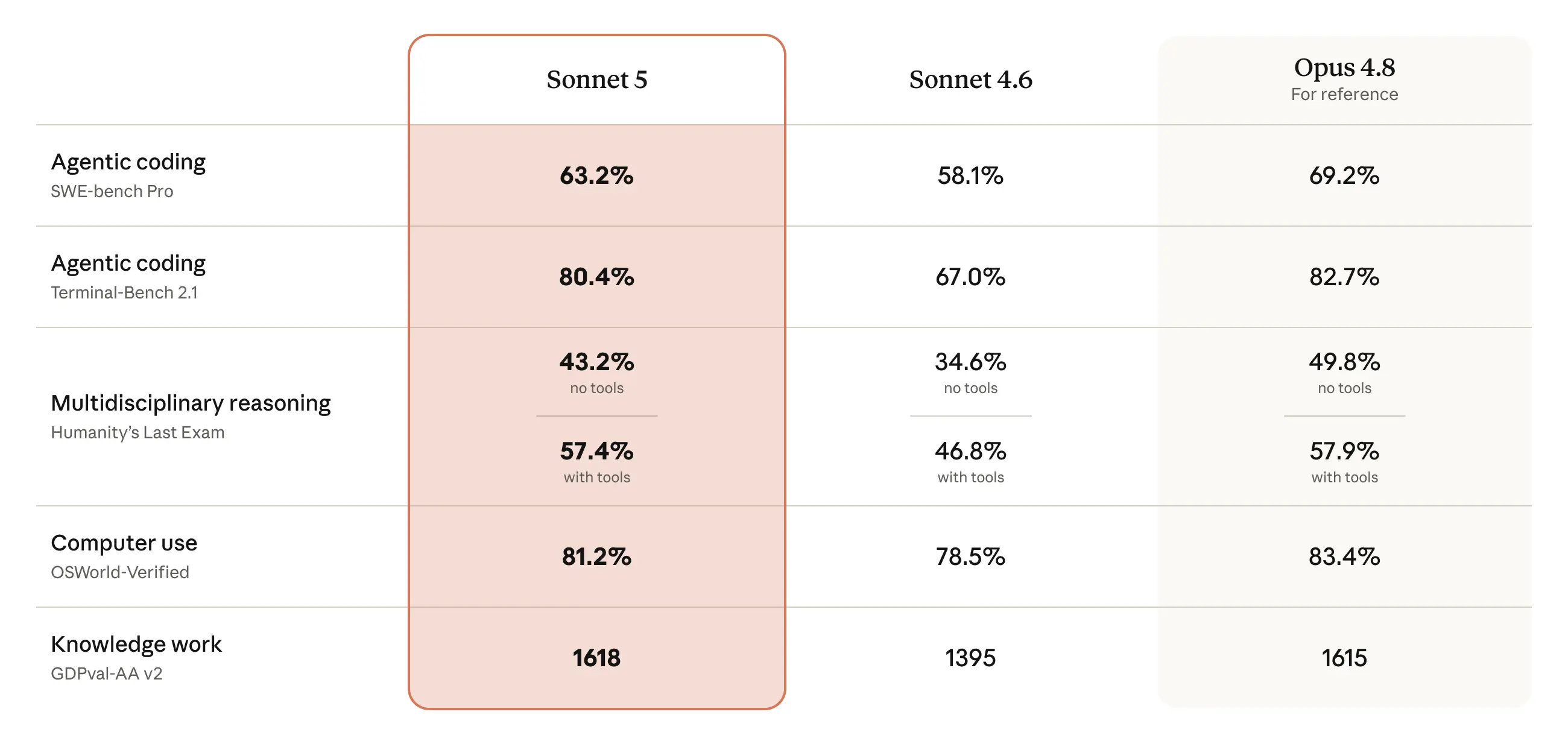
Anthropic’s launch benchmarks put Sonnet 5 within a few points of Opus 4.8 on agentic tasks. On SWE-bench Pro, a coding benchmark, the reported figures were 63.2% for Sonnet 5 and 69.2% for Opus 4.8, up from 58.1% on Sonnet 4.6. On Terminal-Bench 2.1, Sonnet 5 scored 80.4% against Opus 4.8’s 82.7%. On OSWorld-Verified, a computer-use benchmark, Sonnet 5 hit 81.2% versus 83.4% for Opus 4.8. These are Anthropic’s reported numbers, not our own testing. For the full table, see the Claude Sonnet 5 benchmarks breakdown.
The pattern is consistent. With tools in the loop, Sonnet 5 lands within about one to three points of Opus 4.8. On pure reasoning, Opus pulls ahead by around six points. Cursor almost always has tools in the loop, so you get most of the top-tier quality without paying the top-tier price.
Price is the other half. Sonnet 5 costs the same per token as Sonnet 4.6: $3 per million input tokens and $15 per million output tokens on the standard rate. Anthropic is running an introductory rate of $2 per million input and $10 per million output through August 31, 2026. Opus 4.8 costs $5 per million input and $25 per million output. In a long agent session, that gap adds up fast.
Two ways to use Sonnet 5 in Cursor
Cursor supports Anthropic’s Claude models directly, and it also supports bring-your-own-key (BYOK) if you want to bill through your own Anthropic account. Menu wording changes between Cursor versions, so treat these as the shape of the flow rather than exact steps.
Option 1: Cursor’s built-in model picker
If your Cursor plan includes Claude models, this is the fastest path.
- Open Cursor and press the model selector. It usually sits in the chat or Composer input, or under Settings.
- Look for Claude Sonnet 5 in the model list.
- Select it. Cursor now routes your requests through Sonnet 5 for chat, edits, and agent runs.
New models can take a short while to appear in a given Cursor build. If you do not see Sonnet 5 yet, update Cursor to the latest version, then check again. For more setup help, the Cursor setup guide walks through configuration from scratch.
Option 2: Bring your own Anthropic API key
BYOK is useful when you want direct control over billing, higher limits tied to your account, or a model your Cursor plan does not bundle.
- Get an Anthropic API key from the Claude Console. Create a key under your organization’s API keys.
- In Cursor, open Settings and find the model or API keys section.
- Paste your Anthropic key into the Anthropic provider field and save.
- Select Claude Sonnet 5 as your active model.
The model ID Anthropic exposes is claude-sonnet-5, an exact string with no date suffix. You do not usually type the ID into Cursor’s UI, but you will need it if you script anything against the API yourself. Our Claude Sonnet 5 API guide covers the raw request shape, the model ID, and the response format in detail.
Keep your API key out of your codebase. Store it in an environment variable or your OS keychain, and never commit it to git.
What changed under the hood (and why it matters for Cursor)
Sonnet 5 is a drop-in replacement for Sonnet 4.6 at the API level, but a few behavior changes are worth knowing even inside Cursor.
Adaptive thinking is now on by default. On Sonnet 4.6, a request with no thinking field ran without thinking. On Sonnet 5, that same request runs with adaptive thinking. In Cursor, this means the model reasons more before it acts on a hard task, which is what you want for planning multi-file changes. Output can include thinking tokens, so responses may take a little longer and cost a little more on tricky prompts.
Sonnet 5 also ships a new tokenizer. The same input text produces roughly 30% more tokens than on Sonnet 4.6, about 1.3 times as many. The request and response shapes are identical, so nothing breaks. But anything you measure in tokens shifts. Your 1M token context window holds a bit less text on average, and the cost of an equivalent request can be higher even though the per-token rate is unchanged. If you track Cursor spend, remeasure against Sonnet 5 rather than reusing your 4.6 numbers.
Two more constraints matter if you script directly against the API. Manual extended thinking with budget_tokens returns a 400 error. Setting temperature, top_p, or top_k to a non-default value also returns a 400 error. Steer behavior through your prompt instead. Cursor handles this inside its own model calls, so you only hit these if you build against the Anthropic API yourself.
Using Sonnet 5 in Cursor’s agent mode
Agent mode is where Sonnet 5 earns its place. It lets the model read your project, plan a change, edit multiple files, run terminal commands, then check its own work.
A workflow that holds up well:
- Describe the outcome, not the steps. Tell Sonnet 5 what you want built and which files or folders are in scope.
- Let it plan first. With adaptive thinking on, Sonnet 5 tends to lay out an approach before it edits. Read the plan and correct it early if it drifts.
- Keep tasks scoped. Smaller, well-defined tasks give cleaner diffs and cost less than one giant open-ended prompt.
- Review every diff. The model is strong on agentic coding, but you still own the merge.
Because Cursor keeps tools in the loop, Sonnet 5’s agentic strength shows up directly. It handles the read, edit, run, verify cycle well without you reaching for a more expensive model on routine work.
A realistic example: build an API, then test it
Say you ask Sonnet 5 in Cursor to scaffold an Express route that creates an order and returns it as JSON.
// routes/orders.js
const express = require('express');
const router = express.Router();

router.post('/orders', (req, res) => {
  const { customerId, items } = req.body;
  if (!customerId || !Array.isArray(items) || items.length === 0) {
    return res.status(400).json({ error: 'customerId and items are required' });
  }
  const order = {
    id: `order_${Date.now()}`,
    customerId,
    items,
    status: 'created',
  };
  return res.status(201).json(order);
});

module.exports = router;
Cursor and Sonnet 5 can generate this, wire it into your app, and even draft a test. But generated code still needs real verification against real requests. That is where Apidog comes in.
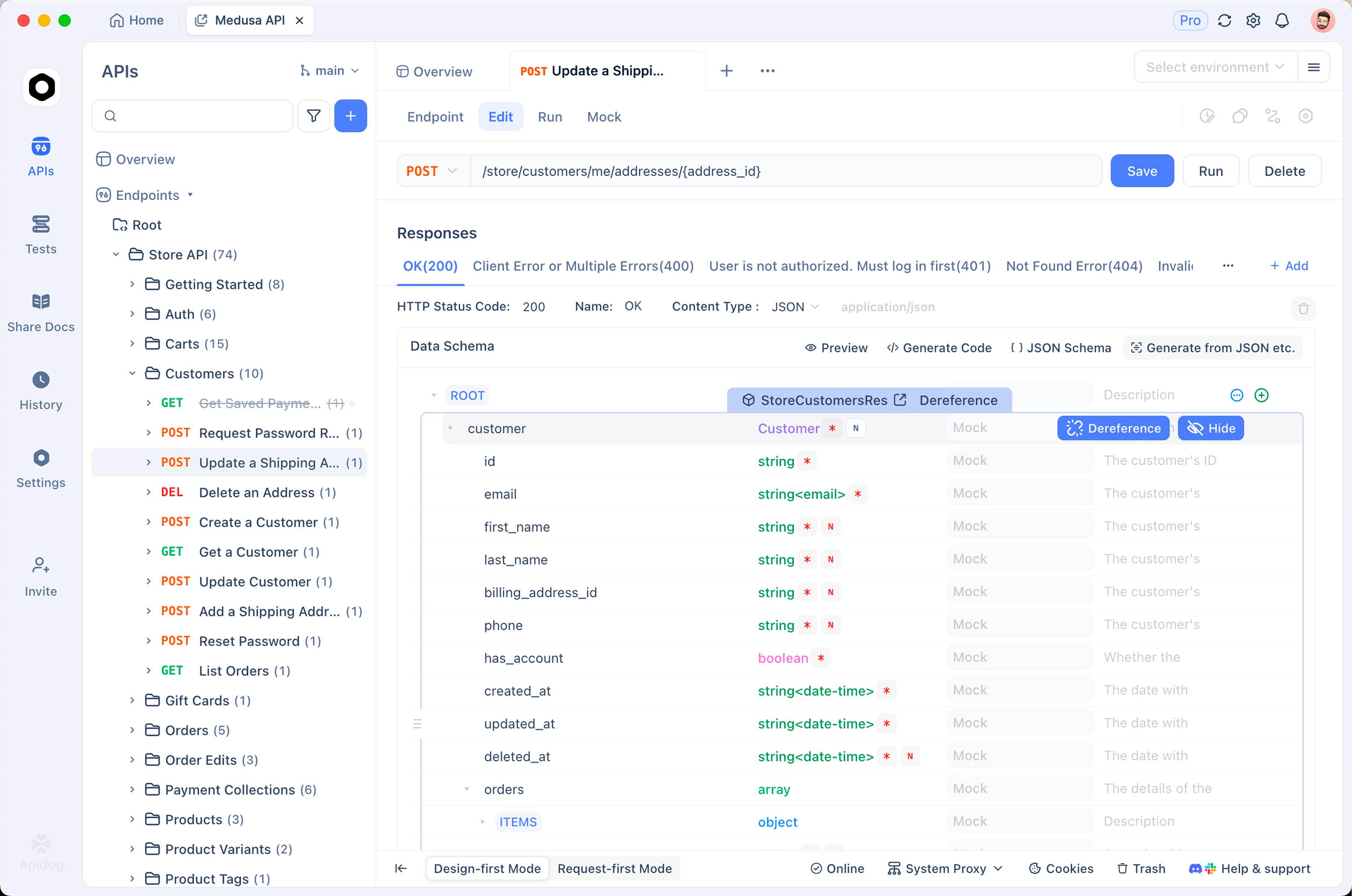
In Apidog, you can:
- Send a
POST /ordersrequest with a JSON body and confirm you get a 201 and the right response shape. - Save the request in a collection so your whole team reuses it.
- Store your base URL and any keys as environment variables, so you never hardcode secrets.
- Add automated assertions, for example that
statusequalscreatedandidis present, then run the suite in CI. - Mock the endpoint so your frontend can build against realistic responses before the backend is finished.
Cursor and Sonnet 5 write the code fast, and Apidog gives you a reproducible way to confirm the API behaves. If you have moved off other tools, this API testing without Postman walkthrough shows the testing flow end to end. Download Apidog to follow along with your own endpoints.
Cost and usage notes
Cursor manages its own billing, limits, and model access, and those specifics change over time, so check Cursor’s current plan details directly. A few principles hold regardless of the plan:
- Sonnet 5 is cheaper to run than Opus 4.8. For everyday coding, that makes it a sensible default.
- Adaptive thinking can raise cost on hard prompts because thinking tokens count toward output. Across many small edits, that overhead is usually small.
- The new tokenizer means the same code and prompts consume more tokens than they did on Sonnet 4.6. Budget with that in mind.
- With BYOK, your Anthropic bill reflects real usage at the rates above. Model your actual workloads instead of assuming flat parity with older Sonnet numbers.
For a wider look at picking a model inside Cursor, see the best Cursor model comparison.
When to switch models
Sonnet 5 covers most Cursor work well. Switch up to Opus 4.8 for the hardest reasoning: gnarly architecture decisions, subtle debugging that needs deep step-by-step reasoning, or long-horizon autonomous runs where quality matters more than cost. On pure reasoning without tools, Opus 4.8 leads Sonnet 5 by around six points on the reported benchmarks, and that margin can be worth the premium on the toughest tasks.
For everything else, from feature work to refactors to writing and running tests, Sonnet 5 gives you close-to-Opus agentic performance at a lower price. Keep Sonnet 5 as your default and bump to Opus 4.8 only when a task actually stalls.
The Cursor setup described here carries over directly; switching to Claude Fable 5 in Cursor walks through what changes when you replace Sonnet 5 with Anthropic's most capable reasoning model.
Frequently asked questions
Is Claude Sonnet 5 available in Cursor? Cursor supports Anthropic’s Claude models, and Sonnet 5 should appear in the model picker once your Cursor build supports it. If it is missing, update Cursor to the latest version. You can also add it through bring-your-own-key with an Anthropic API key.
Do I need my own API key to use Sonnet 5 in Cursor? Not always. If your Cursor plan bundles Claude models, you can select Sonnet 5 without a key. Use BYOK when you want to bill through your own Anthropic account or need direct control over limits. The Claude Sonnet 5 API guide explains how to create a key.
Is Sonnet 5 or Opus 4.8 better for coding in Cursor? For most Cursor work, Sonnet 5 is the better value because it performs close to Opus 4.8 on agentic coding at a lower price. Reach for Opus 4.8 on the hardest reasoning tasks. The Sonnet 5 vs Opus 4.8 comparison breaks down the tradeoff.
Why does Sonnet 5 seem to use more tokens than Sonnet 4.6? Sonnet 5 uses a new tokenizer that produces roughly 30% more tokens for the same text. The per-token price is unchanged, but the cost of equivalent requests can be higher. Measure your real workloads instead of reusing older token counts.
Can I use Sonnet 5 in Cursor for free? That depends on your Cursor plan, which Cursor controls. Sonnet 5 is the default model on the free Claude web and app plan, but that is separate from Cursor. Check Cursor’s current plan details for what is included.