
Running Claude Fable 5 in Cursor turns the editor into a place where you can hand off a multi-file refactor and walk away. Fable 5 is Anthropic’s new long-horizon coding model, built to hold a task together across millions of tokens without losing the plot. Cursor already knows how to talk to Anthropic models, so wiring up claude-fable-5 is a matter of dropping in an API key and picking the model from the picker. This guide walks through the exact setup, the cost math you should understand before you start, and how to confirm the model is actually answering your requests once it is live.
If you have set up other frontier models in the editor before, like the flow in running DeepSeek V4 Pro inside Cursor, the steps here will feel familiar. The differences are mostly about billing and when Fable 5 is worth its price.
TL;DR
Open Cursor Settings, go to Models, paste your Anthropic API key, and click Verify so the key is active. Add claude-fable-5 through the model search box, enable it, then select it from the model picker before a chat or agent run. Because you are using your own key, Anthropic bills you directly at $10 per million input tokens and $50 per million output, so reserve Fable 5 for long-horizon work and drop back to a cheaper model for routine edits.
Why use Fable 5 in Cursor
Most coding models are good at small, well-scoped requests. You ask for a function, you get a function. They start to wander when a task spans dozens of files, takes hundreds of steps, or runs for hours. Context drifts, earlier decisions get forgotten, and you end up babysitting the agent.
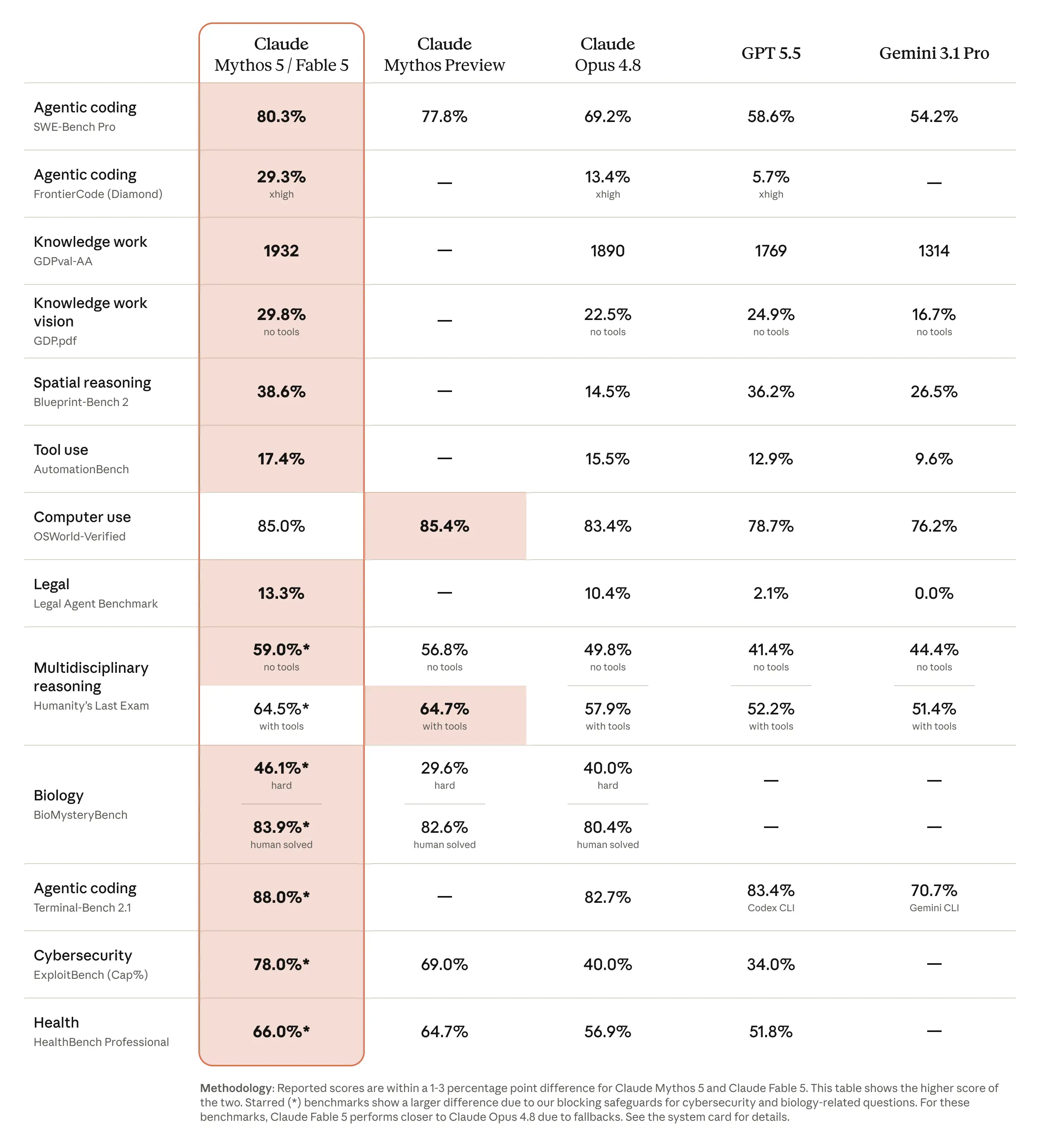
Claude Fable 5 was built for the opposite case. Anthropic describes it as a model that stays focused across millions of tokens and can work autonomously for longer than any previous Claude model. That is the property that matters inside Cursor, where the agent mode can chew through a whole repository, run commands, read results, and keep going. A model that holds its focus over a long run is the difference between a migration that finishes and one that quietly corrupts itself halfway through.
The headline proof point came from Stripe. According to Anthropic’s Fable 5 announcement, the model performed a codebase-wide migration across a 50-million-line Ruby codebase in a single day, work that would have taken a team more than two months by hand. That is the kind of job most engineers would not even attempt with an AI agent, because the failure modes compound over time. Fable 5 is aimed squarely at that risk.
So when does Fable 5 beat your default Cursor model? Reach for it when:
- You are migrating a framework version, an ORM, or a serialization format across many files at once.
- You are doing a large rename or API surface change that has to stay consistent everywhere.
- You want the agent to run for a long stretch, plan, execute, and self-correct without you steering each step.
- You are untangling a legacy module where the model has to keep a lot of interlocking context in its head.
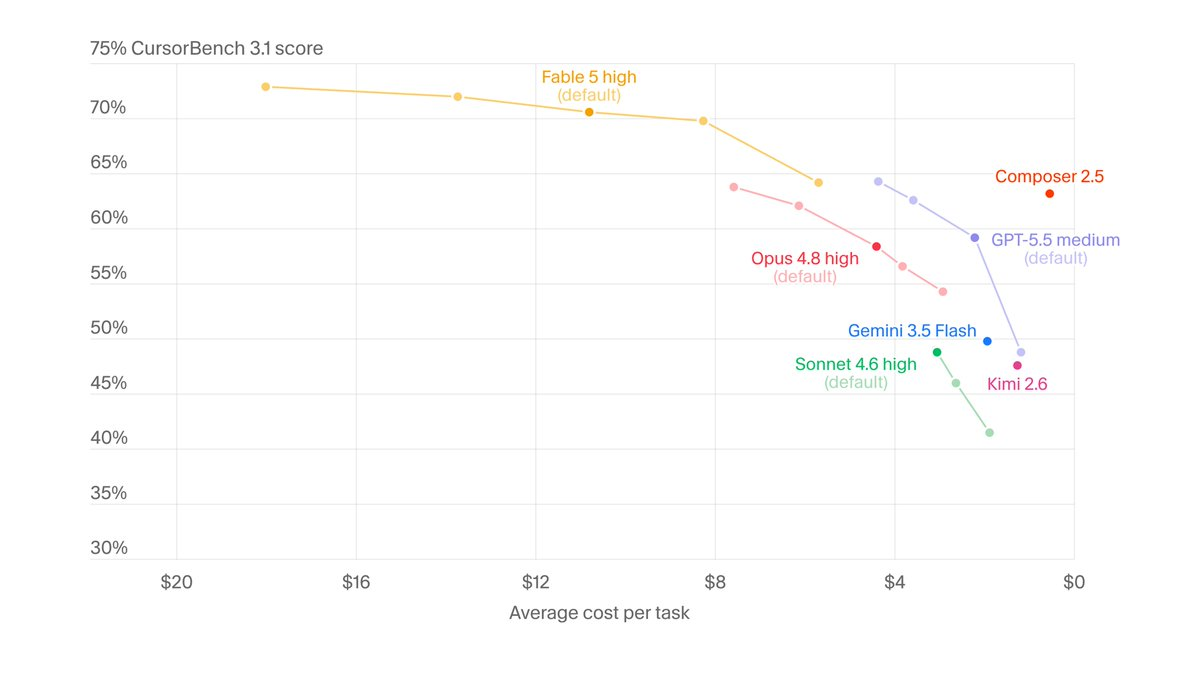
For a one-line fix, a quick test, or a small component, you do not need it. The default model will be faster and far cheaper, and you will not notice the difference in quality. The skill is matching the model to the size of the job, which is the same instinct you apply when you weigh Cursor against Claude Code for a given workflow.
Prerequisites
Before you start, make sure you have:
- Cursor installed and updated. Custom models and bring-your-own-key live under Cursor Settings, and the model picker needs to be recent enough to recognize new Anthropic model names. Update Cursor if you have not in a while.
- A Cursor plan that allows custom models. Bring-your-own-key and custom model selection require a paid Cursor tier. The free Auto-only mode will not let you pin a specific model.
- An Anthropic API key with Fable 5 access. Create or grab a key from the Anthropic developer console, and confirm your account has billing set up. Because you pay Anthropic directly, the key needs a funded workspace, not only a login.
- A sense of the cost. Fable 5 runs at $10 per million input tokens and $50 per million output tokens. Have that number in mind before you point a long agent run at it.
If you want background on the broader Claude lineup before committing, the Claude models overview lists every current model id and its pricing, and our explainer on what Claude Fable 5 is covers the design goals in more depth.
Add Claude Fable 5 to Cursor
The setup has two parts: tell Cursor about your Anthropic key, then make claude-fable-5 available in the model picker. Cursor’s own API key documentation is the canonical reference if the UI shifts under you, but here is the current flow.
1. Open Cursor Settings and go to Models.
Open Settings from the command palette or the gear icon, then select the Models section. This is the panel where Cursor lists every model it can route to and where provider API keys live. You will see a list of models with toggles, and a row of provider key fields lower down.
2. Find the Anthropic API key field.
Scroll to the provider keys area inside Models. There is a labeled field for your Anthropic API key, separate from the OpenAI and Google fields. This is where your own key goes so that Claude requests bill to your Anthropic account instead of Cursor’s bundled credits.
3. Paste your key and click Verify.
Paste the Anthropic key you created earlier into the field. Click Verify. Cursor sends a test request to confirm the key works and that your account can reach the Anthropic API. A green confirmation or a checkmark tells you the key is valid. If verification fails, the usual causes are a typo, a key from the wrong workspace, or an Anthropic account with no billing enabled.
4. Enable the key.
Toggle the Anthropic key on so Cursor actually uses it. Some Cursor builds show an explicit enable switch or an “Enable Anthropic key” confirmation next to the field. Once it is on, Claude models route through your key rather than Cursor’s pooled access.
5. Add claude-fable-5 as a model.
In the Models list there is an add-or-search model box. Type the model id exactly: claude-fable-5. When it appears, choose Add Custom Model (or the equivalent add action) so it joins your model list. With a verified Anthropic key already active, new Claude model names like Fable 5 become reachable through that key.
6. Make sure the model is enabled.
After adding it, confirm the toggle next to claude-fable-5 in the model list is on. A disabled entry will not show up in the picker when you are working in a file. That is the most common reason a freshly added model seems to vanish.
A note on base URL overrides: if you are pointing Cursor at the standard Anthropic API, you do not need to touch any base URL override option. Those overrides are for proxies and gateways, and turning the OpenAI base URL override on by accident can break Claude routing. Leave it off unless you have a specific gateway in front of Anthropic.
Select Fable 5 and verify it’s active
Adding a model and using it are two separate steps. Cursor lets you pick a model per request, so you choose Fable 5 only when you want it.
Pick it from the model picker. Open a chat or the agent panel. There is a model selector, usually near the input box or in the chat header. Click it and choose claude-fable-5 from the list. That selection sticks for the current conversation until you change it, so you can run one thread on Fable 5 and another on a cheaper model side by side.
Confirm the selector shows Fable 5. The simplest check is the picker label itself. Before you send a long or expensive request, glance at the selector and make sure it reads claude-fable-5 and not whatever your default was. This sounds trivial, but it is the single most useful habit when you are mixing models, because output token cost is where the bill grows.
Confirm it is your key doing the work. Send a small test prompt, something like asking the model to summarize the current file. Then open your Anthropic console and look at the usage dashboard. If you see a fresh request against claude-fable-5 charged to your account, the key path is wired correctly and Cursor is billing Anthropic, not its own credits.
Watch for the safeguard fallback. Anthropic routes a narrow band of requests, those touching cybersecurity, biology and chemistry, or model distillation, to Claude Opus 4.8 automatically. Anthropic says more than 95 percent of Fable sessions involve no fallback at all, so in everyday coding you will almost never hit it. But if a response feels different on one of those sensitive topics, that routing is the likely reason rather than a setup problem. If you want to understand the model it falls back to, our breakdown of Claude Opus 4.8 covers it.
Cost and billing notes
This is the part to internalize before you let Fable 5 loose on a big job, because own-key billing means there is no monthly cap protecting you.
Own-key pricing. When you supply your own Anthropic API key, Cursor does not bundle or subsidize the cost. Anthropic bills you directly at $10 per million input tokens and $50 per million output tokens. That is different from Cursor’s own bundled pricing, where requests draw from your subscription’s included usage. With your key, every token is metered on Anthropic’s side and shows up on your Anthropic invoice.
Fable 5 is twice the price of Opus 4.8. Opus 4.8 runs at $5 per million input and $25 per million output. Fable 5 sits at exactly double on both sides. So the question on every long run is whether the task genuinely needs Fable 5’s long-horizon focus, or whether Opus 4.8 would land the same result for half the spend. For a deeper side by side, see our Fable 5 versus Opus 4.8 comparison.
Where the cost actually lands. Output tokens dominate the bill in agent workflows, because the model writes code, runs commands, reads results, and writes more. A long autonomous run can produce a lot of output. That is the run where Fable 5 earns its keep, but it is also the run that can get expensive fast, so keep an eye on the Anthropic usage dashboard while it works.
When to drop back. For routine edits, small fixes, test scaffolding, and quick questions, switch the picker to a cheaper model. There is no quality reason to spend Fable 5 rates on a two-line change. The practical pattern is to default to something economical and promote a thread to Fable 5 only when you are about to start a migration, a sweeping refactor, or a long unattended agent session.
Cursor vs Claude Code for Fable 5
Cursor and Claude Code are both reasonable homes for Fable 5, and the choice comes down to how you like to work. Cursor keeps the model inside a full editor with inline diffs, a file tree, and a chat panel, which suits people who want to watch and steer changes in place. Claude Code is a terminal-native agent that fits engineers who live in the shell and want to script their workflows. Fable 5’s long-horizon strength shows up in both, so neither is wrong. If you are weighing the two for this specific model, our Cursor and Claude Code comparison for 2026 goes through the tradeoffs, and there is a companion guide on running Fable 5 in Claude Code if you want to try the terminal route.
Test the APIs Cursor builds with Apidog
When you point Fable 5 at a backend task, it will happily generate routes, handlers, and request schemas across your project. Generated endpoints still need to be exercised before you trust them, and that is a job for an API client rather than the editor. Apidog is an API design and testing tool that lets you hit those new endpoints, inspect the real responses, and confirm the shapes match what the model claimed it built.
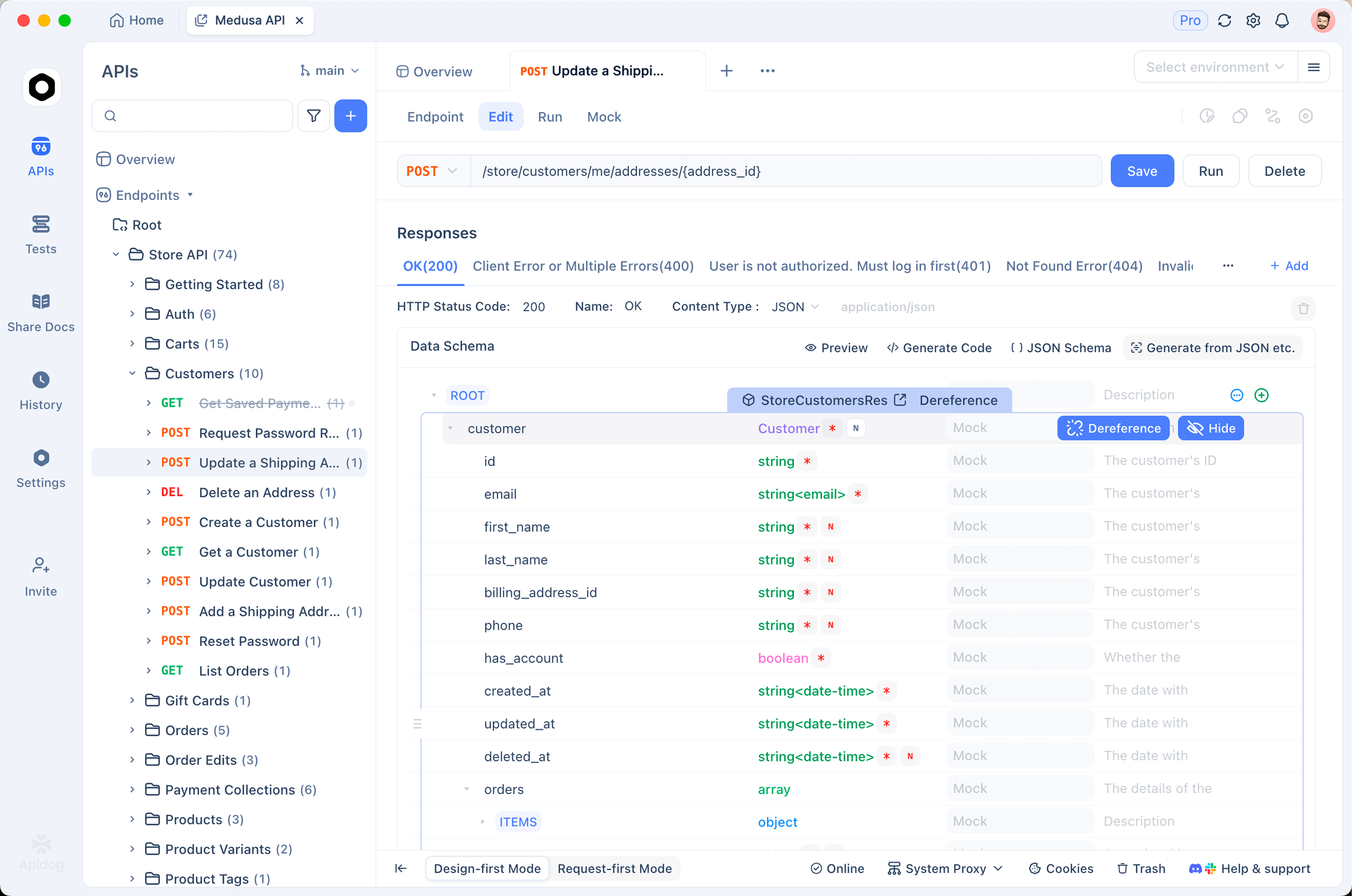
Here is a concrete loop once Fable 5 has produced some endpoints:
- Import the API definition. If the run generated an OpenAPI or Swagger file, import it into Apidog directly. Apidog reads the spec and builds out every endpoint, with paths, methods, and parameters already populated, so you are not retyping anything by hand.
- Send a real request. Pick one of the new endpoints, fill in the parameters or request body, and send it against your running dev server. You get the actual status code, headers, and JSON payload back, not the model’s description of what it thinks should happen.
- Check the response against the schema. Compare the returned body to the schema Fable 5 defined. If a field is missing, mistyped, or null when it should not be, you have found a gap between the generated code and its own contract before it reaches a teammate or production.
- Save the requests for next time. Group the calls into a collection so the same checks run after the next agent pass. A model doing long-horizon edits can change an endpoint two refactors later, and a saved request catches the regression immediately.
That tight loop, generate in Cursor, verify in Apidog, keeps the speed of an autonomous agent without inheriting its blind spots.
You now have Fable 5 wired into Cursor, a way to confirm it is the model answering you, and the cost math to use it without surprises. Start it on a job that actually needs long-horizon focus, a migration or a wide refactor, watch the first run in the agent panel, and validate whatever endpoints it produces in Apidog before you ship. If you want to compare the same setup against the terminal, the Claude Fable 5 API guide is the next stop.