
Unlocking powerful AI tools doesn’t have to break your budget. Right now, developers can access the full capabilities of ChatGPT Team—normally $150/month for 5 seats—for just $1. This limited-time offer is ideal for API developers and backend teams eager to leverage advanced GPT models and streamline their workflow.
In this guide, you’ll learn exactly how to claim the $1 ChatGPT Team deal, why it matters for engineering teams, and how to pair it with Apidog’s free MCP Server—unlocking seamless AI-powered API development in tools like Cursor and VS Code.
Why ChatGPT Team Matters for Engineering Teams
ChatGPT Team isn’t just a group chat—it’s a robust AI workspace built for technical collaboration. Key advantages for developer teams include:
- Higher Usage Limits: Double the message cap of ChatGPT Plus, especially on GPT-4o and other advanced models.
- Priority Feature Access: Early rollout of new GPT models and capabilities.
- Centralized Management: Unified billing, easy seat assignment, and streamlined team control.
Bottom line: Get premium AI assistance for your team at a fraction of the usual cost.
How to Claim the ChatGPT Team $1 Promo
This rare deal is simple to activate—but could disappear at any time. Here’s a step-by-step guide:
1. Access the Promo Link
- Visit the ChatGPT Team Promo (wait for redirect to the offer page).
- Alternatively, add
?promo_campaign=team1dollar#team-pricingto the ChatGPT homepage URL.
2. Subscribe to the Team Plan
- You’ll see the offer: $1/month for up to 5 seats (normally $150/month).
- Complete the checkout process.
- Invite up to 4 colleagues—no extra cost for their seats.

3. Disable Auto-Renewal
- After activation, open your account settings.
- Go to Manage subscription or Manage plan.
- Find Team Plan and click Cancel Plan or Cancel Subscription.
- This ensures you won’t be auto-charged $30/seat next month.
Tips:
- Act quickly—the promo could end without notice.
- Share this walkthrough with your team for maximum value.
Level Up Your Coding Workflow: Apidog MCP Server
While ChatGPT Team boosts AI collaboration, Apidog enhances your API development ecosystem—especially with its free MCP Server integration.
What Is Apidog MCP Server?
Apidog MCP Server connects your API specifications directly to AI-powered IDEs like Cursor and VS Code. This enables your IDE’s AI assistant to read, search, and generate code from your live API specs—streamlining everything from prototyping to documentation.
- Direct API Spec Access: Let AI tools instantly reference your live API definitions.
- Supports Multiple Sources: Connect Apidog projects, OpenAPI/Swagger files, or public docs.
- Automated Code Generation: Instantly create DTOs, endpoint code, and docs—direct from your API schema.
How to Integrate Apidog MCP Server with Your IDE
Set up Apidog’s MCP Server in minutes and empower your favorite AI coding tools.
Prerequisites
- Node.js installed (version 18+ recommended).
- Supported IDE: Cursor, or any IDE with MCP support.
Step 1: Prepare Your OpenAPI File
Have your API definition ready as either:
- A URL (e.g.,
https://petstore.swagger.io/v2/swagger.json) - Or a local file path (e.g.,
~/projects/api-docs/openapi.yaml) - Formats:
.jsonor.yaml(OpenAPI 3.x recommended)
Step 2: Add MCP Configuration to Cursor
Configure your IDE to launch Apidog MCP Server.
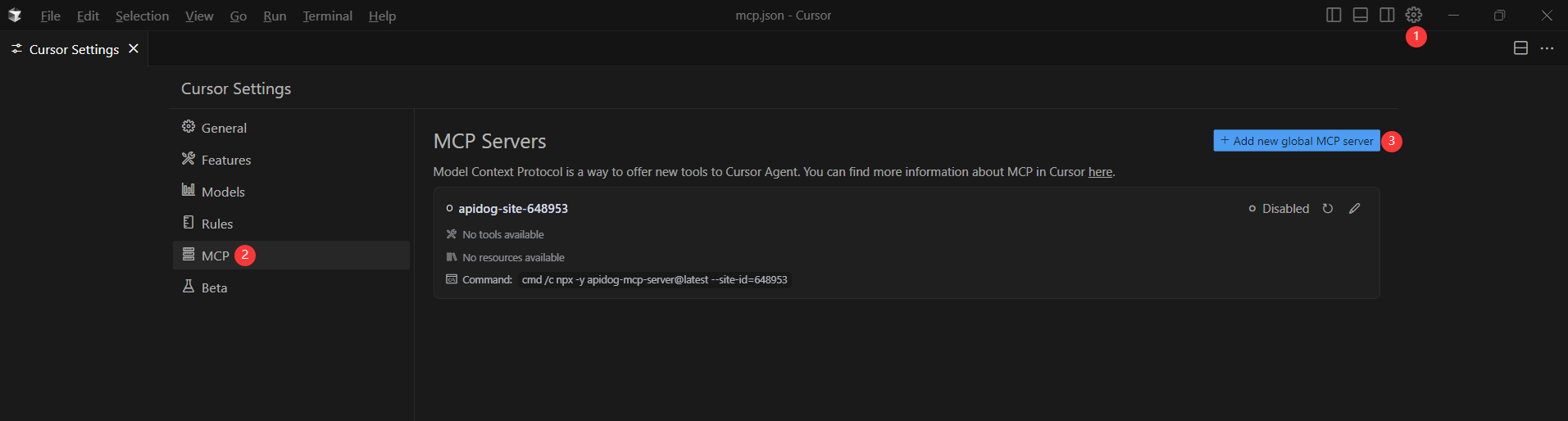
Example for MacOS/Linux:
{
  "mcpServers": {
    "API specification": {
      "command": "npx",
      "args": [
        "-y",
        "apidog-mcp-server@latest",
        "--oas=https://petstore.swagger.io/v2/swagger.json"
      ]
    }
  }
}
Example for Windows:
{
  "mcpServers": {
    "API specification": {
      "command": "cmd",
      "args": [
        "/c",
        "npx",
        "-y",
        "apidog-mcp-server@latest",
        "--oas=https://petstore.swagger.io/v2/swagger.json"
      ]
    }
  }
}
Replace https://petstore.swagger.io/v2/swagger.json with your own API’s URL or path.
Step 3: Test the Connection
In your IDE’s Agent mode, run:
Please fetch API documentation via MCP and tell me how many endpoints exist in the project.
If successful, you’ll see a structured response with endpoint details. If not, verify your OpenAPI path and Node.js setup.
Why Combine ChatGPT Team and Apidog?
By pairing the $1 ChatGPT Team plan with Apidog MCP Server, engineering teams unlock:
- Advanced GPT models with higher usage caps for code, docs, and brainstorming.
- Instant API code and documentation generation right in your IDE.
- Streamlined collaboration across backend, QA, and product teams.
- Significantly reduced dev time and operational cost.
Both tools are simple to set up and free (or nearly free) right now—making this the perfect moment to upgrade your API development stack.
Take Action: Unlock AI-Powered API Development
The $1 ChatGPT Team offer and Apidog’s free MCP Server won’t last forever. By acting now, your team can access cutting-edge AI features and drastically improve productivity—without extra expense.