Quick answer: Async tool calls for AI agents split one blocking run() into a small contract: start() returns a job handle at once, status() reports progress, stop() cancels, and the result comes back later as an event the agent reads on its next turn. The agent keeps talking and taking new instructions while slow work runs.
Most agents today call a tool and wait. Ask a second question during a 6-minute test run and it sits in a queue. That’s fine for a 200 ms lookup and painful for a deploy or a crawl.
A recent essay from the DeepSeek Harness team, “Exploring Super-agent Design”, names the fix “full-duplex”: replace the blocking run() with start() and stop(). This guide covers the agent loop’s side: the tool contract, how results flow back in, cancellation, and the API each tool needs. For the HTTP side of a single slow call, read AI Agents and Long-Running API Calls: Polling vs Webhooks.
What are async tool calls in an agent loop?
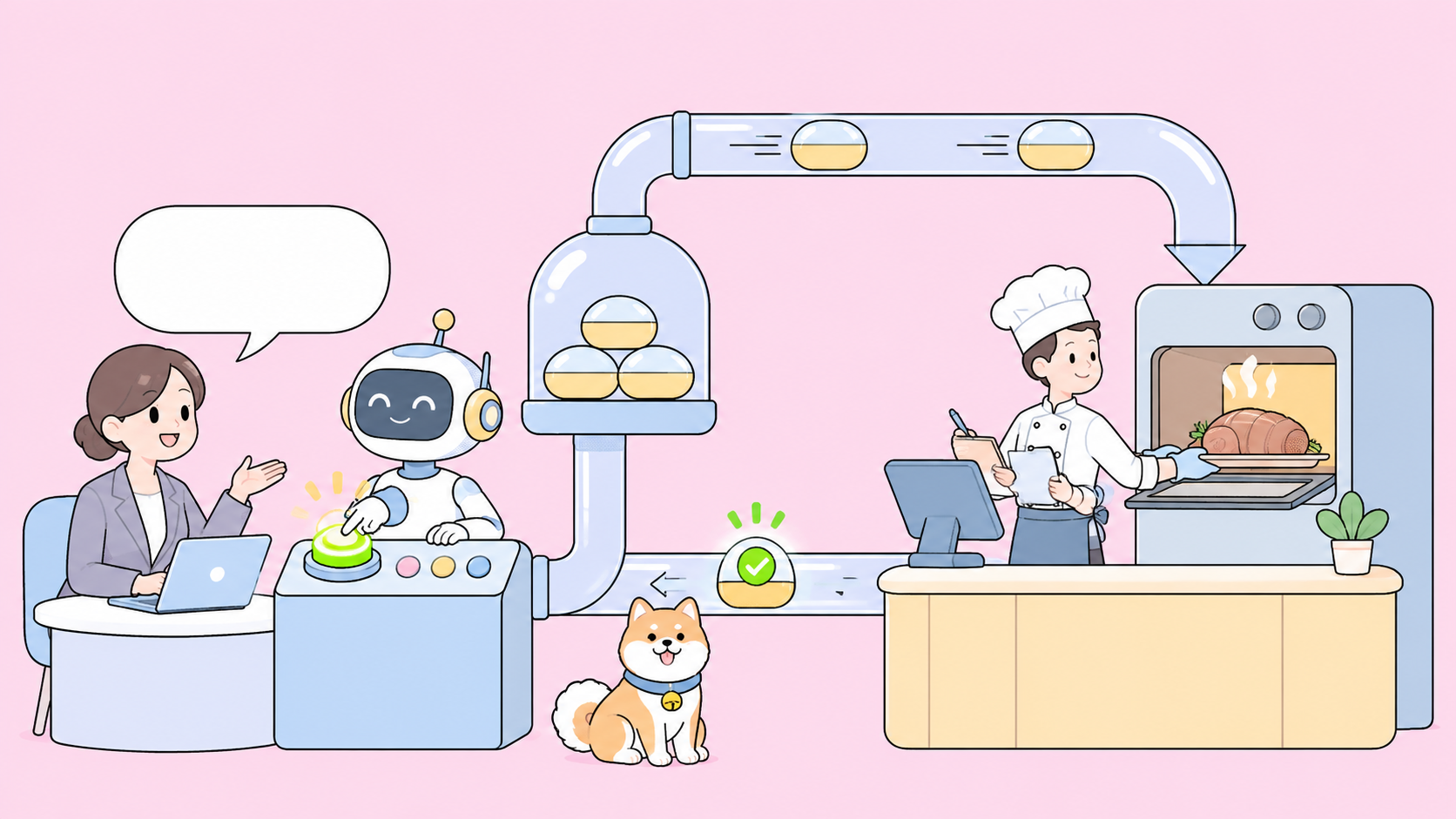
An async tool call is a tool invocation that returns a handle instead of a result. The agent loop records the handle, ends its turn, and stays free for the user. When the work finishes, the runtime injects a completion event into the conversation, and the model reads it on its next turn like any other message.
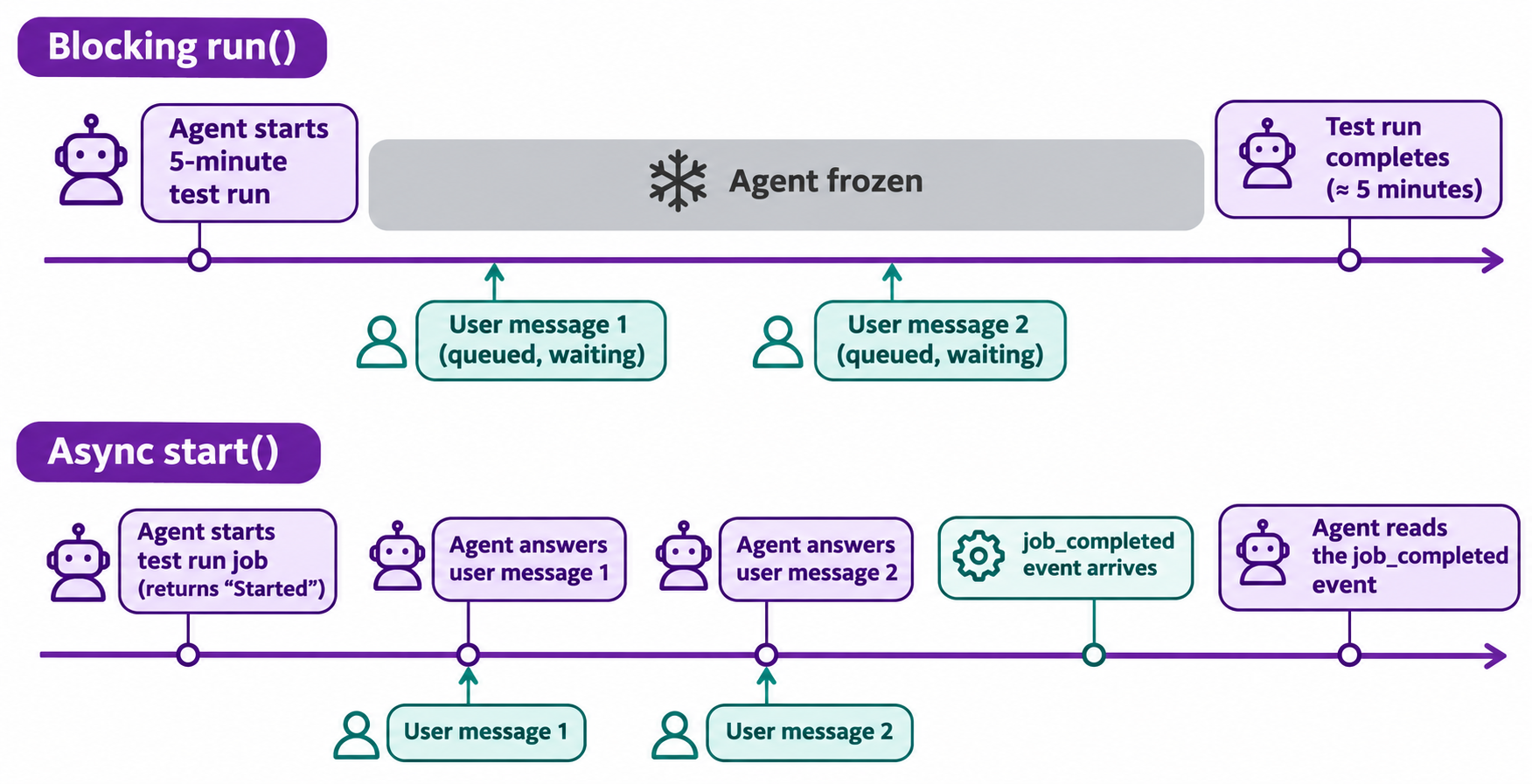
The difference is who waits: with run() the model waits, with start() the runtime does.
Blocking run() |
Async start() |
|
|---|---|---|
| Returns | Final result | Job id, “Started” |
| Agent during work | Frozen | Talking, planning, starting more jobs |
| New user message | Queued until tool returns | Handled now |
| Cancel | Kill the whole turn | stop(job_id) |
The DeepSeek essay describes this as architecture, not a shipped switch. It says full-duplex is implemented in DeepSeek Harness but not enabled by default, and parts live in a prototype plugin called dsh-superagent-prototype, which the authors say is not an official DeepSeek product. Treat it as a design to copy. For background, see what DeepSeek Harness is and the companion piece on how to build a super agent.
The blocking problem: one slow tool freezes the agent
Picture a coding agent asked to run the test suite (5 minutes) and answer a question about a failing import. With blocking calls, your question waits behind the tests even though it needs nothing from them. Three things go wrong:
- Latency stacks. Every slow tool adds its full duration to everything behind it.
- Instructions go stale. You say “actually, skip the e2e tests” two minutes in. The agent can’t hear it until the run ends.
- Timeouts bite. Gateways drop connections held open for minutes, so a long
run()can fail even when the work succeeds.
The essay calls the trait you want “productive”: the agent takes the next instruction before the last one finishes. Async tools are how you get it.
start, status, stop: the async tool contract
Give the model three tools per long-running capability instead of one, with tiny return shapes.
{
  "name": "start_test_run",
  "description": "Start the test suite. Returns immediately with a job_id. The result arrives later as a job_completed event; do not wait for it.",
  "input_schema": {
    "type": "object",
    "properties": {
      "suite": { "type": "string", "enum": ["unit", "e2e", "all"] },
      "idempotency_key": { "type": "string" }
    },
    "required": ["suite", "idempotency_key"]
  }
}
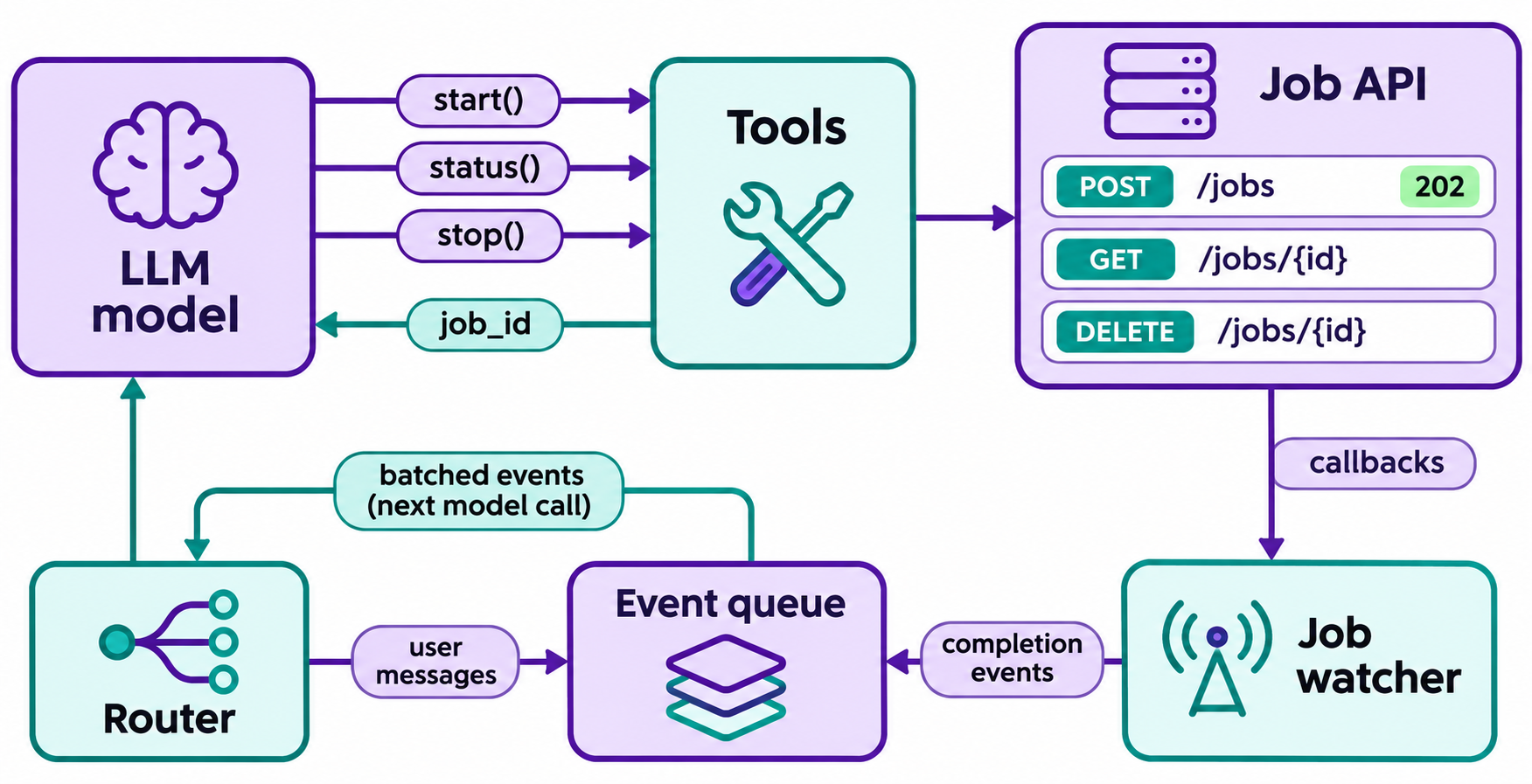
start_test_run returns {"job_id": "job_8f2", "status": "queued"} and nothing else. get_job_status(job_id) returns queued, running, done or failed, plus a short progress note. stop_job(job_id) requests cancellation and returns the state it reached.
Two rules keep the model honest: say “do not wait” in the description, or it will poll get_job_status in a tight loop, and never return data from start, or the model has to guess which shape it got.
How results come back into the loop
Polling from the model is the fallback, not the plan. The better design has the runtime watch jobs and push a completion event into the conversation as a new message:
[event] job_completed job_id=job_8f2 tool=start_test_run status=done
summary: 412 passed, 3 failed (auth/session.test.ts)
details: get_job_result(job_8f2)
Keep the event short and put the full payload behind a fetch tool, so a 40,000-line log never lands in context.
Then batch. The DeepSeek essay describes a router that collects triggers arriving during a turn and merges them into the next model call, long input and short output, folded into prefill. In their experiment, triggers went from 1 to 40 per minute, average batch size rose from 1.0 to 2.8, and time per decision fell from 6.4 s to 1.6 s. Those are the essay’s own test numbers, not a general benchmark, but one call that reads three events beats three calls that each read one. A simple rule: while the model generates, queue events and user messages; when the turn ends, send them together in arrival order.
Ordering, cancellation and idempotency keys
Ordering. Jobs finish in any order. If job B depends on job A, make the dependency explicit: either start B only after A’s completion event, or have the API accept depends_on.
Cancellation. stop is a request, not a guarantee. Return the real end state (cancelled, or done if it finished first) and let the model report it honestly. MCP’s Tasks extension takes the same position: its docs call cancellation cooperative, so a task may still reach a terminal state other than cancelled.
Idempotency keys. Models retry, so a dropped response can trigger a second start. Require an idempotency_key on every start and have the API return the existing job when it sees the key again. Without it, “run the migration” can run twice.
Partial results. Expose early output (the first 50 crawled pages) through get_job_result(job_id, cursor) instead of waiting for the end.
Context growth. Summarize finished jobs into one line once the model has acted on them.
Timeouts. Give every job a deadline and emit job_timed_out when it passes.
What the underlying API must look like
An async tool is only as good as the job API behind it: accept the work, hand back an id, let the caller check in. RFC 9110 defines 202 Accepted as “the request has been accepted for processing, but the processing has not been completed,” and MDN’s 202 reference covers the practical use.
A minimal job API for a start() tool:
| Call | Response | Used by |
|---|---|---|
POST /jobs (with Idempotency-Key header) |
202 + {"job_id", "status":"queued"} + Location: /jobs/{id} |
start |
GET /jobs/{id} |
200 + queued, running, done or failed |
status, job watcher |
GET /jobs/{id}/result |
200 with output, or 409 if not done |
fetch tool |
DELETE /jobs/{id} |
202 cancel requested, then 404 or 409 on later calls |
stop |
| Optional callback URL | POST to the caller on completion |
job watcher |
The callback is what lets the runtime push events instead of polling. If you need help picking between them, the trade-offs are in webhooks vs polling, and the event-driven API side is covered in what is AsyncAPI.
If your tools speak MCP, there’s now a standard for this. The MCP specification (version 2026-07-28) lists Tasks as an optional extension: a server can answer tools/call with a CreateTaskResult holding a taskId, the client polls tasks/get (or listens for notifications/tasks), and tasks/cancel requests a stop. Statuses are working, input_required, completed, failed and cancelled. Both client and server must opt in, and host support varies, so check your client before you depend on it.
Let your coding agent build and test the job API with Apidog CLI
The job API is the part you can verify before any agent touches it. Hand the design and the tests to your coding agent and have it drive Apidog CLI. You write one prompt; the agent writes the spec, the test cases and runs them.
Setup takes three commands:
npm install -g apidog-cli@latest
apidog auth login --with-token <YOUR_TOKEN>
npx -y skills add https://apidog.com   # pick your agent when prompted
Then give your agent one prompt:
In Apidog project <projectId>, design the job API a start() tool needs:
POST /jobs returns 202 with job_id, GET /jobs/{id} returns queued|running|done|failed,
DELETE /jobs/{id} cancels. Create the endpoints, then create test cases that assert:
202 and a job_id on create, a status that reaches done within 60 seconds,
the same job_id when the Idempotency-Key repeats, and 409 or 404 on GET result after cancel.
Run them against the staging environment <envId> and summarize failures.
The agent reads each payload shape from the CLI, validates it, then writes and runs:
apidog cli-schema get endpoint-create
apidog cli-schema validate endpoint-create --file post-jobs.json
apidog endpoint create --project <projectId> --file post-jobs.json
apidog cli-schema get test-case-create
apidog cli-schema validate test-case-create --file case-create-202.json
apidog test-case create --project <projectId> --file case-create-202.json
apidog run --test-case <caseId> --project <projectId> -e <envId> -r cli,json
The cli reporter prints pass and fail per assertion in the terminal, and the json report gives the agent something structured to read back and explain. Run the same command in CI with -r junit once the cases pass; the Apidog CLI agent workflow guide walks through that loop, and Apidog CLI in Claude Code covers agent setup. Apidog’s Free plan covers up to 4 users.
When async tools are worth it, and when they aren’t
Use async when:
- A tool regularly takes more than a few seconds (builds, test suites, crawls, renders, deploys).
- Users talk to the agent while work runs.
Stay blocking when:
- The call returns in under a second or two.
- The next step can’t start without the result anyway.
- You can’t back it with a real job API. A fake async tool that blocks internally adds complexity for nothing.
A practical split: keep reads blocking, make long writes and long computations async.
FAQ
What’s the difference between async tool calls and parallel tool calls? Parallel tool calls run several tools at once inside one turn, and the model still waits for all of them. Async tool calls return immediately and finish across later turns, so the model can keep talking while they run.
Do I need MCP to build async tools? No. Any tool that returns a job id and a runtime that injects completion events will work. MCP’s optional Tasks extension standardizes the handle, polling and cancel calls if your client and server both support it.
How does the agent know when a job finishes? The runtime tells it. A job watcher polls the job API or receives a callback, then adds a short completion event to the conversation. The model reads it on its next turn.
What happens if the user cancels mid-job? The agent calls stop(job_id), the API records the request, and the job reports its true end state. If the work finished before the cancel landed, the agent should say so rather than claim it was stopped.
Is DeepSeek’s full-duplex mode something I can switch on? Not as a product feature. The essay says it’s implemented in DeepSeek Harness but off by default, and the related plugin is a prototype the authors say isn’t an official DeepSeek product. Use it as a reference design.