

Tóm tắt / Trả lời nhanh
Để sử dụng API GPT-5.4: Cài đặt OpenAI SDK (pip install openai), khởi tạo client với khóa API, gọi chat.completions.create() với mô hình gpt-5.4. Các tính năng chính: sử dụng máy tính (tự động hóa trình duyệt gốc), tìm kiếm công cụ (giảm 47% token), cửa sổ ngữ cảnh 1 triệu token, khả năng thị giác. Giá: $2.50/M token đầu vào, $15/M token đầu ra. Hướng dẫn này bao gồm thiết lập, ví dụ mã, cấu hình sử dụng máy tính, tích hợp công cụ và các phương pháp hay nhất cho sản xuất.
Giới thiệu
GPT-5.4 không chỉ là một bản nâng cấp mô hình khác. Đây là mô hình đa năng đầu tiên của OpenAI với khả năng sử dụng máy tính gốc, tìm kiếm công cụ hiệu quả và cửa sổ ngữ cảnh 1 triệu token. Sử dụng GPT-5.4 hiệu quả đòi hỏi phải hiểu các khả năng mới này và cách tích hợp chúng vào quy trình làm việc của bạn.
Hướng dẫn này cung cấp các ví dụ mã hoạt động cho mọi tính năng chính của GPT-5.4. Bạn sẽ học cách triển khai tự động hóa sử dụng máy tính, cấu hình tìm kiếm công cụ cho máy chủ MCP, xử lý hình ảnh độ phân giải cao, xử lý cơ sở mã ngữ cảnh dài và tối ưu hóa chi phí cho việc triển khai sản xuất.
Cho dù bạn đang xây dựng tác nhân AI, tự động hóa quy trình làm việc trình duyệt hay tích hợp GPT-5.4 vào các ứng dụng hiện có, hướng dẫn này cung cấp cho bạn các chi tiết triển khai cần thiết.
Bắt đầu nhanh: Yêu cầu GPT-5.4 đầu tiên của bạn
Bắt đầu và chạy GPT-5.4 trong vòng chưa đầy 5 phút. Trước khi viết mã, hãy kiểm thử các yêu cầu API GPT-5.4 của bạn trong Apidog:
- Tạo một yêu cầu HTTP mới với POST tới
https://api.openai.com/v1/chat/completions - Thêm tiêu đề Authorization:
Bearer YOUR_API_KEY - Đặt nội dung yêu cầu với model, messages và parameters
- Gửi và kiểm tra phản hồi
- Lưu vào bộ sưu tập để kiểm thử lặp lại
- Sử dụng biến môi trường để chuyển đổi giữa các khóa API
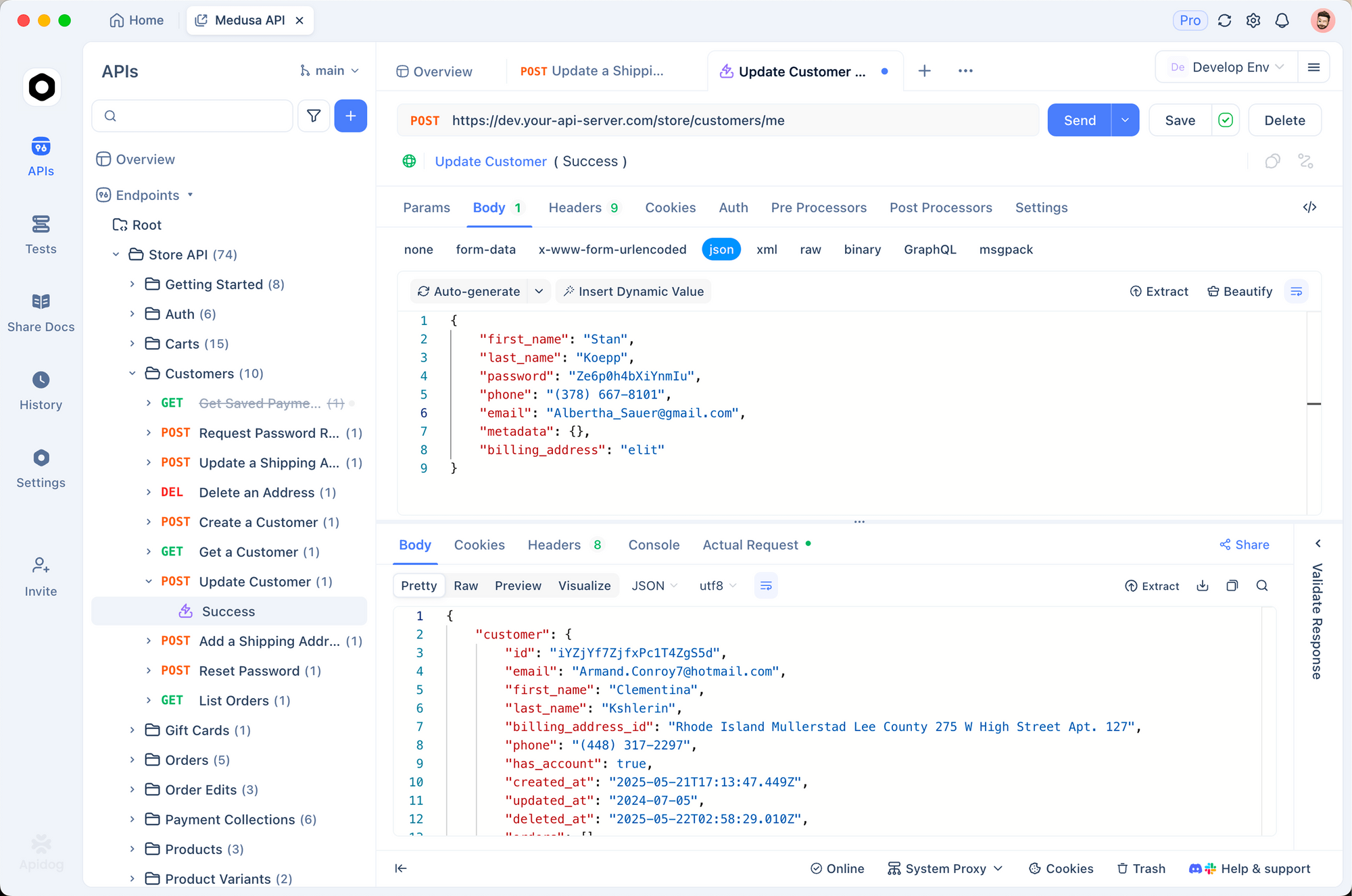
Cách tiếp cận trực quan này giúp tăng tốc kiểm thử ban đầu và giúp bạn hiểu cấu trúc API trước khi triển khai trong mã.
Điều kiện tiên quyết
- Tài khoản OpenAI đã bật thanh toán
- Khóa API từ platform.openai.com/api-keys
- Python 3.7+ hoặc Node.js 14+
Python bắt đầu nhanh
from openai import OpenAI
import os

# Initialize client
client = OpenAI(
    api_key=os.getenv("OPENAI_API_KEY")
)

# Make request
response = client.chat.completions.create(
    model="gpt-5.4",
    messages=[
        {"role": "system", "content": "You are a helpful coding assistant."},
        {"role": "user", "content": "Write a Python function to sort a list of dictionaries by a key."}
    ]
)

print(response.choices[0].message.content)
Node.js bắt đầu nhanh
const OpenAI = require('openai');

const client = new OpenAI({
    apiKey: process.env.OPENAI_API_KEY
});

async function main() {
    const response = await client.chat.completions.create({
        model: 'gpt-5.4',
        messages: [
            { role: 'system', content: 'You are a helpful coding assistant.' },
            { role: 'user', content: 'Write a Python function to sort a list of dictionaries by a key.' }
        ]
    });

    console.log(response.choices[0].message.content);
}

main();
Đầu ra dự kiến
def sort_dicts_by_key(dict_list, key, reverse=False):
    """
    Sort a list of dictionaries by a specified key.

    Args:
        dict_list: List of dictionaries to sort
        key: The dictionary key to sort by
        reverse: If True, sort in descending order

    Returns:
        Sorted list of dictionaries
    """
    return sorted(dict_list, key=lambda x: x.get(key, ''), reverse=reverse)

# Example usage
data = [
    {'name': 'Alice', 'age': 30},
    {'name': 'Bob', 'age': 25},
    {'name': 'Charlie', 'age': 35}
]

sorted_by_age = sort_dicts_by_key(data, 'age')
print(sorted_by_age)
# [{'name': 'Bob', 'age': 25}, {'name': 'Alice', 'age': 30}, {'name': 'Charlie', 'age': 35}]
Hiểu rõ các khả năng của GPT-5.4
GPT-5.4 vượt trội trong bốn lĩnh vực chính. Hiểu rõ những điều này giúp bạn chọn cách tiếp cận phù hợp cho từng trường hợp sử dụng.
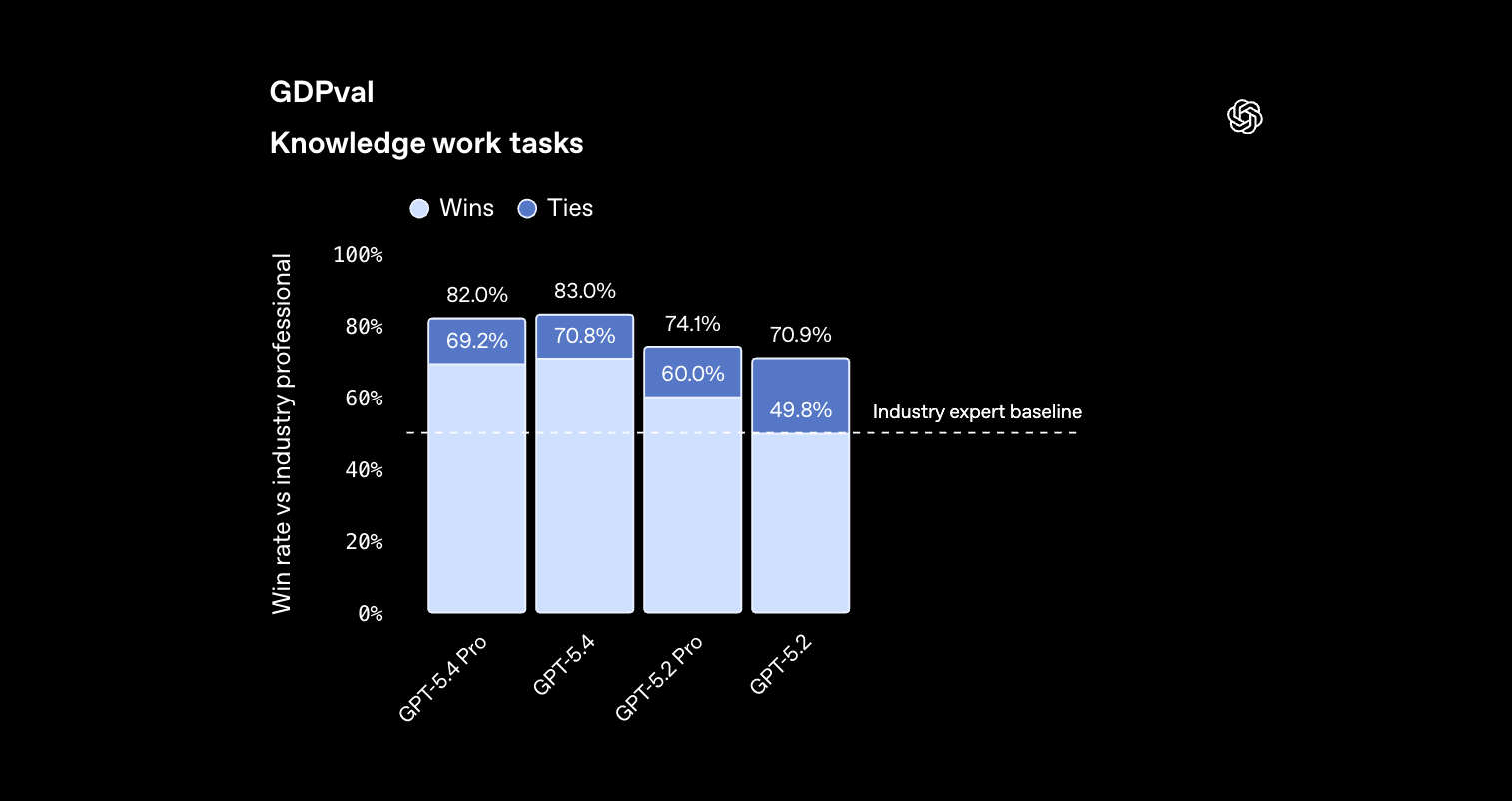
1. Công việc tri thức (Tỷ lệ thắng GDPval 83%)
Tốt nhất cho:
- Tạo và phân tích bảng tính
- Tạo bài thuyết trình
- Soạn thảo và chỉnh sửa tài liệu
- Mô hình tài chính
- Phân tích và báo cáo dữ liệu
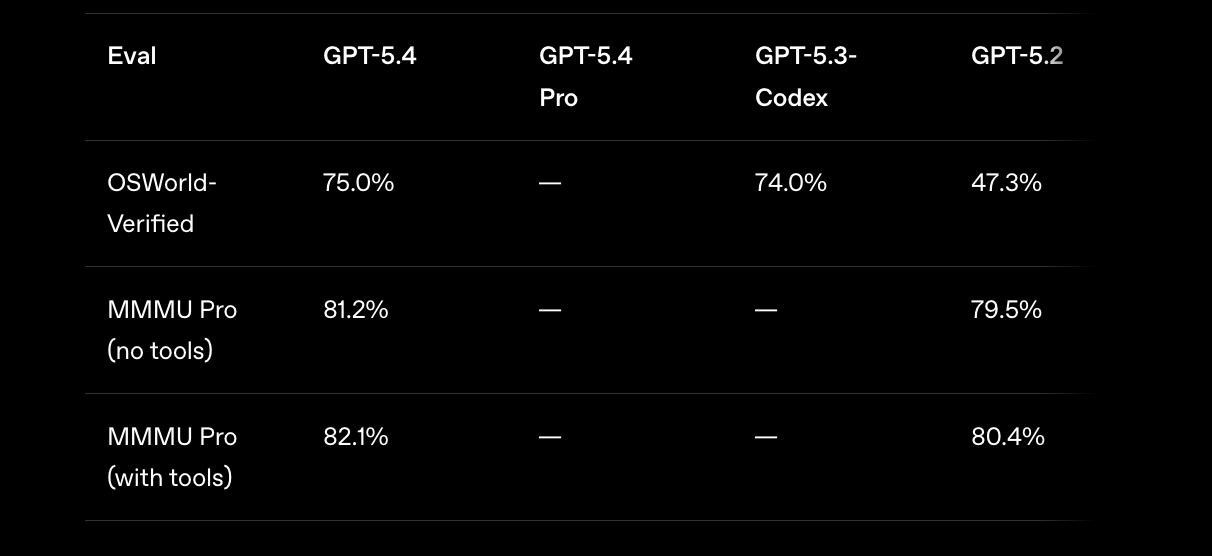
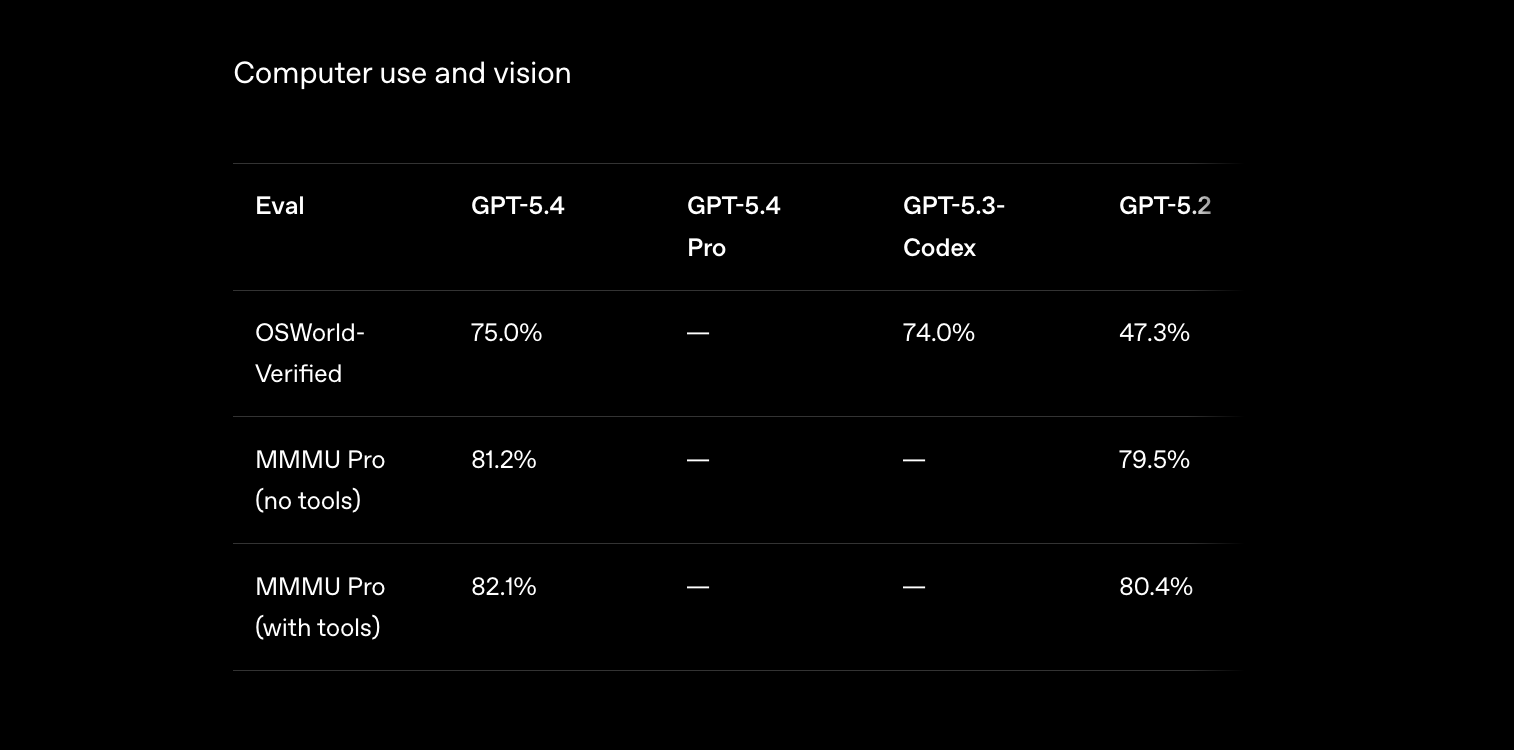
2. Sử dụng máy tính (75% được OSWorld xác minh)
Tốt nhất cho:
- Tự động hóa trình duyệt
- Nhập dữ liệu trên các ứng dụng
- Cào dữ liệu web có tương tác
- Kiểm thử quy trình làm việc
- Tự động hóa tác vụ đa ứng dụng
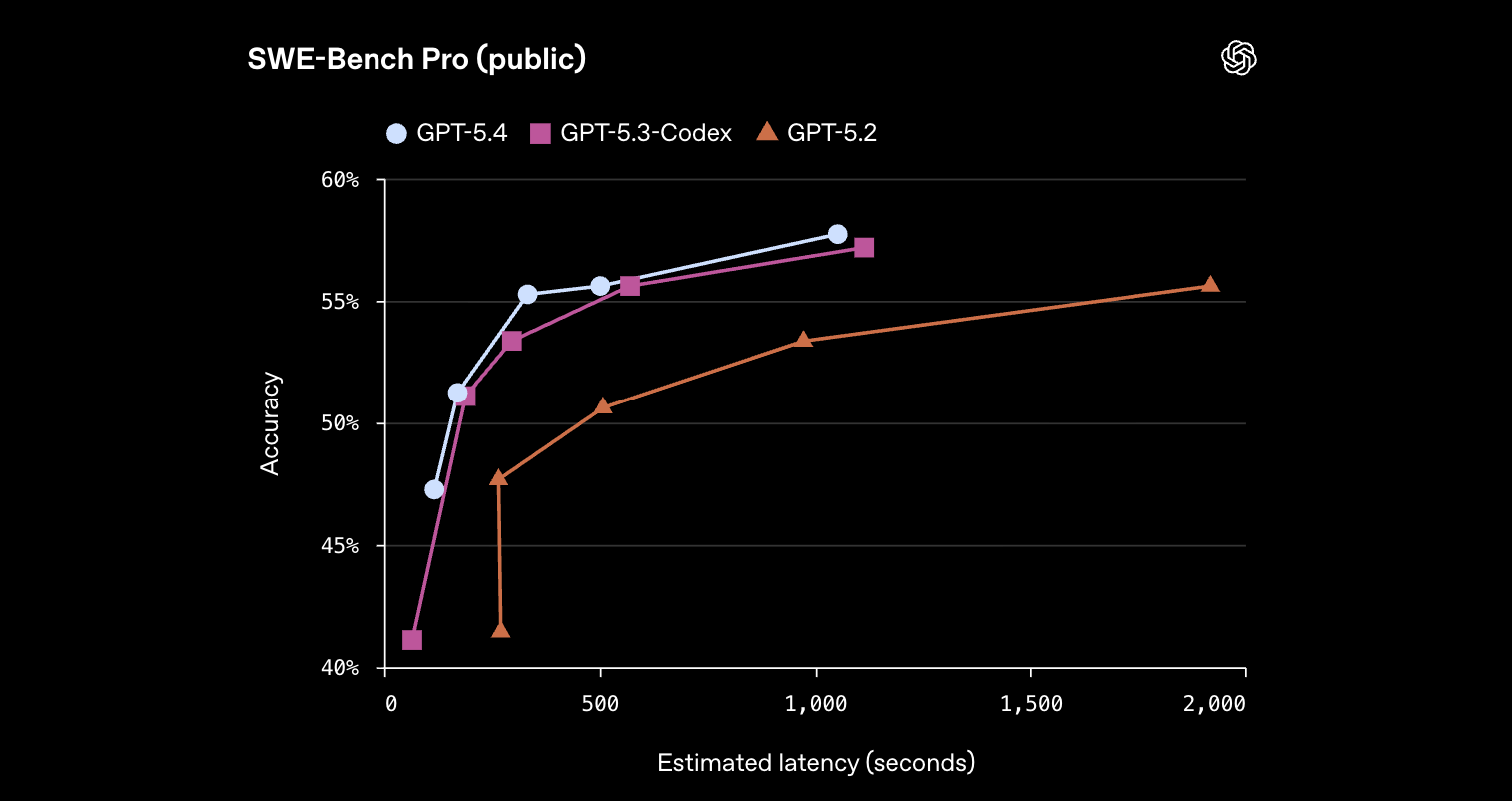
3. Mã hóa (57.7% SWE-Bench Pro)
Tốt nhất cho:
- Phát triển full-stack
- Tạo giao diện người dùng frontend
- Gỡ lỗi các vấn đề phức tạp
- Tái cấu trúc mã
- Tạo kiểm thử
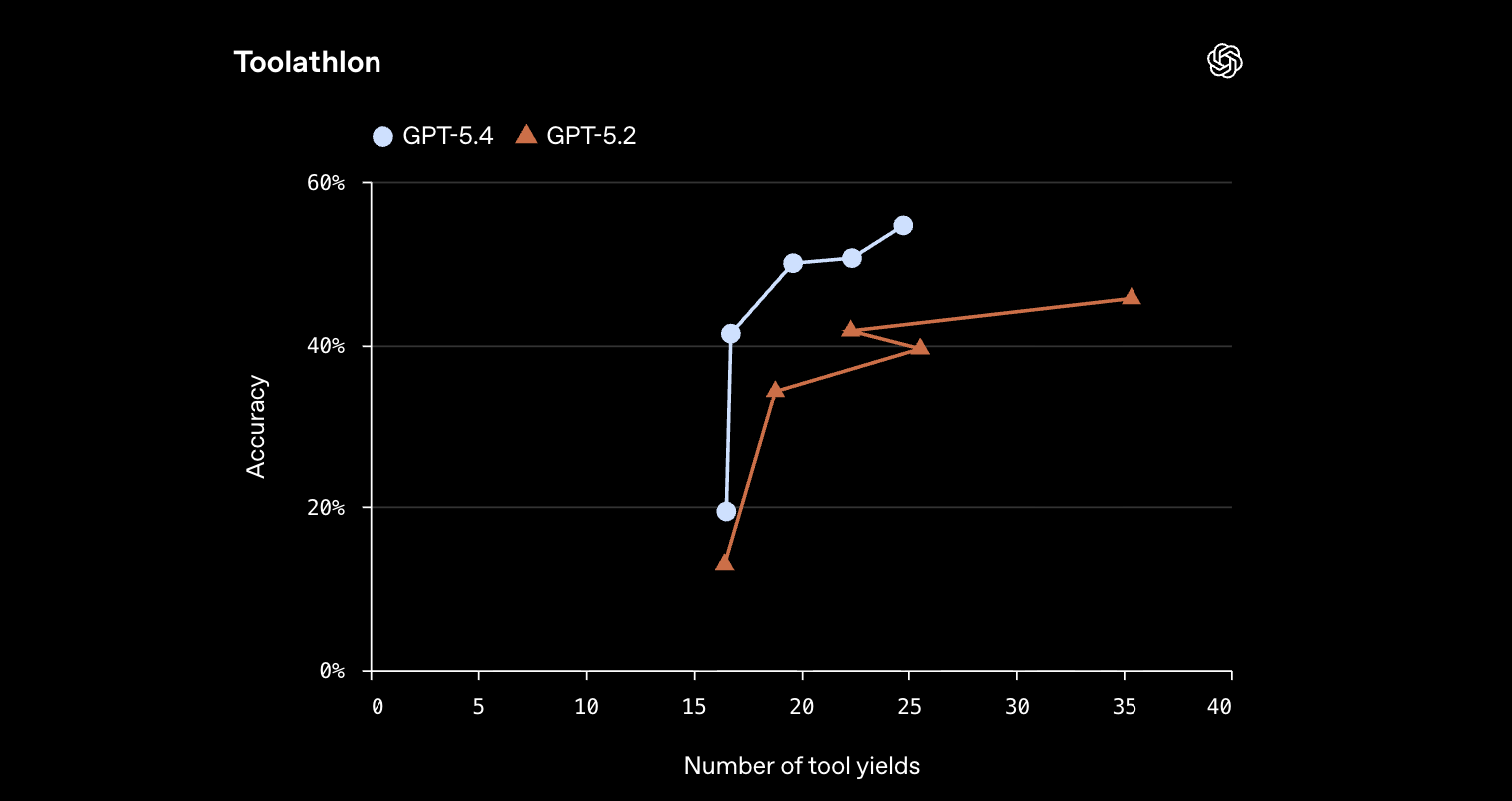
4. Tích hợp công cụ (54.6% Toolathlon)
Tốt nhất cho:
- Tích hợp máy chủ MCP
- Quy trình làm việc API đa bước
- Điều phối công cụ bên ngoài
- Ứng dụng tác nhân
API sử dụng máy tính
Khả năng sử dụng máy tính gốc của GPT-5.4 đại diện cho bước tiến lớn nhất trong bản phát hành này. Mô hình có thể vận hành máy tính thông qua ảnh chụp màn hình, lệnh chuột và nhập liệu từ bàn phím.
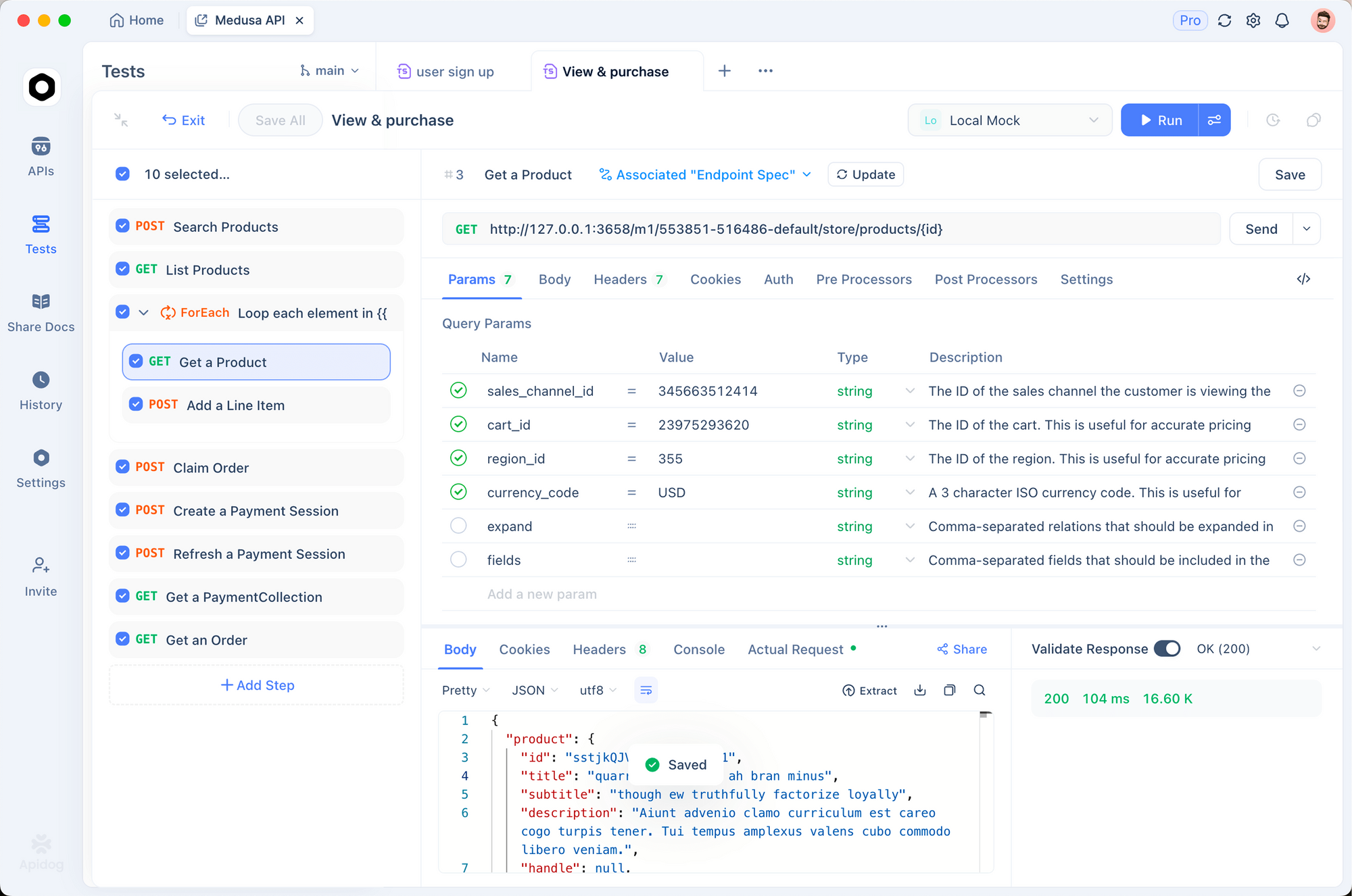
Khi xây dựng các ứng dụng có khả năng sử dụng máy tính, hãy kiểm thử từng bước của quy trình làm việc trong Apidog:
- Xác thực các điểm cuối tải ảnh chụp màn hình lên
- Kiểm thử các API thực thi lệnh (nhấp, gõ, cuộn)
- Tạo phản hồi giả định cho mỗi hành động máy tính
- Tự động hóa kiểm thử các quy trình làm việc đa lượt
- Tài liệu hóa hợp đồng API sử dụng máy tính để nhóm tham khảo
Cách thức hoạt động của tính năng sử dụng máy tính
Quy trình làm việc sử dụng máy tính sử dụng công cụ computer trong các yêu cầu API. Mô hình:
- Nhận ảnh chụp màn hình trạng thái màn hình hiện tại
- Phân tích các yếu tố giao diện người dùng và xác định hành động
- Trả về các lệnh máy tính (nhấp, gõ, cuộn, v.v.)
- Ứng dụng của bạn thực thi lệnh và chụp ảnh màn hình mới
- Vòng lặp tiếp tục cho đến khi hoàn thành tác vụ
Thiết lập sử dụng máy tính cơ bản
from openai import OpenAI
import base64

client = OpenAI()

def take_screenshot():
    """Capture current screen state - implement for your platform."""
    # Use pyautogui, PIL, or platform-specific screenshot
    import pyautogui
    screenshot = pyautogui.screenshot()
    import io
    buffer = io.BytesIO()
    screenshot.save(buffer, format='PNG')
    return base64.b64encode(buffer.getvalue()).decode('utf-8')

def execute_computer_command(command):
    """Execute computer command - implement based on command type."""
    import pyautogui

    action = command.get('action')

    if action == 'click':
        x, y = command.get('coordinate', [0, 0])
        pyautogui.click(x, y)
    elif action == 'type':
        text = command.get('text', '')
        pyautogui.write(text, interval=0.05)
    elif action == 'scroll':
        amount = command.get('scroll_amount', 0)
        pyautogui.scroll(amount)
    elif action == 'keypress':
        key = command.get('key', '')
        pyautogui.press(key)

    # Return new screenshot after action
    return take_screenshot()

# Computer use conversation
messages = [{
    "role": "user",
    "content": [
        {
            "type": "text",
            "text": "Navigate to gmail.com and log in with the credentials I provided."
        },
        {
            "type": "image_url",
            "image_url": {
                "url": f"data:image/png;base64,{take_screenshot()}"
            }
        }
    ]
}]

# Request with computer tool
response = client.chat.completions.create(
    model="gpt-5.4",
    messages=messages,
    tools=[{
        "type": "computer",
        "display_width": 1920,
        "display_height": 1080,
        "display_number": 1
    }],
    tool_choice="required"
)

# Parse and execute computer commands
for tool_call in response.choices[0].message.tool_calls:
    if tool_call.type == "computer":
        command = tool_call.function.arguments
        new_screenshot = execute_computer_command(command)

        # Continue conversation with new screenshot
        messages.append({
            "role": "assistant",
            "content": response.choices[0].message.content
        })
        messages.append({
            "role": "user",
            "content": [{
                "type": "image_url",
                "image_url": {"url": f"data:image/png;base64,{new_screenshot}"}
            }]
        })
Chính sách an toàn sử dụng máy tính
Cấu hình hành vi an toàn dựa trên mức độ chấp nhận rủi ro của bạn:
# Safe mode - requires confirmation for sensitive actions
response = client.chat.completions.create(
    model="gpt-5.4",
    messages=messages,
    tools=[{
        "type": "computer",
        "display_width": 1920,
        "display_height": 1080,
        "confirmation_policy": "always"  # or "never" or "selective"
    }],
    # Custom system message for safety
    system_message="""You are operating a computer. Follow these safety rules:
    1. Never enter credentials without explicit user confirmation
    2. Ask before deleting files or data
    3. Confirm before sending emails or messages
    4. Report any errors or unexpected states immediately
    """
)
Ví dụ tự động hóa trình duyệt
Tự động hóa các tác vụ trình duyệt với tích hợp Playwright:
from playwright.sync_api import sync_playwright

def browser_automation_workflow():
    with sync_playwright() as p:
        browser = p.chromium.launch(headless=False)
        page = browser.new_page()

        # Navigate to page
        page.goto("https://example.com")

        # Get screenshot for GPT-5.4
        screenshot = page.screenshot()
        screenshot_b64 = base64.b64encode(screenshot).decode('utf-8')

        messages = [{
            "role": "user",
            "content": [
                {"type": "text", "text": "Find the login form and fill it out."},
                {"type": "image_url", "image_url": {"url": f"data:image/png;base64,{screenshot_b64}"}}
            ]
        }]

        # Get computer commands from GPT-5.4
        response = client.chat.completions.create(
            model="gpt-5.4",
            messages=messages,
            tools=[{"type": "computer"}],
            tool_choice="required"
        )

        # Parse and execute commands on browser
        for tool_call in response.choices[0].message.tool_calls:
            if tool_call.type == "computer":
                command = json.loads(tool_call.function.arguments)

                if command.get('action') == 'click':
                    x, y = command.get('coordinate', [0, 0])
                    page.mouse.click(x, y)
                elif command.get('action') == 'type':
                    page.keyboard.type(command.get('text', ''))

                # Get new screenshot and continue
                new_screenshot = page.screenshot()
                # ... continue loop
Tự động hóa email và lịch
Ví dụ thực tế: Xử lý email và lên lịch sự kiện:
def process_email_and_schedule_meeting():
    """
    Workflow: Read unread emails, extract meeting requests,
    check calendar availability, and send calendar invites.
    """

    workflow_prompt = """
    Complete this workflow:
    1. Open Gmail and find unread emails from the last 24 hours
    2. Identify any meeting requests or scheduling questions
    3. For each meeting request:
       - Extract proposed dates/times
       - Note attendees and meeting purpose
    4. Open Google Calendar and check availability
    5. Send calendar invites for confirmed meetings
    6. Reply to emails confirming the scheduled time

    Report back with a summary of what was accomplished.
    """

    # Start with inbox screenshot
    screenshot = take_screenshot()

    messages = [{
        "role": "user",
        "content": [
            {"type": "text", "text": workflow_prompt},
            {"type": "image_url", "image_url": {"url": f"data:image/png;base64,{screenshot}"}}
        ]
    }]

    # Execute multi-turn computer use workflow
    for turn in range(10):  # Limit turns to prevent infinite loops
        response = client.chat.completions.create(
            model="gpt-5.4",
            messages=messages,
            tools=[{"type": "computer"}],
            tool_choice="required"
        )

        # Check if task is complete
        if "complete" in response.choices[0].message.content.lower():
            print(f"Workflow completed in {turn + 1} turns")
            break

        # Execute computer commands and get new screenshot
        # ... (command execution logic from earlier example)
Tối ưu hóa hiệu suất
Kết quả của Mainstay xử lý 30 nghìn cổng thuế tài sản:
- Tỷ lệ thành công lần đầu 95%
- Nhanh hơn 3 lần so với các mô hình trước
- Ít token hơn 70% mỗi phiên
Mẹo tối ưu hóa:
- Sử dụng ảnh chụp màn hình chất lượng cao (tối thiểu 1920x1080)
- Cung cấp mô tả tác vụ rõ ràng, cụ thể
- Thực hiện giới hạn lượt để ngăn chặn vòng lặp
- Lưu trữ ảnh chụp màn hình vào bộ nhớ đệm để tránh chụp lại không cần thiết
- Sử dụng chính sách xác nhận chọn lọc cho các quy trình làm việc đáng tin cậy
Tìm kiếm và Tích hợp Công cụ
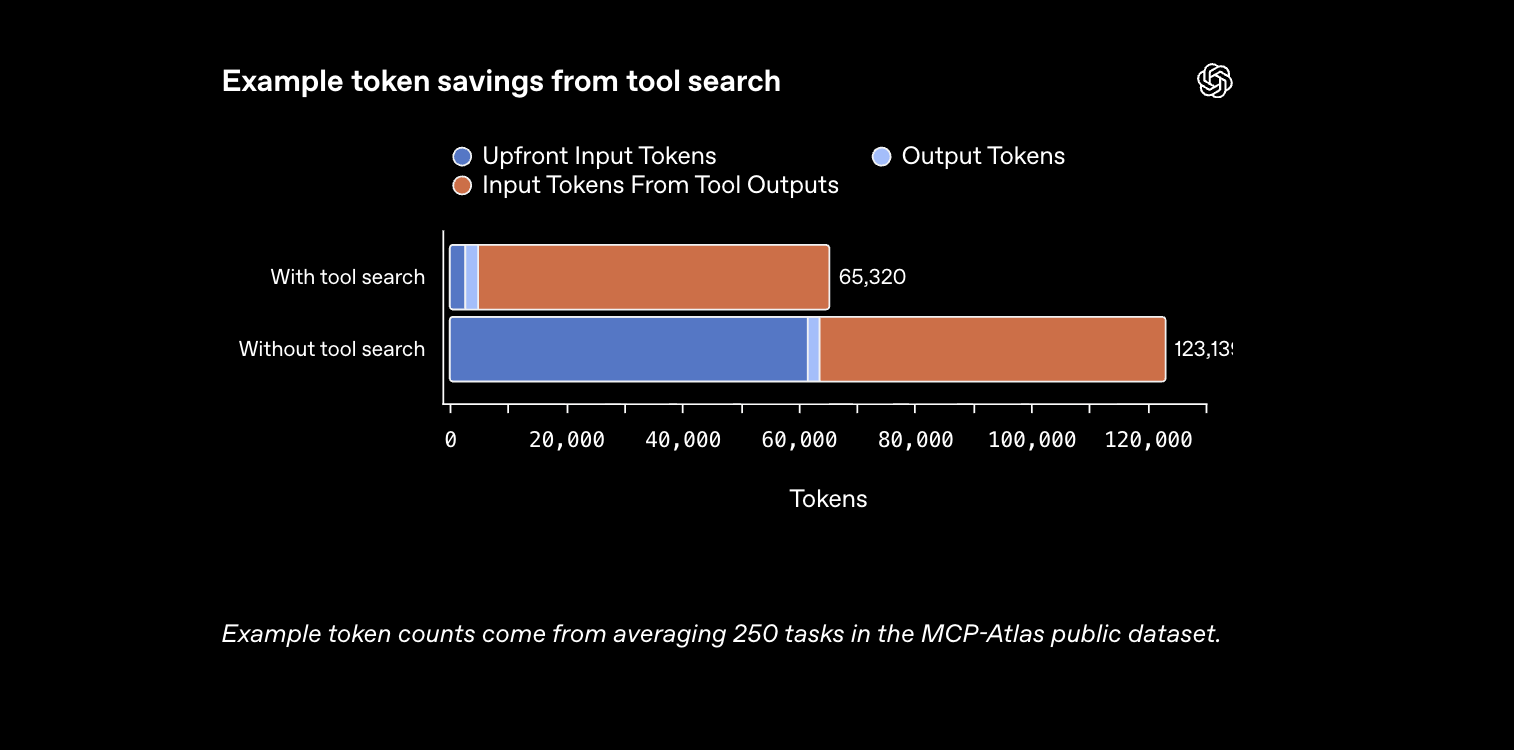
Tìm kiếm công cụ giảm 47% lượng token sử dụng trong khi cho phép làm việc với các hệ sinh thái công cụ lớn.
Cách thức hoạt động của Tìm kiếm Công cụ
Thay vì tải tất cả định nghĩa công cụ ngay từ đầu, mô hình nhận một danh sách nhẹ và tìm kiếm định nghĩa theo yêu cầu.
Thiết lập Tìm kiếm Công cụ cơ bản
# Define available tools (lightweight list)
available_tools = [
    {
        "name": "get_weather",
        "description": "Get current weather for a location"
    },
    {
        "name": "send_email",
        "description": "Send an email to a recipient"
    },
    {
        "name": "calendar_search",
        "description": "Search calendar for events"
    },
    # ... hundreds more tools
]

# Initial request - model sees tool list, not full definitions
response = client.chat.completions.create(
    model="gpt-5.4",
    messages=[
        {"role": "user", "content": "What's the weather in Tokyo and send it to my team?"}
    ],
    tools=available_tools,
    tool_choice="auto"
)

# If model wants to use a tool, it requests the definition
# Your application provides the full definition at that point
Tích hợp máy chủ MCP
Điểm chuẩn MCP Atlas của Scale cho thấy giảm 47% lượng token với tính năng tìm kiếm công cụ.
# MCP Server with many tools
mcp_servers = [
    {
        "name": "filesystem",
        "description": "File system operations",
        "tool_count": 12
    },
    {
        "name": "database",
        "description": "Database query operations",
        "tool_count": 8
    },
    {
        "name": "web-search",
        "description": "Web search and scraping",
        "tool_count": 15
    }
    # ... 36 MCP servers in benchmark
]

# Tool search configuration
response = client.chat.completions.create(
    model="gpt-5.4",
    messages=[
        {"role": "user", "content": "Find all Python files modified today and search for TODO comments."}
    ],
    tools=mcp_servers,
    # Tool search enabled automatically when using this pattern
    parallel_tool_calls=True
)

# Model will request tool definitions as needed
# Token savings: 47% vs loading all definitions upfront
Quy trình làm việc đa bước kiểu Toolathlon
Toolathlon kiểm thử các quy trình làm việc công cụ đa bước phức tạp:
def grade_assignments_workflow():
    """
    Complex workflow: Read emails with attachments,
    upload to grading system, grade assignments,
    record results in spreadsheet.
    """

    workflow_steps = """
    1. Read emails from students with assignment attachments
    2. Download each attachment
    3. Upload to grading portal
    4. Grade each assignment using rubric
    5. Record grades in spreadsheet
    6. Send confirmation emails to students
    """

    tools = [
        {"name": "email_read", "description": "Read emails from inbox"},
        {"name": "email_send", "description": "Send emails"},
        {"name": "file_download", "description": "Download file attachments"},
        {"name": "file_upload", "description": "Upload files to web portal"},
        {"name": "web_form_fill", "description": "Fill and submit web forms"},
        {"name": "spreadsheet_write", "description": "Write data to spreadsheet"},
        {"name": "rubric_evaluate", "description": "Evaluate work against rubric"}
    ]

    response = client.chat.completions.create(
        model="gpt-5.4",
        messages=[
            {"role": "user", "content": workflow_steps}
        ],
        tools=tools,
        parallel_tool_calls=True  # Enable parallel tool execution
    )

    # GPT-5.4 achieves 54.6% on Toolathlon vs 45.7% for GPT-5.2
    # Key: Better tool selection and fewer turns required
Thị giác và Xử lý hình ảnh
GPT-5.4 hỗ trợ nhận thức thị giác nâng cao với chi tiết hình ảnh gốc lên đến 10.24M pixel.
Các mức độ chi tiết hình ảnh
# Original detail - highest fidelity (10.24M pixels, 6000px max dimension)
response = client.chat.completions.create(
    model="gpt-5.4",
    messages=[{
        "role": "user",
        "content": [
            {
                "type": "image_url",
                "image_url": {
                    "url": "https://example.com/high-res-image.jpg",
                    "detail": "original"  # or "high" or "low"
                }
            },
            {"type": "text", "text": "Analyze this technical diagram."}
        ]
    }]
)

# High detail - 2.56M pixels, 2048px max dimension
# Low detail - Fastest processing, lower accuracy
Ví dụ phân tích tài liệu
OmniDocBench: tỷ lệ lỗi 0.109 (so với 0.140 của GPT-5.2)
def parse_complex_document(pdf_path):
    """Parse multi-page PDF with tables and figures."""

    # Convert PDF pages to images
    from pdf2image import convert_from_path
    pages = convert_from_path(pdf_path, dpi=300)

    messages = [{"role": "user", "content": []}]

    for i, page in enumerate(pages[:5]):  # First 5 pages
        import io, base64
        buffer = io.BytesIO()
        page.save(buffer, format='PNG')
        img_b64 = base64.b64encode(buffer.getvalue()).decode()

        messages[0]["content"].append({
            "type": "image_url",
            "image_url": {
                "url": f"data:image/png;base64,{img_b64}",
                "detail": "high"
            }
        })

    messages[0]["content"].append({
        "type": "text",
        "text": """
        Extract all data from this document:
        1. Tables with row/column headers
        2. Key figures and their captions
        3. Summary statistics mentioned in text
        Return as structured JSON.
        """
    })

    response = client.chat.completions.create(
        model="gpt-5.4",
        messages=messages
    )

    return response.choices[0].message.content
Phân tích ảnh chụp màn hình giao diện người dùng
def analyze_ui_screenshot(screenshot_path):
    """Analyze UI screenshot for accessibility issues."""

    with open(screenshot_path, 'rb') as f:
        img_b64 = base64.b64encode(f.read()).decode()

    response = client.chat.completions.create(
        model="gpt-5.4",
        messages=[{
            "role": "user",
            "content": [
                {
                    "type": "image_url",
                    "image_url": {
                        "url": f"data:image/png;base64,{img_b64}",
                        "detail": "original"
                    }
                },
                {
                    "type": "text",
                    "text": """
                    Review this UI screenshot for accessibility issues:
                    1. Color contrast problems
                    2. Missing labels or alt text indicators
                    3. Keyboard navigation issues (visible focus states)
                    4. Text size and readability
                    5. Screen reader compatibility concerns

                    List issues with specific locations and severity.
                    """
                }
            ]
        }]
    )

    return response.choices[0].message.content
Quy trình làm việc ngữ cảnh dài
GPT-5.4 hỗ trợ cửa sổ ngữ cảnh lên đến 1 triệu token (thử nghiệm).
Ngữ cảnh tiêu chuẩn (272K token)
# Load large codebase file
with open('large_codebase.py', 'r') as f:
    code = f.read()

response = client.chat.completions.create(
    model="gpt-5.4",
    messages=[
        {"role": "system", "content": "You are a code review assistant."},
        {"role": "user", "content": f"""
        Review this codebase for:
        1. Security vulnerabilities
        2. Performance issues
        3. Code style inconsistencies
        4. Missing error handling

        Code:
        {code}
        """}
    ],
    max_tokens=4000
)
Ngữ cảnh mở rộng (1 triệu token)
Cấu hình qua các tham số API:
response = client.chat.completions.create(
    model="gpt-5.4",
    messages=[
        {"role": "user", "content": large_document}
    ],
    # Extended context configuration
    extra_body={
        "model_context_window": 1048576,  # 1M tokens
        "model_auto_compact_token_limit": 272000  # Auto-compact after 272K
    }
)

# Note: Requests exceeding 272K count at 2x usage rate
Phân tích đa tài liệu
def analyze_multiple_documents(documents):
    """Analyze 10+ documents in single context."""

    content_parts = []

    for i, doc in enumerate(documents):
        content_parts.append(f"=== Document {i+1}: {doc['title']} ===\n")
        content_parts.append(doc['content'][:50000])  # Truncate if needed
        content_parts.append("\n\n")

    combined_content = "".join(content_parts)

    response = client.chat.completions.create(
        model="gpt-5.4",
        messages=[{
            "role": "user",
            "content": f"""
            Analyze these documents and provide:
            1. Summary of key themes across all documents
            2. Contradictions or inconsistencies between documents
            3. Action items mentioned in any document
            4. Timeline of events if applicable

            {combined_content}
            """
        }],
        max_tokens=8000
    )

    return response.choices[0].message.content
Quy trình làm việc mã hóa và phát triển
GPT-5.4 khớp với GPT-5.3-Codex trên SWE-Bench Pro (57.7%) với các khả năng sử dụng máy tính bổ sung.
Tạo giao diện người dùng (Frontend)
def generate_frontend_component(spec):
    """Generate complete React component with styling."""

    prompt = f"""
    Create a complete React component based on this specification:

    {spec}

    Requirements:
    1. Functional component with hooks
    2. TypeScript types for all props and state
    3. Tailwind CSS for styling
    4. Responsive design (mobile, tablet, desktop)
    5. Accessibility (ARIA labels, keyboard navigation)
    6. Unit tests with Jest/React Testing Library

    Return complete code for:
    - Component file (.tsx)
    - Styles (if not Tailwind)
    - Test file (.test.tsx)
    """

    response = client.chat.completions.create(
        model="gpt-5.4",
        messages=[{"role": "user", "content": prompt}],
        max_tokens=6000
    )

    return response.choices[0].message.content

# Example: Theme park simulation (from OpenAI demo)
theme_park_spec = """
Create an interactive isometric theme park simulation game:
- Tile-based path placement
- Ride and scenery construction
- Guest pathfinding and queueing
- Park metrics (money, guests, happiness, cleanliness)
- Browser-playable with Playwright testing
- Generated isometric assets
"""

component_code = generate_frontend_component(theme_park_spec)
Gỡ lỗi các vấn đề phức tạp
def debug_with_full_context(error_logs, codebase_files, stack_trace):
    """Debug using full context of logs, code, and stack trace."""

    context = f"""
    ERROR LOGS:
    {error_logs}

    STACK TRACE:
    {stack_trace}

    RELEVANT CODE FILES:
    {codebase_files}

    Task: Identify the root cause and provide a fix.
    Consider:
    1. Race conditions or timing issues
    2. Memory leaks or resource exhaustion
    3. Incorrect assumptions about data flow
    4. Edge cases not handled
    5. External dependency issues

    Provide:
    1. Root cause analysis
    2. Specific code changes needed
    3. Tests to prevent regression
    """

    response = client.chat.completions.create(
        model="gpt-5.4",
        messages=[{"role": "user", "content": context}],
        max_tokens=4000
    )

    return response.choices[0].message.content
Kiểm thử tương tác Playwright
Kỹ năng Codex thử nghiệm để kiểm thử trình duyệt:
def playwright_interactive_debug():
    """
    Use Playwright Interactive for browser playtesting.
    GPT-5.4 can test apps while building them.
    """

    prompt = """
    Build a todo web application and test it as you build:

    1. Create HTML structure
    2. Add CSS styling
    3. Implement JavaScript functionality
    4. After each feature, use Playwright to:
       - Verify element visibility
       - Test user interactions
       - Check state persistence
       - Validate edge cases

    Report any issues found during testing and fix them.
    """

    response = client.chat.completions.create(
        model="gpt-5.4",
        messages=[{"role": "user", "content": prompt}],
        tools=[{"type": "playwright_interactive"}],
        max_tokens=8000
    )

    return response.choices[0].message.content
Phản hồi phát trực tuyến
Phát trực tuyến giảm độ trễ cảm nhận cho các phản hồi dài.
Phát trực tuyến Python
from openai import OpenAI

client = OpenAI()

stream = client.chat.completions.create(
    model="gpt-5.4",
    messages=[{"role": "user", "content": "Write a detailed explanation of quantum computing."}],
    stream=True
)

for chunk in stream:
    if chunk.choices[0].delta.content:
        print(chunk.choices[0].delta.content, end="", flush=True)
Phát trực tuyến Node.js
const stream = await client.chat.completions.create({
    model: 'gpt-5.4',
    messages: [{ role: 'user', content: 'Write a detailed explanation of quantum computing.' }],
    stream: true
});

for await (const chunk of stream) {
    if (chunk.choices[0].delta.content) {
        process.stdout.write(chunk.choices[0].delta.content);
    }
}
Phát trực tuyến với đếm token
def stream_with_usage(stream):
    """Track token usage while streaming."""
    total_tokens = 0

    for chunk in stream:
        if chunk.choices[0].delta.content:
            content = chunk.choices[0].delta.content
            print(content, end="", flush=True)
            total_tokens += len(content) // 4  # Rough estimate

        if chunk.usage:
            print(f"\n\nUsage: {chunk.usage.total_tokens} tokens")

    return total_tokens
Xử lý lỗi và Logic thử lại
Mã sản xuất cần xử lý lỗi mạnh mẽ.
Xử lý lỗi toàn diện
from openai import OpenAI, RateLimitError, APIError, AuthenticationError
import time

client = OpenAI()

def make_request_with_retry(messages, max_retries=3):
    """Make request with exponential backoff retry logic."""

    for attempt in range(max_retries):
        try:
            response = client.chat.completions.create(
                model="gpt-5.4",
                messages=messages,
                max_tokens=2000,
                temperature=0.7
            )
            return response

        except RateLimitError as e:
            if attempt == max_retries - 1:
                raise

            wait_time = 2 ** attempt  # 1s, 2s, 4s
            print(f"Rate limited. Waiting {wait_time}s...")
            time.sleep(wait_time)

        except APIError as e:
            if e.status_code >= 500:  # Server error, retry
                if attempt == max_retries - 1:
                    raise
                wait_time = 2 ** attempt
                time.sleep(wait_time)
            else:
                raise  # Client error, don't retry

        except AuthenticationError:
            print("Invalid API key. Check your credentials.")
            raise

        except Exception as e:
            print(f"Unexpected error: {e}")
            raise

    raise Exception("Max retries exceeded")

# Usage
try:
    response = make_request_with_retry([
        {"role": "user", "content": "Hello, GPT-5.4!"}
    ])
    print(response.choices[0].message.content)
except Exception as e:
    print(f"Request failed: {e}")
Xử lý thời gian chờ
import httpx

# Configure timeout
client = OpenAI(
    timeout=httpx.Timeout(60.0, connect=10.0)  # 60s total, 10s connect
)

try:
    response = client.chat.completions.create(
        model="gpt-5.4",
        messages=[{"role": "user", "content": "Long-running task..."}]
    )
except httpx.TimeoutException:
    print("Request timed out. Consider using streaming or reducing complexity.")
Các phương pháp hay nhất cho sản xuất
Sử dụng Apidog cho quy trình làm việc API sản xuất
Trước khi triển khai tích hợp GPT-5.4 vào sản xuất, hãy thiết lập các quy trình kiểm thử và giám sát mạnh mẽ:
Quy trình kiểm thử API:
- Sử dụng Apidog để tạo các bộ kiểm thử toàn diện bao gồm các trường hợp thành công và lỗi
- Tự động hóa kiểm thử API trong các pipeline CI/CD để phát hiện các thay đổi gây lỗi
- Giả lập phản hồi của GPT-5.4 cho các kiểm thử tích hợp để tránh chi phí token
- Tự động tạo tài liệu API từ các yêu cầu đã kiểm thử
Cộng tác nhóm:
- Chia sẻ bộ sưu tập API với các thành viên trong nhóm để có các mẫu tích hợp nhất quán
- Sử dụng biến môi trường để quản lý các khóa API khác nhau (dev/staging/production)
- Thêm tài liệu yêu cầu giải thích hành vi mong đợi và các trường hợp biên
Mô hình tích hợp:
Chiến lược tối ưu hóa chi phí
Tối ưu hóa lời nhắc
# Bad: Lời nhắc dài dòng
bad_prompt = """
Hello! I hope you're doing well. I was wondering if you could possibly help me
with something. I have this code here and I'm not quite sure what it does.
Could you please explain it to me? Here's the code:
""" + code

# Good: Lời nhắc trực tiếp
good_prompt = f"Explain what this code does:\n{code}"

# Tiết kiệm token: ~50 token = $0.000125 cho mỗi yêu cầu
# Với 1 triệu yêu cầu/tháng: tiết kiệm $125
Kiểm soát độ dài phản hồi
# Đặt max_tokens thích hợp
response = client.chat.completions.create(
    model="gpt-5.4",
    messages=[{"role": "user", "content": "Summarize this article."}],
    max_tokens=200  # Đừng để nó dài dòng
)

# Sử dụng chuỗi dừng
response = client.chat.completions.create(
    model="gpt-5.4",
    messages=[{"role": "user", "content": "List 5 items."}],
    stop=["\n\n", "6."]  # Dừng sau danh sách
)
Xử lý theo lô
# Sử dụng Batch API để được giảm giá 50%
from openai import OpenAI

client = OpenAI()

# Tạo tệp lô
batch_requests = []
for article in articles:
    batch_requests.append({
        "custom_id": article["id"],
        "method": "POST",
        "url": "/v1/chat/completions",
        "body": {
            "model": "gpt-5.4",
            "messages": [{"role": "user", "content": article["content"]}]
        }
    })

# Tải lên và xử lý
batch_file = client.files.create(
    file=json.dumps(batch_requests),
    purpose="batch"
)

batch = client.batches.create(
    input_file_id=batch_file.id,
    endpoint="/v1/chat/completions",
    completion_window="24h"
)

# Tiết kiệm 50% chi phí cho các khối lượng công việc không theo thời gian thực
Lưu trữ yêu cầu lặp lại vào bộ đệm
import hashlib
import json

class ResponseCache:
    """Cache identical API responses."""

    def __init__(self):
        self.cache = {}

    def _get_key(self, messages):
        return hashlib.md5(json.dumps(messages).encode()).hexdigest()

    def get_or_create(self, client, messages, **kwargs):
        key = self._get_key(messages)

        if key in self.cache:
            return self.cache[key]

        response = client.chat.completions.create(
            model="gpt-5.4",
            messages=messages,
            **kwargs
        )

        self.cache[key] = response
        return response

# Cách dùng
cache = ResponseCache()
response = cache.get_or_create(client, messages)
Kết luận
GPT-5.4 mở ra những khả năng mới cho các ứng dụng được hỗ trợ bởi AI. Khả năng sử dụng máy tính gốc cho phép tự động hóa trình duyệt và quy trình làm việc đa ứng dụng. Tìm kiếm công cụ giảm chi phí 47% trong khi hỗ trợ các hệ sinh thái công cụ lớn hơn. Thị giác nâng cao xử lý phân tích tài liệu phức tạp. Và cửa sổ ngữ cảnh 1 triệu token xử lý toàn bộ cơ sở mã.
Xây dựng các ứng dụng sản xuất với GPT-5.4 đòi hỏi các quy trình kiểm thử, gỡ lỗi và tài liệu hóa API mạnh mẽ. Apidog cung cấp một nền tảng hợp nhất cho toàn bộ vòng đời API.
Cho dù bạn đang xây dựng tác nhân AI, tự động hóa quy trình làm việc hay tạo các tính năng hướng tới khách hàng được hỗ trợ bởi GPT-5.4, việc có các thực hành phát triển API vững chắc giúp tăng tốc độ phân phối và giảm lỗi.
Bắt đầu với các hoàn thành trò chuyện cơ bản, sau đó thêm vào tính năng sử dụng máy tính, tìm kiếm công cụ và thị giác khi trường hợp sử dụng của bạn yêu cầu. Giám sát chi phí chặt chẽ trong quá trình triển khai ban đầu và tối ưu hóa lời nhắc cùng các chiến lược lưu trữ vào bộ đệm.
Câu hỏi thường gặp
Làm cách nào để sử dụng tính năng sử dụng máy tính của GPT-5.4?
Sử dụng công cụ computer trong các yêu cầu API. Gửi ảnh chụp màn hình dưới dạng hình ảnh, nhận các lệnh máy tính (nhấp, gõ, cuộn) trong phản hồi. Thực thi lệnh bằng pyautogui hoặc Playwright, sau đó gửi ảnh chụp màn hình mới. Lặp lại cho đến khi hoàn thành tác vụ. Cấu hình chính sách an toàn dựa trên mức độ chấp nhận rủi ro.
Tìm kiếm công cụ là gì và làm cách nào để bật nó?
Tìm kiếm công cụ tải định nghĩa công cụ theo yêu cầu thay vì ngay từ đầu, giảm 47% lượng token sử dụng. Bật bằng cách cung cấp một danh sách công cụ nhẹ trong các yêu cầu. Mô hình yêu cầu định nghĩa đầy đủ khi cần. Hoạt động tự động với máy chủ MCP.
Làm cách nào để sử dụng cửa sổ ngữ cảnh 1 triệu token?
Cấu hình qua các tham số extra_body: model_context_window: 1048576 và model_auto_compact_token_limit: 272000. Lưu ý: Các yêu cầu vượt quá 272K token được tính với tỷ lệ sử dụng gấp 2 lần. Có sẵn thử nghiệm trong Codex.
Sự khác biệt giữa gpt-5.4 và gpt-5.4-pro là gì?
GPT-5.4 Pro cung cấp độ chính xác cao hơn trong suy luận phức tạp (89.3% so với 82.7% trên BrowseComp) nhưng chi phí cao hơn 12 lần ($30/$180 so với $2.50/$15). Sử dụng bản tiêu chuẩn cho hầu hết các khối lượng công việc, bản Pro cho các tác vụ yêu cầu độ chính xác tối đa.
Làm cách nào để giảm chi phí API GPT-5.4?
Sử dụng đầu vào đã lưu vào bộ đệm (tiết kiệm 90%), tối ưu hóa độ dài lời nhắc, đặt giới hạn max_tokens, sử dụng Batch API (giảm giá 50%), triển khai lưu phản hồi vào bộ đệm và chọn mức độ chi tiết thích hợp cho hình ảnh.
GPT-5.4 có thể xử lý nhiều hình ảnh trong một yêu cầu không?
Có. Bao gồm nhiều phần nội dung image_url trong một tin nhắn. Hữu ích cho các tài liệu đa trang, tác vụ so sánh hoặc ảnh chụp màn hình tuần tự.
Làm cách nào để xử lý giới hạn tốc độ trong môi trường sản xuất?
Triển khai logic thử lại theo cấp số nhân (độ trễ 1s, 2s, 4s), sử dụng Batch API cho xử lý hàng loạt, phân phối các yêu cầu theo thời gian và yêu cầu tăng giới hạn cho các nhu cầu khối lượng lớn.
GPT-5.4 hỗ trợ tốt nhất những ngôn ngữ lập trình nào?
GPT-5.4 vượt trội trong Python, JavaScript/TypeScript, React, Node.js và các công nghệ web phổ biến. Cũng mạnh về Java, Go, Rust và SQL. Khớp với hiệu suất của GPT-5.3-Codex (57.7% SWE-Bench Pro).
Làm cách nào để phát trực tuyến phản hồi của GPT-5.4?
Đặt stream=True trong các yêu cầu API. Lặp lại qua các chunk và xử lý từng delta. Giảm độ trễ cảm nhận cho các phản hồi dài.
GPT-5.4 có phù hợp cho các khối lượng công việc sản xuất không?
Có. GPT-5.4 có ít hơn 33% lỗi thực tế so với GPT-5.2, sử dụng token hiệu quả hơn và bao gồm xử lý lỗi mạnh mẽ. Triển khai logic thử lại, giám sát và theo dõi chi phí cho việc triển khai sản xuất.