
API ของ Qwen4-Max เปิดให้ใช้งานบน QwenCloud แล้วในรูปแบบจ่ายตามการใช้งาน (pay-per-token) โดยใช้ model ID qwen4-max สร้าง API key แบบ pay-as-you-go ในภูมิภาคของคุณ ชี้ OpenAI SDK ไปที่ https://ap-southeast-1.maas.qwencloudapi.com/compatible-mode/v1 (สิงคโปร์) แล้วเรียกใช้งานได้เลย ราคาอยู่ที่ $1.50 ต่อ input tokens 1 ล้านตัว และ $4.50 ต่อ output tokens 1 ล้านตัว พร้อม context ขนาด 1 ล้าน tokens
คู่มือนี้ครอบคลุมเรื่อง API key, base URLs, thinking, vision, tools, structured outputs, caching, เส้นทางแบบ Anthropic, ข้อจำกัด และข้อผิดพลาดที่พบบ่อย ตัวอย่างโค้ดทั้งหมดอ้างอิงจาก เอกสาร QwenCloud ตามที่อ่านเมื่อวันที่ 16 พฤศจิกายน 2026
สำหรับข้อมูลพื้นฐาน อ่านเรื่อง Qwen4-Max คืออะไร หากต้องการใช้งานแบบสมัครสมาชิกแทนการจ่ายตามการใช้งาน ดูได้ที่ ทุกวิธีในการใช้ Qwen4-Max และ คู่มือ Token Plan
API ของ Qwen4-Max ให้อะไรกับคุณบ้าง
API ของ Qwen4-Max คือโมเดลระดับแนวหน้าของ Alibaba ที่ให้บริการผ่าน QwenCloud พร้อม endpoints ที่รองรับทั้งแบบ OpenAI-compatible, Anthropic-compatible และ DashScope รองรับ input ทั้งข้อความ รูปภาพ และวิดีโอ คืนผลลัพธ์เป็นข้อความ คิดก่อนตอบเป็นค่าเริ่มต้น และรองรับ function calling, structured outputs, context caching, batch jobs, web search และ fine-tuning
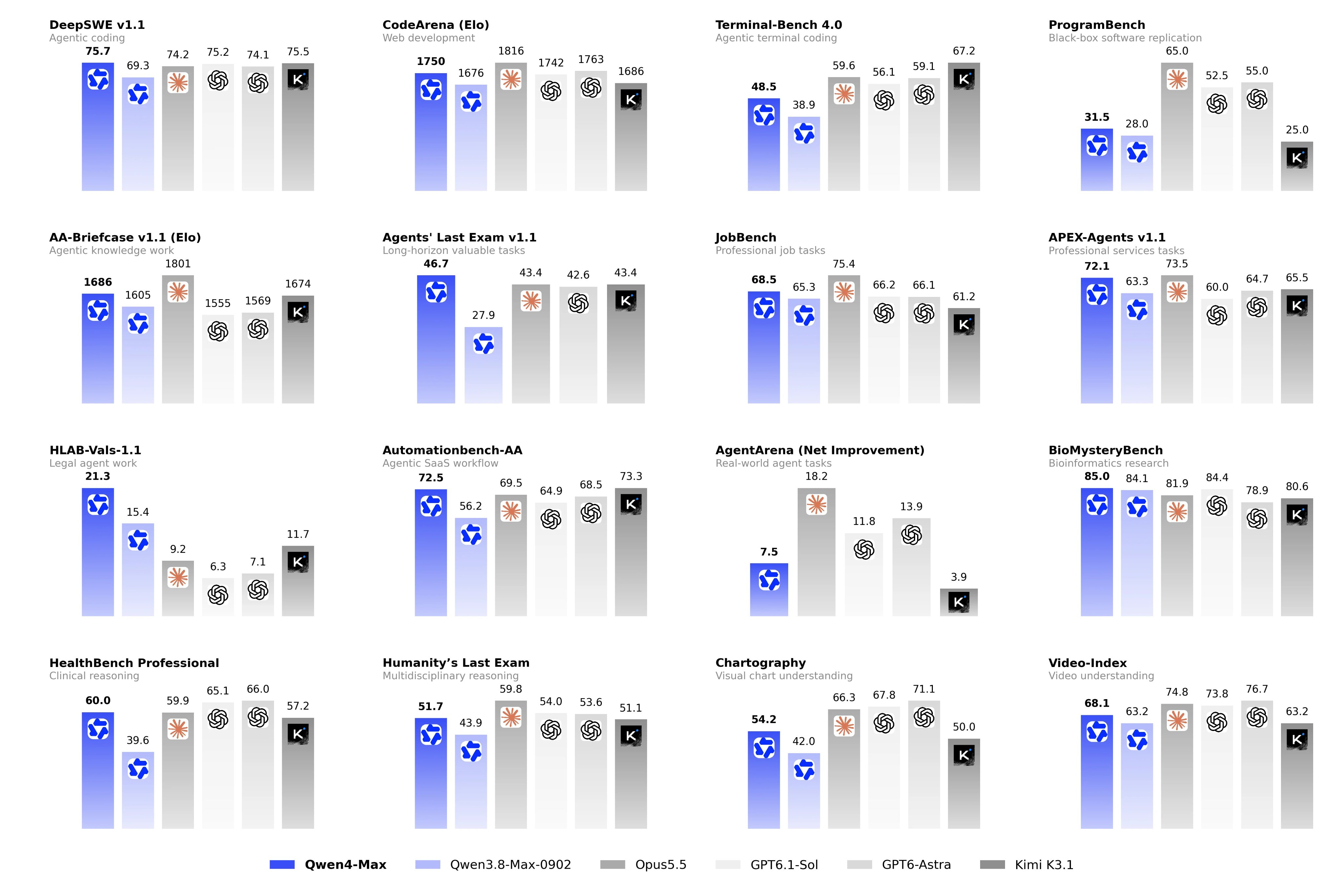
นี่คือตัวเลขจากหน้าโมเดล qwen4-max:
| รายการ | ค่า |
|---|---|
| Model ID | qwen4-max |
| ราคา input | $1.50 ต่อ 1 ล้าน tokens |
| ราคา output | $4.50 ต่อ 1 ล้าน tokens |
| Implicit cache input / explicit cache read | $0.075 ต่อ 1 ล้าน tokens |
| การสร้าง explicit cache | $1.875 (5 นาที) หรือ $3 (1 ชั่วโมง) ต่อ 1 ล้าน tokens |
| Context window | 1 ล้าน tokens |
| Input สูงสุด | 991K (983K เมื่อเปิด thinking) |
| Output สูงสุด | 393K |
| Reasoning สูงสุด | 262K |
| Throughput | 5,000,000 TPM |
Thinking tokens ถูกคิดค่าใช้จ่ายเป็น output tokens ดูรายละเอียดค่าใช้จ่ายแบบเต็มได้ที่ คู่มือราคา Qwen4-Max
รับ API key และเลือก base URL ให้ถูกต้อง
API key ผูกกับภูมิภาค และประเภทของ key ต้องตรงกับ endpoint ที่ใช้
- เปิด QwenCloud console แล้วเลือกภูมิภาคจากตัวเลือกด้านขวาบน
- ไปที่ API Keys คลิก Create API key ใส่คำอธิบายแล้วคลิก Generate Key
- คัดลอก key ทันที เพราะจะแสดงเพียงครั้งเดียว key แบบ pay-as-you-go ตัวใหม่จะขึ้นต้นด้วย
sk-ws- - ส่งออกค่า key:
export DASHSCOPE_API_KEY="sk-ws-..."
ทุกภูมิภาคใช้โดเมน {region}.maas.qwencloudapi.com สิงคโปร์คือ ap-southeast-1, แฟรงก์เฟิร์ตคือ eu-central-1, โตเกียวคือ ap-northeast-1 และสหรัฐฯ (เวอร์จิเนีย) คือ us-east-1 จากนั้นต่อท้ายด้วย protocol path:
| Protocol | Base URL (สิงคโปร์) |
|---|---|
| OpenAI compatible (Chat Completions, Responses) | https://ap-southeast-1.maas.qwencloudapi.com/compatible-mode/v1 |
| Anthropic compatible | https://ap-southeast-1.maas.qwencloudapi.com/apps/anthropic |
| DashScope HTTP | https://ap-southeast-1.maas.qwencloudapi.com/api/v1 |
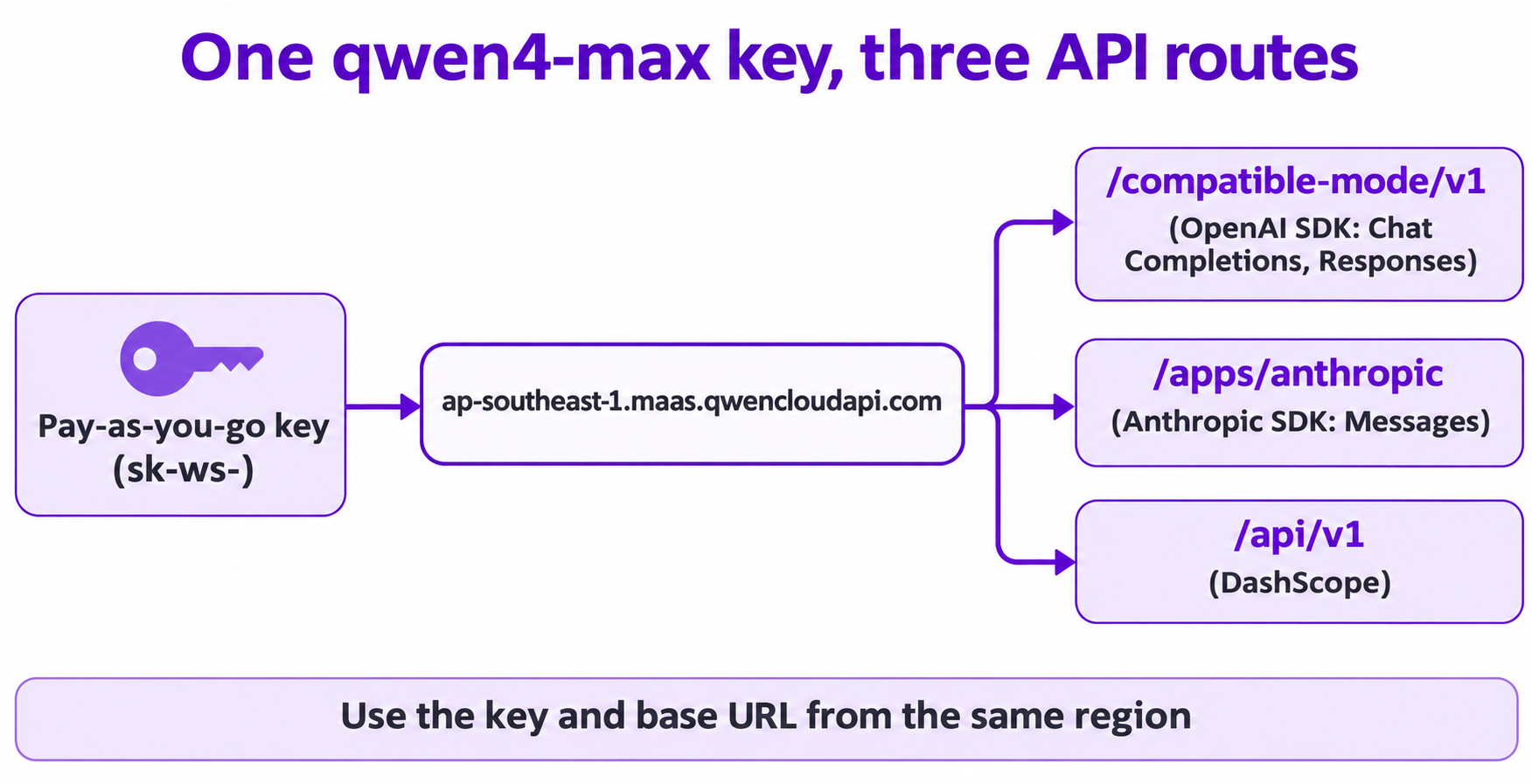
key แบบ Token Plan (sk-sp-) ใช้ได้เฉพาะกับ token-plan.maas.qwencloudapi.com เท่านั้น ส่วน key แบบ pay-as-you-go ใช้ได้เฉพาะโดเมนของภูมิภาคตนเอง การใช้ผสมกันจะทำให้เกิด error 401 ดูเพิ่มเติมที่ ภูมิภาคและ endpoints
การเรียกใช้ Qwen4-Max API ครั้งแรกของคุณ
ติดตั้ง OpenAI SDK (pip install openai) แล้วรัน quickstart จากเอกสาร:
import os
from openai import OpenAI

client = OpenAI(
  api_key=os.getenv("DASHSCOPE_API_KEY"),
  base_url="https://ap-southeast-1.maas.qwencloudapi.com/compatible-mode/v1"
)
completion = client.chat.completions.create(
  model="qwen4-max",
  messages=[{"role": "user", "content": "Summarize the benefits of solar energy in three bullet points."}]
)
print(completion.choices[0].message.content)
Thinking เปิดใช้งานเป็นค่าเริ่มต้นสำหรับ qwen4-max ดังนั้นการเรียกนี้จะใช้ reasoning tokens ด้วย สำหรับ prompt ที่ยาว ควรใช้ streaming หรือตั้ง client timeout ไว้ที่ 180 วินาทีขึ้นไป
โหมด Thinking และการ stream reasoning_content
Qwen4-Max เป็นโมเดลแบบ hybrid thinking ค่าเริ่มต้นตามเอกสารคือ enable_thinking=true, reasoning_effort=high และ thinking_budget=131072 ระดับ effort ได้แก่ low, high และ xhigh ส่วน none ใช้ปิด thinking
Stream reasoning และคำตอบออกมาเป็นสองเฟส (ปรับจากตัวอย่างในหน้าโมเดล):
from openai import OpenAI
import os

client = OpenAI(
    api_key=os.getenv("DASHSCOPE_API_KEY"),
    base_url="https://ap-southeast-1.maas.qwencloudapi.com/compatible-mode/v1",
)
messages = [{"role": "user", "content": "Who are you"}]
completion = client.chat.completions.create(
    model="qwen4-max",
    messages=messages,
    extra_body={"enable_thinking": True},
    stream=True
)
for chunk in completion:
    if not chunk.choices:
        continue
    delta = chunk.choices[0].delta
    if getattr(delta, "reasoning_content", None):
        print(delta.reasoning_content, end="", flush=True)  # phase 1: thinking
    if delta.content:
        print(delta.content, end="", flush=True)            # phase 2: answer
กฎสามข้อที่ควรรู้:
- จำกัด output ด้วย
max_completion_tokensเมื่อเปิด thinking อยู่max_tokensจะรับค่าได้เพียง 1 ถึง 32,768 เท่านั้น (ไม่งั้นจะได้ 400) ส่วนmax_completion_tokensครอบคลุมทั้ง reasoning และคำตอบโดยไม่มีข้อจำกัดนี้ - ปรับระดับความลึกด้วย
extra_bodyส่ง{"enable_thinking": True, "reasoning_effort": "xhigh"}สำหรับโจทย์ที่ยาก หรือ"low"สำหรับงานง่ายๆ - รักษา reasoning ไว้ในบทสนทนาแบบ multi-turn
qwen4-maxเปิดpreserve_thinkingเป็นค่าเริ่มต้น ดังนั้นให้ส่ง reasoning ก่อนหน้ากลับไปในฟิลด์reasoning_contentของข้อความ assistant แต่ละข้อความ ห้ามใส่ในcontent
หากต้องการข้าม thinking ให้ส่ง {"enable_thinking": False}
Input รูปภาพและวิดีโอ
ส่งรูปภาพเป็นส่วน image_url และวิดีโอเป็นส่วน video_url ตัวอย่างนี้ดัดแปลงจาก vision sample ในเอกสารโดยตั้งโมเดลเป็น qwen4-max:
completion = client.chat.completions.create(
  model="qwen4-max",
  messages=[{
    "role": "user",
    "content": [
      {"type": "image_url", "image_url": {"url": "https://example.com/invoice.jpg"}},
      {"type": "text", "text": "Describe what you see in this image"},
    ],
  }],
)
สำหรับวิดีโอ ใช้ {"type": "video_url", "video_url": {"url": "..."}, "fps": 2} ไฟล์ในเครื่องส่งเข้าไปเป็น Base64 Data URIs
คู่มือ vision อนุญาตให้ใช้รูปภาพจาก URL ได้สูงสุด 2,048 รูป ขนาดรูปละ 20 MB, รูปแบบ Base64 ได้ 250 รูป และไม่เกิน 64 MB ต่อคำขอ ค่าความละเอียดของภาพ (image detail) เป็น high โดยค่าเริ่มต้น ซึ่งใช้ input tokens มากกว่า
Function calling
ส่ง array tools เหมือนโมเดลแบบ OpenAI-compatible ทั่วไป:
tools = [{
  "type": "function",
  "function": {
    "name": "get_current_weather",
    "description": "Useful when you want to check the weather for a specific city.",
    "parameters": {
      "type": "object",
      "properties": {"location": {"type": "string", "description": "City or county, such as Singapore or New York."}},
      "required": ["location"],
    },
  },
}]
completion = client.chat.completions.create(model="qwen4-max", messages=messages, tools=tools)
อ่านค่า message.tool_calls รันฟังก์ชัน เพิ่มข้อความ tool แล้วเรียกอีกครั้ง
ในโหมด thinking tool_choice รับได้เฉพาะ "auto" หรือ "none" หากต้องการบังคับใช้ฟังก์ชันใดฟังก์ชันหนึ่ง ต้องปิด thinking ก่อน และเมื่อเปิด thinking อยู่ ให้ส่ง reasoning_content กลับไปพร้อมผลลัพธ์ของ tool ไม่งั้นความแม่นยำจะลดลง
Structured outputs
qwen4-max รองรับโหมด strict JSON Schema:
completion = client.chat.completions.create(
  model="qwen4-max",
  messages=[{"role": "user", "content": "Extract the name and age: Ana is 31."}],
  response_format={
    "type": "json_schema",
    "json_schema": {
      "name": "user_info",
      "strict": True,
      "schema": {
        "type": "object",
        "properties": {"name": {"type": "string"}, "age": {"type": "integer"}},
        "required": ["name", "age"],
        "additionalProperties": False,
      },
    },
  },
)
เมื่อใช้โหมดที่หลวมกว่าอย่าง {"type": "json_object"} คำว่า "JSON" ต้องปรากฏในข้อความใดข้อความหนึ่ง ไม่งั้น API จะปฏิเสธคำขอ หากมี input เป็นรูปภาพหรือวิดีโอ ระบบจะเปลี่ยนไปใช้ json_object โดยอัตโนมัติ ดังนั้น schema จะไม่ถูกบังคับใช้ในการเรียกแบบ multimodal
Context cache และ batch
Cache. หากไม่ตั้งค่าใดๆ implicit cache จะจับคู่ prefix แต่ไม่รับประกันว่าจะ hit หากต้องการให้ hit แบบแน่นอน ให้ใช้ Qwen4 explicit cache: ทำเครื่องหมาย content block ด้วย "prompt_cache_breakpoint": {"mode": "explicit"} (ข้อความ content ต้องเป็น array) และตั้งค่า TTL ด้วย extra_body={"prompt_cache_options": {"mode": "explicit", "ttl": "5m"}} TTL มีให้เลือก 5m หรือ 1h และ prefix ที่ cache ต้องมีอย่างน้อย 1,024 tokens การอ่านจาก cache ราคา $0.075 ต่อ ล้าน tokens ถูกกว่า input ปกติถึง 95%
Batch. ตามคู่มือ batch ค่า input และ output จะถูกคิดที่ 50% ของราคา real-time และคืนผลลัพธ์ภายใน 24 ชั่วโมง สำหรับ qwen4-max Batch File จะรันในภูมิภาคเดียวนอกสิงคโปร์และไม่รองรับ context caching ดังนั้นตรวจสอบคู่มือ batch ก่อนวางแผน pipeline ที่อ้างอิงฟีเจอร์นี้
เส้นทางแบบ Anthropic-compatible
สร้างระบบบน Anthropic SDK อยู่แล้ว? เพียงเปลี่ยน base URL และ key:
import anthropic
import os

client = anthropic.Anthropic(
    api_key=os.getenv("DASHSCOPE_API_KEY"),
    base_url="https://ap-southeast-1.maas.qwencloudapi.com/apps/anthropic",
)
message = client.messages.create(
    model="qwen4-max",
    max_tokens=1024,
    messages=[{"role": "user", "content": "Who are you?"}],
    thinking={"type": "disabled"},
)
print(message.content)
ตัวอย่างนี้ปิด thinking เช่นเดียวกับตัวอย่างในเอกสาร ให้ตัด base URL ที่ /apps/anthropic การเติม /v1/ ต่อท้ายจะทำให้เป็น /v1/v1/... และเกิด 404 ที่นี่ thinking ก็เปิดเป็นค่าเริ่มต้นเช่นกัน และเมื่อเปิด thinking max_tokens ต้องมากกว่า thinking budget ส่วน effort ใช้ผ่าน output_config.effort (low, high, xhigh) และเครื่องมือในตัวอย่าง web_search และ web_fetch ก็พร้อมใช้งานบนเส้นทางนี้
Rate limits ของ Qwen4-Max API
จากหน้า rate limits:
| ภูมิภาค | RPM | TPM |
|---|---|---|
| สิงคโปร์ | Dynamic | ชั้นแบบ dynamic: 5M, 10M, 20M |
| แฟรงก์เฟิร์ต, โตเกียว, สหรัฐฯ (เวอร์จิเนีย) และภูมิภาคอื่นๆ ที่เป็น Global-scope | 30,000 | 5,000,000 |
ข้อจำกัดนี้ใช้ต่อบัญชีต่อภูมิภาค และใช้ต่อวินาทีด้วย (RPS = RPM / 60) ดังนั้นการยิงคำขอพร้อมกันจำนวนมากในช่วงสั้นๆ อาจทำให้โดน throttle แม้ยอดรวมต่อนาทียังไม่เกินก็ตาม
หน้า free quota ระบุว่า free quota มีเฉพาะในสิงคโปร์ คิดเป็นรายโมเดล (โดยทั่วไป 1,000,000 tokens) ใช้ได้ 90 วัน และต้องลงทะเบียนข้อมูลการชำระเงินไว้ โดยไม่ระบุชื่อ qwen4-max ไว้ จึงควรตรวจสอบหน้า Free Tier ใน console หรืออ่านวิธีใช้ Qwen4-Max ฟรี
ข้อผิดพลาดที่พบบ่อยของ Qwen4-Max API
| รหัส | ความหมาย | วิธีแก้ |
|---|---|---|
401 InvalidApiKey |
key และ base URL มาจากภูมิภาคต่างกัน หรือ key แบบ Token Plan ถูกใช้กับ endpoint แบบ pay-as-you-go | ใช้ key ที่สร้างในภูมิภาคเดียวกับ URL |
400 InvalidParameter |
มักเกิดจาก max_tokens อยู่นอกช่วง 1 ถึง 32,768 ขณะเปิด thinking อยู่ |
เปลี่ยนไปใช้ max_completion_tokens |
403 AllocationQuota.FreeTierOnly |
free quota หมดก่อนตั้งค่าการชำระเงิน | เพิ่มข้อมูลการชำระเงินในหน้า Free Tier |
404 ModelNotFound |
qwen4-max ไม่มีให้บริการในภูมิภาคที่คุณเรียกใช้ |
ตรวจสอบ Model prices ของภูมิภาคนั้น |
429 Throttling |
ถึงขีดจำกัด RPM หรือ TPM แล้ว | หน่วงเวลาแล้วลองใหม่ หรือกระจายโหลดออกเป็นหลายวินาที |
ให้ coding agent ของคุณทดสอบ Qwen4-Max API ด้วย Apidog CLI
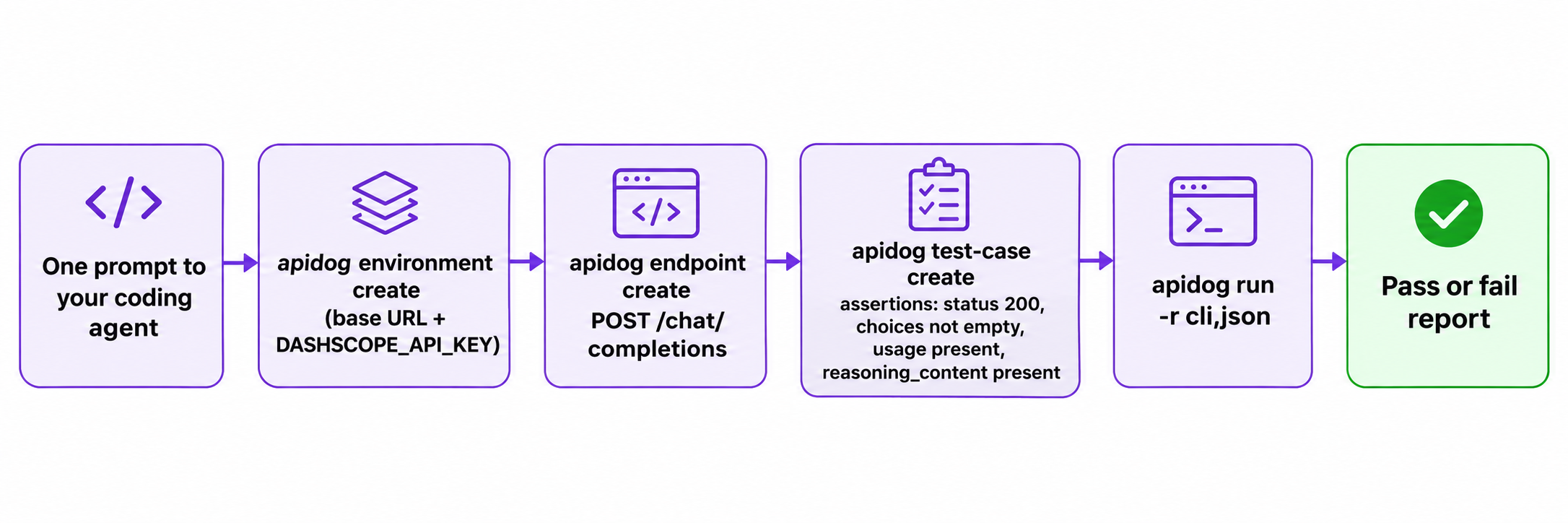
coding agent ของคุณเขียน integration อยู่แล้ว งั้นให้มันเขียน regression test ด้วยเลย Apidog CLI ช่วยให้มันบันทึก endpoint เก็บ key และรัน assertions ได้
ตั้งค่าครั้งเดียว:
npm install -g apidog-cli@latest
apidog login --with-token <YOUR_TOKEN>
npx -y skills add https://apidog.com   # pick your agent when prompted
จากนั้นสั่ง agent ของคุณด้วย prompt เดียว:
In Apidog project <projectId>, create an environment "Qwen Singapore" with base URL
https://ap-southeast-1.maas.qwencloudapi.com/compatible-mode/v1 and a secret
variable DASHSCOPE_API_KEY. Add POST /chat/completions with a Bearer auth header,
model qwen4-max and enable_thinking true. Create a test case asserting status 200,
a non-empty choices array, a usage object, and reasoning_content present on the
first choice's message. Run it and summarize any failures.
agent จะอ่าน payload schema ของแต่ละส่วนก่อนเขียน แล้วรัน test case:
apidog environment create "Qwen Singapore" --project <projectId> --base-url https://ap-southeast-1.maas.qwencloudapi.com/compatible-mode/v1
apidog cli-schema get environment-update
apidog environment update <envId> --project <projectId> --file env.json
apidog cli-schema get endpoint-create
apidog endpoint create --project <projectId> --file endpoint.json
apidog cli-schema validate test-case-create --file case.json
apidog test-case create --project <projectId> --file case.json
apidog run --test-case <caseId> --project <projectId> -e <envId> -r cli,json
reporter แบบ cli จะแสดงผลผ่านหรือไม่ผ่าน ส่วน json จะเขียนรายงานที่ agent อ่านได้ ย้ายคำสั่ง apidog run ... -r junit เดียวกันไปใส่ใน CI ด้วยคู่มือ CI/CD ของ Apidog CLI และดูApidog CLI ใน Claude Code สำหรับ prompt เพิ่มเติม แผน Free ของ Apidog รองรับผู้ใช้ได้ถึง 4 คน
คำถามที่พบบ่อย (FAQ)
Model ID ของ Qwen4-Max API คืออะไร?
ID ถาวรคือ qwen4-max ส่วน qwen4-max-preview ที่มีมาก่อนหน้าใช้สำหรับ Token Plan เท่านั้นในช่วง preview ที่เริ่มต้นวันที่ 11 พฤศจิกายน 2026
Qwen4-Max API เข้ากันได้กับ OpenAI หรือไม่?
ใช่ ใช้ OpenAI SDK กับ base URL /compatible-mode/v1 สำหรับ Chat Completions และ Responses API นอกจากนี้ยังมี endpoint แบบ Anthropic-compatible และ DashScope API ให้ใช้งานด้วย
จะปิด thinking ใน Qwen4-Max API ได้อย่างไร?
ส่ง extra_body={"enable_thinking": False} คุณจะไม่ได้รับ reasoning_content แต่ latency และ output tokens จะลดลง ต้องการเปรียบเทียบโมเดล? ดูที่ Qwen4-Max vs Qwen3.8
Qwen4-Max API ราคาเท่าไร?
$1.50 ต่อ input tokens 1 ล้านตัว และ $4.50 ต่อ output tokens 1 ล้านตัว โดยการอ่านจาก cache อยู่ที่ $0.075 ต่อ 1 ล้าน tokens
ใช้ key แบบ Token Plan กับ API แบบ pay-per-token ได้ไหม?
ไม่ได้ key แบบ Token Plan (sk-sp-) ใช้ได้เฉพาะกับ token-plan.maas.qwencloudapi.com และ key แบบ pay-as-you-go ใช้ได้เฉพาะโดเมนของภูมิภาคตนเองเท่านั้น