

หากต้องการใช้ Gemini Decisions API ให้สร้าง API key ใน Google AI Studio ติดตั้ง google-genai เวอร์ชัน 3.2 ขึ้นไป แล้วเรียก client.decisions.create() ด้วยโมเดล gemini-decision-1, input ที่ใช้ร่วมกันหนึ่งชุด และแผนที่ของ questions ที่ระบุประเภทไว้ (noul, choice หรือ score) คุณจะได้รับความน่าจะเป็นที่ผ่านการปรับเทียบและค่า confidence สำหรับทุกคำถาม โดยใช้ output tokens เป็นศูนย์
ด้านล่างนี้คือขั้นตอนทีละส่วนใน Python, JavaScript และ REST ตั้งแต่คำถามแบบใช่/ไม่ใช่ครั้งแรกของคุณ ไปจนถึงการจัดเส้นทางตามค่า confidence และชุดทดสอบสำหรับ CI
Gemini Decisions API คืออะไร?
Gemini Decisions API คือ endpoint ใน Gemini Developer API (v1beta) ที่ตอบคำถามแบบปิดชุดตัวเลือก (closed-set) แทนการสร้างข้อความ คุณส่ง input แบบ multimodal หนึ่งชุดพร้อมคำถามอิสระได้สูงสุด 1,000 คำถาม โมเดล gemini-decision-1 จะให้คะแนนทุกตัวเลือกในการประมวลผลครั้งเดียว และคืนค่าความน่าจะเป็นที่ผ่านการปรับเทียบซึ่งโค้ดของคุณนำไปใช้แยกทาง (branch) ได้ทันที
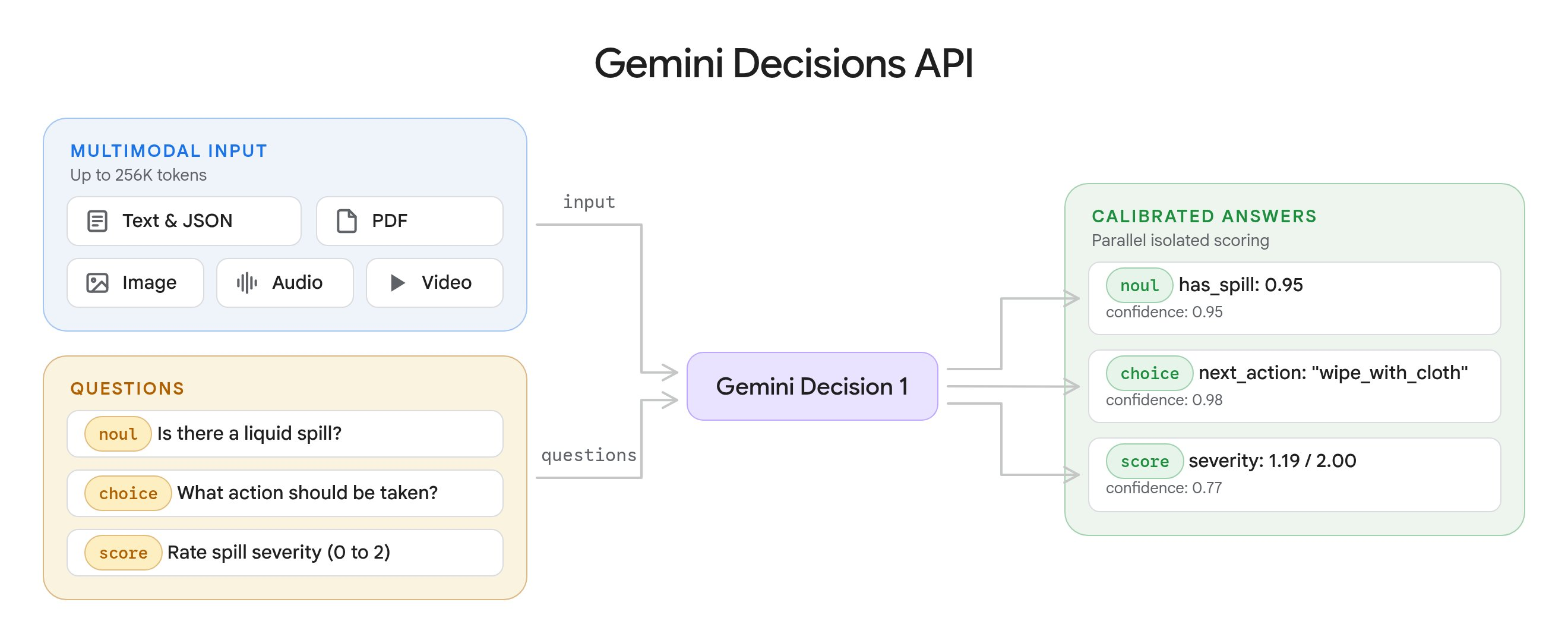
Google ประกาศเปิดตัวเมื่อวันที่ 11 พฤศจิกายน 2026 โดย เอกสารอย่างเป็นทางการ กำหนดประเภทคำถามไว้ 3 แบบ:
| ประเภทคำถาม | ใช้เพื่อ | คืนค่า |
|---|---|---|
noul |
ตรวจสอบว่าข้อความเป็นจริงหรือไม่ (ใช่/ไม่ใช่) | noul (0.01 ถึง 0.99), confidence |
choice |
เลือกหนึ่งตัวเลือกจาก 2 ถึง 255 ตัวเลือก | choice, probabilities, confidence |
score |
ให้คะแนนตามระดับที่เรียงลำดับ 2 ถึง 255 ระดับ | score, probabilities, legend, confidence |
ตามหน้าราคาของ Gemini API ราคาคือ $0.10 ต่อ input tokens 1 ล้านตัว และ $0 สำหรับ output โดย input ที่ใช้ร่วมกันจะถูกคิดค่าบริการครั้งเดียวต่อคำขอ ไม่ว่าคุณจะถามกี่คำถาม หากคุณเคยอ่านคู่มือของเราเรื่อง วิธีใช้ OpenAI Decisions API แล้ว โครงสร้างจะคุ้นเคย แต่ฟิลด์ต่าง ๆ ด้านล่างนี้เป็นแบบเฉพาะของ Gemini
ขั้นตอนที่ 1: รับ API key และติดตั้ง SDK
- เปิด Google AI Studio แล้วสร้าง API key
- ส่งออกค่าตัวแปร:
export GEMINI_API_KEY="your-key" - ติดตั้ง SDK เวอร์ชัน 3.2 ขึ้นไป:
pip install -U google-genaiหรือnpm install @google/genai@latest
คุณสามารถลองถามคำถามโดยไม่ต้องเขียนโค้ดก่อนได้ใน Decisions Playground ซึ่งส่งออกโค้ดที่รันได้จริงให้ด้วย
แพ็กเจจฟรี ตรวจสอบเมื่อวันที่ 12 พฤศจิกายน 2026: หน้า rate limits ระบุขีดจำกัดของแพ็กเจจฟรีไว้ที่ 200 คำขอต่อนาที, 50,000 tokens ต่อนาที และ 10,000 คำขอต่อวัน Input ใช้ฟรีในแพ็กเจจนี้ แต่หน้าราคาระบุข้อมูลของแพ็กเจจฟรีว่า “ใช้เพื่อปรับปรุงผลิตภัณฑ์ของเรา: ใช่” จึงควรเก็บข้อมูลลูกค้าจริงไว้ใช้บนแพ็กเจจแบบเสียเงิน ดูข้อมูลเพิ่มเติมเกี่ยวกับโควตาฟรีของ Google ได้ในคู่มือ Gemini API free tier ของเรา
| แพ็กเจจ | RPM | TPM | RPD |
|---|---|---|---|
| ฟรี | 200 | 50,000 | 10,000 |
| Tier 1 | 1,500 | 1,000,000 | 50,000 |
| Tier 2 | 5,000 | 4,000,000 | ไม่จำกัด |
| Tier 3 | 15,000 | 10,000,000 | ไม่จำกัด |
ขั้นตอนที่ 2: ถามคำถามแบบ noul (ใช่/ไม่ใช่) ครั้งแรกของคุณ
คำถามแบบ noul จะคืนค่าความน่าจะเป็นที่คำตอบคือ “ใช่” โปรดสังเกต API เวอร์ชัน v1beta: endpoint นี้ไม่มีอยู่บน v1
Python:
from google import genai

client = genai.Client(http_options={"api_version": "v1beta"})

result = client.decisions.create(
    model="gemini-decision-1",
    input="The blue mug I ordered on Monday arrived cracked on Wednesday.",
    questions={
        "is_damaged": {
            "type": "noul",
            "instructions": "Did the item arrive damaged?",
        },
    },
)

answer = result.answers["is_damaged"]
print(f"P(yes)={answer.noul:.2f} confidence={answer.confidence:.2f}")
JavaScript:
import { GoogleGenAI } from "@google/genai";

const ai = new GoogleGenAI({ apiVersion: "v1beta" });

const result = await ai.decisions.create({
  model: "gemini-decision-1",
  input: "The blue mug I ordered on Monday arrived cracked on Wednesday.",
  questions: {
    is_damaged: { type: "noul", instructions: "Did the item arrive damaged?" },
  },
});

const answer = result.answers?.is_damaged;
if (answer?.type === "noul") console.log(answer.noul, answer.confidence);
REST:
curl -X POST "https://generativelanguage.googleapis.com/v1beta/decisions" \
  -H "x-goog-api-key: $GEMINI_API_KEY" \
  -H "Content-Type: application/json" \
  -d '{
    "model": "gemini-decision-1",
    "input": "The blue mug I ordered on Monday arrived cracked on Wednesday.",
    "questions": {
      "is_damaged": { "type": "noul", "instructions": "Did the item arrive damaged?" }
    }
  }'
เอกสารของ Google แสดง response นี้ (เป็นตัวอย่างจากเอกสาร ไม่ใช่ผลรันของเรา):
{
  "answers": { "is_damaged": { "type": "noul", "noul": 0.99, "confidence": 0.99 } },
  "usage": { "total_input_tokens": 100, "total_output_tokens": 0, "total_tokens": 100 }
}
เมื่อคำว่า “ใช่” ไม่ชัดเจน ให้เพิ่ม criteria พร้อม true_description และ false_description กฎสำคัญที่ต้องจำ: ค่า noul จะอยู่ระหว่าง 0.01 ถึง 0.99 เสมอ ดังนั้น threshold ที่สูงกว่า 0.99 จะไม่เข้าเงื่อนไขเลย
ขั้นตอนที่ 3: เพิ่มคำถามแบบ choice และ score
ใส่คำถามอิสระเกี่ยวกับ input เดียวกันในคำขอเดียว input จะถูกคิดค่าบริการเพียงครั้งเดียว ส่วนคำถามแต่ละข้อเพิ่ม tokens เฉพาะของตัวเองเท่านั้น
result = client.decisions.create(
    model="gemini-decision-1",
    input="I was charged twice for my order and the export page crashes in Safari.",
    questions={
        "department": {
            "type": "choice",
            "instructions": "Which department should handle this request?",
            "criteria": {
                "billing": "Payments, invoices, and refunds.",
                "technical": "Problems using the product.",
                "shipping": "Delivery and tracking.",
                "other": "Anything outside these categories.",
            },
        },
        "severity": {
            "type": "score",
            "instructions": "How severe is this issue for the user?",
            "criteria": [
                "Cosmetic: appearance only, no lost functionality.",
                "Workaround available: a task fails, but another way works.",
                "Fully blocked: a task fails with no workaround.",
            ],
        },
    },
)
รายละเอียดสามข้อจากเอกสารที่คนมักสับสน:
- คีย์ของ choice จะถูกจัดเรียงตามตัวอักษรก่อนการให้คะแนน ใช้
otherเป็นตัวเลือกกันชน ไม่ใช่none_of_the_aboveซึ่งจะจัดเรียงมาก่อนตัวเลือกจริง - criteria ของ score เป็นลิสต์ เรียงจากต่ำสุดไปสูงสุดและเริ่มนับ index จาก 0 ค่า
scoreที่คืนมาเป็นค่าเฉลี่ยถ่วงน้ำหนักด้วยความน่าจะเป็น จึงอาจอยู่ระหว่างระดับได้ (เอกสารแสดงตัวอย่างค่า1.12) - โมเดลไม่เห็นคีย์คำถามของคุณเลย ให้เขียนคำถามแบบเต็มไว้ใน
instructions
หากต้องการระดับแบบไม่ต่อเนื่องจากค่า score ให้เลือกตัวที่มีความน่าจะเป็นสูงสุด:
sev = result.answers["severity"]
level = max(sev.probabilities, key=sev.probabilities.get)
print(sev.legend[level])
ขั้นตอนที่ 4: ส่งรูปภาพ, PDF และเสียง
input รับค่าเป็นสตริง, content block หนึ่งชิ้น หรือลิสต์ของ blocks โดยใช้รูปแบบ block เดียวกับ Interactions API โดยรองรับ block ประเภท text, image, audio, video และ document (เฉพาะ PDF)
import base64

with open("earcup.jpg", "rb") as f:
    image_b64 = base64.b64encode(f.read()).decode("utf-8")
with open("return-form.pdf", "rb") as f:
    pdf_b64 = base64.b64encode(f.read()).decode("utf-8")

result = client.decisions.create(
    model="gemini-decision-1",
    input=[
        {"type": "text", "text": "Customer photo and form for return #8821.\n"},
        {"type": "image", "data": image_b64, "mime_type": "image/jpeg", "resolution": "low"},
        {"type": "document", "data": pdf_b64, "mime_type": "application/pdf"},
    ],
    questions={
        "visible_damage": {
            "type": "noul",
            "instructions": "Does the photo show physical damage to the device? Ignore the packaging.",
        },
        "form_signed": {
            "type": "noul",
            "instructions": "Is the return form in the PDF signed by the customer?",
        },
    },
)
สำหรับเสียง ให้ส่ง block เช่น {"type": "audio", "uri": "<https-url>", "mime_type": "audio/mp3"} ขีดจำกัดที่ควรรู้:
- ข้อมูล base64 แบบ inline จำกัดที่ 100 MB ต่อคำขอ (PDF จำกัด 50 MB); URL ภายนอกจำกัด 15 MB ต่อไฟล์
- ระบุ MIME type ที่ถูกต้องจริง API จะปฏิเสธ
application/octet-stream - ไม่รองรับ URL ของ YouTube และ URI แบบ
gs://ให้ใช้ Files API, URL HTTPS แบบสาธารณะหรือ signed URL หรือข้อมูลแบบ inline แทน resolution(low,medium,high,ultra_high) แลกเปลี่ยนความละเอียดของภาพกับจำนวน tokens โดยultra_highใช้ได้กับรูปภาพเท่านั้น
ขั้นตอนที่ 5: อ่านค่าความน่าจะเป็นและ confidence
คำตอบทุกข้อมีค่า confidence ตั้งแต่ 0 ถึง 1 ซึ่งเป็นความน่าจะเป็นโดยประมาณว่าคำตอบอันดับหนึ่งถูกต้อง สำหรับ choice และ score ค่านี้จะเท่ากับความน่าจะเป็นของผลลัพธ์อันดับหนึ่ง สำหรับ noul ค่านี้คือ max(noul, 1 - noul)
ดังนั้น noul ที่ 0.03 จะมี confidence เท่ากับ 0.97: โมเดลมั่นใจว่าคำตอบคือ “ไม่ใช่”
ขั้นตอนที่ 6: ส่งคำตอบที่มี confidence ต่ำไปยังทางเลือกสำรอง
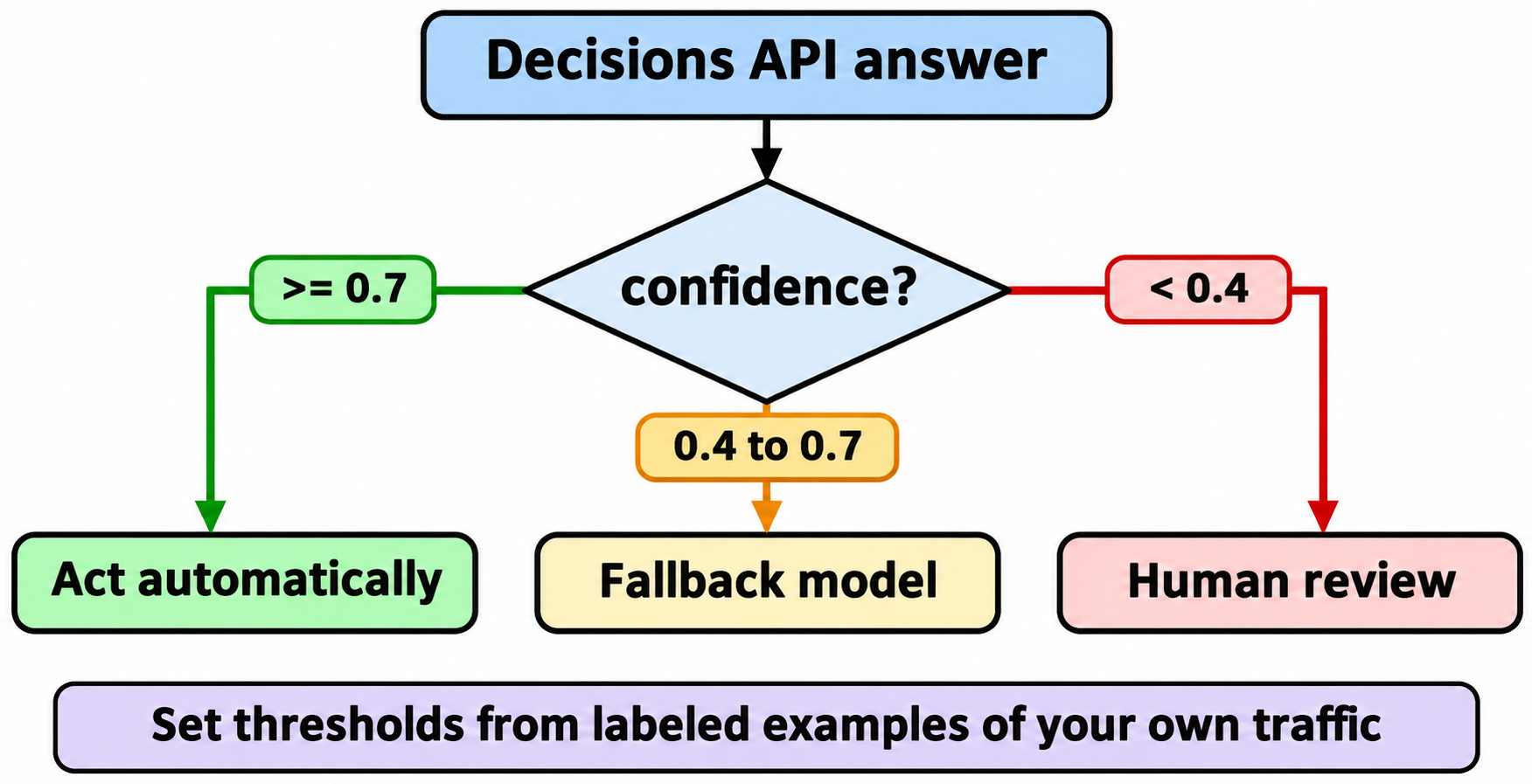
ใช้ค่าคำตอบเพื่อเลือกการดำเนินการ และใช้ confidence เพื่อตัดสินใจว่าจะทำอัตโนมัติหรือไม่:
a = result.answers
dept = a["department"]

if dept.confidence >= 0.7 and dept.choice != "other":
    route_to(dept.choice)
elif dept.confidence >= 0.4:
    route_to_fallback_model(ticket)   # a bigger model reasons it out
else:
    route_to("human_review")
ค่า cutoff 0.7 และ 0.4 เป็นเพียงตัวอย่าง: Google แนะนำให้กำหนด thresholds จากตัวอย่างที่ติดป้ายกำกับจาก traffic จริงของคุณ กฎเพิ่มเติมอีกสองข้อจากเอกสาร:
- คำถามแบบ choice จะกระจายความน่าจะเป็นไปยังตัวเลือกของคุณเสมอ แม้ไม่มีตัวเลือกใดตรงเลย ให้คู่กับการตรวจสอบขอบเขต เช่น “ข้อความนี้เกี่ยวกับคำสั่งซื้อหรือไม่?”
- ถือว่า input ไม่น่าเชื่อถือ ข้อความของผู้ใช้อาจให้เหตุผลสนับสนุนการจัดหมวดหมู่ไปในทางของมันเอง ให้มีมนุษย์หรือการตรวจสอบครั้งที่สองเกี่ยวข้องกับการจ่ายเงินและการดำเนินการที่มีความเสี่ยงสูงอื่น ๆ
ขั้นตอนที่ 7: ให้ coding agent ของคุณทดสอบด้วย Apidog CLI
เลเยอร์จัดเส้นทางมักล้มเหลวอย่างเงียบ ๆ ใครสักคนแก้คำอธิบายเกณฑ์ billing กลายเป็น technical สำหรับตั๋วครึ่งหนึ่งของคุณ และไม่มีอะไรแสดง error ขึ้นมาเลย วิธีแก้คือชุดทดสอบ regression ที่ผูกคำตอบที่คาดหวังไว้ ซึ่ง coding agent ของคุณสามารถสร้างได้ด้วย Apidog CLI ขณะที่คุณตรวจทานอยู่
npm install -g apidog-cli@latest
apidog auth login --with-token <YOUR_TOKEN>
npx -y skills add https://apidog.com   # pick your agent when prompted
จากนั้นสั่ง agent ของคุณด้วย prompt เดียว:
In Apidog project <id>, build a test suite for POST
https://generativelanguage.googleapis.com/v1beta/decisions (header x-goog-api-key
from env var GEMINI_API_KEY). Add one request per question type (noul, choice,
score) asserting status 200, confidence between 0 and 1 and zero output tokens.
Add a test data set of 20 tickets with expected departments and assert each
choice matches with confidence >= 0.7. Run it and summarize failures.
Agent จะอ่าน schema ของ payload แต่ละอัน ตรวจสอบความถูกต้อง เขียน resources และรันชุดทดสอบ:
apidog cli-schema get test-scenario-create
apidog cli-schema validate test-scenario-create --file scenario.json
apidog test-scenario create --project <id> --file scenario.json
apidog test-data create --project <id> --file tickets.json
apidog test-suite create --project <id> --file suite.json
apidog run --test-suite <suiteId> --project <id> -e <envId> -d <testDataId> -r cli,junit --out-dir reports
ทุก flag ข้างต้นมาจาก apidog run --help บน CLI 2.2.12 ตอนนี้การเปลี่ยน prompt หรือเกณฑ์ที่ทำให้คำตอบของ fixture เปลี่ยนไปจะทำให้การรันล้มเหลว เอาคำสั่ง apidog run ... -r cli,junit เดียวกันไปใส่ใน GitHub Actions และไฟล์ JUnit จะแสดงว่าตั๋วไหนเปลี่ยนไป คู่มือ Apidog CLI CI/CD ของเรามีไฟล์ workflow ให้ และApidog CLI in Claude Code ครอบคลุมการตั้งค่า agent แผนฟรีของ Apidog รองรับผู้ใช้ได้ถึง 4 คน
ขีดจำกัดและสิ่งที่ยังไม่รองรับ
จากขีดจำกัดของ Decisions API ตรวจสอบเมื่อวันที่ 12 พฤศจิกายน 2026:
- คำถาม 1 ถึง 1,000 ข้อต่อคำขอ ภายใน context window 262,144 tokens
- ไม่รองรับ context caching, Batch API หรือการอนุมานแบบ Flex และ Priority input ที่ซ้ำกันในหลายคำขอถูกคิดค่าบริการเต็มจำนวน
- การบล็อกด้วย Safety จะคืน HTTP 400 พร้อม
error.codeเช่นsafetyหรือprohibited_contentแทนคำตอบ - รองรับเฉพาะ Gemini Developer API (
v1beta) Google ระบุว่าการรองรับ Vertex AI “กำลังจะมาเร็ว ๆ นี้” โดยไม่ระบุวันที่
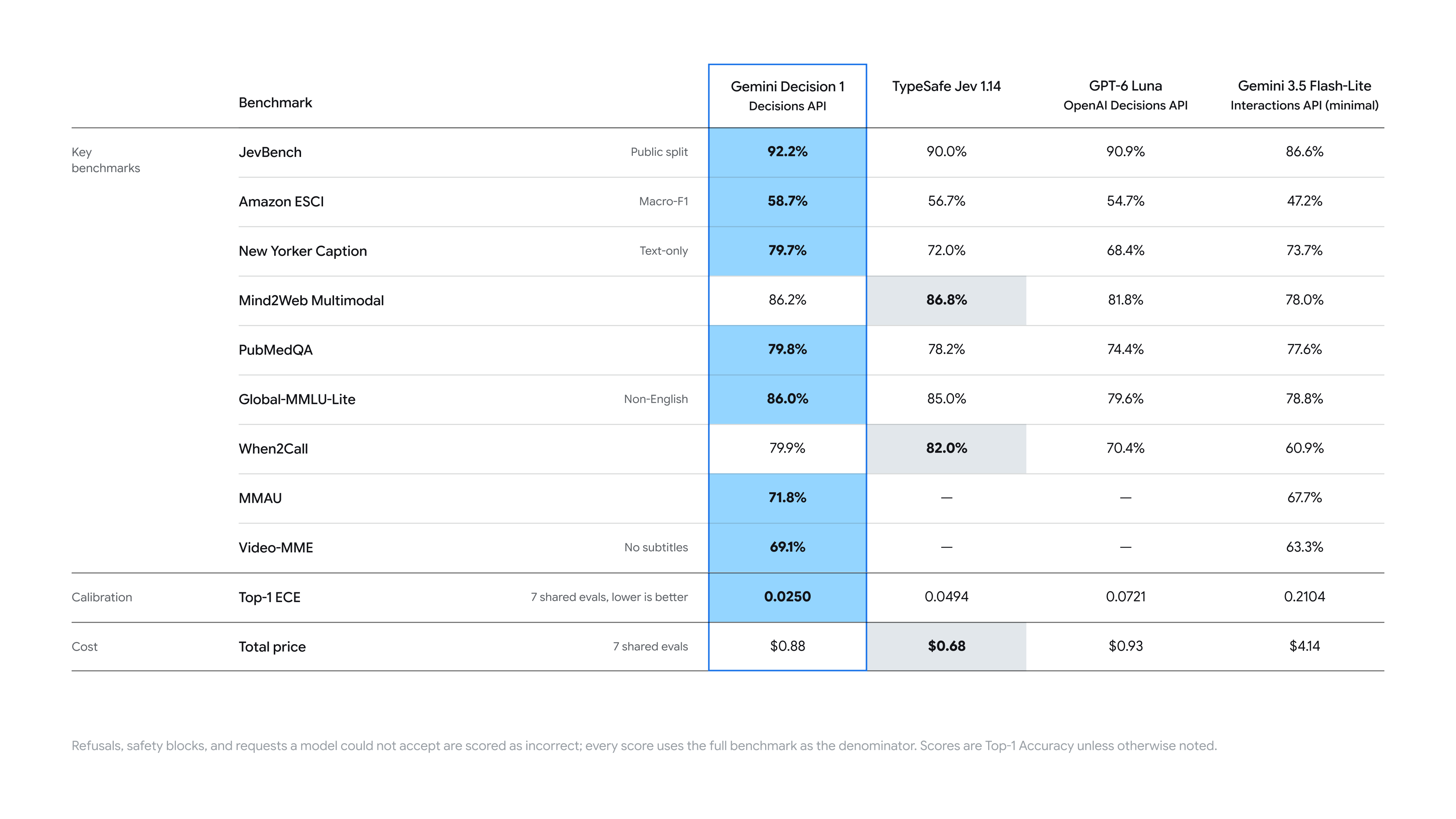
Google รายงาน latency รวมตั้งแต่ต้นจนจบที่ 150 ถึง 250 ms ซึ่งแทบไม่เปลี่ยนแปลงจาก 1 ถึง 100 คำถามสำหรับ input ที่ไม่เกิน 16K tokens และระบุว่า Gemini Decision 1 นำในชุด benchmark ของตัวเองด้วย calibration error ต่ำสุด นั่นคือตัวเลขของ Google ควรวัด latency ด้วย input ของคุณเองก่อนออกแบบระบบโดยอิงตามตัวเลขเหล่านั้น
คำถามที่พบบ่อย
Gemini Decisions API ฟรีหรือไม่? มีแพ็กเจจฟรีที่ใช้ input ได้โดยไม่เสียค่าใช้จ่าย จำกัดที่ 200 RPM, 50,000 TPM และ 10,000 คำขอต่อวัน (ตรวจสอบเมื่อวันที่ 12 พฤศจิกายน 2026) ข้อมูลจากแพ็กเจจฟรีอาจถูกใช้เพื่อปรับปรุงผลิตภัณฑ์ของ Google แพ็กเจจแบบเสียเงินราคา $0.10 ต่อ input tokens 1 ล้านตัว
noul หมายถึงอะไร? เป็นประเภทคำถามแบบใช่/ไม่ใช่ โดยฟิลด์ noul คือความน่าจะเป็นที่คำตอบคือ “ใช่” ซึ่งอยู่ระหว่าง 0.01 ถึง 0.99
ต้องใช้ API เวอร์ชันใด? v1beta กำหนด http_options={"api_version": "v1beta"} ใน Python, apiVersion: "v1beta" ใน JavaScript หรือเรียก /v1beta/decisions ผ่าน REST
ใช้ได้กับ Vertex AI หรือไม่? ยังไม่ได้ ตอนนี้มีเฉพาะบน Gemini Developer API เท่านั้น โดย Google ระบุว่า Gemini ใน Google Cloud กำลังจะมาเร็ว ๆ นี้
เลือกค่า threshold ของ confidence อย่างไร? ติดป้ายกำกับ input จริงสักหลายร้อยรายการ รันผ่าน API แล้วเลือกจุด cutoff ที่ต้นทุนของการดำเนินการอัตโนมัติที่ผิดพลาดเท่ากับต้นทุนของการให้มนุษย์ตรวจสอบ