บางครั้ง ข้อมูลตอบสนอง API ถูกเข้ารหัสหรือเข้ารหัส และอาจจำเป็นต้องแปลงเป็นข้อความธรรมดาที่อ่านได้ คุณสามารถทำได้โดยใช้ไลบรารี JS ในตัวใน Apidog หรือโดยการเรียกใช้ภาษาการเขียนโปรแกรมภายนอก เช่น Python หรือ JavaScript เพื่อประมวลผล
ตัวอย่างเช่น ข้อมูลที่เข้ารหัส Base64 สามารถถอดรหัสได้โดยใช้ไลบรารีในตัว

ด้านล่างนี้ เราจะแบ่งปันตัวอย่างทั่วไปของการถอดรหัสและถอดรหัส หากคุณยังไม่ได้ติดตั้ง Apidog เพียงคลิกปุ่มเพื่อเริ่มต้น!
การถอดรหัสข้อมูลตอบสนอง
การถอดรหัส Base64
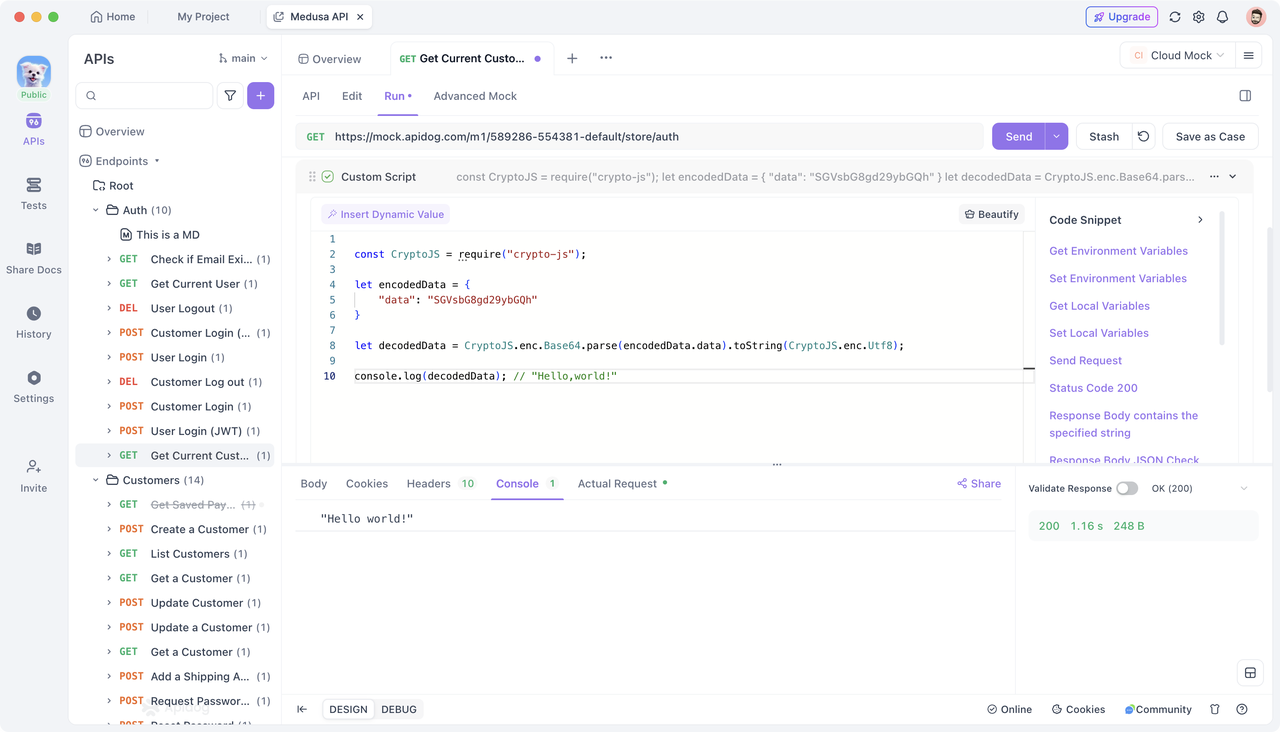
เมื่อ API ส่งคืนข้อมูลที่เข้ารหัส Base64 คุณสามารถใช้ไลบรารี CryptoJS ที่มีอยู่ใน Apidog เพื่อถอดรหัสได้ วิธีการมีดังนี้:
สมมติว่า API ส่งคืนข้อมูลที่เข้ารหัส Base64 ต่อไปนี้:
{"data": "SGVsbG8gd29ybGQh"}
คุณสามารถถอดรหัสข้อมูล Base64 นี้ด้วยสคริปต์เช่นนี้:
// Import CryptoJS library
const CryptoJS = require("crypto-js");

// Base64 encoded string (extracted from response data)let encodedData = {"data": "SGVsbG8gd29ybGQh"
};

// Decode Base64 datalet decodedData = CryptoJS.enc.Base64.parse(encodedData.data).toString(CryptoJS.enc.Utf8);

// Output the decoded result
console.log(decodedData); // "Hello, world!"
ใน Apidog คุณสามารถเพิ่มสคริปต์แบบกำหนดเองในส่วน "Post-request" พร้อมตรรกะข้างต้น หลังจากส่งคำขอแล้ว คุณสามารถดูข้อมูลที่ถอดรหัสได้ใน "Console" ของแผงการตอบสนอง
นอกจากนี้ คุณอาจเก็บข้อมูลที่ถอดรหัสไว้ในตัวแปรสภาพแวดล้อมเพื่อใช้ในอนาคต เช่นนี้:
pm.environment.set("decodedData", decodedData);
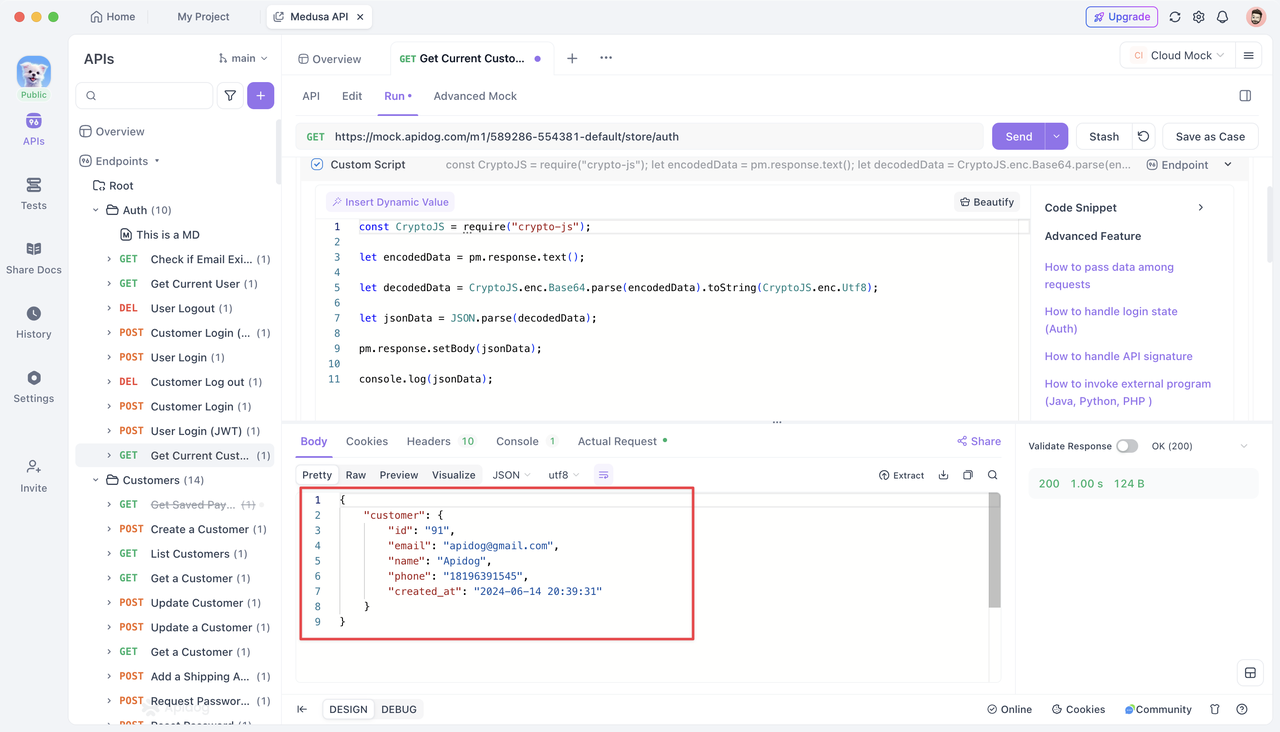
หากการตอบสนอง JSON มีข้อมูลที่เข้ารหัส Base64 คุณสามารถใช้ CryptoJS เพื่อถอดรหัสและตั้งค่าข้อมูล JSON ที่ถอดรหัสเป็นเนื้อหาการตอบสนองด้วยเมธอด pm.response.setBody() ได้เช่นเดียวกัน นี่คือตัวอย่างสำหรับการตอบสนอง JSON ที่เข้ารหัส Base64:
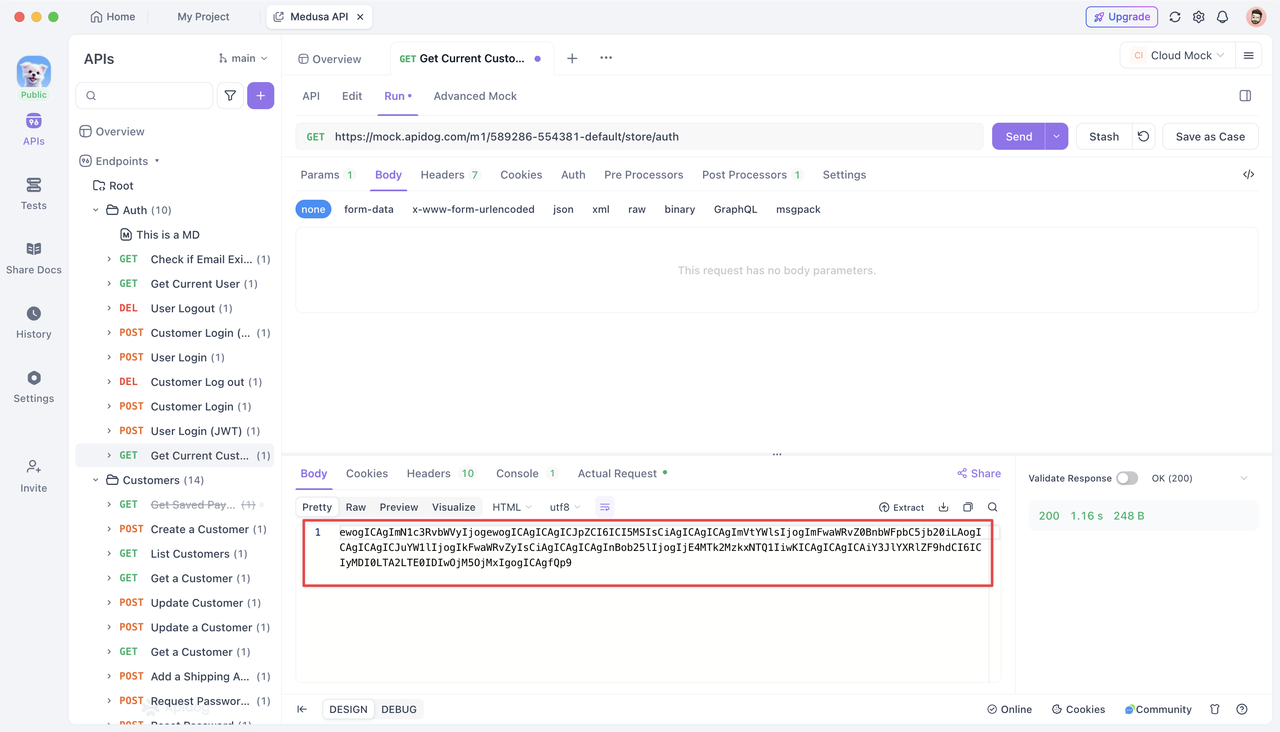
ในการถอดรหัสและแสดงข้อมูล JSON ที่ถอดรหัสใน Response Body สคริปต์ตัวอย่างมีดังนี้:
// Import CryptoJS library
const CryptoJS = require("crypto-js");

// Base64 encoded string (extracted from response data)let encodedData = pm.response.text();

// Decode Base64 datalet decodedData = CryptoJS.enc.Base64.parse(encodedData).toString(CryptoJS.enc.Utf8);

// Parse the decoded JSON stringlet jsonData = JSON.parse(decodedData);

// Set the parsed JSON data as the response body
pm.response.setBody(JSON.stringify(jsonData));
URLEncode Decode
เมื่อข้อมูลตอบสนองถูกเข้ารหัส URL คุณสามารถใช้เมธอด decodeURIComponent() ในตัวของ JavaScript เพื่อถอดรหัสได้
ตัวอย่างเช่น พิจารณา API ที่ส่งคืนสตริง JSON ที่เข้ารหัส URL ต่อไปนี้:
{"name": "%E5%BC%A0%E4%B8%89","email": "qxhswppn%40gmail.com"
}
คุณสามารถถอดรหัสค่าของสตริง JSON นี้ได้ดังนี้:
// This is the URL-encoded JSON data from the responselet response = {"name": "%E5%BC%A0%E4%B8%89","email": "qxhswppn%40gmail.com"
};

// Decode using decodeURIComponentlet decodedName = decodeURIComponent(response.name);
let decodedEmail = decodeURIComponent(response.email);
console.log(decodedName);  // "Jason"
console.log(decodedEmail);  // "qxhswppn@gmail.com"
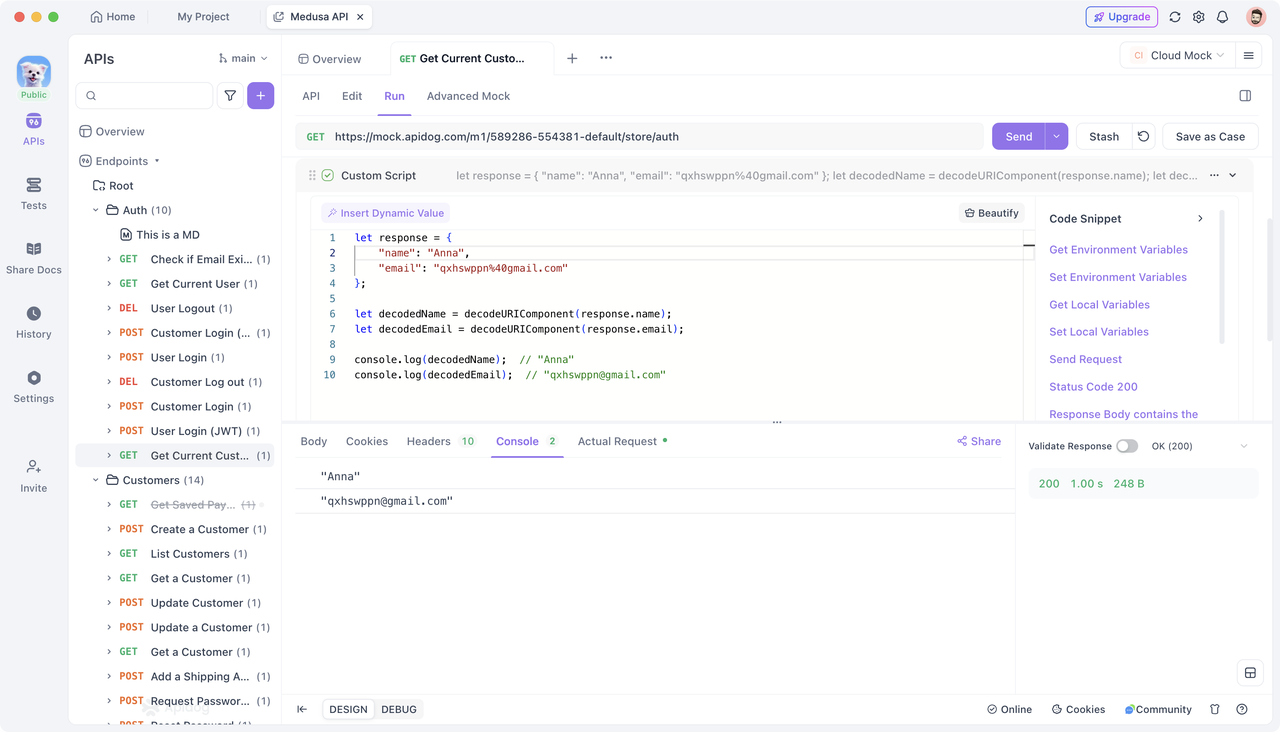
การถอดรหัสข้อมูลตอบสนอง
การถอดรหัส AES
ในการถอดรหัสข้อความที่เข้ารหัส AES คุณต้องระบุคีย์หรือเวกเตอร์เริ่มต้น (IV) ที่เหมาะสม AES ใช้การเข้ารหัสแบบสมมาตร ซึ่งหมายความว่าใช้คีย์เดียวกันสำหรับการเข้ารหัสและการถอดรหัส หากคุณไม่มีคีย์หรือ IV ที่ถูกต้อง คุณจะไม่สามารถถอดรหัสข้อความที่เข้ารหัสได้
สมมติว่าคุณมีข้อความที่เข้ารหัส AES ในโหมด ECB คุณสามารถใช้ไลบรารี CryptoJS เพื่อถอดรหัสใน Apidog ได้ดังนี้:
// Import CryptoJS libraryconst CryptoJS = require('crypto-js');

// Base64 encoded AES encrypted ciphertext (extracted from response data)const ciphertext = "Gig+YJFu4fLrrexzam/vblRV3hoT25hPZn0HoNoosHQ=";

// Key for decryption (ensure it is 16/24/32 bytes; typically read from an environment variable)const key = CryptoJS.enc.Utf8.parse('1234567891234567');

// AES Decryptconst decryptedBytes = CryptoJS.AES.decrypt(ciphertext, key, {
    mode: CryptoJS.mode.ECB, // Decryption mode
    padding: CryptoJS.pad.Pkcs7 // Padding method
});

// Convert decrypted byte array to UTF-8 stringconst originalText = decryptedBytes.toString(CryptoJS.enc.Utf8);

// Output the decrypted text
console.log(originalText); // "Hello,Apidog!"
คุณสามารถดูข้อมูลที่ถอดรหัสได้ในคอนโซลการตอบสนอง
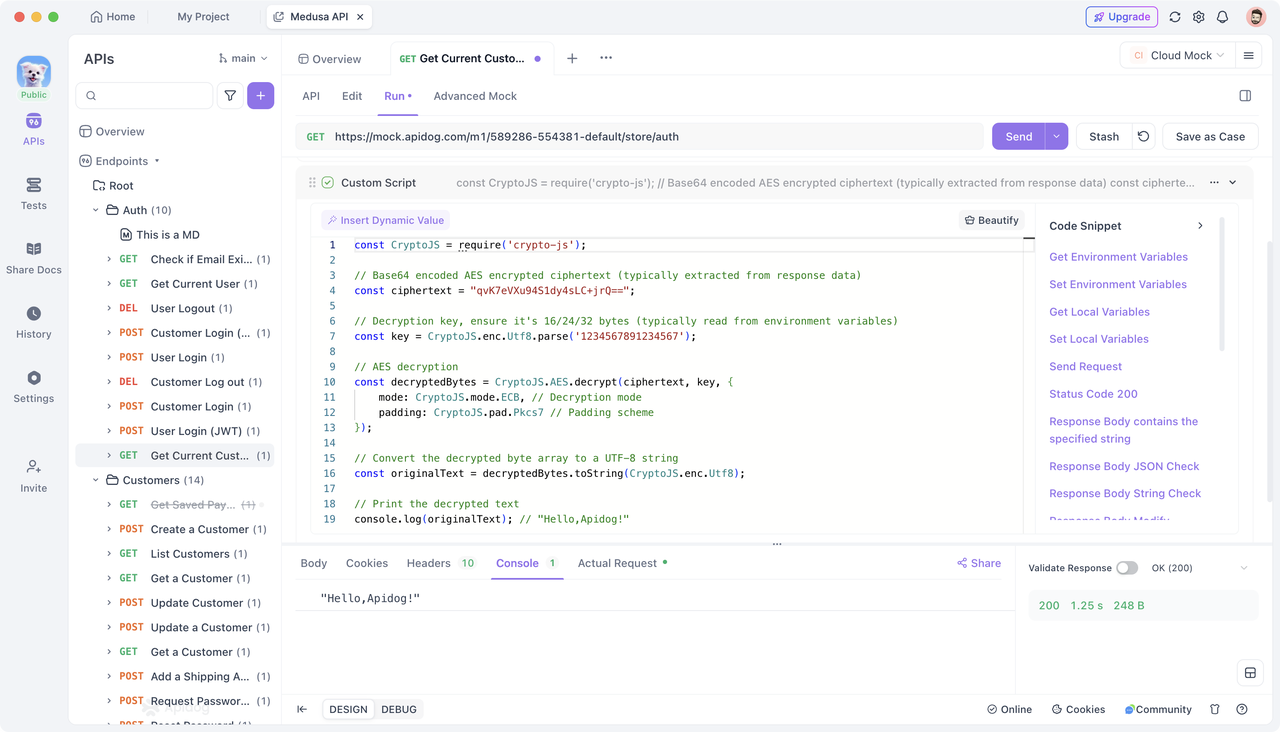
การถอดรหัส RSA
ในการถอดรหัสข้อความที่เข้ารหัส RSA คุณต้องระบุคีย์ส่วนตัว RSA ที่เกี่ยวข้อง เนื่องจาก RSA เป็นอัลกอริธึมการเข้ารหัสแบบอสมมาตร ชุดคีย์ประกอบด้วยคีย์สาธารณะและคีย์ส่วนตัว และคีย์ส่วนตัวมีความจำเป็นสำหรับการถอดรหัส
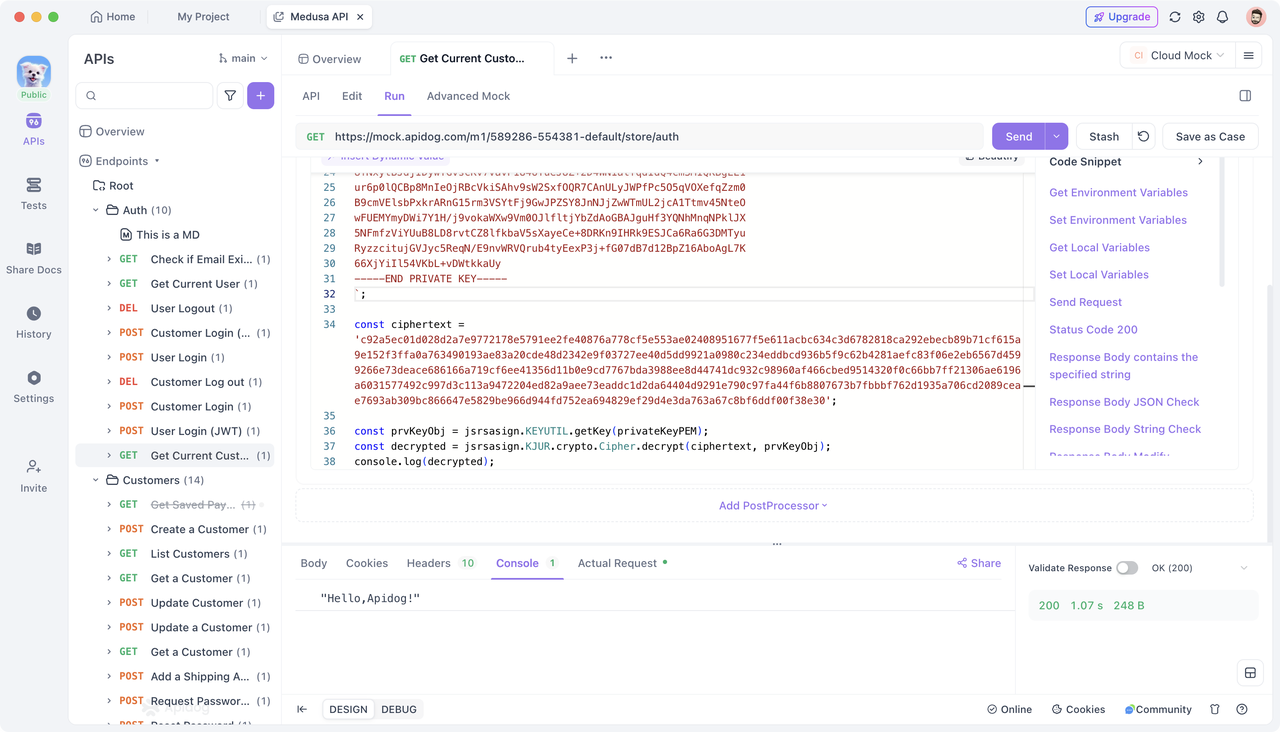
Apidog มีไลบรารี jsrsasign (อัปเดตเวอร์ชันล่าสุด) ซึ่งคุณสามารถใช้เพื่อถอดรหัสข้อความที่เข้ารหัส RSA ได้ นี่คือตัวอย่าง:
// Import the jsrsasign library
const jsrsasign = require('jsrsasign');

// Define the private key (typically read from environment variables)
const privateKeyPEM = `
-----BEGIN PRIVATE KEY-----
Private key...
-----END PRIVATE KEY-----
`;

// Define the ciphertext (typically extracted from response data)
const ciphertext = '';

// Decrypt
const prvKeyObj = jsrsasign.KEYUTIL.getKey(privateKeyPEM);
const decrypted = jsrsasign.KJUR.crypto.Cipher.decrypt(ciphertext, prvKeyObj);
console.log(decrypted);
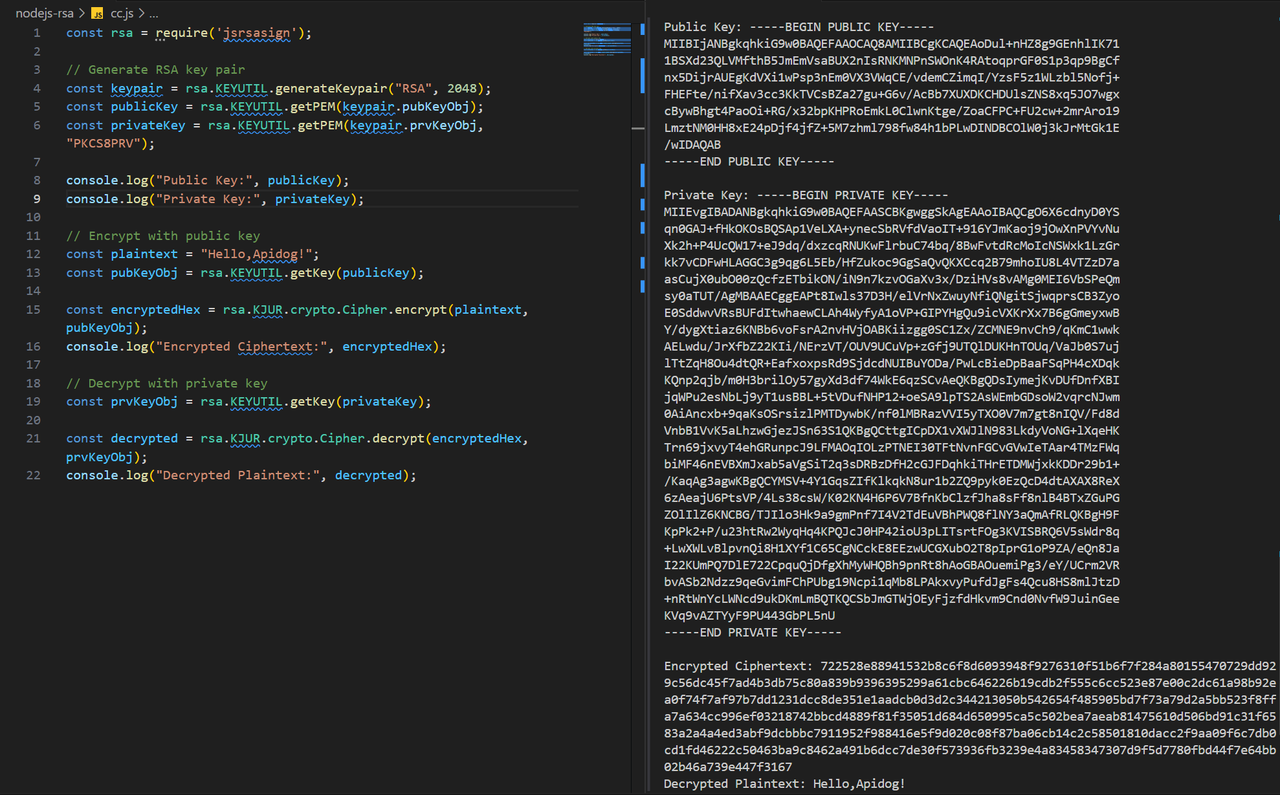
ตัวอย่างอ้างอิงที่สมบูรณ์สำหรับการเข้ารหัสและการถอดรหัส RSA อย่างง่าย (โปรดทราบว่า jsrsasign เวอร์ชันคือ 10.3.0 และไวยากรณ์ของเวอร์ชันอื่นๆ อาจเข้ากันไม่ได้) ซึ่งคุณสามารถเรียกใช้ในสภาพแวดล้อม Node.js และดำเนินการเข้ารหัสหรือการถอดรหัสใน Apidog ได้ตามต้องการ:
const rsa = require('jsrsasign');

// Generate RSA key pair
const keypair = rsa.KEYUTIL.generateKeypair("RSA", 2048);
const publicKey = rsa.KEYUTIL.getPEM(keypair.pubKeyObj);
const privateKey = rsa.KEYUTIL.getPEM(keypair.prvKeyObj, "PKCS8PRV");

console.log("Public Key:", publicKey);
console.log("Private Key:", privateKey);

// Encrypt with the public key
const plaintext = "Hello, Apidog!";
const pubKeyObj = rsa.KEYUTIL.getKey(publicKey);

const encryptedHex = rsa.KJUR.crypto.Cipher.encrypt(plaintext, pubKeyObj);
console.log("Encrypted Key:", encryptedHex);

// Decrypt with the private key
const prvKeyObj = rsa.KEYUTIL.getKey(privateKey);

const decrypted = rsa.KJUR.crypto.Cipher.decrypt(encryptedHex, prvKeyObj);
console.log("Decrypted Plaintext:", decrypted);
การใช้โปรแกรมภายนอกสำหรับการถอดรหัส
นอกเหนือจากการใช้ไลบรารี JS ในตัวของ Apidog สำหรับการถอดรหัสแล้ว คุณยังสามารถเรียกใช้ "โปรแกรมภายนอก" เพื่อดำเนินการถอดรหัสได้ สำหรับข้อมูลเพิ่มเติมเกี่ยวกับการใช้โปรแกรมภายนอก คุณสามารถตรวจสอบศูนย์ช่วยเหลือ Apidog สำหรับคำแนะนำโดยละเอียด
.jar สำหรับโปรแกรม Java หรือ .py, .php, .js สำหรับสคริปต์ในภาษาอื่นๆ คุณสามารถเข้าถึงไดเรกทอรีนี้ได้ผ่าน "Settings -> External Programs" ที่มุมบนขวาของอินเทอร์เฟซ Apidog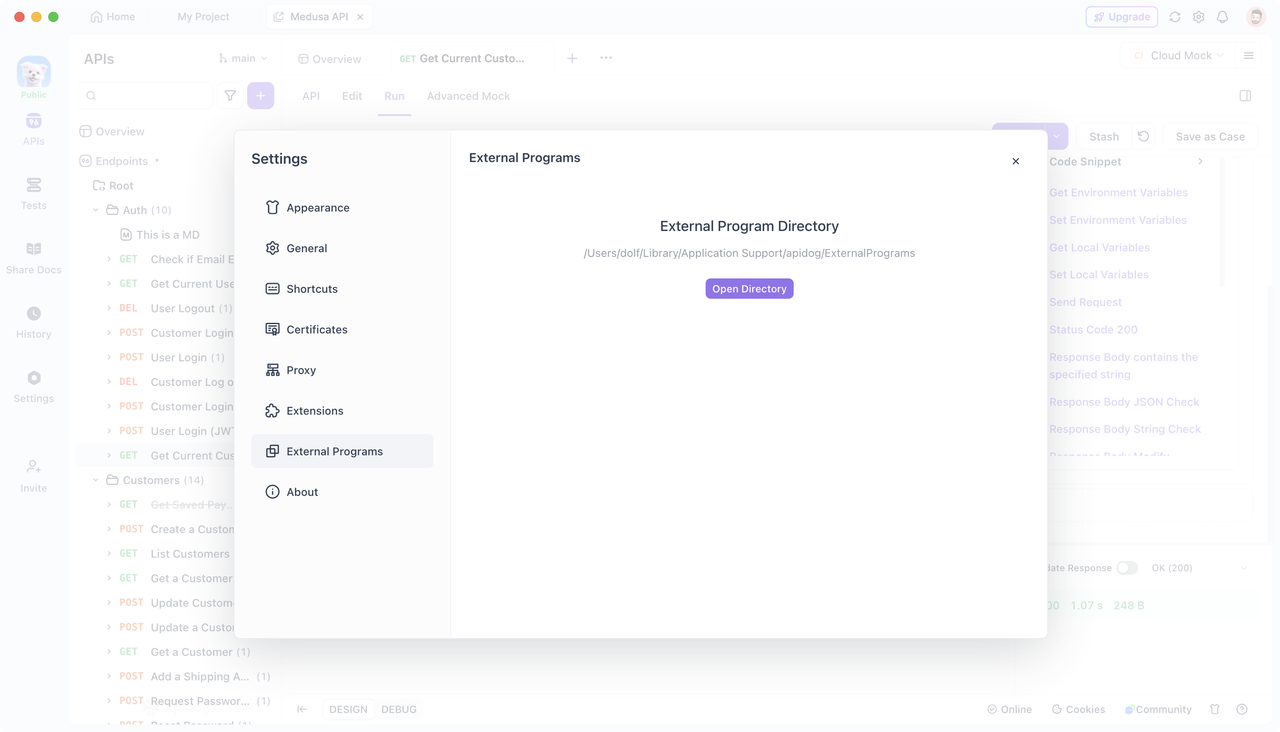
ตัวอย่าง: การถอดรหัส RSA ด้วย Node.js
หากคุณต้องการดำเนินการถอดรหัส RSA โดยใช้ไลบรารี node-forge ใน Node.js คุณสามารถสร้างไฟล์ .js ใน External Program Directory เพื่อใช้ตรรกะการถอดรหัส วิธีการมีดังนี้:
- สร้างสคริปต์การถอดรหัส ก่อนอื่น ให้สร้างไฟล์
.jsและใช้ตรรกะการถอดรหัส เนื่องจากคุณจะใช้ไลบรารีnode-forgeให้ติดตั้งในไดเรกทอรีนั้นโดยใช้ npm หรือ yarn นี่คือลักษณะที่สคริปต์ของคุณอาจมีลักษณะดังนี้:
// Import node-forge library
const forge = require('node-forge');
// Get command-line arguments
const args = process.argv.slice(2);
// Your private key (PEM format)
const privateKeyPem = `
-----BEGIN RSA PRIVATE KEY-----
private key……
-----END RSA PRIVATE KEY-----`;
// Encrypted ciphertext from command line
const encrypted = args[0];
// Convert PEM format private key to forge private key object
const privateKey = forge.pki.privateKeyFromPem(privateKeyPem);
// Convert Base64 encoded encrypted data to byte array
const encryptedBytes = forge.util.decode64(encrypted);
// Decrypt the data
const decrypted = privateKey.decrypt(encryptedBytes, 'RSA-OAEP');
// console.log() output will be captured by Apidog
console.log(decrypted);
- เรียกใช้โปรแกรมภายนอกใน Apidog หลังจากเขียนสคริปต์การถอดรหัสแล้ว คุณสามารถใช้เมธอด
pm.executeAsync()ในส่วน "Post-request" ของ Apidog เพื่อเรียกโปรแกรมภายนอกนี้ได้ ตรวจสอบให้แน่ใจว่าสคริปต์การถอดรหัสของคุณอยู่ในไดเรกทอรีโปรแกรมภายนอกที่ถูกต้อง และเส้นทางที่คุณอ้างอิงนั้นสัมพันธ์กับไดเรกทอรีนั้น วิธีการเรียกใช้มีดังนี้:
// Encrypted ciphertext (typically obtained from the response data)
const encrypted = 'iDqUyR3BpaTqpzq…………';
// External program path, passing parameters
const result = await pm.executeAsync('./nodejs-rsa/rsa.js', [`${encrypted}`]);
console.log('Result:', result);
เมื่อคุณส่งคำขอใน Apidog ระบบจะส่งข้อความที่เข้ารหัสไปยังโปรแกรมภายนอกที่คุณกำหนดโดยอัตโนมัติ ดำเนินการถอดรหัส และจับภาพผลลัพธ์ผ่าน console.log() ซึ่งท้ายที่สุดจะส่งคืนข้อความธรรมดาที่ถอดรหัส
การถอดรหัสประเภทนี้ไม่ได้จำกัดอยู่แค่ Node.js เท่านั้น ภาษาการเขียนโปรแกรมอื่นๆ เช่น Java, PHP, Python, Go ฯลฯ สามารถดำเนินการและเรียกใช้ที่คล้ายกันได้
บทสรุป
การใช้วิธีการที่สรุปไว้ในบทความนี้ คุณสามารถถอดรหัสและถอดรหัสข้อมูลตอบสนองใน Apidog ได้อย่างมีประสิทธิภาพ เปลี่ยนเป็นข้อความธรรมดาที่อ่านได้ ลองใช้ Apidog เลย!