
ERNIE 5.5 Flash API เปิดให้ใช้งานแล้วในสองแพลตฟอร์ม: Baidu Qianfan ซึ่งคุณเรียก ernie-5.5-flash-preview ที่ https://qianfan.baidubce.com/v2/chat/completions และ OpenRouter ซึ่ง baidu/ernie-5.5-flash-preview:free มีราคา $0 ต่อ token ทั้งสองรองรับรูปแบบ OpenAI Chat Completions ดังนั้นคุณสามารถชี้ OpenAI SDK ตัวทางการไปยังแพลตฟอร์มใดก็ได้โดยแค่เปลี่ยน base URL, API key และชื่อโมเดล
เนื้อหาด้านล่างนี้ครอบคลุม: การขอ API key, request แรกด้วย curl, Python และ JavaScript, การ streaming, reasoning tokens, context window ขนาด 1M และการจัดการ error ข้อมูลทุกฟิลด์และข้อจำกัดมาจากหน้า official ของ Qianfan และ OpenRouter โดยตรวจสอบเมื่อวันที่ 12 พฤศจิกายน 2026
สำหรับข้อมูลพื้นฐาน อ่านERNIE 5.5 Flash คืออะไร หรือคู่มือ ERNIE 5.1 API สำหรับรุ่นก่อนหน้า
ERNIE 5.5 Flash API คืออะไร?
ERNIE 5.5 Flash API คือ endpoint ที่ Baidu ให้บริการสำหรับ ERNIE 5.5 Flash Preview ซึ่งเป็นโมเดล sparse mixture-of-experts ที่มีพารามิเตอร์รวม 280B, active parameters 14B ต่อ token และ context ขนาด 1M token Baidu เปิดตัวเมื่อวันที่ 11 พฤศจิกายน 2026 ในฐานะโมเดล post-trained ตัวแรกที่สร้างบน ERNIE 5.5 Flash Base และให้บริการผ่าน Qianfan และ OpenRouter
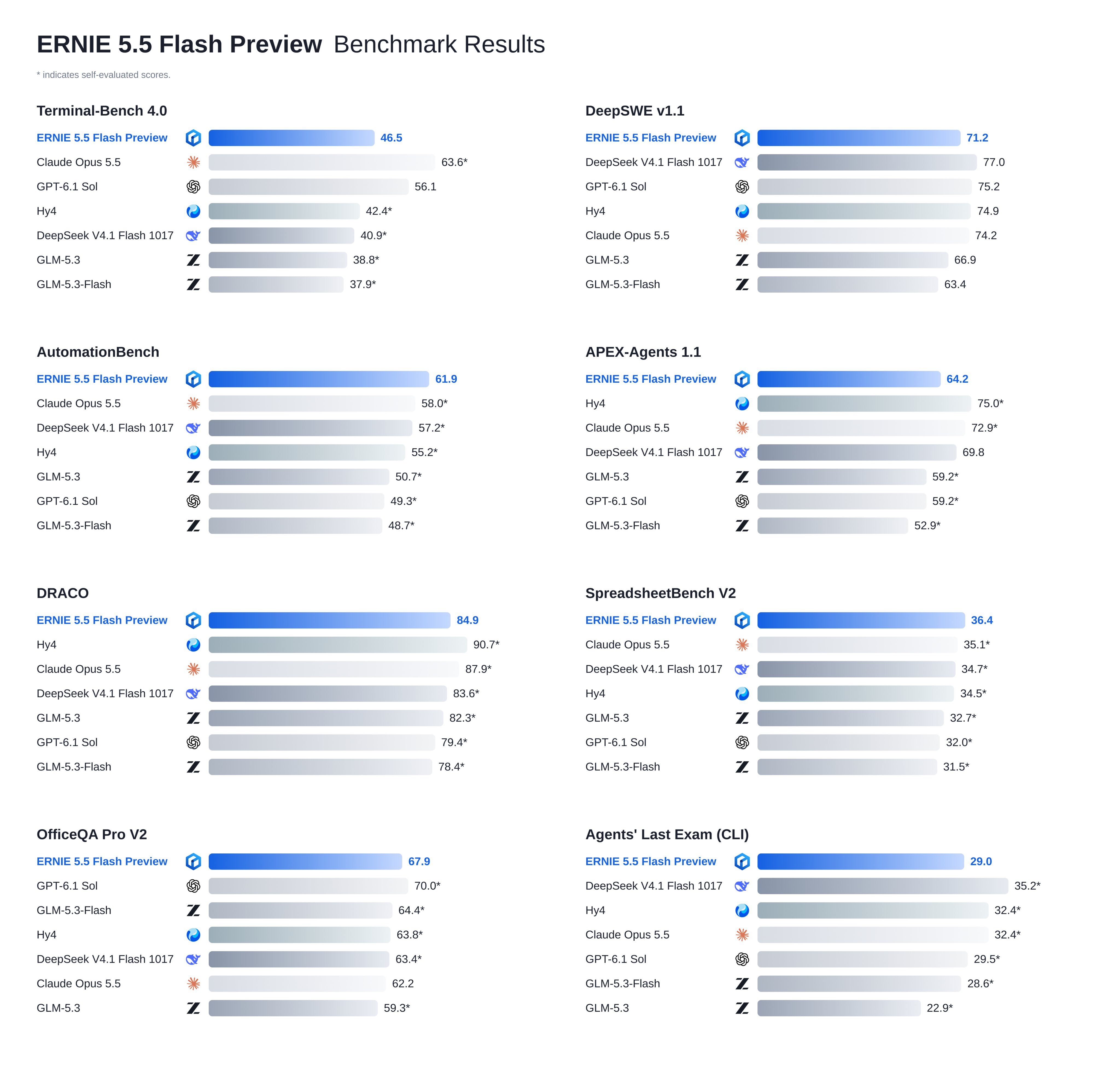
โพสต์เปิดตัวของ Baidu ระบุว่าโมเดลนี้เหมาะสำหรับงานเขียนโค้ด งาน agentic, การสร้างโมเดล 3D, งานด้านความรู้ และการสร้างคอนเทนต์ Baidu เรียกโมเดลนี้ว่าเป็น intermediate checkpoint ดังนั้นอย่าคาดหวังว่าพฤติกรรมจะคงที่ และระบุว่า weights จะถูกเปิดให้ใช้แบบ open source ภายใต้ Apache 2.0 เร็ว ๆ นี้ โดยไม่ระบุวันที่
Qianfan vs OpenRouter: ควรใช้ endpoint ไหน?
นี่คือการเปรียบเทียบสองเส้นทาง โดยใช้ข้อมูลที่แต่ละแพลตฟอร์มเผยแพร่ในปัจจุบัน
| Baidu Qianfan | OpenRouter | |
|---|---|---|
| Base URL | https://qianfan.baidubce.com/v2 |
https://openrouter.ai/api/v1 |
| Model ID | ernie-5.5-flash-preview |
baidu/ernie-5.5-flash-preview:free |
| Auth header | Authorization: Bearer <Qianfan API key> |
Authorization: Bearer <OpenRouter key> |
| Context | อินพุต 1M, เอาต์พุต 1M | 1,024,000 tokens |
| ราคา | คิดจากยอดเงินใน Baidu AI Cloud ของคุณ; console แสดงอัตราค่าใช้จ่าย | $0 ในเวอร์ชัน :free |
| ข้อจำกัดเริ่มต้น | 300 requests/นาที, 3,000,000 tokens/นาที | 20 requests/นาที; 50/วัน หรือ 1,000/วัน เมื่อเติมเครดิต $10 |
| Reasoning | เปิดตลอด กำหนด effort เป็น high แบบตายตัว |
ควบคุมด้วย object reasoning |
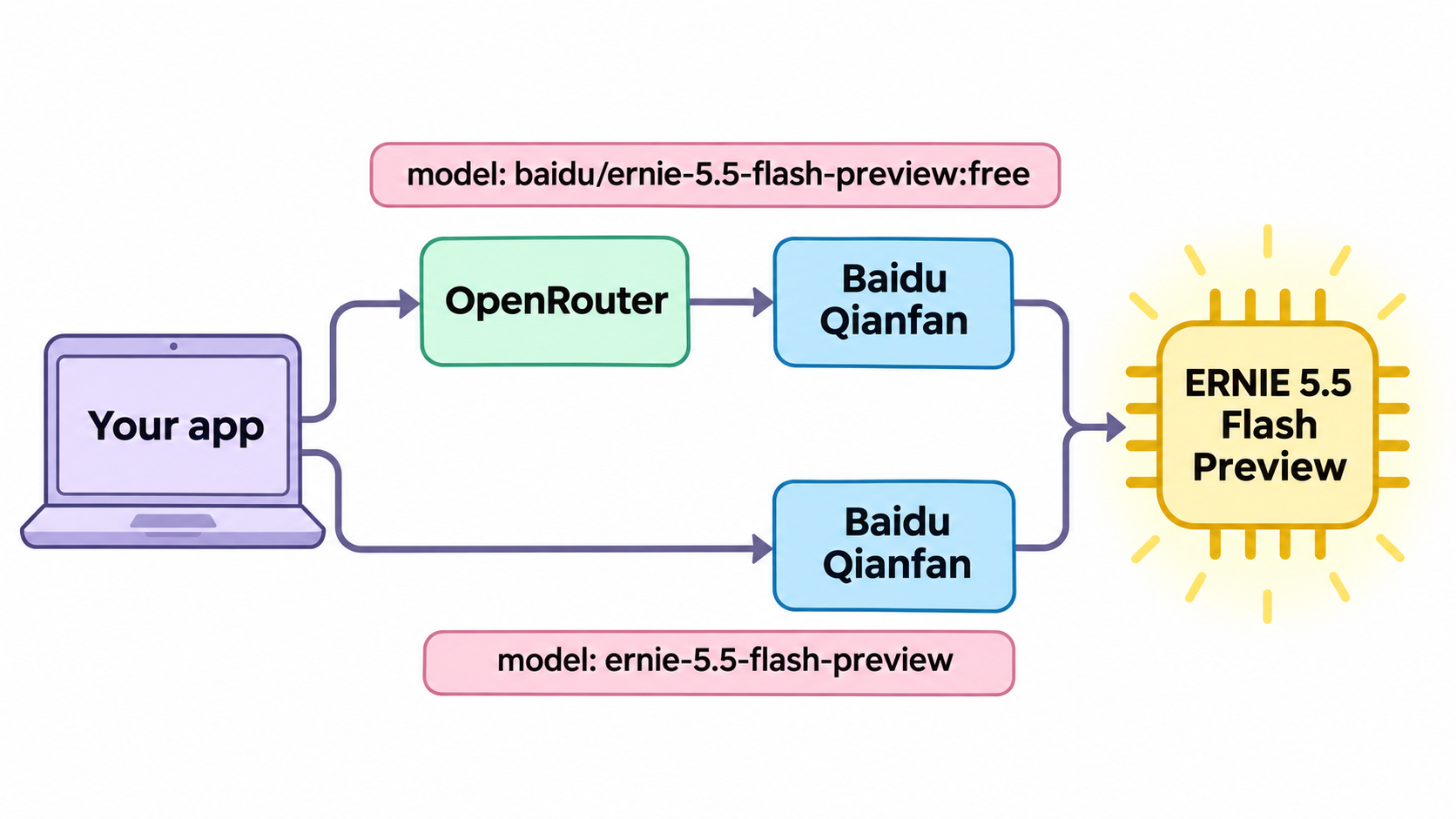
OpenRouter แสดง provider เดียวคือ Baidu Qianfan ดังนั้นทั้งสองเส้นทางจึงเข้าถึง backend เดียวกัน ความแตกต่างที่แท้จริงคือข้อจำกัด: free tier ของ OpenRouter เหมาะกับการ prototype และ eval ส่วนค่าเริ่มต้น 300 RPM ของ Qianfan เหมาะกับ production คู่มือ ERNIE 5.5 Flash ฟรี อธิบายเส้นทางที่ราคา $0 อย่างละเอียดมากขึ้น
จะขอ ERNIE 5.5 Flash API key ได้อย่างไร?
Qianfan
- ลงชื่อเข้าใช้Qianfan console ด้วยบัญชี Baidu AI Cloud
- เปิด API Key ภายใต้ system management แล้วสร้าง key ซึ่งจะมีลักษณะแบบ
bce-v3/ALTAK-... - ส่งออก key:
export QIANFAN_API_KEY="bce-v3/ALTAK-..."
Qianfan คิดค่าใช้จ่ายจากยอดเงินใน Baidu AI Cloud ของคุณ หากยอดเงินติดลบจะได้รับ 403 account_overdue ดังนั้นเติมเงินก่อนทำ load test
OpenRouter
- สร้างบัญชีและ key ที่ OpenRouter
- ส่งออก key:
export OPENROUTER_API_KEY="sk-or-v1-..." - ใช้ model ID
baidu/ernie-5.5-flash-preview:free
ส่ง request แรกไปยัง ERNIE 5.5 Flash
curl
Qianfan:
curl https://qianfan.baidubce.com/v2/chat/completions \
  -H "Content-Type: application/json" \
  -H "Authorization: Bearer $QIANFAN_API_KEY" \
  -d '{
    "model": "ernie-5.5-flash-preview",
    "messages": [
      {"role": "system", "content": "You are a concise senior engineer."},
      {"role": "user", "content": "Write a Python function that validates an ISO 8601 date."}
    ]
  }'
OpenRouter:
curl https://openrouter.ai/api/v1/chat/completions \
  -H "Content-Type: application/json" \
  -H "Authorization: Bearer $OPENROUTER_API_KEY" \
  -d '{
    "model": "baidu/ernie-5.5-flash-preview:free",
    "messages": [
      {"role": "user", "content": "Write a Python function that validates an ISO 8601 date."}
    ]
  }'
Python
ติดตั้ง SDK ด้วย pip install openai จากนั้นสลับ base URL ตาม provider:
import os
from openai import OpenAI

PROVIDERS = {
    "qianfan": ("https://qianfan.baidubce.com/v2", "QIANFAN_API_KEY", "ernie-5.5-flash-preview"),
    "openrouter": ("https://openrouter.ai/api/v1", "OPENROUTER_API_KEY", "baidu/ernie-5.5-flash-preview:free"),
}

base_url, key_env, model = PROVIDERS["qianfan"]
client = OpenAI(base_url=base_url, api_key=os.environ[key_env])

resp = client.chat.completions.create(
    model=model,
    messages=[{"role": "user", "content": "Explain idempotency keys in two sentences."}],
    max_completion_tokens=4096,
)
print(resp.choices[0].message.content)
print(resp.usage)
JavaScript
import OpenAI from "openai";

const client = new OpenAI({
  baseURL: "https://openrouter.ai/api/v1",
  apiKey: process.env.OPENROUTER_API_KEY,
});

const resp = await client.chat.completions.create({
  model: "baidu/ernie-5.5-flash-preview:free",
  messages: [{ role: "user", content: "List three causes of HTTP 499 errors." }],
});
console.log(resp.choices[0].message.content);
จะ stream response จาก ERNIE 5.5 Flash ได้อย่างไร?
เพิ่ม "stream": true แล้วทั้งสอง provider จะส่งคืน server-sent events ที่จบด้วย data: [DONE] บน Qianfan ให้เพิ่ม "stream_options": {"include_usage": true} เพื่อรับจำนวน token ใน chunk สุดท้าย หากคุณยังไม่คุ้นเคยกับรูปแบบนี้ คู่มือ SSE streaming อธิบาย wire format ไว้
stream = client.chat.completions.create(
    model=model,
    messages=[{"role": "user", "content": "Draft a README for a CLI tool."}],
    stream=True,
    stream_options={"include_usage": True},
)
for chunk in stream:
    if chunk.choices:
        delta = chunk.choices[0].delta
        thinking = getattr(delta, "reasoning_content", None)
        if thinking:
            print(f"[thinking] {thinking}", end="", flush=True)
        if delta.content:
            print(delta.content, end="", flush=True)
    if chunk.usage:
        print("\n", chunk.usage)
ควรใช้ stream เป็นค่าเริ่มต้น: โมเดลจะคิด (reason) ก่อนตอบ ดังนั้นการเรียกแบบ blocking อาจหยุดนิ่งเงียบไประยะหนึ่ง
Reasoning tokens ทำงานอย่างไรในแต่ละ provider?
ERNIE 5.5 Flash Preview เป็นโมเดลแบบ reasoning และทั้งสองแพลตฟอร์มเปิดเผยฟีเจอร์นี้แตกต่างกัน
บน Qianfan เอกสาร deep-thinking ระบุ ernie-5.5-flash-preview ไว้ว่า "เปิดได้อย่างเดียว ปิดไม่ได้" สำหรับพารามิเตอร์ thinking และค่าเริ่มต้น reasoning_effort ที่ high "ปรับไม่ได้" ดังนั้นคุณจึงปิด reasoning หรือลดระดับลงไม่ได้ Chain of thought จะส่งกลับมาใน reasoning_content แยกจาก content Qianfan นับส่วนนี้อยู่ใน max_completion_tokens ดังนั้นการจำกัดค่าต่ำเกินไปอาจตัดคำตอบสุดท้ายให้สั้นลงและทำให้คุณได้ finish_reason: "length"
บน OpenRouter คุณควบคุม reasoning ด้วย object reasoning และอ่าน trace จาก reasoning_details หากต้องการซ่อน trace จาก response:
{
  "model": "baidu/ernie-5.5-flash-preview:free",
  "reasoning": { "exclude": true },
  "messages": [{ "role": "user", "content": "Is 2^61 - 1 prime?" }]
}
ในการสนทนาแบบ multi-turn OpenRouter ขอให้คุณส่ง reasoning_details เต็มกลับไปพร้อมข้อความ assistant เพื่อให้โมเดลทำงานต่อจากจุดเดิมได้ จำนวน reasoning tokens จะแสดงใน usage.completion_tokens_details.reasoning_tokens
เคล็ดลับสำหรับ context window ขนาด 1M token
Context หนึ่งล้าน token สามารถรองรับ codebase ขนาดกลางได้ สี่นิสัยเหล่านี้ช่วยให้การเรียกที่มีข้อมูลยาวคาดเดาได้:
- วางแผนตาม token ต่อนาที ไม่ใช่แค่จำนวน request ค่าเริ่มต้นของ Qianfan คือ 3,000,000 TPM ดังนั้น prompt แบบ 1M token เต็มเพียงสามอันในหนึ่งนาทีก็ใช้โควตาหมด ให้ติดตาม
X-Ratelimit-Remaining-Input-Tokensในทุก response - วางเนื้อหาคงที่ไว้ต้น context ให้ system prompt และเอกสารอ้างอิงอยู่ตอนต้น ส่วนคำถามที่เปลี่ยนแปลงอยู่ตอนท้าย เพื่อให้ prefix ที่ซ้ำกันสามารถ hit cache ได้ OpenRouter รายงานอัตรา cache hit 90.83% สำหรับโมเดลนี้เมื่อวันที่ 12 พฤศจิกายน
- เผื่อพื้นที่สำหรับ reasoning กำหนด
max_completion_tokensให้สูงพอสำหรับส่วนคิด (thinking) บวกกับคำตอบ - วัดผลก่อนเชื่อคำอ้างเรื่องความเร็ว Baidu ระบุว่าโมเดลสร้างได้มากกว่า 200 tokens ต่อวินาที แต่บน free endpoint ของ OpenRouter ค่า throughput ที่ P50 เมื่อวันที่ 12 พฤศจิกายนอยู่ที่ 79 tokens ต่อวินาที โดยมี latency ที่ P50 เท่ากับ 2.53 วินาที
สำหรับ structured output ให้ทดสอบอย่างละเอียดก่อนนำไปใช้จริง OpenRouter รองรับ response_format ที่มี JSON schema แต่หน้าของมันรายงานอัตรา error ของ structured output 21.70% ในช่วงสามวัน เทียบกับอัตรา error ของ tool-call ที่ 1.01% ให้ validate ทุก JSON response และ retry เมื่อ parse ไม่สำเร็จ
Error และ rate limit ของ ERNIE 5.5 Flash API
นี่คือรหัสที่คุณจะพบบ่อยที่สุด จากตาราง error code ของ Qianfan และหน้า limits ของ OpenRouter:
| สถานะ | Provider | รหัสหรือสาเหตุ | วิธีแก้ |
|---|---|---|---|
| 400 | Qianfan | tokens_too_long |
ลดความยาว prompt ให้ต่ำกว่าขีดจำกัด input 1M |
| 401 | Qianfan | invalid_iam_token |
Key ผิดหรือหมดอายุ หรือขาด prefix Bearer |
| 401 | Qianfan | invalid_model |
ตรวจสอบว่า model ID เป็น ernie-5.5-flash-preview อย่างถูกต้อง |
| 403 | Qianfan | account_overdue |
ยอดเงินติดลบ; เติมเงิน |
| 429 | Qianfan | rpm_rate_limit_exceeded, tpm_rate_limit_exceeded |
ถอยเวลา (back off); โควตาจะรีเซ็ตภายใน 60 วินาที |
| 402 | OpenRouter | ยอดเครดิตติดลบ | เติมเครดิต แม้แต่ในโมเดล :free |
| 429 | OpenRouter | โควตาโมเดลฟรี (20/นาที, 50 หรือ 1,000/วัน) | อ่าน X-RateLimit-Reset หรือตรวจสอบ GET /api/v1/key |
บน OpenRouter GET https://openrouter.ai/api/v1/key จะคืนค่า free_model_daily_requests.remaining ให้ retry 429 ด้วย exponential backoff และ jitter แต่ห้าม retry 400 หรือ 401 เด็ดขาด
ให้ coding agent ของคุณทดสอบทั้งสอง endpoint ด้วย Apidog CLI
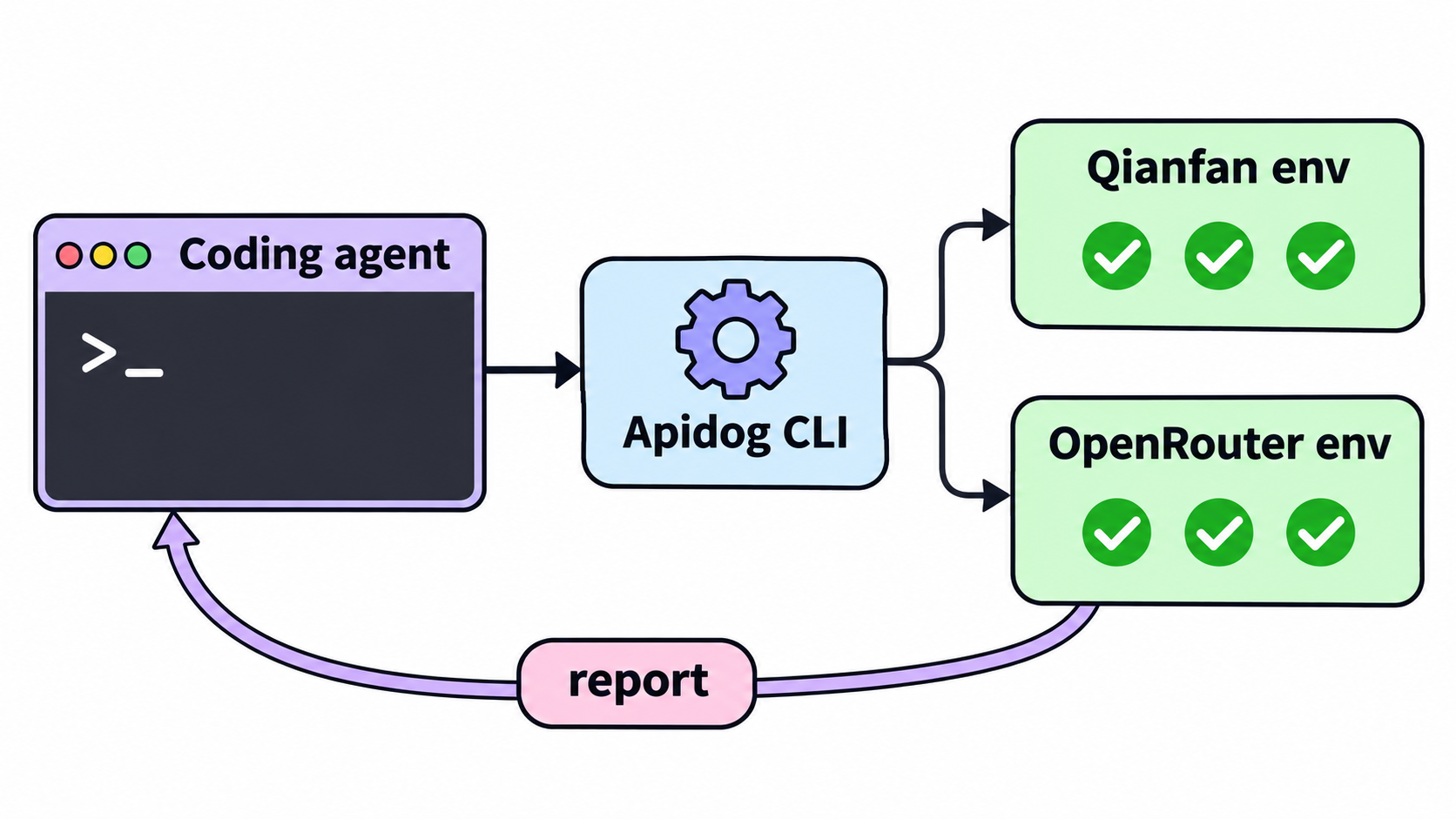
เมื่อทั้งสอง provider ตอบกลับได้แล้ว คุณต้องการหลักฐานว่าพวกมันยังตอบกลับถูกต้องอยู่: status ถูก, โครงสร้างถูก, latency อยู่ในระดับที่ยอมรับได้ มอบงานนี้ให้ coding agent ของคุณ Apidog CLI ให้ Claude Code, Codex, Cursor หรือ OpenCode มีคำสั่งสำหรับ import endpoint, บันทึก environment ต่อ provider และรัน test scenario กับแต่ละตัว
ตั้งค่าเพียงครั้งเดียว:
npm install -g apidog-cli@latest
apidog auth login --with-token <YOUR_APIDOG_TOKEN>
apidog skill install
จากนั้นสั่ง agent ของคุณด้วย prompt เดียว:
Write an OpenAPI 3 file for POST /chat/completions that matches the ERNIE 5.5 Flash
request and response shape (model, messages, stream; choices[0].message.content, usage).
Import it into Apidog project <projectId>. Create two environments: "qianfan" with base
URL https://qianfan.baidubce.com/v2 and "openrouter" with https://openrouter.ai/api/v1,
each with a "model" variable. Build one test scenario that sends a short prompt and
asserts status 200, the response schema, and a response time under 30 seconds. Run it
against both environments, passing the API keys as environment variables, and summarize
any failures.
Agent จะตรวจสอบ schema แต่ละตัว validate payload และรันคำสั่งอย่างนี้:
apidog import --project <projectId> --format openapi --file ./ernie-5-5-flash.openapi.yaml
apidog environment create qianfan --project <projectId> --base-url https://qianfan.baidubce.com/v2
apidog environment create openrouter --project <projectId> --base-url https://openrouter.ai/api/v1
apidog cli-schema get test-scenario-create
apidog test-scenario create --project <projectId> --name "ERNIE 5.5 Flash smoke" --folder-id <folderId> --priority <priority>
apidog test-scenario import-steps <scenarioId> --project <projectId> --source endpoint --ids <endpointId> --sync manual
apidog run -t <scenarioId> --project <projectId> -e <qianfanEnvId> --env-var "apiKey=$QIANFAN_API_KEY" -r cli,json
apidog run -t <scenarioId> --project <projectId> -e <openrouterEnvId> --env-var "apiKey=$OPENROUTER_API_KEY" -r cli,json
การส่ง key ผ่าน --env-var ช่วยให้ key ไม่ถูกบันทึกลงใน project และ scenario เดียวช่วยให้คุณเปรียบเทียบทั้งสองเส้นทางได้ข้างเคียงกัน apidog run เดียวกันที่ใช้ -r junit สามารถใส่ลงใน pipeline ได้ คู่มือ Apidog CLI CI/CD แสดงวิธีตั้งค่า และ Apidog CLI ใน Claude Code ครอบคลุมด้าน agent Apidog แผน Free รองรับผู้ใช้ได้ถึง 4 คน
คำถามที่พบบ่อย (FAQ)
ERNIE 5.5 Flash API ฟรีหรือไม่? บน OpenRouter ฟรี: baidu/ernie-5.5-flash-preview:free มีราคา $0 ต่อ token โดยจำกัดที่ 20 requests ต่อนาที และ 50 ต่อวัน หรือ 1,000 ต่อวันเมื่อคุณซื้อเครดิต $10 แล้ว ส่วน Qianfan คิดค่าใช้จ่ายจากยอดเงินใน Baidu AI Cloud ของคุณ
Model ID ของ ERNIE 5.5 Flash คืออะไร? ใช้ ernie-5.5-flash-preview บน Qianfan และ baidu/ernie-5.5-flash-preview:free บน OpenRouter
ปิด thinking บน Qianfan ได้หรือไม่? ไม่ได้ เอกสารของ Qianfan ระบุว่า thinking สำหรับโมเดลนี้เปิดได้อย่างเดียว และ reasoning_effort จะคงอยู่ที่ high ให้วางแผน output tokens สำหรับ reasoning trace ให้เพียงพอ
ERNIE 5.5 Flash API รองรับ tool calling หรือไม่? รองรับ Qianfan ระบุว่ารองรับ Function Call และ structured output ส่วน OpenRouter รองรับ tools, tool_choice และ response_format ให้ validate structured output เนื่องจาก OpenRouter รายงานอัตรา error ที่สูงสำหรับฟีเจอร์นี้
รัน ERNIE 5.5 Flash เองได้หรือไม่? Baidu เผยแพร่ ERNIE 5.5 Flash Base บน Hugging Face และ weights ของ Preview ได้รับการสัญญาว่าจะเปิดให้ใช้ภายใต้ Apache 2.0 ดูวิธีรัน ERNIE 5.5 Flash ในเครื่องด้วย vLLM
เทียบกับ DeepSeek V4.1 Flash อย่างไร? ดูERNIE 5.5 Flash vs DeepSeek V4.1 Flash และคู่มือ DeepSeek V4.1 Flash API