TL;DR
Calendly APIs let you automate scheduling workflows. You authenticate with OAuth 2.0, access event types and bookings via api.calendly.com, and receive real-time updates via webhooks. For testing, use Apidog to validate webhook payloads and test your integration without creating real bookings.
Introduction
Calendly processes millions of meetings monthly. People use it for sales calls, support sessions, consultations, and interviews. The API lets you embed that scheduling power into your own apps.
The common pattern: you want Calendly bookings to trigger actions in your system. A user books a demo, and your CRM gets updated. A consultation is scheduled, and you send a questionnaire. A meeting is canceled, and you notify your team.
Calendly’s API handles this via webhooks. When events happen (booking created, canceled, rescheduled), Calendly POSTs to your endpoints. You process the payload and take action.
Authentication with OAuth 2.0
Calendly uses OAuth 2.0 for API access. You can’t just use an API key.
Create an OAuth application
- Go to Calendly → Integrations → API & Webhooks
- Click “Create New Application”
- Set your redirect URI (e.g.,
https://yourapp.com/auth/calendly/callback) - Get your client ID and client secret
The OAuth flow
Step 1: Redirect user to authorize
https://auth.calendly.com/oauth/authorize?
  client_id=YOUR_CLIENT_ID&
  response_type=code&
  redirect_uri=https://yourapp.com/auth/calendly/callback
Step 2: User authorizes and gets redirected back
https://yourapp.com/auth/calendly/callback?code=AUTHORIZATION_CODE
Step 3: Exchange code for access token
const response = await fetch('https://auth.calendly.com/oauth/token', {
  method: 'POST',
  headers: {
    'Content-Type': 'application/x-www-form-urlencoded',
    'Authorization': 'Basic ' + Buffer.from(clientId + ':' + clientSecret).toString('base64')
  },
  body: new URLSearchParams({
    grant_type: 'authorization_code',
    code: authCode,
    redirect_uri: 'https://yourapp.com/auth/calendly/callback'
  })
})

const { access_token, refresh_token, expires_in } = await response.json()
Step 4: Use the token
curl -X GET "https://api.calendly.com/users/me" \
  -H "Authorization: Bearer ACCESS_TOKEN"
Refresh tokens
Access tokens expire after 2 hours. Use refresh tokens to get new ones:
const response = await fetch('https://auth.calendly.com/oauth/token', {
  method: 'POST',
  headers: {
    'Content-Type': 'application/x-www-form-urlencoded',
    'Authorization': 'Basic ' + Buffer.from(clientId + ':' + clientSecret).toString('base64')
  },
  body: new URLSearchParams({
    grant_type: 'refresh_token',
    refresh_token: storedRefreshToken
  })
})
Getting user information
Get current user
curl -X GET "https://api.calendly.com/users/me" \
  -H "Authorization: Bearer ACCESS_TOKEN"
Response:
{
  "resource": {
    "avatar_url": "https://calendly.com/avatar.jpg",
    "created_at": "2024-01-15T10:00:00Z",
    "current_organization": "https://api.calendly.com/organizations/ABC123",
    "email": "you@example.com",
    "name": "John Doe",
    "scheduling_url": "https://calendly.com/johndoe",
    "slug": "johndoe",
    "timezone": "America/New_York",
    "uri": "https://api.calendly.com/users/ABC123"
  }
}
Get organization membership
curl -X GET "https://api.calendly.com/organization_memberships/me" \
  -H "Authorization: Bearer ACCESS_TOKEN"
Event types
Event types are the meeting templates users create (30 min call, 60 min consultation, etc.).
List event types
curl -X GET "https://api.calendly.com/event_types?user=https://api.calendly.com/users/ABC123" \
  -H "Authorization: Bearer ACCESS_TOKEN"
Response:
{
  "resource": {
    "uri": "https://api.calendly.com/event_types/ETC123",
    "active": true,
    "booking_method": "instant",
    "color": "#0066FF",
    "created_at": "2024-01-15T10:00:00Z",
    "description_html": "<p>30-minute consultation</p>",
    "duration": 30,
    "internal_note": "Use Zoom link",
    "kind": "solo",
    "name": "30 Min Consultation",
    "pooling_type": null,
    "profile": {
      "name": "John Doe",
      "type": "User",
      "owner": "https://api.calendly.com/users/ABC123"
    },
    "scheduling_url": "https://calendly.com/johndoe/30min",
    "slug": "30min",
    "type": "StandardEventType"
  },
  "pagination": {
    "count": 1,
    "next_page": null
  }
}
Get a specific event type
curl -X GET "https://api.calendly.com/event_types/ETC123" \
  -H "Authorization: Bearer ACCESS_TOKEN"
Scheduled events (bookings)
Events are the actual bookings made through Calendly.
List scheduled events
curl -X GET "https://api.calendly.com/scheduled_events?user=https://api.calendly.com/users/ABC123" \
  -H "Authorization: Bearer ACCESS_TOKEN"
Filter by date range:
curl -X GET "https://api.calendly.com/scheduled_events?min_start_time=2026-03-01T00:00:00Z&max_start_time=2026-03-31T23:59:59Z" \
  -H "Authorization: Bearer ACCESS_TOKEN"
Response:
{
  "resource": {
    "uri": "https://api.calendly.com/scheduled_events/ABC123",
    "status": "active",
    "tracking": {
      "utm_campaign": "spring_sale",
      "utm_source": "email",
      "utm_medium": "newsletter"
    },
    "created_at": "2026-03-24T10:00:00Z",
    "end_time": "2026-03-25T11:00:00Z",
    "event_type": "https://api.calendly.com/event_types/ETC123",
    "invitees_counter": {
      "active": 1,
      "limit": 1,
      "total": 1
    },
    "location": {
      "type": "zoom",
      "join_url": "https://zoom.us/j/123456789"
    },
    "start_time": "2026-03-25T10:30:00Z",
    "updated_at": "2026-03-24T10:00:00Z"
  }
}
Get event details
curl -X GET "https://api.calendly.com/scheduled_events/EVENT_ID" \
  -H "Authorization: Bearer ACCESS_TOKEN"
Get invitees for an event
curl -X GET "https://api.calendly.com/scheduled_events/EVENT_ID/invitees" \
  -H "Authorization: Bearer ACCESS_TOKEN"
Response:
{
  "resource": [
    {
      "cancel_url": "https://calendly.com/cancellations/ABC123",
      "created_at": "2026-03-24T10:00:00Z",
      "email": "jane@example.com",
      "event": "https://api.calendly.com/scheduled_events/ABC123",
      "name": "Jane Smith",
      "new_invitee": null,
      "old_invitee": null,
      "reschedule_url": "https://calendly.com/reschedulings/ABC123",
      "status": "active",
      "text_reminder_number": "+15551234567",
      "timezone": "America/New_York",
      "tracking": {
        "utm_campaign": null,
        "utm_source": null
      },
      "updated_at": "2026-03-24T10:00:00Z",
      "uri": "https://api.calendly.com/scheduled_event_invitees/INV123",
      "canceled": null
    }
  ]
}
Webhooks for real-time updates
Webhooks notify your app about booking events in real time.
Create a webhook subscription
curl -X POST "https://api.calendly.com/webhook_subscriptions" \
  -H "Authorization: Bearer ACCESS_TOKEN" \
  -H "Content-Type: application/json" \
  -d '{
    "url": "https://yourapp.com/webhooks/calendly",
    "events": [
      "invitee.created",
      "invitee.canceled",
      "invitee.rescheduled"
    ],
    "organization": "https://api.calendly.com/organizations/ORG123",
    "scope": "organization"
  }'
Available events:
invitee.created- New booking madeinvitee.canceled- Booking canceledinvitee.rescheduled- Booking rescheduled
List webhook subscriptions
curl -X GET "https://api.calendly.com/webhook_subscriptions?organization=https://api.calendly.com/organizations/ORG123" \
  -H "Authorization: Bearer ACCESS_TOKEN"
Delete a webhook
curl -X DELETE "https://api.calendly.com/webhook_subscriptions/WEBHOOK_ID" \
  -H "Authorization: Bearer ACCESS_TOKEN"
Handling webhook payloads
Verify webhook signatures
Calendly signs webhooks with a signature in the Calendly-Webhook-Signature header:
import crypto from 'crypto'

function verifySignature(payload, signature, secret) {
  const [t, v1] = signature.split(',')
  const timestamp = t.split('=')[1]
  const hash = v1.split('=')[1]

  const expectedSignature = crypto
    .createHmac('sha256', secret)
    .update(timestamp + '.' + payload)
    .digest('hex')

  return crypto.timingSafeEqual(
    Buffer.from(hash),
    Buffer.from(expectedSignature)
  )
}

app.post('/webhooks/calendly', (req, res) => {
  const signature = req.headers['calendly-webhook-signature']
  const payload = JSON.stringify(req.body)

  if (!verifySignature(payload, signature, process.env.CALENDLY_WEBHOOK_SECRET)) {
    return res.status(401).send('Invalid signature')
  }

  // Process webhook
  handleWebhook(req.body)
  res.status(200).send('OK')
})
Process booking events
function handleWebhook(payload) {
  const { event, payload: data } = payload

  switch (event) {
    case 'invitee.created':
      console.log(`New booking: ${data.event.start_time}`)
      console.log(`Invitee: ${data.email}`)
      // Add to CRM, send confirmation email, etc.
      syncToCRM(data)
      break

    case 'invitee.canceled':
      console.log(`Booking canceled: ${data.event.uri}`)
      // Update CRM, notify team, etc.
      removeFromCRM(data)
      break

    case 'invitee.rescheduled':
      console.log(`Booking rescheduled: ${data.event.start_time}`)
      // Update calendar, notify team, etc.
      updateCRM(data)
      break
  }
}
Testing with Apidog
Calendly’s API requires OAuth, which complicates testing. Apidog simplifies this.
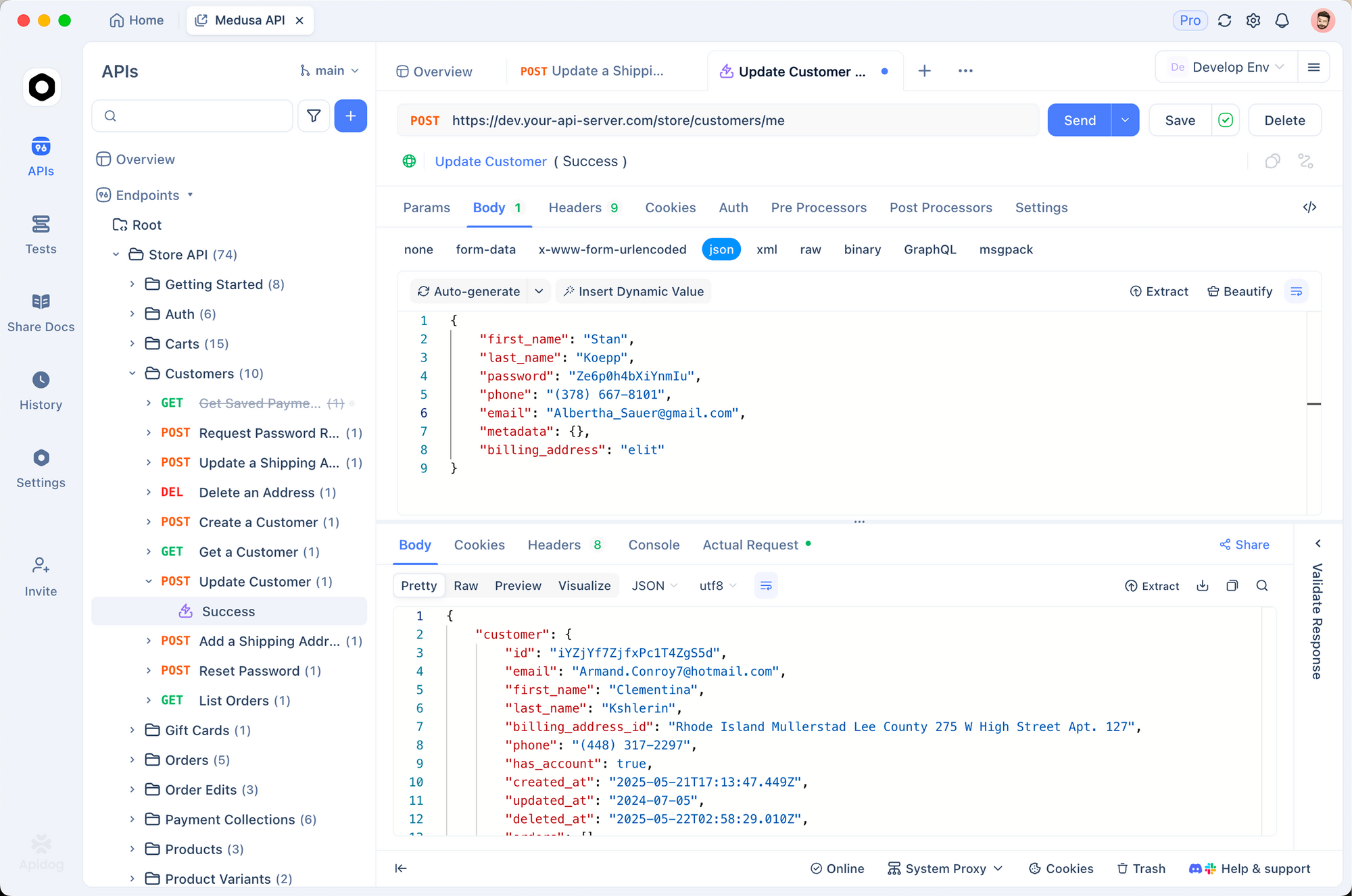
1. Mock OAuth responses
During development, don’t go through the full OAuth flow every time. Mock the token response:
{
  "access_token": "mock_access_token",
  "refresh_token": "mock_refresh_token",
  "expires_in": 7200,
  "created_at": 1700000000
}
2. Test webhook handlers
Create mock webhook payloads:
{
  "created_at": "2026-03-24T10:00:00Z",
  "event": "invitee.created",
  "payload": {
    "email": "test@example.com",
    "name": "Test User",
    "event": {
      "start_time": "2026-03-25T10:30:00Z",
      "end_time": "2026-03-25T11:00:00Z",
      "event_type": {
        "name": "30 Min Consultation"
      }
    }
  }
}
Send to your webhook endpoint and verify handling.
3. Environment variables
CALENDLY_CLIENT_ID: abc123
CALENDLY_CLIENT_SECRET: xyz789
CALENDLY_ACCESS_TOKEN: stored_token
CALENDLY_REFRESH_TOKEN: stored_refresh
CALENDLY_WEBHOOK_SECRET: webhook_signing_secret
4. Validate webhook signatures
pm.test('Webhook signature is valid', () => {
  const signature = pm.request.headers.get('Calendly-Webhook-Signature')
  pm.expect(signature).to.exist

  const payload = pm.request.body.raw
  const secret = pm.environment.get('CALENDLY_WEBHOOK_SECRET')

  // Verify signature
  const valid = verifySignature(payload, signature, secret)
  pm.expect(valid).to.be.true
})
Test Calendly webhooks with Apidog - free
Common errors and fixes
401 Unauthorized
Cause: Invalid or expired token.
Fix:
- Check token hasn’t expired (2 hour expiry)
- Use refresh token to get new access token
- Ensure Authorization header is
Bearer {token}
403 Forbidden
Cause: OAuth scope insufficient.
Fix: The OAuth token needs appropriate scopes. When requesting authorization, include needed scopes. Calendly’s scopes are implicit based on what the user authorizes.
404 Not Found
Cause: Resource doesn’t exist or user lacks access.
Fix:
- Verify the resource URI is correct
- Ensure the authenticated user has access to the resource
- Check the event type or event ID is valid
422 Unprocessable Entity
Cause: Validation error in request.
Fix: Check the response for details:
{
  "title": "Validation Error",
  "message": "Invalid parameter: url must be a valid HTTPS URL"
}
Alternatives and comparisons
| Feature | Calendly | Acuity | Cal.com | Calendly |
|---|---|---|---|---|
| Free tier | Limited | Limited | Self-hosted free | ✓ |
| API access | ✓ | ✓ | ✓ | ✓ |
| Webhooks | ✓ | ✓ | ✓ | ✓ |
| OAuth | ✓ | API key | API key | OAuth |
| Team scheduling | ✓ | ✓ | ✓ | ✓ |
| Open source | No | No | Yes | No |
Calendly has the most polished API documentation and OAuth flow. Cal.com is the open-source alternative with simpler API key auth.
Real-world use cases
Sales CRM integration. A B2B SaaS company embeds Calendly on their pricing page. When someone books a demo, the webhook triggers:
- Create lead in Salesforce
- Send Slack notification to sales team
- Add to marketing automation sequence
- Log activity in customer success platform
Consultation platform. A legal services platform lets clients book consultations with lawyers. The API integration:
- Syncs bookings to internal scheduling system
- Generates Zoom meeting links
- Sends intake questionnaire 24 hours before
- Creates case file when meeting completes
Interview scheduling. A recruiting platform uses Calendly for candidate interviews. Webhooks:
- Update ATS with interview details
- Notify hiring manager via email
- Send calendar invites to all participants
- Track no-shows for follow-up
Conclusion
Here’s what you’ve learned:
- Calendly uses OAuth 2.0 for API authentication
- Access event types and scheduled events via the API
- Webhooks provide real-time booking notifications
- Always verify webhook signatures for security
- Test with Apidog before connecting to real calendars
Your next steps:
- Create an OAuth application in Calendly
- Implement the OAuth flow
- Set up a webhook subscription
- Test with mock payloads in Apidog
- Deploy to production
Test Calendly webhooks with Apidog - free
FAQ
Do I need a paid Calendly plan to use the API?No. The API is available on all plans including free. However, free plans have limited features. Webhooks are available on all plans.
What’s the difference between user-level and organization-level webhooks?User-level webhooks only capture events for one user. Organization-level webhooks capture events for all team members. Most integrations use organization scope.
How do I get the webhook signing secret?When you create a webhook via API, the response includes a signing_key. Store this securely. It’s used to verify webhook signatures.
Can I create bookings via API?No. Calendly doesn’t have an API endpoint to create bookings. Bookings must happen through Calendly’s UI or embedded widgets. The API is read-only for bookings.
How do I handle timezone conversions?All timestamps in the API are UTC (ISO 8601). Convert to local time in your application. The user’s timezone is available in the user resource.
What’s the rate limit?Calendly doesn’t publicly document rate limits. Use reasonable request patterns. If you hit limits, implement exponential backoff.
Can I get historical bookings?Yes. Use min_start_time and max_start_time to query historical events. There’s no limit on how far back you can query.
How do I test the OAuth flow locally?Use a tunneling service like ngrok to expose your local server. Set the redirect URI to your ngrok URL. Complete the OAuth flow in a browser, then inspect the callback.