OpenAI shipped Codex on mobile this week. On May 14, 2026, the ChatGPT app on iOS and Android added a fully-featured Codex experience for every plan, including Free and Go. You can now monitor running tasks, approve commands, swap models, and kick off new work from your phone while your laptop sleeps in the next room.
Apidog readers have been asking when serious AI coding would reach a phone. The answer is now. Here is what shipped, how to set it up, and what is worth doing first.
For context on coding agents in your terminal first, Apidog has a setup guide for the Codex CLI. If you would rather see how Anthropic and Cursor compare on mobile, the Claude Code on mobile walkthrough and the Run Cursor on your phone post cover those routes. Or grab Apidog and start building APIs that your phone-side Codex can hit while you commute.
What "Codex from anywhere" means
OpenAI's announcement is wider than mobile. The phrase covers four shipping surfaces:
- Codex in the ChatGPT mobile app (iOS, Android, preview, all plans)
- Codex in Slack (Plus, Pro, Business, Enterprise, Edu, mention
@Codexin a thread) - Codex Chrome extension (shipped May 7, 2026; works across tabs without taking over the browser)
- Codex SDK (programmatic control of Codex from your own scripts and CI)
Mobile is the headline, but the Slack and SDK pieces decide how far your team can take it. A senior engineer can hand a task to Codex from a Slack thread while waiting for coffee, then approve the diff from their phone twenty minutes later. That is the loop OpenAI is building toward.
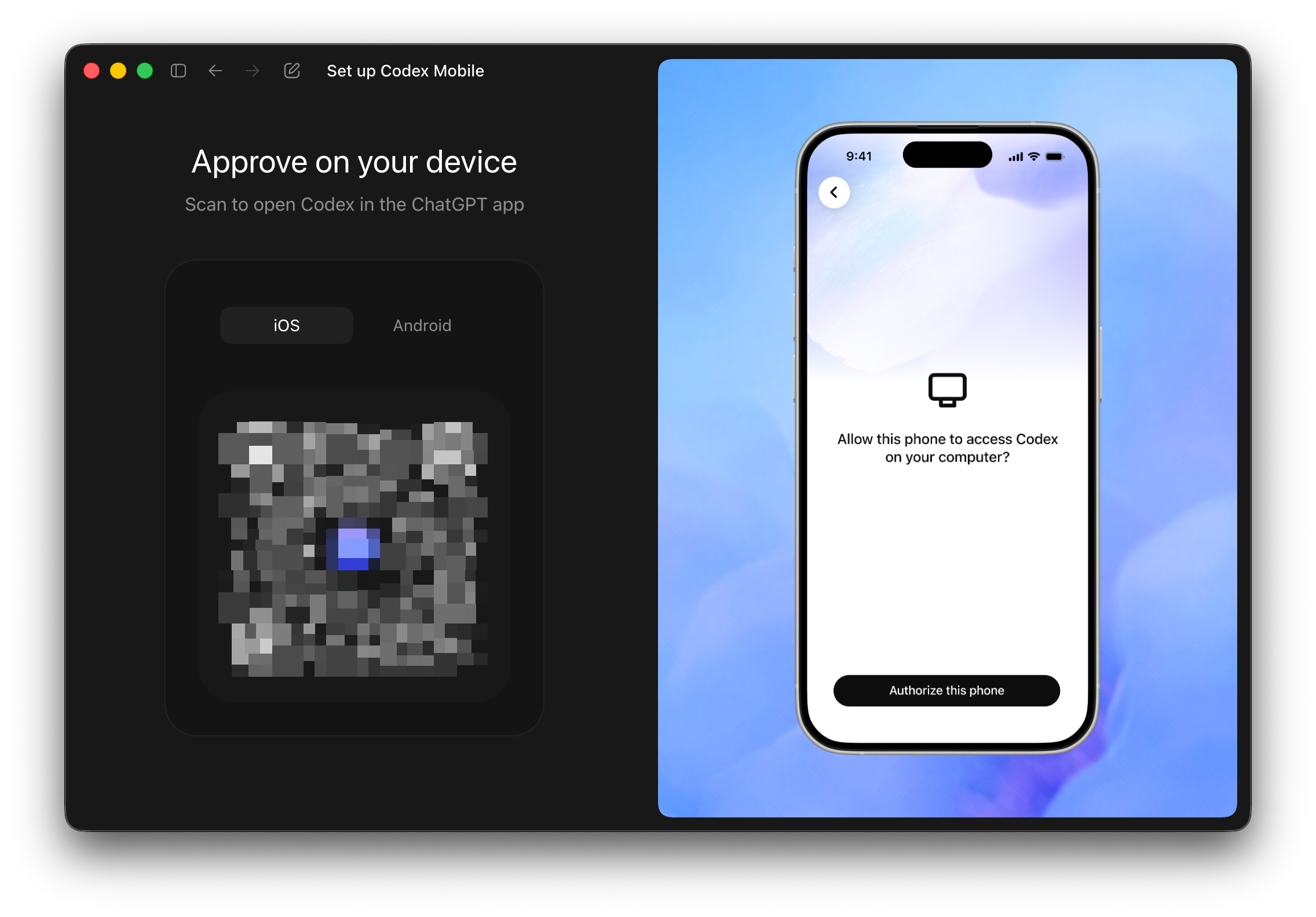
Codex on iOS and Android: getting set up
Setup is short. The mobile experience lives inside the existing ChatGPT app, so there is no separate download.
Step 1: Update the ChatGPT app
Open the App Store on iOS or Play Store on Android. Pull the latest ChatGPT version. Mobile Codex requires the May 13, 2026 release or newer per the Codex changelog.
Step 2: Sign into the same account you use on desktop
Mobile Codex sees the same threads, environments, and connected hosts as the web app. Log in with the OpenAI account you already use for ChatGPT or Codex CLI.
Step 3: Connect a cloud environment
If you only use Codex from your terminal, you need at least one cloud environment for the mobile app to talk to. Go to Settings → Codex → Environments in the web app, link GitHub, and configure a repo. Mobile inherits that setup.
Step 4: Open the Codex tab
On the bottom navigation in the ChatGPT app, tap Codex. Your active tasks and threads load in a list.
Step 5: Approve a test task
Start small. Ask Codex to add a docstring to a function or tweak a README. Confirm the diff renders on your phone. Tap Approve to merge. If that flow works, the harder stuff (longer-running tasks, multi-file refactors) works too.
What you can do from your phone
The mobile experience is read, review, and approve. It is also start-and-monitor. From your phone, you can:
- Watch live runs across laptops, devboxes, or any connected remote environment
- Browse threads and jump between parallel tasks
- Review diffs before they merge into a branch
- Approve commands Codex wants to run on your hardware
- Swap models mid-task if a stronger one is needed
- Start new tasks from a fresh prompt or a GitHub issue
- Comment on a pull request that Codex opened against your repo
OpenAI's own line: "From your phone, you can work across all of your threads, review outputs, approve commands, change models, or start something new." That covers most of the day-to-day.
The catch: mobile is not yet a full editor. You will not write raw code in the app the way you would in VS Code. Codex does the writing; you steer.
Slack: hand work to Codex from a team thread
The Slack route ships next to mobile and is the easiest way to make Codex feel like a coworker.
How it works
After your workspace admin installs the Codex Slack app from the Marketplace, any team member can mention @Codex in a channel or thread with a prompt. The bot:
- Picks the best environment from those you have configured
- Defaults to the first repository in the environment map (you can override by specifying a repo)
- Reacts with an emoji, posts a task link, and runs the work
- Replies in the thread with the result when the run finishes
What you need
- A ChatGPT Plus, Pro, Business, Enterprise, or Edu plan (Free is excluded for Slack)
- A connected GitHub account
- At least one configured cloud environment
- Workspace admin approval to install the Slack app
Enterprise admins can disable answer posting and force Codex to only share task links. That keeps generated code out of channel transcripts. The option lives in workspace settings.
A useful pattern
When you triage incoming GitHub issues from your Slack channel, you can now ask Codex to attempt a fix in-thread before a human looks at it. The OpenClaw GitHub triage bot does something similar and is worth reading for the operational pieces.
Codex SDK: programmatic control
The SDK is for the side of your team that builds tools. It lets scripts, schedulers, and CI runners drive Codex with your workspace identity.
A common shape:
from openai import Codex

client = Codex()
task = client.tasks.create(
    repo="apidog/awesome-api",
    prompt="Add OpenAPI examples to every endpoint missing them.",
    environment="prod-mirror",
)

for event in client.tasks.stream(task.id):
    print(event.summary)
You can wire this into a nightly job that opens follow-up PRs on stale issues, or into a pre-merge step that asks Codex to write a missing test. Enterprise workspaces can mint access tokens for these non-interactive flows. That capability shipped May 5, 2026.
For teams already running Claude Code with GitHub Actions, the Codex SDK fills the same niche on the OpenAI side.
Plans, pricing, and availability
Mobile preview is open to every plan including Free and Go. The other surfaces have tier gates.
| Surface | Free | Go | Plus | Pro | Business | Enterprise / Edu |
|---|---|---|---|---|---|---|
| Mobile (iOS + Android) | Yes (preview) | Yes | Yes | Yes | Yes | Yes |
| Slack integration | No | No | Yes | Yes | Yes | Yes |
| Chrome extension | Yes (preview) | Yes | Yes | Yes | Yes | Yes |
| Codex SDK | Limited | Limited | Yes | Yes | Yes | Yes |
| Enterprise access tokens | No | No | No | No | No | Yes |
For a deeper read on what Codex costs in each tier, the GPT-5.5 pricing breakdown has the per-token numbers. If you want to try Codex without paying, the free Codex for open source guide walks through the application route.
How phone Codex compares to the alternatives
Mobile coding agents are a year-old category. Three options worth knowing:
- OpenAI Codex (this article). Strongest mobile UX, tight ChatGPT integration, available on Free.
- Claude Code on mobile. The Claude Code mobile setup routes through a tmux session and an SSH client. More DIY, but more powerful for long-running terminal work.
- Cursor on your phone. The Cursor mobile workflow leans on remote development plus Cursor's web preview. Good if you live in Cursor on desktop.
If you want a side-by-side feature comparison of the desktop versions before picking a phone client, the Claude Code vs Codex 2026 breakdown is the cleanest read. The four-way Copilot vs Claude vs Cursor vs Codex comparison is the broader one.
What about your APIs?
Here is where Apidog earns its place in this stack. A coding agent on your phone is only useful if the code it ships behaves in production. APIs are usually the part that breaks.
Apidog gives you an API client, OpenAPI editor, and automated test runner that runs on your laptop or in CI. The pattern most teams settle into:
- Codex (mobile or Slack) opens a PR that touches an endpoint.
- Apidog's CI runs the existing OpenAPI test suite against the PR's preview deploy.
- If the suite is green, you approve the diff from your phone.
The Apidog ChatGPT API testing guide and the How to test AI agents that call your APIs post cover the wiring. Download Apidog if you want to try the loop tonight.
Common questions
Does Codex on mobile work offline?
No. Codex always runs against OpenAI's cloud or your connected environment. Without a network, the app shows your last-known thread state but cannot start new tasks.
Can I edit code directly in the mobile app?
Not in the way you might expect. You can prompt, review, and approve. Mobile is not an editor; it is a control surface for a remote agent.
Is the mobile version slower than desktop?
The agent itself runs on the same backend. What feels slower is the screen real estate. Long diffs are harder to scan on a phone, so the natural pattern is to read the summary on mobile and bounce to the desktop for serious review.
Does mobile Codex support voice input?
Through the existing ChatGPT voice mode, yes. You can dictate prompts to Codex the same way you dictate any other ChatGPT message.
What happens if I lose signal mid-approval?
The task keeps running on the cloud side. When you reconnect, the state updates. Codex does not require an open mobile session to keep working.
Can my enterprise admin disable mobile Codex?
Yes. Workspace owners can restrict Codex access from the admin panel. The same toggles that gate desktop access apply to mobile.
Will Codex on mobile cost extra?
No separate fee for the mobile app. You pay for the underlying Codex compute on whichever plan you are on. The Codex pricing post has the breakdown.
Is this different from the older "Codex" model?
Yes. The current Codex is a coding agent product, not the deprecated 2021 model. If you are still picturing the old API endpoint, the Codex CLI introduction catches you up on what the product is in 2026.
The agent wars are not only OpenAI’s to fight — our comparison of Devin vs Cursor in 2026 tracks how the autonomous-coding field has reshuffled.
Try it tonight
Update the ChatGPT app, sign in, link an environment, and ship a one-line README change. That is the smallest end-to-end loop. Once you have it working, the Slack and SDK layers are worth adding next.
If you want your API contracts to stay correct while Codex ships from your phone, pair it with Apidog. The agent writes the code; the test suite catches the regression.